light Hyundai Equus 2014 Owner's Manual
[x] Cancel search | Manufacturer: HYUNDAI, Model Year: 2014, Model line: Equus, Model: Hyundai Equus 2014Pages: 479, PDF Size: 10.15 MB
Page 320 of 479
563
Driving your vehicle
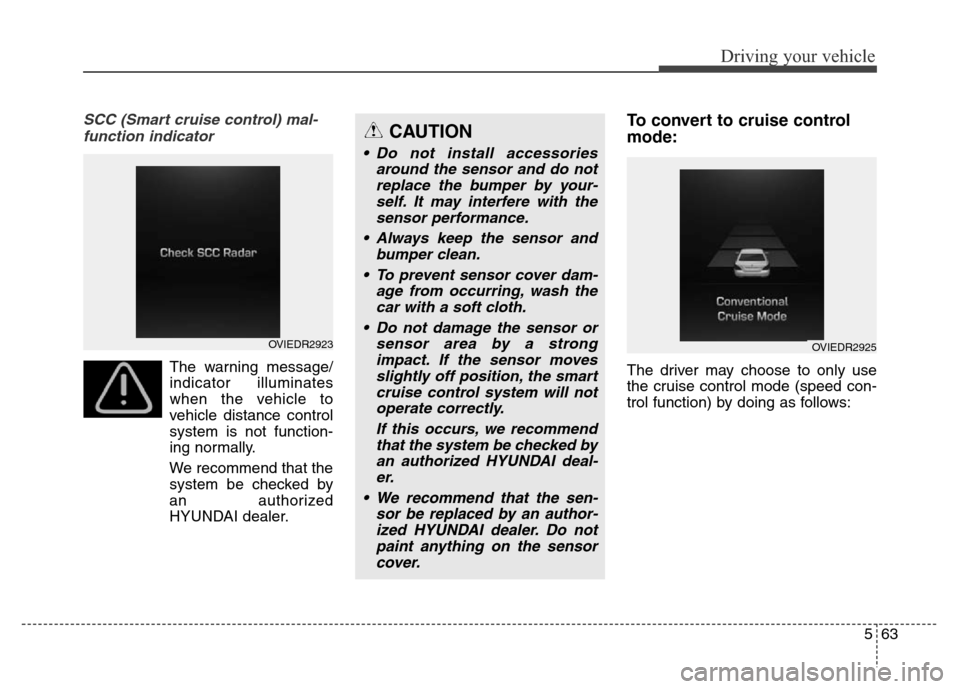
SCC (Smart cruise control) mal-
function indicator
The warning message/
indicator illuminates
when the vehicle to
vehicle distance control
system is not function-
ing normally.
We recommend that the
system be checked by
an authorized
HYUNDAI dealer.
To convert to cruise control
mode:
The driver may choose to only use
the cruise control mode (speed con-
trol function) by doing as follows:
CAUTION
• Do not install accessories
around the sensor and do not
replace the bumper by your-
self. It may interfere with the
sensor performance.
• Always keep the sensor and
bumper clean.
• To prevent sensor cover dam-
age from occurring, wash the
car with a soft cloth.
• Do not damage the sensor or
sensor area by a strong
impact. If the sensor moves
slightly off position, the smart
cruise control system will not
operate correctly.
If this occurs, we recommend
that the system be checked by
an authorized HYUNDAI deal-
er.
• We recommend that the sen-
sor be replaced by an author-
ized HYUNDAI dealer. Do not
paint anything on the sensor
cover.
OVIEDR2923OVIEDR2925
Page 321 of 479
Driving your vehicle
64 5
1.Turn the smart cruise control sys-
tem on (the cruise indicator light
will be on but the system will not be
activated).
2.Pull the distance to distance switch
for more than 2 seconds.
3.Choose between "Smart cruise
control(SCC) mode" and "Cruise
control(CC) mode".Limitations of the system
The smart cruise control system may
have limits to its ability to detect dis-
tance to the vehicle ahead due to
road and traffic conditions.
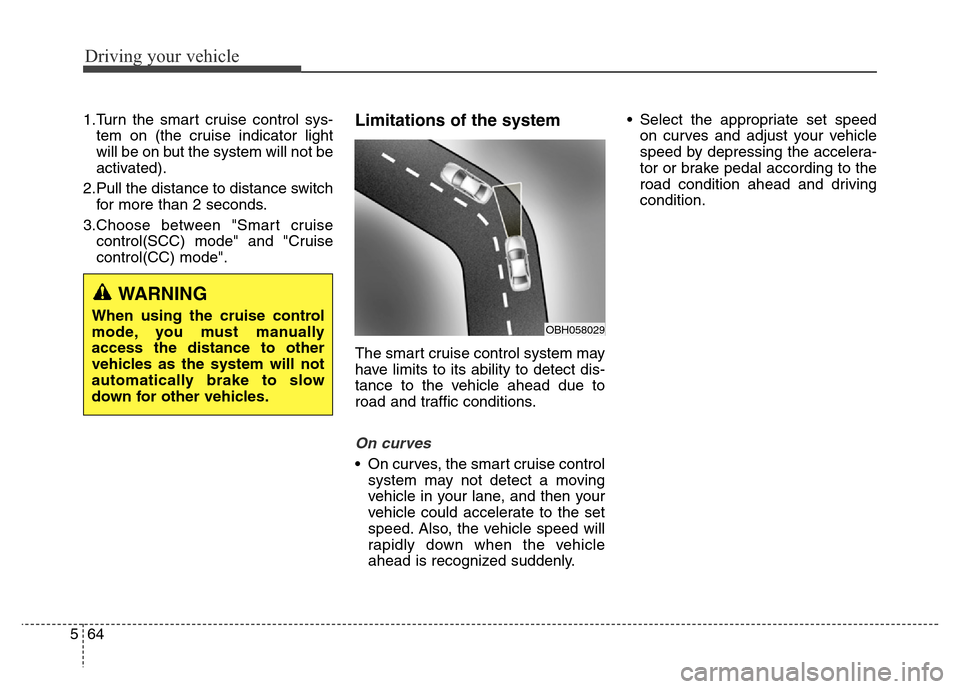
On curves
• On curves, the smart cruise control
system may not detect a moving
vehicle in your lane, and then your
vehicle could accelerate to the set
speed. Also, the vehicle speed will
rapidly down when the vehicle
ahead is recognized suddenly.• Select the appropriate set speed
on curves and adjust your vehicle
speed by depressing the accelera-
tor or brake pedal according to the
road condition ahead and driving
condition.
WARNING
When using the cruise control
mode, you must manually
access the distance to other
vehicles as the system will not
automatically brake to slow
down for other vehicles.OBH058029
Page 327 of 479
Driving your vehicle
70 5
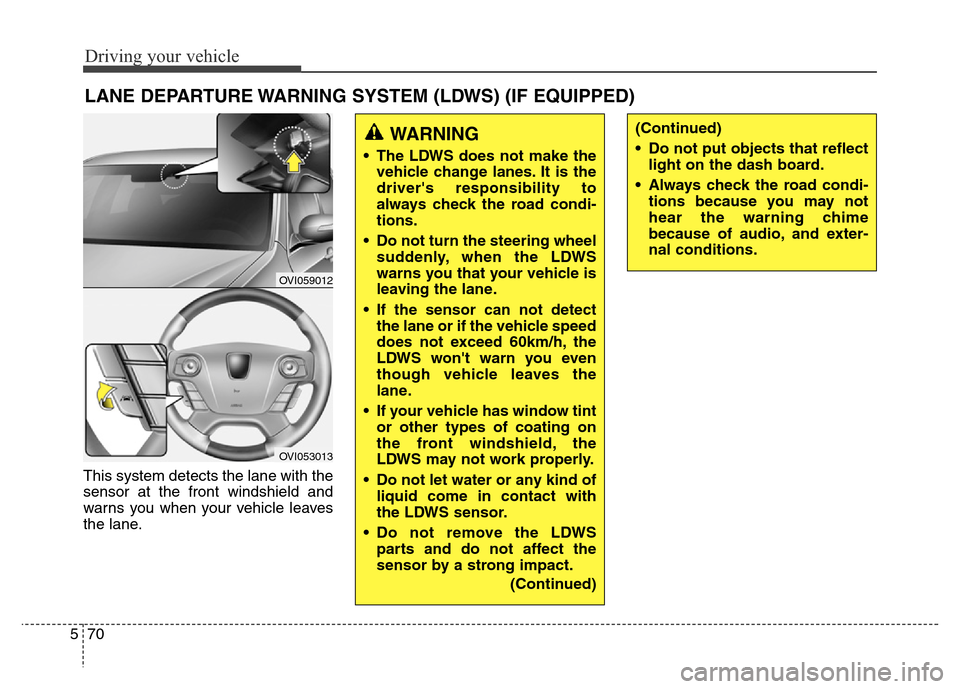
This system detects the lane with the
sensor at the front windshield and
warns you when your vehicle leaves
the lane.
LANE DEPARTURE WARNING SYSTEM (LDWS) (IF EQUIPPED)
OVI059012
OVI053013
WARNING
• The LDWS does not make the
vehicle change lanes. It is the
driver's responsibility to
always check the road condi-
tions.
• Do not turn the steering wheel
suddenly, when the LDWS
warns you that your vehicle is
leaving the lane.
• If the sensor can not detect
the lane or if the vehicle speed
does not exceed 60km/h, the
LDWS won't warn you even
though vehicle leaves the
lane.
• If your vehicle has window tint
or other types of coating on
the front windshield, the
LDWS may not work properly.
• Do not let water or any kind of
liquid come in contact with
the LDWS sensor.
• Do not remove the LDWS
parts and do not affect the
sensor by a strong impact.
(Continued)
(Continued)
• Do not put objects that reflect
light on the dash board.
• Always check the road condi-
tions because you may not
hear the warning chime
because of audio, and exter-
nal conditions.
Page 328 of 479
571
Driving your vehicle
LDWS operation
To operate the LDWS, pull
the switch with the engine
start/stop button in the
ON position. The indicator
(green) illuminates on the
cluster. To cancel the
LDWS, pull the switch
again.
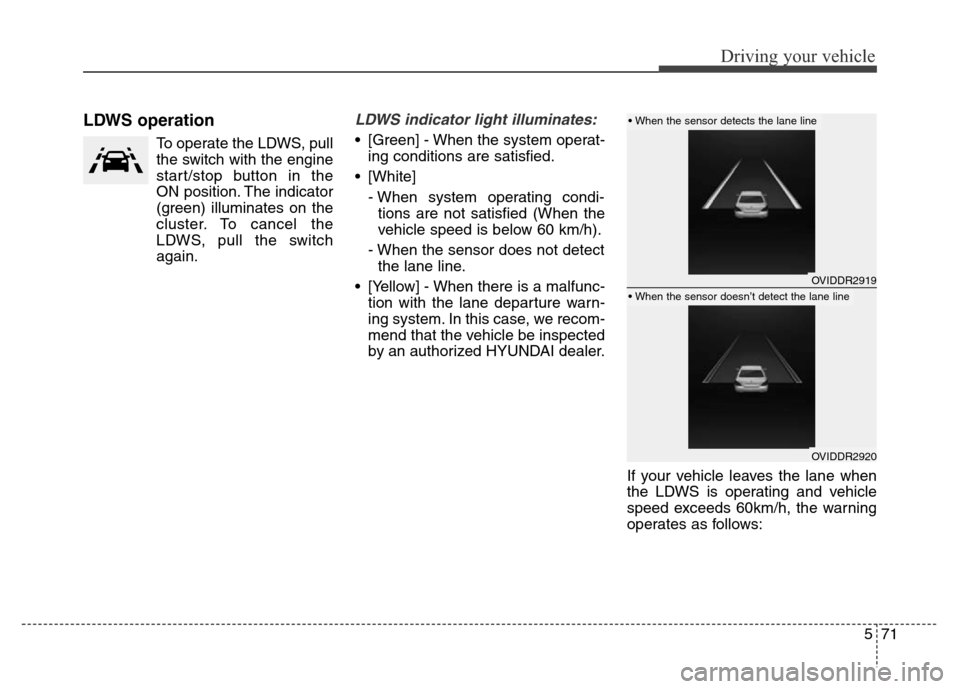
LDWS indicator light illuminates:
• [Green] - When the system operat-
ing conditions are satisfied.
• [White]
- When system operating condi-
tions are not satisfied (When the
vehicle speed is below 60 km/h).
- When the sensor does not detect
the lane line.
• [Yellow] - When there is a malfunc-
tion with the lane departure warn-
ing system. In this case, we recom-
mend that the vehicle be inspected
by an authorized HYUNDAI dealer.
If your vehicle leaves the lane when
the LDWS is operating and vehicle
speed exceeds 60km/h, the warning
operates as follows:
OVIDDR2919
OVIDDR2920
• When the sensor detects the lane line
• When the sensor doesn’t detect the lane line
Page 330 of 479
573
Driving your vehicle
DRIVER'S ATTENTION
The driver must be cautious in the
below situations for the system may
not assist the driver and may not
work properly.
• The lane is not visible due to snow,
rain, stain, a puddle or many other
things.
• The brightness of the outside
changes suddenly such as passing
through a tunnel.
• Not turning on the headlight or
the light is weak even at night or in
a tunnel.
• Difficult to distinguish the color of
the lane marker from the road.
• Driving on a steep grade or a
curve.
• Light reflects from the water on
the road such as sunlight, street-
light or the light of oncoming vehi-
cles.
• The lens or windshield is stained
with foreign matters.
• The sensor cannot detect the lane
because of fog, heavy rain or
heavy snow.
• The surrounding of the inside rear
view mirror temperature is high
due to direct light.• The lane is very wide or narrow.
• The lane marker is damaged or
indistinct.
• The shadow is on the lane marker
by a median strip.
• There is a mark similar to a lane
marker.
• There is a boundary structure.
• The distance from vehicle ahead is
very short or the vehicle ahead
drives hiding the lane marker.
• The vehicle shakes heavily.
• The lane number increases or
decreases or the lane marker are
crossing complicatedly.
• Placing something on the dash-
board.
• Driving with the sun in front of
you.
• Driving in areas under construc-
tion.
• The lane marker is more than two.
• The lane marker in a tunnel is
hard to distinguish due to dust or
grease.
• The lane marker is hard to distin-
guish after raining at night.
• The lane marker is hard to distin-
guish due to dust.
Page 332 of 479

575
Driving your vehicle
AVSM detects the distance from the
vehicle ahead with the sensor, to
warn you before collision and protect
you in certain hazardous situations
by using warning message, warning
sound and seat belt vibration (if
equipped).
• If the AVSM senses the object
ahead too near the vehicle and if
driver's operating of the brake
pedal or the steering wheel should
be needed, the warning light illumi-
nates.
Immediately reduce your speed.
• If the AVSM senses more danger-
ous, the warning sound also oper-
ates and the seat belt vibrates.
Immediately reduce your speed.
ADVANCED VEHICLE SAFETY MANAGEMENT (AVSM) (IF EQUIPPED)
CAUTION
Always check the road condi-
tions to prevent danger even if
the warning light does not illu-
minate, the warning sound does
not operate or the seat belt does
not vibrate.
OVIEDR29101
Page 336 of 479
579
Driving your vehicle
Operating conditions
The indicator on the switch will illumi-
nate when the BSD (Blind spot
detection) system switch is pressed
with the ignition switch ON. If vehicle
speed exceeds 15 km/h (9.3 mph),
the system will activate.
If you press the switch again, the
switch indicator and system will be
turned off.
If the ignition switch is turned OFF
and ON the system returns to the
previous state.
When the system is not used turn the
system off by turning off the switch.
When the system is turned on the
warning light will illuminate for 3 sec-
onds on the outside rearview mirror.
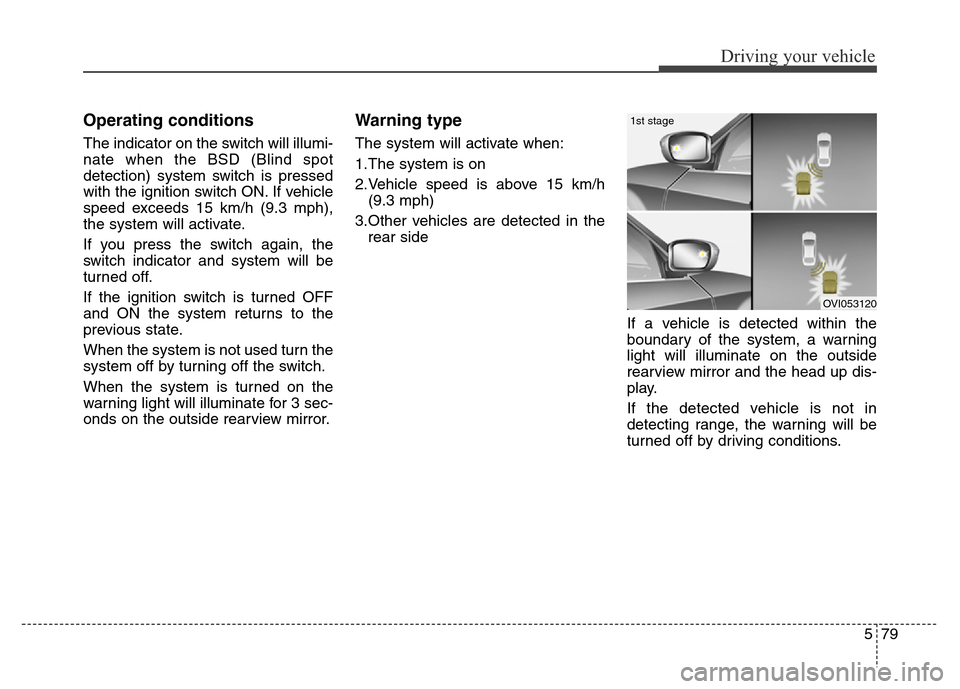
Warning type
The system will activate when:
1.The system is on
2.Vehicle speed is above 15 km/h
(9.3 mph)
3.Other vehicles are detected in the
rear side
If a vehicle is detected within the
boundary of the system, a warning
light will illuminate on the outside
rearview mirror and the head up dis-
play.
If the detected vehicle is not in
detecting range, the warning will be
turned off by driving conditions.
OVI053120
1st stage
Page 337 of 479
Driving your vehicle
80 5
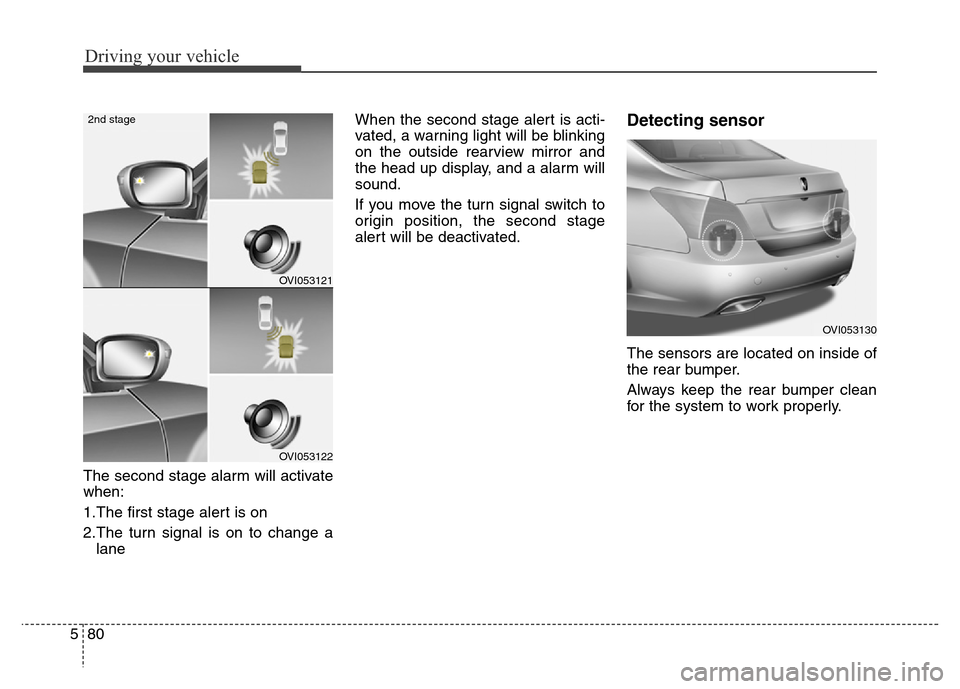
The second stage alarm will activate
when:
1.The first stage alert is on
2.The turn signal is on to change a
laneWhen the second stage alert is acti-
vated, a warning light will be blinking
on the outside rearview mirror and
the head up display, and a alarm will
sound.
If you move the turn signal switch to
origin position, the second stage
alert will be deactivated.
Detecting sensor
The sensors are located on inside of
the rear bumper.
Always keep the rear bumper clean
for the system to work properly.
OVI053121
OVI053122
2nd stage
OVI053130
Page 339 of 479
Driving your vehicle
82 5
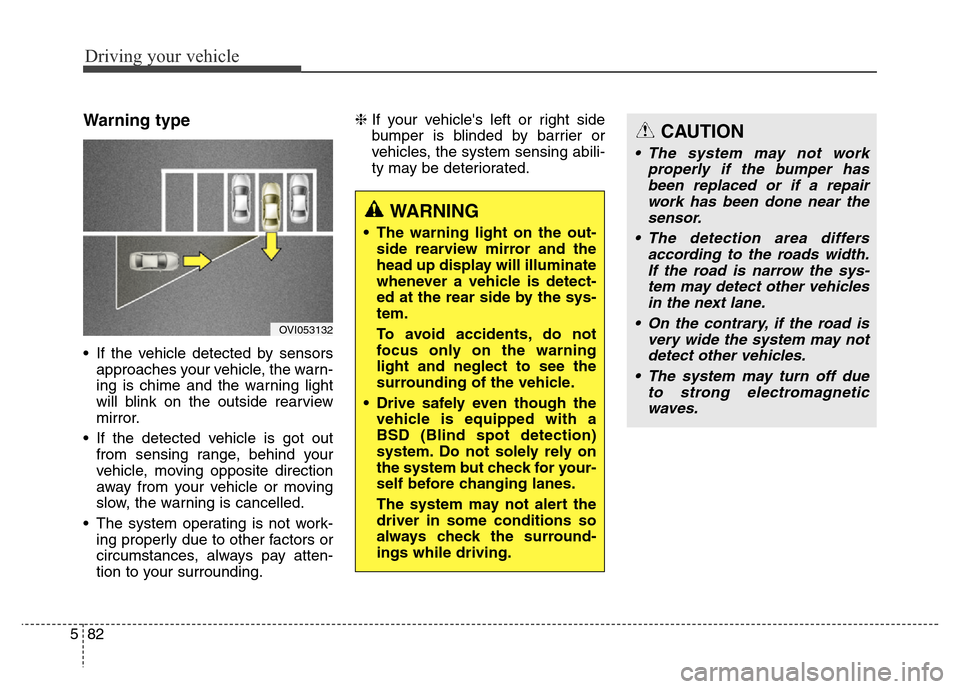
Warning type
• If the vehicle detected by sensors
approaches your vehicle, the warn-
ing is chime and the warning light
will blink on the outside rearview
mirror.
• If the detected vehicle is got out
from sensing range, behind your
vehicle, moving opposite direction
away from your vehicle or moving
slow, the warning is cancelled.
• The system operating is not work-
ing properly due to other factors or
circumstances, always pay atten-
tion to your surrounding.❈If your vehicle's left or right side
bumper is blinded by barrier or
vehicles, the system sensing abili-
ty may be deteriorated.
OVI053132
WARNING
• The warning light on the out-
side rearview mirror and the
head up display will illuminate
whenever a vehicle is detect-
ed at the rear side by the sys-
tem.
To avoid accidents, do not
focus only on the warning
light and neglect to see the
surrounding of the vehicle.
• Drive safely even though the
vehicle is equipped with a
BSD (Blind spot detection)
system. Do not solely rely on
the system but check for your-
self before changing lanes.
The system may not alert the
driver in some conditions so
always check the surround-
ings while driving.
CAUTION
• The system may not work
properly if the bumper has
been replaced or if a repair
work has been done near the
sensor.
• The detection area differs
according to the roads width.
If the road is narrow the sys-
tem may detect other vehicles
in the next lane.
• On the contrary, if the road is
very wide the system may not
detect other vehicles.
• The system may turn off due
to strong electromagnetic
waves.
Page 341 of 479
Driving your vehicle
84 5
Your vehicle's fuel economy depends
mainly on your style of driving, where
you drive and when you drive.
Each of these factors affects how
many miles (kilometers) you can get
from a gallon (liter) of fuel. To operate
your vehicle as economically as pos-
sible, use the following driving sug-
gestions to help save money in both
fuel and repairs:
• Drive smoothly. Accelerate at a
moderate rate. Don't make "jack-
rabbit" starts or full-throttle shifts
and maintain a steady cruising
speed. Don't race between stop-
lights. Try to adjust your speed to
that of the other traffic so you don't
have to change speeds unneces-
sarily. Avoid heavy traffic whenever
possible. Always maintain a safe
distance from other vehicles so
you can avoid unnecessary brak-
ing. This also reduces brake wear.
• Drive at a moderate speed. The
faster you drive, the more fuel your
car uses. Driving at a moderate
speed, especially on the highway,
is one of the most effective ways to
reduce fuel consumption.• Don't "ride" the brake pedal. This
can increase fuel consumption and
also increase wear on these com-
ponents. In addition, driving with
your foot resting on the brake pedal
may cause the brakes to overheat,
which reduces their effectiveness
and may lead to more serious con-
sequences.
• Take care of your tires. Keep them
inflated to the recommended pres-
sure. Incorrect inflation, either too
much or too little, results in unnec-
essary tire wear. Check the tire
pressures at least once a month.
• Be sure that the wheels are
aligned correctly. Improper align-
ment can result from hitting curbs
or driving too fast over irregular
surfaces. Poor alignment causes
faster tire wear and may also result
in other problems as well as
greater fuel consumption.• Keep your car in good condition.
For better fuel economy and
reduced maintenance costs, main-
tain your car in accordance with
the maintenance schedule in sec-
tion 7. If you drive your car in
severe conditions, more frequent
maintenance is required (see sec-
tion 7 for details).
• Keep your car clean. For maximum
service, your vehicle should be
kept clean and free of corrosive
materials. It is especially important
that mud, dirt, ice, etc. not be
allowed to accumulate on the
underside of the car. This extra
weight can result in increased fuel
consumption and also contribute to
corrosion.
• Travel lightly. Don't carry unneces-
sary weight in your car. Weight
reduces fuel economy.
• Don't let the engine idle longer
than necessary. If you are waiting
(and not in traffic), turn off your
engine and restart only when
you're ready to go.
ECONOMICAL OPERATION