change time Hyundai Equus 2014 User Guide
[x] Cancel search | Manufacturer: HYUNDAI, Model Year: 2014, Model line: Equus, Model: Hyundai Equus 2014Pages: 479, PDF Size: 10.15 MB
Page 164 of 479
475
Features of your vehicle
Warning Messages
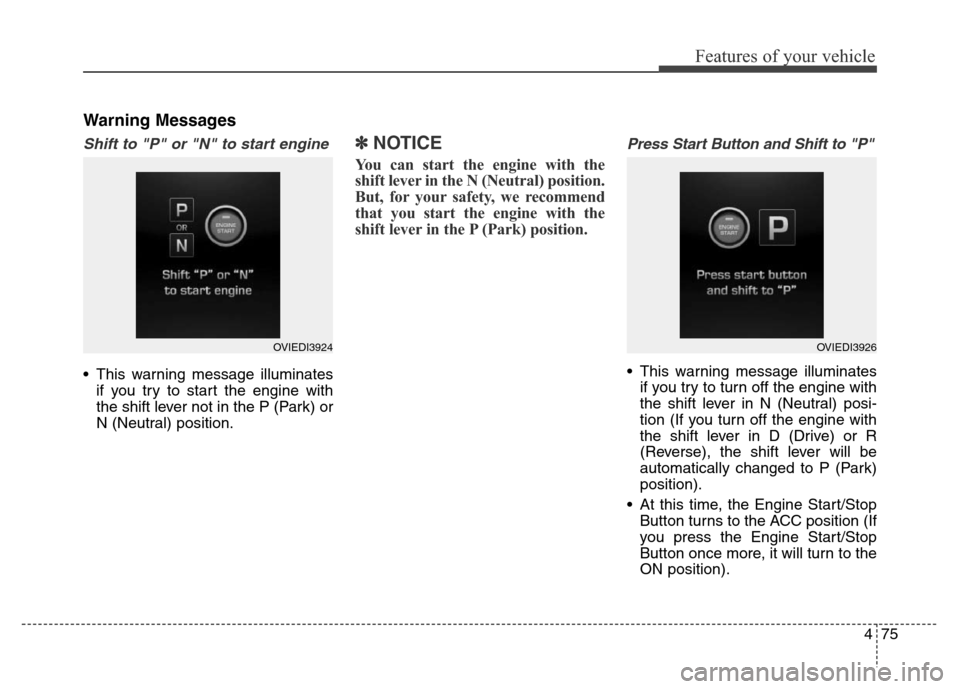
Shift to "P" or "N" to start engine
• This warning message illuminates
if you try to start the engine with
the shift lever not in the P (Park) or
N (Neutral) position.
✽NOTICE
You can start the engine with the
shift lever in the N (Neutral) position.
But, for your safety, we recommend
that you start the engine with the
shift lever in the P (Park) position.
Press Start Button and Shift to "P"
• This warning message illuminates
if you try to turn off the engine with
the shift lever in N (Neutral) posi-
tion (If you turn off the engine with
the shift lever in D (Drive) or R
(Reverse), the shift lever will be
automatically changed to P (Park)
position).
• At this time, the Engine Start/Stop
Button turns to the ACC position (If
you press the Engine Start/Stop
Button once more, it will turn to the
ON position).
OVIEDI3924OVIEDI3926
Page 165 of 479
Features of your vehicle
76 4
• In this case, you can turn off the
engine as follows.
1. Shift to P (Park) position with the
Engine Start/Stop Button in ON
position (If the Engine Start/Stop
Button is in ACC position,
change into ON position by
pressing the Engine Start/Stop
Button once).
2. Turn off the engine by pressing
the Engine Start/Stop Button.
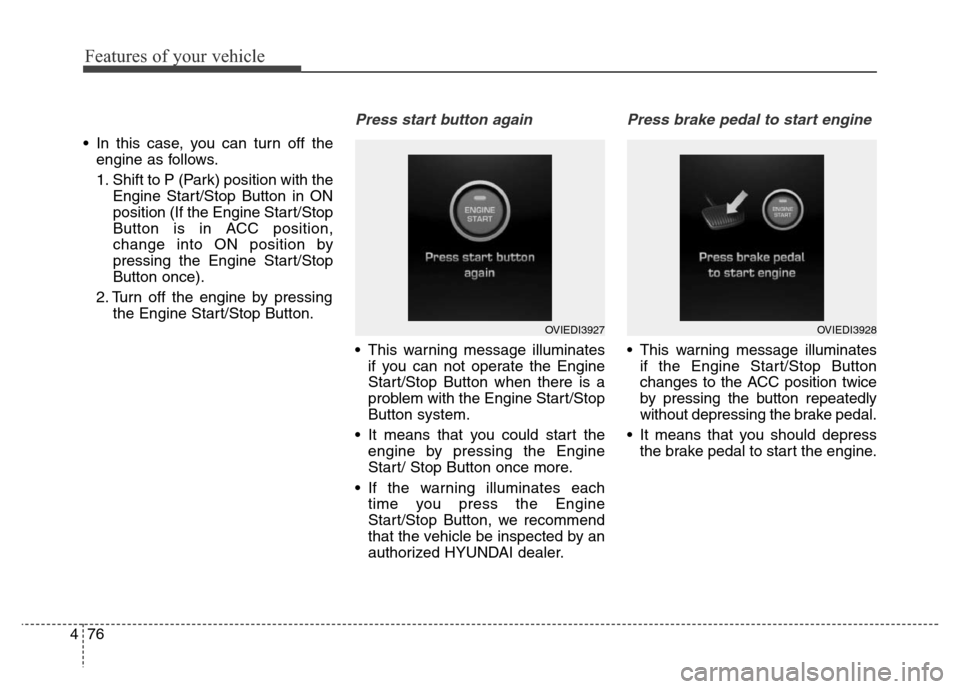
Press start button again
• This warning message illuminates
if you can not operate the Engine
Start/Stop Button when there is a
problem with the Engine Start/Stop
Button system.
• It means that you could start the
engine by pressing the Engine
Start/ Stop Button once more.
• If the warning illuminates each
time you press the Engine
Start/Stop Button, we recommend
that the vehicle be inspected by an
authorized HYUNDAI dealer.
Press brake pedal to start engine
• This warning message illuminates
if the Engine Start/Stop Button
changes to the ACC position twice
by pressing the button repeatedly
without depressing the brake pedal.
• It means that you should depress
the brake pedal to start the engine.
OVIEDI3927OVIEDI3928
Page 166 of 479
477
Features of your vehicle
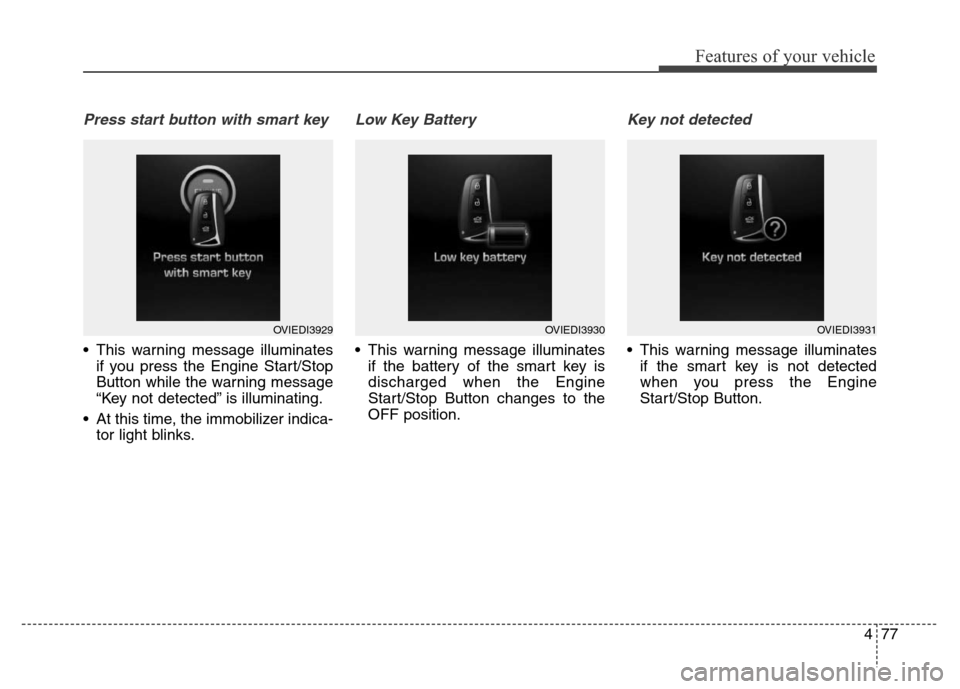
Press start button with smart key
• This warning message illuminates
if you press the Engine Start/Stop
Button while the warning message
“Key not detected” is illuminating.
• At this time, the immobilizer indica-
tor light blinks.
Low Key Battery
• This warning message illuminates
if the battery of the smart key is
discharged when the Engine
Start/Stop Button changes to the
OFF position.
Key not detected
• This warning message illuminates
if the smart key is not detected
when you press the Engine
Start/Stop Button.
OVIEDI3929OVIEDI3930OVIEDI3931
Page 175 of 479
Features of your vehicle
86 4
Overview
Description
The trip computer is a microcomput-
er-controlled driver information sys-
tem that displays information related
to driving.
✽NOTICE
Some driving information stored in
the trip computer (for example
Average Vehicle Speed) resets if the
battery is disconnected.
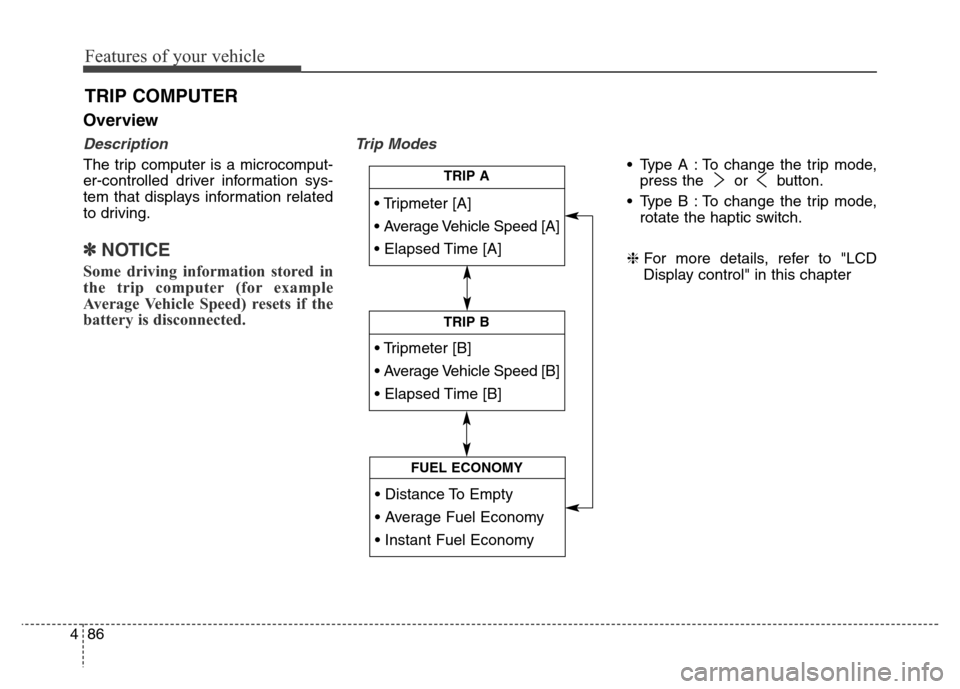
Trip Modes
• Type A : To change the trip mode,
press the or button.
• Type B : To change the trip mode,
rotate the haptic switch.
❈For more details, refer to "LCD
Display control" in this chapter
TRIP COMPUTER
• Tripmeter [A]
• Average Vehicle Speed [A]
• Elapsed Time [A]
TRIP A
• Tripmeter [B]
• Average Vehicle Speed [B]
• Elapsed Time [B]
TRIP B
• Distance To Empty
• Average Fuel Economy
• Instant Fuel Economy
FUEL ECONOMY
Page 210 of 479
4121
Features of your vehicle
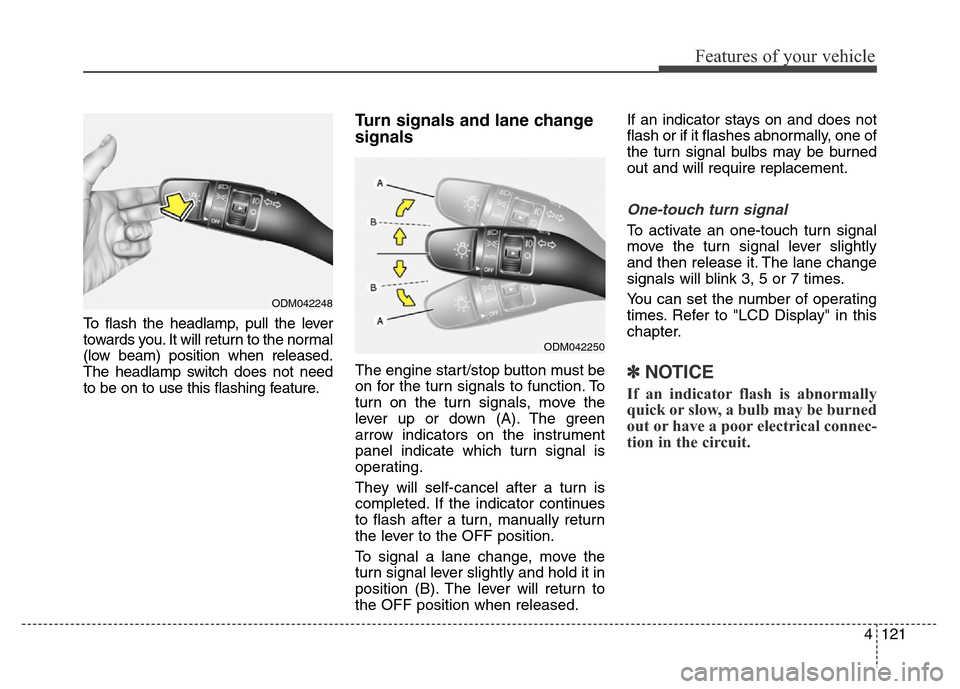
To flash the headlamp, pull the lever
towards you. It will return to the normal
(low beam) position when released.
The headlamp switch does not need
to be on to use this flashing feature.
Turn signals and lane change
signals
The engine start/stop button must be
on for the turn signals to function. To
turn on the turn signals, move the
lever up or down (A). The green
arrow indicators on the instrument
panel indicate which turn signal is
operating.
They will self-cancel after a turn is
completed. If the indicator continues
to flash after a turn, manually return
the lever to the OFF position.
To signal a lane change, move the
turn signal lever slightly and hold it in
position (B). The lever will return to
the OFF position when released.If an indicator stays on and does not
flash or if it flashes abnormally, one of
the turn signal bulbs may be burned
out and will require replacement.
One-touch turn signal
To activate an one-touch turn signal
move the turn signal lever slightly
and then release it. The lane change
signals will blink 3, 5 or 7 times.
You can set the number of operating
times. Refer to "LCD Display" in this
chapter.
✽NOTICE
If an indicator flash is abnormally
quick or slow, a bulb may be burned
out or have a poor electrical connec-
tion in the circuit.
ODM042248
ODM042250
Page 234 of 479
4145
Features of your vehicle
Air conditioning
HYUNDAI Air Conditioning Systems
are filled with environmentally friend-
ly refrigerant.
1. Start the engine. Press the air con-
ditioning button.
2. Set the mode to the position.
3. Set the air intake control to the
outside air or recirculated air posi-
tion.
4. Adjust the fan speed control and
temperature control to maintain
maximum comfort.
✽NOTICE
• When using the air conditioning
system, monitor the temperature
gauge closely while driving up
hills or in heavy traffic when out-
side temperatures are high. Air
conditioning system operation
may cause engine overheating.
Continue to use the blower fan but
turn the air conditioning system
off if the temperature gauge indi-
cates engine overheating.
• When opening the windows in
humid weather air conditioning
may create water droplets inside
the vehicle. Since excessive water
droplets may cause damage to
electrical equipment, air condi-
tioning should only be run with
the windows closed.
Air conditioning system operation tips
• If the vehicle has been parked in
direct sunlight during hot weather,
open the windows for a short time
to let the hot air inside the vehicle
escape.
• To help reduce moisture inside of
the windows on rainy or humid
days, decrease the humidity inside
the vehicle by operating the air
conditioning system.
• During air conditioning system
operation, you may occasionally
notice a slight change in engine
speed as the air conditioning com-
pressor cycles. This is a normal
system operation characteristic.
• Use the air conditioning system
every month only for a few minutes
to ensure maximum system per-
formance.
Page 235 of 479
Features of your vehicle
146 4
• When using the air conditioning
system, you may notice clear water
dripping (or even puddling) on the
ground under the passenger side
of the vehicle. This is a normal sys-
tem operation characteristic.
• Operating the air conditioning sys-
tem in the recirculated air position
provides maximum cooling, how-
ever, continual operation in this
mode may cause the air inside the
vehicle to become stale.
• During cooling operation, you may
occasionally notice a misty air flow
because of rapid cooling and
humid air intake. This is a normal
system operation characteristics.Climate control air filter
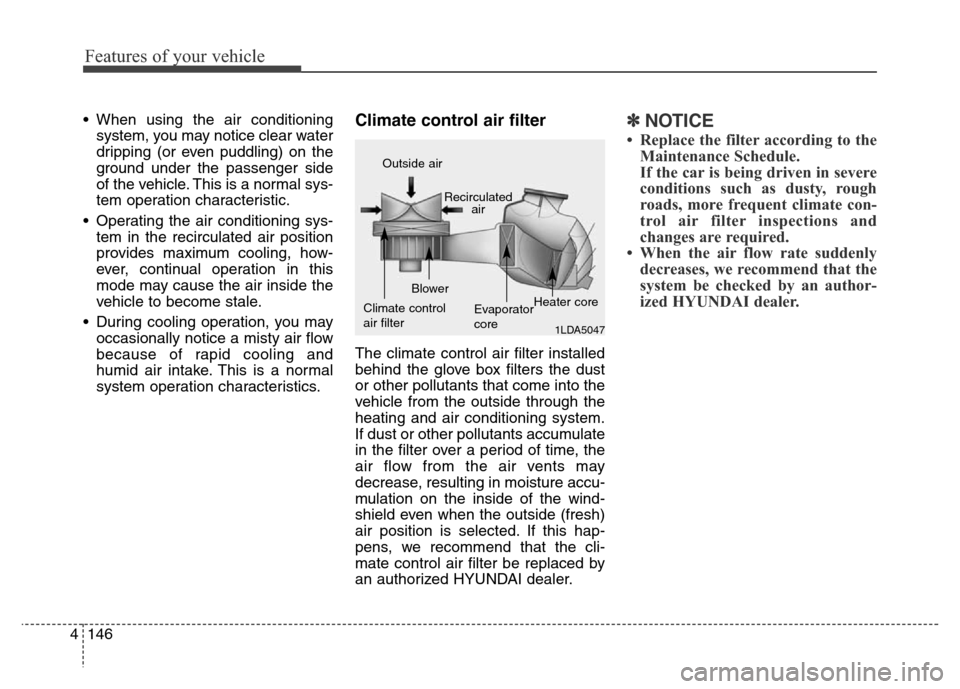
The climate control air filter installed
behind the glove box filters the dust
or other pollutants that come into the
vehicle from the outside through the
heating and air conditioning system.
If dust or other pollutants accumulate
in the filter over a period of time, the
air flow from the air vents may
decrease, resulting in moisture accu-
mulation on the inside of the wind-
shield even when the outside (fresh)
air position is selected. If this hap-
pens, we recommend that the cli-
mate control air filter be replaced by
an authorized HYUNDAI dealer.
✽NOTICE
• Replace the filter according to the
Maintenance Schedule.
If the car is being driven in severe
conditions such as dusty, rough
roads, more frequent climate con-
trol air filter inspections and
changes are required.
• When the air flow rate suddenly
decreases, we recommend that the
system be checked by an author-
ized HYUNDAI dealer.
1LDA5047
Outside air
Recirculated
air
Climate control
air filterBlower
Evaporator
coreHeater core
Page 244 of 479
4155
Features of your vehicle
If you press the operate button (2)
once, the indicator on the button will
be illuminated blue and then you can
keep drinks cool. If you press the
operate button (2) once more, the
indicator on the button will be
changed to amber and then you can
keep drinks warm.
To stop operating, press the operate
button (2) once more. The indicator
on the button will be turned off.
It takes about 5 minutes to swift from
warming mode to cooling mode or
from cooling mode to warming mode.
There are partitions in the box to fix
the drink. You can remove the parti-
tions to fit bigger size bottles. Be
careful not to damage the partitions.
WARNING
We recommend that the cool
and warm box be serviced by an
authorized HYUNDAI dealer.
Inappropriate repair causes
damage resulting in a fire and
injury.
CAUTION
• When you operate the cooling
mode, if the drink temperature
is high, it takes a long time to
cool the drink. To use the cool-
ing mode efficiently, put a cool
drink in the box.
• When you operate the warm-
ing mode, if the drink temper-
ature is low, it takes a long
time to warm the drink. To use
the warming mode efficiently,
put a warm drink in the box.
• If the cover does not close
securely, the efficiency will be
low and frost will occur. Always
close the cover securely.
• If you attempt to close the
cover by force when drinks
are not put in the box correct-
ly, it will damage the cover.
(Continued)
(Continued)
• Because the temperature of
the box bottom is very low, be
sure frost does not occur on
the drink.
• Put the cap on the bottle
securely when you put the
bottle in the box.
• Do not put sharp or any other
object except drinks in the
box. It will damage the box.
• If you keep food in the box for
a long time, the food may get
spoiled and smells.
• When you clean the inside of
the box, use a soft cloth. Don't
use strong soap, chemical
detergents.
Page 260 of 479
53
Driving your vehicle
WARNING- ENGINE EXHAUST CAN BE DANGEROUS!
Engine exhaust fumes can be extremely dangerous. If, at any time, you smell exhaust fumes inside the vehicle,
open the windows immediately.
• Do not inhale exhaust fumes.
Exhaust fumes contain carbon monoxide, a colorless, odorless gas that can cause unconsciousness and death
by asphyxiation.
• Be sure the exhaust system does not leak.
The exhaust system should be checked whenever the vehicle is raised to change the oil or for any other purpose.
If you hear a change in the sound of the exhaust or if you drive over something that strikes the underneath side
of the car, we recommend that the system be checked by an authorized HYUNDAI dealer.
• Do not run the engine in an enclosed area.
Letting the engine idle in your garage, even with the garage door open, is a hazardous practice. Never run the
engine in your garage any longer than it takes to start the engine and back the car out.
• Avoid idling the engine for prolonged periods with people inside the car.
If it is necessary to idle the engine for a prolonged period with people inside the car, be sure to do so only in an
open area with the air intake set at "Fresh" and fan operating at one of the higher speeds so fresh air is drawn
into the interior.
If you must drive with the trunk lid open because you are carrying objects that make this necessary:
1. Close all windows.
2. Open side vents.
3. Set the air intake control at "Fresh", the air flow control at "Floor" or "Face" and the fan at one of the higher
speeds.
To assure proper operation of the ventilation system, be sure the ventilation air intakes located just in front of the
windshield are kept clear of snow, ice, leaves or other obstructions.
Page 264 of 479
57
Driving your vehicle
ACC(Accessory)
Press the engine start/stop button
when it is in the OFF position without
depressing the brake pedal.
The steering wheel is unlocked and
electrical accessories are opera-
tional.
If the engine start/stop button is in
the ACC position for more than 1
hour, the button is off automatically
to prevent the battery discharge.
ON
Press the engine start/stop button
while it is in the ACC position without
depressing the brake pedal.
The warning lights can be checked
before the engine is started.
Do not leave the engine start/stop
button in the ON position for a long
time. The battery may discharge,
because the engine is not running.
START
To start the engine, depress the
brake pedal and press the engine
start/stop button with the shift lever in
the P(Park) or the N(Neutral) posi-
tion. For your safety, start the engine
with the shift lever in the P (Park)
position.
✽NOTICE
• If you press the engine start/stop
button without depressing the
brake pedal, the engine will not
start and the engine start/stop but-
ton changes as follow :
OFF
→ACC →ON →OFF