change time Hyundai Equus 2014 Owner's Guide
[x] Cancel search | Manufacturer: HYUNDAI, Model Year: 2014, Model line: Equus, Model: Hyundai Equus 2014Pages: 479, PDF Size: 10.15 MB
Page 272 of 479
![Hyundai Equus 2014 Owners Guide 515
Driving your vehicle
When you turn off the vehicle in [N]
gear, if you open the drivers door or
front passengers door, the gear is
automatically changed to [P].D (Drive)
This is the normal forwa](/img/35/14641/w960_14641-271.png "Hyundai Equus 2014 Owners Guide 515
Driving your vehicle
When you turn off the vehicle in [N]
gear, if you open the drivers door or
front passengers door, the gear is
automatically changed to [P].D (Drive)
This is the normal forwa")
515
Driving your vehicle
When you turn off the vehicle in [N]
gear, if you open the driver's door or
front passenger's door, the gear is
automatically changed to [P].D (Drive)
This is the normal forward driving
position. The transmission will auto-
matically shift through a 8-gear
sequence, providing the best fuel
economy and power.
For extra power when passing anoth-
er vehicle or climbing grades,
depress the accelerator fully, at
which time the transmission will
automatically downshift to the lower
gear.
To shift into [D], depress the brake
pedal and press the [UNLOCK] but-
ton of shift lever. And then move the
shift lever to backward.
To shift into [D], from [N] you must
depress the brake pedal.
✽NOTICE
Always come to a complete stop
before shifting into D (Drive).
Manual mode
Whether the vehicle is stationary or
in motion, sports mode is selected by
pushing the shift lever from the D
(Drive) position into the manual gate.
To return to D (Drive) range opera-
tion, push the shift lever back into the
main gate.
In manual mode, moving the shift
lever backwards and forwards will
allow you to make gearshifts rapidly.
Up (+) : Push the lever forward
once to shift up one gear.
Down (-) : Pull the lever backwards
once to shift down one
gear.
OVI053106L
+ (UP)
- (DOWN)
Manual mode
WARNING
Do not drive with the shift lever
in N (Neutral).
The engine brake will not work
and lead to an accident.
Page 274 of 479
![Hyundai Equus 2014 Owners Guide 517
Driving your vehicle
■When the battery is dis-
charged:
When the battery is discharged, the
automatic transmission (shift by wire)
is not shifted.
In emergency, if you want to shift into
[N], fo](/img/35/14641/w960_14641-273.png "Hyundai Equus 2014 Owners Guide 517
Driving your vehicle
■When the battery is dis-
charged:
When the battery is discharged, the
automatic transmission (shift by wire)
is not shifted.
In emergency, if you want to shift into
[N], fo")
517
Driving your vehicle
■When the battery is dis-
charged:
When the battery is discharged, the
automatic transmission (shift by wire)
is not shifted.
In emergency, if you want to shift into
[N], follow actions;
You can shift into [N] by using the
driver if the jump starting is impossi-
ble to do.
Insert the screwdriver (-) to service
hole (1) as direction of clockwise 10
times. The shifting is changed to [N]
from [P] position. If you want to shift
to [P] position, turn the driver count-
er-clockwise.
OVI053108E
CAUTION
If the electric parking brake is
not released, we recommend
that the vehicle is towed as flat-
bed towing.
WARNING
Always fully depress the brake
pedal before and while shifting
out of the P (Park) position into
another position to avoid inad-
vertent motion of the vehicle
which could injure persons in
or around the car.
Page 288 of 479
531
Driving your vehicle
Leaving
If you press the accelerator pedal
with the shift lever in R (Reverse), D
(Drive) or manual mode, the Auto
Hold will be released automatically
and the vehicle will start to move.
The indicator changes from green to
white.
If you want to release it manually, pull
the EPB switch while depressing the
brake pedal. The AUTO HOLD indi-
cator changes from green to white
and the system changes to the
standby position.
For your safety, release the AUTO
HOLD operation manually if the vehi-
cle ahead is too close.Cancel
To cancel the Auto Hold operation,
press the Auto Hold switch while
depressing the brake pedal. The
AUTO HOLD indicator will go out.
✽NOTICE
• The Auto Hold does not operate
when:
- The driver's seat belt is unfas-
tened and driver's door is opened
- The engine hood is opened
- The trunk is opened
- The shift lever is in P (Park)
- The EPB is applied
• For your safety, the Auto Hold
automatically switches to EPB in
such cases:
- The driver's seat belt is unfas-
tened and driver's door is opened
- The engine hood is opened in [D]
gear
- The trunk is opened in [R] gear
- The vehicle is in a standstill for
more than 10 minutes
- The vehicle is standing on a steep
slope
- The vehicle moved several times
In these cases, the brake warning
light comes on, the AUTO HOLD
indicator changes from green to
white, and a warning sounds and a
message will appear to inform you
that EPB has been automatically
engaged.
(Continued)
WARNING
When driving off from Auto
Hold by depressing the acceler-
ator pedal, always check the
surrounding area near your
vehicle.
Slowly depress the accelerator
pedal for a smooth launch.
CAUTION
For your safety, cancel the Auto
Hold operation when:
• Driving downhill.
• Driving slowly, parking, or
backing up.
• Washing the vehicle in an
automatic car wash.
Page 301 of 479
Driving your vehicle
44 5
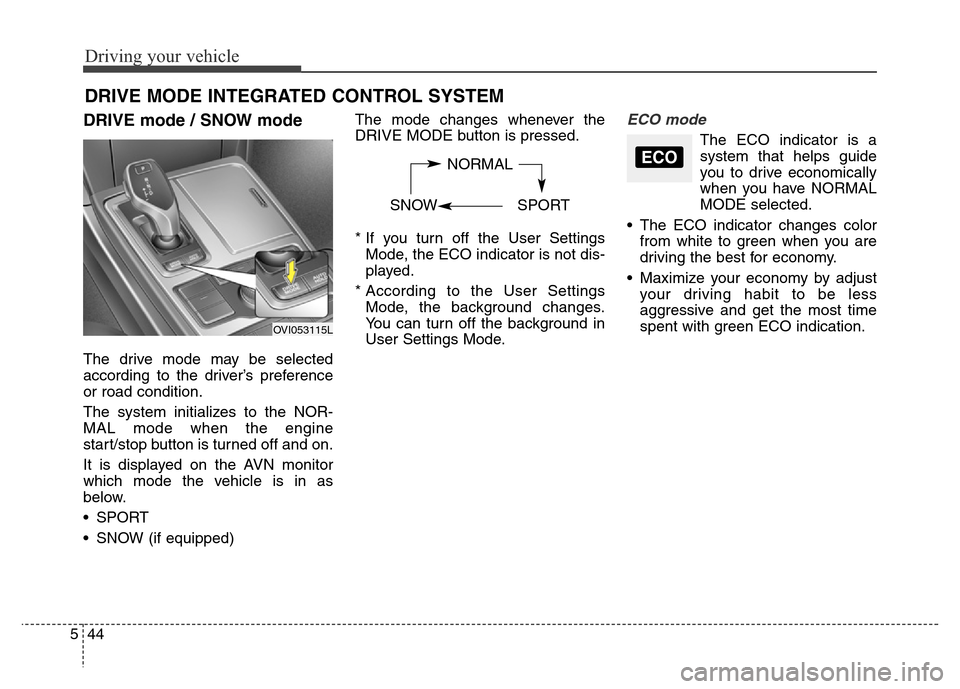
DRIVE mode / SNOW mode
The drive mode may be selected
according to the driver’s preference
or road condition.
The system initializes to the NOR-
MAL mode when the engine
start/stop button is turned off and on.
It is displayed on the AVN monitor
which mode the vehicle is in as
below.
• SPORT
• SNOW (if equipped)The mode changes whenever the
DRIVE MODE button is pressed.
* If you turn off the User Settings
Mode, the ECO indicator is not dis-
played.
* According to the User Settings
Mode, the background changes.
You can turn off the background in
User Settings Mode.
ECO mode
The ECO indicator is a
system that helps guide
you to drive economically
when you have NORMAL
MODE selected.
• The ECO indicator changes color
from white to green when you are
driving the best for economy.
• Maximize your economy by adjust
your driving habit to be less
aggressive and get the most time
spent with green ECO indication.
DRIVE MODE INTEGRATED CONTROL SYSTEM
NORMAL
SNOW SPORTECO
OVI053115L
Page 309 of 479
Driving your vehicle
52 5
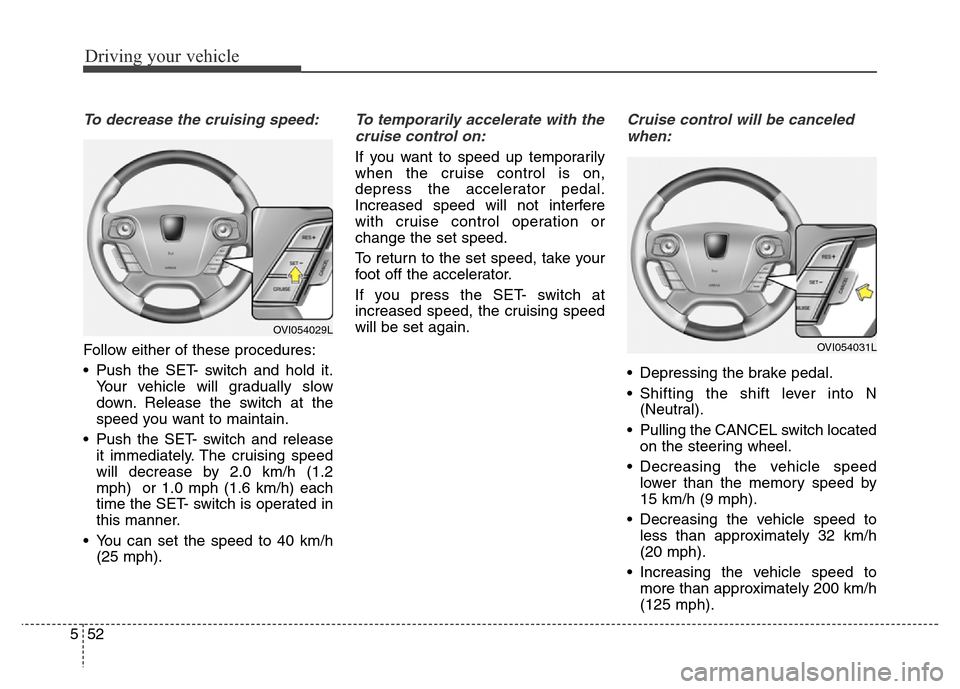
To decrease the cruising speed:
Follow either of these procedures:
• Push the SET- switch and hold it.
Your vehicle will gradually slow
down. Release the switch at the
speed you want to maintain.
• Push the SET- switch and release
it immediately. The cruising speed
will decrease by 2.0 km/h (1.2
mph) or 1.0 mph (1.6 km/h) each
time the SET- switch is operated in
this manner.
• You can set the speed to 40 km/h
(25 mph).
To temporarily accelerate with the
cruise control on:
If you want to speed up temporarily
when the cruise control is on,
depress the accelerator pedal.
Increased speed will not interfere
with cruise control operation or
change the set speed.
To return to the set speed, take your
foot off the accelerator.
If you press the SET- switch at
increased speed, the cruising speed
will be set again.
Cruise control will be canceled
when:
• Depressing the brake pedal.
• Shifting the shift lever into N
(Neutral).
• Pulling the CANCEL switch located
on the steering wheel.
• Decreasing the vehicle speed
lower than the memory speed by
15 km/h (9 mph).
• Decreasing the vehicle speed to
less than approximately 32 km/h
(20 mph).
• Increasing the vehicle speed to
more than approximately 200 km/h
(125 mph).
OVI054031L
OVI054029L
Page 314 of 479
557
Driving your vehicle
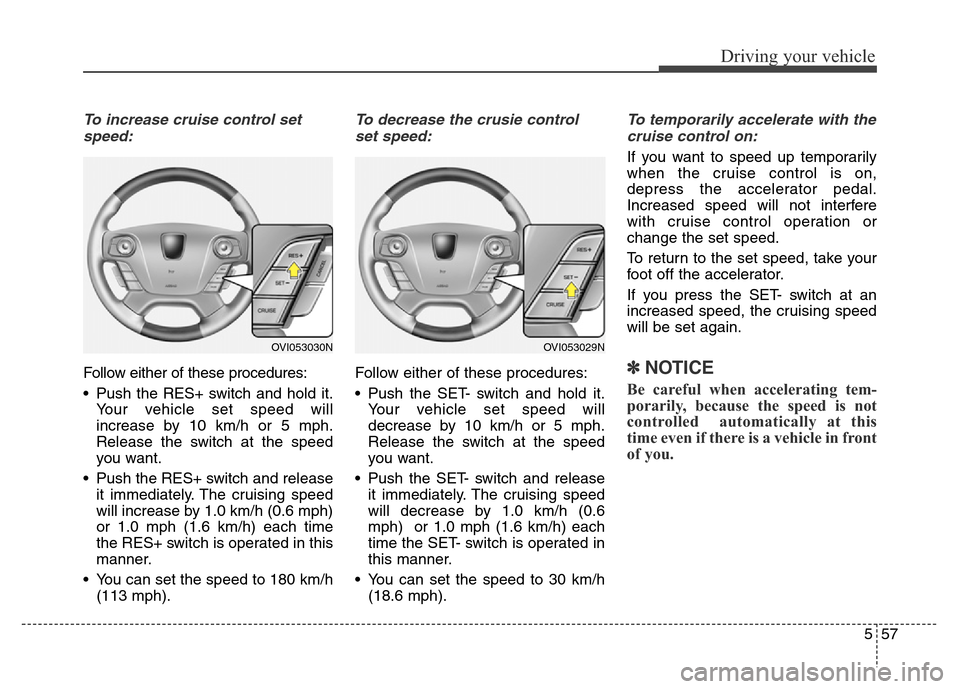
To increase cruise control set
speed:
Follow either of these procedures:
• Push the RES+ switch and hold it.
Your vehicle set speed will
increase by 10 km/h or 5 mph.
Release the switch at the speed
you want.
• Push the RES+ switch and release
it immediately. The cruising speed
will increase by 1.0 km/h (0.6 mph)
or 1.0 mph (1.6 km/h) each time
the RES+ switch is operated in this
manner.
• You can set the speed to 180 km/h
(113 mph).
To decrease the crusie control
set speed:
Follow either of these procedures:
• Push the SET- switch and hold it.
Your vehicle set speed will
decrease by 10 km/h or 5 mph.
Release the switch at the speed
you want.
• Push the SET- switch and release
it immediately. The cruising speed
will decrease by 1.0 km/h (0.6
mph) or 1.0 mph (1.6 km/h) each
time the SET- switch is operated in
this manner.
• You can set the speed to 30 km/h
(18.6 mph).
To temporarily accelerate with the
cruise control on:
If you want to speed up temporarily
when the cruise control is on,
depress the accelerator pedal.
Increased speed will not interfere
with cruise control operation or
change the set speed.
To return to the set speed, take your
foot off the accelerator.
If you press the SET- switch at an
increased speed, the cruising speed
will be set again.
✽NOTICE
Be careful when accelerating tem-
porarily, because the speed is not
controlled automatically at this
time even if there is a vehicle in front
of you.
OVI053030NOVI053029N
Page 317 of 479
Driving your vehicle
60 5
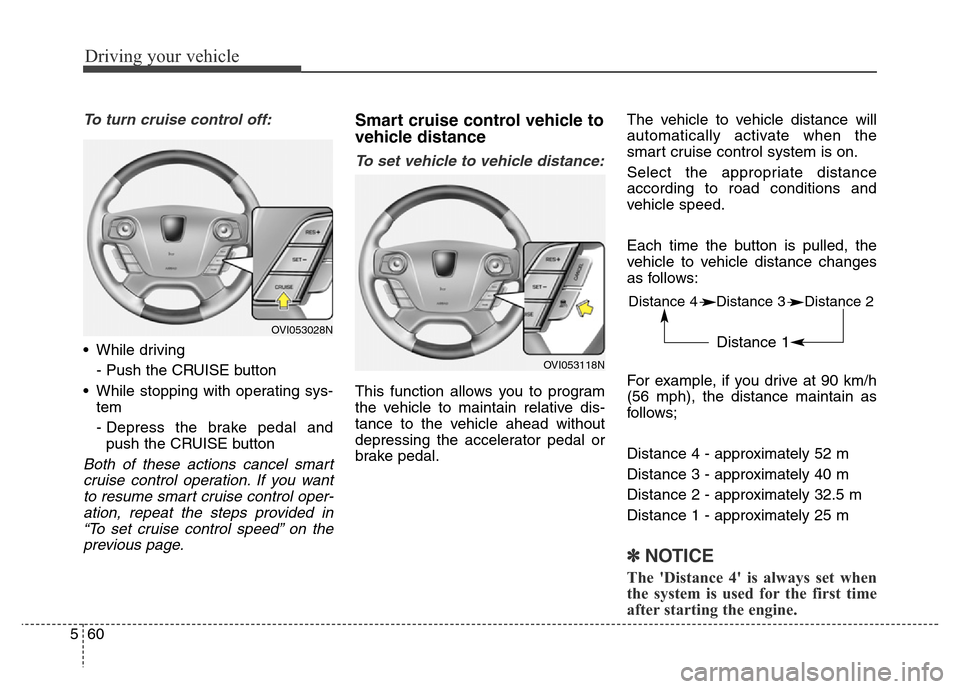
To turn cruise control off:
• While driving
- Push the CRUISE button
• While stopping with operating sys-
tem
- Depress the brake pedal and
push the CRUISE button
Both of these actions cancel smart
cruise control operation. If you want
to resume smart cruise control oper-
ation, repeat the steps provided in
“To set cruise control speed” on the
previous page.
Smart cruise control vehicle to
vehicle distance
To set vehicle to vehicle distance:
This function allows you to program
the vehicle to maintain relative dis-
tance to the vehicle ahead without
depressing the accelerator pedal or
brake pedal.The vehicle to vehicle distance will
automatically activate when the
smart cruise control system is on.
Select the appropriate distance
according to road conditions and
vehicle speed.
Each time the button is pulled, the
vehicle to vehicle distance changes
as follows:
For example, if you drive at 90 km/h
(56 mph), the distance maintain as
follows;
Distance 4 - approximately 52 m
Distance 3 - approximately 40 m
Distance 2 - approximately 32.5 m
Distance 1 - approximately 25 m
✽NOTICE
The 'Distance 4' is always set when
the system is used for the first time
after starting the engine.
OVI053028N
OVI053118N
Distance 4 Distance 3 Distance 2
Distance 1
Page 340 of 479
583
Driving your vehicle
Non-operating condition
Driver's Attention
The driver must be cautious in the
below situations for the system may
not assist the driver and may not
work properly.
- Curved roads, tollgates, etc.
- The surrounding of the sensor is
polluted with rain, snow, mud, etc
- The rear bumper near the sensor is
covered or hidden with a foreign
matter such as a sticker, bumper
guard, bicycle stand etc.
- The rear bumper is damaged or the
sensor is out of place.
- The height of the vehicle shows
much change such as when the
trunk is loaded with heavy objects,
abnormal tire pressure etc.
- Due to bad weather such as heavy
rain or snow.
- A fixed object is near such as a
guardrail, etc.
- A lot of amount of metal sub-
stances are near the vehicles such
as a construction area.- A big vehicle is near such as a bus
or truck.
- A motorcycle or bicycle is near.
- A flat trailer like vehicle is near.
- If the vehicle has started at the
same time as the vehicle next to it
and has accelerated.
- When the other vehicle passes by
very fast.
- When changing lanes.
- When going down or up a steep
road where the height of the lane is
different.
- When the other vehicle drives at
the rear very nearby or drives very
close.
- When a trailer or carrier is installed.
- When the temperature of rear
bumper is high
- When the sensors are covered by
the vehicle, wall and pillar of park-
ing lot
- When your vehicle moves back, if
the detected vehicle also moves
back
- If there is small things like shopping
cart and baby carriage- If there is low height vehicle like
sport vehicle
- When the vehicle is closing to your
vehicle
Outside rearview mirror may not
alert the driver when:
- The outside rearview mirror hous-
ing is severely polluted
- The window is severely polluted
- The windows are severely tinted.
Page 398 of 479
713
Maintenance
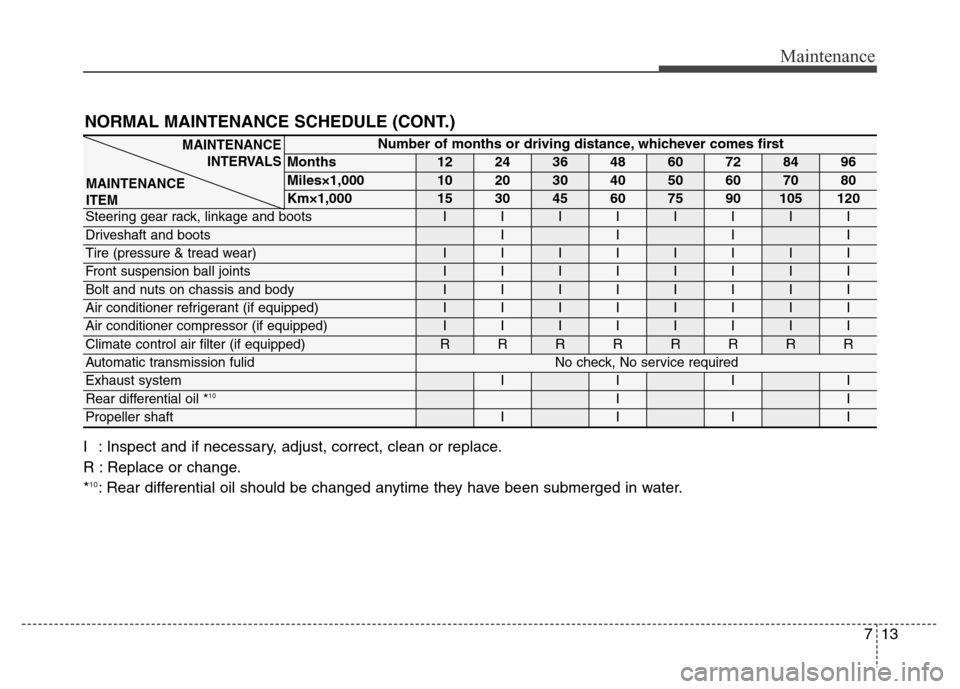
NORMAL MAINTENANCE SCHEDULE (CONT.)
I : Inspect and if necessary, adjust, correct, clean or replace.
R : Replace or change.
*
10: Rear differential oil should be changed anytime they have been submerged in water.
Number of months or driving distance, whichever comes first
Months1224364860728496
Miles×1,0001020304050607080
Km×1,000153045607590105120
Steering gear rack, linkage and bootsIIIIIIII
Driveshaft and bootsIIII
Tire (pressure & tread wear)IIIIIIII
Front suspension ball jointsIIIIIIII
Bolt and nuts on chassis and bodyIIIIIIII
Air conditioner refrigerant (if equipped)IIIIIIII
Air conditioner compressor (if equipped)IIIIIIII
Climate control air filter (if equipped)RRRRRRRR
Automatic transmission fulidNo check, No service required
Exhaust systemIIII
Rear differential oil *10II
Propeller shaftIIII
MAINTENANCE
INTERVALS
MAINTENANCE
ITEM