steering Hyundai Equus 2014 User Guide
[x] Cancel search | Manufacturer: HYUNDAI, Model Year: 2014, Model line: Equus, Model: Hyundai Equus 2014Pages: 479, PDF Size: 10.15 MB
Page 87 of 479
Safety features of your vehicle
68 3
SRS Care
The SRS is virtually maintenance-
free and so there are no parts you
can safely service by yourself. If the
SRS air bag warning light does not
illuminate when you turn the ignition
ON, or if it continuously remains on,
we recommend that the system be
inspected by an authorized HYUNDAI
dealer.
Improper handling of the SRS sys-
tem may result in serious personal
injury.WARNING
• Modification to SRS compo-
nents or wiring, including the
addition of any kind of badges
to the pad covers or modifica-
tions to the body structure,
can adversely affect SRS per-
formance and lead to possible
injury.
• For cleaning the air bag pad
covers, use only a soft, dry
cloth or one which has been
moistened with plain water.
Solvents or cleaners could
adversely affect the air bag
covers and proper deploy-
ment of the system.
• No objects should be placed
over or near the air bag mod-
ules on the steering wheel,
instrument panel, and the
front passenger's panel above
the glove box, because any
such object could cause harm
if the vehicle is in a crash
severe enough to cause the
air bags to inflate.
(Continued)
(Continued)
• If the air bags inflate, they
must be replaced by an
authorized HYUNDAI dealer.
• Do not tamper with or discon-
nect SRS wiring, or other
components of the SRS sys-
tem. Doing so could result in
injury, due to accidental infla-
tion of the air bags or by ren-
dering the SRS inoperative.
• If components of the air bag
system must be discarded, or
if the vehicle must be
scrapped, certain safety pre-
cautions must be observed.
An authorized HYUNDAI deal-
er knows these precautions
and can give you the neces-
sary information. Failure to
follow these precautions and
procedures could increase
the risk of personal injury.
• If your car was flooded and
has soaked carpeting or water
on the flooring, you shouldn't
try to start the engine; have
the car towed to an authorized
HYUNDAI dealer.
Page 90 of 479
Features of your vehicle
Smart key . . . . . . . . . . . . . . . . . . . . . . . . . . . . . . . . . 4-4
• Smart key function . . . . . . . . . . . . . . . . . . . . . . . . . . . . 4-4
• Buttons on the smart key . . . . . . . . . . . . . . . . . . . . . . . 4-7
• Restrictions in handling keys . . . . . . . . . . . . . . . . . . . . 4-8
• Smart key precautions . . . . . . . . . . . . . . . . . . . . . . . . . 4-9
• Immobilizer system . . . . . . . . . . . . . . . . . . . . . . . . . . . 4-10
• Battery replacement . . . . . . . . . . . . . . . . . . . . . . . . . . 4-11
Theft-alarm system . . . . . . . . . . . . . . . . . . . . . . . . 4-13
Door locks . . . . . . . . . . . . . . . . . . . . . . . . . . . . . . . . 4-16
• From outside . . . . . . . . . . . . . . . . . . . . . . . . . . . . . . . . 4-16
• Power door latch . . . . . . . . . . . . . . . . . . . . . . . . . . . . . 4-17
• From inside . . . . . . . . . . . . . . . . . . . . . . . . . . . . . . . . . 4-17
• Child-protector rear door lock . . . . . . . . . . . . . . . . . 4-19
Trunk . . . . . . . . . . . . . . . . . . . . . . . . . . . . . . . . . . . . 4-20
• Non-powered trunk . . . . . . . . . . . . . . . . . . . . . . . . . . . 4-20
• Power trunk . . . . . . . . . . . . . . . . . . . . . . . . . . . . . . . . . 4-21
• Emergency trunk safety release . . . . . . . . . . . . . . . . . 4-26
Windows . . . . . . . . . . . . . . . . . . . . . . . . . . . . . . . . . 4-28
Hood. . . . . . . . . . . . . . . . . . . . . . . . . . . . . . . . . . . . . 4-33
Fuel filler lid . . . . . . . . . . . . . . . . . . . . . . . . . . . . . . 4-35
• Emergency fuel filler lid release. . . . . . . . . . . . . . . . . 4-37
Sunroof . . . . . . . . . . . . . . . . . . . . . . . . . . . . . . . . . . 4-38
• Sliding the sunroof . . . . . . . . . . . . . . . . . . . . . . . . . . . 4-39
• Tilting the sunroof . . . . . . . . . . . . . . . . . . . . . . . . . . . . 4-39
• Sunshade . . . . . . . . . . . . . . . . . . . . . . . . . . . . . . . . . . . 4-40• Resetting the sunroof . . . . . . . . . . . . . . . . . . . . . . . . . 4-41
Driver position memory system . . . . . . . . . . . . . . 4-42
Steering wheel . . . . . . . . . . . . . . . . . . . . . . . . . . . . . 4-44
• Power steering . . . . . . . . . . . . . . . . . . . . . . . . . . . . . . . 4-44
• Tilt/Telescopic steering . . . . . . . . . . . . . . . . . . . . . . . . 4-45
• Heated steering wheel . . . . . . . . . . . . . . . . . . . . . . . . . 4-45
• Horn . . . . . . . . . . . . . . . . . . . . . . . . . . . . . . . . . . . . . . . 4-46
Mirrors . . . . . . . . . . . . . . . . . . . . . . . . . . . . . . . . . . 4-47
• Inside rearview mirror . . . . . . . . . . . . . . . . . . . . . . . . 4-47
• Outside rearview mirror . . . . . . . . . . . . . . . . . . . . . . . 4-51
Instrument cluster . . . . . . . . . . . . . . . . . . . . . . . . . 4-55
• Instrument cluster control . . . . . . . . . . . . . . . . . . . . . 4-56
• LCD display control . . . . . . . . . . . . . . . . . . . . . . . . . . 4-57
• Gauges . . . . . . . . . . . . . . . . . . . . . . . . . . . . . . . . . . . . . 4-58
LCD display . . . . . . . . . . . . . . . . . . . . . . . . . . . . . . 4-63
• LCD modes. . . . . . . . . . . . . . . . . . . . . . . . . . . . . . . . . . 4-63
• Trip computer mode . . . . . . . . . . . . . . . . . . . . . . . . . . 4-64
• ASCC/LDWS mode . . . . . . . . . . . . . . . . . . . . . . . . . . . 4-64
• A/V mode . . . . . . . . . . . . . . . . . . . . . . . . . . . . . . . . . . . 4-64
• Turn by turn mode . . . . . . . . . . . . . . . . . . . . . . . . . . . 4-65
• Information mode . . . . . . . . . . . . . . . . . . . . . . . . . . . . 4-65
• User settings mode. . . . . . . . . . . . . . . . . . . . . . . . . . . . 4-68
• Warning messages . . . . . . . . . . . . . . . . . . . . . . . . . . . . 4-75
4
Page 92 of 479
Interior features . . . . . . . . . . . . . . . . . . . . . . . . . . 4-157
• Ashtray . . . . . . . . . . . . . . . . . . . . . . . . . . . . . . . . . . . . 4-157
• Cup holder . . . . . . . . . . . . . . . . . . . . . . . . . . . . . . . . . 4-158
• Sunvisor . . . . . . . . . . . . . . . . . . . . . . . . . . . . . . . . . . . 4-159
• Rear vanity mirror . . . . . . . . . . . . . . . . . . . . . . . . . . 4-159
• Power outlet . . . . . . . . . . . . . . . . . . . . . . . . . . . . . . . . 4-160
• Clock . . . . . . . . . . . . . . . . . . . . . . . . . . . . . . . . . . . . . . 4-161
• Clothes hanger . . . . . . . . . . . . . . . . . . . . . . . . . . . . . . 4-162
• Bag hanger . . . . . . . . . . . . . . . . . . . . . . . . . . . . . . . . 4-163
• Floor mat anchor(s). . . . . . . . . . . . . . . . . . . . . . . . . . 4-163
• Luggage net (holder) . . . . . . . . . . . . . . . . . . . . . . . . . 4-164
• Rear curtain . . . . . . . . . . . . . . . . . . . . . . . . . . . . . . . . 4-164
Multimedia system . . . . . . . . . . . . . . . . . . . . . . . . 4-166
• Aux, USB and iPod®port . . . . . . . . . . . . . . . . . . . . . 4-166
• Antenna . . . . . . . . . . . . . . . . . . . . . . . . . . . . . . . . . . . 4-166
• Steering wheel audio control . . . . . . . . . . . . . . . . . . 4-167
4
Page 131 of 479
Features of your vehicle
42 4
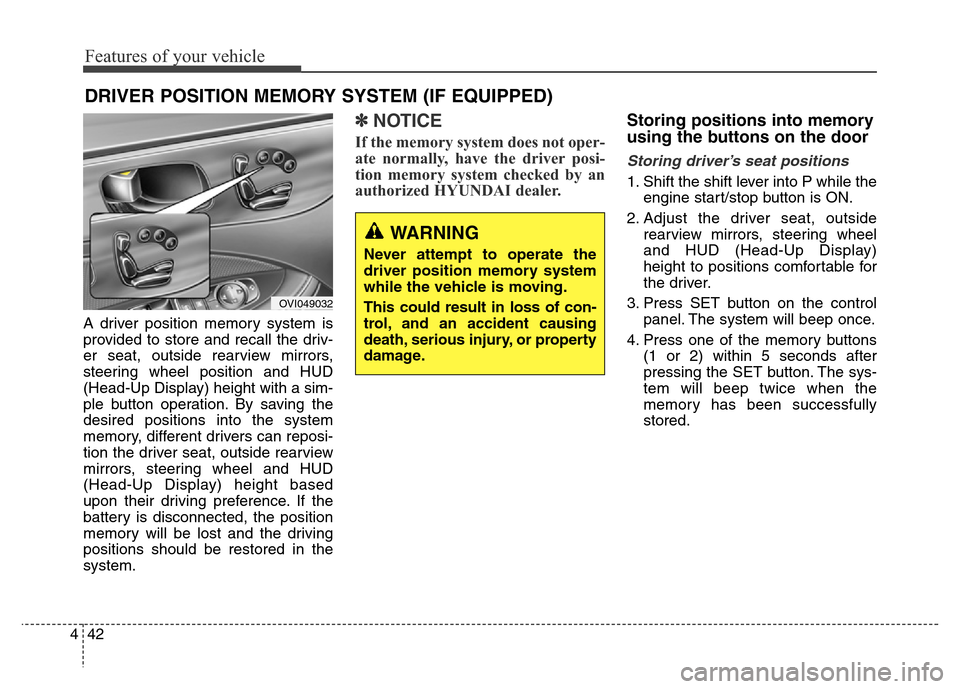
A driver position memory system is
provided to store and recall the driv-
er seat, outside rearview mirrors,
steering wheel position and HUD
(Head-Up Display) height with a sim-
ple button operation. By saving the
desired positions into the system
memory, different drivers can reposi-
tion the driver seat, outside rearview
mirrors, steering wheel and HUD
(Head-Up Display) height based
upon their driving preference. If the
battery is disconnected, the position
memory will be lost and the driving
positions should be restored in the
system.
✽NOTICE
If the memory system does not oper-
ate normally, have the driver posi-
tion memory system checked by an
authorized HYUNDAI dealer.
Storing positions into memory
using the buttons on the door
Storing driver’s seat positions
1. Shift the shift lever into P while the
engine start/stop button is ON.
2. Adjust the driver seat, outside
rearview mirrors, steering wheel
and HUD (Head-Up Display)
height to positions comfortable for
the driver.
3. Press SET button on the control
panel. The system will beep once.
4. Press one of the memory buttons
(1 or 2) within 5 seconds after
pressing the SET button. The sys-
tem will beep twice when the
memory has been successfully
stored.
DRIVER POSITION MEMORY SYSTEM (IF EQUIPPED)
WARNING
Never attempt to operate the
driver position memory system
while the vehicle is moving.
This could result in loss of con-
trol, and an accident causing
death, serious injury, or property
damage.
OVI049032
Page 132 of 479
443
Features of your vehicle
Recalling positions from memory
1. Shift the shift lever into P while the
engine start/stop button is ON.
2. To recall the position in memory,
press the desired memory button
(1 or 2). The system will beep
once, and then the driver seat,
outside rearview mirrors, steering
wheel and HUD (Head-Up
Display) height will automatically
adjust to the stored positions.
Adjusting one of the control knobs for
the driver seat, outside rearview mir-
ror and steering wheel while the sys-
tem is recalling the stored positions
will cause the movement for that
component to stop and move in the
direction that the control knob is
moved. Other components will con-
tinue to the recalled position.
Easy access function
(if equipped)
The steering wheel will move away
from the driver and the seat will
move rearward, when the engine
start/stop button is turned to the OFF
position.
The steering wheel will move toward
the driver and the seat will move for-
ward, when the engine start/stop but-
ton is turned to the ACC or ON posi-
tion.
WARNING
Use caution when recalling
adjustment memory while sitting
in the vehicle. Push the seat posi-
tion control knob to the desired
position immediately if the seat
moves too far in any direction.
Page 133 of 479
Features of your vehicle
44 4
STEERING WHEEL
Power steering
Power steering uses energy from the
engine to assist you in steering the
vehicle. If the engine is off or if the
power steering system becomes
inoperative, the vehicle may still be
steered, but it will require increased
steering effort.
Should you notice any change in the
effort required to steer during normal
vehicle operation, we recommend
that the system be checked by an
authorized HYUNDAI dealer.
Electronic Hydraulic Power
Steering (EHPS)
EHPS uses an electromotor to assist
you in steering the vehicle. It senses
the vehicle speed and road condition.
If the engine is off or if the power
steering system becomes inoperative,
the vehicle may still be steered, but it
will require increased steering effort.
Should you notice any change in the
effort required to steer during normal
vehicle operation, we recommend
that the system be checked by an
authorized HYUNDAI dealer.
✽NOTICE
If the power steering drive belt
breaks or if the power steering
pump malfunctions, the steering
effort will greatly increase.
✽NOTICE
If the vehicle is parked for extended
periods outside in cold weather
(below -10°C/14°F), the power steer-
ing may require increased effort
when the engine is first started. This
is caused by increased fluid viscosity
due to the cold weather and does not
indicate a malfunction.
When this happens, increase the
engine RPM by depressing accelera-
tor until the RPM reaches 1,500 rpm
then release or let the engine idle for
two or three minutes to warm up the
fluid.
CAUTION
Never hold the steering wheel
against a stop (extreme right or
left turn) for more than 5 sec-
onds with the engine running.
Holding the steering wheel for
more than 5 seconds in either
position may cause damage to
the power steering pump.
Page 134 of 479
445
Features of your vehicle
Tilt/Telescopic steering
Tilt/Telescopic steering allows you to
adjust the steering wheel before you
drive. You can also raise it to give
your legs more room when you exit
and enter the vehicle.
The steering wheel should be posi-
tioned so that it is comfortable for
you to drive, while permitting you to
see the instrument panel warning
lights and gauges.
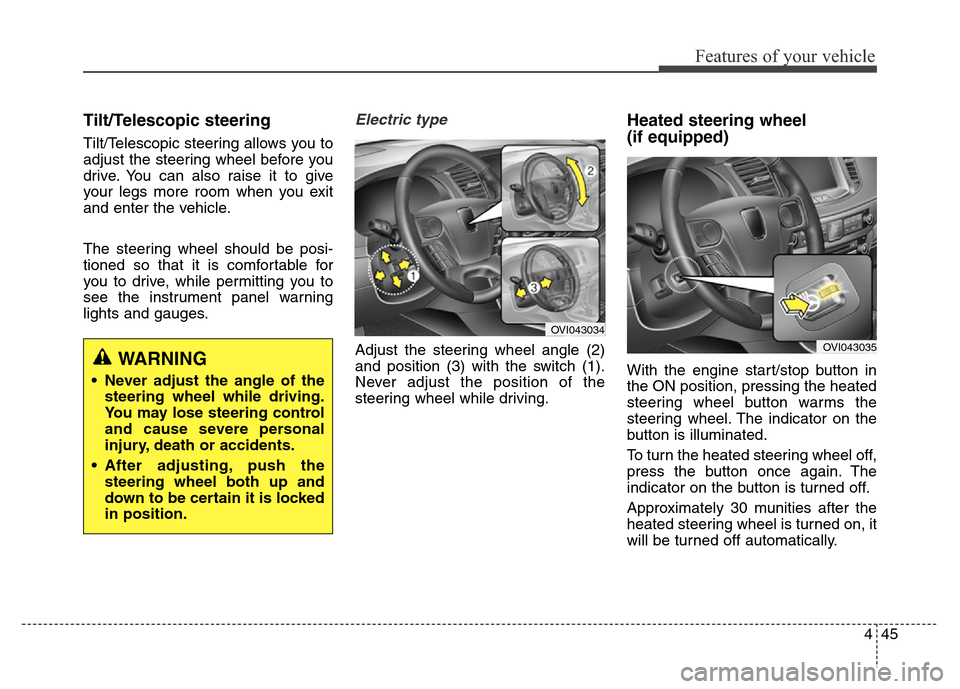
Electric type
Adjust the steering wheel angle (2)
and position (3) with the switch (1).
Never adjust the position of the
steering wheel while driving.
Heated steering wheel
(if equipped)
With the engine start/stop button in
the ON position, pressing the heated
steering wheel button warms the
steering wheel. The indicator on the
button is illuminated.
To turn the heated steering wheel off,
press the button once again. The
indicator on the button is turned off.
Approximately 30 munities after the
heated steering wheel is turned on, it
will be turned off automatically.WARNING
• Never adjust the angle of the
steering wheel while driving.
You may lose steering control
and cause severe personal
injury, death or accidents.
• After adjusting, push the
steering wheel both up and
down to be certain it is locked
in position.
OVI043034
OVI043035
Page 135 of 479
Features of your vehicle
46 4
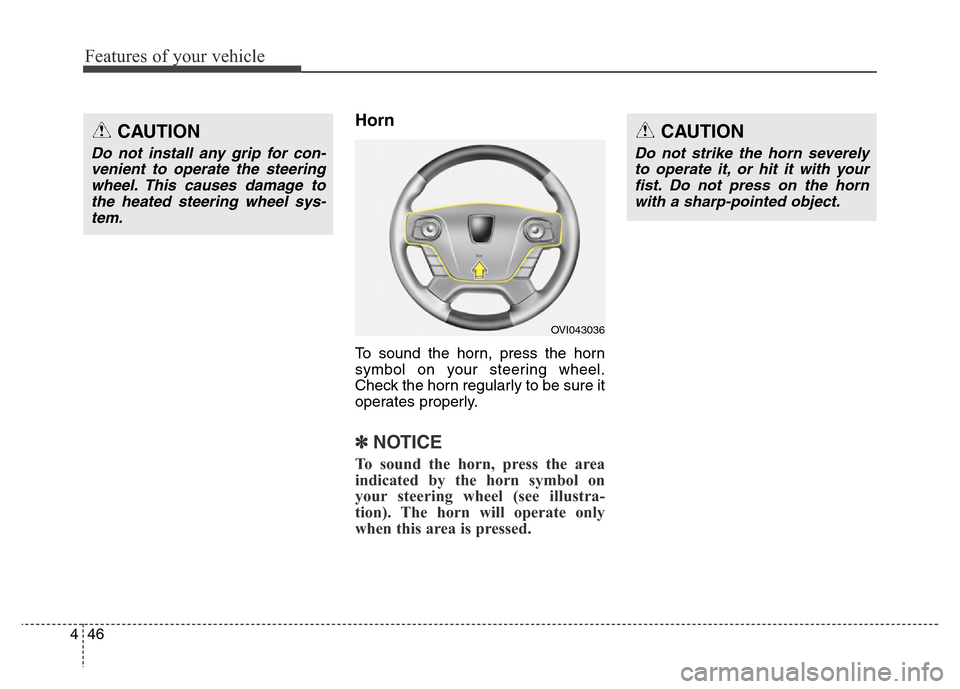
Horn
To sound the horn, press the horn
symbol on your steering wheel.
Check the horn regularly to be sure it
operates properly.
✽NOTICE
To sound the horn, press the area
indicated by the horn symbol on
your steering wheel (see illustra-
tion). The horn will operate only
when this area is pressed.
OVI043036
CAUTION
Do not strike the horn severely
to operate it, or hit it with your
fist. Do not press on the horn
with a sharp-pointed object.
CAUTION
Do not install any grip for con-
venient to operate the steering
wheel. This causes damage to
the heated steering wheel sys-
tem.
Page 139 of 479
Features of your vehicle
50 4
3. Press the button until the new zone
number appears in the display.
After you stop pressing the button
in, the display will show a compass
direction within a few seconds.
4. Changing Mirror Angle setting
(if equipped):
Due to mirror positions being angled
towards the driver, the compass mir-
ror can also compensate for drivers
seated on the Left Hand side of the
vehicle (steering wheel on the LH
side of the vehicle) or Right Hand
side of the vehicle (steering wheel on
the RH side of the vehicle).To adjust the Left Hand, “L” or Right
Hand, “R”, setting:
1. Press and hold the button for more
than 12 seconds.
2. Release then press the button to
toggle between “L” and “R”.
✽NOTICE
This procedure also causes the com-
pass to be de-calibrated.
3. To re-calibrate the compass, drive
the vehicle in 2 complete circles at
less than 8km/h (5mph).
CAUTION
1.Do not install the ski rack,
antenna, etc. which are
attached to the vehicle by
means of a magnet. They affect
the operation of the compass.
2.If the compass deviates from
the correct indication soon
after repeated adjustment, we
recommend that the system
be checked by an authorized
HYUNDAI dealer.
3.The compass may not indicate
the correct compass point in
tunnels or while driving up or
down a steep hill.
(The compass returns to the
correct compass point when
the vehicle moves to an area
where the geomagnetism is
stabilized.)
4.When cleaning the mirror, use
a paper towel or similar materi-
al dampened with glass clean-
er. Do not spray glass cleaner
directly on the mirror as that
may cause the liquid cleaner to
enter the mirror housing.
Page 146 of 479
457
Features of your vehicle
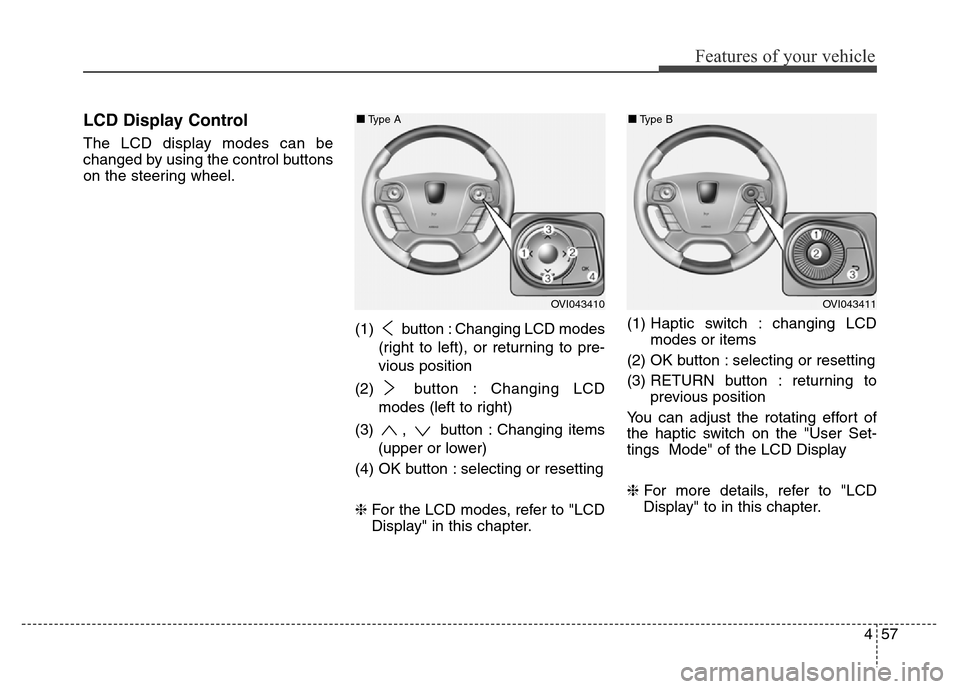
LCD Display Control
The LCD display modes can be
changed by using the control buttons
on the steering wheel.
(1) button : Changing LCD modes
(right to left), or returning to pre-
vious position
(2) button : Changing LCD
modes (left to right)
(3) , button : Changing items
(upper or lower)
(4) OK button : selecting or resetting
❈For the LCD modes, refer to "LCD
Display" in this chapter.(1) Haptic switch : changing LCD
modes or items
(2) OK button : selecting or resetting
(3) RETURN button : returning to
previous position
You can adjust the rotating effort of
the haptic switch on the "User Set-
tings Mode" of the LCD Display
❈For more details, refer to "LCD
Display" to in this chapter.
OVI043410
■Type A
OVI043411
■Type B