display Hyundai Equus 2015 User Guide
[x] Cancel search | Manufacturer: HYUNDAI, Model Year: 2015, Model line: Equus, Model: Hyundai Equus 2015Pages: 483, PDF Size: 13.26 MB
Page 148 of 483
459
Features of your vehicle
INSTRUMENT CLUSTER
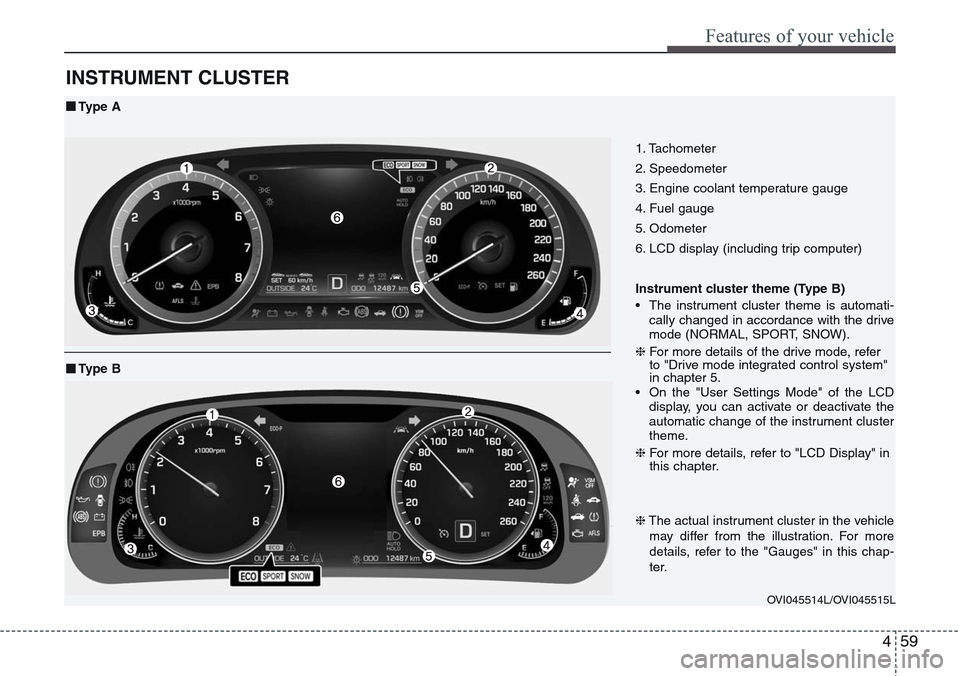
1. Tachometer
2. Speedometer
3. Engine coolant temperature gauge
4. Fuel gauge
5. Odometer
6. LCD display (including trip computer)
Instrument cluster theme (Type B)
• The instrument cluster theme is automati-
cally changed in accordance with the drive
mode (NORMAL, SPORT, SNOW).
❈For more details of the drive mode, refer
to "Drive mode integrated control system"
in chapter 5.
• On the "User Settings Mode" of the LCD
display, you can activate or deactivate the
automatic change of the instrument cluster
theme.
❈For more details, refer to "LCD Display" in
this chapter.
OVI045514L/OVI045515L
■Type A
❈The actual instrument cluster in the vehicle
may differ from the illustration. For more
details, refer to the "Gauges" in this chap-
ter.
■Type B
Page 150 of 483
461
Features of your vehicle
LCD Display Control
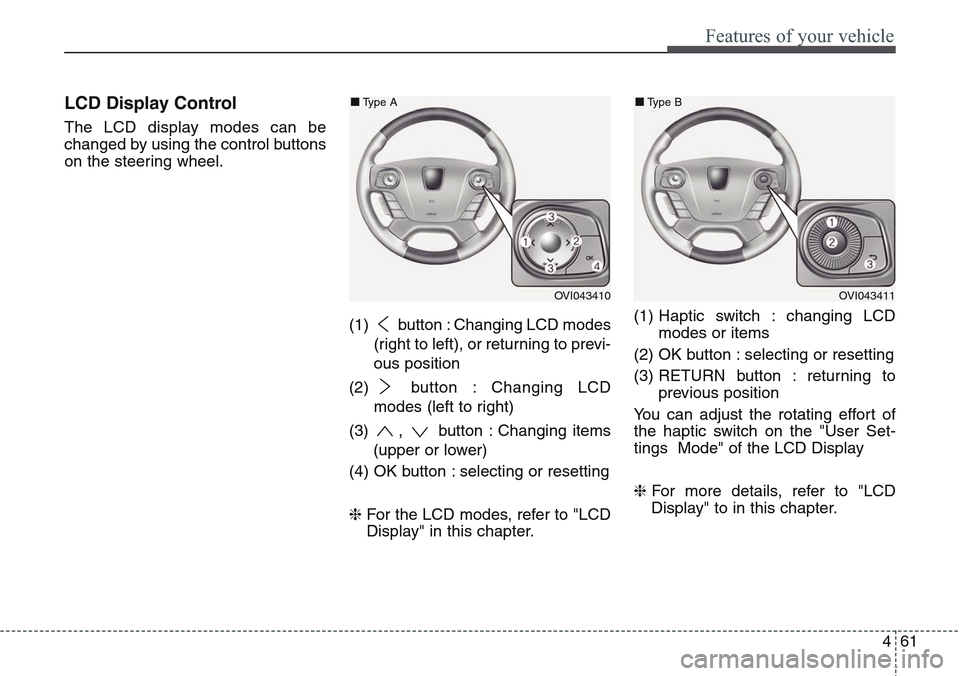
The LCD display modes can be
changed by using the control buttons
on the steering wheel.
(1) button : Changing LCD modes
(right to left), or returning to previ-
ous position
(2) button : Changing LCD
modes (left to right)
(3) , button : Changing items
(upper or lower)
(4) OK button : selecting or resetting
❈For the LCD modes, refer to "LCD
Display" in this chapter.(1) Haptic switch : changing LCD
modes or items
(2) OK button : selecting or resetting
(3) RETURN button : returning to
previous position
You can adjust the rotating effort of
the haptic switch on the "User Set-
tings Mode" of the LCD Display
❈For more details, refer to "LCD
Display" to in this chapter.
OVI043410
■Type A
OVI043411
■Type B
Page 151 of 483
Features of your vehicle
62 4
Gauges
Speedometer
✽NOTICE
On the "User Settings Mode" of the
LCD display, you can set the font
size of the speedometer (Normal or
Large) (Type B).
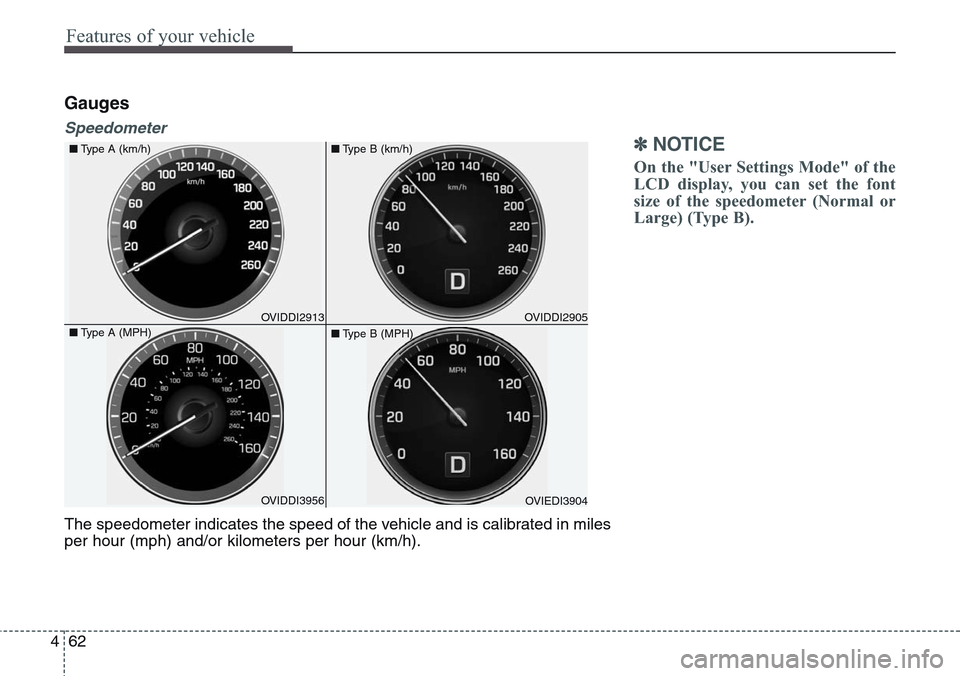
The speedometer indicates the speed of the vehicle and is calibrated in miles
per hour (mph) and/or kilometers per hour (km/h).
OVIDDI3956 ■Type A (km/h)
■Type A (MPH)OVIDDI2913OVIEDI3904 ■Type B (km/h)
■Type B (MPH)OVIDDI2905
Page 155 of 483
Features of your vehicle
66 4
Automatic Transmission Shift
Indicator
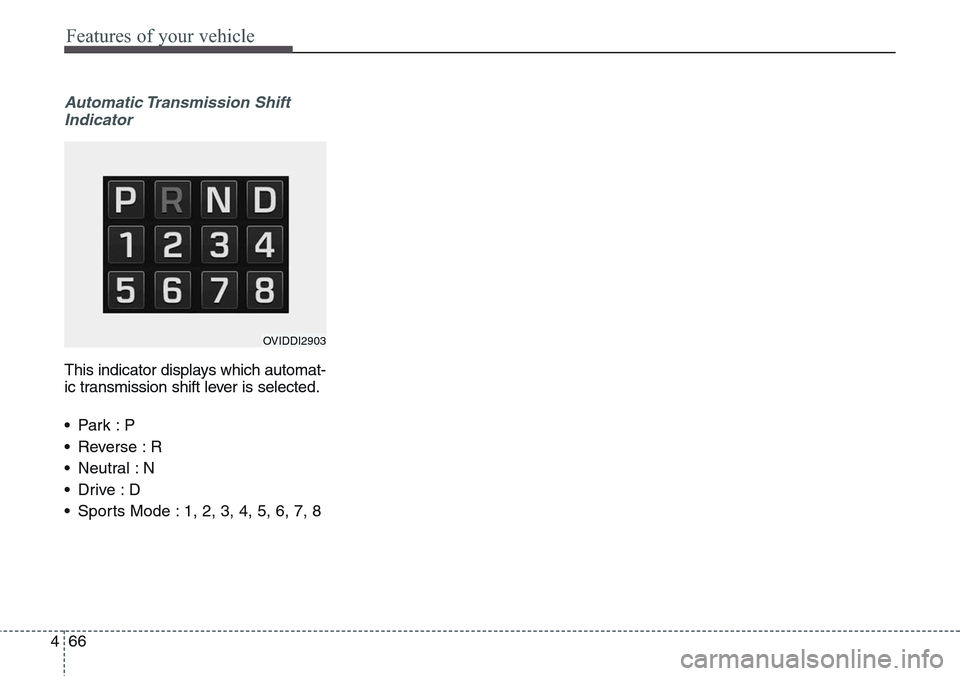
This indicator displays which automat-
ic transmission shift lever is selected.
•Park :P
• Reverse : R
• Neutral : N
•Drive :D
• Sports Mode : 1, 2, 3, 4, 5, 6, 7, 8
OVIDDI2903
Page 156 of 483
467
Features of your vehicle
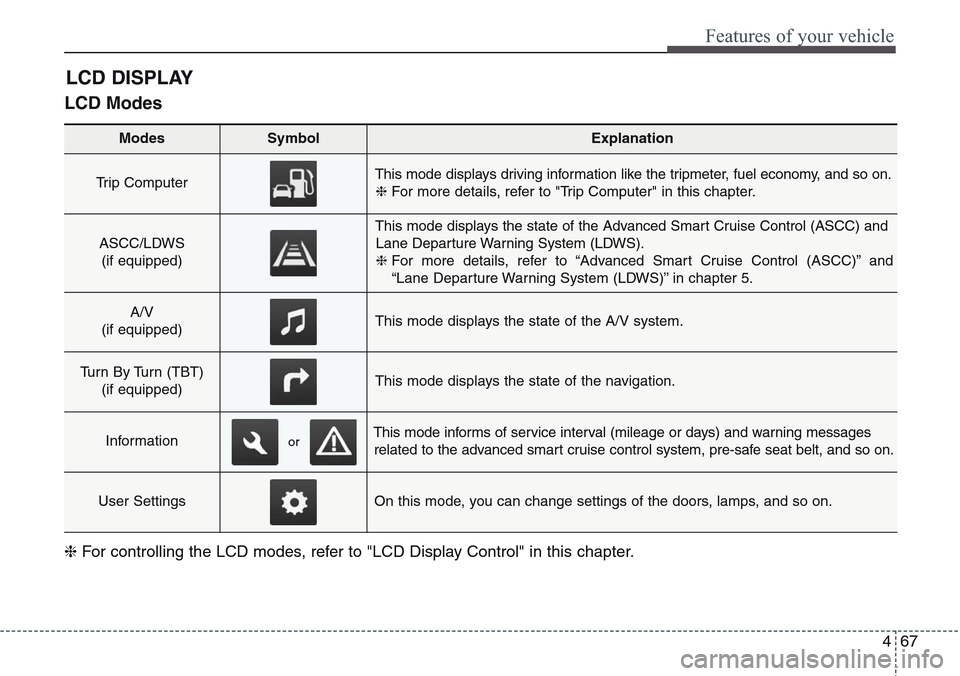
LCD Modes
LCD DISPLAY
Modes SymbolExplanation
Trip Computer This mode displays driving information like the tripmeter, fuel economy, and so on.
❈For more details, refer to "Trip Computer" in this chapter.
ASCC/LDWS
(if equipped)
This mode displays the state of the Advanced Smart Cruise Control (ASCC) and
Lane Departure Warning System (LDWS).
❈For more details, refer to “Advanced Smart Cruise Control (ASCC)” and
“Lane Departure Warning System (LDWS)” in chapter 5.
A/V
(if equipped)This mode displays the state of the A/V system.
Turn By Turn (TBT)
(if equipped)This mode displays the state of the navigation.
InformationThis mode informs of service interval (mileage or days) and warning messages
related to the advanced smart cruise control system, pre-safe seat belt, and so on.
User SettingsOn this mode, you can change settings of the doors, lamps, and so on.
❈For controlling the LCD modes, refer to "LCD Display Control" in this chapter.
or
Page 157 of 483
Features of your vehicle
68 4
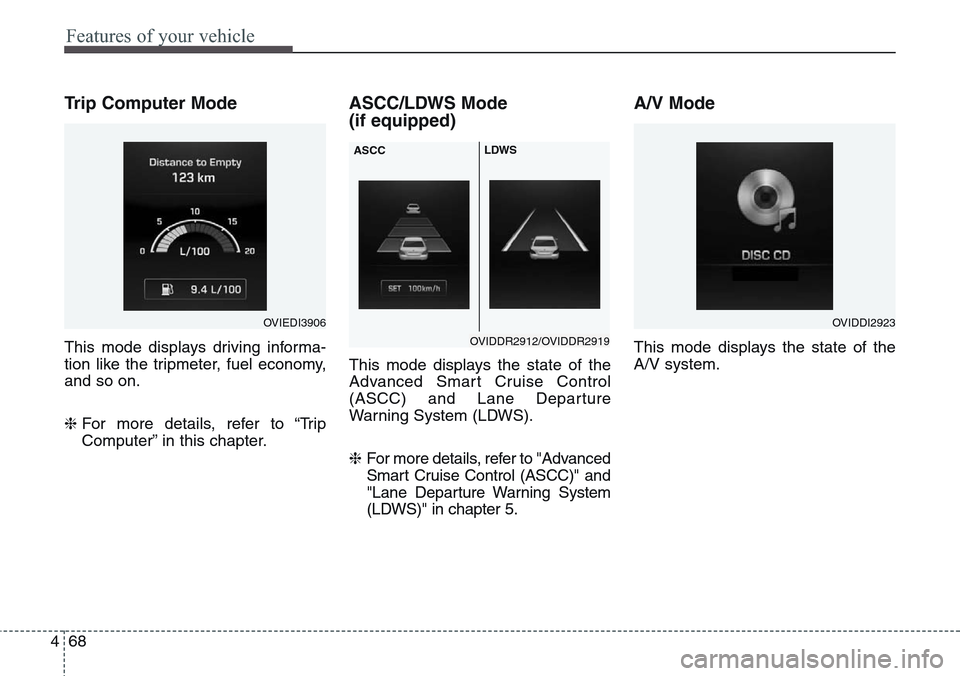
Trip Computer Mode
This mode displays driving informa-
tion like the tripmeter, fuel economy,
and so on.
❈For more details, refer to “Trip
Computer” in this chapter.
ASCC/LDWS Mode
(if equipped)
This mode displays the state of the
Advanced Smart Cruise Control
(ASCC) and Lane Departure
Warning System (LDWS).
❈ For more details, refer to "Advanced
Smart Cruise Control (ASCC)" and
"Lane Departure Warning System
(LDWS)" in chapter 5.
A/V Mode
This mode displays the state of the
A/V system.
OVIEDI3906OVIDDI2923
OVIDDR2912/OVIDDR2919 ASCCLDWS
Page 158 of 483
469
Features of your vehicle
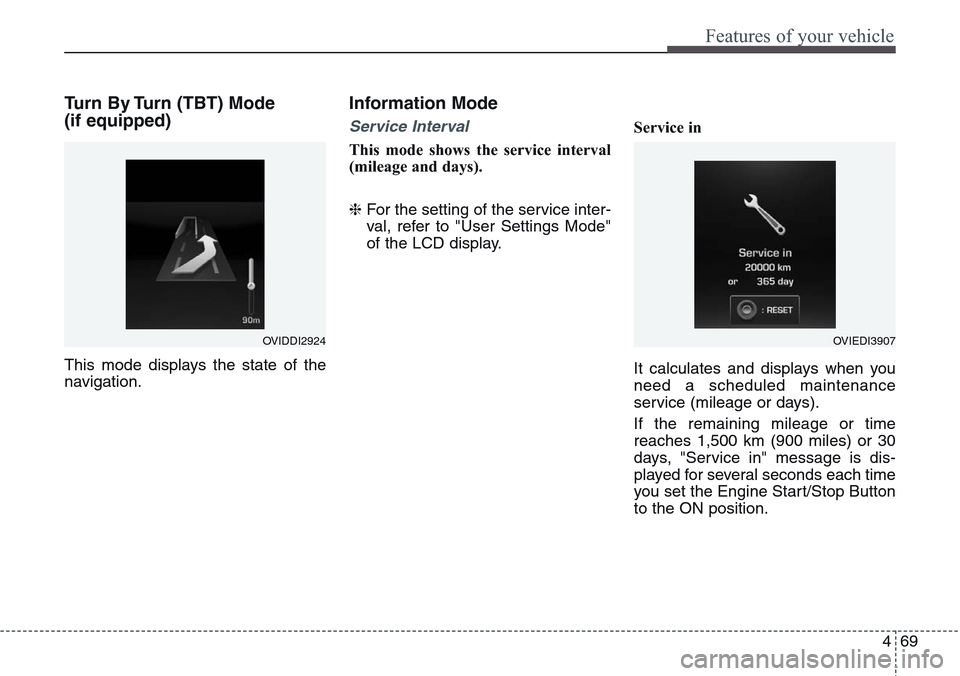
Turn By Turn (TBT) Mode
(if equipped)
This mode displays the state of the
navigation.
Information Mode
Service Interval
This mode shows the service interval
(mileage and days).
❈For the setting of the service inter-
val, refer to "User Settings Mode"
of the LCD display.Service in
It calculates and displays when you
need a scheduled maintenance
service (mileage or days).
If the remaining mileage or time
reaches 1,500 km (900 miles) or 30
days, "Service in" message is dis-
played for several seconds each time
you set the Engine Start/Stop Button
to the ON position.
OVIDDI2924OVIEDI3907
Page 159 of 483
Features of your vehicle
70 4
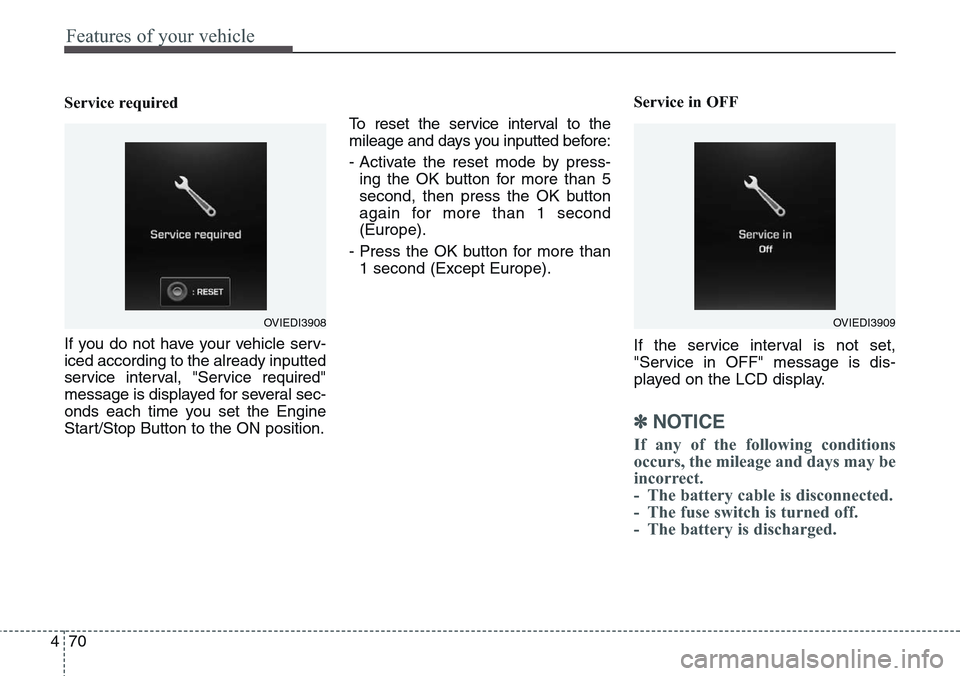
Service required
If you do not have your vehicle serv-
iced according to the already inputted
service interval, "Service required"
message is displayed for several sec-
onds each time you set the Engine
Start/Stop Button to the ON position.To reset the service interval to the
mileage and days you inputted before:
- Activate the reset mode by press-
ing the OK button for more than 5
second, then press the OK button
again for more than 1 second
(Europe).
- Press the OK button for more than
1 second (Except Europe).Service in OFF
If the service interval is not set,
"Service in OFF" message is dis-
played on the LCD display.
✽NOTICE
If any of the following conditions
occurs, the mileage and days may be
incorrect.
- The battery cable is disconnected.
- The fuse switch is turned off.
- The battery is discharged.
OVIEDI3909OVIEDI3908
Page 160 of 483
471
Features of your vehicle
Warning Message
If one of followings occurs, warning
messages will be displayed on the
information mode for about 10 sec-
onds.
- Malfunction of the pre-safe seat
belt, electronic control suspension,
or advanced smart cruise control
system
- Low washer fluid
Page 161 of 483
Features of your vehicle
72 4
User Settings Mode
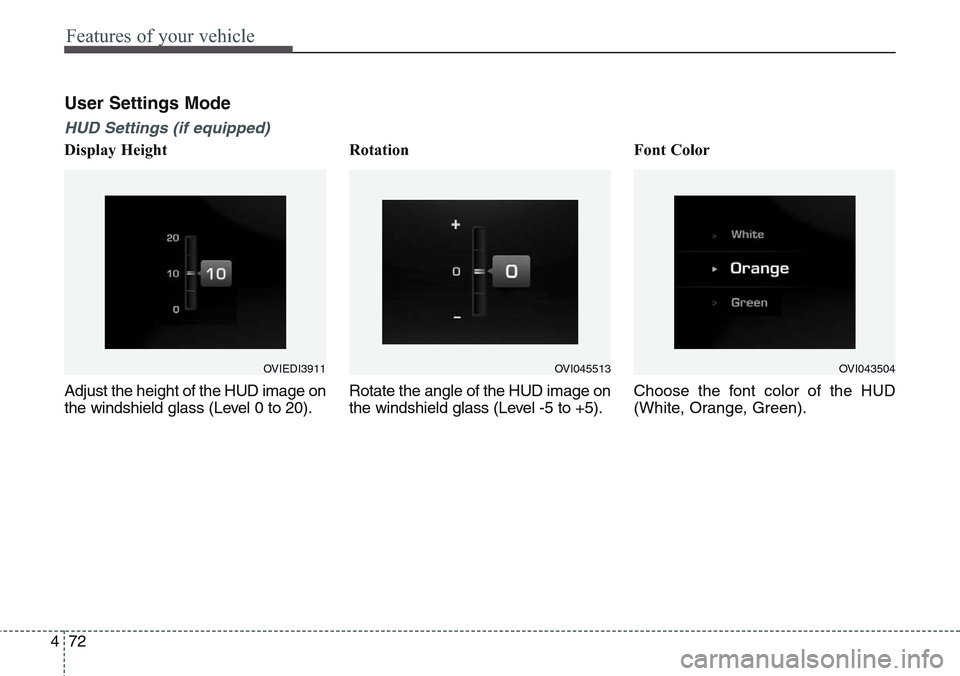
HUD Settings (if equipped)
Display Height
Adjust the height of the HUD image on
the windshield glass (Level 0 to 20).Rotation
Rotate the angle of the HUD image on
the windshield glass (Level -5 to +5).Font Color
Choose the font color of the HUD
(White, Orange, Green).
OVIEDI3911OVI043504OVI045513