display Hyundai Equus 2015 Owner's Guide
[x] Cancel search | Manufacturer: HYUNDAI, Model Year: 2015, Model line: Equus, Model: Hyundai Equus 2015Pages: 483, PDF Size: 13.26 MB
Page 162 of 483
473
Features of your vehicle
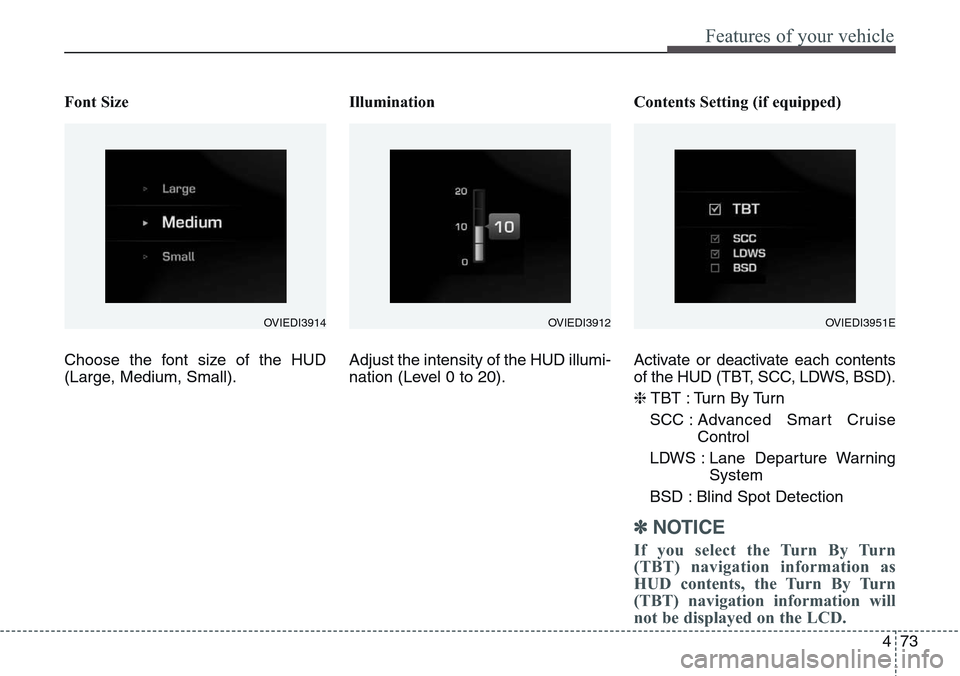
Font Size
Choose the font size of the HUD
(Large, Medium, Small).Illumination
Adjust the intensity of the HUD illumi-
nation (Level 0 to 20).Contents Setting (if equipped)
Activate or deactivate each contents
of the HUD (TBT, SCC, LDWS, BSD).
❈TBT : Turn By Turn
SCC : Advanced Smart Cruise
Control
LDWS : Lane Departure Warning
System
BSD : Blind Spot Detection
✽NOTICE
If you select the Turn By Turn
(TBT) navigation information as
HUD contents, the Turn By Turn
(TBT) navigation information will
not be displayed on the LCD.
OVIEDI3914OVIEDI3951EOVIEDI3912
Page 163 of 483
Features of your vehicle
74 4
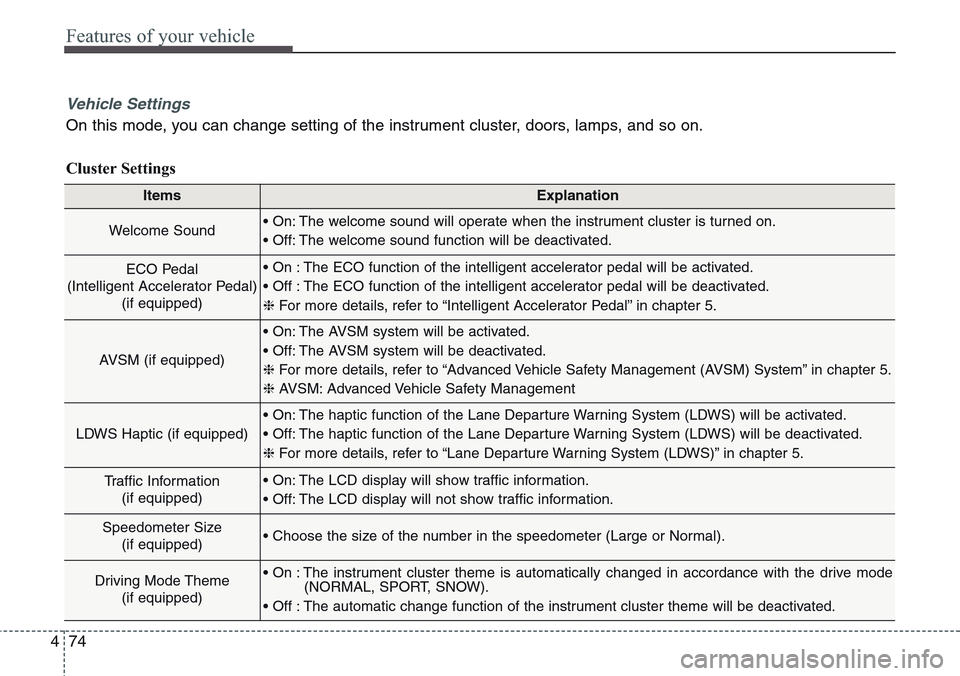
ItemsExplanation
Welcome Sound• On: The welcome sound will operate when the instrument cluster is turned on.
• Off: The welcome sound function will be deactivated.
ECO Pedal
(Intelligent Accelerator Pedal)
(if equipped)• On : The ECO function of the intelligent accelerator pedal will be activated.
• Off : The ECO function of the intelligent accelerator pedal will be deactivated.
❈For more details, refer to “Intelligent Accelerator Pedal” in chapter 5.
AVSM (if equipped)
• On: The AVSM system will be activated.
• Off: The AVSM system will be deactivated.
❈For more details, refer to “Advanced Vehicle Safety Management (AVSM) System” in chapter 5.
❈ AVSM: Advanced Vehicle Safety Management
LDWS Haptic (if equipped)
• On: The haptic function of the Lane Departure Warning System (LDWS) will be activated.
• Off: The haptic function of the Lane Departure Warning System (LDWS) will be deactivated.
❈For more details, refer to “Lane Departure Warning System (LDWS)” in chapter 5.
Traffic Information
(if equipped)• On: The LCD display will show traffic information.
• Off: The LCD display will not show traffic information.
Speedometer Size
(if equipped)• Choose the size of the number in the speedometer (Large or Normal).
Driving Mode Theme
(if equipped)• On : The instrument cluster theme is automatically changed in accordance with the drive mode
(NORMAL, SPORT, SNOW).
• Off : The automatic change function of the instrument cluster theme will be deactivated.
Vehicle Settings
On this mode, you can change setting of the instrument cluster, doors, lamps, and so on.
Cluster Settings
Page 164 of 483
475
Features of your vehicle
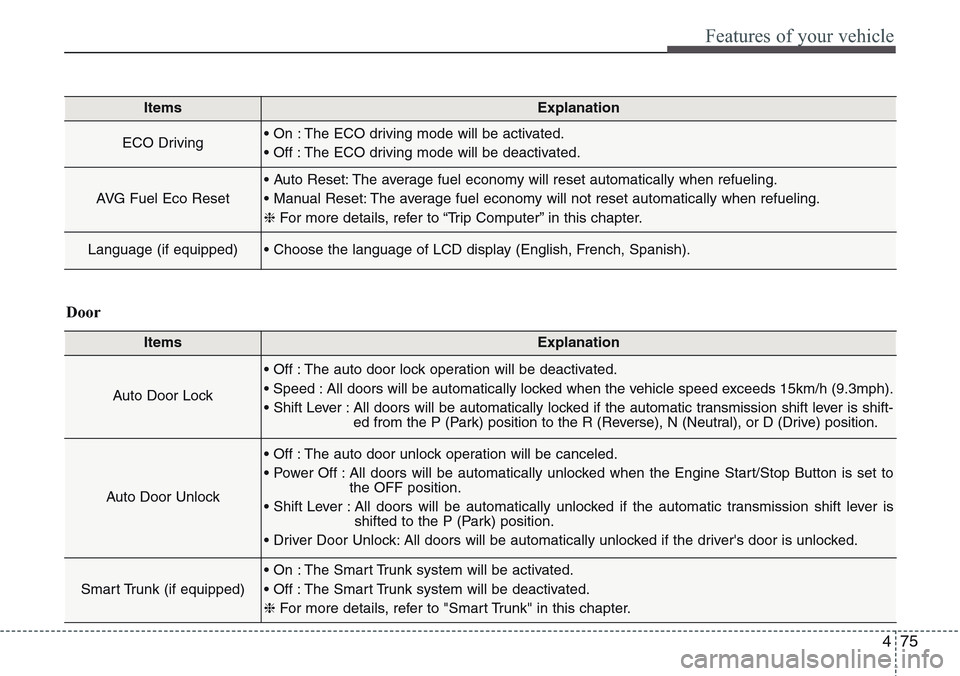
ItemsExplanation
ECO Driving• On : The ECO driving mode will be activated.
• Off : The ECO driving mode will be deactivated.
AVG Fuel Eco Reset
• Auto Reset: The average fuel economy will reset automatically when refueling.
• Manual Reset: The average fuel economy will not reset automatically when refueling.
❈For more details, refer to “Trip Computer” in this chapter.
Language (if equipped)• Choose the language of LCD display (English, French, Spanish).
ItemsExplanation
Auto Door Lock
• Off : The auto door lock operation will be deactivated.
• Speed : All doors will be automatically locked when the vehicle speed exceeds 15km/h (9.3mph).
• Shift Lever : All doors will be automatically locked if the automatic transmission shift lever is shift-
ed from the P (Park) position to the R (Reverse), N (Neutral), or D (Drive) position.
Auto Door Unlock
• Off : The auto door unlock operation will be canceled.
• Power Off : All doors will be automatically unlocked when the Engine Start/Stop Button is set to
the OFF position.
• Shift Lever : All doors will be automatically unlocked if the automatic transmission shift lever is
shifted to the P (Park) position.
• Driver Door Unlock: All doors will be automatically unlocked if the driver's door is unlocked.
Smart Trunk (if equipped)
• On : The Smart Trunk system will be activated.
• Off : The Smart Trunk system will be deactivated.
❈For more details, refer to "Smart Trunk" in this chapter.
Door
Page 166 of 483
477
Features of your vehicle
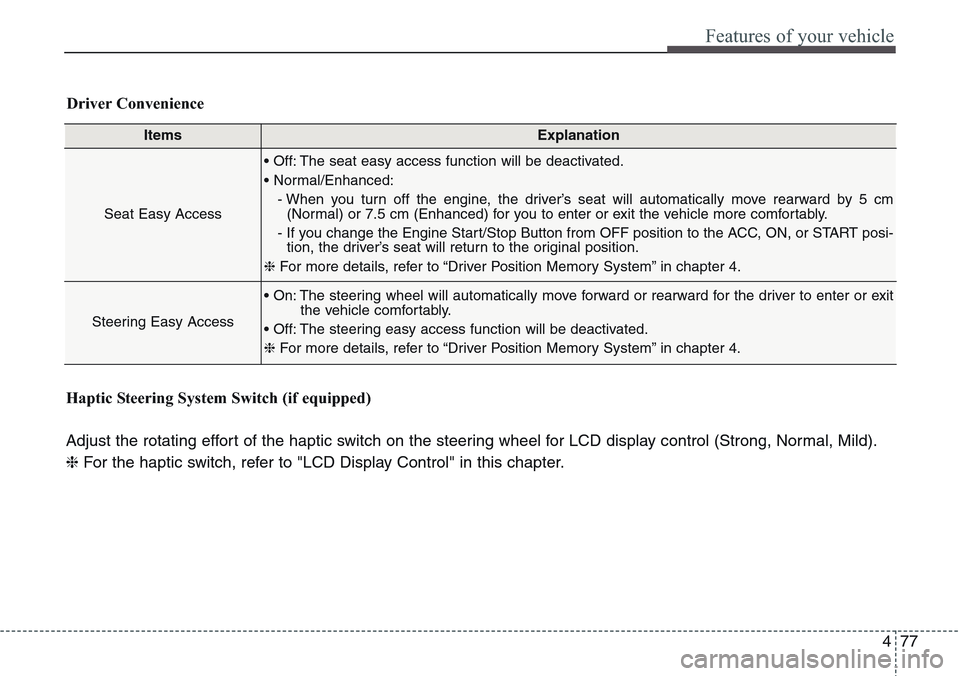
ItemsExplanation
Seat Easy Access
• Off: The seat easy access function will be deactivated.
• Normal/Enhanced:
- When you turn off the engine, the driver’s seat will automatically move rearward by 5 cm
(Normal) or 7.5 cm (Enhanced) for you to enter or exit the vehicle more comfortably.
- If you change the Engine Start/Stop Button from OFF position to the ACC, ON, or START posi-
tion, the driver’s seat will return to the original position.
❈For more details, refer to “Driver Position Memory System” in chapter 4.
Steering Easy Access
• On: The steering wheel will automatically move forward or rearward for the driver to enter or exit
the vehicle comfortably.
• Off: The steering easy access function will be deactivated.
❈For more details, refer to “Driver Position Memory System” in chapter 4.
Driver Convenience
Haptic Steering System Switch (if equipped)
Adjust the rotating effort of the haptic switch on the steering wheel for LCD display control (Strong, Normal, Mild).
❈For the haptic switch, refer to "LCD Display Control" in this chapter.
Page 167 of 483
Features of your vehicle
78 4
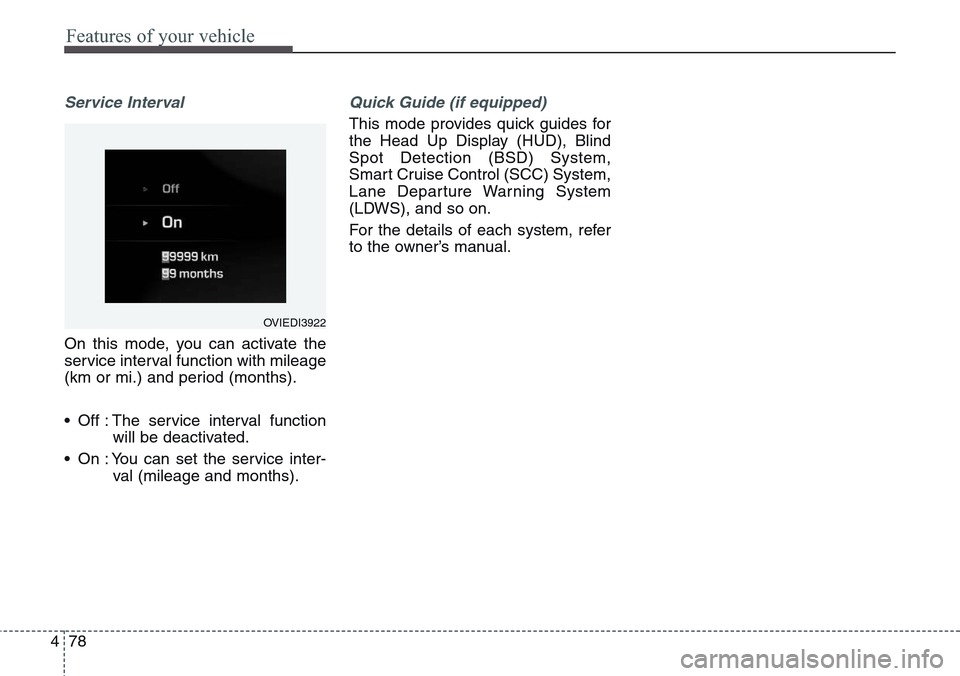
Service Interval
On this mode, you can activate the
service interval function with mileage
(km or mi.) and period (months).
• Off : The service interval function
will be deactivated.
• On : You can set the service inter-
val (mileage and months).
Quick Guide (if equipped)
This mode provides quick guides for
the Head Up Display (HUD), Blind
Spot Detection (BSD) System,
Smart Cruise Control (SCC) System,
Lane Departure Warning System
(LDWS), and so on.
For the details of each system, refer
to the owner’s manual.
OVIEDI3922
Page 179 of 483
Features of your vehicle
90 4
Overview
Description
The trip computer is a microcomput-
er-controlled driver information sys-
tem that displays information related
to driving.
✽NOTICE
Some driving information stored in
the trip computer (for example
Average Vehicle Speed) resets if the
battery is disconnected.
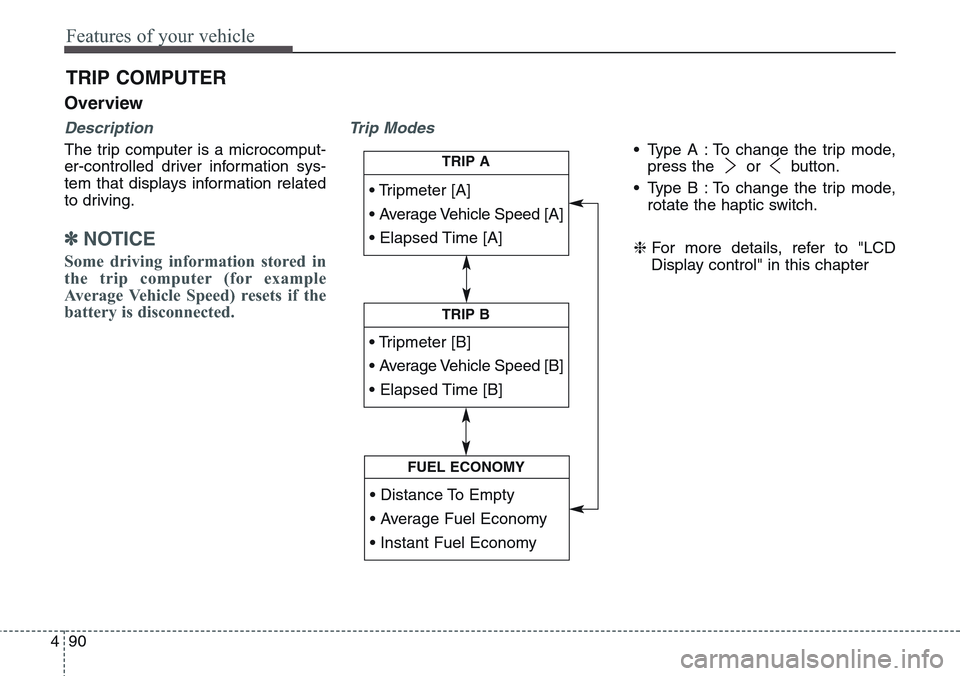
Trip Modes
• Type A : To change the trip mode,
press the or button.
• Type B : To change the trip mode,
rotate the haptic switch.
❈For more details, refer to "LCD
Display control" in this chapter
TRIP COMPUTER
• Tripmeter [A]
• Average Vehicle Speed [A]
• Elapsed Time [A]
TRIP A
• Tripmeter [B]
• Average Vehicle Speed [B]
• Elapsed Time [B]
TRIP B
• Distance To Empty
• Average Fuel Economy
• Instant Fuel Economy
FUEL ECONOMY
Page 180 of 483
491
Features of your vehicle
Trip A/B
✽NOTICE
If you reset one of the tripmeter,
elapsed time, and average vehicle
speed, they will be reset all together.
❈For more details of OK button,
refer to the "LCD Display Control"
in this chapter
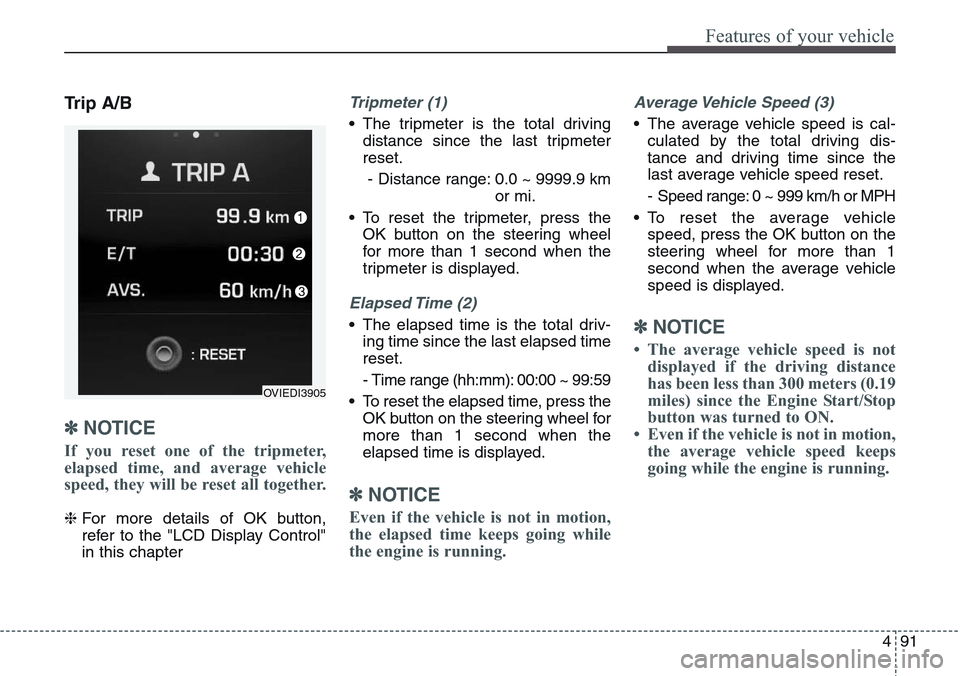
Tripmeter (1)
• The tripmeter is the total driving
distance since the last tripmeter
reset.
- Distance range: 0.0 ~ 9999.9 km
or mi.
• To reset the tripmeter, press the
OK button on the steering wheel
for more than 1 second when the
tripmeter is displayed.
Elapsed Time (2)
• The elapsed time is the total driv-
ing time since the last elapsed time
reset.
- Time range (hh:mm): 00:00 ~ 99:59
• To reset the elapsed time, press the
OK button on the steering wheel for
more than 1 second when the
elapsed time is displayed.
✽NOTICE
Even if the vehicle is not in motion,
the elapsed time keeps going while
the engine is running.
Average Vehicle Speed (3)
• The average vehicle speed is cal-
culated by the total driving dis-
tance and driving time since the
last average vehicle speed reset.
- Speed range: 0 ~ 999 km/h or MPH
• To reset the average vehicle
speed, press the OK button on the
steering wheel for more than 1
second when the average vehicle
speed is displayed.
✽NOTICE
• The average vehicle speed is not
displayed if the driving distance
has been less than 300 meters (0.19
miles) since the Engine Start/Stop
button was turned to ON.
• Even if the vehicle is not in motion,
the average vehicle speed keeps
going while the engine is running.
OVIEDI3905
Page 181 of 483
Features of your vehicle
92 4
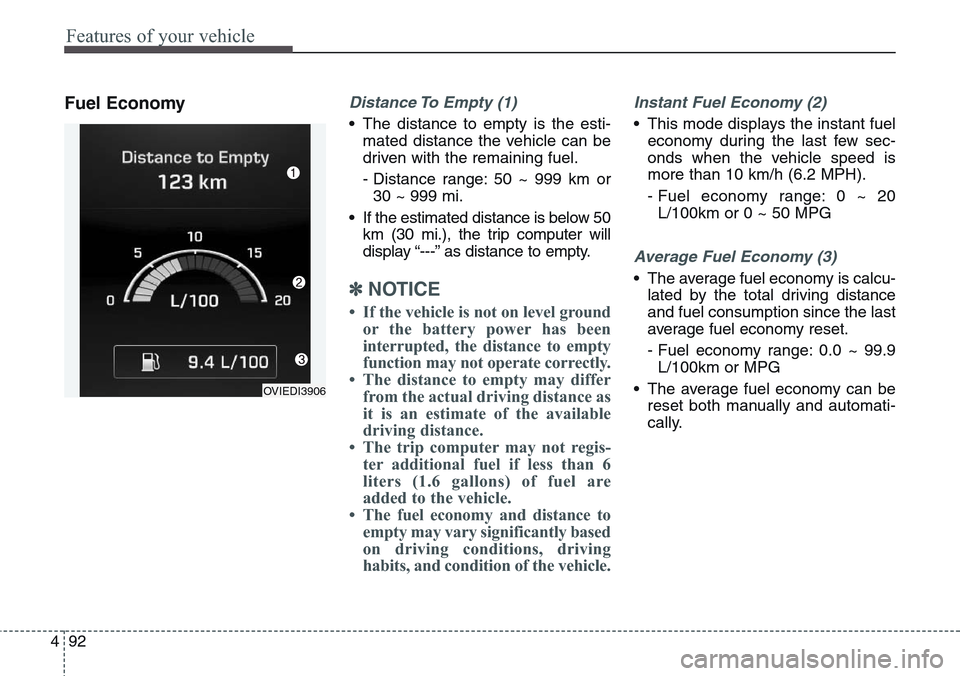
Fuel EconomyDistance To Empty (1)
• The distance to empty is the esti-
mated distance the vehicle can be
driven with the remaining fuel.
- Distance range: 50 ~ 999 km or
30 ~ 999 mi.
• If the estimated distance is below 50
km (30 mi.), the trip computer will
display “---” as distance to empty.
✽NOTICE
• If the vehicle is not on level ground
or the battery power has been
interrupted, the distance to empty
function may not operate correctly.
• The distance to empty may differ
from the actual driving distance as
it is an estimate of the available
driving distance.
• The trip computer may not regis-
ter additional fuel if less than 6
liters (1.6 gallons) of fuel are
added to the vehicle.
• The fuel economy and distance to
empty may vary significantly based
on driving conditions, driving
habits, and condition of the vehicle.
Instant Fuel Economy (2)
• This mode displays the instant fuel
economy during the last few sec-
onds when the vehicle speed is
more than 10 km/h (6.2 MPH).
- Fuel economy range: 0 ~ 20
L/100km or 0 ~ 50 MPG
Average Fuel Economy (3)
• The average fuel economy is calcu-
lated by the total driving distance
and fuel consumption since the last
average fuel economy reset.
- Fuel economy range: 0.0 ~ 99.9
L/100km or MPG
• The average fuel economy can be
reset both manually and automati-
cally.
OVIEDI3906
Page 182 of 483
493
Features of your vehicle
Manual reset
To clear the average fuel economy
manually, press the OK button on the
steering wheel for more than 1 sec-
ond when the average fuel economy
is displayed.
❈For more details of OK button,
refer to the "LCD Display Control"
in this chapterAutomatic reset
To make the average fuel economy
be reset automatically whenever refu-
eling, select the "Auto Reset" mode in
User Setting menu of the LCD display
(Refer to "LCD Display").
Under "Auto Reset" mode, the aver-
age fuel economy will be cleared to
zero (---) when the vehicle speed
exceeds 1 km/h after refueling more
than 6 liters (1.6 gallons).
✽NOTICE
The average fuel economy is not dis-
played for more accurate calculation
if the vehicle does not drive more
than 300 meters (0.19 miles) since
the Engine Start/Stop button is
turned to ON.
Page 189 of 483
Features of your vehicle
100 4
Low Tire Pressure
Warning Light
(if equipped)
This warning light illuminates:
• Once you set the ignition switch or
Engine Start/Stop Button to the ON
position.
- It illuminates for approximately 3
seconds and then goes off.
• When one or more of your tires are
significantly underinflated (The
location of the underinflated tires
are displayed on the LCD display).
For more details, refer to “Tire
Pressure Monitoring System
(TPMS)” in chapter 6.This warning light remains on after
blinking for approximately 60 seconds
or repeats blinking and off at the
intervals of approximately 3 seconds:
• When there is a malfunction with
the TPMS.
In this case, we recommend that
you have the vehicle inspected by
an authorized HYUNDAI dealer as
soon as possible.
For more details, refer to “Tire
Pressure Monitoring System
(TPMS)” in chapter 6.
Door Ajar Warning Light
This warning light illuminates:
When a door is not closed securely.
Trunk Open Warning
Light
This warning light illuminates:
When the trunk lid is not closed
securely.
WARNING -Safe Stopping
• The TPMS cannot alert you to
severe and sudden tire damage
caused by external factors.
• If you notice any vehicle insta-
bility, immediately take your
foot off the accelerator pedal,
apply the brakes gradually with
light force, and slowly move to
a safe position off the road.