ECO mode Hyundai Equus 2016 User Guide
[x] Cancel search | Manufacturer: HYUNDAI, Model Year: 2016, Model line: Equus, Model: Hyundai Equus 2016Pages: 477, PDF Size: 16.25 MB
Page 152 of 477
Operating HomeLink®
To operate, simply press and release
the programmed HomeLink®button.
Activation will occur for the trained
device (i.e. garage door opener, gate
operator, security system, entry door
lock, home/office lighting, etc.). For
convenience, the hand-held transmit-
ter of the device may also be used at
any time.
Reprogramming a single
HomeLink
®button
To program a new device to a previ-
ously trained HomeLink
®button, fol-
low these steps:
1. Press and hold the desired HomeLink
®button. Do NOT release
until the step 4 is completed.
2. When the indicator light begins to flash slowly (after 20 seconds),
point the handheld transmitter 1 to
3 inches away from the
HomeLink
®surface.
3. Press and hold the handheld transmitter button. The HomeLink
®
indicator light will flash, first slowly
and then rapidly.
4. When the indicator light begins to flash rapidly, release both buttons.
5. Press and hold the just-trained HomeLink
®button and observe
the red Status Indicator LED. If the
indicator light stays on constantly,
programming is complete and
your new device should activate. Erasing HomeLink
®buttons
An individual programming cannot
be erased. However, to erase all
three programmings;
1. Press and hold the two outer HomeLink
®buttons until the indi-
cator light begins to flash after 20
seconds; and
2. Release both buttons. Do not hold for longer than 30 seconds.
The Integrated HomeLink
®Wireless
Control System is now in the training
(learning) mode and can be pro-
grammed at any time by following the
appropriate steps as in the
"Programming".
FCC ID: NZLZTVHL3
IC: 4112A-ZTVHL3
3-57
Convenient features of your vehicle03
Page 163 of 477
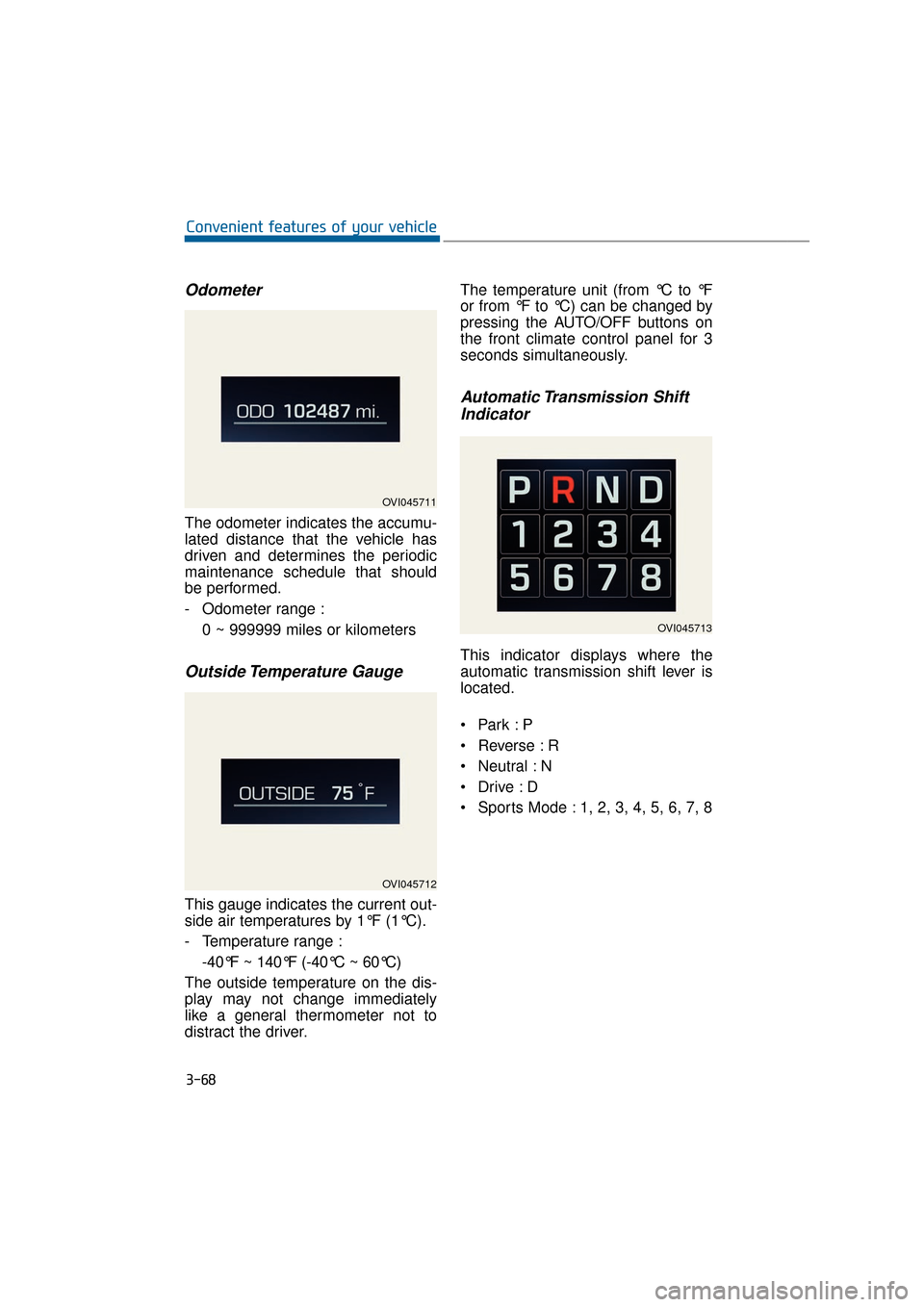
Odometer
The odometer indicates the accumu-
lated distance that the vehicle has
driven and determines the periodic
maintenance schedule that should
be performed.
- Odometer range :0 ~ 999999 miles or kilometers
Outside Temperature Gauge
This gauge indicates the current out-
side air temperatures by 1°F (1°C).
- Temperature range :-40°F ~ 140°F (-40°C ~ 60°C)
The outside temperature on the dis-
play may not change immediately
like a general thermometer not to
distract the driver. The temperature unit (from °C to °F
or from °F to °C) can be changed by
pressing the AUTO/OFF buttons on
the front climate control panel for 3
seconds simultaneously.
Automatic Transmission Shift
Indicator
This indicator displays where the
automatic transmission shift lever is
located.
Reverse : R
Neutral : N
Sports Mode : 1, 2, 3, 4, 5, 6, 7, 8
3-68
Convenient features of your vehicle
OVI045711
OVI045712
OVI045713
Page 164 of 477
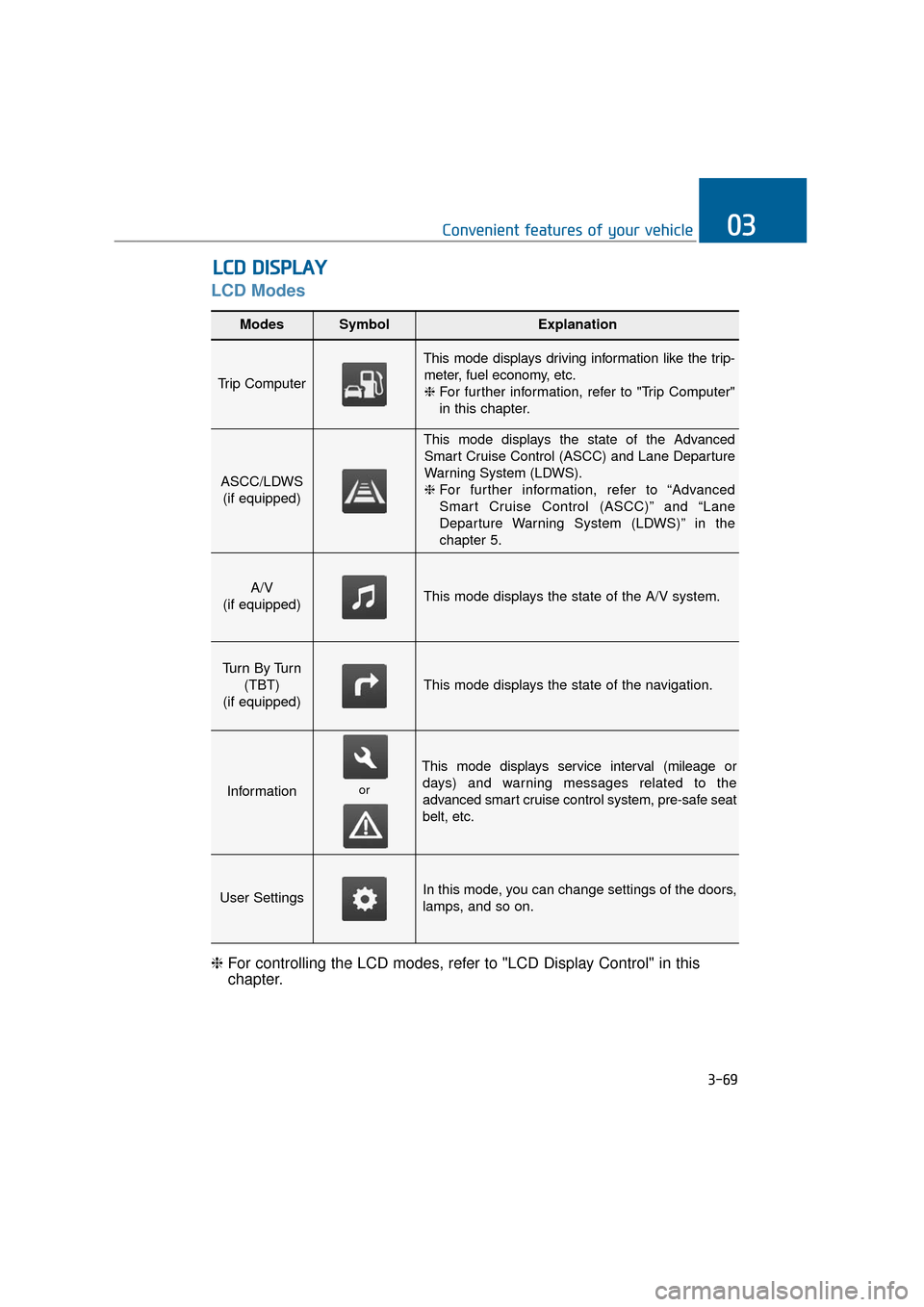
LCD Modes
L
LC
C D
D
D
D I
IS
S P
P L
LA
A Y
Y
3-69
Convenient features of your vehicle03
Modes SymbolExplanation
Trip Computer
This mode displays driving information like the trip-
meter, fuel economy, etc.❈ For further information, refer to "Trip Computer"
in this chapter.
ASCC/LDWS
(if equipped)
This mode displays the state of the AdvancedSmart Cruise Control (ASCC) and Lane Departure
Warning System (LDWS).
❈ For further information, refer to “Advanced
Smart Cruise Control (ASCC)” and “Lane
Departure Warning System (LDWS)” in the
chapter 5.
A/V
(if equipped)This mode displays the state of the A/V system.
Tu r n B y Tu r n (TBT)
(if equipped)
This mode displays the state of the navigation.
Information
This mode displays service interval (mileage or days) and warning messages related to the
advanced smart cruise control system, pre-safe seat
belt, etc.
User SettingsIn this mode, you can change settings of the doors,
lamps, and so on.
❈ For controlling the LCD modes, refer to "LCD Display Control" in this
chapter.
or
Page 165 of 477
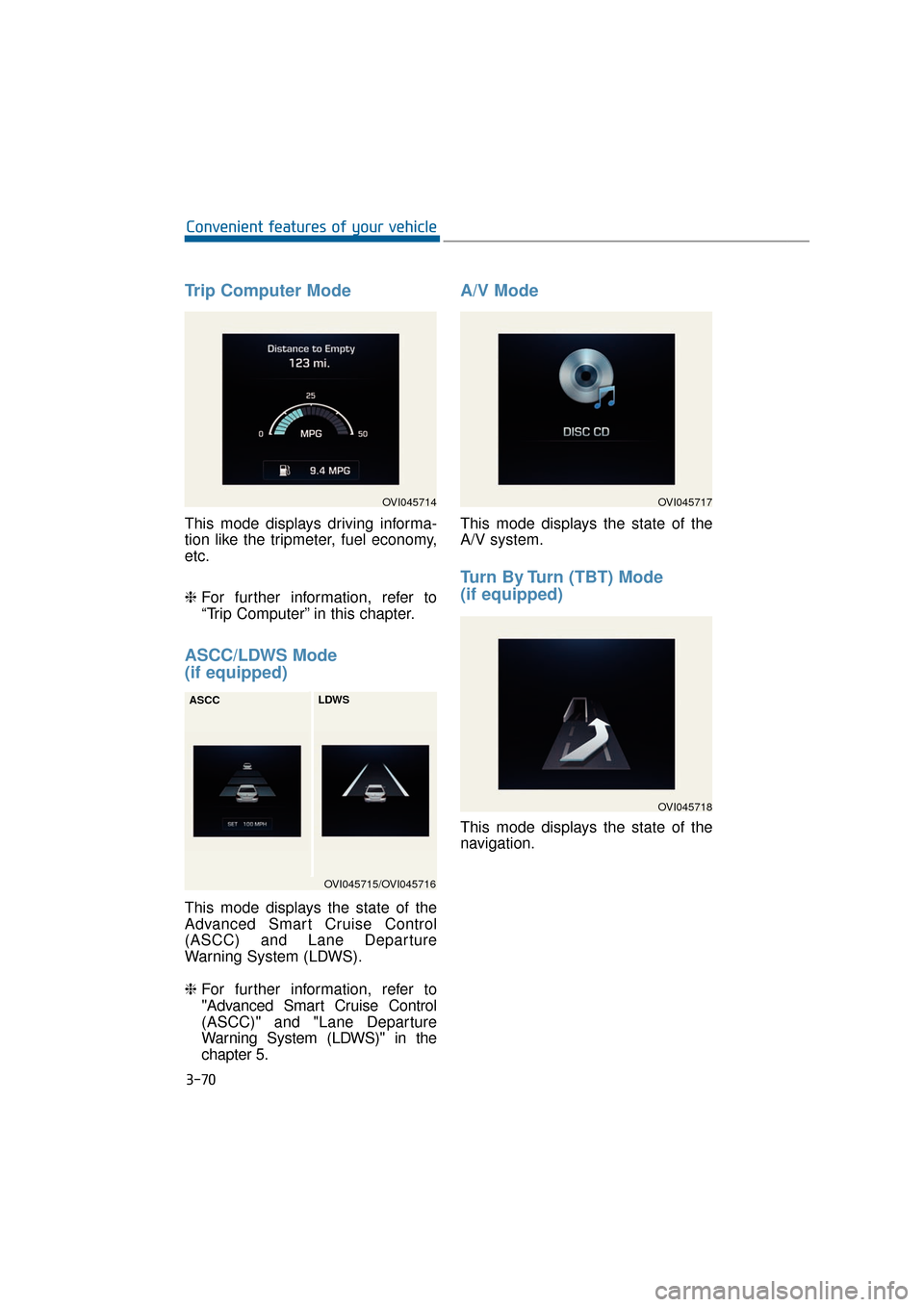
Trip Computer Mode
This mode displays driving informa-
tion like the tripmeter, fuel economy,
etc.
❈For further information, refer to
“Trip Computer” in this chapter.
ASCC/LDWS Mode
(if equipped)
This mode displays the state of the
Advanced Smart Cruise Control
(ASCC) and Lane Departure
Warning System (LDWS).
❈ For further information, refer to
"Advanced Smart Cruise Control
(ASCC)" and "Lane Departure
Warning System (LDWS)" in the
chapter 5.
A/V Mode
This mode displays the state of the
A/V system.
Turn By Turn (TBT) Mode
(if equipped)
This mode displays the state of the
navigation.
3-70
Convenient features of your vehicle
OVI045714
OVI045715/OVI045716
ASCC
LDWS
OVI045717
OVI045718
Page 166 of 477
Information Mode
Service Interval
This mode displays the service inter-
val (mileage and days).
❈For the setting of the service inter-
val, refer to "User Settings Mode"
of the LCD display.
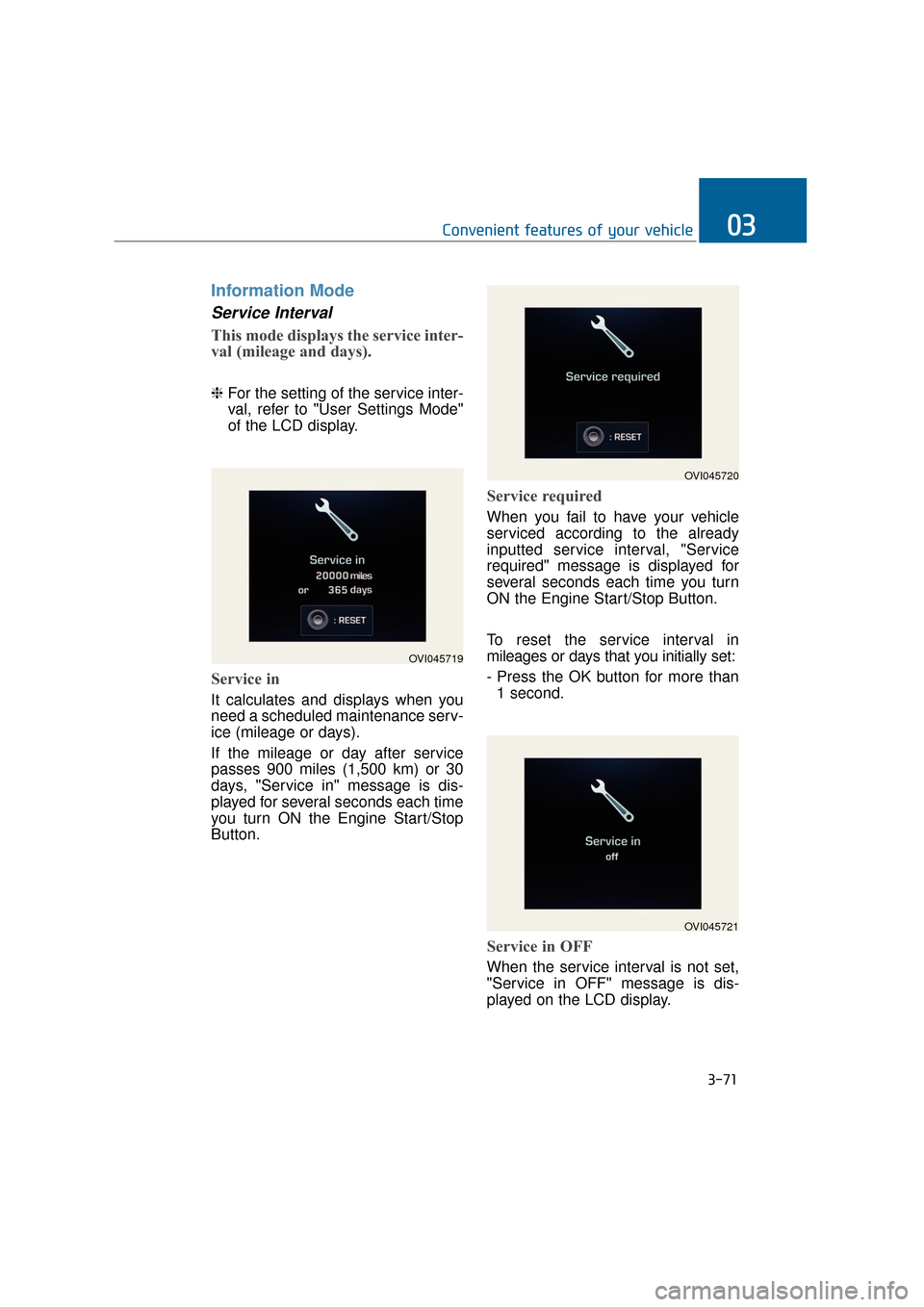
Service in
It calculates and displays when you
need a scheduled maintenance serv-
ice (mileage or days).
If the mileage or day after service
passes 900 miles (1,500 km) or 30
days, "Service in" message is dis-
played for several seconds each time
you turn ON the Engine Start/Stop
Button.
Service required
When you fail to have your vehicle
serviced according to the already
inputted service interval, "Service
required" message is displayed for
several seconds each time you turn
ON the Engine Start/Stop Button.
To reset the service interval in
mileages or days that you initially set:
- Press the OK button for more than
1 second.
Service in OFF
When the service interval is not set,
"Service in OFF" message is dis-
played on the LCD display.
3-71
Convenient features of your vehicle03
OVI045719
OVI045720
OVI045721
Page 170 of 477
3-75
Convenient features of your vehicle03
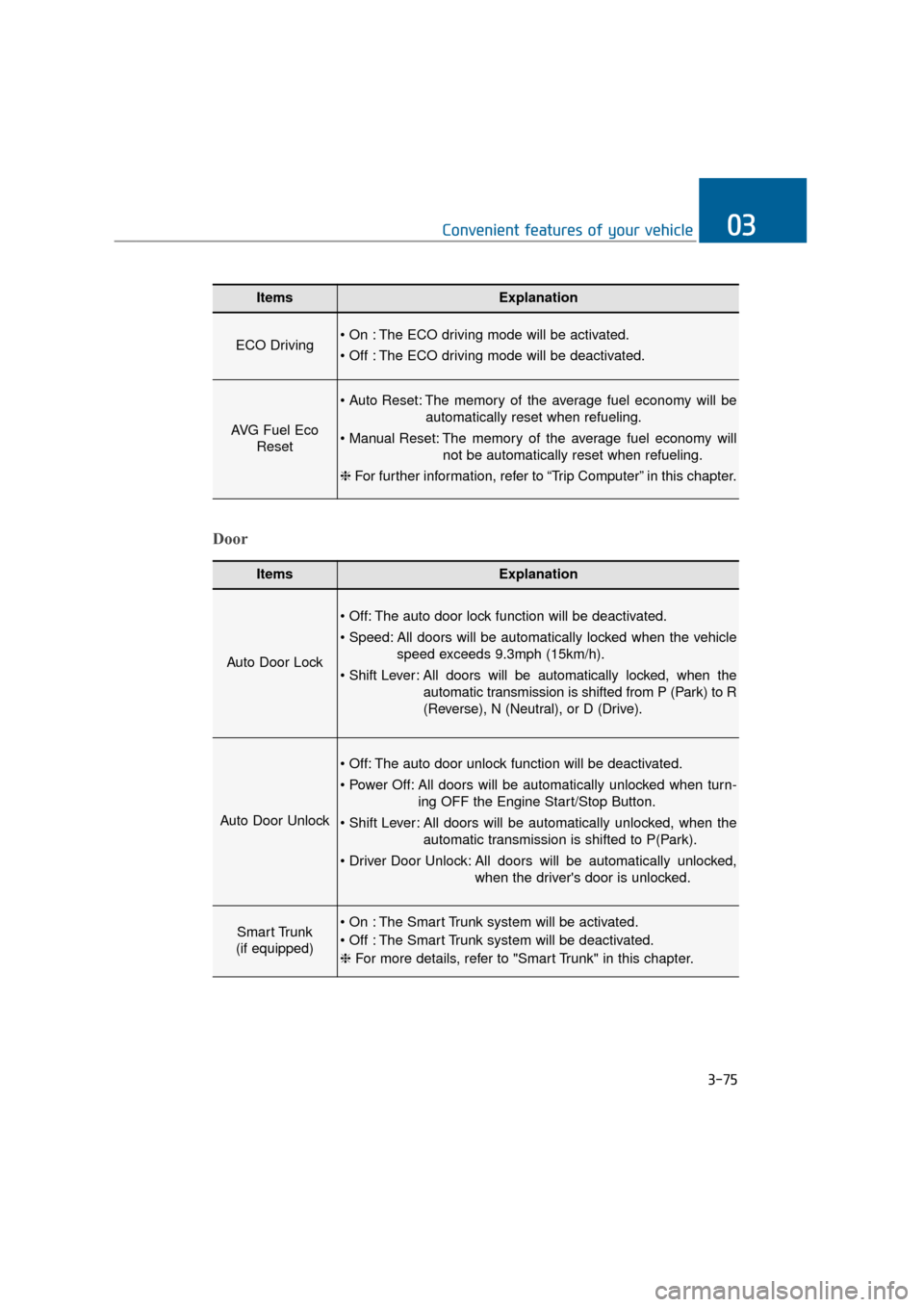
ItemsExplanation
ECO Driving The ECO driving mode will be activated.
The ECO driving mode will be deactivated.
AVG Fuel EcoReset
The memory of the average fuel economy will be
automatically reset when refueling.
The memory of the average fuel economy will not be automatically reset when refueling.
❈ For further information, refer to “Trip Computer” in this chapter.
ItemsExplanation
Auto Door Lock
The auto door lock function will be deactivated.
All doors will be automatically locked when the vehicle
speed exceeds 9.3mph (15km/h).
All doors will be automatically locked, when the
automatic transmission is shifted from P (Park) to R
(Reverse), N (Neutral), or D (Drive).
Auto Door Unlock
The auto door unlock function will be deactivated.
All doors will be automatically unlocked when turn- ing OFF the Engine Start/Stop Button.
All doors will be automatically unlocked, when the automatic transmission is shifted to P(Park).
All doors will be automatically unlocked, when the driver's door is unlocked.
Smart Trunk
(if equipped) The Smart Trunk system will be activated.
The Smart Trunk system will be deactivated.
❈ For more details, refer to "Smart Trunk" in this chapter.
Door
Page 173 of 477
Service Interval
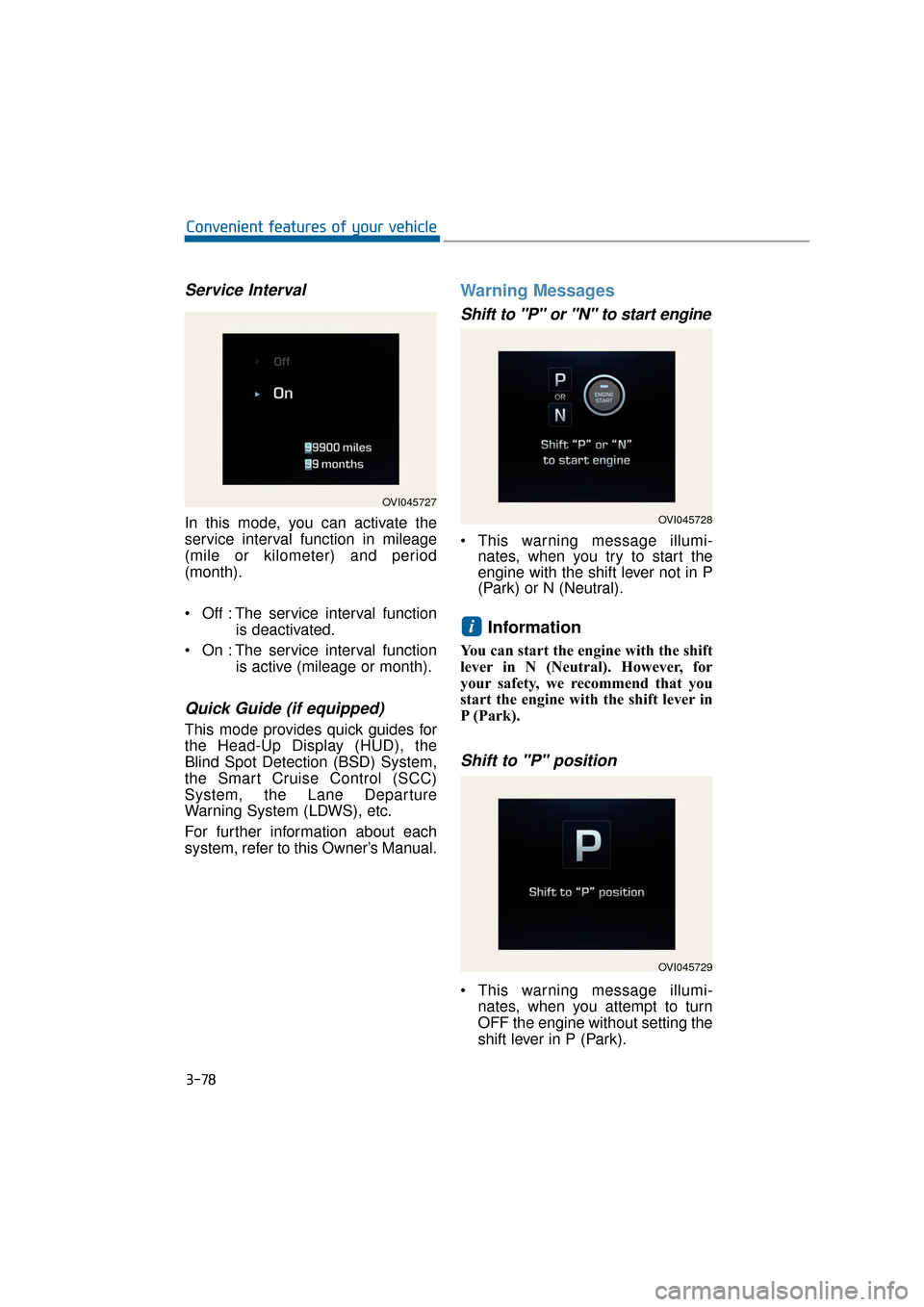
In this mode, you can activate the
service interval function in mileage
(mile or kilometer) and period
(month).
Off : The service interval functionis deactivated.
On : The service interval function is active (mileage or month).
Quick Guide (if equipped)
This mode provides quick guides for
the Head-Up Display (HUD), the
Blind Spot Detection (BSD) System,
the Smart Cruise Control (SCC)
System, the Lane Departure
Warning System (LDWS), etc.
For further information about each
system, refer to this Owner’s Manual.
Warning Messages
Shift to "P" or "N" to start engine
This warning message illumi-nates, when you try to start the
engine with the shift lever not in P
(Park) or N (Neutral).
Information
You can start the engine with the shift
lever in N (Neutral). However, for
your safety, we recommend that you
start the engine with the shift lever in
P (Park).
Shift to "P" position
This warning message illumi-
nates, when you attempt to turn
OFF the engine without setting the
shift lever in P (Park).
i
3-78
Convenient features of your vehicle
OVI045727
OVI045728
OVI045729
Page 181 of 477
Overview
Description
The trip computer is a driving infor-
mation system, controlled by a
micro-computer. This displays driv-
ing-related information.
Information
Some driving information, stored in
the trip computer (i.e. average vehicle
speed), is reset, when the battery is
disconnected.
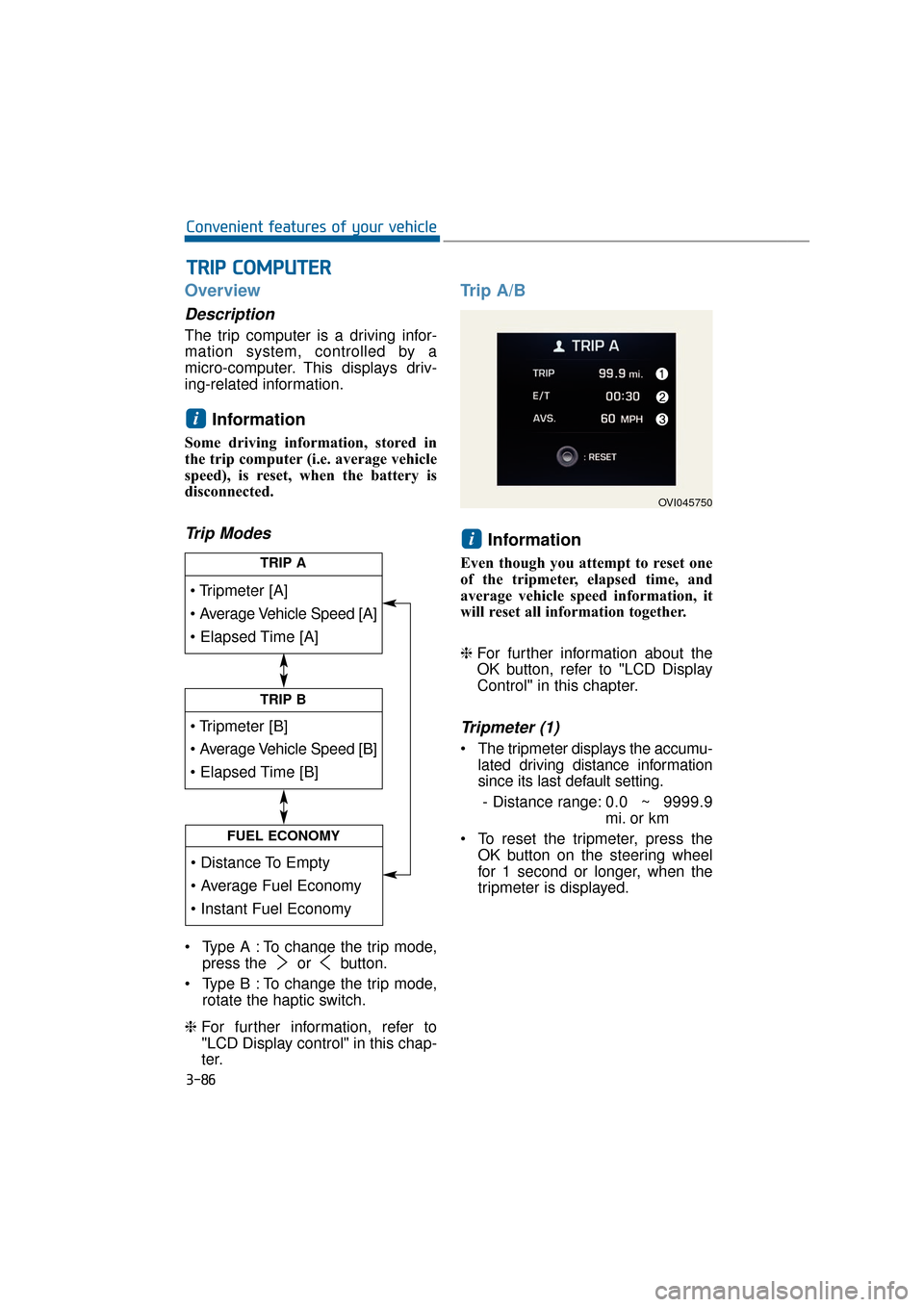
Trip Modes
Type A : To change the trip mode,press the or button.
Type B : To change the trip mode, rotate the haptic switch.
❈ For further information, refer to
"LCD Display control" in this chap-
ter.
Trip A/B
Information
Even though you attempt to reset one
of the tripmeter, elapsed time, and
average vehicle speed information, it
will reset all information together.
❈For further information about the
OK button, refer to "LCD Display
Control" in this chapter.
Tripmeter (1)
The tripmeter displays the accumu-
lated driving distance information
since its last default setting.
- Distance range: 0.0 ~ 9999.9
mi. or km
To reset the tripmeter, press the OK button on the steering wheel
for 1 second or longer, when the
tripmeter is displayed.
i
i
T
TR
R I
IP
P
C
C O
O M
M P
PU
U T
TE
ER
R
3-86
Convenient features of your vehicle
TRIP A
TRIP B
FUEL ECONOMY
OVI045750
Page 183 of 477
Instant Fuel Economy (2)
This mode displays the instant fueleconomy during the last few sec-
onds when a driving speed exceeds
6.2 MPH (10 km/h).
- Fuel economy range: 0 ~ 50MPG or 0 ~ 20 L/100km
Average Fuel Economy (3)
The average fuel economy is cal- culated by dividing the total driving
distance by the fuel consumption
since its last default setting.
- Fuel economy range: 0.0 ~ 99.9MPG or L/100km
The average fuel economy can be reset both manually and automati-
cally.
Manual reset
To manually reset the average fuel
economy, press the OK button on the
steering wheel for 1 second or over,
when the average fuel economy is
displayed.
❈For further information about the
OK button, refer to "LCD Display
Control" in this chapter.
Automatic reset
To automatically reset the average
fuel economy after refueling, select
the "Auto Reset" mode in User
Setting menu on the LCD display
(Refer to "LCD Display").
In "Auto Reset" mode, the average
fuel economy will be reset to zero
(---), when more than 1.6 gallons (6
liters) of fuel is added, and then a
driving speed exceeds 1 km/h.
Information
The average fuel economy may dis-
play inaccurate calculation, when the
vehicle drives shorter than 0.19 miles
(300 meters) after turning ON the
Engine Start/Stop button.
i
3-88
Convenient features of your vehicle
Page 194 of 477
Advanced VehicleSafety Management(AVSM) OFF IndicatorLight (if equipped)
This indicator light illuminates:
Once you turn ON the Engine
Start/Stop button
- It illuminates for approximately 3seconds and then goes OFF.
When you deactivate the AVSM system on the LCD display.
❈ For further information, refer to
“LCD Display” in this chapter.
When this indicator illuminates with-
out selecting the AVSM OFF, there is
a malfunction with the AVSM.
In this case, have your vehicle
inspected by an authorized EQUUS
dealer.
❈ For further information, refer to
“Advanced Vehicle Safety
Management (AVSM) System” in
the chapter 5.
SPORT/SNOW Mode
Indicator Light
This indicator light illuminates:
When you select "SPORT/SNOW"
mode as the drive mode.
❈ For further information, refer to
"Drive mode integrated control
system" in the chapter 5.
Information
If you activate the Driving Mode
Theme on the User Settings Mode of
the LCD display (if equipped), the
SPORT and SNOW indicators will not
turn on the instrument cluster.
ECO Indicator Light
(if equipped)
The ECO indicator light informs you
to drive economically, and turns on
green in accordance with the driving
condition.
This indicator light illuminates:
[Green] when you are driving eco-
nomically.
The drive’s driving habit and road condition can affect fuel efficiency.
The light will not display : - If the condition does not meeteconomical driving such as P
(Park), N (Neutral), R (Reverse),
or sports mode.
- While the instant fuel Economy of the trip computer is display on
the LCD display.
In the "User Settings Mode" of the LCD, you can activate or deacti-
vate the ECO driving mode.
❈ For further information, refer to
"LCD Display" in this chapter.
i
3-99
Convenient features of your vehicle03
Do not monitor the ECO indica-
tor while driving. This will dis-
tract you and may cause an
accident, resulting in severe
personal injury.
WARNING