ECO mode Hyundai Equus 2016 Owner's Guide
[x] Cancel search | Manufacturer: HYUNDAI, Model Year: 2016, Model line: Equus, Model: Hyundai Equus 2016Pages: 477, PDF Size: 16.25 MB
Page 225 of 477
3-130
Convenient features of your vehicle
Temperature control
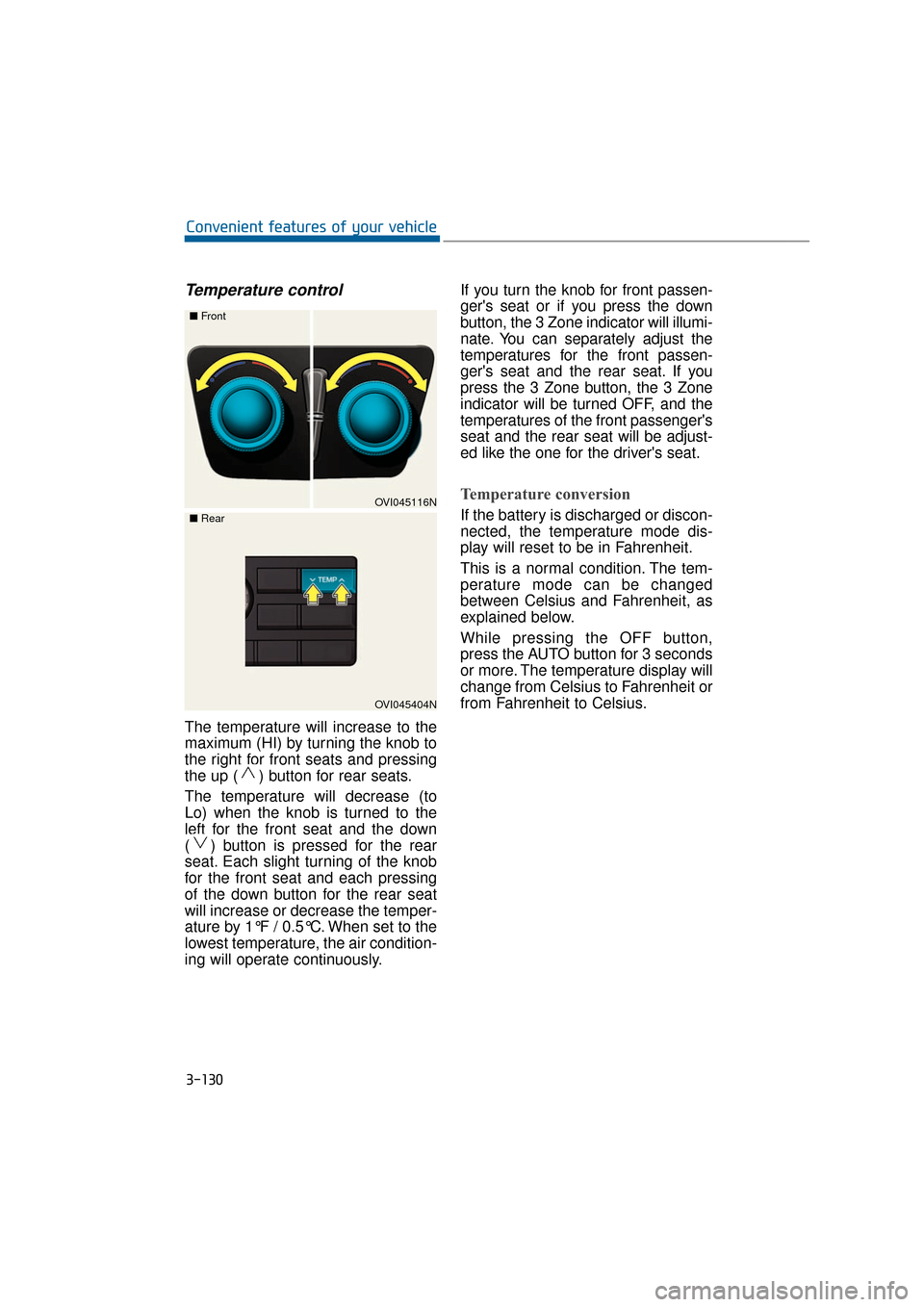
The temperature will increase to the
maximum (HI) by turning the knob to
the right for front seats and pressing
the up ( ) button for rear seats.
The temperature will decrease (to
Lo) when the knob is turned to the
left for the front seat and the down
( ) button is pressed for the rear
seat. Each slight turning of the knob
for the front seat and each pressing
of the down button for the rear seat
will increase or decrease the temper-
ature by 1°F / 0.5°C. When set to the
lowest temperature, the air condition-
ing will operate continuously.If you turn the knob for front passen-
ger's seat or if you press the down
button, the 3 Zone indicator will illumi-
nate. You can separately adjust the
temperatures for the front passen-
ger's seat and the rear seat. If you
press the 3 Zone button, the 3 Zone
indicator will be turned OFF, and the
temperatures of the front passenger's
seat and the rear seat will be adjust-
ed like the one for the driver's seat.
Temperature conversion
If the battery is discharged or discon-
nected, the temperature mode dis-
play will reset to be in Fahrenheit.
This is a normal condition. The tem-
perature mode can be changed
between Celsius and Fahrenheit, as
explained below.
While pressing the OFF button,
press the AUTO button for 3 seconds
or more. The temperature display will
change from Celsius to Fahrenheit or
from Fahrenheit to Celsius.OVI045116N
■
Front
OVI045404N
■
Rear
Page 231 of 477
3-136
Convenient features of your vehicle
Air conditioning system operation
tips
When the vehicle is parked underthe direct sunlight in hot weather,
open the windows for a short time
to expel the hot air inside from the
vehicle.
To reduce the dew condensation on the inside of the windows on
rainy or humid days, lower the
humidity inside the vehicle by
operating the A/C system.
During the A/C operation, you may occasionally notice a slight
change in the engine speed, as
the A/C compressor cycles. This is
a normal condition.
Test the A/C system every month only for a few minutes to maximize
the system performance.
After the inside temperature becomes sufficiently cool, change
the air intake control from the air
recirculation mode to the (fresh)
air intake mode.
When operating the A/C system, you may notice clear water drip-
ping (or even puddling) from the
passenger side of the vehicle. This
does not indicate a system failure.
The air recirculation mode of the A/C provides the maximum cool-
ing. However, a prolonged period
of the A/C operation in this mode
may make the air stale inside the
vehicle.
While operating the A/C system, you may occasionally notice the
dew condensation because of the
rapid cooling process and humid
air intake. This does not mean
there is not a system failure.
Climate control air filter
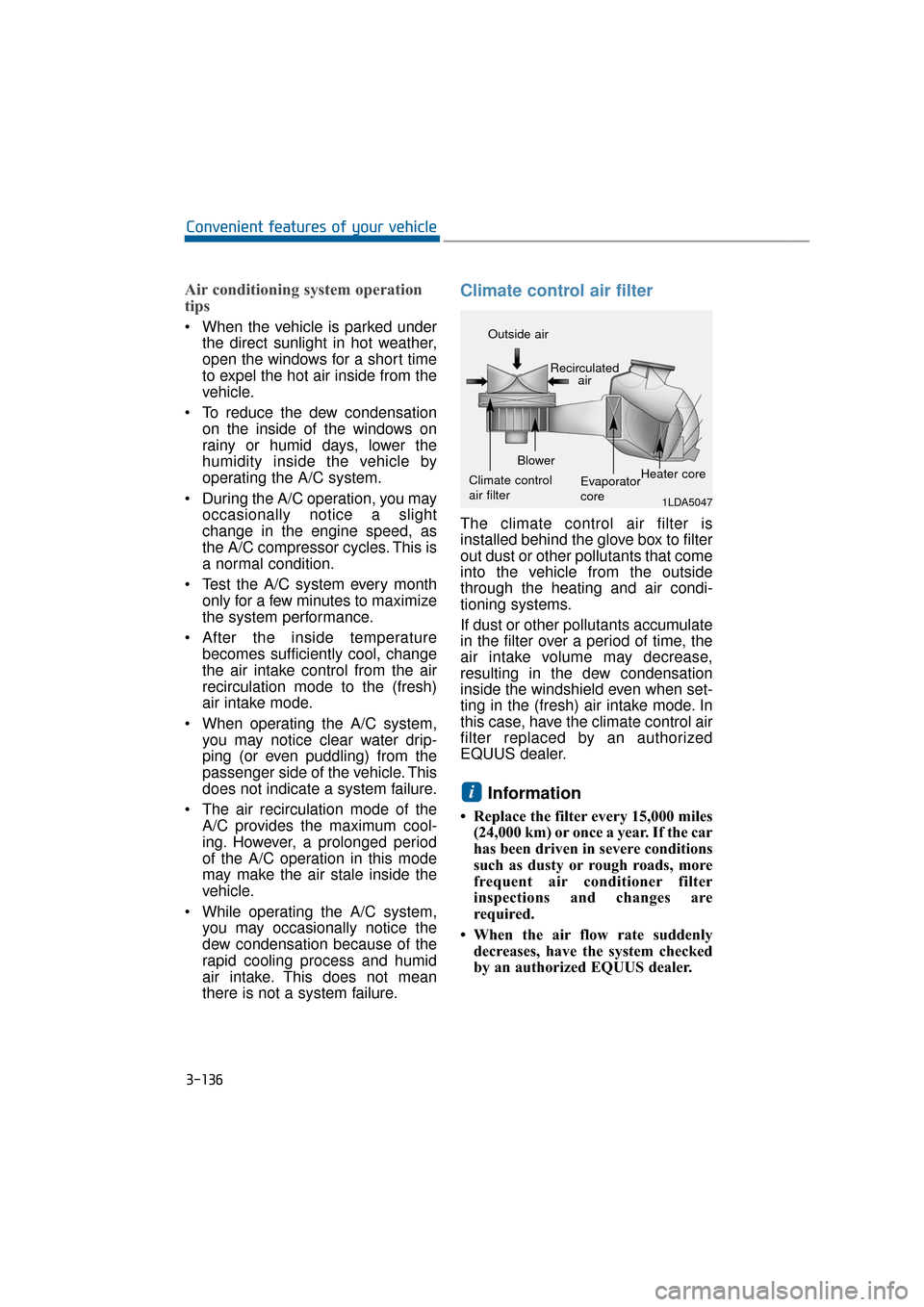
The climate control air filter is
installed behind the glove box to filter
out dust or other pollutants that come
into the vehicle from the outside
through the heating and air condi-
tioning systems.
If dust or other pollutants accumulate
in the filter over a period of time, the
air intake volume may decrease,
resulting in the dew condensation
inside the windshield even when set-
ting in the (fresh) air intake mode. In
this case, have the climate control air
filter replaced by an authorized
EQUUS dealer.
Information
• Replace the filter every 15,000 miles(24,000 km) or once a year. If the car
has been driven in severe conditions
such as dusty or rough roads, more
frequent air conditioner filter
inspections and changes are
required.
• When the air flow rate suddenly decreases, have the system checked
by an authorized EQUUS dealer.
i
1LDA5047
Outside air
Recirculatedair
Climate control
air filter Blower
Evaporator
coreHeater core
Page 234 of 477
3-139
Convenient features of your vehicle03
To defrost outside windshield
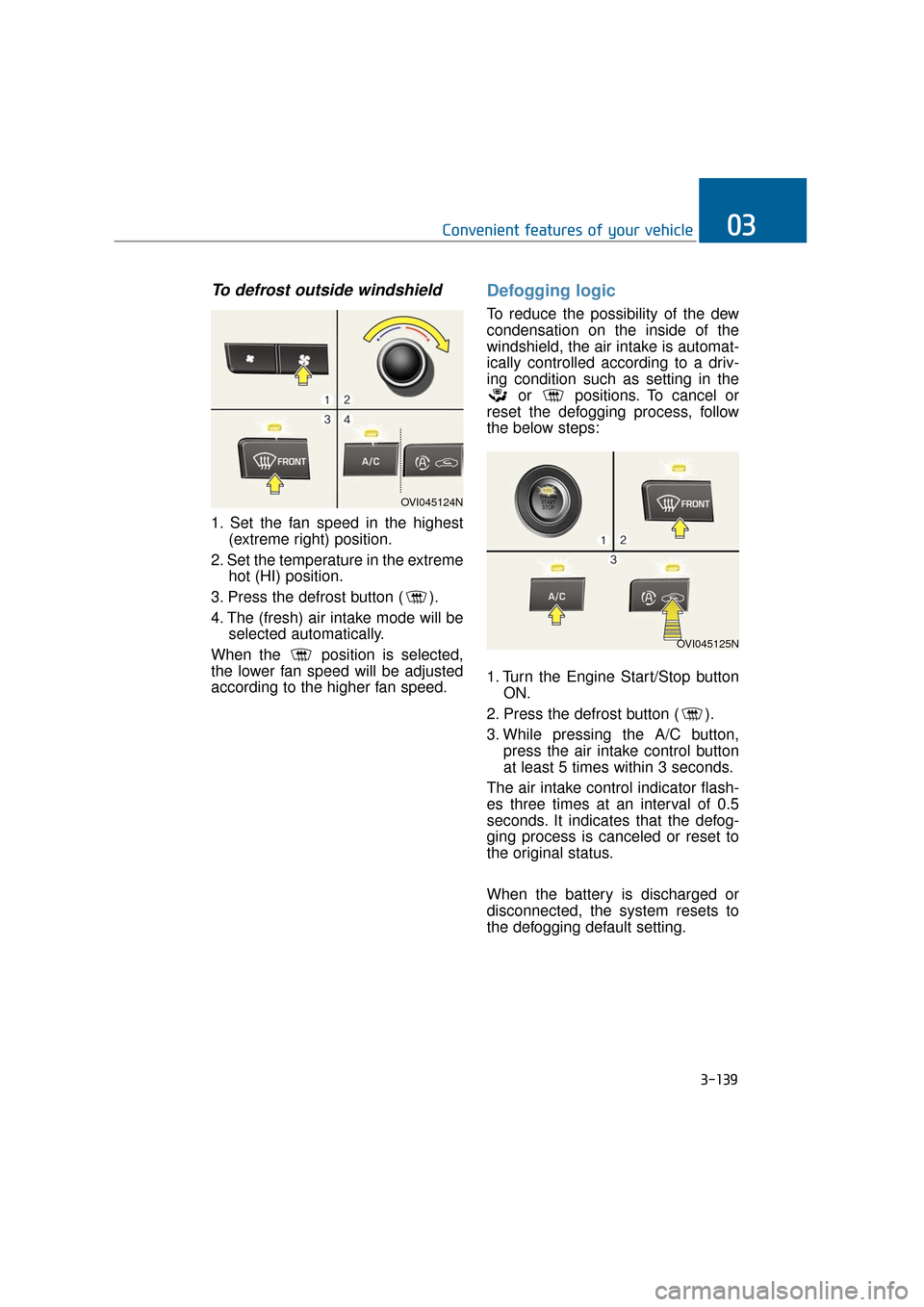
1. Set the fan speed in the highest(extreme right) position.
2. Set the temperature in the extreme hot (HI) position.
3. Press the defrost button ( ).
4. The (fresh) air intake mode will be selected automatically.
When the position is selected,
the lower fan speed will be adjusted
according to the higher fan speed.
Defogging logic
To reduce the possibility of the dew
condensation on the inside of the
windshield, the air intake is automat-
ically controlled according to a driv-
ing condition such as setting in the or positions. To cancel or
reset the defogging process, follow
the below steps:
1. Turn the Engine Start/Stop button ON.
2. Press the defrost button ( ).
3. While pressing the A/C button, press the air intake control button
at least 5 times within 3 seconds.
The air intake control indicator flash-
es three times at an interval of 0.5
seconds. It indicates that the defog-
ging process is canceled or reset to
the original status.
When the battery is discharged or
disconnected, the system resets to
the defogging default setting.
OVI045124N
OVI045125N
Page 235 of 477
3-140
Convenient features of your vehicle
Auto defogging system (if equipped)
Auto defogging reduces the probabil-
ity of the dew condensation on the
inside of the windshield by automati-
cally sensing the moisture.
The auto defogging system operates
when the heater or the A/C is ON.
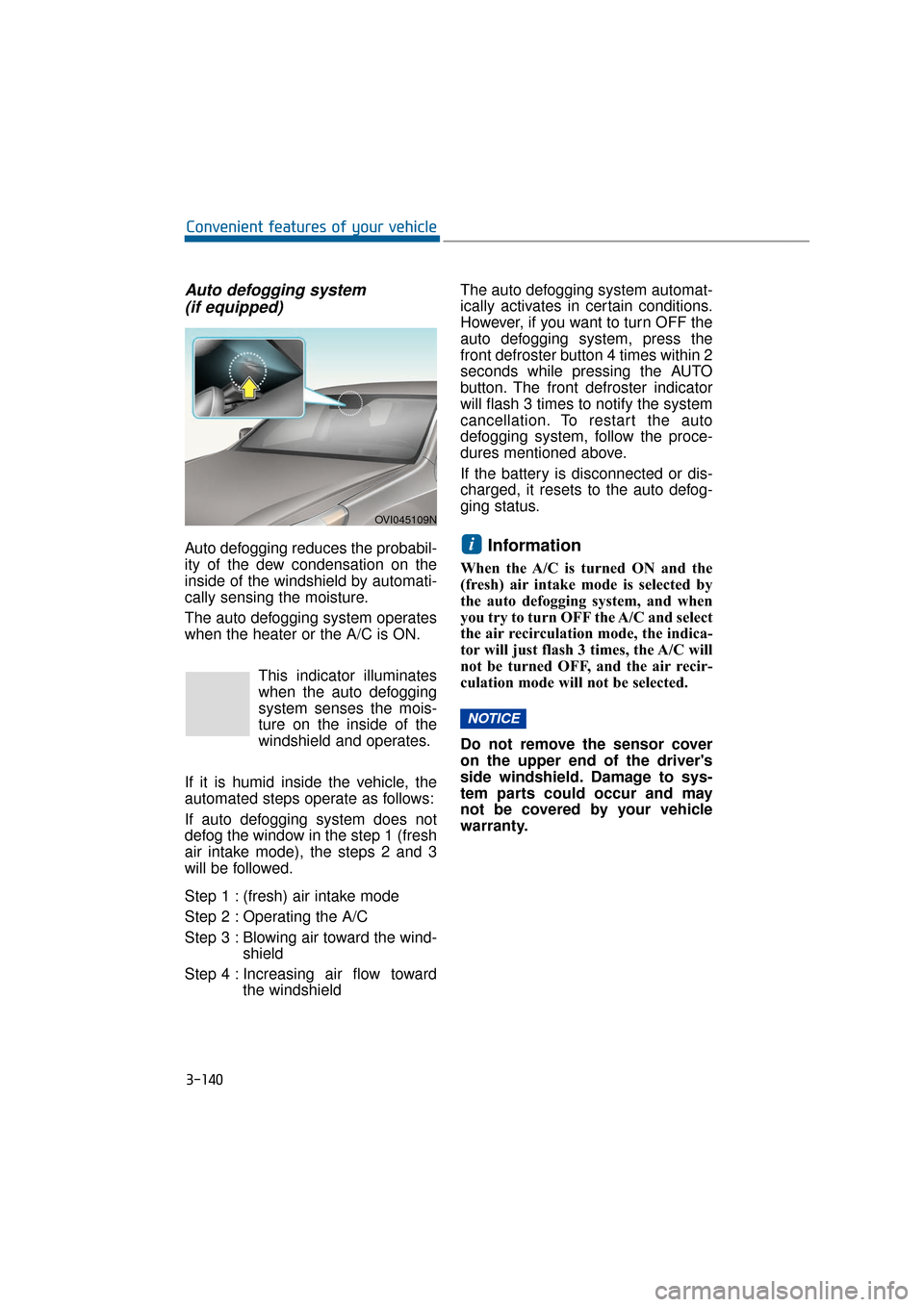
This indicator illuminates
when the auto defogging
system senses the mois-
ture on the inside of the
windshield and operates.
If it is humid inside the vehicle, the
automated steps operate as follows:
If auto defogging system does not
defog the window in the step 1 (fresh
air intake mode), the steps 2 and 3
will be followed.
Step 1 : (fresh) air intake mode
Step 2 : Operating the A/C
Step 3 : Blowing air toward the wind- shield
Step 4 : Increasing air flow toward the windshield The auto defogging system automat-
ically activates in certain conditions.
However, if you want to turn OFF the
auto defogging system, press the
front defroster button 4 times within 2
seconds while pressing the AUTO
button. The front defroster indicator
will flash 3 times to notify the system
cancellation. To restart the auto
defogging system, follow the proce-
dures mentioned above.
If the battery is disconnected or dis-
charged, it resets to the auto defog-
ging status.Information
When the A/C is turned ON and the
(fresh) air intake mode is selected by
the auto defogging system, and when
you try to turn OFF the A/C and select
the air recirculation mode, the indica-
tor will just flash 3 times, the A/C will
not be turned OFF, and the air recir-
culation mode will not be selected.
Do not remove the sensor cover
on the upper end of the driver's
side windshield. Damage to sys-
tem parts could occur and may
not be covered by your vehicle
warranty.
NOTICE
i
OVI045109N
Page 251 of 477
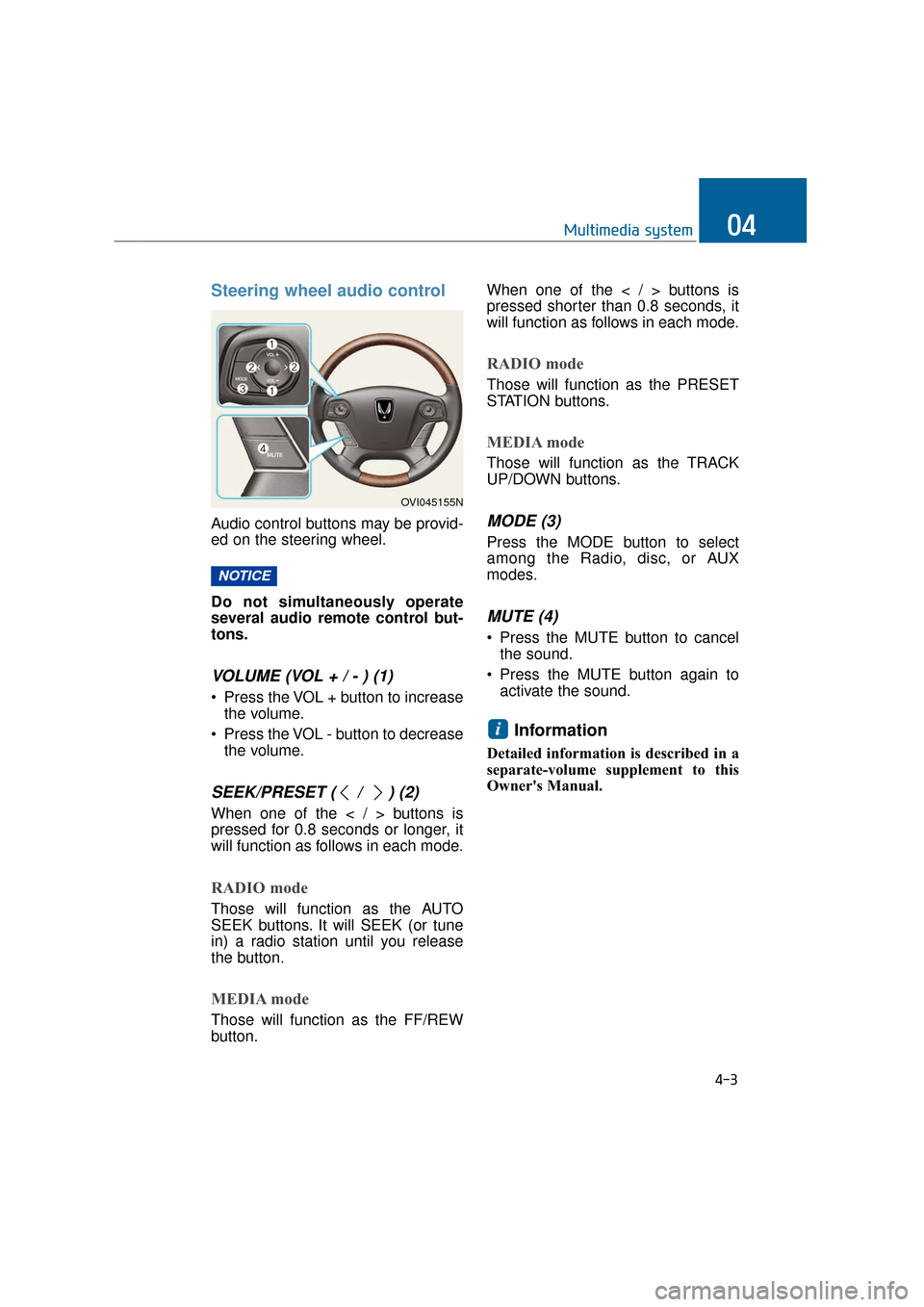
Steering wheel audio control
Audio control buttons may be provid-
ed on the steering wheel.
Do not simultaneously operate
several audio remote control but-
tons.
VOLUME (VOL + / - ) (1)
• Press the VOL + button to increasethe volume.
Press the VOL - button to decrease the volume.
SEEK/PRESET ( / ) (2)
When one of the < / > buttons is
pressed for 0.8 seconds or longer, it
will function as follows in each mode.
RADIO mode
Those will function as the AUTO
SEEK buttons. It will SEEK (or tune
in) a radio station until you release
the button.
MEDIA mode
Those will function as the FF/REW
button. When one of the < / > buttons is
pressed shorter than 0.8 seconds, it
will function as follows in each mode.
RADIO mode
Those will function as the PRESET
STATION buttons.
MEDIA mode
Those will function as the TRACK
UP/DOWN buttons.
MODE (3)
Press the MODE button to select
among the Radio, disc, or AUX
modes.
MUTE (4)
Press the MUTE button to cancel
the sound.
Press the MUTE button again to activate the sound.
Information
Detailed information is described in a
separate-volume supplement to this
Owner's Manual.
i
NOTICE
4-3
Multimedia system04
OVI045155N
Page 253 of 477
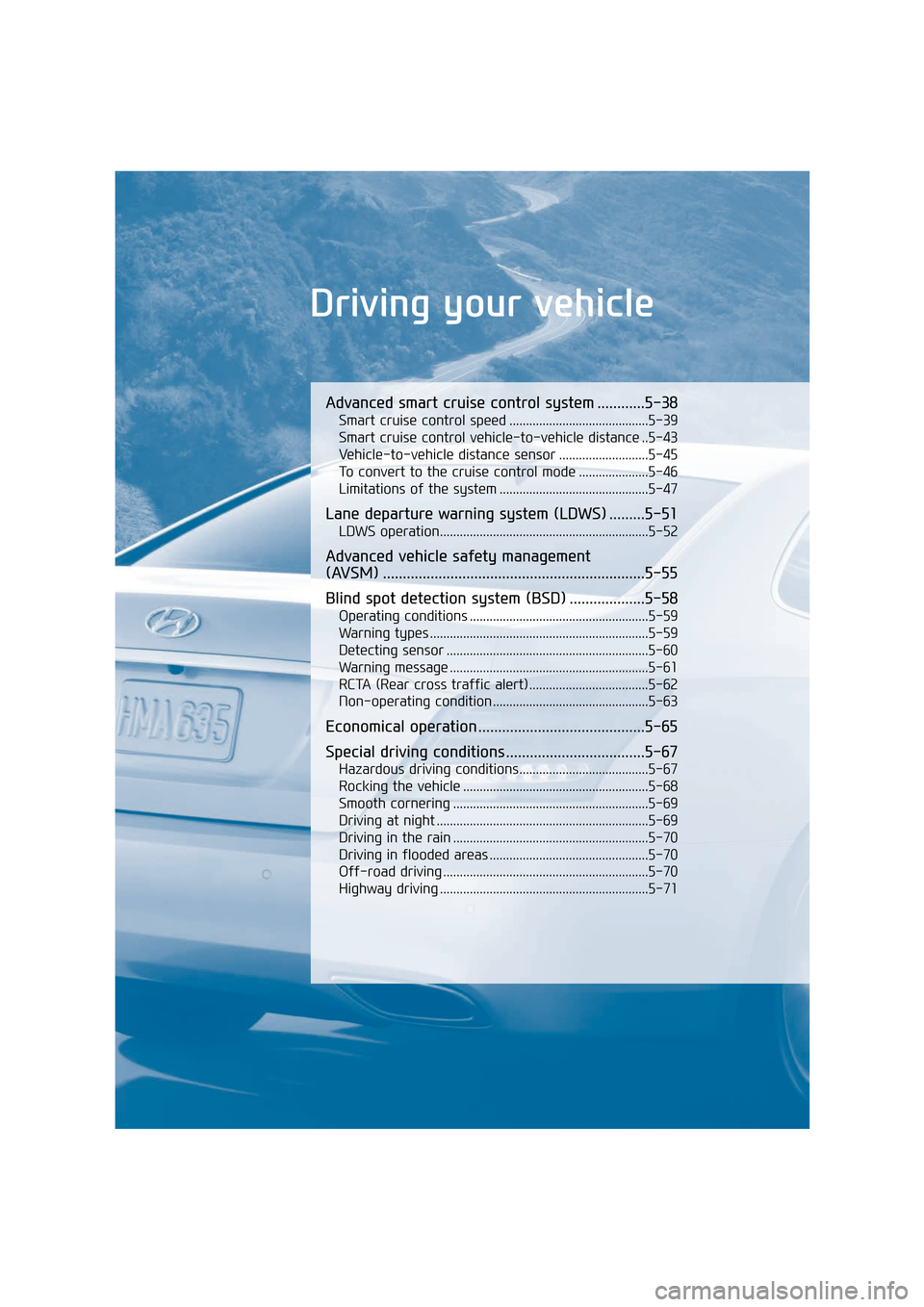
Driving your vehicle
Advanced smart cruise control system ............5-38
Smart cruise control speed ..........................................5-39
Smart cruise control vehicle-to-vehicle distance ..5-43
Vehicle-to-vehicle distance sensor ...........................5-45
To convert to the cruise control mode .....................5-46
Limitations of the system .............................................5-47
Lane departure warning system (LDWS) .........5-51
LDWS operation...............................................................5-52
Advanced vehicle safety management
(AVSM) ..................................................................5-55
Blind spot detection system (BSD) ...................5-58
Operating conditions ......................................................5-59
Warning types ..................................................................5-59
Detecting sensor .............................................................5-60
Warning message ............................................................5-61
RCTA (Rear cross traffic alert) ....................................5-62
Non-operating condition ...............................................5-63
Economical operation ..........................................5-65
Special driving conditions ...................................5-67
Hazardous driving conditions.......................................5-67
Rocking the vehicle ........................................................5-68
Smooth cornering ...........................................................5-69
Driving at night ................................................................5-69
Driving in the rain ...........................................................5-70
Driving in flooded areas ................................................5-70
Off-road driving ..............................................................5-70
Highway driving ...............................................................5-71
Page 260 of 477
1.Carry the Smart Key inside thevehicle.
2.Check the parking brake is firmly applied.
3.Place the shift lever in P(Park).
4.Depress the brake pedal.
5.Press the Engine Start/Stop but- ton.
It should be started without
depressing the accelerator.
6.Do not wait for the engine to warm up while idling the engine.
Start driving at a moderate speed.
(Sudden accelerating and deceler-
ating should be avoided.)
If the engine stops while driving,
do not attempt to move the shift
lever to P (Park). When traffic and
road conditions permit, and while
the vehicle is still moving, you
may move the shift lever to
N(Neutral), and press the Engine
Start/Stop button to restart the
engine. Even though the Smart Key is
inside the vehicle, but when the
key is far away from the driver, the
engine may not start.
When the Engine Start/Stop button is in the ACC or ON position, and
when any door is open, the system
checks for the presence of the
Smart Key. If the Smart Key is not
inside the vehicle, the "Key not in
vehicle" indicator will illuminate.
When all doors are closed, the
chime will also sound for approxi-
mately 5 seconds. The indicator
will be turned OFF while the vehi-
cle is moving. Keep the Smart Key
inside the vehicle when the Engine
Start/Stop button is in the ACC or
ON position.
NOTICE
S ST
T A
A R
RT
TI
IN
N G
G
T
T H
H E
E
E
E N
N G
GI
IN
N E
E
5-9
Driving your vehicle05
Always wear proper shoes
when driving your vehicle.
Improper types of shoes (i.e.
high heels, slippers, ski boots,
etc.) may interfere with your
ability to control the brake and
accelerator pedal.
WARNING
Only when the Smart Key is
inside the vehicle, pressing the
Engine Start/Stop button will
start the engine. Never allow
children or any persons, who
are unfamiliar with the vehicle,
to touch the Engine Start/Stop
button or other related parts.
WARNING
Page 264 of 477
R (Reverse)
Set the shift lever in this position to
drive backwards.
Always completely stop the vehi-
cle before changing the shift lever
to or out of R (Reverse). You may
damage the transmission when
changing the shift lever to R while
driving, except as explained in
"Rocking the Vehicle" in this chap-
ter.
N (Neutral)
The wheels and transmission are not
engaged. The vehicle rolls freely
even on the slightest slope, unless
the parking brake or service brake is
applied.
D (Drive)
This is for the forward driving posi-
tion. The transmission will automati-
cally shift in a 8-gear sequence, pro-
viding the best fuel economy and
power.
For extra power to pass ahead
another vehicle or to climb a slope,
fully depress the accelerator. Then,
the transmission will automatically
downshift to the next lower gear (or
gears, as appropriate).
Information
Always come to a complete stop before
changing the shift lever to D (Drive).
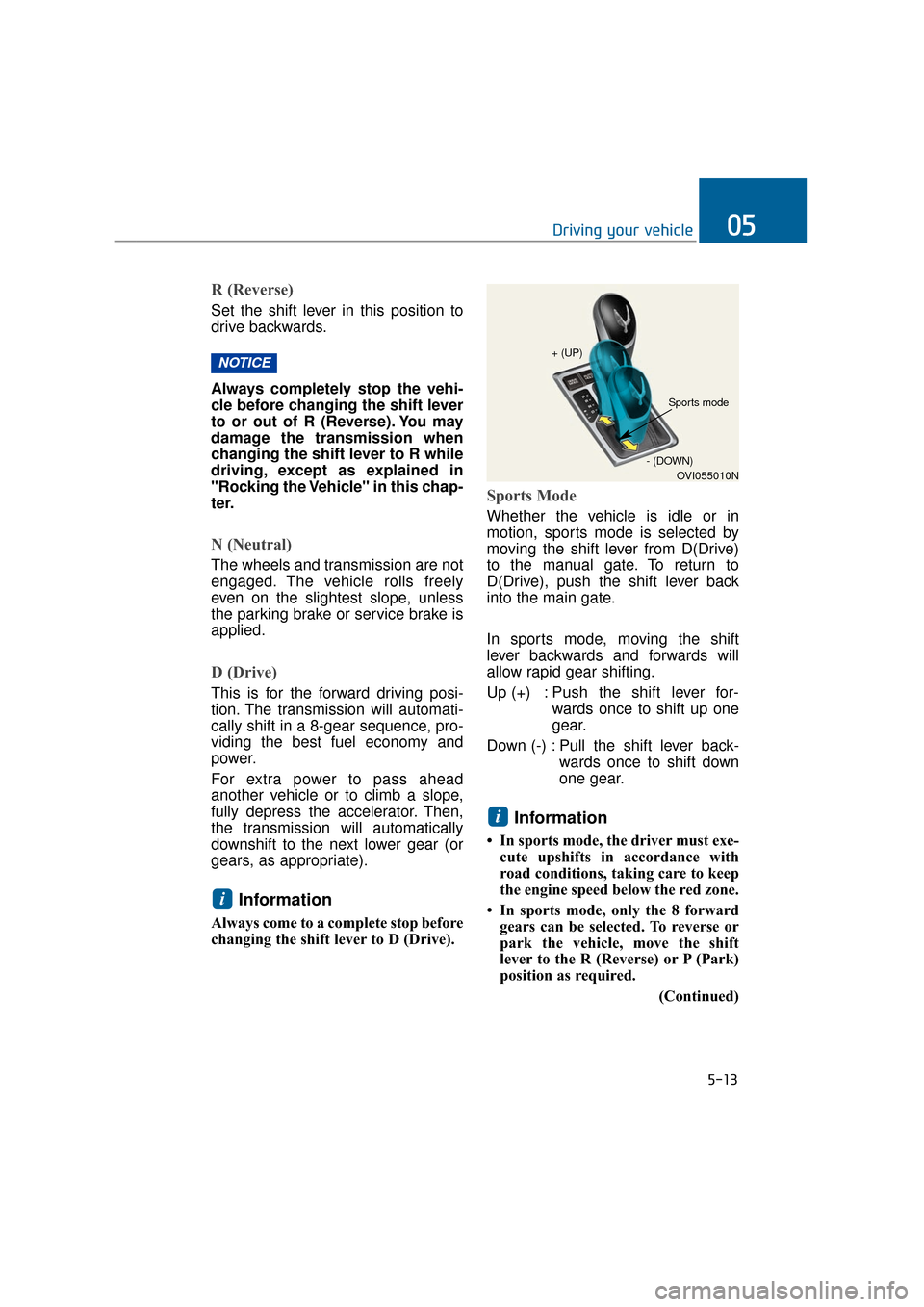
Sports Mode
Whether the vehicle is idle or in
motion, sports mode is selected by
moving the shift lever from D(Drive)
to the manual gate. To return to
D(Drive), push the shift lever back
into the main gate.
In sports mode, moving the shift
lever backwards and forwards will
allow rapid gear shifting.
Up (+) : Push the shift lever for-wards once to shift up one
gear.
Down (-) : Pull the shift lever back- wards once to shift down
one gear.
Information
• In sports mode, the driver must exe-cute upshifts in accordance with
road conditions, taking care to keep
the engine speed below the red zone.
• In sports mode, only the 8 forward gears can be selected. To reverse or
park the vehicle, move the shift
lever to the R (Reverse) or P (Park)
position as required.
(Continued)
i
i
NOTICE
5-13
Driving your vehicle05
OVI055010N
+ (UP)
- (DOWN)
Sports mode
Page 266 of 477
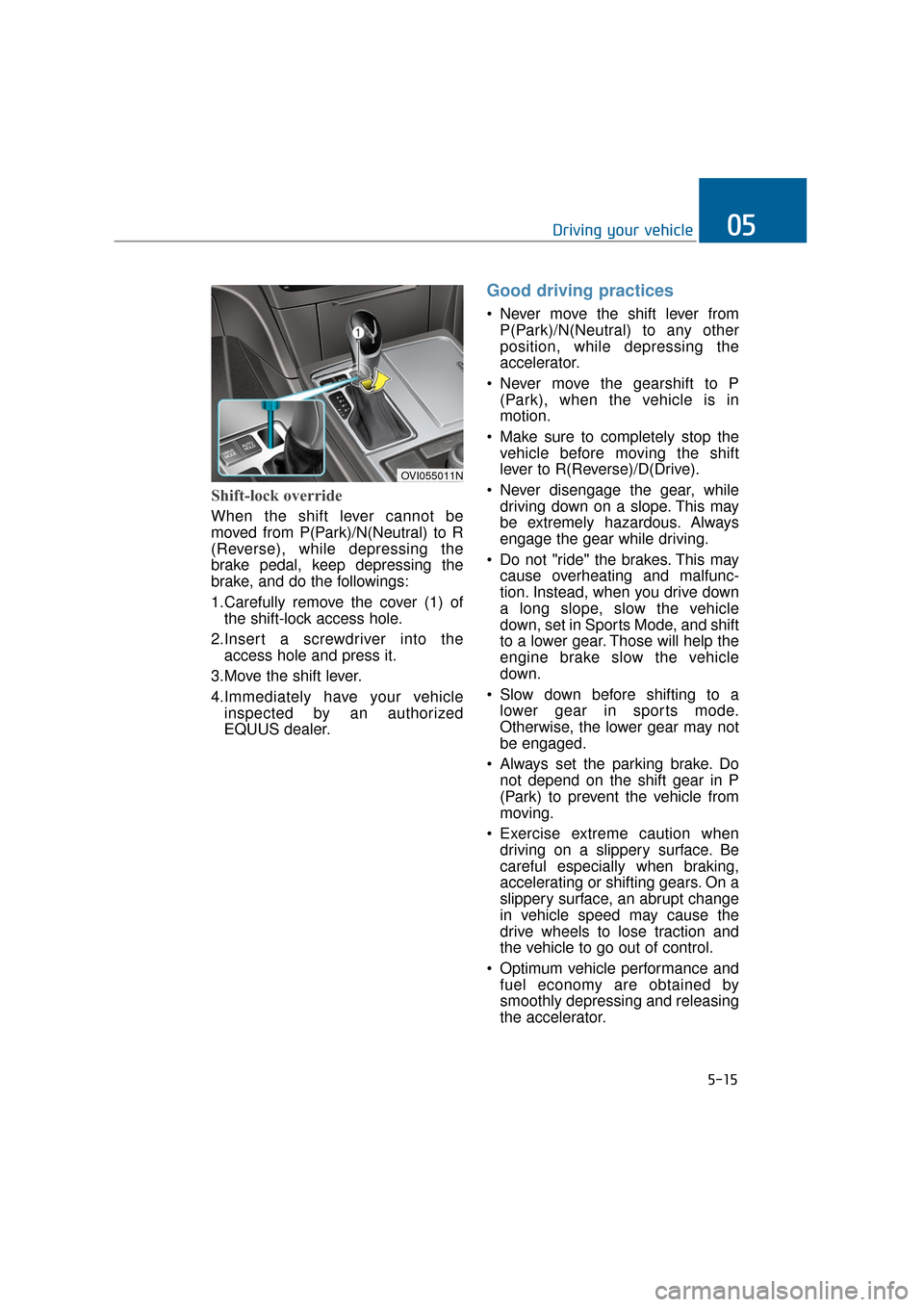
Shift-lock override
When the shift lever cannot be
moved from P(Park)/N(Neutral) to R
(Reverse), while depressing the
brake pedal, keep depressing the
brake, and do the followings:
1.Carefully remove the cover (1) ofthe shift-lock access hole.
2.Insert a screwdriver into the access hole and press it.
3.Move the shift lever.
4.Immediately have your vehicle inspected by an authorized
EQUUS dealer.
Good driving practices
Never move the shift lever fromP(Park)/N(Neutral) to any other
position, while depressing the
accelerator.
Never move the gearshift to P (Park), when the vehicle is in
motion.
Make sure to completely stop the vehicle before moving the shift
lever to R(Reverse)/D(Drive).
Never disengage the gear, while driving down on a slope. This may
be extremely hazardous. Always
engage the gear while driving.
Do not "ride" the brakes. This may cause overheating and malfunc-
tion. Instead, when you drive down
a long slope, slow the vehicle
down, set in Sports Mode, and shift
to a lower gear. Those will help the
engine brake slow the vehicle
down.
Slow down before shifting to a lower gear in sports mode.
Otherwise, the lower gear may not
be engaged.
Always set the parking brake. Do not depend on the shift gear in P
(Park) to prevent the vehicle from
moving.
Exercise extreme caution when driving on a slippery surface. Be
careful especially when braking,
accelerating or shifting gears. On a
slippery surface, an abrupt change
in vehicle speed may cause the
drive wheels to lose traction and
the vehicle to go out of control.
Optimum vehicle performance and fuel economy are obtained by
smoothly depressing and releasing
the accelerator.
5-15
Driving your vehicle05
OVI055011N
Page 285 of 477
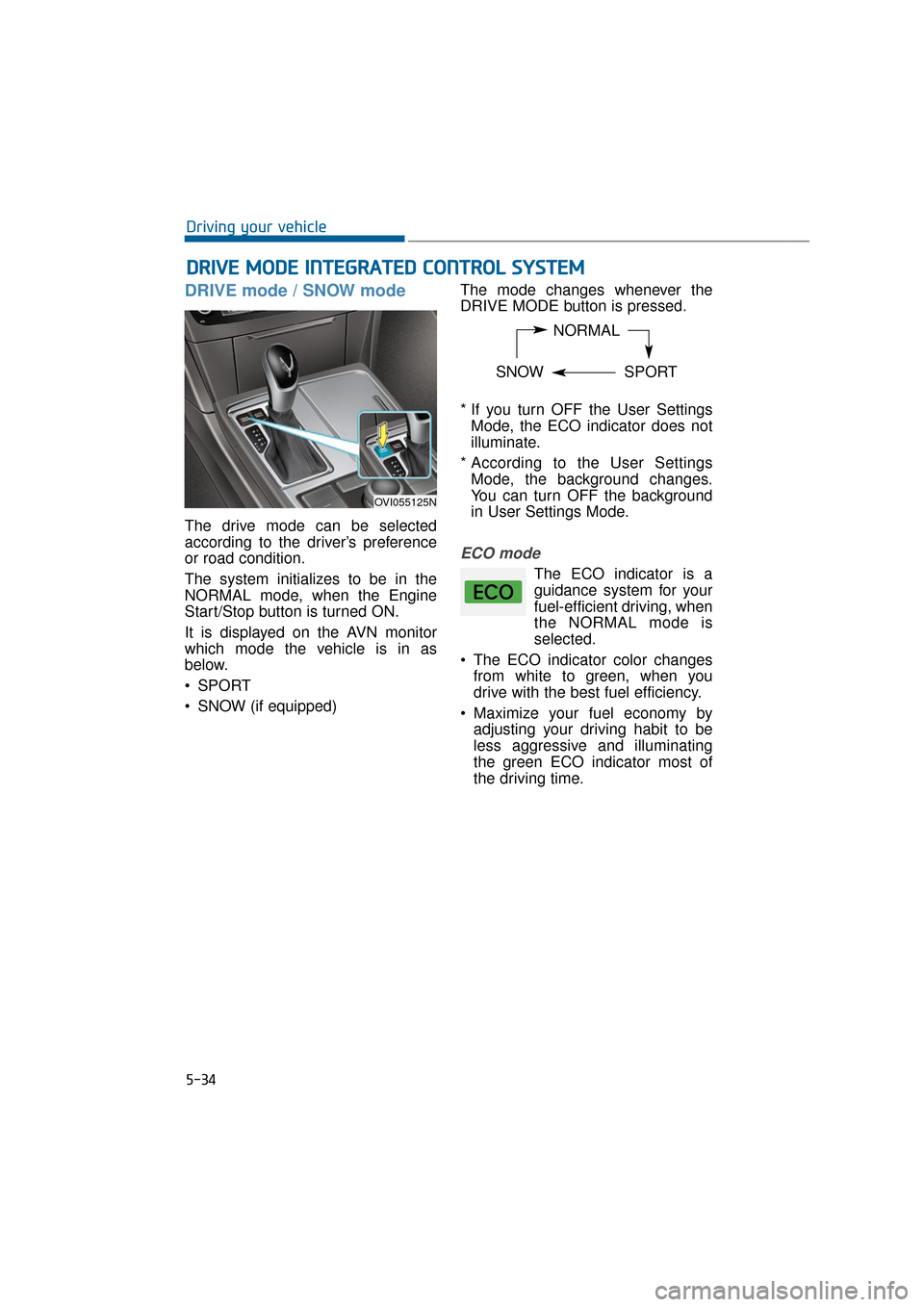
DRIVE mode / SNOW mode
The drive mode can be selected
according to the driver’s preference
or road condition.
The system initializes to be in the
NORMAL mode, when the Engine
Start/Stop button is turned ON.
It is displayed on the AVN monitor
which mode the vehicle is in as
below.
SPORT
SNOW (if equipped)The mode changes whenever the
DRIVE MODE button is pressed.
* If you turn OFF the User Settings
Mode, the ECO indicator does not
illuminate.
* According to the User Settings Mode, the background changes.
You can turn OFF the background
in User Settings Mode.
ECO mode
The ECO indicator is a
guidance system for your
fuel-efficient driving, when
the NORMAL mode is
selected.
The ECO indicator color changes from white to green, when you
drive with the best fuel efficiency.
Maximize your fuel economy by adjusting your driving habit to be
less aggressive and illuminating
the green ECO indicator most of
the driving time.
D DR
RI
IV
V E
E
M
M O
OD
DE
E
I
IN
N T
TE
EG
G R
RA
A T
TE
ED
D
C
C O
O N
NT
TR
R O
O L
L
S
S Y
Y S
ST
T E
EM
M
5-34
Driving your vehicle
NORMAL
SNOW SPORT
OVI055125N