change wheel Hyundai Equus 2016 Owner's Manual
[x] Cancel search | Manufacturer: HYUNDAI, Model Year: 2016, Model line: Equus, Model: Hyundai Equus 2016Pages: 477, PDF Size: 16.25 MB
Page 137 of 477
Electronic Hydraulic Power
Steering (EHPS)
This system uses an electromotor to
assist your steering. When the
engine is turned OFF, or when the
EHPS becomes inoperative, you
may still steer the vehicle, but it
requires more effort in steering.
When you notice such a change
while steering, have the EHPS
checked by an authorized EQUUS
dealer.
Do not turn the steering wheel to
the extreme right or left for five
seconds or over, while running the
engine. This may cause damage to
the EHPS motor pump.
Information
When there is a malfunction with the
EHPS motor pump, the efforts to steer
may greatly increase.
Information
When the vehicle is parked outside for
an extended period of time at a cold
temperature (below 14°F/-10°C), the
power steering may require more
efforts, after first starting the engine.
This is due to the increased fluid vis-
cosity at a cold temperature and does
not indicate a malfunction.
When this happens, depress the accel-
erator to increase the engine RPM,
until it reaches 1,500 rpm. Then, let
the engine idle for two-to-three min-
utes to warm up the fluid.
Tilt Steering/Telescope Steering
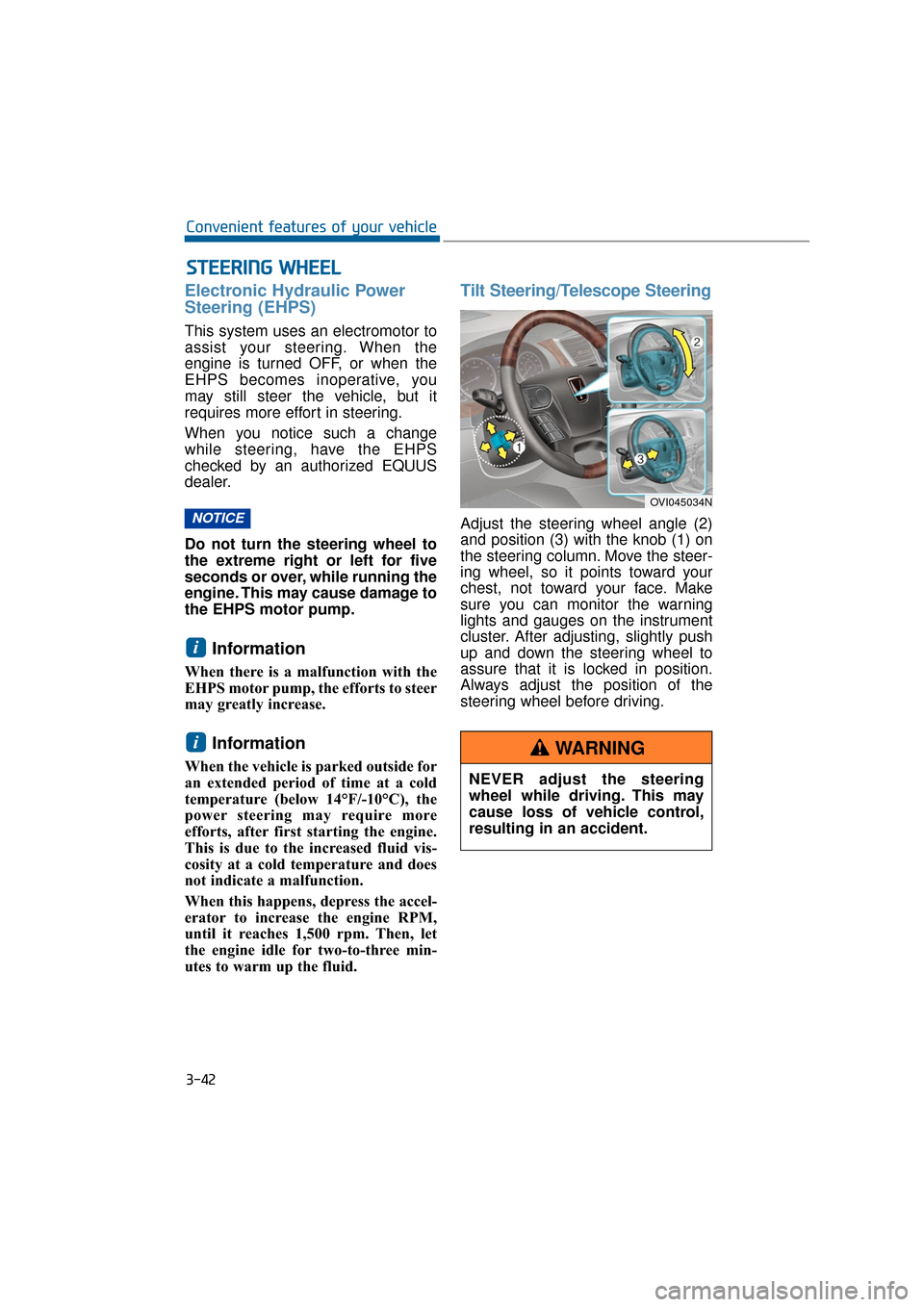
Adjust the steering wheel angle (2)
and position (3) with the knob (1) on
the steering column. Move the steer-
ing wheel, so it points toward your
chest, not toward your face. Make
sure you can monitor the warning
lights and gauges on the instrument
cluster. After adjusting, slightly push
up and down the steering wheel to
assure that it is locked in position.
Always adjust the position of the
steering wheel before driving.
i
i
NOTICE
S ST
T E
EE
ER
R I
IN
N G
G
W
W H
HE
EE
EL
L
3-42
Convenient features of your vehicle
OVI045034N
NEVER adjust the steering
wheel while driving. This may
cause loss of vehicle control,
resulting in an accident.
WARNING
Page 159 of 477
Instrument Cluster Control
Adjusting Instrument ClusterIllumination
The brightness of the instrument
panel illumination can be adjusted by
pressing the illumination control but-
tons (“+” or “-”) when the Engine
Start/Stop Button is ON or the tale
lights are turned ON.
The brightness has 20 levels: 1 (MIN) ~ 20 (MAX)
If you press the illumination con- trol button (“+” or “-”), the bright-
ness level will be continuously
adjusted.
If the brightness reaches to the maximum or minimum level, an
alarm will sound.
LCD Display Control
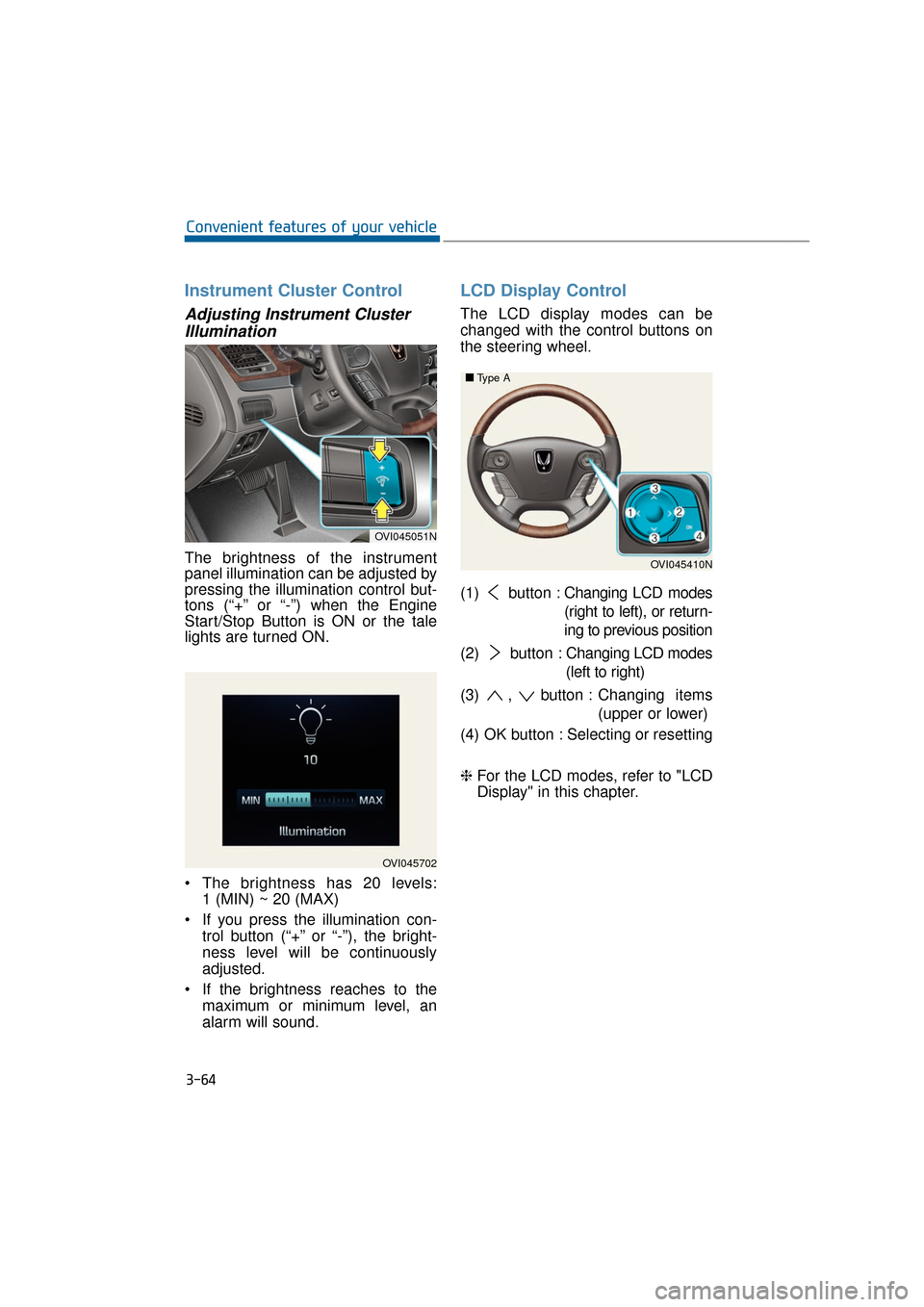
The LCD display modes can be
changed with the control buttons on
the steering wheel.
(1) button : Changing LCD modes
(right to left), or return-
ing to previous position
(2) button : Changing LCD modes
(left to right)
(3) , button : Changing items
(upper or lower)
(4) OK button : Selecting or resetting
❈ For the LCD modes, refer to "LCD
Display" in this chapter.
3-64
Convenient features of your vehicle
OVI045702
OVI045051N
OVI045410N
■
■
Type A
Page 181 of 477
Overview
Description
The trip computer is a driving infor-
mation system, controlled by a
micro-computer. This displays driv-
ing-related information.
Information
Some driving information, stored in
the trip computer (i.e. average vehicle
speed), is reset, when the battery is
disconnected.
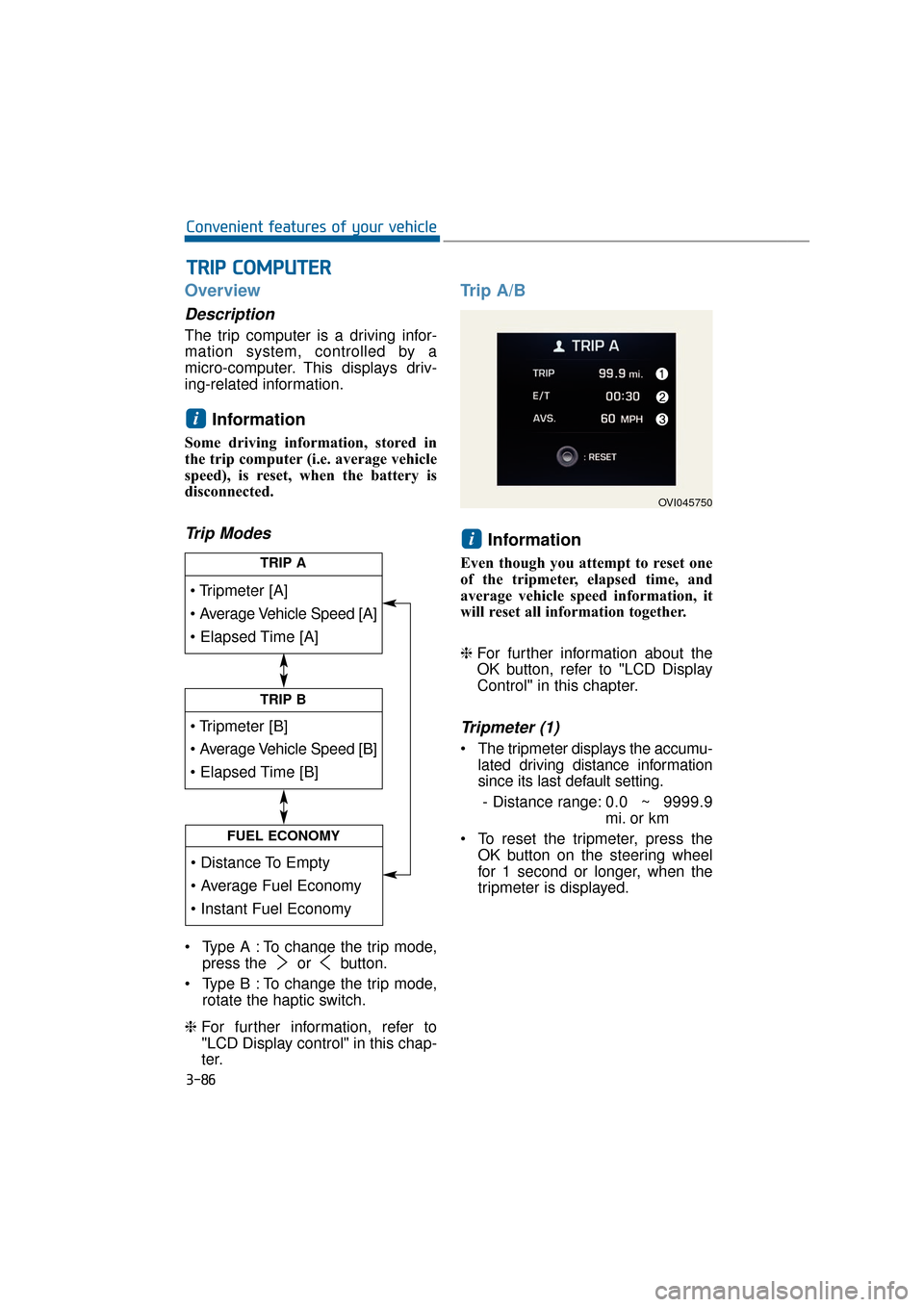
Trip Modes
Type A : To change the trip mode,press the or button.
Type B : To change the trip mode, rotate the haptic switch.
❈ For further information, refer to
"LCD Display control" in this chap-
ter.
Trip A/B
Information
Even though you attempt to reset one
of the tripmeter, elapsed time, and
average vehicle speed information, it
will reset all information together.
❈For further information about the
OK button, refer to "LCD Display
Control" in this chapter.
Tripmeter (1)
The tripmeter displays the accumu-
lated driving distance information
since its last default setting.
- Distance range: 0.0 ~ 9999.9
mi. or km
To reset the tripmeter, press the OK button on the steering wheel
for 1 second or longer, when the
tripmeter is displayed.
i
i
T
TR
R I
IP
P
C
C O
O M
M P
PU
U T
TE
ER
R
3-86
Convenient features of your vehicle
TRIP A
TRIP B
FUEL ECONOMY
OVI045750
Page 259 of 477
START
To start the engine, depress the
brake pedal and press the Engine
Start/Stop Button with the shift gear
in P(Park) or N(Neutral).
For your safety, start the engine with
the shift gear in P(Park).
Information
• If you press the Engine Start/Stopbutton without depressing the brake
pedal, the engine does not start.
When the Engine Start/Stop button
is pressed, it changes as follows:
OFF → →
ACC →
→
ON →
→
OFF
• If you leave the Engine Start/Stop Button in the ACC or the ON posi-
tion for a long time, the battery will
be discharged.
i
5-8
Driving your vehicle
Never press the Engine Start/Stop button while the
vehicle is in motion except in
an emergency situation. This
would turn the engine OFF,
resulting in loss of power
assist for the steering wheel
and brake. This may lead to
loss of directional control and
braking function, which could
cause an accident.
(Continued)
(Continued)
Before leaving the driver’sseat, always make sure the
shift gear is engaged in P
(Park), fully set the parking
brake and turn the engine
OFF. Unexpected and sudden
vehicle movement may occur
if these precautions are not
taken.
Never touch the Engine Start/Stop button, or any other
controls on the steering wheel
while the vehicle is in motion.
Reaching out for those con-
trols with your hand or arm
may cause a loss of vehicle
control, an accident, serious
bodily injury or death.
Do not place any loose objects around the driver’s
seat, as they may toss about
while driving, interfering with
the driver's pedal operation
and leading to an accident.
WARNING
Page 266 of 477
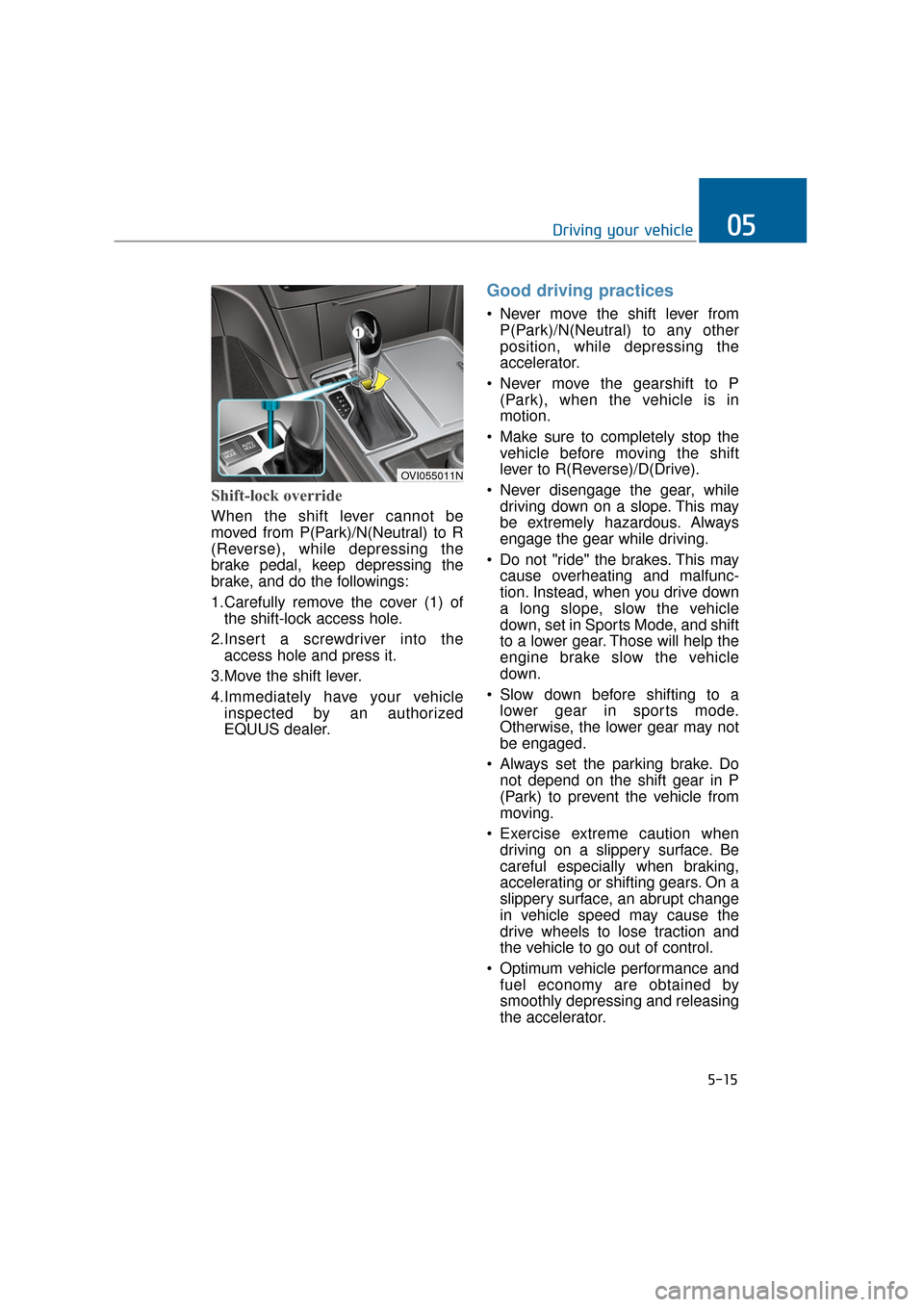
Shift-lock override
When the shift lever cannot be
moved from P(Park)/N(Neutral) to R
(Reverse), while depressing the
brake pedal, keep depressing the
brake, and do the followings:
1.Carefully remove the cover (1) ofthe shift-lock access hole.
2.Insert a screwdriver into the access hole and press it.
3.Move the shift lever.
4.Immediately have your vehicle inspected by an authorized
EQUUS dealer.
Good driving practices
Never move the shift lever fromP(Park)/N(Neutral) to any other
position, while depressing the
accelerator.
Never move the gearshift to P (Park), when the vehicle is in
motion.
Make sure to completely stop the vehicle before moving the shift
lever to R(Reverse)/D(Drive).
Never disengage the gear, while driving down on a slope. This may
be extremely hazardous. Always
engage the gear while driving.
Do not "ride" the brakes. This may cause overheating and malfunc-
tion. Instead, when you drive down
a long slope, slow the vehicle
down, set in Sports Mode, and shift
to a lower gear. Those will help the
engine brake slow the vehicle
down.
Slow down before shifting to a lower gear in sports mode.
Otherwise, the lower gear may not
be engaged.
Always set the parking brake. Do not depend on the shift gear in P
(Park) to prevent the vehicle from
moving.
Exercise extreme caution when driving on a slippery surface. Be
careful especially when braking,
accelerating or shifting gears. On a
slippery surface, an abrupt change
in vehicle speed may cause the
drive wheels to lose traction and
the vehicle to go out of control.
Optimum vehicle performance and fuel economy are obtained by
smoothly depressing and releasing
the accelerator.
5-15
Driving your vehicle05
OVI055011N
Page 267 of 477
Moving up a steep grade from astanding start
To drive up on a steep slope,
depress the brake pedal, move the
shift gear to D (Drive), and release
the parking brake. Gradually depress
the accelerator while releasing the
service brakes.
When accelerating on a steep
slope, the vehicle may have a ten-
dency to slide backwards. Shifting
to the 2nd gear (Second Gear) will
help prevent the vehicle from slid-
ing backwards.
5-16
Driving your vehicle
Always buckle up! In a colli- sion, an unbelted occupant is
more likely to be seriously
injured or killed than a proper-
ly belted occupant.
Avoid high speeds when cor- nering or turning.
Do not make quick wheel steering, such as sharp lane
changes or fast, sharp turns.
The risk of rollover is greatly increased when you lose con-
trol of your vehicle at a high
speed.
Loss of control often occurs, when two or more wheels are
swerved out of the roadway
and are overly steered to
reenter the roadway.
In the event your vehicle is swerved out of the roadway,
do not make a sharp steering.
Instead, slow down the vehi-
cle before reentering into the
lanes.
Never exceed posted speed limits.
WARNING
When your vehicle is stuck in
snow, mud, sand and others,
you may rock the vehicle by
moving it forward and back-
wards. Do not attempt this pro-
cedure when there are people
or objects near the vehicle.
During the rocking operation,
the vehicle may suddenly move
forwards or backwards as it
becomes unstuck, causing
injury or damage to nearby peo-
ple or objects.
WARNING
Page 316 of 477
5-65
Driving your vehicle05
Your vehicle's fuel economy depends
mainly on your driving style such as
where you drive and when you drive.
Each of these factors affects your
fuel economy (how many miles/kilo-
meters you can drive with a
gallon/liter of fuel). To drive your vehi-
cle as economically as possible, fol-
low the below driving suggestions.
These will help you save in both the
fuel and repair expenses:
Drive smoothly. Accelerate at amoderate rate. Do not make
"jackrabbit" starts or full-throttle
shifts. Maintain a steady cruising
speed. Do not race between stop-
lights. Try to adjust your speed in
accordance with other traffic to
avoid unnecessary speed
changes. Avoid heavy traffic when-
ever possible. Always maintain a
safe distance from a vehicle in
front to avoid unnecessary braking.
This also reduces brake wear-out.
Drive at a moderate speed. The faster you drive, the more fuel your
vehicle uses. Driving at a moderate
speed, in the highest gear appro-
priate for the driving conditions
especially on the highway, is one of
the most effective ways to reduce
fuel consumption.
Do not "ride" the brake pedal. This can increase fuel consumption and
also wear out the brake compo-
nents. In addition, resting your foot
on the brake pedal, while driving,
may overheat the brake, reducing
breaking effects and possibly lead-
ing a serious consequence.
Check your tire conditions. Keep them inflated to the recommended
pressure level. Under or over infla-
tion will unnecessarily tire wear-
out. Check the tire pressures at
least once a month. Make sure that the wheels are cor-
rectly aligned. Hitting a curb or
driving too fast on uneven surfaces
may distort the wheel alignment.
Poor alignment causes faster tire
wear-out and may also result in
other problems as well as greater
fuel consumption.
Keep your vehicle in good condi- tion. For the better fuel economy
and the cheaper maintenance
expenses, maintain your vehicle in
accordance with the maintenance
schedule in the chapter 7. When
you drive your vehicle in harsh con-
ditions, more frequent mainte-
nance is required (refer to the
chapter 7 for further information).
Keep your vehicle clean. Your vehi- cle should be kept clean and away
from any corrosive substances. It is
especially important that mud, dirt,
ice and others are not daubed
under the vehicle. This extra weight
may increase the fuel consumption
and also cause corrosion.
Avoid a heavy loading. Do not carry unnecessary weight in your
vehicle. It will improve your fuel
economy.
Do not let the engine idle longer than necessary. When you wait
(not in traffic), turn OFF the engine.
Then restart the engine, when you
are ready to go.
Remember that your vehicle does not require the engine warm-up for
a long time. After turning On the
engine, run the engine for 10 to 20
seconds, before shifting the gear.
In cold weather, however, your
engine needs a slightly longer
warm-up period.
E EC
CO
O N
NO
O M
M I
IC
C A
A L
L
O
O P
PE
ER
R A
A T
TI
IO
O N
N
Page 318 of 477
5-67
Driving your vehicle05
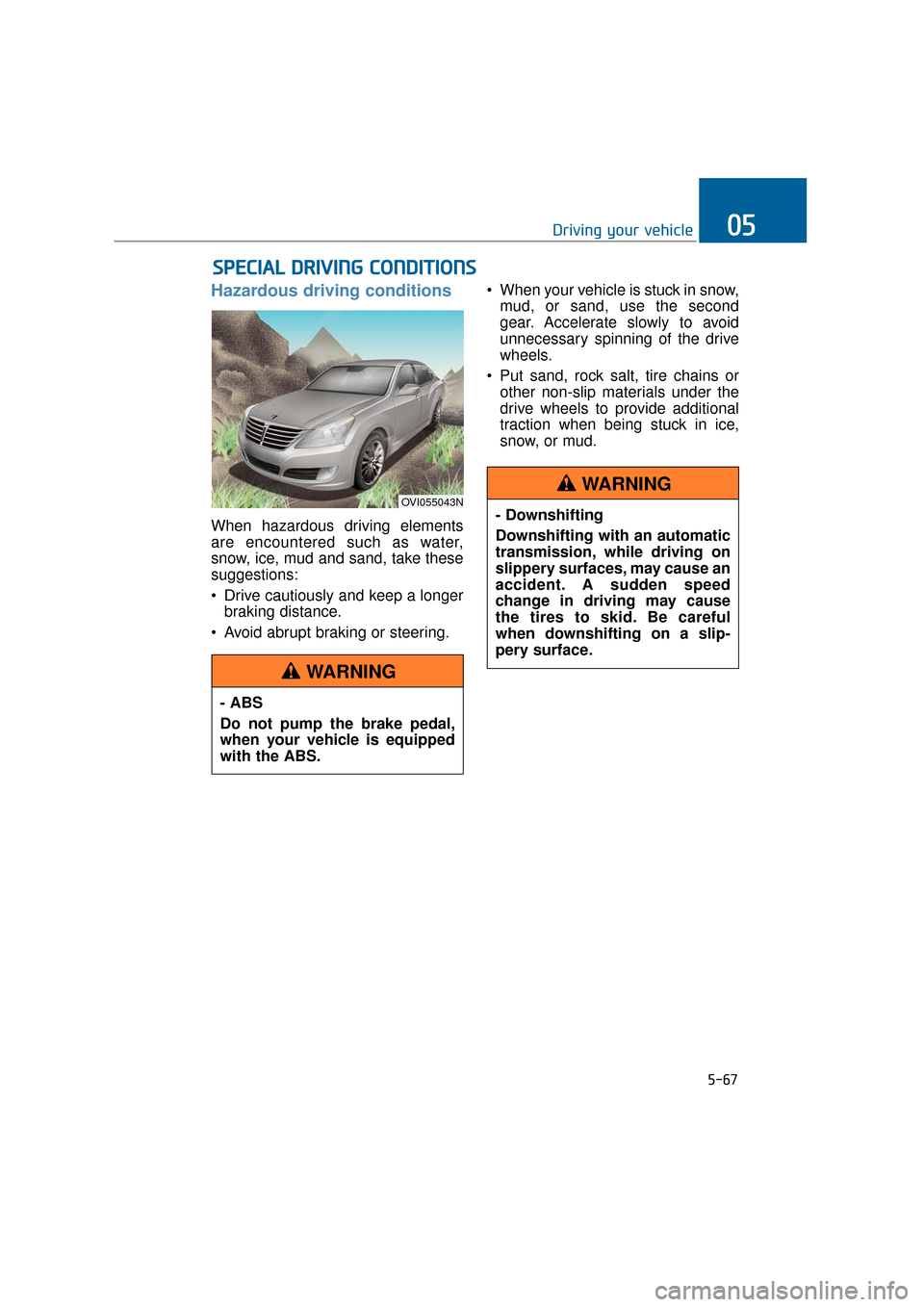
Hazardous driving conditions
When hazardous driving elements
are encountered such as water,
snow, ice, mud and sand, take these
suggestions:
Drive cautiously and keep a longerbraking distance.
Avoid abrupt braking or steering. When your vehicle is stuck in snow,
mud, or sand, use the second
gear. Accelerate slowly to avoid
unnecessary spinning of the drive
wheels.
Put sand, rock salt, tire chains or other non-slip materials under the
drive wheels to provide additional
traction when being stuck in ice,
snow, or mud.
S SP
P E
EC
CI
IA
A L
L
D
D R
RI
IV
V I
IN
N G
G
C
C O
O N
ND
DI
IT
T I
IO
O N
NS
S
OVI055043N
- ABS
Do not pump the brake pedal,
when your vehicle is equipped
with the ABS.
WARNING
- Downshifting
Downshifting with an automatic
transmission, while driving on
slippery surfaces, may cause an
accident. A sudden speed
change in driving may cause
the tires to skid. Be careful
when downshifting on a slip-
pery surface.
WARNING
Page 325 of 477
5-74
Driving your vehicle
An AutoSock, which is in the wrong size or is improperly
installed, may damage brake
lines, suspension, body and
wheels of your vehicle.
Stop driving and retighten the AutoSock, whenever there are
snapping sounds between the
vehicle and the AutoSock.
Use high quality ethylene gly-
col coolant
The cooling system of your vehicle is
filled with the high-quality ethylene
glycol coolant when being delivered.
It is the only type of coolant that your
vehicle is filled with, because it pre-
vents corrosion of the cooling sys-
tem, lubricates the water pump and
prevents freezing. Refill the cooling
system in accordance with your
maintenance schedule in the chapter
7. Before winter, check your coolant
to assure that the freezing point is
sufficiently lower than the expected
winter temperature.
Check battery and cables
The winter temperature increases
the battery consumption. Inspect the
battery and cables, as described in
the chapter 7. The battery charging
level can be checked by an author-
ized EQUUS dealer or in a service
station.
Change to "winter weight" oil,
if necessary
In some regions during the cold win-
ter, it is recommended to use the
"winter weight" oil with lower viscosi-
ty. For further information about this,
refer to the chapter 8. When you can-
not be sure about a type of winter
weight oil, consult an authorized
EQUUS dealer.
Check spark plugs and ignition
system
Inspect your spark plugs and, if nec-
essary, replace them. Also check all
ignition wirings and components for
any cracks, wear-out, and damage.
NOTICE
- Chain installation
When installing the AutoSock,
park the vehicle on level ground
away from other vehicles. Press
ON the Hazard Warning flasher
and place a warning triangle
behind your vehicle, if available.
Place the shift lever in P(Park),
set the parking brake and turn
OFF the engine, before
installing the AutoSock.
WARNING
- Tire chains
The use of the AutoSock may
adversely affect vehicle han-
dling.
Do not drive faster than the lower of the two - 20 mph (30
km/h) and the AutoSock manu-
facturer’s recommended
speed limit.
Drive carefully and avoid bumps, holes, sharp turns, and
other road hazards, which may
bounce the vehicle.
Avoid turning sharply or lock- ing the wheel brake.
WARNING
Page 345 of 477
Jack and tools
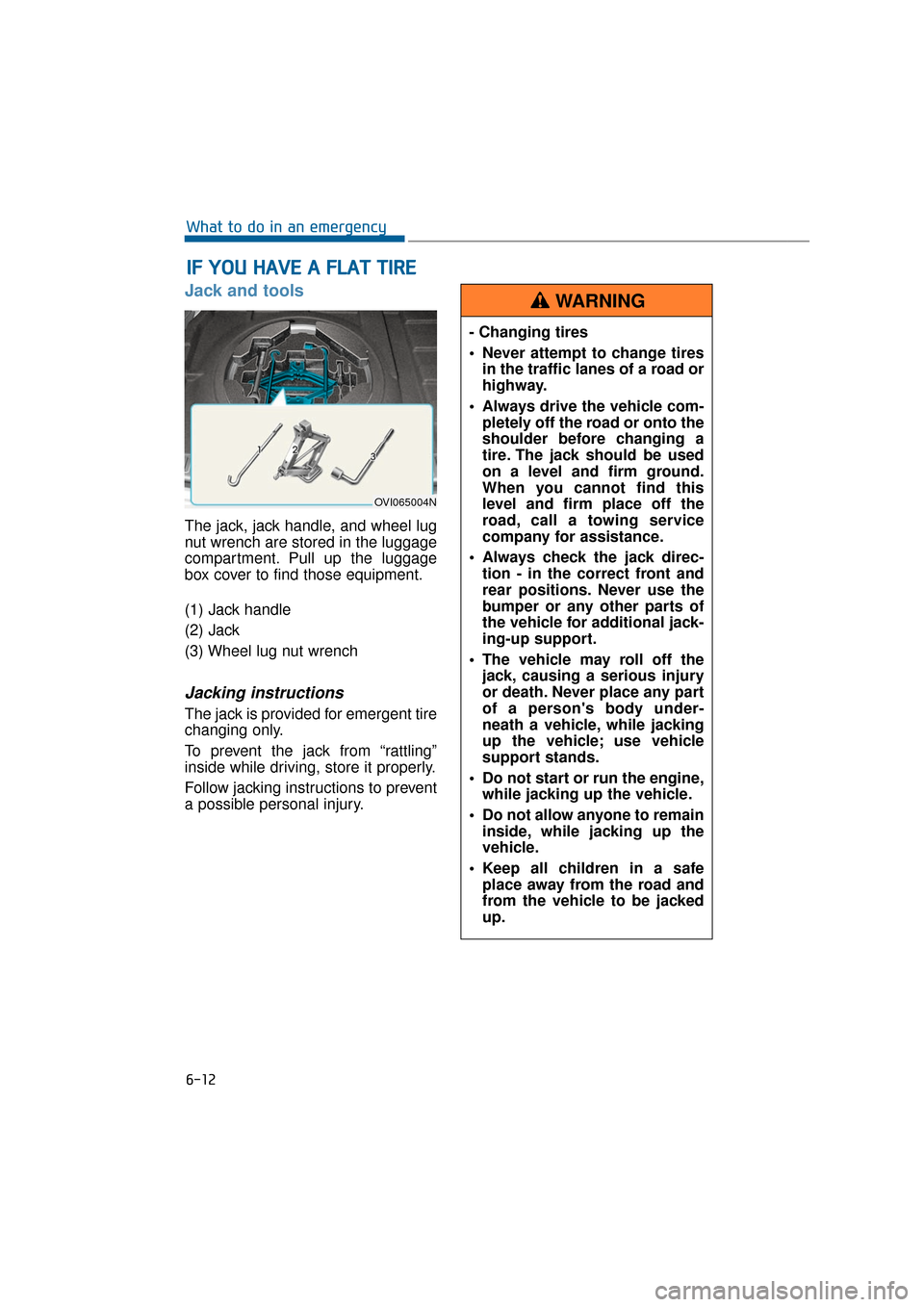
The jack, jack handle, and wheel lug
nut wrench are stored in the luggage
compartment. Pull up the luggage
box cover to find those equipment.
(1) Jack handle
(2) Jack
(3) Wheel lug nut wrench
Jacking instructions
The jack is provided for emergent tire
changing only.
To prevent the jack from “rattling”
inside while driving, store it properly.
Follow jacking instructions to prevent
a possible personal injury.
I IF
F
Y
Y O
O U
U
H
H A
AV
VE
E
A
A
F
F L
LA
A T
T
T
T I
IR
R E
E
6-12
What to do in an emergency
OVI065004N
- Changing tires
Never attempt to change tires
in the traffic lanes of a road or
highway.
Always drive the vehicle com- pletely off the road or onto the
shoulder before changing a
tire. The jack should be used
on a level and firm ground.
When you cannot find this
level and firm place off the
road, call a towing service
company for assistance.
Always check the jack direc- tion - in the correct front and
rear positions. Never use the
bumper or any other parts of
the vehicle for additional jack-
ing-up support.
The vehicle may roll off the jack, causing a serious injury
or death. Never place any part
of a person's body under-
neath a vehicle, while jacking
up the vehicle; use vehicle
support stands.
Do not start or run the engine, while jacking up the vehicle.
Do not allow anyone to remain inside, while jacking up the
vehicle.
Keep all children in a safe place away from the road and
from the vehicle to be jacked
up.
WARNING