buttons Hyundai Equus 2016 User Guide
[x] Cancel search | Manufacturer: HYUNDAI, Model Year: 2016, Model line: Equus, Model: Hyundai Equus 2016Pages: 477, PDF Size: 16.25 MB
Page 149 of 477
There are some conditions that can
cause changes to the vehicle mag-
nets, such as installing a ski rack or
a CB antenna. Body repair work on
the vehicle can also cause changes
to the vehicle's magnetic field. In
these situations, the compass will
need to be re-calibrated to quickly
correct these changes. To re-cali-
brate the compass:
1. Press and hold the button formore than 6 seconds. When the
compass memory is deleted, a let-
ter "C" will appear on the display.
2. To calibrate the compass, drive the vehicle in 2 complete circles at
less than 5 mph (8 km/h).
Integrated HomeLink®Wireless
Control System
The HomeLink®Wireless Control
System provides a convenient way to
replace up to three hand-held
radiofrequency (RF) transmitters
with a single built-in device. This
innovative feature will learn the radio
frequency codes of most current
transmitters to operate devices such
as gate operators, garage door
openers, entry door locks, security
systems, and even home lighting.
Both standard and rolling code-
equipped transmitters can be pro-
grammed by following the outlined
procedures. Additional HomeLink
®
information can be found at:
www.homelink.com or by calling 1-
800-355-3515. Before programming HomeLink
®to
a garage door opener or gate oper-
ator, make sure that people and
objects are out of the way from the
device to prevent potential harm or
damage. Do not use HomeLink
®
with any garage door opener that
lacks the safety stop and reverse
features required by U.S. federal
safety standards (this includes any
garage door opener model manu-
factured before April 1, 1982). A
garage door that cannot detect an
object - signaling the door to stop
and reverse - does not meet cur-
rent U.S. federal safety standards.
Using a garage door opener with-
out these features increases the
risk of serious injury or death.
Retain the original transmitter of the
RF device you programmed for use
in other vehicles as well as for future
HomeLink
®programming. It is also
suggested that upon the sale of the
vehicle, the programmed HomeLink
®
buttons be erased for security pur-
poses.
NOTICE
3-54
Convenient features of your vehicle
Page 150 of 477
Programming HomeLink®
Information
• When programming a garage dooropener, it is advised to park the
vehicle outside of the garage.
• It is recommended to replace the hand-held transmitter battery of the
device being programmed to
HomeLink
®for quicker training
and accurate transmission of the
radio-frequency signal.
• Some vehicles may require the igni- tion switch to be turned to the sec-
ond (or "accessories") position for
programming and/or operation of
HomeLink
®.
• In the event that there are still pro- gramming difficulties or questions
after following the programming
steps listed below, contact
HomeLink
®at: www.homelink.com
or 1-800-355-3515. Standard programming
To train most devices, follow these
instructions:
1. For first-time programming, press
and hold the two outside buttons,
HomeLink
®Channel 1 and
Channel 3 Buttons, until the indi-
cator light begins to flash (after 20
seconds). Release both buttons.
Do not hold the buttons for longer
than 30 seconds.
2. Point the end of your hand-held transmitter 1-3 inches (2-8 cm)
away from the HomeLink
®button
you wish to program while keeping
the indicator light in view.
3. Simultaneously press and hold both the HomeLink
®and handheld
transmitter buttons. DO NOT
release the buttons until step 4 is
completed.
4. When continuously pressing the buttons, the red Indicator Status
LED will flash slowly and then rap-
idly after HomeLink
®successfully
trains to the frequency signal from
the hand-held transmitter. Then,
release both buttons.
5. Press and hold the just-trained HomeLink
®button and observe
the red Status Indicator LED. If the
indicator light stays on constantly,
programming is complete and
your device will activate when the
HomeLink
®button is pressed and
released.
6. To program the remaining two HomeLink
®buttons, follow the
steps 2 to 5.
i
3-55
Convenient features of your vehicle03
Page 151 of 477
Rolling code programming
Rolling code devices, which are
"code-protected" and manufactured
after 1996, may be determined by
the followings:
Reference in the device manualfor verification.
The handheld transmitter appears to program the HomeLink
®
Universal Transceiver but does not
activate the device.
Press and hold the trained HomeLink
®button. The device has
the rolling code function if the indi-
cator light flashes rapidly and then
turns constantly ON after 2 sec-
onds.
To train rolling code devices, follow
these instructions:
1. At the garage door opener receiv- er (motor-head unit) in the garage,
locate the "learn" or "smart" but-
ton. This can usually be found
where the hanging antenna wire is
attached to the motor-head unit.
Exact location and color of the but-
ton may vary by garage door
opener brand. If there is difficulty
locating the training button, refer-
ence the device owner's manual or
please visit our Web site at
www.homelink.com.
2. Firmly press and release the "learn" or "smart" button (which
activates the "training light").
Information
Wait for 30 seconds before starting the
step 3. 3. Return to the vehicle. Firmly press
and hold the desired HomeLink
®
button for two seconds. Then,
release it. Repeat the
"press/hold/release" sequence a
second time to complete the pro-
gramming. (Some devices may
require you to repeat this
sequence a third time to complete
the programming.)
4. Press and hold the just-trained HomeLink
®button and observe
the red Status Indicator LED. If the
indicator light stays on constantly,
programming is complete and
your device should activate.
5. To program the remaining two HomeLink
®buttons, follow either
the steps 1 to 4, as above, for other
Rolling Code devices or the steps
2 to 5 in Standard Programming for
standard devices.
Gate operator & Canadian
programming
During programming, your handheld
transmitter may automatically stop
transmitting. Continue to press the
Integrated HomeLink
®Wireless
Control System button (refer to the
steps 2 to 4 in the Standard
Programming) while you press and
re-press ("cycle") your handheld
transmitter every two seconds until
the frequency signal is learned. The
indicator light will flash slowly and
then rapidly after several seconds
upon successful training.
i
3-56
Convenient features of your vehicle
Page 152 of 477
Operating HomeLink®
To operate, simply press and release
the programmed HomeLink®button.
Activation will occur for the trained
device (i.e. garage door opener, gate
operator, security system, entry door
lock, home/office lighting, etc.). For
convenience, the hand-held transmit-
ter of the device may also be used at
any time.
Reprogramming a single
HomeLink
®button
To program a new device to a previ-
ously trained HomeLink
®button, fol-
low these steps:
1. Press and hold the desired HomeLink
®button. Do NOT release
until the step 4 is completed.
2. When the indicator light begins to flash slowly (after 20 seconds),
point the handheld transmitter 1 to
3 inches away from the
HomeLink
®surface.
3. Press and hold the handheld transmitter button. The HomeLink
®
indicator light will flash, first slowly
and then rapidly.
4. When the indicator light begins to flash rapidly, release both buttons.
5. Press and hold the just-trained HomeLink
®button and observe
the red Status Indicator LED. If the
indicator light stays on constantly,
programming is complete and
your new device should activate. Erasing HomeLink
®buttons
An individual programming cannot
be erased. However, to erase all
three programmings;
1. Press and hold the two outer HomeLink
®buttons until the indi-
cator light begins to flash after 20
seconds; and
2. Release both buttons. Do not hold for longer than 30 seconds.
The Integrated HomeLink
®Wireless
Control System is now in the training
(learning) mode and can be pro-
grammed at any time by following the
appropriate steps as in the
"Programming".
FCC ID: NZLZTVHL3
IC: 4112A-ZTVHL3
3-57
Convenient features of your vehicle03
Page 159 of 477
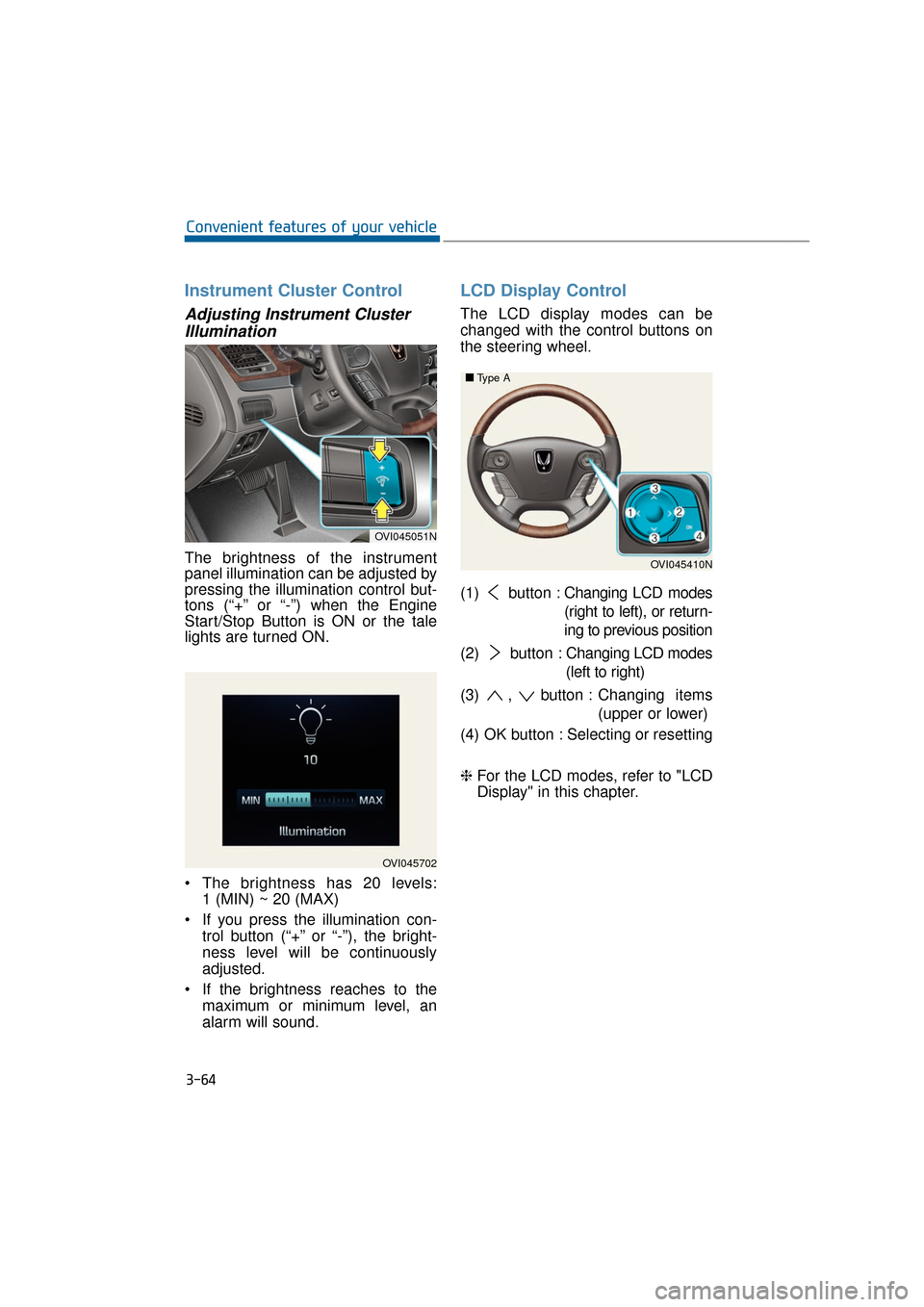
Instrument Cluster Control
Adjusting Instrument ClusterIllumination
The brightness of the instrument
panel illumination can be adjusted by
pressing the illumination control but-
tons (“+” or “-”) when the Engine
Start/Stop Button is ON or the tale
lights are turned ON.
The brightness has 20 levels: 1 (MIN) ~ 20 (MAX)
If you press the illumination con- trol button (“+” or “-”), the bright-
ness level will be continuously
adjusted.
If the brightness reaches to the maximum or minimum level, an
alarm will sound.
LCD Display Control
The LCD display modes can be
changed with the control buttons on
the steering wheel.
(1) button : Changing LCD modes
(right to left), or return-
ing to previous position
(2) button : Changing LCD modes
(left to right)
(3) , button : Changing items
(upper or lower)
(4) OK button : Selecting or resetting
❈ For the LCD modes, refer to "LCD
Display" in this chapter.
3-64
Convenient features of your vehicle
OVI045702
OVI045051N
OVI045410N
■
■
Type A
Page 163 of 477
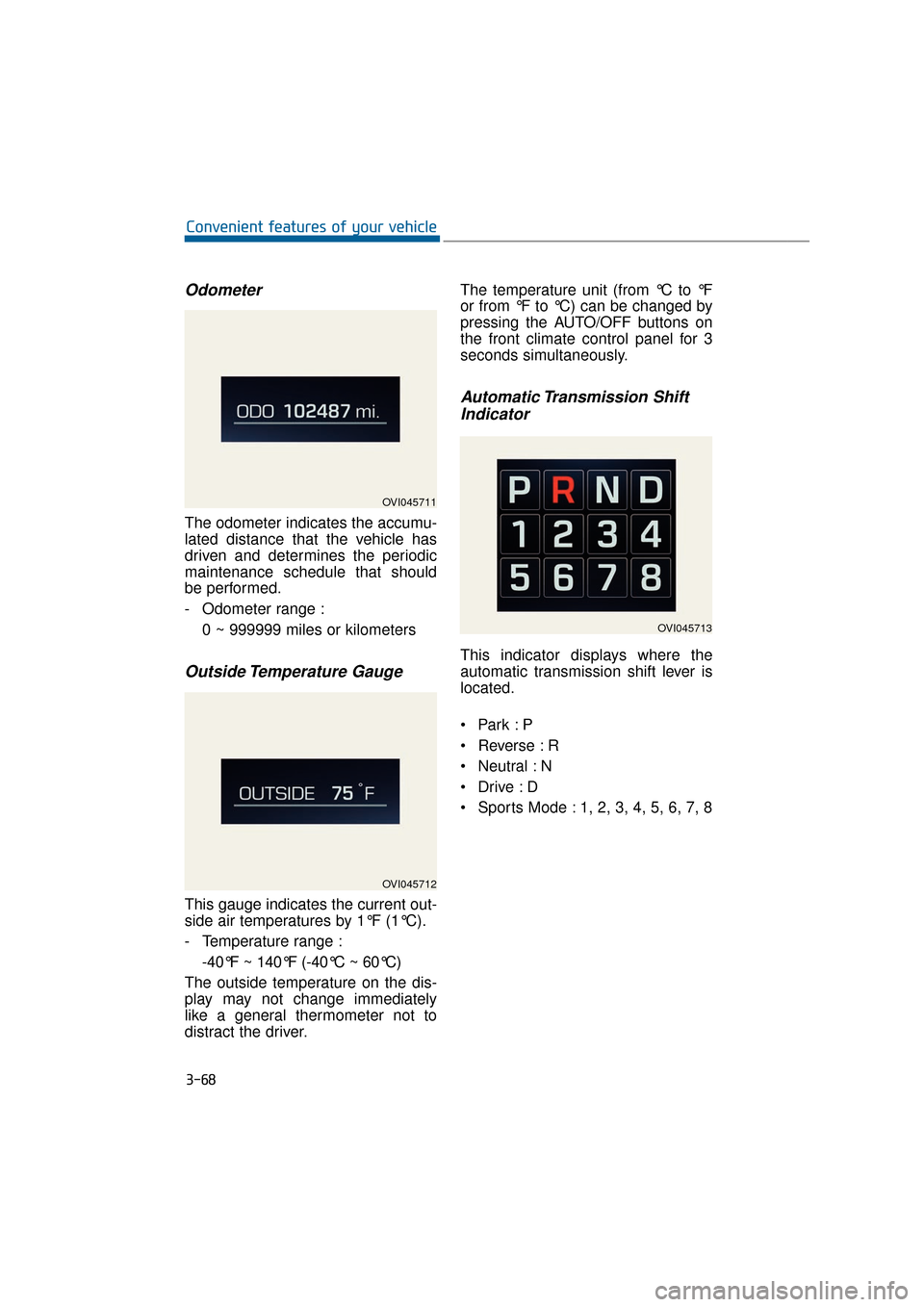
Odometer
The odometer indicates the accumu-
lated distance that the vehicle has
driven and determines the periodic
maintenance schedule that should
be performed.
- Odometer range :0 ~ 999999 miles or kilometers
Outside Temperature Gauge
This gauge indicates the current out-
side air temperatures by 1°F (1°C).
- Temperature range :-40°F ~ 140°F (-40°C ~ 60°C)
The outside temperature on the dis-
play may not change immediately
like a general thermometer not to
distract the driver. The temperature unit (from °C to °F
or from °F to °C) can be changed by
pressing the AUTO/OFF buttons on
the front climate control panel for 3
seconds simultaneously.
Automatic Transmission Shift
Indicator
This indicator displays where the
automatic transmission shift lever is
located.
Reverse : R
Neutral : N
Sports Mode : 1, 2, 3, 4, 5, 6, 7, 8
3-68
Convenient features of your vehicle
OVI045711
OVI045712
OVI045713
Page 221 of 477
3-126
Convenient features of your vehicle
Manual air heating and cooling
The heating and cooling system can
be controlled manually by pushing
buttons except the AUTO button. In
this case, the system works sequen-
tially according to the order of button
selection. When pressing any button
except the AUTO button in automatic
mode, the selected function will
changed not to be controlled auto-
matically.
1. Start the engine.
2. Set the mode, as desired.For improved heating and cooling
effects:- Heating:
- Cooling:
3. Set the temperature control, as desired.
4. Set the air intake control to the outside (fresh) air position.
5. Set the fan speed control, as desired.
6. If air conditioning operation is needed, turn the air conditioning
system ON.
Press the AUTO button in order to
convert to the full automatic mode of
the climate control system.
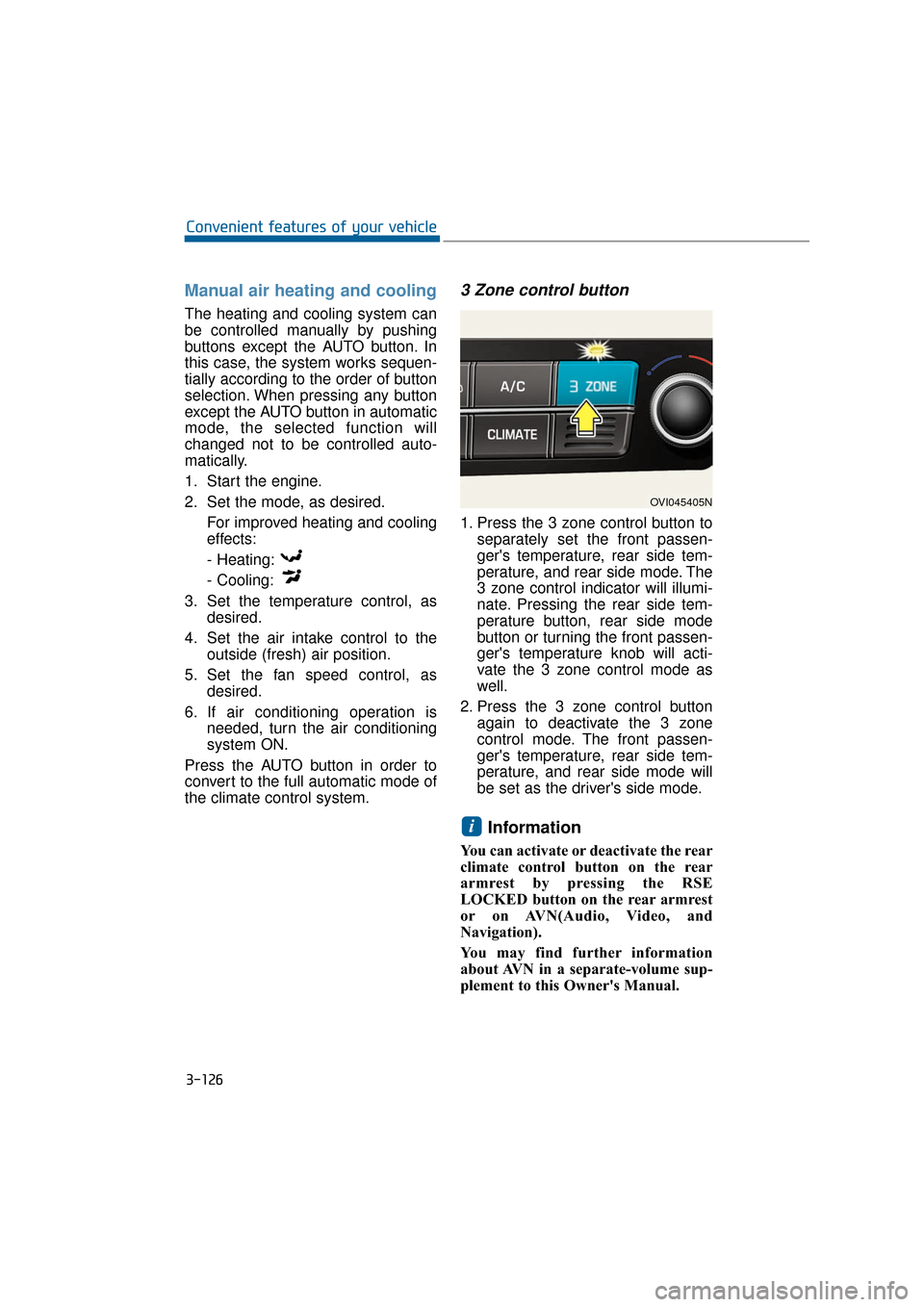
3 Zone control button
1. Press the 3 zone control button to separately set the front passen-
ger's temperature, rear side tem-
perature, and rear side mode. The
3 zone control indicator will illumi-
nate. Pressing the rear side tem-
perature button, rear side mode
button or turning the front passen-
ger's temperature knob will acti-
vate the 3 zone control mode as
well.
2. Press the 3 zone control button again to deactivate the 3 zone
control mode. The front passen-
ger's temperature, rear side tem-
perature, and rear side mode will
be set as the driver's side mode.
Information
You can activate or deactivate the rear
climate control button on the rear
armrest by pressing the RSE
LOCKED button on the rear armrest
or on AVN(Audio, Video, and
Navigation).
You may find further information
about AVN in a separate-volume sup-
plement to this Owner's Manual.
i
OVI045405N
Page 233 of 477
3-138
Convenient features of your vehicle
For the maximum defrosting effects, set the temperature to be
extreme hot (extreme right) and
set the fan speed in the highest.
When you want warm air near the floor while defrosting or defogging,
set the mode in the floor-defrost
position.
Before driving, clear all snow and ice from the windshield, rear win-
dow, outside rear view mirrors,
and all side windows.
Clear all snow and ice from the hood and air inlet in the cowl grill
to improve heater and defroster
efficiency and to prevent possible
dew condensation on the inside of
the windshield.
Information
If the engine temperature is still cold
after starting, brief warming up of the
engine may be required to warm the
air in the air outlet.
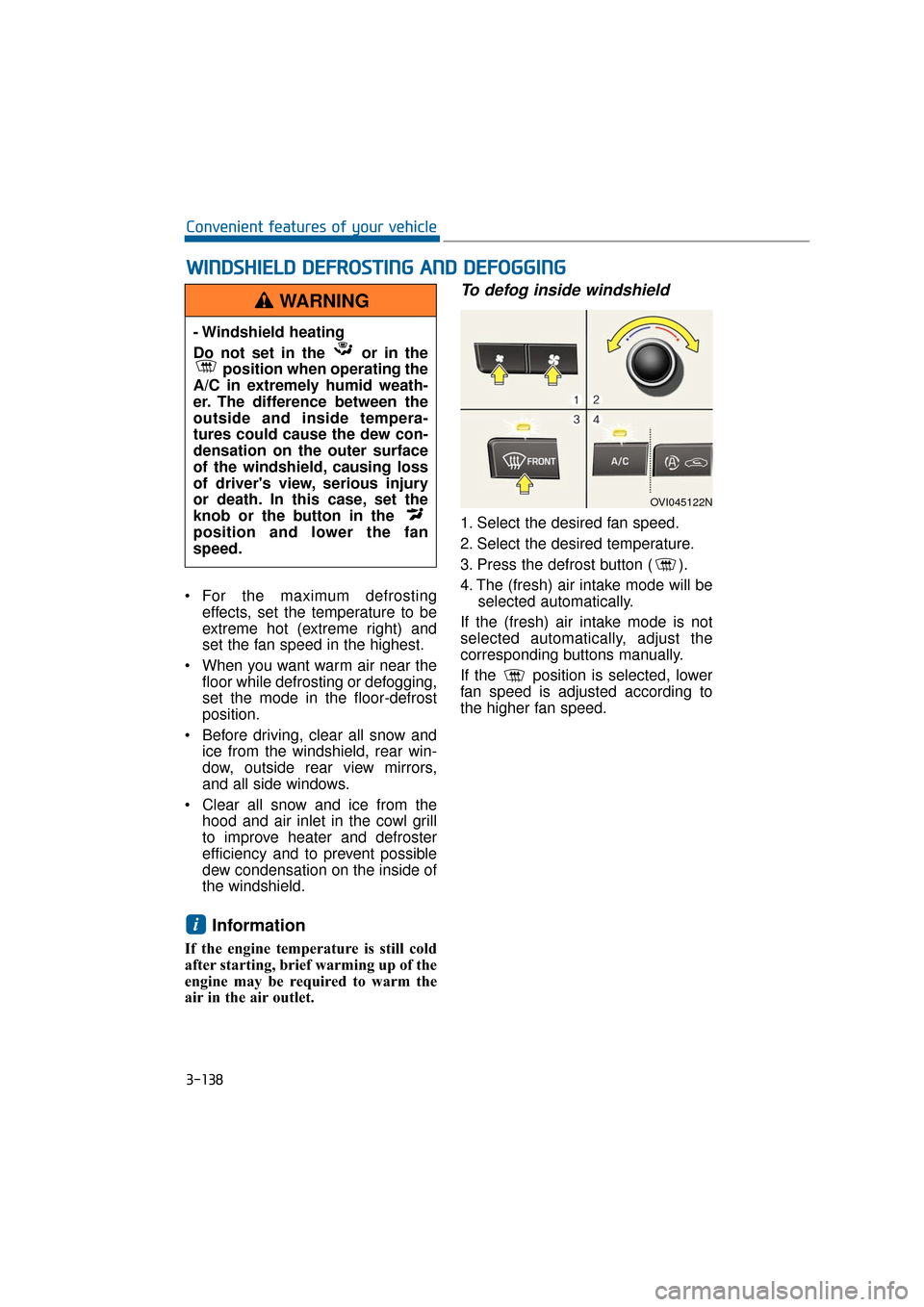
To defog inside windshield
1. Select the desired fan speed.
2. Select the desired temperature.
3. Press the defrost button ( ).
4. The (fresh) air intake mode will beselected automatically.
If the (fresh) air intake mode is not
selected automatically, adjust the
corresponding buttons manually.
If the position is selected, lower
fan speed is adjusted according to
the higher fan speed.
i
W
W I
IN
N D
DS
SH
H I
IE
E L
LD
D
D
D E
EF
FR
R O
O S
ST
T I
IN
N G
G
A
A N
N D
D
D
D E
EF
FO
O G
GG
GI
IN
N G
G
- Windshield heating
Do not set in the or in the
position when operating the
A/C in extremely humid weath-
er. The difference between the
outside and inside tempera-
tures could cause the dew con-
densation on the outer surface
of the windshield, causing loss
of driver's view, serious injury
or death. In this case, set the
knob or the button in the
position and lower the fan
speed.
WARNING
OVI045122N
Page 251 of 477
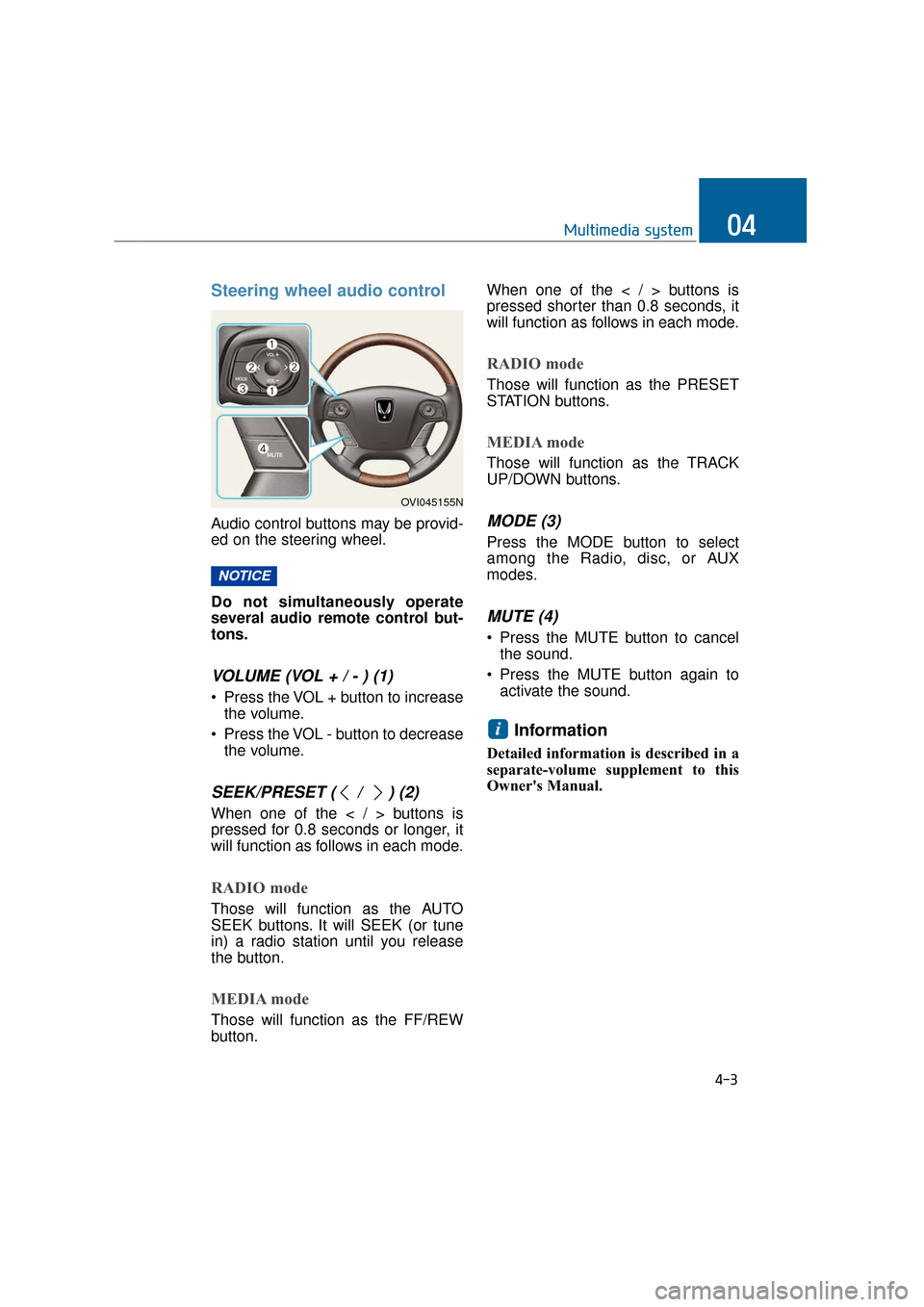
Steering wheel audio control
Audio control buttons may be provid-
ed on the steering wheel.
Do not simultaneously operate
several audio remote control but-
tons.
VOLUME (VOL + / - ) (1)
• Press the VOL + button to increasethe volume.
Press the VOL - button to decrease the volume.
SEEK/PRESET ( / ) (2)
When one of the < / > buttons is
pressed for 0.8 seconds or longer, it
will function as follows in each mode.
RADIO mode
Those will function as the AUTO
SEEK buttons. It will SEEK (or tune
in) a radio station until you release
the button.
MEDIA mode
Those will function as the FF/REW
button. When one of the < / > buttons is
pressed shorter than 0.8 seconds, it
will function as follows in each mode.
RADIO mode
Those will function as the PRESET
STATION buttons.
MEDIA mode
Those will function as the TRACK
UP/DOWN buttons.
MODE (3)
Press the MODE button to select
among the Radio, disc, or AUX
modes.
MUTE (4)
Press the MUTE button to cancel
the sound.
Press the MUTE button again to activate the sound.
Information
Detailed information is described in a
separate-volume supplement to this
Owner's Manual.
i
NOTICE
4-3
Multimedia system04
OVI045155N