ESP Hyundai Equus 2016 Owner's Guide
[x] Cancel search | Manufacturer: HYUNDAI, Model Year: 2016, Model line: Equus, Model: Hyundai Equus 2016Pages: 477, PDF Size: 16.25 MB
Page 266 of 477
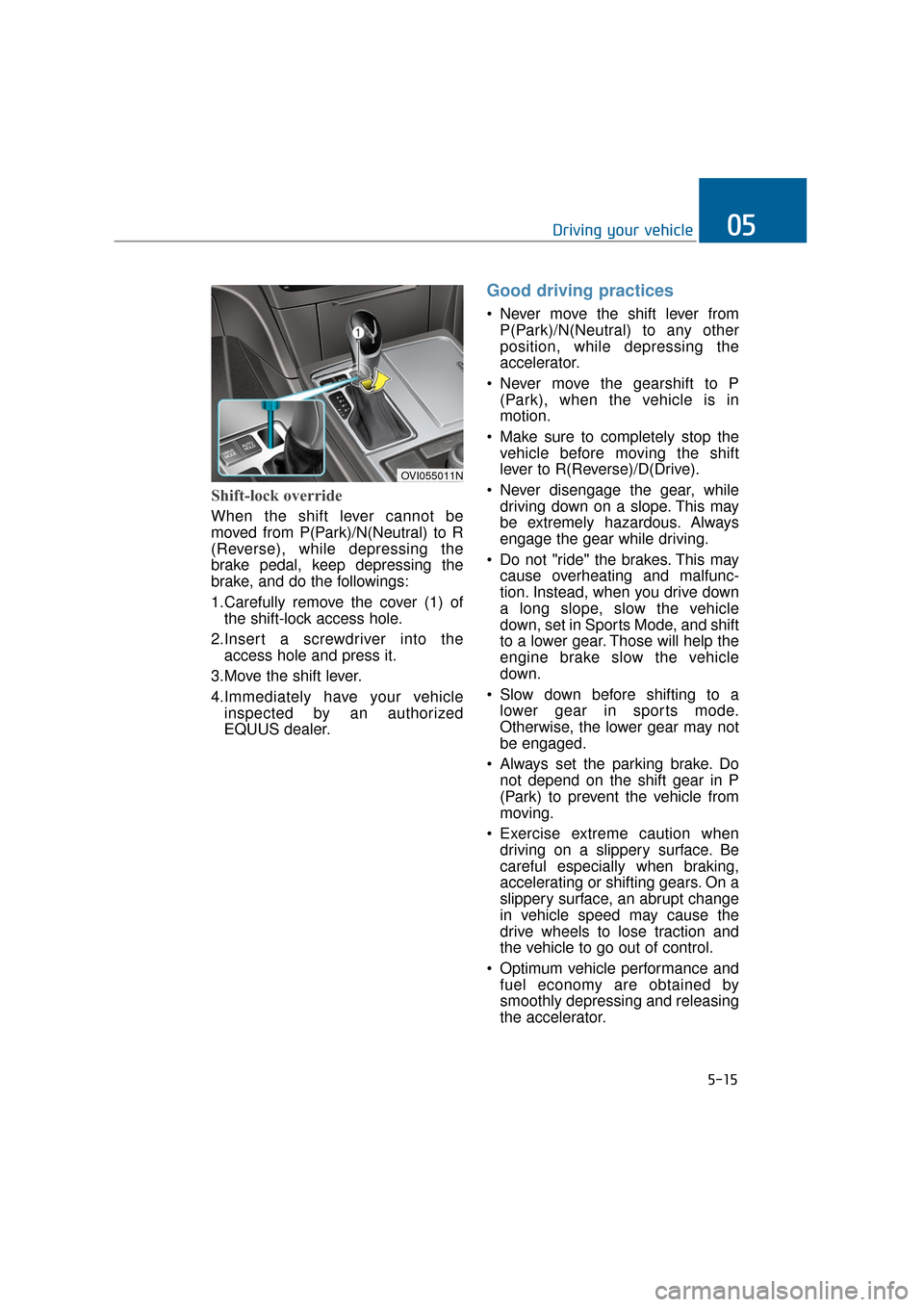
Shift-lock override
When the shift lever cannot be
moved from P(Park)/N(Neutral) to R
(Reverse), while depressing the
brake pedal, keep depressing the
brake, and do the followings:
1.Carefully remove the cover (1) ofthe shift-lock access hole.
2.Insert a screwdriver into the access hole and press it.
3.Move the shift lever.
4.Immediately have your vehicle inspected by an authorized
EQUUS dealer.
Good driving practices
Never move the shift lever fromP(Park)/N(Neutral) to any other
position, while depressing the
accelerator.
Never move the gearshift to P (Park), when the vehicle is in
motion.
Make sure to completely stop the vehicle before moving the shift
lever to R(Reverse)/D(Drive).
Never disengage the gear, while driving down on a slope. This may
be extremely hazardous. Always
engage the gear while driving.
Do not "ride" the brakes. This may cause overheating and malfunc-
tion. Instead, when you drive down
a long slope, slow the vehicle
down, set in Sports Mode, and shift
to a lower gear. Those will help the
engine brake slow the vehicle
down.
Slow down before shifting to a lower gear in sports mode.
Otherwise, the lower gear may not
be engaged.
Always set the parking brake. Do not depend on the shift gear in P
(Park) to prevent the vehicle from
moving.
Exercise extreme caution when driving on a slippery surface. Be
careful especially when braking,
accelerating or shifting gears. On a
slippery surface, an abrupt change
in vehicle speed may cause the
drive wheels to lose traction and
the vehicle to go out of control.
Optimum vehicle performance and fuel economy are obtained by
smoothly depressing and releasing
the accelerator.
5-15
Driving your vehicle05
OVI055011N
Page 280 of 477
The ESC system is an electronic
system to help the driver maintain
vehicle control in adverse conditions.
It is not a substitute for safe driving
practices. Various factors, including
speed, road conditions and driver's
steering maneuver, affect the ESC
performance in preventing a loss of
control. It is still driver's responsibility
to drive and corner at a proper speed
and to keep a safe distance. When
depressing the brake under condi-
tions, which may lock the wheels,
you may hear a snapping sound and
feel like that from the brake pedal.
This is normal and indicates your
ESC actively operates.
Information
A clicking sound may be heard from
the engine compartment, when the
engine is started and the vehicle
begins to move. This is normal, indi-
cating that the ESC actively operates.
ESC operation
ESC ON condition
When the Engine Start/Stop button
is turned ON, the ESC and the ESC
OFF indicator lights illuminate for
approximately 3 seconds and goes
off, then the ESC is turned on.
When operating
When the ESC operates,
the ESC indicator will flash.
operates, you can feel a
slight pulsation from the
vehicle. This is because of
the brake control, and
does not indicate a prob-
lem.
mud or driving on a slip-
pery road, the engine rpm
may not be increased
even with the accelerator
deeply depressed. This is
to maintain the stability
and traction and does not
indicate a problem.
i
5-29
Driving your vehicle05
Page 289 of 477
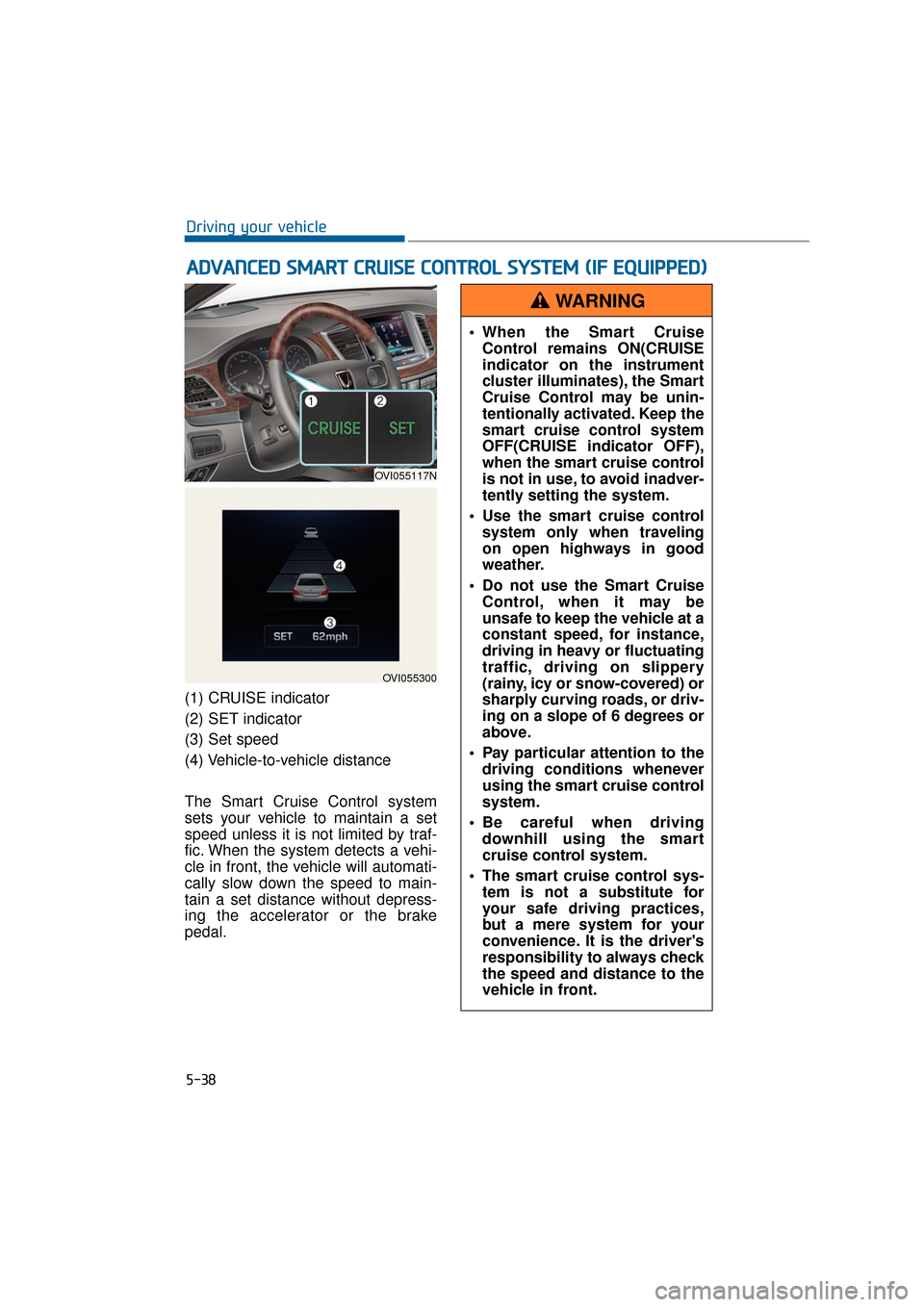
(1) CRUISE indicator
(2) SET indicator
(3) Set speed
(4) Vehicle-to-vehicle distance
The Smart Cruise Control system
sets your vehicle to maintain a set
speed unless it is not limited by traf-
fic. When the system detects a vehi-
cle in front, the vehicle will automati-
cally slow down the speed to main-
tain a set distance without depress-
ing the accelerator or the brake
pedal.
A AD
DV
VA
A N
N C
CE
E D
D
S
S M
M A
AR
RT
T
C
C R
R U
U I
IS
S E
E
C
C O
O N
NT
TR
R O
O L
L
S
S Y
Y S
ST
T E
EM
M
(
( I
IF
F
E
E Q
Q U
UI
IP
P P
PE
ED
D )
)
5-38
Driving your vehicle
OVI055117N
OVI055300
When the Smart Cruise
Control remains ON(CRUISE
indicator on the instrument
cluster illuminates), the Smart
Cruise Control may be unin-
tentionally activated. Keep the
smart cruise control system
OFF(CRUISE indicator OFF),
when the smart cruise control
is not in use, to avoid inadver-
tently setting the system.
Use the smart cruise control system only when traveling
on open highways in good
weather.
Do not use the Smart Cruise Control, when it may be
unsafe to keep the vehicle at a
constant speed, for instance,
driving in heavy or fluctuating
traffic, driving on slippery
(rainy, icy or snow-covered) or
sharply curving roads, or driv-
ing on a slope of 6 degrees or
above.
Pay particular attention to the driving conditions whenever
using the smart cruise control
system.
Be careful when driving downhill using the smart
cruise control system.
The smart cruise control sys- tem is not a substitute for
your safe driving practices,
but a mere system for your
convenience. It is the driver's
responsibility to always check
the speed and distance to the
vehicle in front.
WARNING
Page 290 of 477
Information
During the normal operation of the
Smart Cruise Control, with the SET
switch activated or reactivated after
applying brakes, the Smart Cruise
Control will energize after approxi-
mately 3 seconds. This delay is nor-
mal.
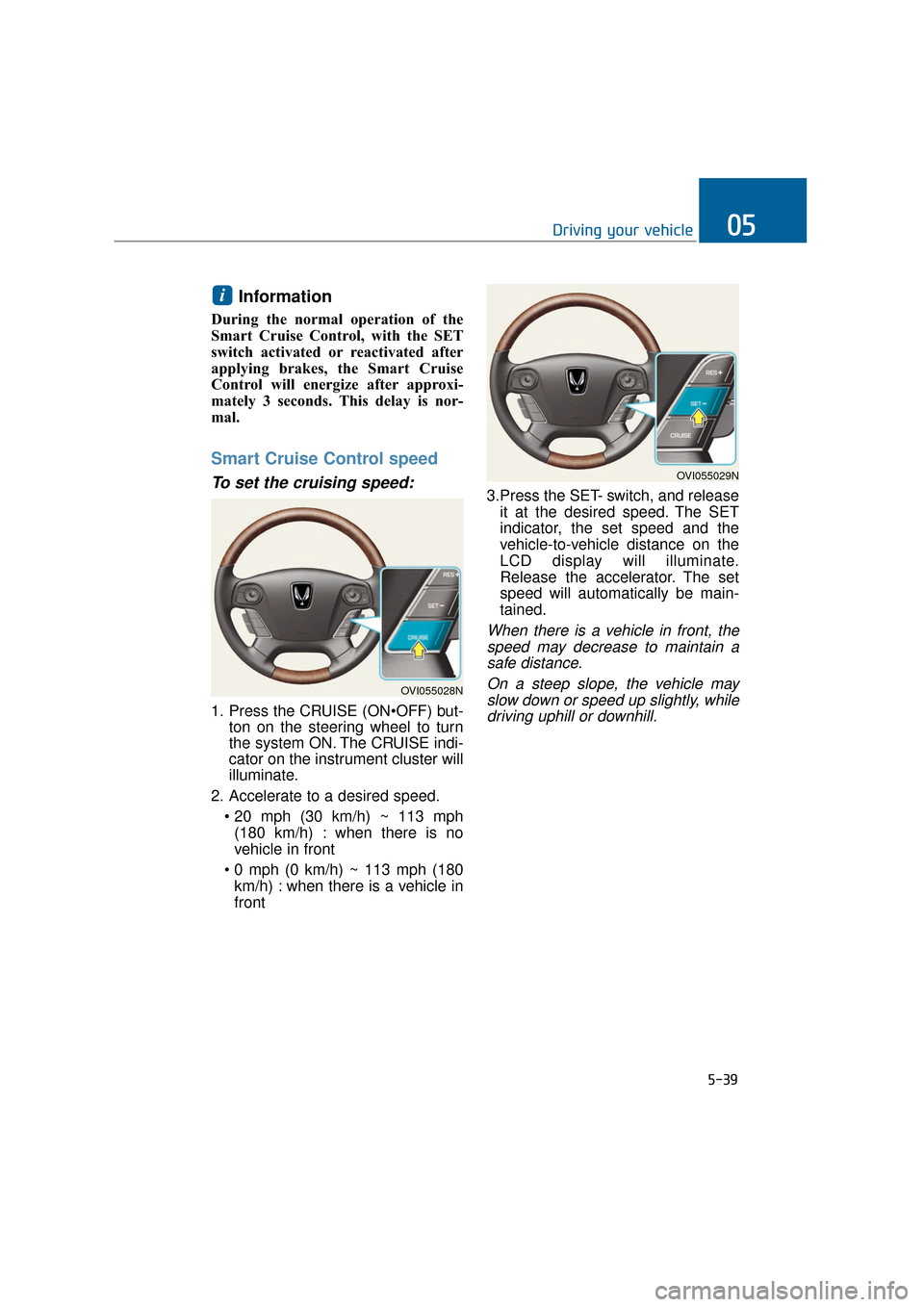
Smart Cruise Control speed
To set the cruising speed:
1. Press the CRUISE (ONton on the steering wheel to turn
the system ON. The CRUISE indi-
cator on the instrument cluster will
illuminate.
2. Accelerate to a desired speed. (180 km/h) : when there is no
vehicle in front
km/h) : when there is a vehicle in
front 3.Press the SET- switch, and release
it at the desired speed. The SET
indicator, the set speed and the
vehicle-to-vehicle distance on the
LCD display will illuminate.
Release the accelerator. The set
speed will automatically be main-
tained.
When there is a vehicle in front, thespeed may decrease to maintain asafe distance.
On a steep slope, the vehicle mayslow down or speed up slightly, whiledriving uphill or downhill.
i
5-39
Driving your vehicle05
OVI055028N
OVI055029N
Page 301 of 477
The Smart Cruise Control system
may be temporarily inoperable
due to any strong electromagnetic
waves.
NOTICE
5-50
Driving your vehicle The vehicle cannot be stopped by using the Smart Cruise
Control system.
If necessary, you must
depress the brake.
Maintain a safe distance from a vehicle in front depending
on the road conditions and the
vehicle speed. When the vehi-
cle-to-vehicle distance is too
close while driving at a high
speed, it may cause a serious
collision.
The Smart Cruise Control sys- tem cannot recognize stopped
vehicles, pedestrians or
oncoming vehicles.
Always cautiously look
around the front to prevent
unexpected and sudden situa-
tions from occurring.
When a vehicle in front fre- quently change lanes, it may
delay the system reaction
time or may react to recognize
a vehicle in the next lane.
Always cautiously look
around the front to prevent
unexpected and sudden situa-
tions from occurring.
The Smart Cruise Control sys- tem is not a substitute for
your safe driving practices
but only a system for your
convenience. It is the driver's
responsibility to always check
the speed and the vehicle-to-
vehicle distance.
Always be aware of the set speed and vehicle-to-vehicle
distance.
(Continued)
(Continued)
Always maintain a sufficientbraking distance. If neces-
sary, decelerate your vehicle
by depressing the brake.
Always pay close attention to the driving conditions and the
vehicle speed, since the
Smart Cruise Control system
may not recognize complex
driving situations.
For your safe operation, care- fully read the manual in
advance and follow the
instructions.WARNING
Page 302 of 477
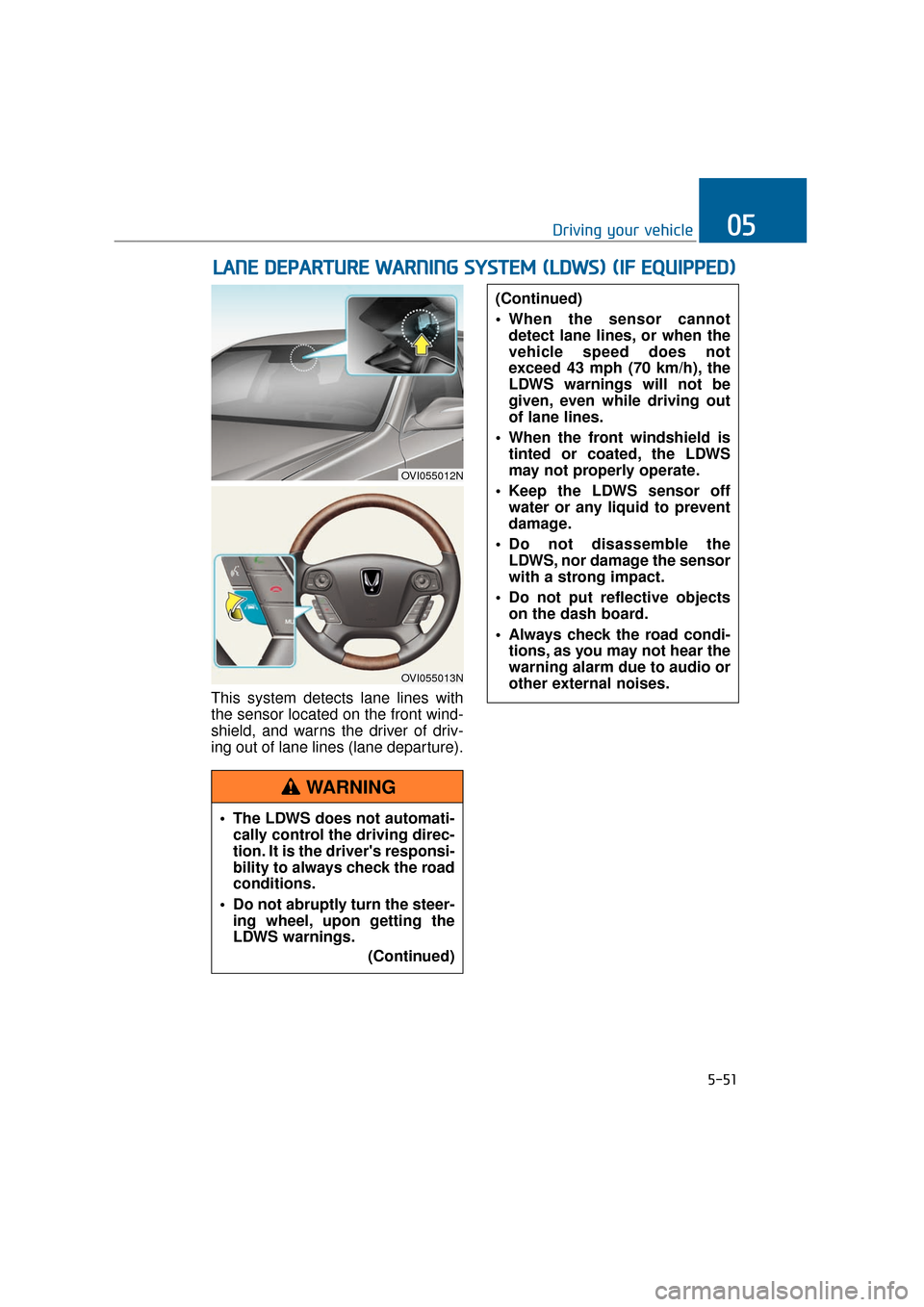
This system detects lane lines with
the sensor located on the front wind-
shield, and warns the driver of driv-
ing out of lane lines (lane departure).
L LA
A N
N E
E
D
D E
EP
P A
A R
RT
TU
U R
RE
E
W
W A
AR
RN
N I
IN
N G
G
S
S Y
Y S
ST
T E
EM
M
(
( L
L D
D W
W S
S)
)
(
( I
IF
F
E
E Q
Q U
UI
IP
P P
PE
ED
D )
)
5-51
Driving your vehicle05
OVI055012N
OVI055013N
The LDWS does not automati-
cally control the driving direc-
tion. It is the driver's responsi-
bility to always check the road
conditions.
Do not abruptly turn the steer- ing wheel, upon getting the
LDWS warnings.
(Continued)
(Continued)
When the sensor cannotdetect lane lines, or when the
vehicle speed does not
exceed 43 mph (70 km/h), the
LDWS warnings will not be
given, even while driving out
of lane lines.
When the front windshield is tinted or coated, the LDWS
may not properly operate.
Keep the LDWS sensor off water or any liquid to prevent
damage.
Do not disassemble the LDWS, nor damage the sensor
with a strong impact.
Do not put reflective objects on the dash board.
Always check the road condi- tions, as you may not hear the
warning alarm due to audio or
other external noises.
WARNING
Page 307 of 477
Seat belt operating
The seat belt tightens when the vehi-
cle senses a collision.
When the AVSM is activated ordeactivated, make sure that the
vehicle is stopped.
When the engine runs, the AVSM is automatically turned ON. If
unnecessary, select the AVSM
OFF in the User Settings mode.
Even when the AVSM ON is selected in the User Settings
mode, but when the ESC is
turned OFF by pressing the ESC
OFF button, the AVSM is auto-
matically deactivated. Then, it is
impossible to manually control
the AVSM.
Malfunction indicator
The AVSM OFF indicator illumi-nates, when the Engine Start/Stop
button is pressed ON. However, it
goes OFF in approximately 3 sec-
onds. When the indicator does not
illuminate, or continuously remains
ON even after 3 seconds, with the
Engine Start/Stop button ON, or
when the indicator remains ON
while driving, the AVSM does not
properly operate. Take your vehicle
to an authorized EQUUS dealer
and have the system checked.
The AVSM OFF indicator may illu- minate, when the ESC indicator or
SCC indicator illuminates. It does
not indicate a malfunction of the
AVSM.
NOTICE
5-56
Driving your vehicle
The AVSM is not a substitute for
your safe driving practices, but
only a supplementary system. It
is the driver's responsibility to
always check the speed and the
vehicle-to-vehicle distance.
WARNING
The AVSM is activated depend-
ing on the vehicle-to-vehicle
distance, relative velocity and
driver's brake pedal/accelerator
operation. Do not recklessly
drive on purpose to activate the
AVSM.
WARNING
Page 316 of 477
5-65
Driving your vehicle05
Your vehicle's fuel economy depends
mainly on your driving style such as
where you drive and when you drive.
Each of these factors affects your
fuel economy (how many miles/kilo-
meters you can drive with a
gallon/liter of fuel). To drive your vehi-
cle as economically as possible, fol-
low the below driving suggestions.
These will help you save in both the
fuel and repair expenses:
Drive smoothly. Accelerate at amoderate rate. Do not make
"jackrabbit" starts or full-throttle
shifts. Maintain a steady cruising
speed. Do not race between stop-
lights. Try to adjust your speed in
accordance with other traffic to
avoid unnecessary speed
changes. Avoid heavy traffic when-
ever possible. Always maintain a
safe distance from a vehicle in
front to avoid unnecessary braking.
This also reduces brake wear-out.
Drive at a moderate speed. The faster you drive, the more fuel your
vehicle uses. Driving at a moderate
speed, in the highest gear appro-
priate for the driving conditions
especially on the highway, is one of
the most effective ways to reduce
fuel consumption.
Do not "ride" the brake pedal. This can increase fuel consumption and
also wear out the brake compo-
nents. In addition, resting your foot
on the brake pedal, while driving,
may overheat the brake, reducing
breaking effects and possibly lead-
ing a serious consequence.
Check your tire conditions. Keep them inflated to the recommended
pressure level. Under or over infla-
tion will unnecessarily tire wear-
out. Check the tire pressures at
least once a month. Make sure that the wheels are cor-
rectly aligned. Hitting a curb or
driving too fast on uneven surfaces
may distort the wheel alignment.
Poor alignment causes faster tire
wear-out and may also result in
other problems as well as greater
fuel consumption.
Keep your vehicle in good condi- tion. For the better fuel economy
and the cheaper maintenance
expenses, maintain your vehicle in
accordance with the maintenance
schedule in the chapter 7. When
you drive your vehicle in harsh con-
ditions, more frequent mainte-
nance is required (refer to the
chapter 7 for further information).
Keep your vehicle clean. Your vehi- cle should be kept clean and away
from any corrosive substances. It is
especially important that mud, dirt,
ice and others are not daubed
under the vehicle. This extra weight
may increase the fuel consumption
and also cause corrosion.
Avoid a heavy loading. Do not carry unnecessary weight in your
vehicle. It will improve your fuel
economy.
Do not let the engine idle longer than necessary. When you wait
(not in traffic), turn OFF the engine.
Then restart the engine, when you
are ready to go.
Remember that your vehicle does not require the engine warm-up for
a long time. After turning On the
engine, run the engine for 10 to 20
seconds, before shifting the gear.
In cold weather, however, your
engine needs a slightly longer
warm-up period.
E EC
CO
O N
NO
O M
M I
IC
C A
A L
L
O
O P
PE
ER
R A
A T
TI
IO
O N
N
Page 319 of 477
5-68
Driving your vehicle
Rocking the vehicle
When it is necessary to rock the
vehicle to escape from snow, sand,
or mud, first move the steering wheel
from side to side to clear the front-
wheel area. Then, move the shift
lever back and forth between
R(Reverse) and any forward gears.
Do not race the engine, and avoid
unnecessary wheel spins. When
your vehicle is still stuck in after try-
ing the above, have the vehicle
pulled out by a tow truck to avoid
engine overheating and transmission
damages.
A long-time rocking may overheat
the engine and damage the trans-
mission/tires.
Information
The ESC system must be turned OFF
before rocking the vehicle.
i
NOTICE
- Spinning tires
Do not spin the wheels, espe-
cially faster than 35 mph (56
km/h). Spinning the wheels at a
high speed, while parking, may
overheat a tire and injure
passers-by.
WARNING
When your vehicle is stuck in
snow, mud, sand, etc., you may
rock the vehicle to escape by
moving forwards and back-
wards. Do not attempt this,
when people or objects are any-
where near the vehicle. Rocking
the vehicle may cause it to sud-
denly move forwards or back-
wards, as it becomes unstuck,
injuring nearby people or dam-
aging objects.
WARNING
Page 320 of 477
5-69
Driving your vehicle05
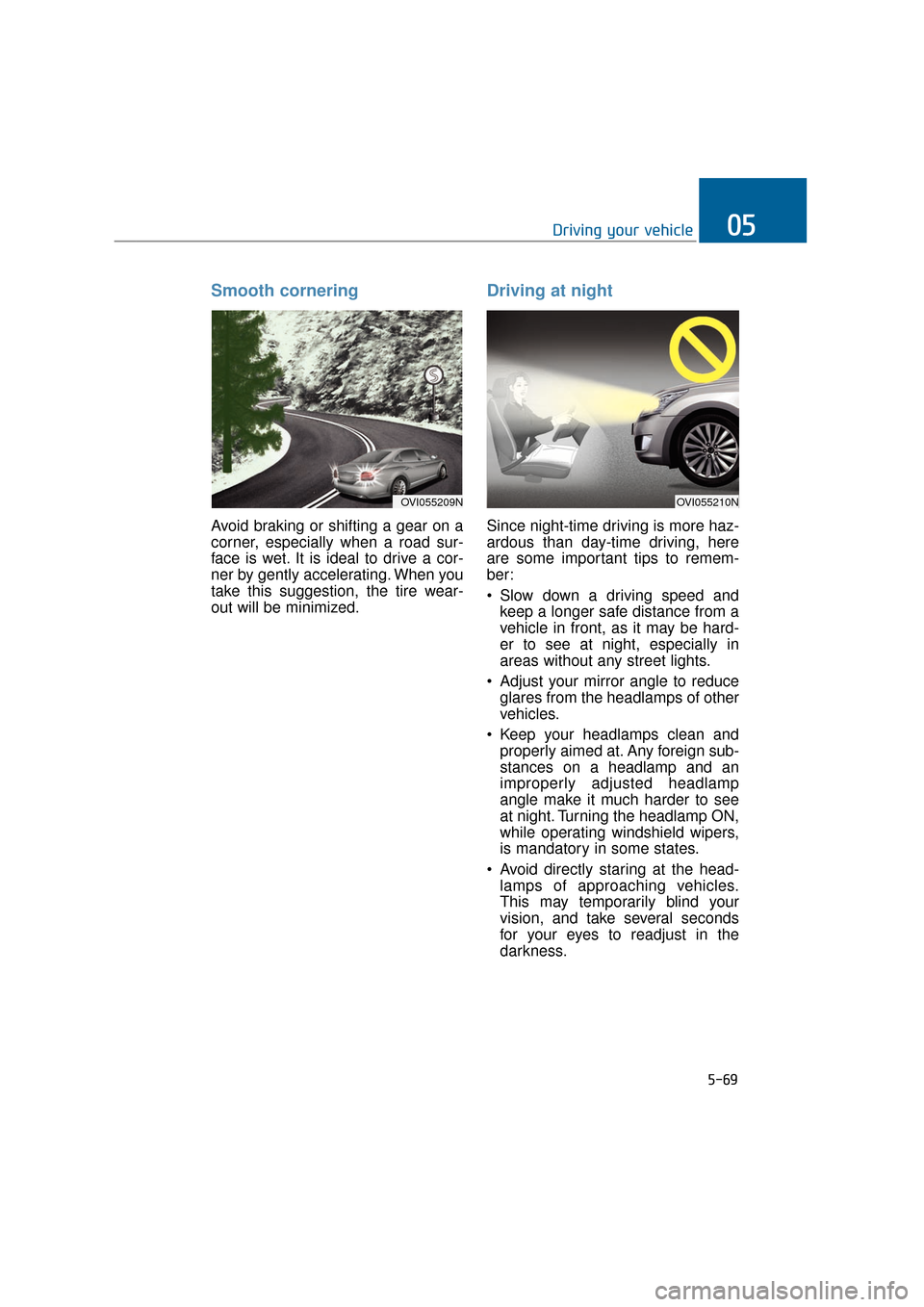
Smooth cornering
Avoid braking or shifting a gear on a
corner, especially when a road sur-
face is wet. It is ideal to drive a cor-
ner by gently accelerating. When you
take this suggestion, the tire wear-
out will be minimized.
Driving at night
Since night-time driving is more haz-
ardous than day-time driving, here
are some important tips to remem-
ber:
Slow down a driving speed andkeep a longer safe distance from a
vehicle in front, as it may be hard-
er to see at night, especially in
areas without any street lights.
Adjust your mirror angle to reduce glares from the headlamps of other
vehicles.
Keep your headlamps clean and properly aimed at. Any foreign sub-
stances on a headlamp and an
improperly adjusted headlamp
angle make it much harder to see
at night. Turning the headlamp ON,
while operating windshield wipers,
is mandatory in some states.
Avoid directly staring at the head- lamps of approaching vehicles.
This may temporarily blind your
vision, and take several seconds
for your eyes to readjust in the
darkness.
OVI055209NOVI055210N