display Hyundai Equus 2016 Owner's Guide
[x] Cancel search | Manufacturer: HYUNDAI, Model Year: 2016, Model line: Equus, Model: Hyundai Equus 2016Pages: 477, PDF Size: 16.25 MB
Page 159 of 477
Instrument Cluster Control
Adjusting Instrument ClusterIllumination
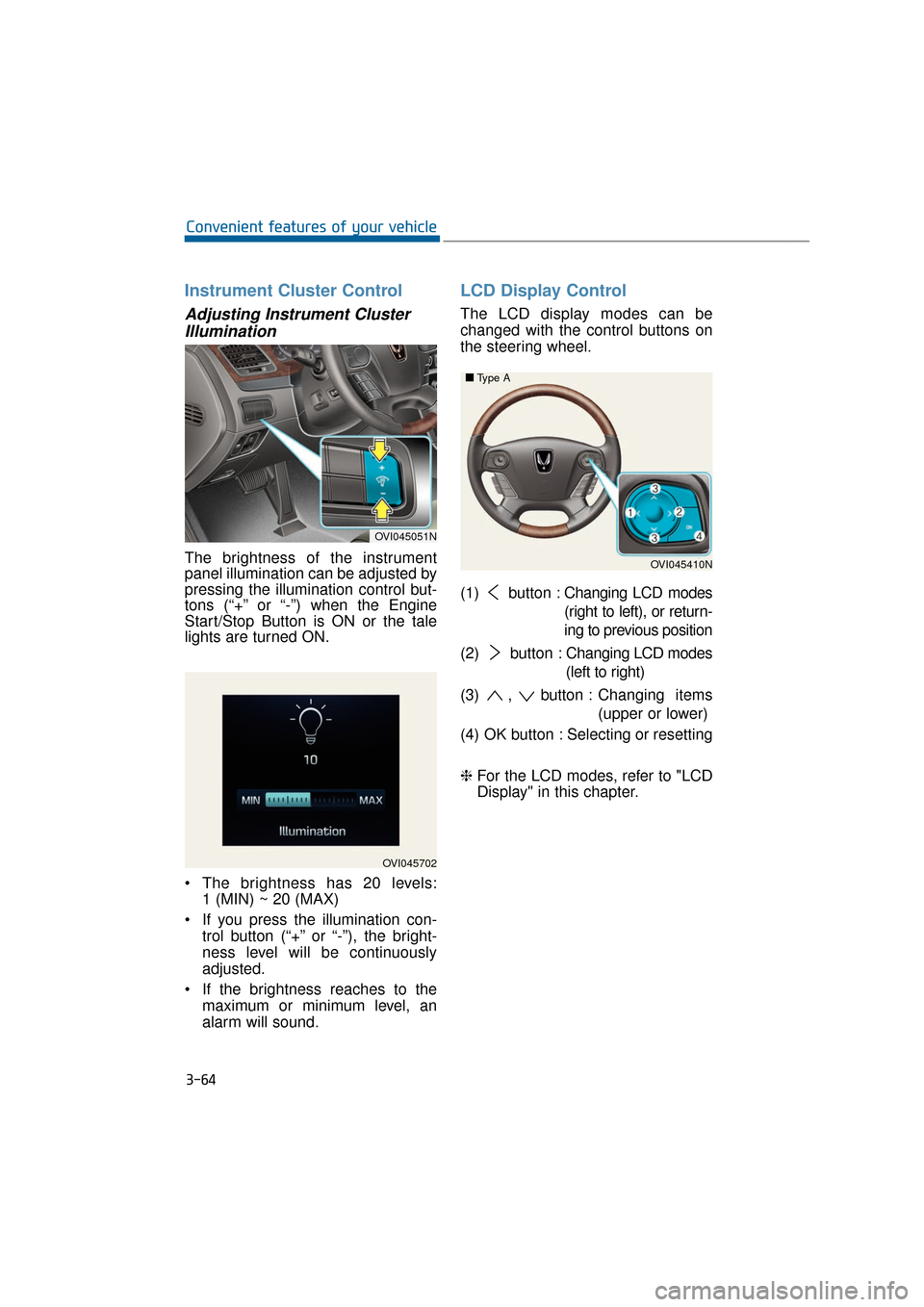
The brightness of the instrument
panel illumination can be adjusted by
pressing the illumination control but-
tons (“+” or “-”) when the Engine
Start/Stop Button is ON or the tale
lights are turned ON.
The brightness has 20 levels: 1 (MIN) ~ 20 (MAX)
If you press the illumination con- trol button (“+” or “-”), the bright-
ness level will be continuously
adjusted.
If the brightness reaches to the maximum or minimum level, an
alarm will sound.
LCD Display Control
The LCD display modes can be
changed with the control buttons on
the steering wheel.
(1) button : Changing LCD modes
(right to left), or return-
ing to previous position
(2) button : Changing LCD modes
(left to right)
(3) , button : Changing items
(upper or lower)
(4) OK button : Selecting or resetting
❈ For the LCD modes, refer to "LCD
Display" in this chapter.
3-64
Convenient features of your vehicle
OVI045702
OVI045051N
OVI045410N
■
■
Type A
Page 160 of 477
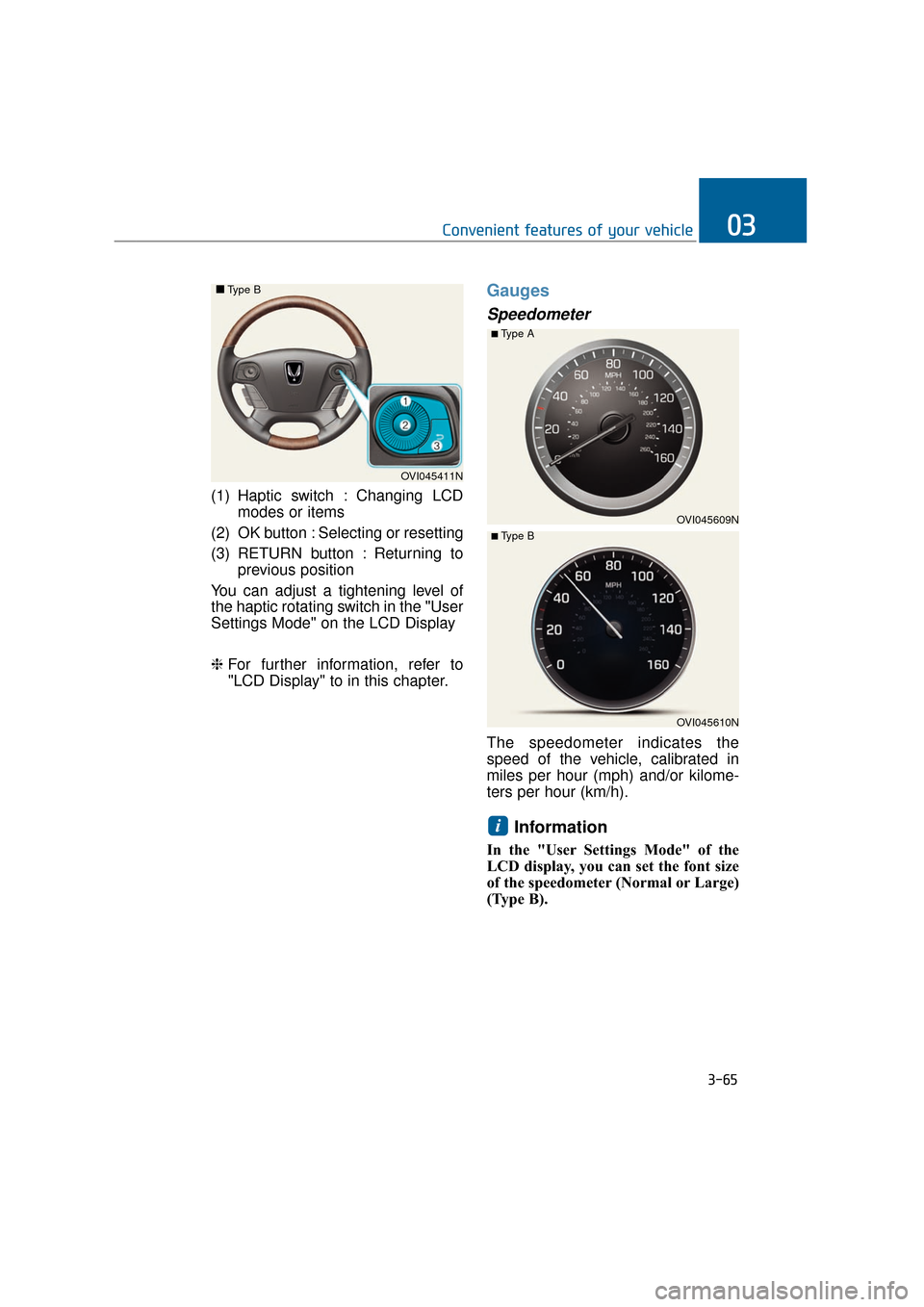
(1) Haptic switch : Changing LCDmodes or items
(2) OK button : Selecting or resetting
(3) RETURN button : Returning to previous position
You can adjust a tightening level of
the haptic rotating switch in the "User
Settings Mode" on the LCD Display
❈ For further information, refer to
"LCD Display" to in this chapter.
Gauges
Speedometer
The speedometer indicates the
speed of the vehicle, calibrated in
miles per hour (mph) and/or kilome-
ters per hour (km/h).
Information
In the "User Settings Mode" of the
LCD display, you can set the font size
of the speedometer (Normal or Large)
(Type B).
i
3-65
Convenient features of your vehicle03
OVI045411N
■
■
Type B
OVI045609N
■Type A
OVI045610N
■ Type B
Page 163 of 477
Odometer
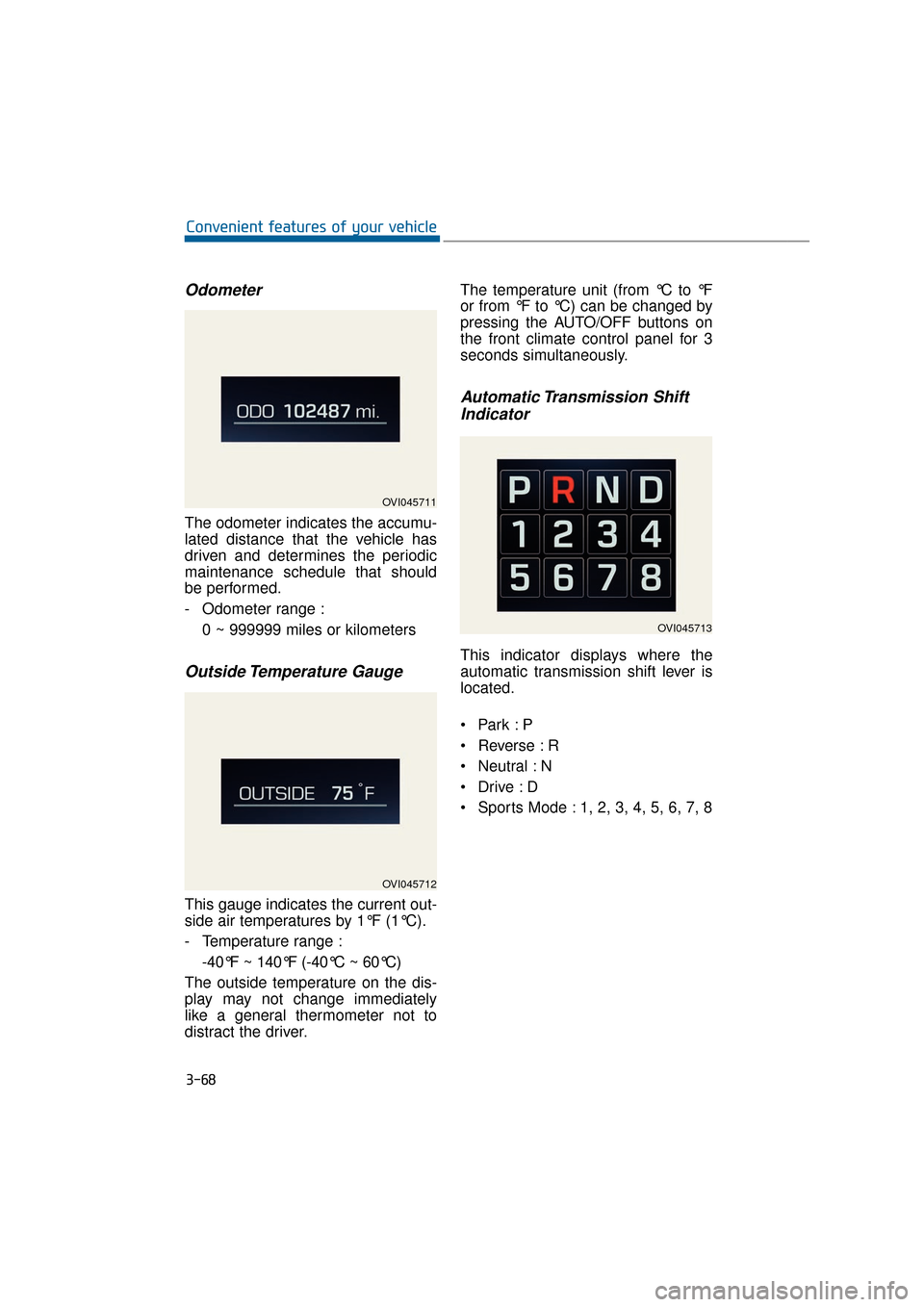
The odometer indicates the accumu-
lated distance that the vehicle has
driven and determines the periodic
maintenance schedule that should
be performed.
- Odometer range :0 ~ 999999 miles or kilometers
Outside Temperature Gauge
This gauge indicates the current out-
side air temperatures by 1°F (1°C).
- Temperature range :-40°F ~ 140°F (-40°C ~ 60°C)
The outside temperature on the dis-
play may not change immediately
like a general thermometer not to
distract the driver. The temperature unit (from °C to °F
or from °F to °C) can be changed by
pressing the AUTO/OFF buttons on
the front climate control panel for 3
seconds simultaneously.
Automatic Transmission Shift
Indicator
This indicator displays where the
automatic transmission shift lever is
located.
Reverse : R
Neutral : N
Sports Mode : 1, 2, 3, 4, 5, 6, 7, 8
3-68
Convenient features of your vehicle
OVI045711
OVI045712
OVI045713
Page 164 of 477
LCD Modes
L
LC
C D
D
D
D I
IS
S P
P L
LA
A Y
Y
3-69
Convenient features of your vehicle03
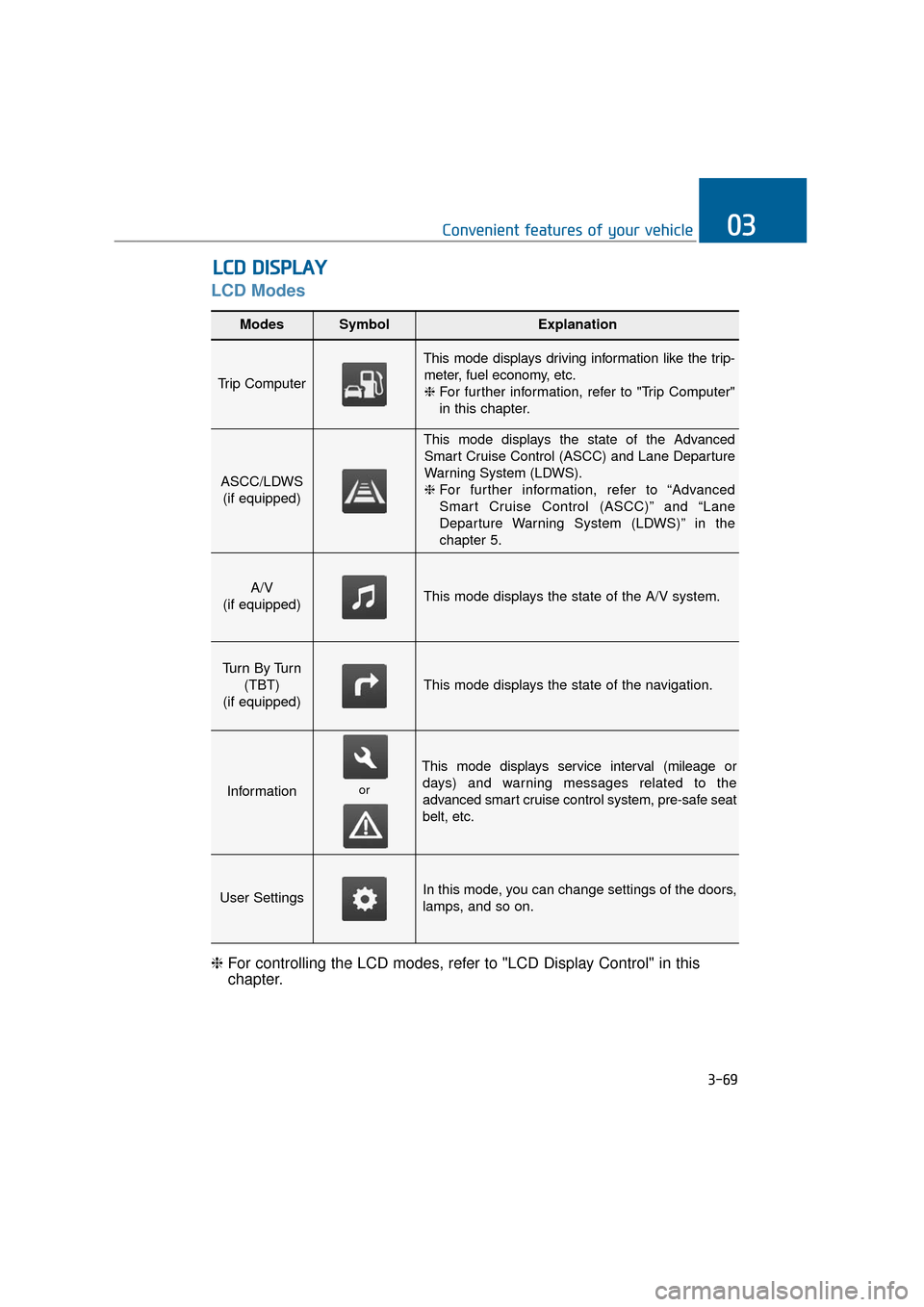
Modes SymbolExplanation
Trip Computer
This mode displays driving information like the trip-
meter, fuel economy, etc.❈ For further information, refer to "Trip Computer"
in this chapter.
ASCC/LDWS
(if equipped)
This mode displays the state of the AdvancedSmart Cruise Control (ASCC) and Lane Departure
Warning System (LDWS).
❈ For further information, refer to “Advanced
Smart Cruise Control (ASCC)” and “Lane
Departure Warning System (LDWS)” in the
chapter 5.
A/V
(if equipped)This mode displays the state of the A/V system.
Tu r n B y Tu r n (TBT)
(if equipped)
This mode displays the state of the navigation.
Information
This mode displays service interval (mileage or days) and warning messages related to the
advanced smart cruise control system, pre-safe seat
belt, etc.
User SettingsIn this mode, you can change settings of the doors,
lamps, and so on.
❈ For controlling the LCD modes, refer to "LCD Display Control" in this
chapter.
or
Page 165 of 477
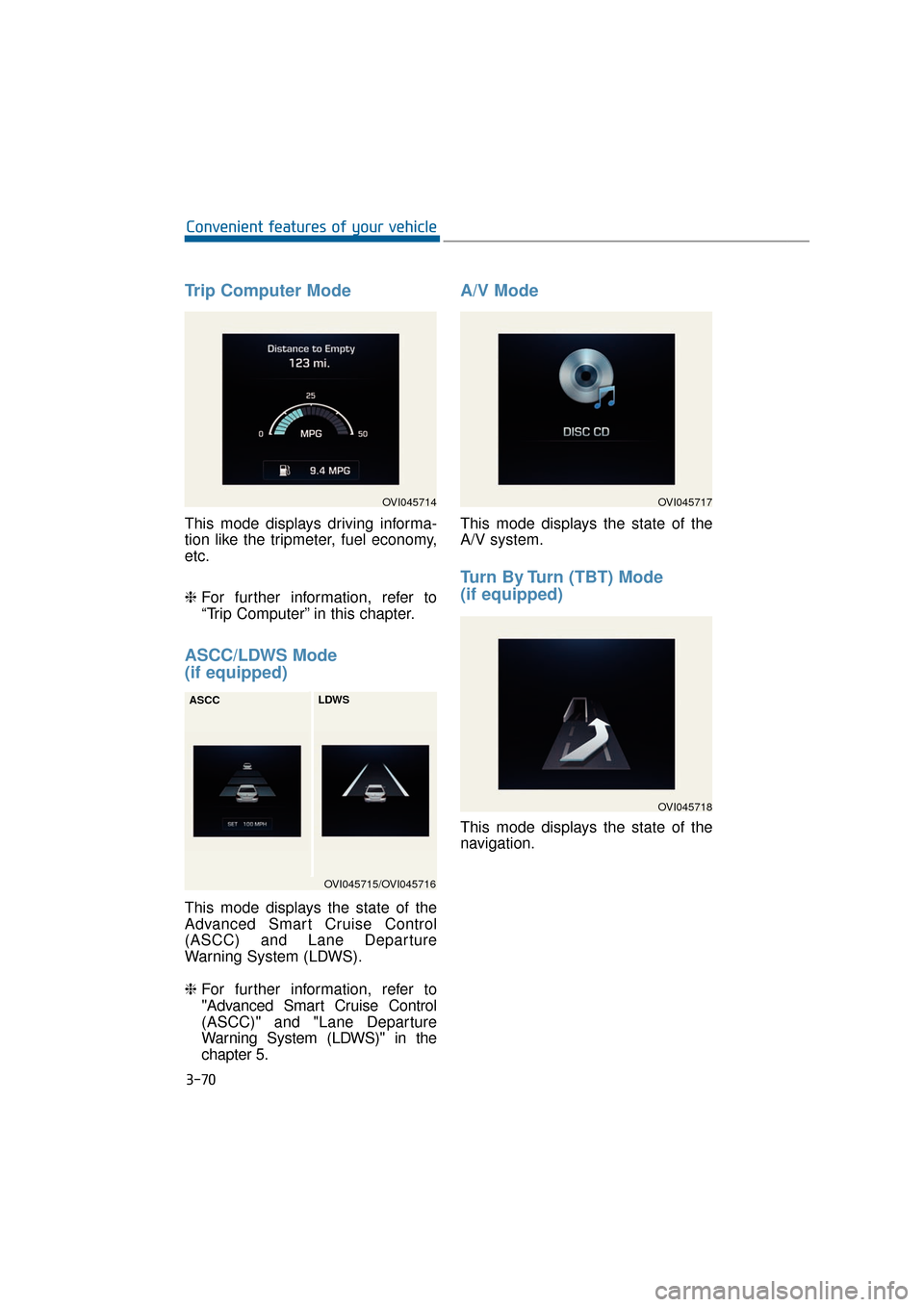
Trip Computer Mode
This mode displays driving informa-
tion like the tripmeter, fuel economy,
etc.
❈For further information, refer to
“Trip Computer” in this chapter.
ASCC/LDWS Mode
(if equipped)
This mode displays the state of the
Advanced Smart Cruise Control
(ASCC) and Lane Departure
Warning System (LDWS).
❈ For further information, refer to
"Advanced Smart Cruise Control
(ASCC)" and "Lane Departure
Warning System (LDWS)" in the
chapter 5.
A/V Mode
This mode displays the state of the
A/V system.
Turn By Turn (TBT) Mode
(if equipped)
This mode displays the state of the
navigation.
3-70
Convenient features of your vehicle
OVI045714
OVI045715/OVI045716
ASCC
LDWS
OVI045717
OVI045718
Page 166 of 477
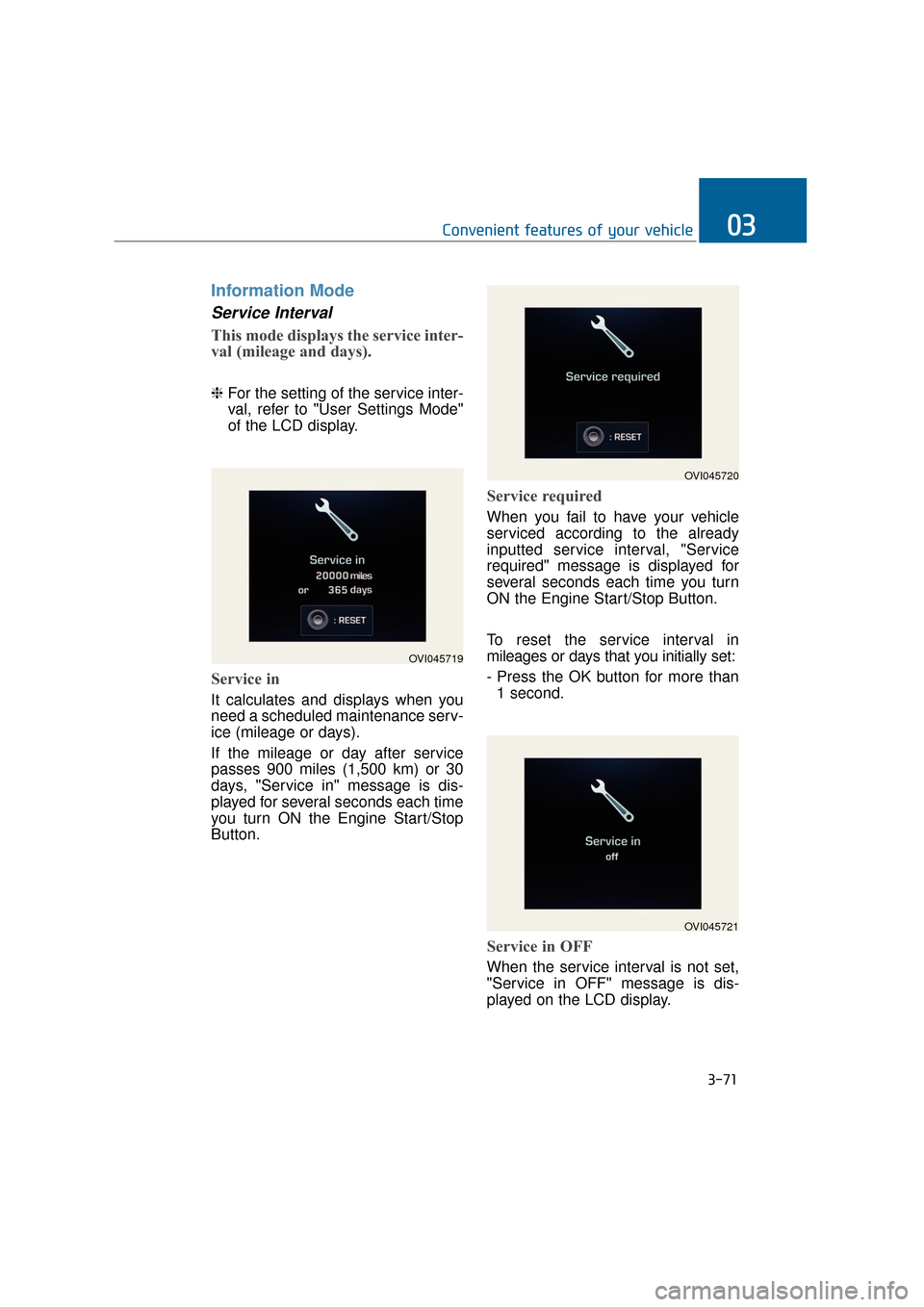
Information Mode
Service Interval
This mode displays the service inter-
val (mileage and days).
❈For the setting of the service inter-
val, refer to "User Settings Mode"
of the LCD display.
Service in
It calculates and displays when you
need a scheduled maintenance serv-
ice (mileage or days).
If the mileage or day after service
passes 900 miles (1,500 km) or 30
days, "Service in" message is dis-
played for several seconds each time
you turn ON the Engine Start/Stop
Button.
Service required
When you fail to have your vehicle
serviced according to the already
inputted service interval, "Service
required" message is displayed for
several seconds each time you turn
ON the Engine Start/Stop Button.
To reset the service interval in
mileages or days that you initially set:
- Press the OK button for more than
1 second.
Service in OFF
When the service interval is not set,
"Service in OFF" message is dis-
played on the LCD display.
3-71
Convenient features of your vehicle03
OVI045719
OVI045720
OVI045721
Page 167 of 477
Information
If any of the following conditions
occurs, the mileage and days may be
incorrect.
- The battery cable is disconnected.
- The fuse switch is turned off.
- The battery is discharged.
Warning Message
If one of followings occurs, warning
messages will be displayed in the
information mode for about 10 sec-
onds.
- Malfunction of the pre-safe seatbelt, electronic control suspen-
sion, or advanced smart cruise
control system
- Low washer fluid
- Check fuel cap
User Settings Mode
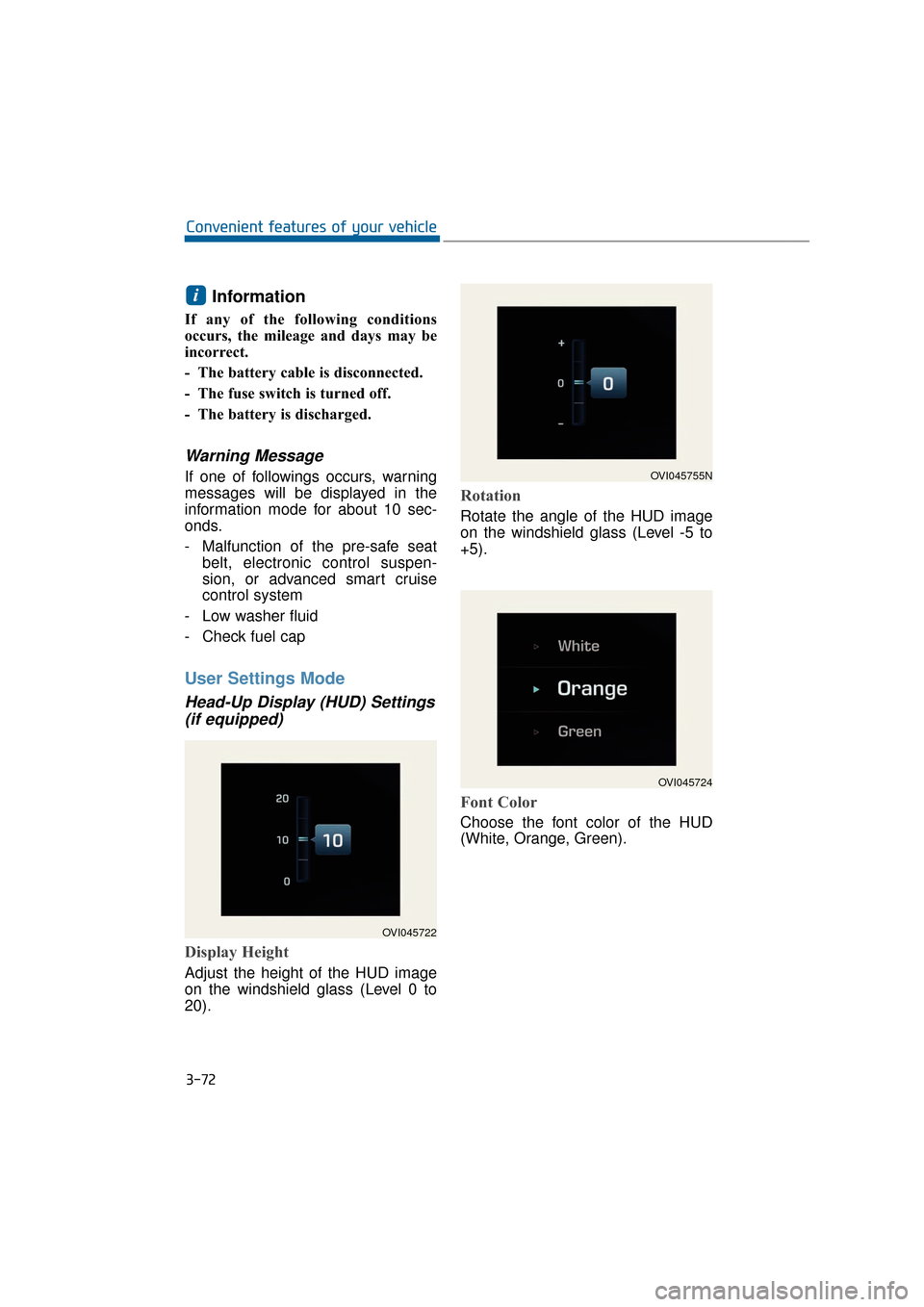
Head-Up Display (HUD) Settings (if equipped)
Display Height
Adjust the height of the HUD image
on the windshield glass (Level 0 to
20).
Rotation
Rotate the angle of the HUD image
on the windshield glass (Level -5 to
+5).
Font Color
Choose the font color of the HUD
(White, Orange, Green).
i
3-72
Convenient features of your vehicle
OVI045722
OVI045755N
OVI045724
Page 168 of 477
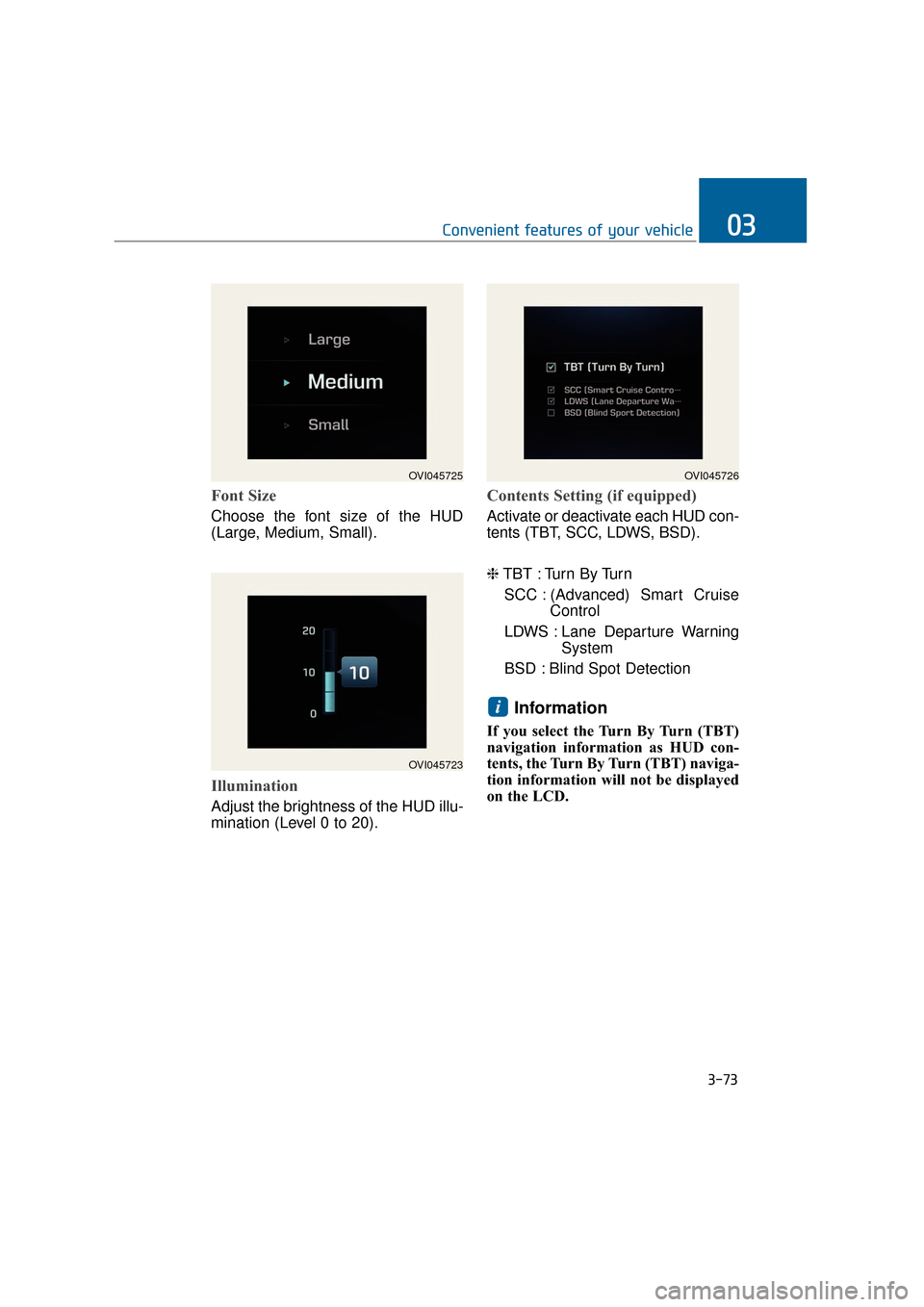
Font Size
Choose the font size of the HUD
(Large, Medium, Small).
Illumination
Adjust the brightness of the HUD illu-
mination (Level 0 to 20).
Contents Setting (if equipped)
Activate or deactivate each HUD con-
tents (TBT, SCC, LDWS, BSD).
❈TBT : Turn By Turn
SCC : (Advanced) Smart Cruise Control
LDWS : Lane Departure Warning System
BSD : Blind Spot Detection
Information
If you select the Turn By Turn (TBT)
navigation information as HUD con-
tents, the Turn By Turn (TBT) naviga-
tion information will not be displayed
on the LCD.
i
3-73
Convenient features of your vehicle03
OVI045723
OVI045725OVI045726
Page 172 of 477
3-77
Convenient features of your vehicle03
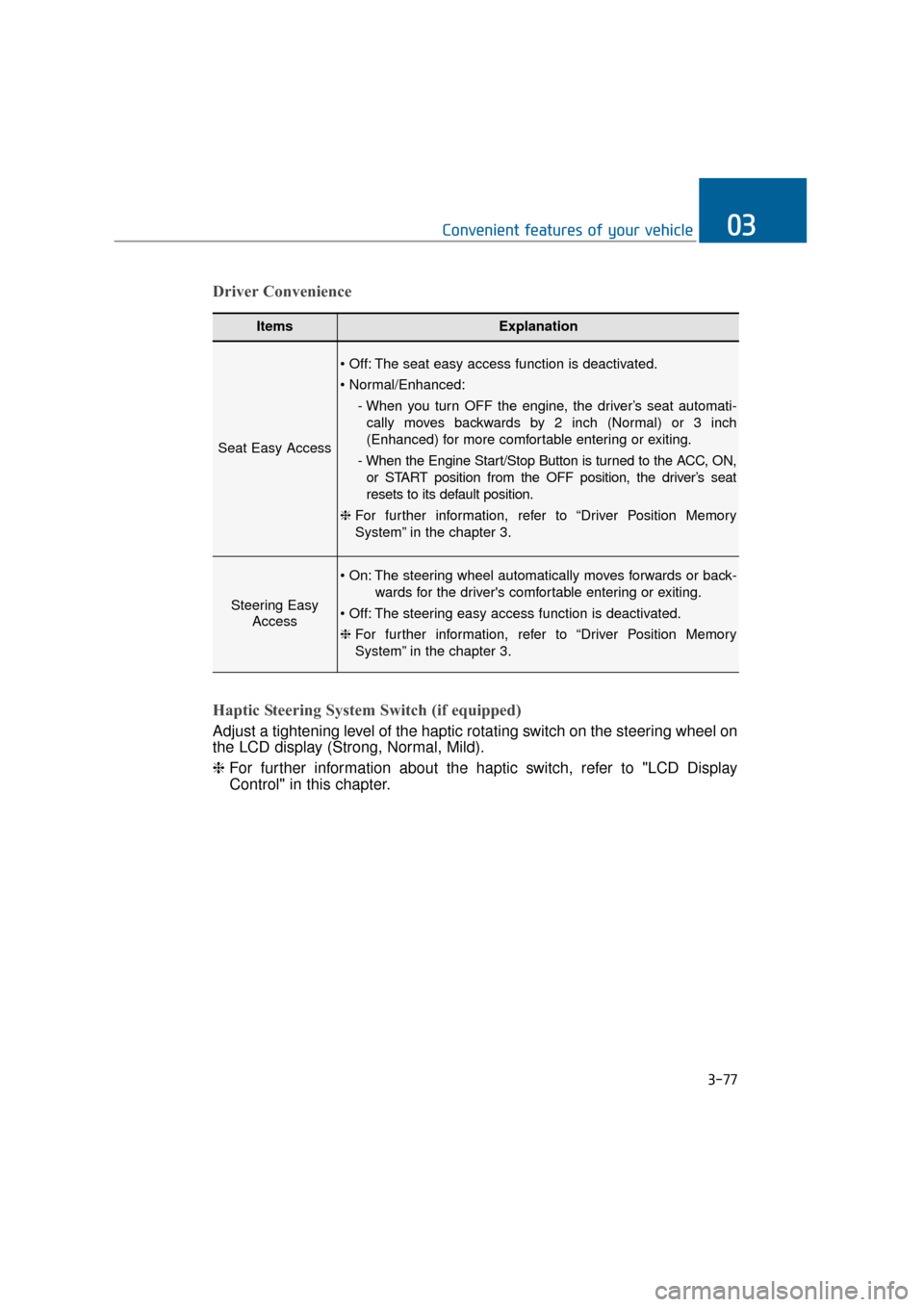
ItemsExplanation
Seat Easy Access
The seat easy access function is deactivated.
- When you turn OFF the engine, the driver’s seat automati-cally moves backwards by 2 inch (Normal) or 3 inch
(Enhanced) for more comfortable entering or exiting.
- When the Engine Start/Stop Button is turned to the ACC, ON, or START position from the OFF position, the driver’s seat
resets to its default position.
❈ For further information, refer to “Driver Position Memory
System” in the chapter 3.
Steering Easy
Access
The steering wheel automatically moves forwards or back-
wards for the driver's comfortable entering or exiting.
The steering easy access function is deactivated.
❈ For further information, refer to “Driver Position Memory
System” in the chapter 3.
Driver Convenience
Haptic Steering System Switch (if equipped)
Adjust a tightening level of the haptic rotating switch on the steering wheel on
the LCD display (Strong, Normal, Mild).
❈ For further information about the haptic switch, refer to "LCD Display
Control" in this chapter.
Page 173 of 477
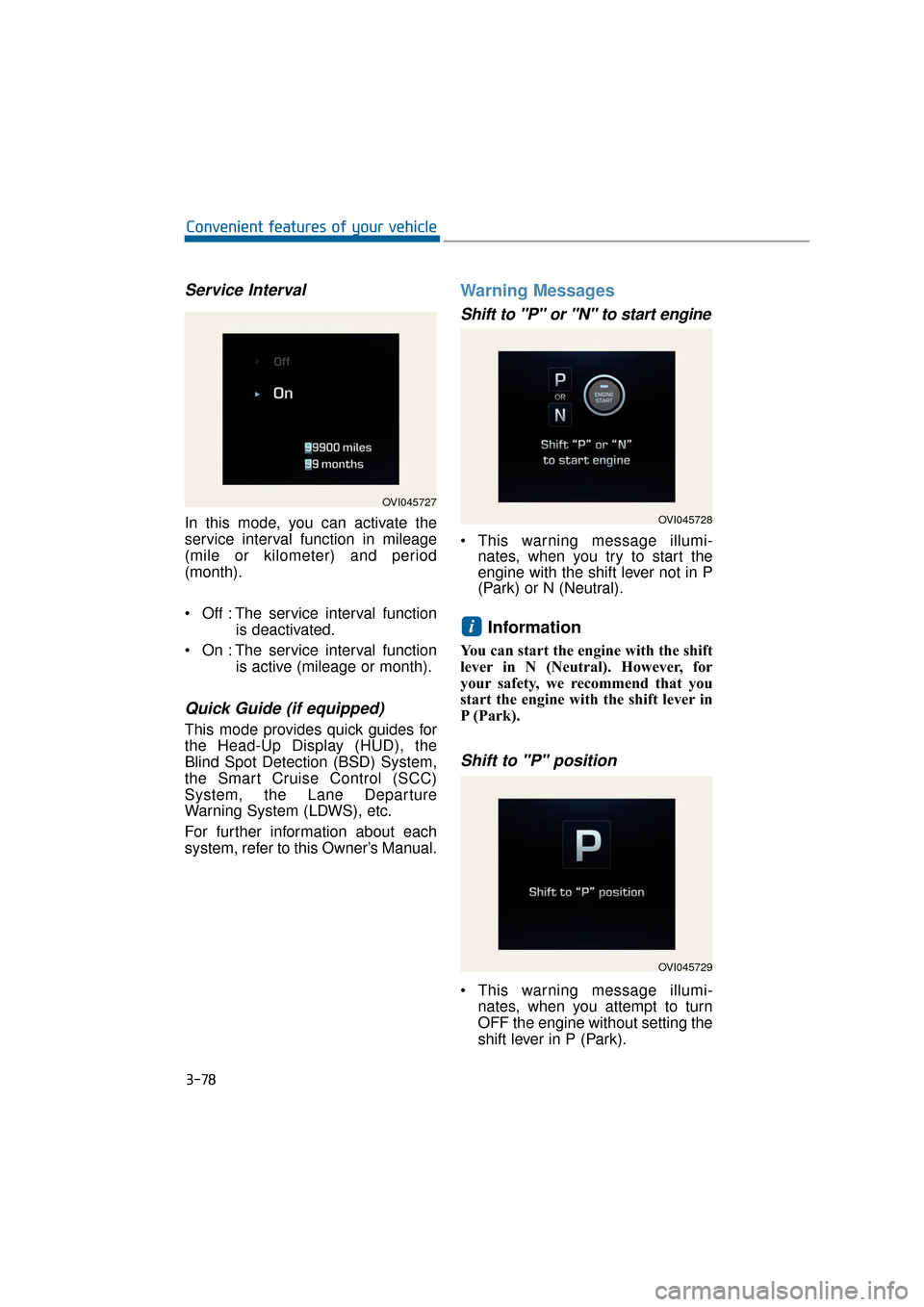
Service Interval
In this mode, you can activate the
service interval function in mileage
(mile or kilometer) and period
(month).
Off : The service interval functionis deactivated.
On : The service interval function is active (mileage or month).
Quick Guide (if equipped)
This mode provides quick guides for
the Head-Up Display (HUD), the
Blind Spot Detection (BSD) System,
the Smart Cruise Control (SCC)
System, the Lane Departure
Warning System (LDWS), etc.
For further information about each
system, refer to this Owner’s Manual.
Warning Messages
Shift to "P" or "N" to start engine
This warning message illumi-nates, when you try to start the
engine with the shift lever not in P
(Park) or N (Neutral).
Information
You can start the engine with the shift
lever in N (Neutral). However, for
your safety, we recommend that you
start the engine with the shift lever in
P (Park).
Shift to "P" position
This warning message illumi-
nates, when you attempt to turn
OFF the engine without setting the
shift lever in P (Park).
i
3-78
Convenient features of your vehicle
OVI045727
OVI045728
OVI045729