display Hyundai Equus 2016 Workshop Manual
[x] Cancel search | Manufacturer: HYUNDAI, Model Year: 2016, Model line: Equus, Model: Hyundai Equus 2016Pages: 477, PDF Size: 16.25 MB
Page 290 of 477
Information
During the normal operation of the
Smart Cruise Control, with the SET
switch activated or reactivated after
applying brakes, the Smart Cruise
Control will energize after approxi-
mately 3 seconds. This delay is nor-
mal.
Smart Cruise Control speed
To set the cruising speed:
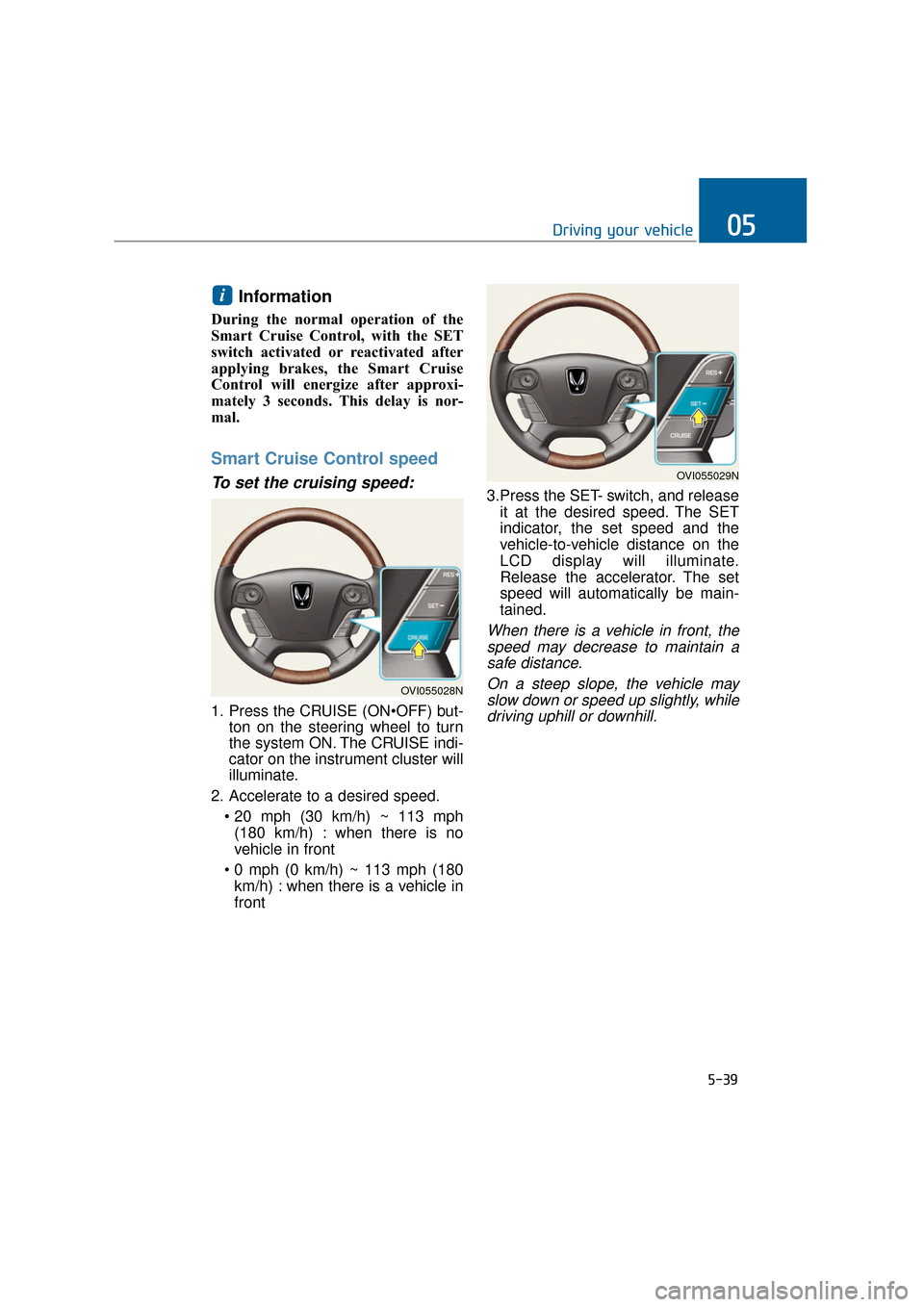
1. Press the CRUISE (ONton on the steering wheel to turn
the system ON. The CRUISE indi-
cator on the instrument cluster will
illuminate.
2. Accelerate to a desired speed. (180 km/h) : when there is no
vehicle in front
km/h) : when there is a vehicle in
front 3.Press the SET- switch, and release
it at the desired speed. The SET
indicator, the set speed and the
vehicle-to-vehicle distance on the
LCD display will illuminate.
Release the accelerator. The set
speed will automatically be main-
tained.
When there is a vehicle in front, thespeed may decrease to maintain asafe distance.
On a steep slope, the vehicle mayslow down or speed up slightly, whiledriving uphill or downhill.
i
5-39
Driving your vehicle05
OVI055028N
OVI055029N
Page 292 of 477
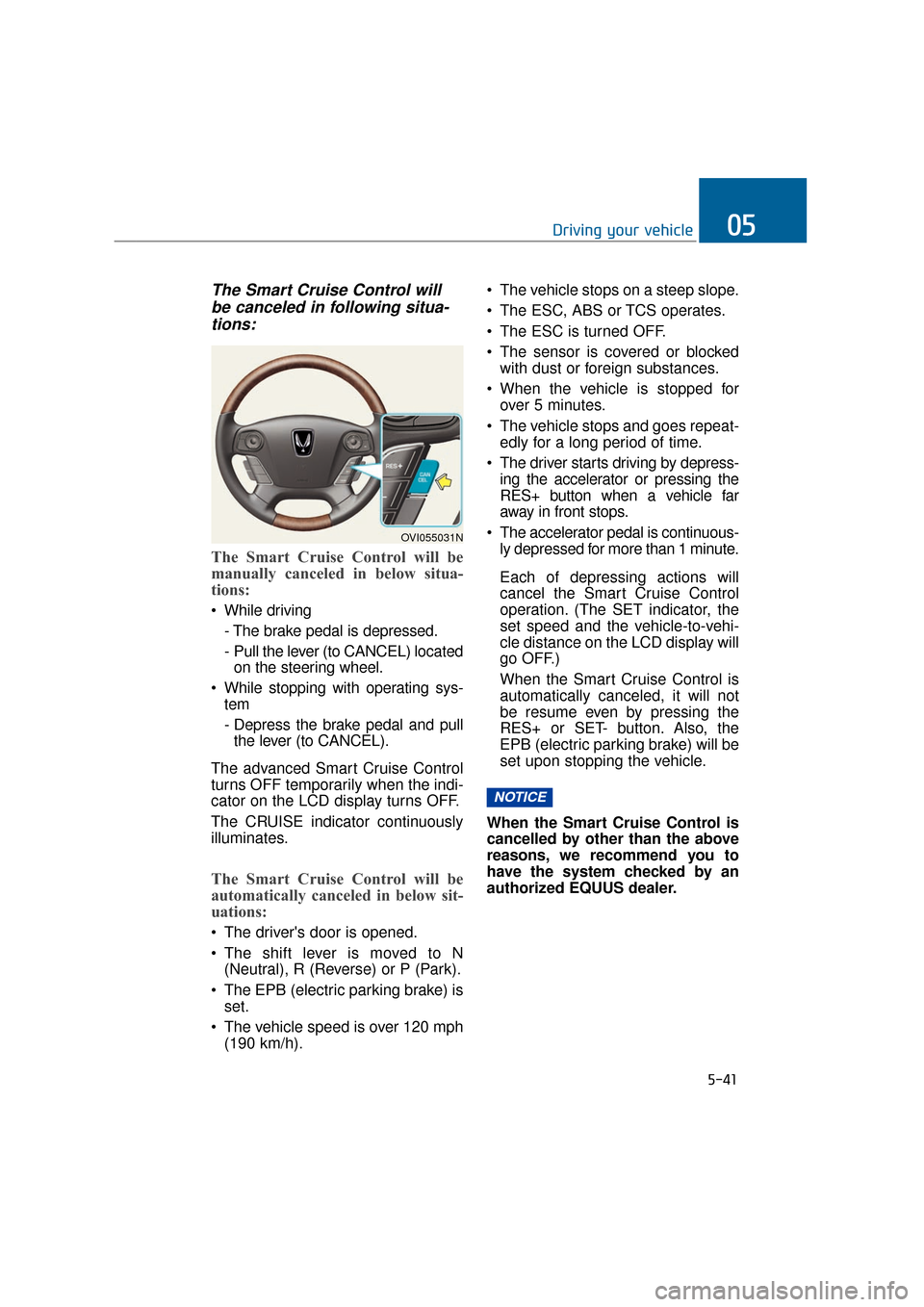
The Smart Cruise Control willbe canceled in following situa-tions:
The Smart Cruise Control will be
manually canceled in below situa-
tions:
While driving
- The brake pedal is depressed.
- Pull the lever (to CANCEL) locatedon the steering wheel.
While stopping with operating sys- tem
- Depress the brake pedal and pullthe lever (to CANCEL).
The advanced Smart Cruise Control
turns OFF temporarily when the indi-
cator on the LCD display turns OFF.
The CRUISE indicator continuously
illuminates.
The Smart Cruise Control will be
automatically canceled in below sit-
uations:
The driver's door is opened.
The shift lever is moved to N (Neutral), R (Reverse) or P (Park).
The EPB (electric parking brake) is set.
The vehicle speed is over 120 mph (190 km/h). The vehicle stops on a steep slope.
The ESC, ABS or TCS operates.
The ESC is turned OFF.
The sensor is covered or blocked
with dust or foreign substances.
When the vehicle is stopped for over 5 minutes.
The vehicle stops and goes repeat- edly for a long period of time.
The driver starts driving by depress- ing the accelerator or pressing the
RES+ button when a vehicle far
away in front stops.
The accelerator pedal is continuous- ly depressed for more than 1 minute.
Each of depressing actions will
cancel the Smart Cruise Control
operation. (The SET indicator, the
set speed and the vehicle-to-vehi-
cle distance on the LCD display will
go OFF.)
When the Smart Cruise Control is
automatically canceled, it will not
be resume even by pressing the
RES+ or SET- button. Also, the
EPB (electric parking brake) will be
set upon stopping the vehicle.
When the Smart Cruise Control is
cancelled by other than the above
reasons, we recommend you to
have the system checked by an
authorized EQUUS dealer.
NOTICE
5-41
Driving your vehicle05
OVI055031N
Page 296 of 477
In traffic situation
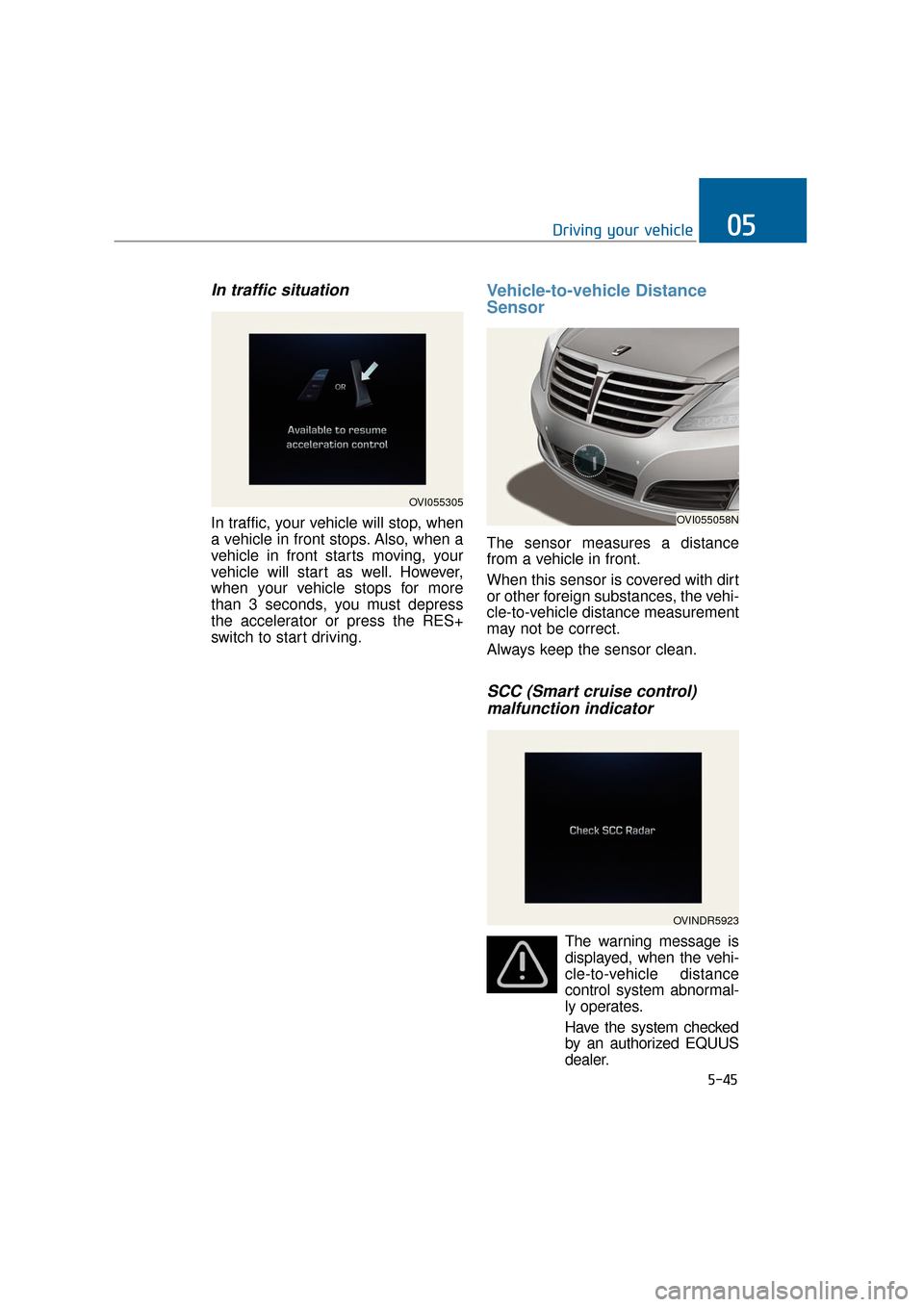
In traffic, your vehicle will stop, when
a vehicle in front stops. Also, when a
vehicle in front starts moving, your
vehicle will start as well. However,
when your vehicle stops for more
than 3 seconds, you must depress
the accelerator or press the RES+
switch to start driving.
Vehicle-to-vehicle Distance
Sensor
The sensor measures a distance
from a vehicle in front.
When this sensor is covered with dirt
or other foreign substances, the vehi-
cle-to-vehicle distance measurement
may not be correct.
Always keep the sensor clean.
SCC (Smart cruise control) malfunction indicator
The warning message is
displayed, when the vehi-
cle-to-vehicle distance
control system abnormal-
ly operates.
Have the system checked by an authorized EQUUS
dealer.
5-45
Driving your vehicle05
OVI055305
OVI055058N
OVINDR5923
Page 303 of 477
LDWS operation
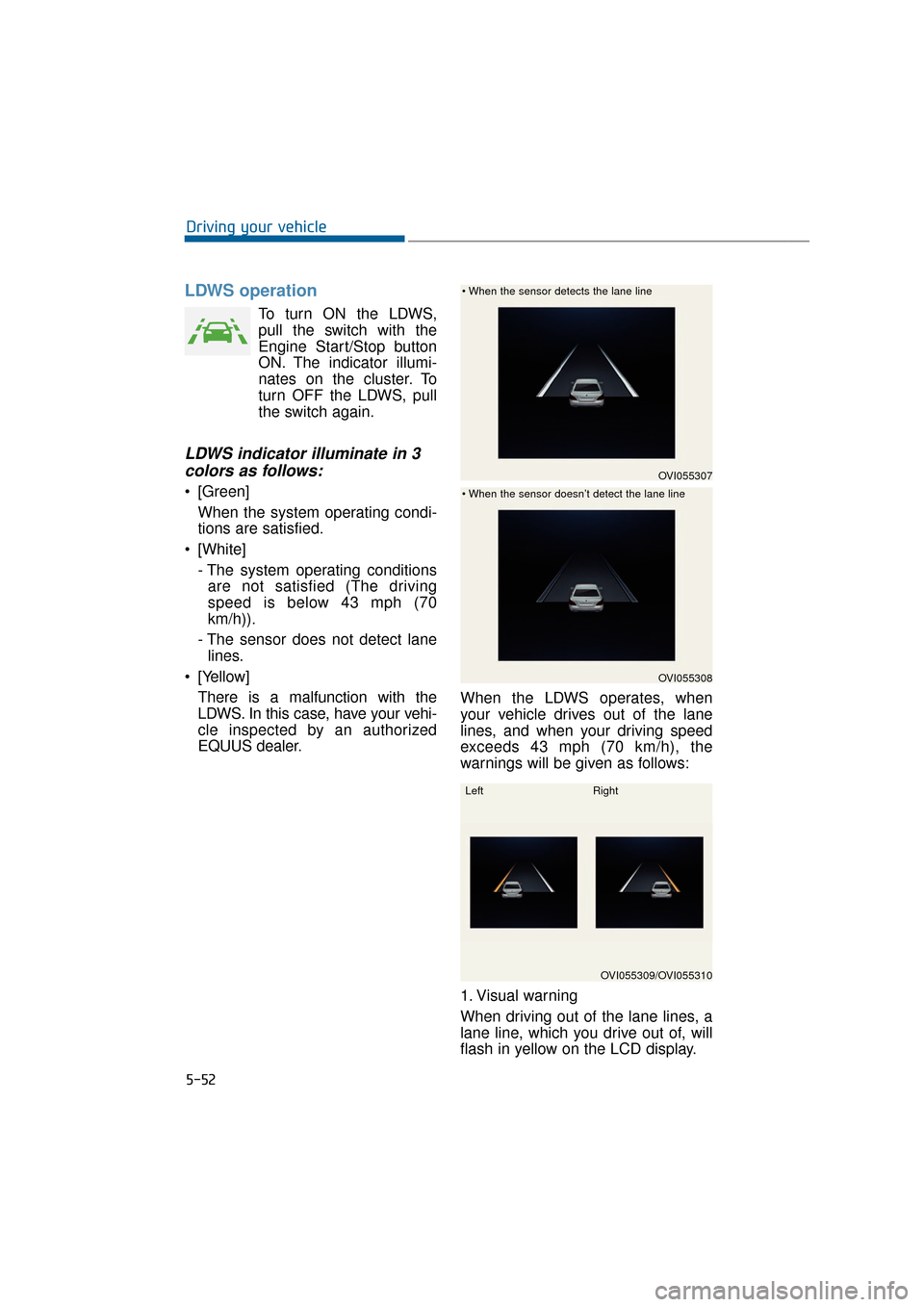
To turn ON the LDWS,
pull the switch with the
Engine Start/Stop button
ON. The indicator illumi-
nates on the cluster. To
turn OFF the LDWS, pull
the switch again.
LDWS indicator illuminate in 3colors as follows:
[Green]
When the system operating condi-
tions are satisfied.
[White] - The system operating conditionsare not satisfied (The driving
speed is below 43 mph (70
km/h)).
- The sensor does not detect lane lines.
[Yellow] There is a malfunction with the
LDWS. In this case, have your vehi-
cle inspected by an authorized
EQUUS dealer. When the LDWS operates, when
your vehicle drives out of the lane
lines, and when your driving speed
exceeds 43 mph (70 km/h), the
warnings will be given as follows:
1. Visual warning
When driving out of the lane lines, a
lane line, which you drive out of, will
flash in yellow on the LCD display.
5-52
Driving your vehicle
OVI055307
OVI055308
OVI055309/OVI055310
Left
Right
Page 311 of 477
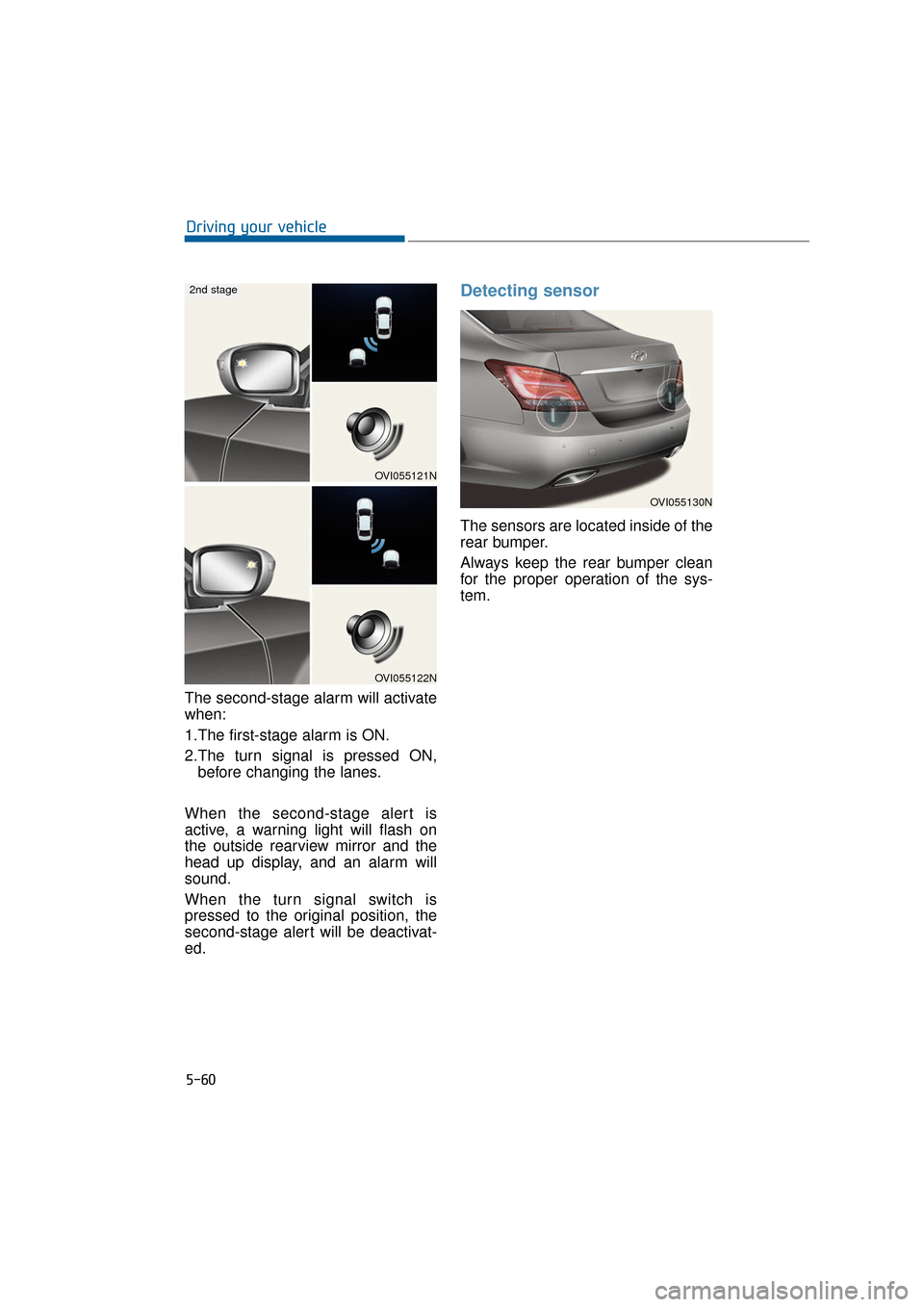
The second-stage alarm will activate
when:
1.The first-stage alarm is ON.
2.The turn signal is pressed ON,before changing the lanes.
When the second-stage alert is
active, a warning light will flash on
the outside rearview mirror and the
head up display, and an alarm will
sound.
When the turn signal switch is
pressed to the original position, the
second-stage alert will be deactivat-
ed.
Detecting sensor
The sensors are located inside of the
rear bumper.
Always keep the rear bumper clean
for the proper operation of the sys-
tem.
5-60
Driving your vehicle
OVI055130N
OVI055121N
OVI055122N
2nd stage
Page 312 of 477
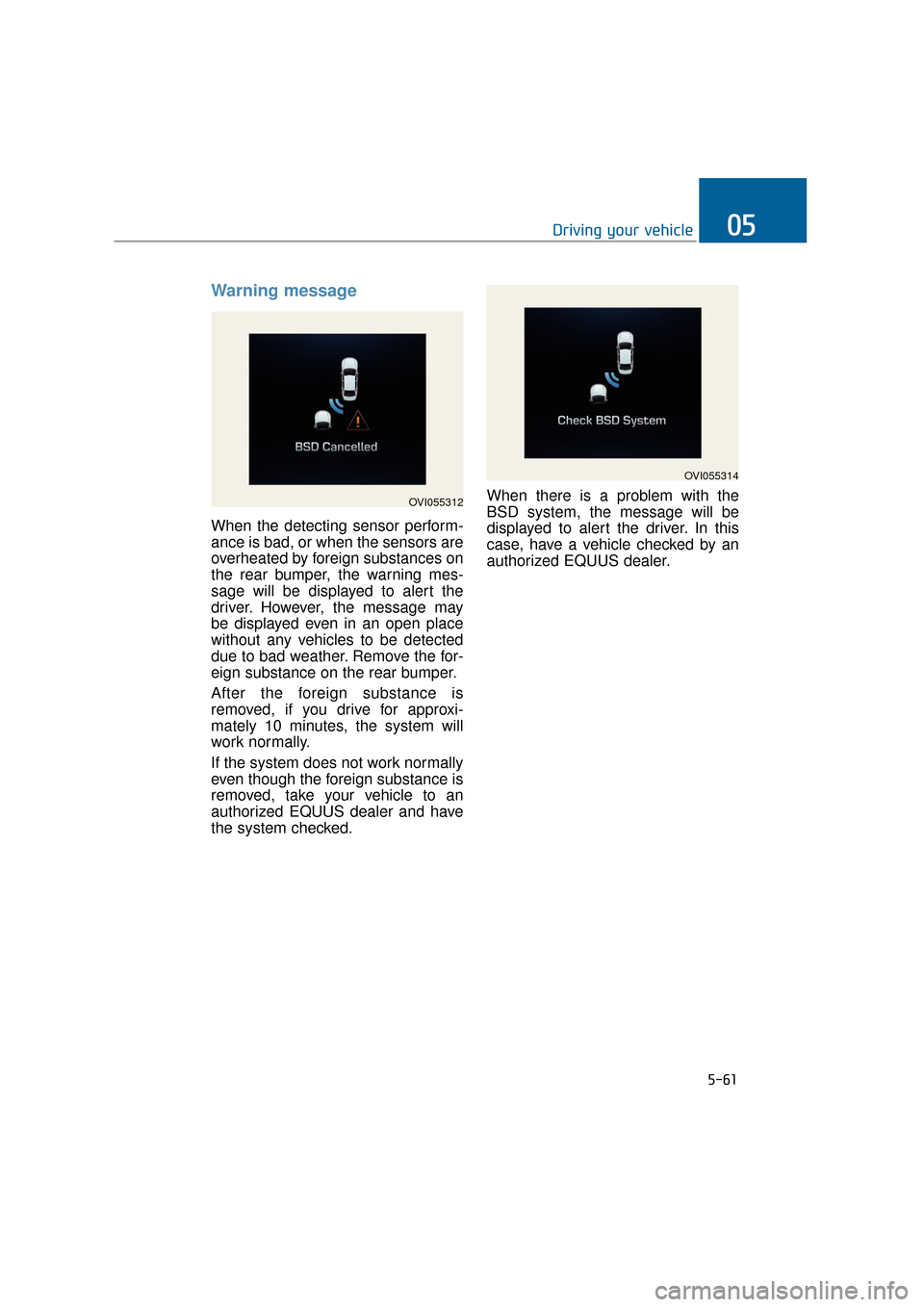
Warning message
When the detecting sensor perform-
ance is bad, or when the sensors are
overheated by foreign substances on
the rear bumper, the warning mes-
sage will be displayed to alert the
driver. However, the message may
be displayed even in an open place
without any vehicles to be detected
due to bad weather. Remove the for-
eign substance on the rear bumper.
After the foreign substance is
removed, if you drive for approxi-
mately 10 minutes, the system will
work normally.
If the system does not work normally
even though the foreign substance is
removed, take your vehicle to an
authorized EQUUS dealer and have
the system checked.When there is a problem with the
BSD system, the message will be
displayed to alert the driver. In this
case, have a vehicle checked by an
authorized EQUUS dealer.
5-61
Driving your vehicle05
OVI055312
OVI055314
Page 314 of 477
The system may not properlyoperate, when the bumper is
replaced, or when a repair work
is done near the sensor.
The sensing range differs according to the roads width.
When the road is narrow, the
system may detect other vehi-
cles in the next lane.
On the contrary, when the road is wide, the system may not
detect other vehicles.
The system may be turn OFF due to the strong electromagnet-
ic waves.
Non-operating condition
Driver's Attention
The driver must be cautious in the
below situations, because the sys-
tem may not properly operate to
assist the driver.
- The vehicle drives on a curved roador through a tollgate.
- The sensor is polluted with rain, snow, mud, etc.
- The rear bumper, in which the sen- sor is located, is covered or blocked
with a foreign matter such as a
sticker, a bumper guard, a bicycle
stand, etc.
- The rear bumper is damaged, or the sensor is out of the original
default position.
- The vehicle height gets lower or higher due to heavy loading in a
trunk, abnormal tire pressure, etc.
- The vehicle drives in a bad weather such as heavy rain or snow.
- There is a fixed object near the vehicle, such as a guardrail.
- A huge amount of metal sub- stances are near the vehicle, such
as in a construction site.
- A big vehicle is near such as a bus or truck.
- A motorcycle or bicycle is near.
- A flat trailer like vehicle is near.
- When the other vehicle passes by very fast.
- When changing lanes.
- When going down or up a steep road where the height of the lane is differ-
ent.
NOTICE
5-63
Driving your vehicle05
The warning light on the out- side rearview mirror and the
head-up display will illumi-
nate whenever an approach-
ing vehicle behind is detected
by the system.
To avoid an accident, do not
pay too much attention to the
warnings, and do not neglect
to take a look around.
Drive safely even though the vehicle is equipped with the
BSD system. Do not rely sole-
ly on the system. Check the
road conditions before chang-
ing the lanes.
The system may not alert the
driver in some conditions.
Thus, take a look around.
WARNING
Page 341 of 477
Always check the TPMS malfunction
telltale after replacing one or more
tires or wheels on your vehicle to
ensure that the replacement or alter-
nate tires and wheels allow the TPMS
to continue to function properly.
Information
If any of the followings happens, we
recommend that the system be
checked by an authorized EQUUS
dealer.
1. The low tire pressure telltale/TPMSmalfunction indicator does not illu-
minate for 3 seconds when the igni-
tion switch is turned ON or engine is
running.
2. The TPMS malfunction indicator remains ON after flashing for
approximately 1 minute.
3. The Low tire pressure position tell- tale remains ON.
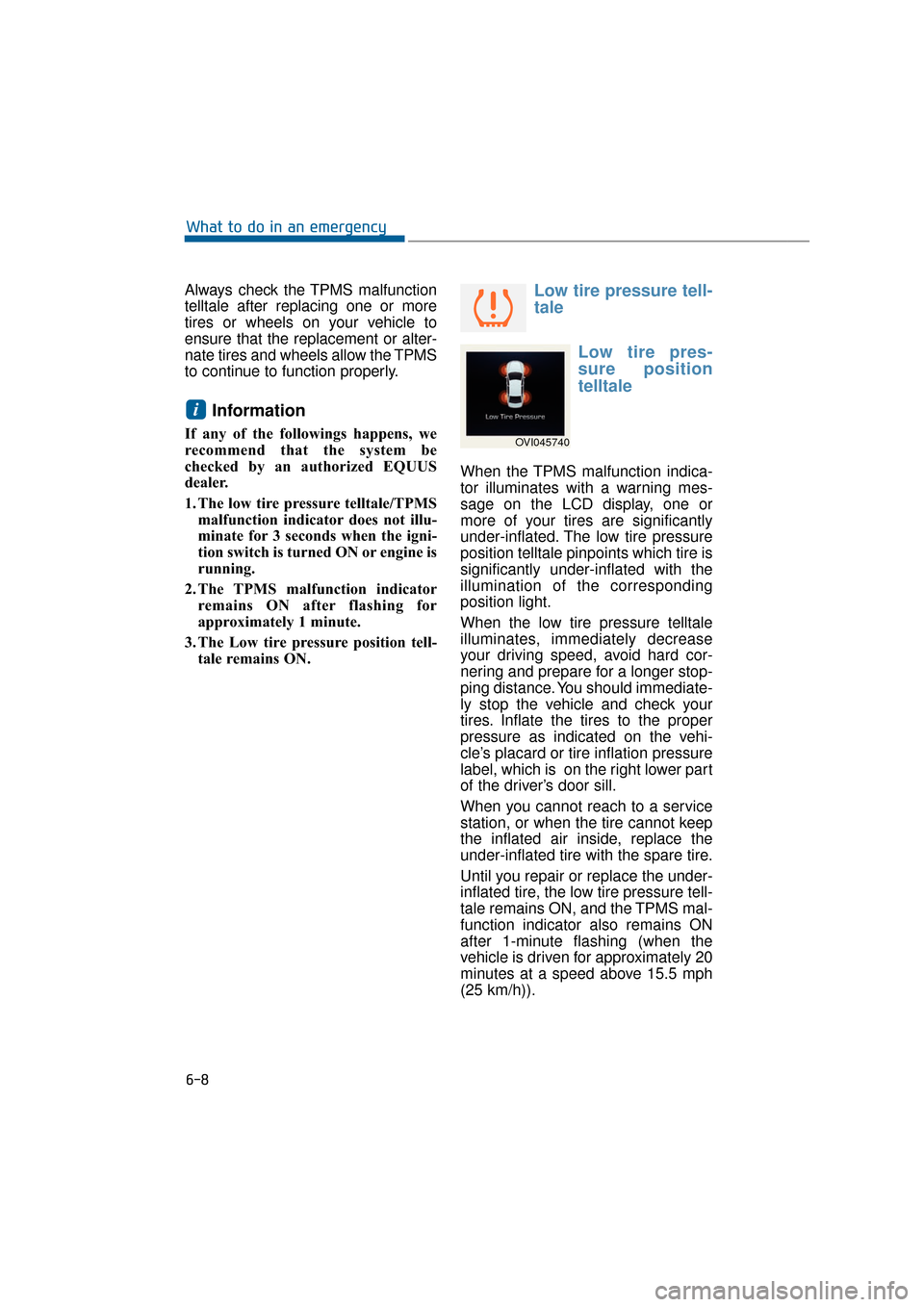
Low tire pressure tell-
tale
Low tire pres-
sure position
telltale
When the TPMS malfunction indica-
tor illuminates with a warning mes-
sage on the LCD display, one or
more of your tires are significantly
under-inflated. The low tire pressure
position telltale pinpoints which tire is
significantly under-inflated with the
illumination of the corresponding
position light.
When the low tire pressure telltale
illuminates, immediately decrease
your driving speed, avoid hard cor-
nering and prepare for a longer stop-
ping distance. You should immediate-
ly stop the vehicle and check your
tires. Inflate the tires to the proper
pressure as indicated on the vehi-
cle’s placard or tire inflation pressure
label, which is on the right lower part
of the driver’s door sill.
When you cannot reach to a service
station, or when the tire cannot keep
the inflated air inside, replace the
under-inflated tire with the spare tire.
Until you repair or replace the under-
inflated tire, the low tire pressure tell-
tale remains ON, and the TPMS mal-
function indicator also remains ON
after 1-minute flashing (when the
vehicle is driven for approximately 20
minutes at a speed above 15.5 mph
(25 km/h)).
i
6-8
What to do in an emergency
OVI045740
Page 419 of 477
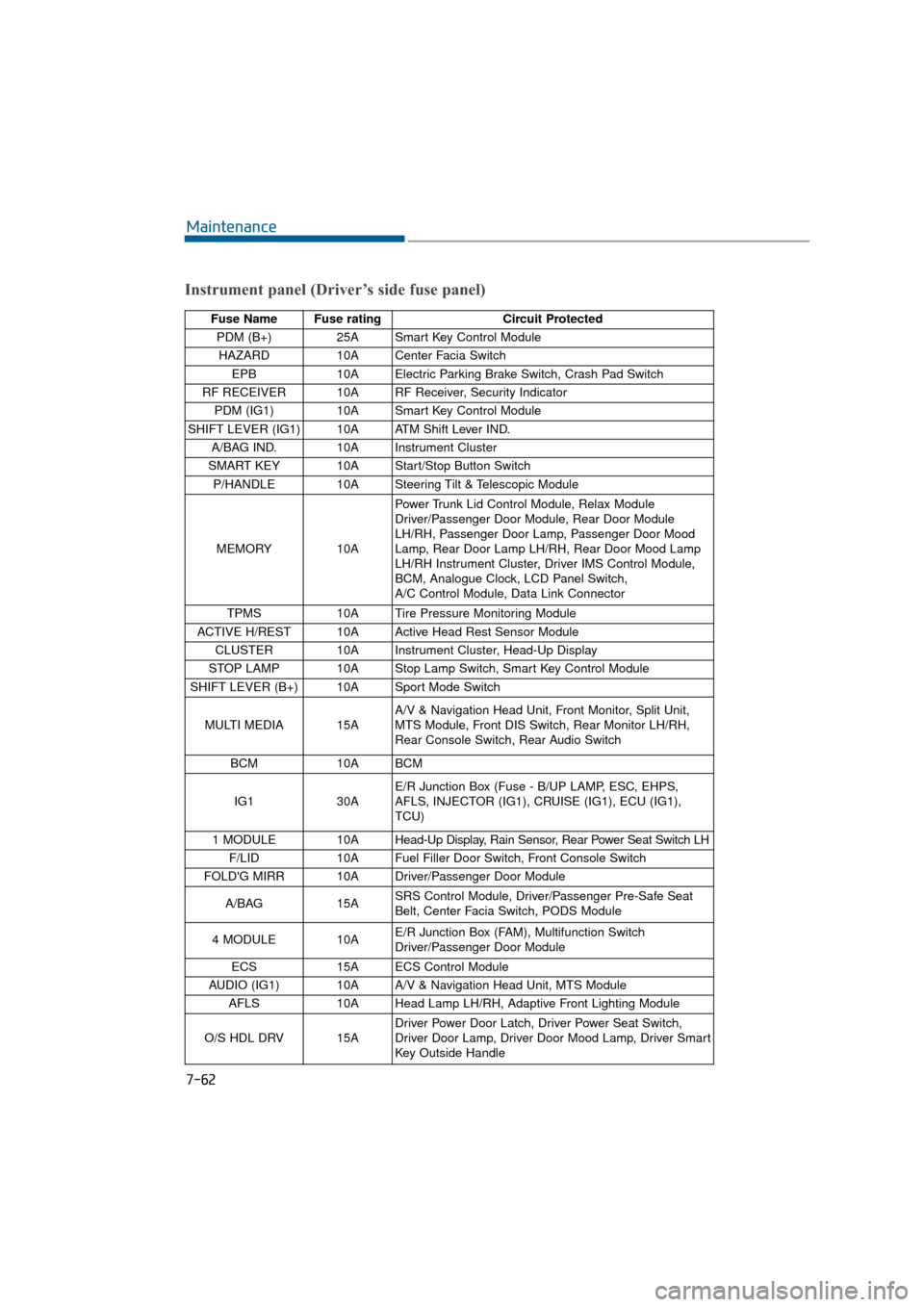
7-62
Maintenance
Instrument panel (Driver’s side fuse panel)
Fuse Name Fuse ratingCircuit Protected
PDM (B+) 25A Smart Key Control Module
HAZARD 10A Center Facia Switch
EPB 10A Electric Parking Brake Switch, Crash Pad Switch
RF RECEIVER 10A RF Receiver, Security Indicator PDM (IG1) 10A Smart Key Control Module
SHIFT LEVER (IG1) 10A ATM Shift Lever IND. A/BAG IND. 10A Instrument Cluster
SMART KEY 10A Start/Stop Button Switch P/HANDLE 10A Steering Tilt & Telescopic Module
MEMORY 10APower Trunk Lid Control Module, Relax Module
Driver/Passenger Door Module, Rear Door Module
LH/RH, Passenger Door Lamp, Passenger Door Mood
Lamp, Rear Door Lamp LH/RH, Rear Door Mood Lamp
LH/RH Instrument Cluster, Driver IMS Control Module,
BCM, Analogue Clock, LCD Panel Switch,
A/C Control Module, Data Link Connector
TPMS 10A Tire Pressure Monitoring Module
ACTIVE H/REST 10A Active Head Rest Sensor Module CLUSTER 10A Instrument Cluster, Head-Up Display
STOP LAMP 10A Stop Lamp Switch, Smart Key Control Module
SHIFT LEVER (B+) 10A Sport Mode Switch
MULTI MEDIA 15A A/V & Navigation Head Unit, Front Monitor, Split Unit,
MTS Module, Front DIS Switch, Rear Monitor LH/RH,
Rear Console Switch, Rear Audio Switch
BCM 10A BCM
IG1 30AE/R Junction Box (Fuse - B/UP LAMP, ESC, EHPS,
AFLS, INJECTOR (IG1), CRUISE (IG1), ECU (IG1),
TCU)
1 MODULE 10A Head-Up Display, Rain Sensor, Rear Power Seat Switch LH
F/LID 10A Fuel Filler Door Switch, Front Console Switch
FOLD'G MIRR 10A Driver/Passenger Door Module
A/BAG 15ASRS Control Module, Driver/Passenger Pre-Safe Seat
Belt, Center Facia Switch, PODS Module
4 MODULE 10A E/R Junction Box (FAM), Multifunction Switch
Driver/Passenger Door Module
ECS 15A ECS Control Module
AUDIO (IG1) 10A A/V & Navigation Head Unit, MTS Module AFLS 10A Head Lamp LH/RH, Adaptive Front Lighting Module
O/S HDL DRV 15A Driver Power Door Latch, Driver Power Seat Switch,
Driver Door Lamp, Driver Door Mood Lamp, Driver Smart
Key Outside Handle
Page 422 of 477
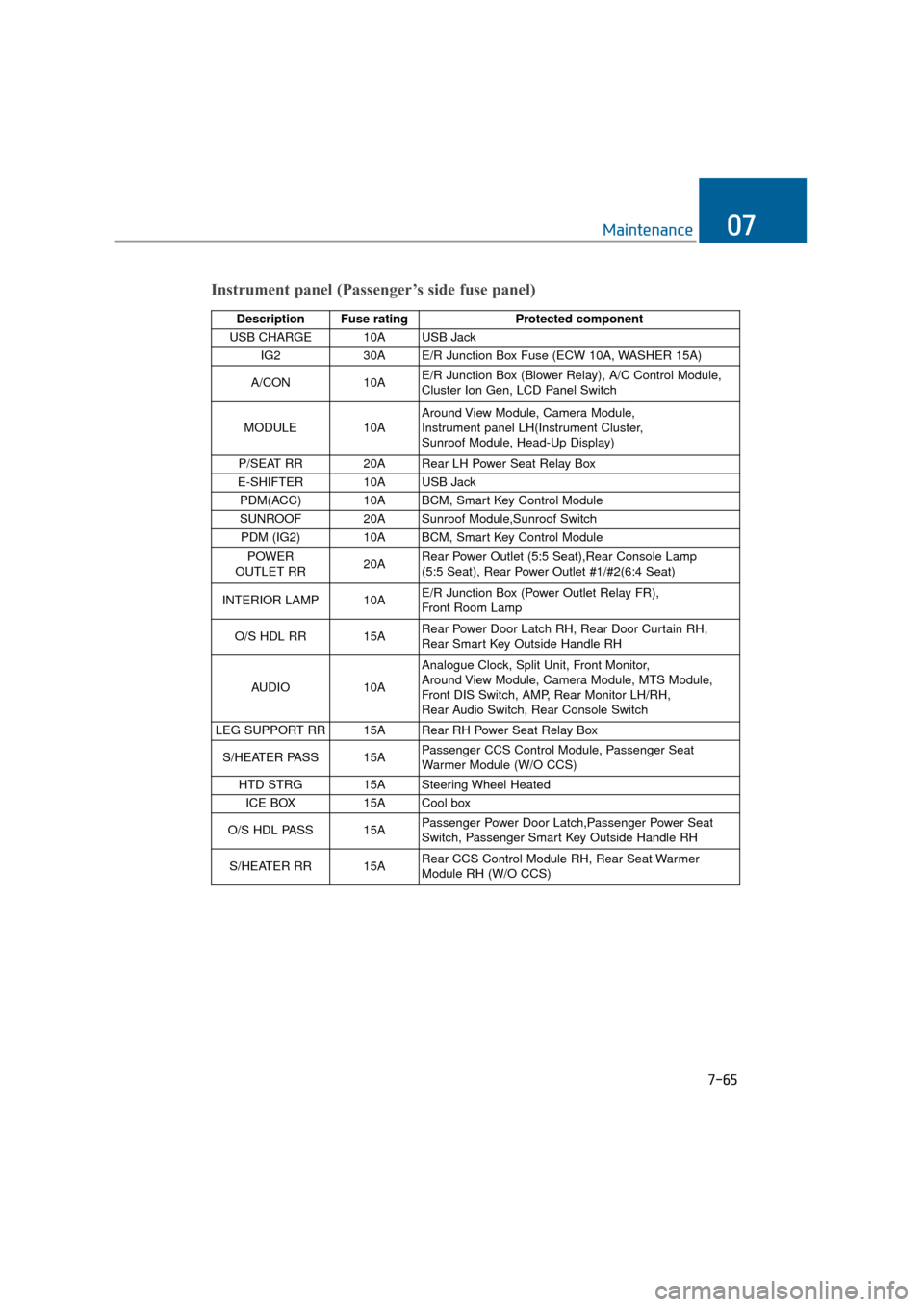
7-65
Maintenance07
Instrument panel (Passenger’s side fuse panel)
Description Fuse ratingProtected component
USB CHARGE 10A USB Jack IG2 30A E/R Junction Box Fuse (ECW 10A, WASHER 15A)
A/CON 10AE/R Junction Box (Blower Relay), A/C Control Module,
Cluster Ion Gen, LCD Panel Switch
MODULE 10AAround View Module, Camera Module,
Instrument panel LH(Instrument Cluster,
Sunroof Module, Head-Up Display)
P/SEAT RR 20A Rear LH Power Seat Relay Box
E-SHIFTER 10A USB Jack PDM(ACC) 10A BCM, Smart Key Control Module
SUNROOF 20A Sunroof Module,Sunroof Switch PDM (IG2) 10A BCM, Smart Key Control Module
POWER
OUTLET RR 20ARear Power Outlet (5:5 Seat),Rear Console Lamp
(5:5 Seat), Rear Power Outlet #1/#2(6:4 Seat)
INTERIOR LAMP 10A E/R Junction Box (Power Outlet Relay FR),
Front Room Lamp
O/S HDL RR 15A Rear Power Door Latch RH, Rear Door Curtain RH,
Rear Smart Key Outside Handle RH
AUDIO 10AAnalogue Clock, Split Unit, Front Monitor,
Around View Module, Camera Module, MTS Module,
Front DIS Switch, AMP, Rear Monitor LH/RH,
Rear Audio Switch, Rear Console Switch
LEG SUPPORT RR 15A Rear RH Power Seat Relay Box
S/HEATER PASS 15A Passenger CCS Control Module, Passenger Seat
Warmer Module (W/O CCS)
HTD STRG 15A Steering Wheel Heated ICE BOX 15A Cool box
O/S HDL PASS15APassenger Power Door Latch,Passenger Power Seat
Switch, Passenger Smart Key Outside Handle RH
S/HEATER RR15ARear CCS Control Module RH, Rear Seat Warmer
Module RH (W/O CCS)