hold Hyundai Genesis 2012 Owner's Guide
[x] Cancel search | Manufacturer: HYUNDAI, Model Year: 2012, Model line: Genesis, Model: Hyundai Genesis 2012Pages: 393, PDF Size: 8.81 MB
Page 115 of 393
Features of your vehicle
42 4
D130100ABH
Power steering
Power steering uses energy from the
engine to assist you in steering the vehi-
cle. If the engine is off or if the power
steering system becomes inoperative,
the vehicle may still be steered, but it will
require increased steering effort.
Should you notice any change in the
effort required to steer during normal
vehicle operation, have the power steer-
ing checked by an authorized HYUNDAI
dealer.
Electronic Hydraulic Power Steering
(EHPS) (if equipped)
EHPS uses an electromotor to assist you
in steering the vehicle. It senses the vehi-
cle speed and road condition.
If the engine is off or if the power steer-
ing system becomes inoperative, the
vehicle may still be steered, but it will
require increased steering effort.
Should you notice any change in the
effort required to steer during normal
vehicle operation, have the power steer-
ing checked by an authorized HYUNDAI
dealer.
✽NOTICE
If the power steering drive belt breaks
or if the power steering pump malfunc-
tions, the steering effort will greatly
increase.
✽NOTICE
If the vehicle is parked for extended
periods outside in cold weather
(below -10°C/14°F), the power steering
may require increased effort when the
engine is first started. This is caused by
increased fluid viscosity due to the cold
weather and does not indicate a mal-
function.
When this happens, increase the engine
RPM by depressing accelerator until the
RPM reaches 1,500 rpm then release or
let the engine idle for two or three min-
utes to warm up the fluid.
STEERING WHEEL
CAUTION
Never hold the steering wheel
against a stop (extreme right or left
turn) for more than 5 seconds with
the engine running. Holding the
steering wheel for more than 5 sec-
onds in either position may cause
damage to the power steering
pump.
Page 121 of 393
Features of your vehicle
48 4
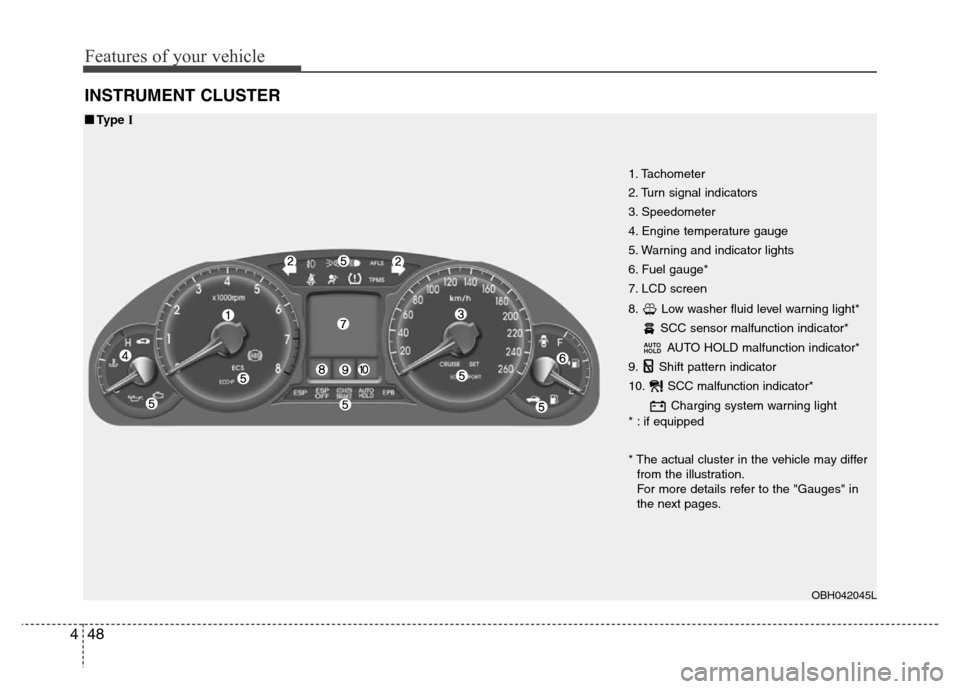
1. Tachometer
2. Turn signal indicators
3. Speedometer
4. Engine temperature gauge
5. Warning and indicator lights
6. Fuel gauge*
7. LCD screen
8. Low washer fluid level warning light*
SCC sensor malfunction indicator*
AUTO HOLD malfunction indicator*
9. Shift pattern indicator
10. SCC malfunction indicator*
Charging system warning light
* : if equipped
* The actual cluster in the vehicle may differ
from the illustration.
For more details refer to the "Gauges" in
the next pages.
AUTO
HOLD
OBH042045L
■■Type I
INSTRUMENT CLUSTER
Page 122 of 393
449
Features of your vehicle
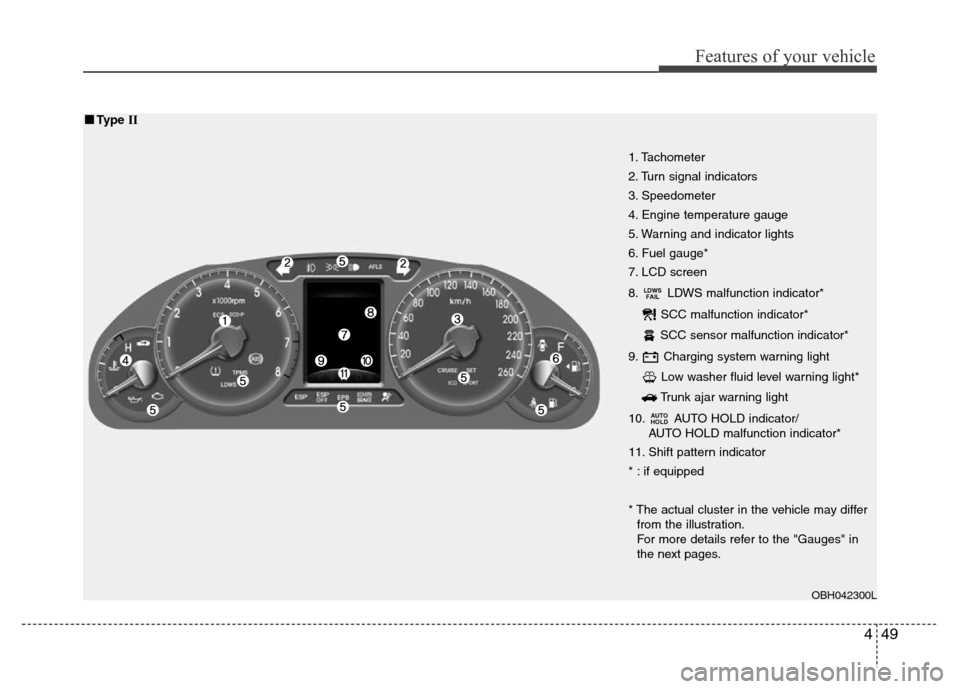
1. Tachometer
2. Turn signal indicators
3. Speedometer
4. Engine temperature gauge
5. Warning and indicator lights
6. Fuel gauge*
7. LCD screen
8. LDWS malfunction indicator*
SCC malfunction indicator*
SCC sensor malfunction indicator*
9. Charging system warning light
Low washer fluid level warning light*
Trunk ajar warning light
10. AUTO HOLD indicator/
AUTO HOLD malfunction indicator*
11. Shift pattern indicator
* : if equipped
* The actual cluster in the vehicle may differ
from the illustration.
For more details refer to the "Gauges" in
the next pages.
AUTO
HOLD
LDWS
FAIL
OBH042300L
■■Type II
Page 137 of 393
Features of your vehicle
64 4
D150315AHD
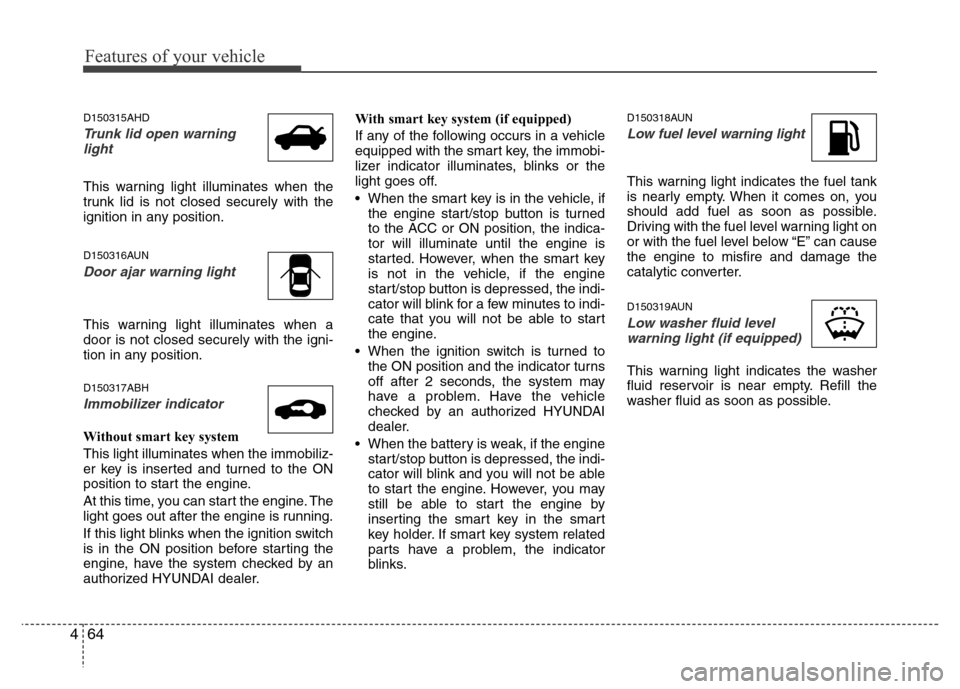
Trunk lid open warning
light
This warning light illuminates when the
trunk lid is not closed securely with the
ignition in any position.
D150316AUN
Door ajar warning light
This warning light illuminates when a
door is not closed securely with the igni-
tion in any position.
D150317ABH
Immobilizer indicator
Without smart key system
This light illuminates when the immobiliz-
er key is inserted and turned to the ON
position to start the engine.
At this time, you can start the engine. The
light goes out after the engine is running.
If this light blinks when the ignition switch
is in the ON position before starting the
engine, have the system checked by an
authorized HYUNDAI dealer.With smart key system (if equipped)
If any of the following occurs in a vehicle
equipped with the smart key, the immobi-
lizer indicator illuminates, blinks or the
light goes off.
• When the smart key is in the vehicle, if
the engine start/stop button is turned
to the ACC or ON position, the indica-
tor will illuminate until the engine is
started. However, when the smart key
is not in the vehicle, if the engine
start/stop button is depressed, the indi-
cator will blink for a few minutes to indi-
cate that you will not be able to start
the engine.
• When the ignition switch is turned to
the ON position and the indicator turns
off after 2 seconds, the system may
have a problem. Have the vehicle
checked by an authorized HYUNDAI
dealer.
• When the battery is weak, if the engine
start/stop button is depressed, the indi-
cator will blink and you will not be able
to start the engine. However, you may
still be able to start the engine by
inserting the smart key in the smart
key holder. If smart key system related
parts have a problem, the indicator
blinks.
D150318AUN
Low fuel level warning light
This warning light indicates the fuel tank
is nearly empty. When it comes on, you
should add fuel as soon as possible.
Driving with the fuel level warning light on
or with the fuel level below “E” can cause
the engine to misfire and damage the
catalytic converter.
D150319AUN
Low washer fluid level
warning light (if equipped)
This warning light indicates the washer
fluid reservoir is near empty. Refill the
washer fluid as soon as possible.
Page 140 of 393
467
Features of your vehicle
D150327ABH
Key reminder warning chime
(if equipped)
If the driver’s door is opened while the
ignition key is left in the ignition switch
(ACC or LOCK position), the key
reminder warning chime will sound. This
is to prevent you from locking your keys
in the vehicle. The chime sounds until the
key is removed from the ignition switch or
the driver’s door is closed.
With smart key
If the driver’s door is opened while the
smart key is in the vehicle with the
engine start/stop button in ACC or the
smart key is in the smart key holder with
the engine start/stop button in OFF, the
key reminder warning chime will sound.
The chime sounds until the smart key is
removed from the smart key holder or the
driver’s door is closed.
D150330AEN
Overspeed warning
(if equipped)
Overspeed warning light
If you drive with the speed of 120 km/h or
more, the overspeed warning light will
blink. This is to prevent you from driving
your vehicle with overspeed.
Overspeed warning chime
If you drive with the speed of 120 km/h or
more, the overspeed warning chime will
sound for about 5 seconds. This is to pre-
vent you from driving your vehicle with
overspeed.
D150332ABH
EPB (Electric Parking
Brake) malfunction indica-
tor (if equipped)
The EPB malfunction indicator will illumi-
nate when the ignition switch is turned
ON, but should go off after approximate-
ly 3 seconds. If the warning light does not
come on, or continuously remains on
after coming on for about 3 seconds
when you turned the ignition switch to the
ON position, the Electric Parking Brake is
not working properly.
If it comes on while driving, the EPB is
not working properly.
Take your vehicle to an authorized
HYUNDAI dealer and have the system
checked.
The EPB malfunction indicator may illu-
minate when the ESP indicator comes on
to indicate that the ESP is not working
properly, but if this occurs, it does not
indicate malfunction of the EPB.
EPB120km/h
Page 141 of 393
Features of your vehicle
68 4
D150333ABH
AUTO HOLD indicator
(if equipped)
If you press the AUTO HOLD switch, the
AUTO HOLD indicator on the cluster
comes on white. And when you stop the
vehicle completely by pressing the brake
pedal, the indicator changes from white
to green.
If the AUTO HOLD malfunction indicator
on the LCD screen lights up yellow, the
AUTO HOLD is not working properly. Take
your vehicle to an authorized HYUNDAI
dealer and have the system checked.
For more information, refer to “AUTO
HOLD” in section 5.
D150334ABH
AFLS (Adaptive Front
Lighting System)
malfunction indicator
(if equipped)
If the AFLS malfunction indicator comes
on, the AFLS is not working properly.
Drive to the nearest safe location and
restart the engine. If the indicator contin-
uously remains on, take your vehicle to
an authorized HYUNDAI dealer and have
the system checked.
SPORT indicator
(if equipped)
With electronic controlled
suspension (if equipped)
The SPORT indicator light will illuminate
when the SPORT button is pressed. It
enables you to drive dynamically. The
indicator light turns off when the SPORT
button is pressed again. The sporty driv-
ing mode returns to the normal mode.
For more information, refer to "Electronic
controlled suspension" in section 5.
D150335ABH
ECS (Electronic Control
Suspension) malfunction
indicator (if equipped)
The ECS malfunction indicator will illumi-
nate when the ignition switch is turned
ON, but should go off after approximate-
ly 3 seconds. If the warning light does not
come on, or continuously remains on
after coming on for about 3 seconds
when you turned the ignition switch to the
ON position, the ECS is not working
properly.
If it comes on while driving, the electron-
ic control suspension is not working
properly.
Take your vehicle to an authorized
HYUNDAI dealer and have the system
checked.
ECS malfunction indicator may illuminate
when the ESP indicator comes on to indi-
cate that the ESP is not working proper-
ly, but it does not indicate malfunction of
the ECS.
ECSAFLSAUTO
HOLD
SPORT
Page 142 of 393
469
Features of your vehicle
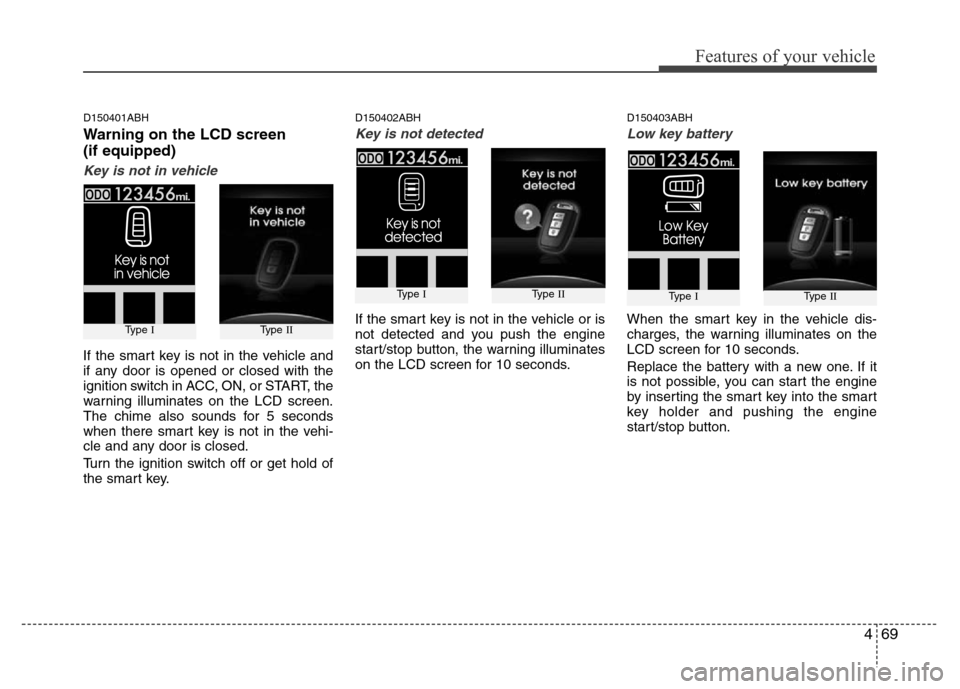
D150401ABH
Warning on the LCD screen
(if equipped)
Key is not in vehicle
If the smart key is not in the vehicle and
if any door is opened or closed with the
ignition switch in ACC, ON, or START, the
warning illuminates on the LCD screen.
The chime also sounds for 5 seconds
when there smart key is not in the vehi-
cle and any door is closed.
Turn the ignition switch off or get hold of
the smart key.
D150402ABH
Key is not detected
If the smart key is not in the vehicle or is
not detected and you push the engine
start/stop button, the warning illuminates
on the LCD screen for 10 seconds.
D150403ABH
Low key battery
When the smart key in the vehicle dis-
charges, the warning illuminates on the
LCD screen for 10 seconds.
Replace the battery with a new one. If it
is not possible, you can start the engine
by inserting the smart key into the smart
key holder and pushing the engine
start/stop button.
Type IType II
Type IType II
Type IType II
Page 143 of 393

Features of your vehicle
70 4
D150404ABH
Press brake pedal to start engine
If the ignition switch turn to the ACC posi-
tion twice by pushing the engine start/
stop button repeatedly without pressing
the brake pedal, the warning illuminates
on the LCD screen for 10 seconds to
indicate that you should press the brake
pedal to start the engine.
D150405ABH
Shift to "P" position
If you push the engine start/ stop P but-
ton with the ignition switch ON and the
shift lever not in P(Park), the warning illu-
minates on the LCD screen for 10 sec-
onds to indicate that you should press
the start/stop button with the shift lever in
P(Park) to turn off the engine.
D150406ABH
Remove key
When you turn off the engine with the
smart key in the smart key holder, the
warning illuminates on the LCD screen
for 10 seconds.
Push the smart key inward and pull it out
from the smart key holder.
Type IType IIType IType IIType IType II
Page 154 of 393
481
Features of your vehicle
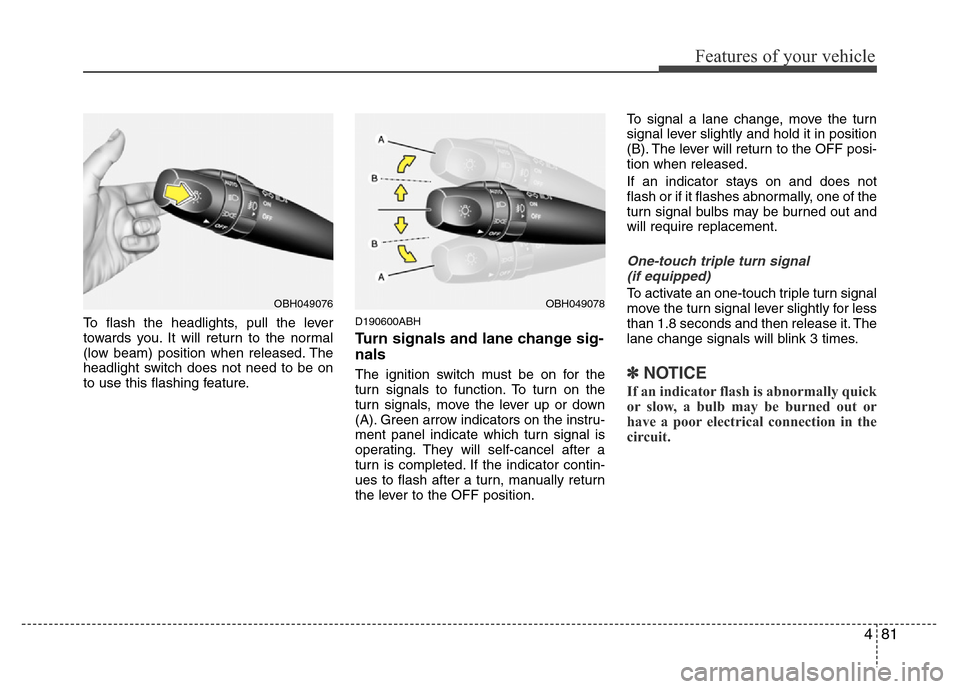
To flash the headlights, pull the lever
towards you. It will return to the normal
(low beam) position when released. The
headlight switch does not need to be on
to use this flashing feature.D190600ABH
Turn signals and lane change sig-
nals
The ignition switch must be on for the
turn signals to function. To turn on the
turn signals, move the lever up or down
(A). Green arrow indicators on the instru-
ment panel indicate which turn signal is
operating. They will self-cancel after a
turn is completed. If the indicator contin-
ues to flash after a turn, manually return
the lever to the OFF position.To signal a lane change, move the turn
signal lever slightly and hold it in position
(B). The lever will return to the OFF posi-
tion when released.
If an indicator stays on and does not
flash or if it flashes abnormally, one of the
turn signal bulbs may be burned out and
will require replacement.
One-touch triple turn signal
(if equipped)
To activate an one-touch triple turn signal
move the turn signal lever slightly for less
than 1.8 seconds and then release it. The
lane change signals will blink 3 times.
✽NOTICE
If an indicator flash is abnormally quick
or slow, a bulb may be burned out or
have a poor electrical connection in the
circuit.
OBH049076OBH049078
Page 179 of 393
Features of your vehicle
106 4
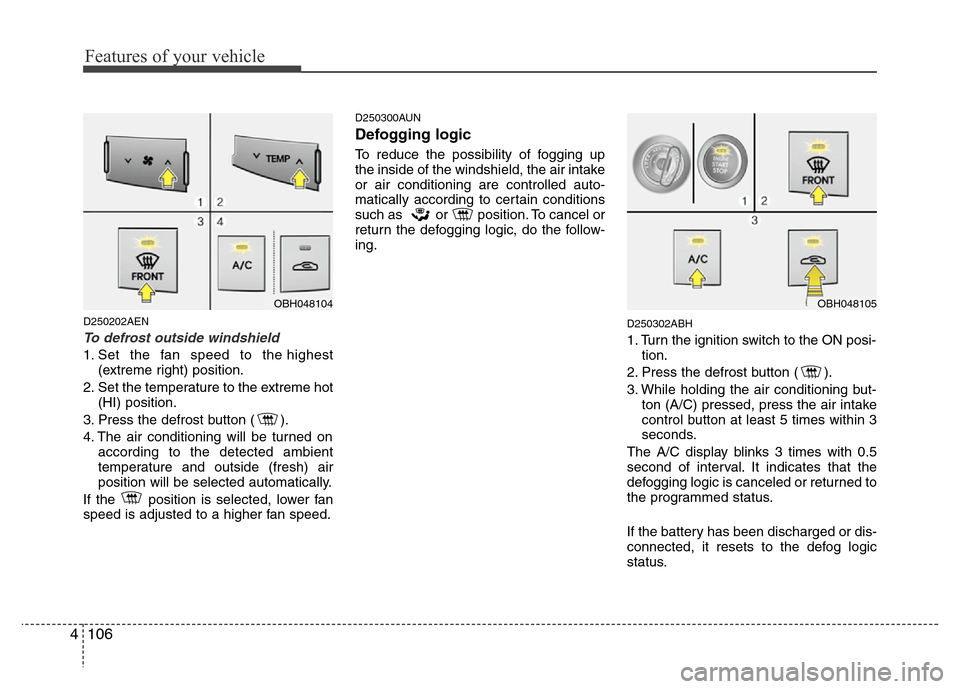
D250202AEN
To defrost outside windshield
1. Set the fan speed to the highest
(extreme right) position.
2. Set the temperature to the extreme hot
(HI) position.
3. Press the defrost button ( ).
4. The air conditioning will be turned on
according to the detected ambient
temperature and outside (fresh) air
position will be selected automatically.
If the position is selected, lower fan
speed is adjusted to a higher fan speed.
D250300AUN
Defogging logic
To reduce the possibility of fogging up
the inside of the windshield, the air intake
or air conditioning are controlled auto-
matically according to certain conditions
such as or position. To cancel or
return the defogging logic, do the follow-
ing.
D250302ABH
1. Turn the ignition switch to the ON posi-
tion.
2. Press the defrost button ( ).
3. While holding the air conditioning but-
ton (A/C) pressed, press the air intake
control button at least 5 times within 3
seconds.
The A/C display blinks 3 times with 0.5
second of interval. It indicates that the
defogging logic is canceled or returned to
the programmed status.
If the battery has been discharged or dis-
connected, it resets to the defog logic
status.
OBH048104OBH048105