hold Hyundai Genesis 2012 User Guide
[x] Cancel search | Manufacturer: HYUNDAI, Model Year: 2012, Model line: Genesis, Model: Hyundai Genesis 2012Pages: 393, PDF Size: 8.81 MB
Page 50 of 393
Safety features of your vehicle
34 3
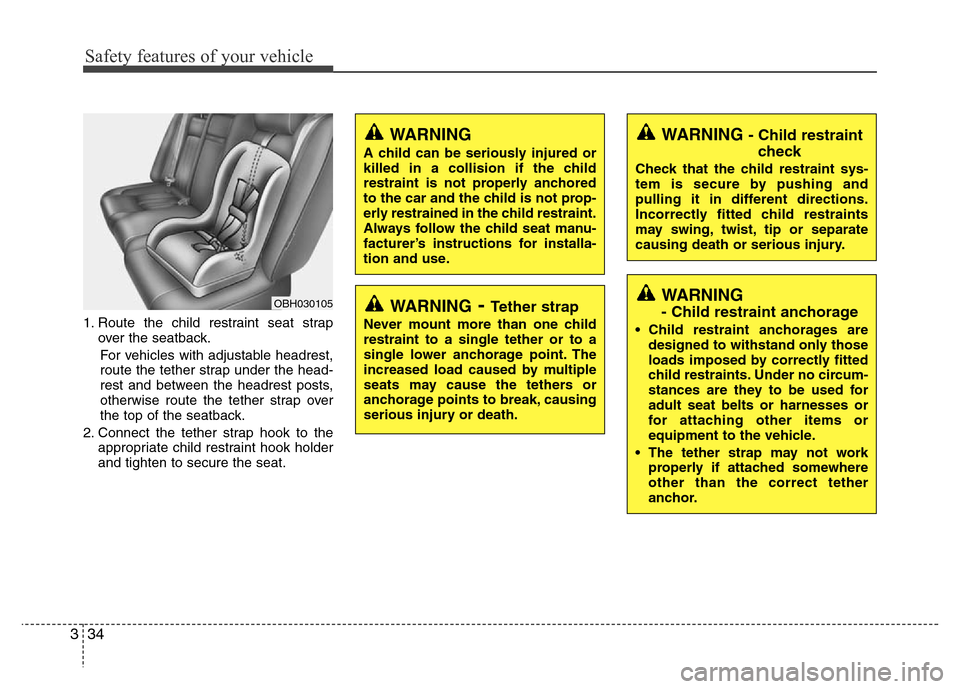
1. Route the child restraint seat strap
over the seatback.
For vehicles with adjustable headrest,
route the tether strap under the head-
rest and between the headrest posts,
otherwise route the tether strap over
the top of the seatback.
2. Connect the tether strap hook to the
appropriate child restraint hook holder
and tighten to secure the seat.
WARNING - Child restraint
check
Check that the child restraint sys-
tem is secure by pushing and
pulling it in different directions.
Incorrectly fitted child restraints
may swing, twist, tip or separate
causing death or serious injury.
WARNING
- Child restraint anchorage
• Child restraint anchorages are
designed to withstand only those
loads imposed by correctly fitted
child restraints. Under no circum-
stances are they to be used for
adult seat belts or harnesses or
for attaching other items or
equipment to the vehicle.
• The tether strap may not work
properly if attached somewhere
other than the correct tether
anchor.
OBH030105WARNING- Tether strap
Never mount more than one child
restraint to a single tether or to a
single lower anchorage point. The
increased load caused by multiple
seats may cause the tethers or
anchorage points to break, causing
serious injury or death.
WARNING
A child can be seriously injured or
killed in a collision if the child
restraint is not properly anchored
to the car and the child is not prop-
erly restrained in the child restraint.
Always follow the child seat manu-
facturer’s instructions for installa-
tion and use.
Page 52 of 393
Safety features of your vehicle
36 3
To secure the child restraint seat
1. To engage the child restraint seat to
the ISOFIX anchor, insert the child
restraint seat latch into the ISOFIX
anchor. Listen for the audible “click”
sound.
2. Connect the tether strap hook to the
child restraint hook holder and tighten
to secure the seat. (Refer to the previ-
ous page.)
WARNING
• Do not install a child restraint
seat at the center of the rear seat
using the vehicle's ISOFIX
anchors. The ISOFIX anchors are
only provided for the left and
right outboard rear seating posi-
tions. Do not misuse the ISOFIX
anchors by attempting to attach a
child restraint seat in the middle
of the rear seat to the ISOFIX
anchors.
In a crash, the child restraint seat
ISOFIX attachments may not be
strong enough to secure the child
restraint seat properly in the cen-
ter of the rear seat and may
break, causing serious injury or
death.
(Continued)
WARNING
• When using the vehicle's
"ISOFIX" system to install a child
restraint system in the rear seat,
all unused vehicle rear seat belt
metal latch plates or tabs must be
latched securely in their seat belt
buckles and the seat belt web-
bing must be retracted behind
the child restraint to prevent the
child from reaching and taking
hold of unretracted seat belts.
Unlatched metal latch plates or
tabs may allow the child to reach
the unretracted seat belts which
may result in strangulation and a
serious injury or death to the
child in the child restraint.
• Do not place anything around the
ISOFIX anchors. Also make sure
that the seat belt is not caught in
the ISOFIX anchors.
CAUTION
Do not allow the rear seat belt web-
bing to get scratched or pinched by
the ISOFIX-seat latch and ISOFIX
anchor during the installation.
Page 60 of 393
Safety features of your vehicle
44 3
WARNING
• Do not install or place any acces-
sories (drink holder, cassette
holder, sticker, etc.) on the front
passenger's panel above the
glove box in a vehicle with a pas-
senger's air bag. Such objects
may become dangerous projec-
tiles and cause injury if the pas-
senger's air bag inflates.
• When installing a container of liq-
uid air freshener inside the vehi-
cle, do not place it near the
instrument cluster nor on the
instrument panel surface.
It may become a dangerous pro-
jectile and cause injury if the pas-
senger's air bag inflates.
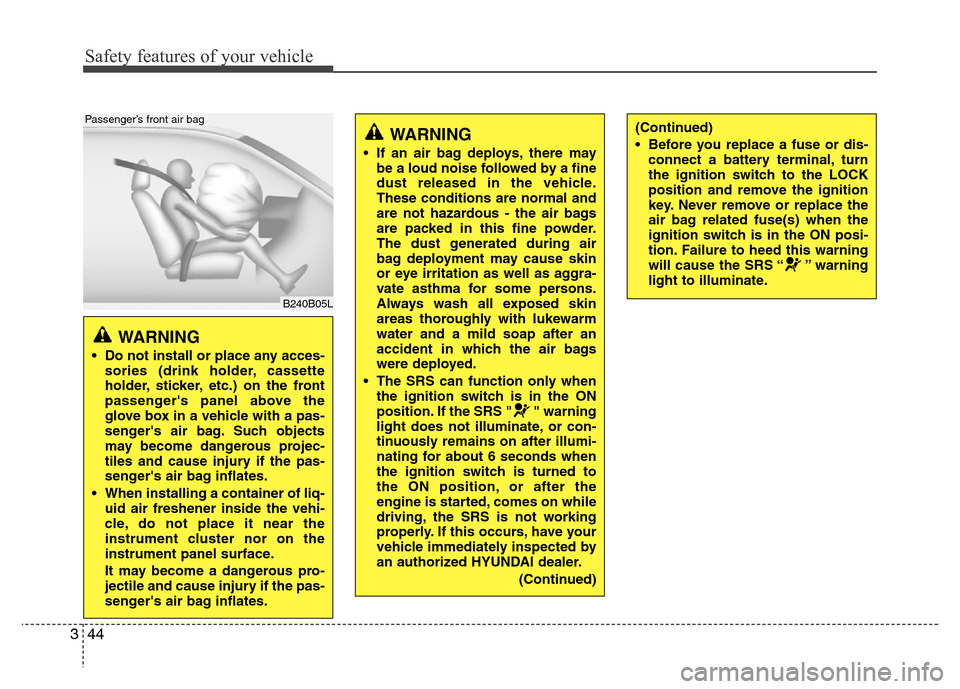
B240B05L
Passenger’s front air bag
WARNING
• If an air bag deploys, there may
be a loud noise followed by a fine
dust released in the vehicle.
These conditions are normal and
are not hazardous - the air bags
are packed in this fine powder.
The dust generated during air
bag deployment may cause skin
or eye irritation as well as aggra-
vate asthma for some persons.
Always wash all exposed skin
areas thoroughly with lukewarm
water and a mild soap after an
accident in which the air bags
were deployed.
• The SRS can function only when
the ignition switch is in the ON
position. If the SRS " " warning
light does not illuminate, or con-
tinuously remains on after illumi-
nating for about 6 seconds when
the ignition switch is turned to
the ON position, or after the
engine is started, comes on while
driving, the SRS is not working
properly. If this occurs, have your
vehicle immediately inspected by
an authorized HYUNDAI dealer.
(Continued)
(Continued)
• Before you replace a fuse or dis-
connect a battery terminal, turn
the ignition switch to the LOCK
position and remove the ignition
key. Never remove or replace the
air bag related fuse(s) when the
ignition switch is in the ON posi-
tion. Failure to heed this warning
will cause the SRS “ ” warning
light to illuminate.
Page 62 of 393
Safety features of your vehicle
46 3
(Continued)
• Move your seat as far back as
practical from the front air bags,
while still maintaining control of
the vehicle.
• You and your passengers should
never sit or lean unnecessarily
close to the air bags. Improperly
positioned drivers and passen-
gers can be severely injured by
inflating air bags.
• Never lean against the door or
center console – always sit in an
upright position.
• No objects should be placed over
or near the air bag modules on
the steering wheel, instrument
panel, and the front passenger's
panel above the glove box,
because any such object could
cause harm if the vehicle is in a
crash severe enough to cause
the air bags to deploy.
• Do not tamper with or disconnect
SRS wiring or other components
of the SRS system. Doing so
could result in injury, due to acci-
dental deployment of the air bags
or by rendering the SRS inopera-
tive.
(Continued)(Continued)
• If the SRS air bag warning light
“ ”remains illuminated while
the vehicle is being driven, have
an authorized HYUNDAI dealer
inspect the air bag system as
soon as possible.
• Air bags can only be used once –
have an authorized HYUNDAI
dealer replace the air bag imme-
diately after deployment.
• The SRS is designed to deploy
the front air bags only when an
impact is sufficiently severe and
when the impact angle is less
than 30° from the forward longitu-
dinal axis of the vehicle.
Additionally, the air bags will only
deploy once. Seat belts must be
worn at all times.
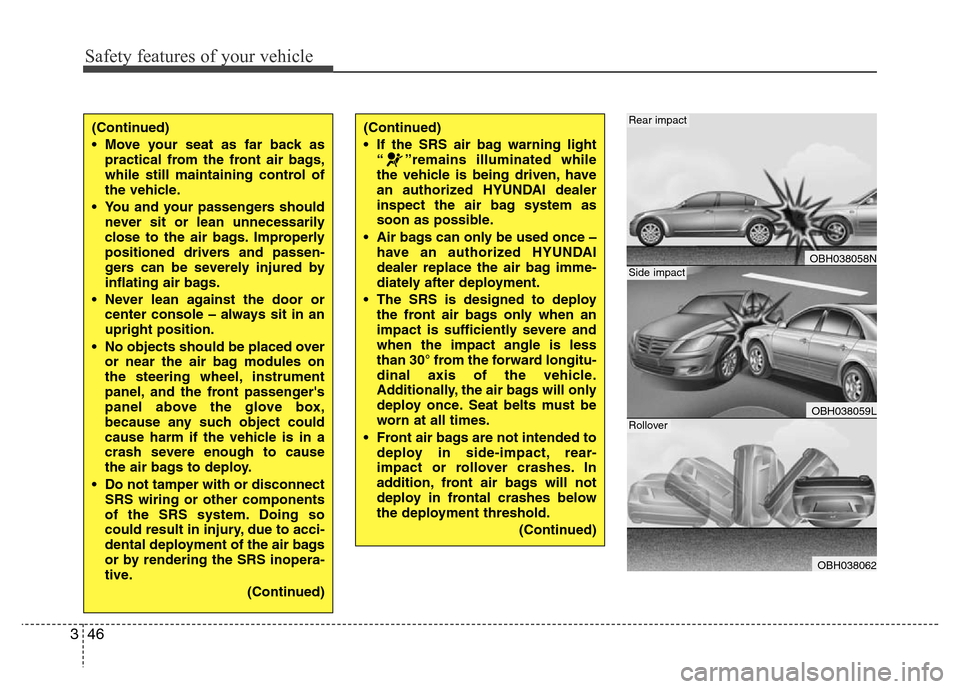
• Front air bags are not intended to
deploy in side-impact, rear-
impact or rollover crashes. In
addition, front air bags will not
deploy in frontal crashes below
the deployment threshold.
(Continued)
OBH038058N
OBH038059L
OBH038062
Rear impact
Side impact
Rollover
Page 72 of 393
Safety features of your vehicle
56 3
C041300ABH
Additional safety precautions
• All occupants should sit upright, fully
back in their seats with their seat belts
on and their feet on the floor.
•Passengers should not move out of
or change seats while the vehicle is
moving.A passenger who is not wear-
ing a seat belt during a crash or emer-
gency stop can be thrown against the
inside of the vehicle, against other
occupants, or out of the vehicle.
•Each seat belt is designed to
restrain one occupant.If more than
one person uses the same seat belt,
they could be seriously injured or killed
in a collision.
•Do not use any accessories on seat
belts.Devices claiming to improve
occupant comfort or reposition the seat
belt can reduce the protection provided
by the seat belt and increase the
chance of serious injury in a crash.
•Passengers should not place hard
or sharp objects between them-
selves and the air bags.Carrying
hard or sharp objects on your lap or in
your mouth can result in injuries if an
air bag inflates.•Keep occupants away from the air
bag covers.All occupants should sit
upright, fully back in their seats with
their seat belts on and their feet on the
floor. If occupants are too close to the
air bag covers, they could be injured if
the air bags inflate.
•Do not attach or place objects on or
near the air bag covers.Any object
attached to or placed on the front or
side air bag covers could interfere with
the proper operation of the air bags.
•Do not modify the front seats.
Modification of the front seats could
interfere with the operation of the sup-
plemental restraint system sensing
components or side air bags.
•Do not place items under the front
seats.Placing items under the front
seats could interfere with the operation
of the supplemental restraint system
sensing components and wiring har-
nesses.
•Never hold an infant or child on your
lap.The infant or child could be seri-
ously injured or killed in the event of a
crash. All infants and children should
be properly restrained in appropriate
child safety seats or seat belts in the
rear seat.
C041400AUN
Adding equipment to or modifying
your air bag-equipped vehicle
If you modify your vehicle by changing
your vehicle's frame, bumper system,
front end or side sheet metal or ride
height, this may affect the operation of
your vehicle's air bag system.
WARNING
• Sitting improperly or out of posi-
tion can cause occupants to be
shifted too close to a deploying
air bag, strike the interior struc-
ture or be thrown from the vehicle
resulting in serious injury or
death.
• Always sit upright with the seat-
back in an upright position, cen-
tered on the seat cushion with
your seat belt on, legs comfort-
ably extended and your feet on
the floor.
Page 76 of 393
43
Features of your vehicle
D010100AEN
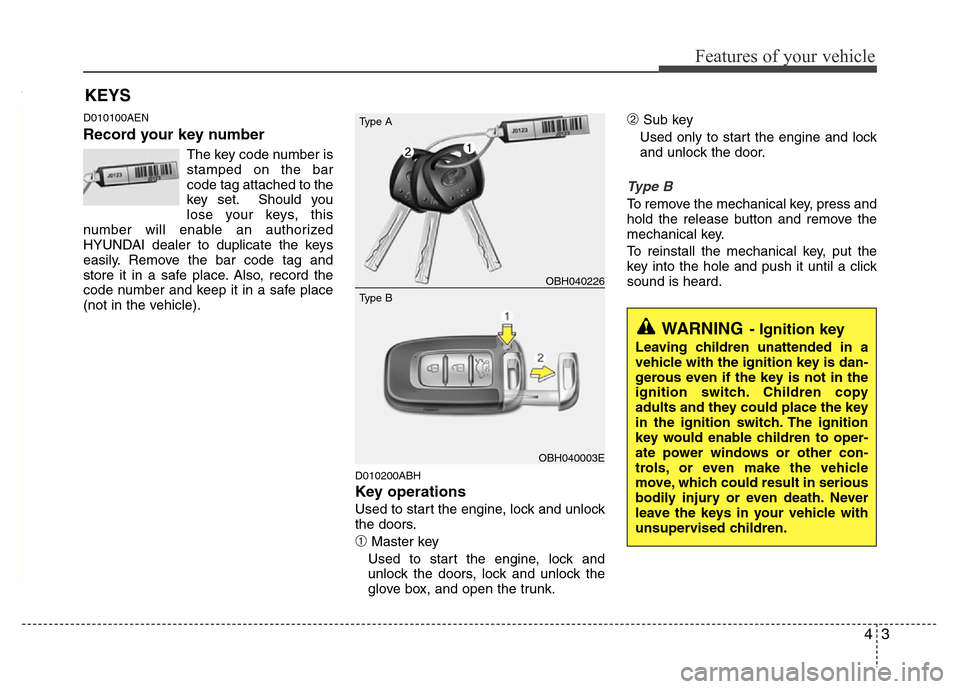
Record your key number
The key code number is
stamped on the bar
code tag attached to the
key set. Should you
lose your keys, this
number will enable an authorized
HYUNDAI dealer to duplicate the keys
easily. Remove the bar code tag and
store it in a safe place. Also, record the
code number and keep it in a safe place
(not in the vehicle).
D010200ABH
Key operations
Used to start the engine, lock and unlock
the doors.
➀Master key
Used to start the engine, lock and
unlock the doors, lock and unlock the
glove box, and open the trunk.
➁Sub key
Used only to start the engine and lock
and unlock the door.
Type B
To remove the mechanical key, press and
hold the release button and remove the
mechanical key.
To reinstall the mechanical key, put the
key into the hole and push it until a click
sound is heard.
KEYS
WARNING- Ignition key
Leaving children unattended in a
vehicle with the ignition key is dan-
gerous even if the key is not in the
ignition switch. Children copy
adults and they could place the key
in the ignition switch. The ignition
key would enable children to oper-
ate power windows or other con-
trols, or even make the vehicle
move, which could result in serious
bodily injury or even death. Never
leave the keys in your vehicle with
unsupervised children.
OBH040226
OBH040003E Type A
Type B
Page 81 of 393
Features of your vehicle
8 4
D040600ABH
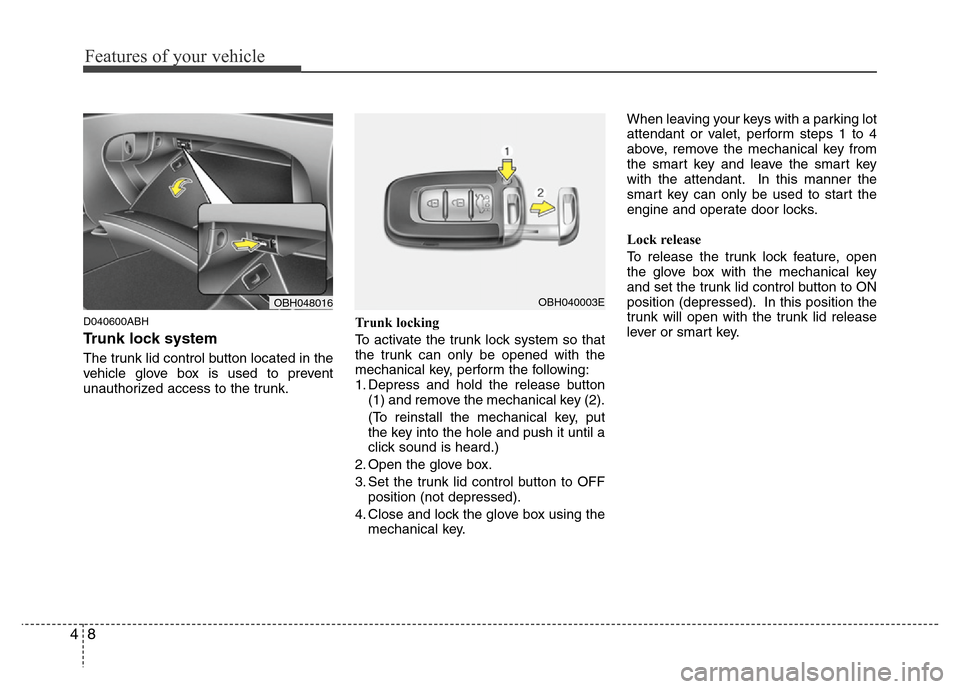
Trunk lock system
The trunk lid control button located in the
vehicle glove box is used to prevent
unauthorized access to the trunk.Trunk locking
To activate the trunk lock system so that
the trunk can only be opened with the
mechanical key, perform the following:
1. Depress and hold the release button
(1) and remove the mechanical key (2).
(To reinstall the mechanical key, put
the key into the hole and push it until a
click sound is heard.)
2. Open the glove box.
3. Set the trunk lid control button to OFF
position (not depressed).
4. Close and lock the glove box using the
mechanical key.When leaving your keys with a parking lot
attendant or valet, perform steps 1 to 4
above, remove the mechanical key from
the smart key and leave the smart key
with the attendant. In this manner the
smart key can only be used to start the
engine and operate door locks.
Lock release
To release the trunk lock feature, open
the glove box with the mechanical key
and set the trunk lid control button to ON
position (depressed). In this position the
trunk will open with the trunk lid release
lever or smart key.
OBH048016OBH040003E
Page 91 of 393
Features of your vehicle
18 4
D050400ABH
✽NOTICE
You can select some auto door
lock/unlock features in the INFO menu
of DIS (Driver Information System, if
equipped) as follows;
• Speed sensing auto door lock
• Auto door unlock by unlocking the
driver's door lock button
• Auto door unlock when the ignition
key is removed from the ignition
switch or the smart key is removed
from the smart key holder.
• Auto door lock/unlock by shifting the
shift lever out of P (Park) or into P
(Park)
If you want this feature, refer to the DIS
manual (if equipped) supplied separate-
ly (if equipped).
D050500ABH
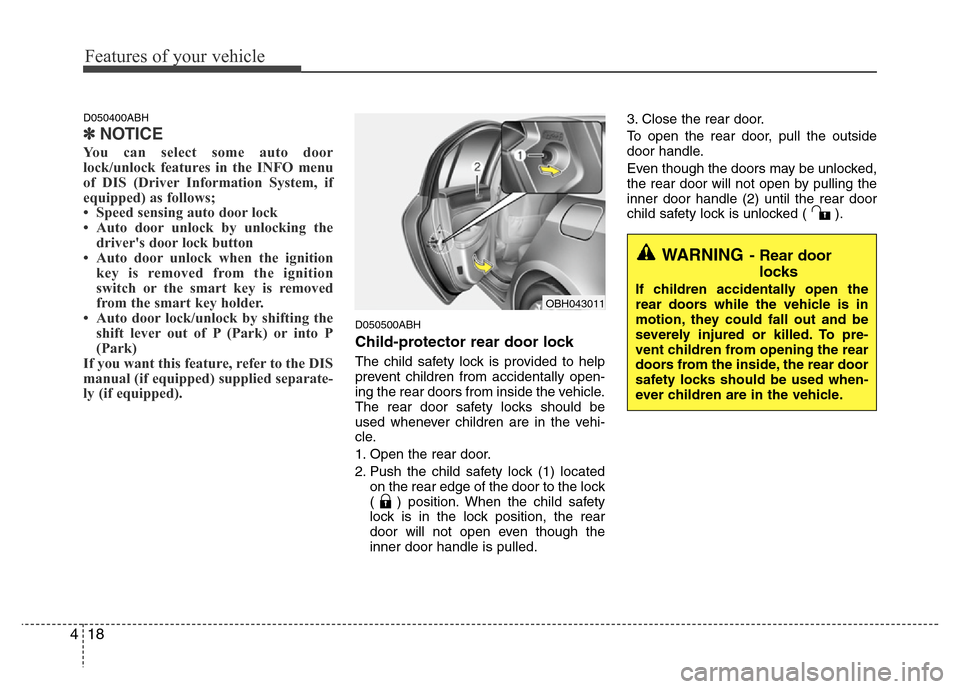
Child-protector rear door lock
The child safety lock is provided to help
prevent children from accidentally open-
ing the rear doors from inside the vehicle.
The rear door safety locks should be
used whenever children are in the vehi-
cle.
1. Open the rear door.
2. Push the child safety lock (1) located
on the rear edge of the door to the lock
( ) position. When the child safety
lock is in the lock position, the rear
door will not open even though the
inner door handle is pulled.3. Close the rear door.
To open the rear door, pull the outside
door handle.
Even though the doors may be unlocked,
the rear door will not open by pulling the
inner door handle (2) until the rear door
child safety lock is unlocked ( ).
WARNING- Rear door
locks
If children accidentally open the
rear doors while the vehicle is in
motion, they could fall out and be
severely injured or killed. To pre-
vent children from opening the rear
doors from the inside, the rear door
safety locks should be used when-
ever children are in the vehicle.OBH043011
Page 95 of 393
Features of your vehicle
22 4
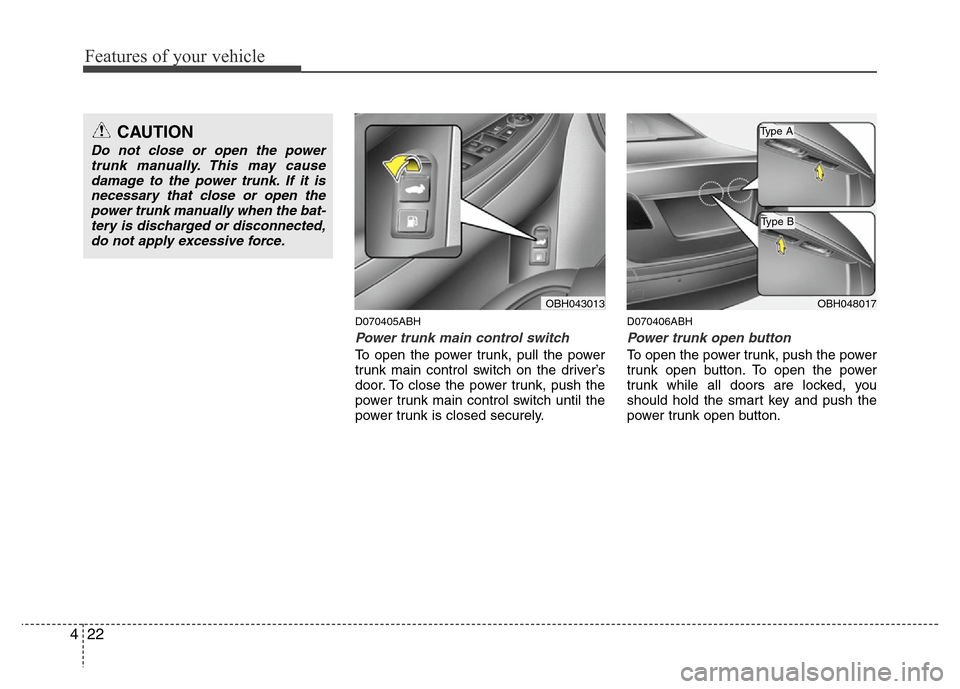
D070405ABH
Power trunk main control switch
To open the power trunk, pull the power
trunk main control switch on the driver’s
door. To close the power trunk, push the
power trunk main control switch until the
power trunk is closed securely.
D070406ABH
Power trunk open button
To open the power trunk, push the power
trunk open button. To open the power
trunk while all doors are locked, you
should hold the smart key and push the
power trunk open button.
OBH043013OBH048017
CAUTION
Do not close or open the power
trunk manually. This may cause
damage to the power trunk. If it is
necessary that close or open the
power trunk manually when the bat-
tery is discharged or disconnected,
do not apply excessive force.
Type B
Type A
Page 111 of 393
Features of your vehicle
38 4
D110500BBH
Resetting the sunroof
Whenever the vehicle battery is discon-
nected or discharged, or related fuse is
blown, you must reset your sunroof sys-
tem as follows:
1. Turn the ignition switch to the ON
position and close the sunroof com-
pletely.
2. Type A: Release the control lever.
Type B: Press and hold the control
lever upward until the sunroof
tilts completely upward. Then,
release the lever.
3. Type A: Pull and hold the control lever
downward until the sunroof
tilts and slightly moves up
and down. Then, release the
lever.
Type B: Press and hold the control
lever upward until the sunroof
slightly moves up and down.
Then, release the lever.4. Pull and hold the control lever down-
ward (Type B: Press and hold the con-
trol lever upward) until the sunroof is
operated as follows;
TILT DOWN →SLIDE OPEN →
SLIDE CLOSE
Then, release the control lever.
When this is complete, the sunroof sys-
tem is reset.
❈For more detailed information, contact
an authorized HYUNDAI dealer.
CAUTION
If the sunroof is not reset when the
vehicle battery is disconnected or
discharged, or related fuse is
blown, the sunroof may operate
improperly.