hold Hyundai Genesis 2012 Owner's Guide
[x] Cancel search | Manufacturer: HYUNDAI, Model Year: 2012, Model line: Genesis, Model: Hyundai Genesis 2012Pages: 393, PDF Size: 8.81 MB
Page 182 of 393
4109
Features of your vehicle
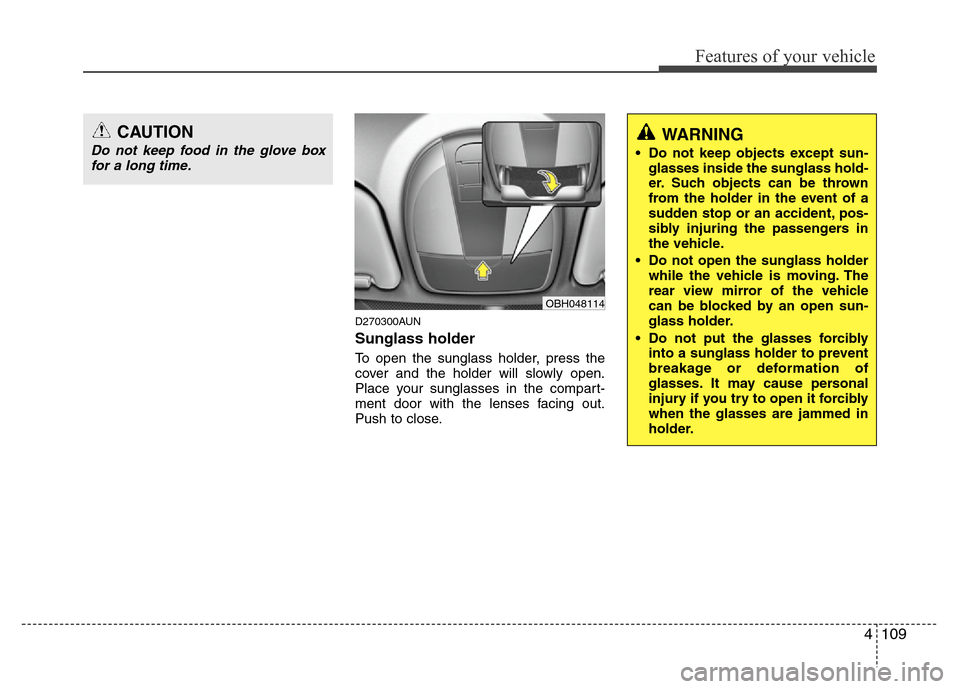
D270300AUN
Sunglass holder
To open the sunglass holder, press the
cover and the holder will slowly open.
Place your sunglasses in the compart-
ment door with the lenses facing out.
Push to close.
OBH048114
WARNING
• Do not keep objects except sun-
glasses inside the sunglass hold-
er. Such objects can be thrown
from the holder in the event of a
sudden stop or an accident, pos-
sibly injuring the passengers in
the vehicle.
• Do not open the sunglass holder
while the vehicle is moving. The
rear view mirror of the vehicle
can be blocked by an open sun-
glass holder.
• Do not put the glasses forcibly
into a sunglass holder to prevent
breakage or deformation of
glasses. It may cause personal
injury if you try to open it forcibly
when the glasses are jammed in
holder.
CAUTION
Do not keep food in the glove box
for a long time.
Page 183 of 393
Features of your vehicle
110 4
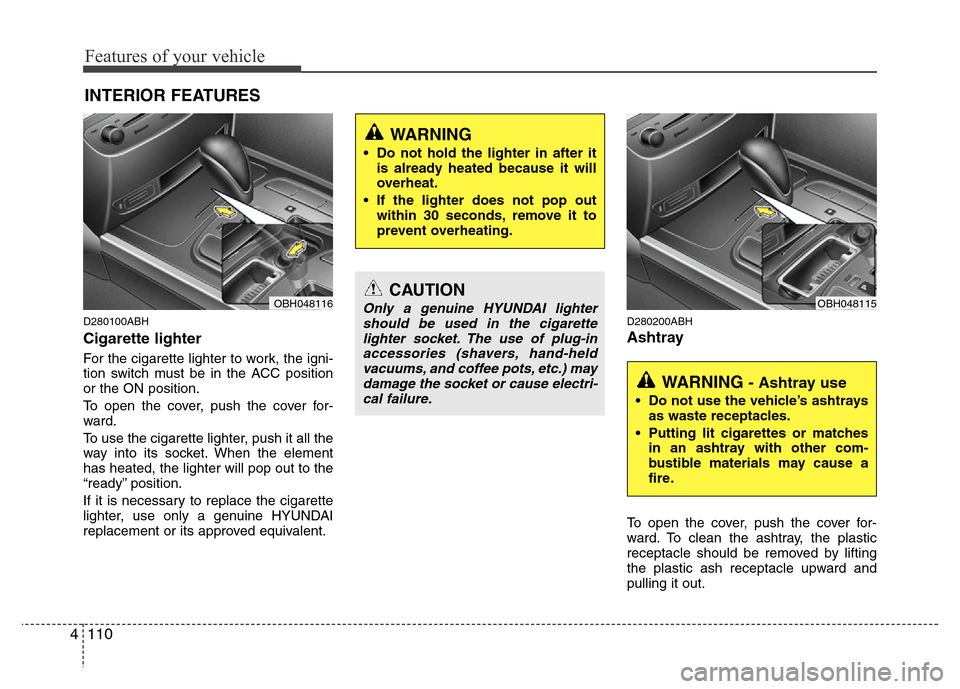
D280100ABH
Cigarette lighter
For the cigarette lighter to work, the igni-
tion switch must be in the ACC position
or the ON position.
To open the cover, push the cover for-
ward.
To use the cigarette lighter, push it all the
way into its socket. When the element
has heated, the lighter will pop out to the
“ready” position.
If it is necessary to replace the cigarette
lighter, use only a genuine HYUNDAI
replacement or its approved equivalent.
D280200ABH
Ashtray
To open the cover, push the cover for-
ward. To clean the ashtray, the plastic
receptacle should be removed by lifting
the plastic ash receptacle upward and
pulling it out.
INTERIOR FEATURES
CAUTION
Only a genuine HYUNDAI lighter
should be used in the cigarette
lighter socket. The use of plug-in
accessories (shavers, hand-held
vacuums, and coffee pots, etc.) may
damage the socket or cause electri-
cal failure.
WARNING
• Do not hold the lighter in after it
is already heated because it will
overheat.
• If the lighter does not pop out
within 30 seconds, remove it to
prevent overheating.
OBH048116
WARNING - Ashtray use
• Do not use the vehicle’s ashtrays
as waste receptacles.
• Putting lit cigarettes or matches
in an ashtray with other com-
bustible materials may cause a
fire.
OBH048115
Page 184 of 393
4111
Features of your vehicle
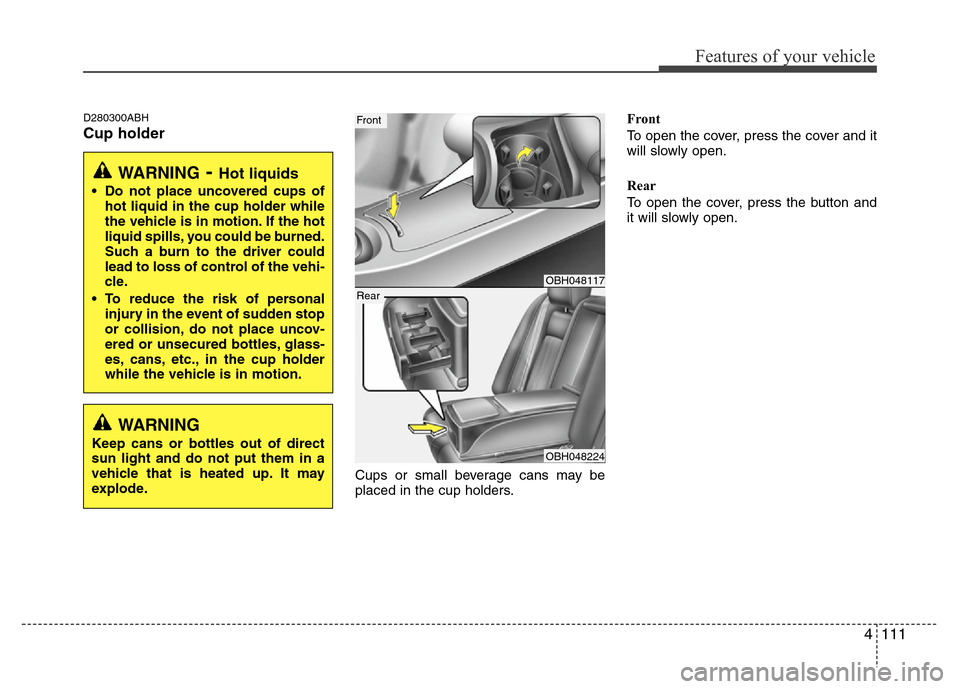
D280300ABH
Cup holder
Cups or small beverage cans may be
placed in the cup holders.Front
To open the cover, press the cover and it
will slowly open.
Rear
To open the cover, press the button and
it will slowly open.
WARNING- Hot liquids
• Do not place uncovered cups of
hot liquid in the cup holder while
the vehicle is in motion. If the hot
liquid spills, you could be burned.
Such a burn to the driver could
lead to loss of control of the vehi-
cle.
• To reduce the risk of personal
injury in the event of sudden stop
or collision, do not place uncov-
ered or unsecured bottles, glass-
es, cans, etc., in the cup holder
while the vehicle is in motion.
OBH048117
OBH048224
Front
Rear
WARNING
Keep cans or bottles out of direct
sun light and do not put them in a
vehicle that is heated up. It may
explode.
Page 185 of 393
Features of your vehicle
112 4
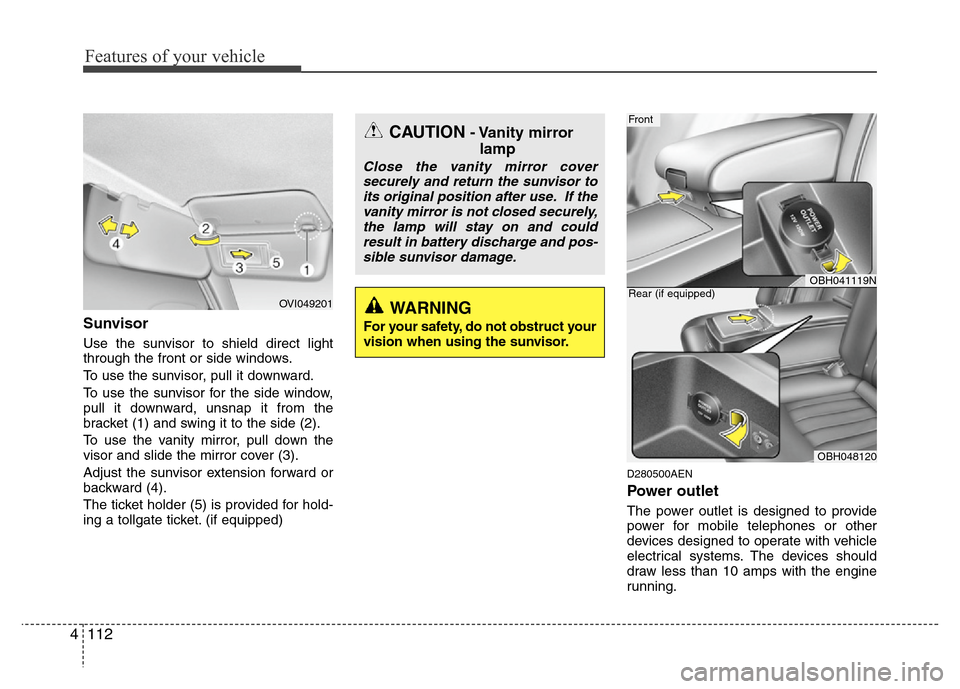
Sunvisor
Use the sunvisor to shield direct light
through the front or side windows.
To use the sunvisor, pull it downward.
To use the sunvisor for the side window,
pull it downward, unsnap it from the
bracket (1) and swing it to the side (2).
To use the vanity mirror, pull down the
visor and slide the mirror cover (3).
Adjust the sunvisor extension forward or
backward (4).
The ticket holder (5) is provided for hold-
ing a tollgate ticket. (if equipped)
D280500AEN
Power outlet
The power outlet is designed to provide
power for mobile telephones or other
devices designed to operate with vehicle
electrical systems. The devices should
draw less than 10 amps with the engine
running.
OBH041119N
Front
OBH048120 Rear (if equipped)
OVI049201
CAUTION- Vanity mirror
lamp
Close the vanity mirror cover
securely and return the sunvisor to
its original position after use. If the
vanity mirror is not closed securely,
the lamp will stay on and could
result in battery discharge and pos-
sible sunvisor damage.
WARNING
For your safety, do not obstruct your
vision when using the sunvisor.
Page 189 of 393
Features of your vehicle
116 4
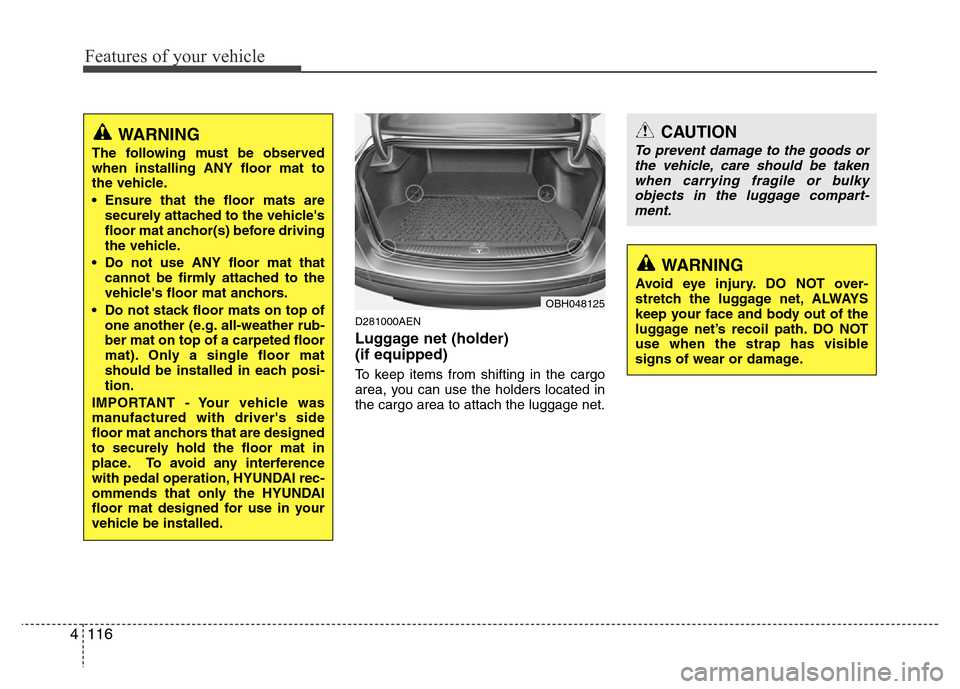
D281000AEN
Luggage net (holder)
(if equipped)
To keep items from shifting in the cargo
area, you can use the holders located in
the cargo area to attach the luggage net.
CAUTION
To prevent damage to the goods or
the vehicle, care should be taken
when carrying fragile or bulky
objects in the luggage compart-
ment.
WARNING
Avoid eye injury. DO NOT over-
stretch the luggage net, ALWAYS
keep your face and body out of the
luggage net’s recoil path. DO NOT
use when the strap has visible
signs of wear or damage.
OBH048125
WARNING
The following must be observed
when installing ANY floor mat to
the vehicle.
• Ensure that the floor mats are
securely attached to the vehicle's
floor mat anchor(s) before driving
the vehicle.
• Do not use ANY floor mat that
cannot be firmly attached to the
vehicle's floor mat anchors.
• Do not stack floor mats on top of
one another (e.g. all-weather rub-
ber mat on top of a carpeted floor
mat). Only a single floor mat
should be installed in each posi-
tion.
IMPORTANT - Your vehicle was
manufactured with driver's side
floor mat anchors that are designed
to securely hold the floor mat in
place. To avoid any interference
with pedal operation, HYUNDAI rec-
ommends that only the HYUNDAI
floor mat designed for use in your
vehicle be installed.
Page 196 of 393
4123
Features of your vehicle
Care of discs
• If the temperature inside the car is too
high, open the car windows for ventila-
tion before using your car audio.
• It is illegal to copy and use MP3/WMA
files without permission. Use CDs that
are created only by lawful means.
• Do not apply volatile agents such as
benzene and thinner, normal cleaners
and magnetic sprays made for ana-
logue disc onto CDs.
• To prevent the disc surface from get-
ting damaged. Hold and carry CDs by
the edges or the edges of the center
hole only.
• Clean the disc surface with a piece of
soft cloth before playback (wipe it from
the center to the outside edge).
• Do not damage the disc surface or
attach pieces of sticky tape or paper
onto it.
• Make sure nothing other than CDs are
inserted into the CD player (Do not
insert more than one CD at a time).• Keep CDs in their cases after use to
protect them from scratches or dirt.
• Depending on the type of CD-R/CD-
RW CDs, certain CDs may not operate
normally depending upon manufactur-
ing companies or processes and
recording methods. In such circum-
stances, if you still continue to use
those CDs, they may cause the mal-
function of your car audio system.
✽NOTICE- Playing an
Incompatible Copy
Protected Audio CD
Some copy protected CDs, which do not
comply with the international audio CD
standards (Red Book), may not play on
your car audio. Please note that if you
try to play copy protected CDs and the
CD player does not perform correctly
the CDs maybe defective, not the CD
player.
Page 228 of 393
Driving your vehicle
6 5
Starting the engine
E040000AUN-EU
E040100ABH
1. Make sure the parking brake is
applied.
2. Place the shift lever in P (Park).
Depress the brake pedal fully.
You can also start the engine when
the shift lever is in the N (Neutral)
position.
3. Turn the ignition switch to START and
hold it there until the engine starts (a
maximum of 10 seconds), then
release the key.
4. In extremely cold weather (below
-18°C / 0°F) or after the vehicle has
not been operated for several days, let
the engine warm up without depress-
ing the accelerator.
Whether the engine is cold or warm, it
should be started without depressing
the accelerator.
WARNING
Always wear appropriate shoes
when operating your vehicle.
Unsuitable shoes (high heels, ski
boots,etc.) may interfere with your
ability to use the brake and acceler-
ator pedal.
CAUTION
If the engine stalls while you are in
motion, do not attempt to move the
shift lever to the P (Park) position. If
traffic and road conditions permit,
you may put the shift lever in the N
(Neutral) position while the vehicle
is still moving and turn the ignition
switch to the START position in an
attempt to restart the engine.
CAUTION
Do not engage the starter for more
than 10 seconds. If the engine stalls
or fails to start, wait 5 to 10 seconds
before re-engaging the starter.
Improper use of the starter may
damage it.
(Continued)
• Do not place any movable objects
around the driver’s seat as they
may move while driving, interfere
with the driver and lead to an
accident.
Page 229 of 393
57
Driving your vehicle
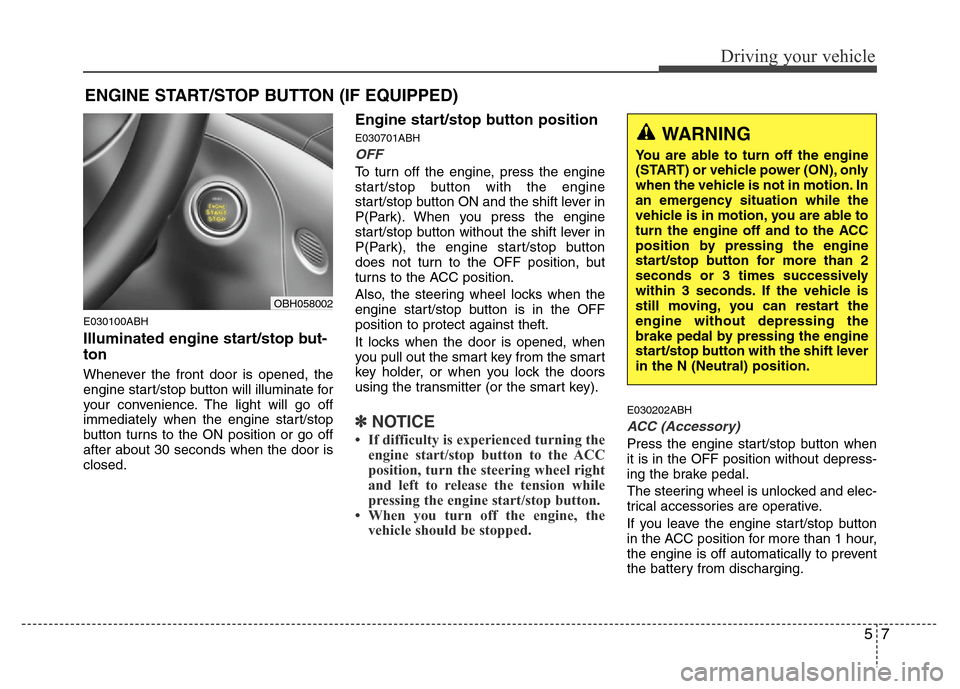
E030100ABH
Illuminated engine start/stop but-
ton
Whenever the front door is opened, the
engine start/stop button will illuminate for
your convenience. The light will go off
immediately when the engine start/stop
button turns to the ON position or go off
after about 30 seconds when the door is
closed.
Engine start/stop button position
E030701ABH
OFF
To turn off the engine, press the engine
start/stop button with the engine
start/stop button ON and the shift lever in
P(Park). When you press the engine
start/stop button without the shift lever in
P(Park), the engine start/stop button
does not turn to the OFF position, but
turns to the ACC position.
Also, the steering wheel locks when the
engine start/stop button is in the OFF
position to protect against theft.
It locks when the door is opened, when
you pull out the smart key from the smart
key holder, or when you lock the doors
using the transmitter (or the smart key).
✽NOTICE
• If difficulty is experienced turning the
engine start/stop button to the ACC
position, turn the steering wheel right
and left to release the tension while
pressing the engine start/stop button.
• When you turn off the engine, the
vehicle should be stopped.
E030202ABH
ACC (Accessory)
Press the engine start/stop button when
it is in the OFF position without depress-
ing the brake pedal.
The steering wheel is unlocked and elec-
trical accessories are operative.
If you leave the engine start/stop button
in the ACC position for more than 1 hour,
the engine is off automatically to prevent
the battery from discharging.
ENGINE START/STOP BUTTON (IF EQUIPPED)
WARNING
You are able to turn off the engine
(START) or vehicle power (ON), only
when the vehicle is not in motion. In
an emergency situation while the
vehicle is in motion, you are able to
turn the engine off and to the ACC
position by pressing the engine
start/stop button for more than 2
seconds or 3 times successively
within 3 seconds. If the vehicle is
still moving, you can restart the
engine without depressing the
brake pedal by pressing the engine
start/stop button with the shift lever
in the N (Neutral) position.
OBH058002
Page 232 of 393
Driving your vehicle
10 5
✽NOTICE
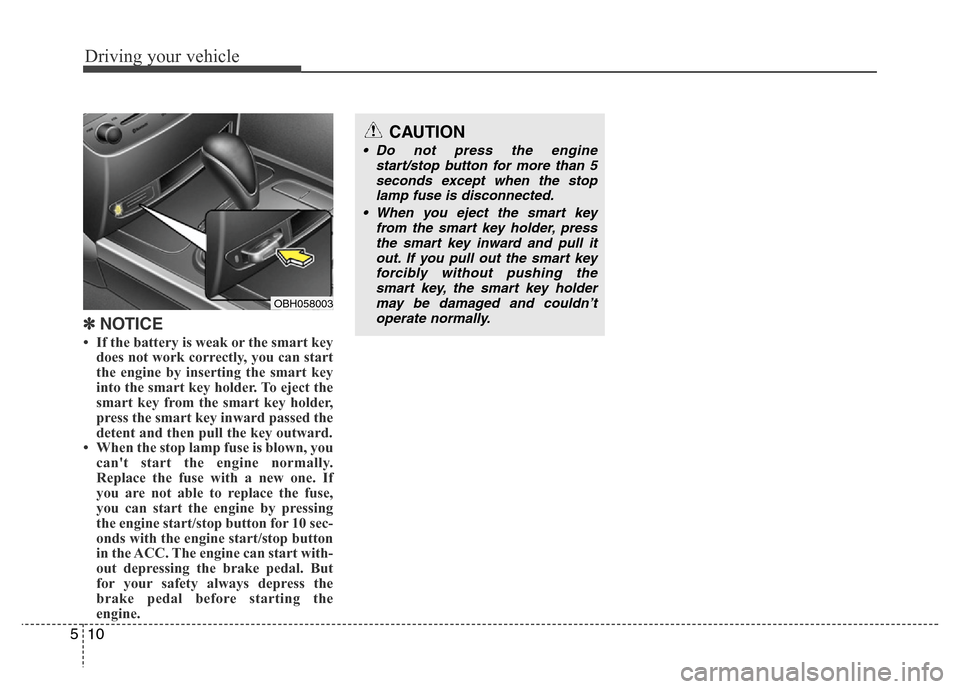
• If the battery is weak or the smart key
does not work correctly, you can start
the engine by inserting the smart key
into the smart key holder. To eject the
smart key from the smart key holder,
press the smart key inward passed the
detent and then pull the key outward.
• When the stop lamp fuse is blown, you
can't start the engine normally.
Replace the fuse with a new one. If
you are not able to replace the fuse,
you can start the engine by pressing
the engine start/stop button for 10 sec-
onds with the engine start/stop button
in the ACC. The engine can start with-
out depressing the brake pedal. But
for your safety always depress the
brake pedal before starting the
engine.
OBH058003
CAUTION
• Do not press the engine
start/stop button for more than 5
seconds except when the stop
lamp fuse is disconnected.
• When you eject the smart key
from the smart key holder, press
the smart key inward and pull it
out. If you pull out the smart key
forcibly without pushing the
smart key, the smart key holder
may be damaged and couldn’t
operate normally.
Page 234 of 393
Driving your vehicle
12 5
For smooth operation, depress the brake
pedal when shifting from N (Neutral) to a
forward or reverse gear.E060101BBH
Transmission ranges
The indicator in the instrument cluster
displays the shift lever position when the
ignition switch is in the ON position.
P (Park)
Always come to a complete stop before
shifting into P (Park). This position locks
the transmission and prevents the drive
wheels from rotating.
WARNING- Automatic
transmission
• Always check the surrounding
areas near your vehicle for peo-
ple, especially children, before
shifting a car into D (Drive) or R
(Reverse).
• Before leaving the driver’s seat,
always make sure the shift lever
is in the P (Park) position; then
set the parking brake fully and
shut the engine off. Unexpected
and sudden vehicle movement
can occur if these precautions
are not followed in the order iden-
tified.
CAUTION
• To avoid damage to your trans-
mission, do not accelerate the
engine in R (Reverse) or any for-
ward gear position with the
brakes on.
• When stopped on an incline, do
not hold the vehicle stationary
with engine power. Use the serv-
ice brake or the parking brake.
• Do not shift from N (Neutral) or P
(Park) into D (Drive), or R
(Reverse) when the engine is
above idle speed.
WARNING
• Shifting into P (Park) while the
vehicle is in motion will cause the
drive wheels to lock which will
cause you to lose control of the
vehicle.
• Do not use the P (Park) position
in place of the parking brake.
Always make sure the shift lever
is latched in the P (Park) position
and set the parking brake fully.
• Never leave a child unattended in
a vehicle.