instrument cluster Hyundai Genesis 2014 User Guide
[x] Cancel search | Manufacturer: HYUNDAI, Model Year: 2014, Model line: Genesis, Model: Hyundai Genesis 2014Pages: 546, PDF Size: 13.59 MB
Page 319 of 546
5-43
Driving your vehicle
5
DRIVE MODE INTEGRATED CONTROL SYSTEM
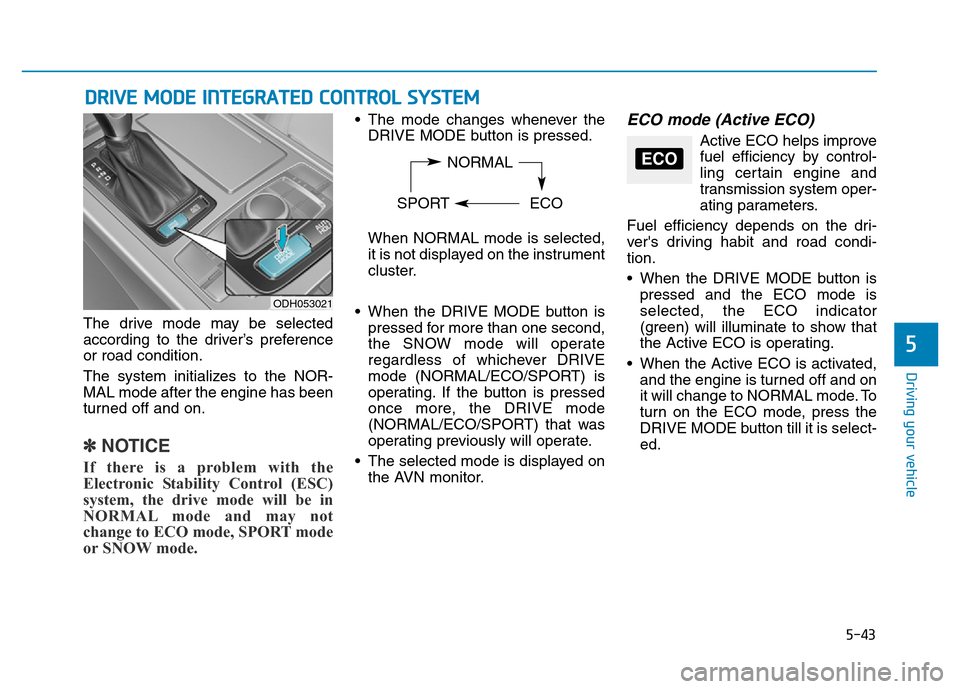
The drive mode may be selected
according to the driver’s preference
or road condition.
The system initializes to the NOR-
MAL mode after the engine has been
turned off and on.
✽NOTICE
If there is a problem with the
Electronic Stability Control (ESC)
system, the drive mode will be in
NORMAL mode and may not
change to ECO mode, SPORT mode
or SNOW mode.
• The mode changes whenever the
DRIVE MODE button is pressed.
When NORMAL mode is selected,
it is not displayed on the instrument
cluster.
• When the DRIVE MODE button is
pressed for more than one second,
the SNOW mode will operate
regardless of whichever DRIVE
mode (NORMAL/ECO/SPORT) is
operating. If the button is pressed
once more, the DRIVE mode
(NORMAL/ECO/SPORT) that was
operating previously will operate.
• The selected mode is displayed on
the AVN monitor.ECO mode (Active ECO)
Active ECO helps improve
fuel efficiency by control-
ling certain engine and
transmission system oper-
ating parameters.
Fuel efficiency depends on the dri-
ver's driving habit and road condi-
tion.
• When the DRIVE MODE button is
pressed and the ECO mode is
selected, the ECO indicator
(green) will illuminate to show that
the Active ECO is operating.
• When the Active ECO is activated,
and the engine is turned off and on
it will change to NORMAL mode. To
turn on the ECO mode, press the
DRIVE MODE button till it is select-
ed.
ODH053021
NORMAL
SPORT ECOECO
Page 327 of 546
5-51
Driving your vehicle
5
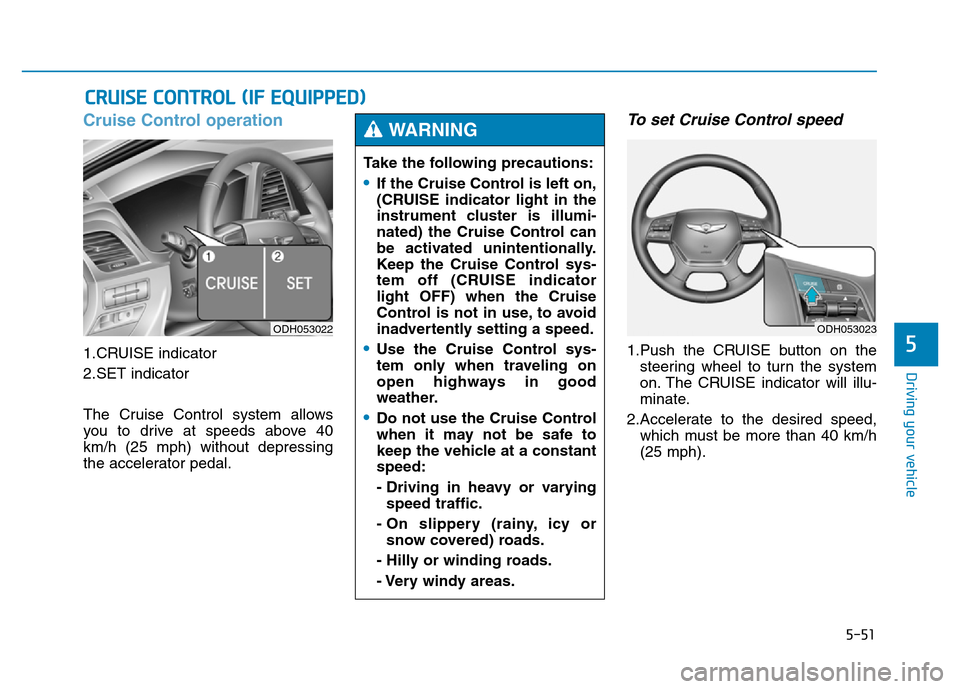
Cruise Control operation
1.CRUISE indicator
2.SET indicator
The Cruise Control system allows
you to drive at speeds above 40
km/h (25 mph) without depressing
the accelerator pedal.
To set Cruise Control speed
1.Push the CRUISE button on the
steering wheel to turn the system
on. The CRUISE indicator will illu-
minate.
2.Accelerate to the desired speed,
which must be more than 40 km/h
(25 mph).
CRUISE CONTROL (IF EQUIPPED)
ODH053022
Take the following precautions:
•If the Cruise Control is left on,
(CRUISE indicator light in the
instrument cluster is illumi-
nated) the Cruise Control can
be activated unintentionally.
Keep the Cruise Control sys-
tem off (CRUISE indicator
light OFF) when the Cruise
Control is not in use, to avoid
inadvertently setting a speed.
•Use the Cruise Control sys-
tem only when traveling on
open highways in good
weather.
•Do not use the Cruise Control
when it may not be safe to
keep the vehicle at a constant
speed:
- Driving in heavy or varying
speed traffic.
- On slippery (rainy, icy or
snow covered) roads.
- Hilly or winding roads.
- Very windy areas.
WARNING
ODH053023
Page 328 of 546
5-52
Driving your vehicle
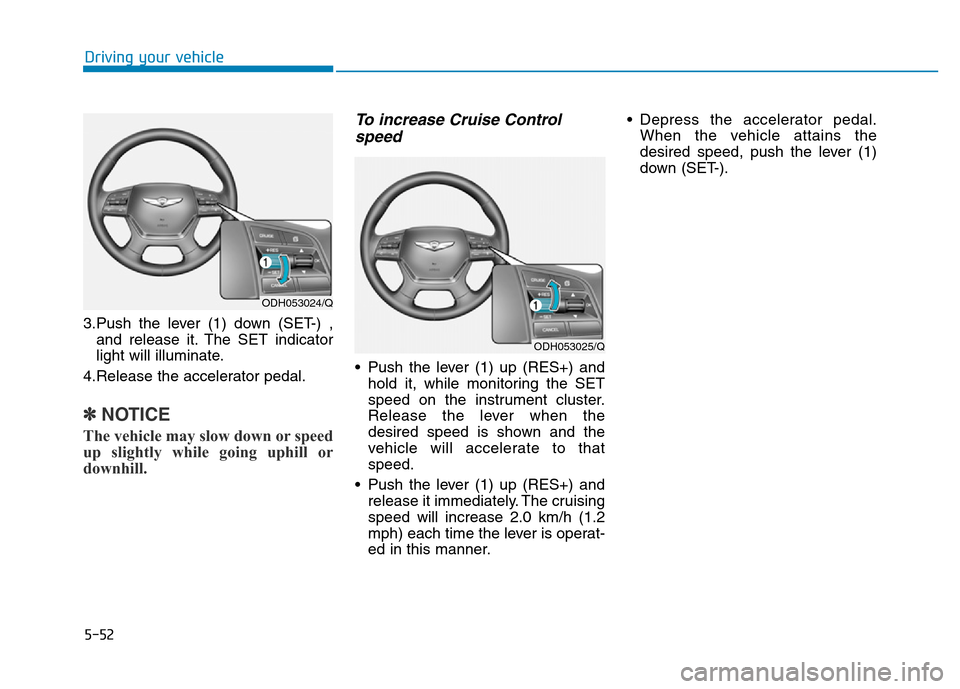
3.Push the lever (1) down (SET-) ,
and release it. The SET indicator
light will illuminate.
4.Release the accelerator pedal.
✽NOTICE
The vehicle may slow down or speed
up slightly while going uphill or
downhill.
To increase Cruise Control
speed
• Push the lever (1) up (RES+) and
hold it, while monitoring the SET
speed on the instrument cluster.
Release the lever when the
desired speed is shown and the
vehicle will accelerate to that
speed.
• Push the lever (1) up (RES+) and
release it immediately. The cruising
speed will increase 2.0 km/h (1.2
mph) each time the lever is operat-
ed in this manner.• Depress the accelerator pedal.
When the vehicle attains the
desired speed, push the lever (1)
down (SET-).
ODH053024/Q
ODH053025/Q
Page 330 of 546
5-54
Driving your vehicle
• Decreasing the vehicle speed
lower than the memory speed by
15 km/h (9 mph).
• Decreasing the vehicle speed to
less than approximately 40 km/h
(25 mph).
• The ESC (Electronic Stability
Control) is operating.
• Downshifting to the 2nd gear in
Sports Mode.
✽NOTICE
Each of the above actions will cancel
Cruise Control operation (the SET
indicator light in the instrument
cluster will go off), but only pressing
the CRUISE button will turn the
system off. If you wish to resume
Cruise Control operation, push the
lever up (RES+) located on your
steering wheel. You will return to
your previously preset speed, unless
the system was turned off using the
CRUISE button.
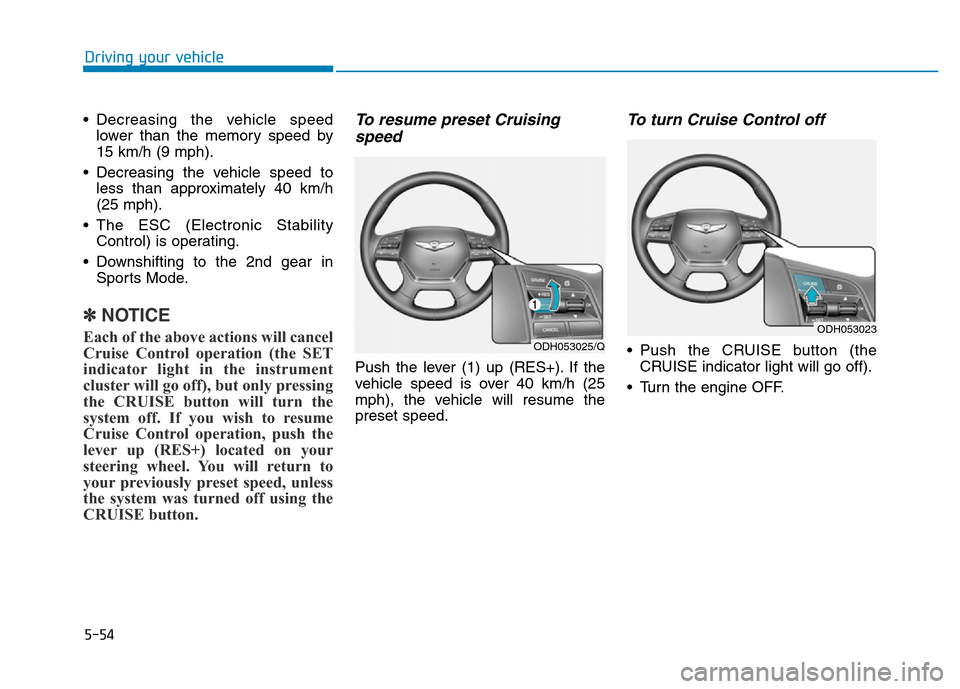
To resume preset Cruising
speed
Push the lever (1) up (RES+). If the
vehicle speed is over 40 km/h (25
mph), the vehicle will resume the
preset speed.
To turn Cruise Control off
• Push the CRUISE button (the
CRUISE indicator light will go off).
• Turn the engine OFF.ODH053025/Q
ODH053023
Page 331 of 546
5-55
Driving your vehicle
5
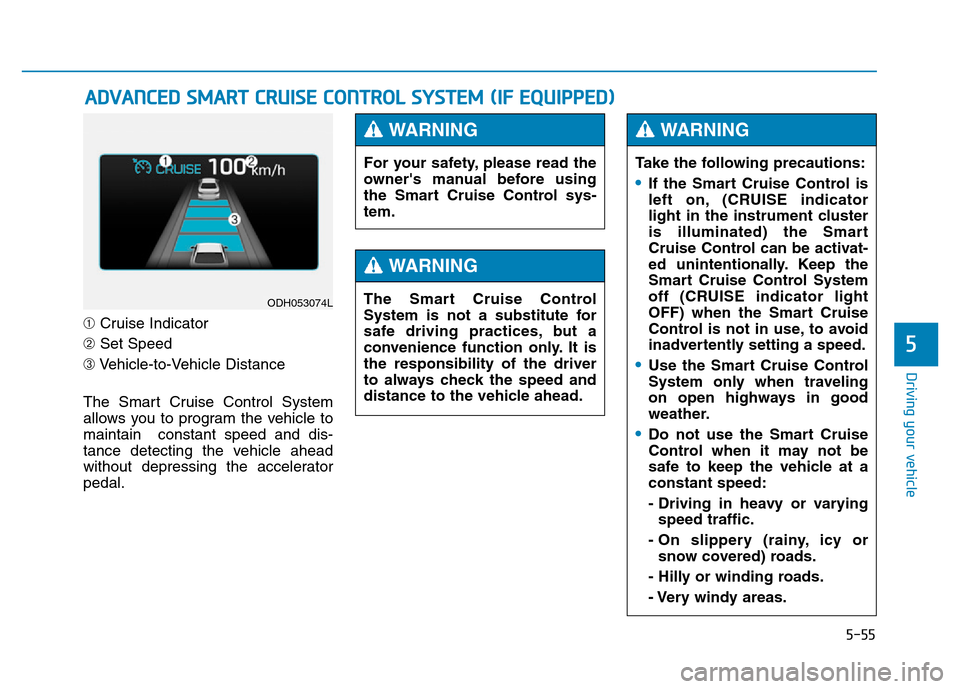
➀Cruise Indicator
➁Set Speed
➂Vehicle-to-Vehicle Distance
The Smart Cruise Control System
allows you to program the vehicle to
maintain constant speed and dis-
tance detecting the vehicle ahead
without depressing the accelerator
pedal.
ADVANCED SMART CRUISE CONTROL SYSTEM (IF EQUIPPED)
ODH053074L
For your safety, please read the
owner's manual before using
the Smart Cruise Control sys-
tem.
WARNING
The Smart Cruise Control
System is not a substitute for
safe driving practices, but a
convenience function only. It is
the responsibility of the driver
to always check the speed and
distance to the vehicle ahead.
WARNING
Take the following precautions:
•If the Smart Cruise Control is
left on, (CRUISE indicator
light in the instrument cluster
is illuminated) the Smart
Cruise Control can be activat-
ed unintentionally. Keep the
Smart Cruise Control System
off (CRUISE indicator light
OFF) when the Smart Cruise
Control is not in use, to avoid
inadvertently setting a speed.
•Use the Smart Cruise Control
System only when traveling
on open highways in good
weather.
•Do not use the Smart Cruise
Control when it may not be
safe to keep the vehicle at a
constant speed:
- Driving in heavy or varying
speed traffic.
- On slippery (rainy, icy or
snow covered) roads.
- Hilly or winding roads.
- Very windy areas.
WARNING
Page 496 of 546
7-60
Maintenance
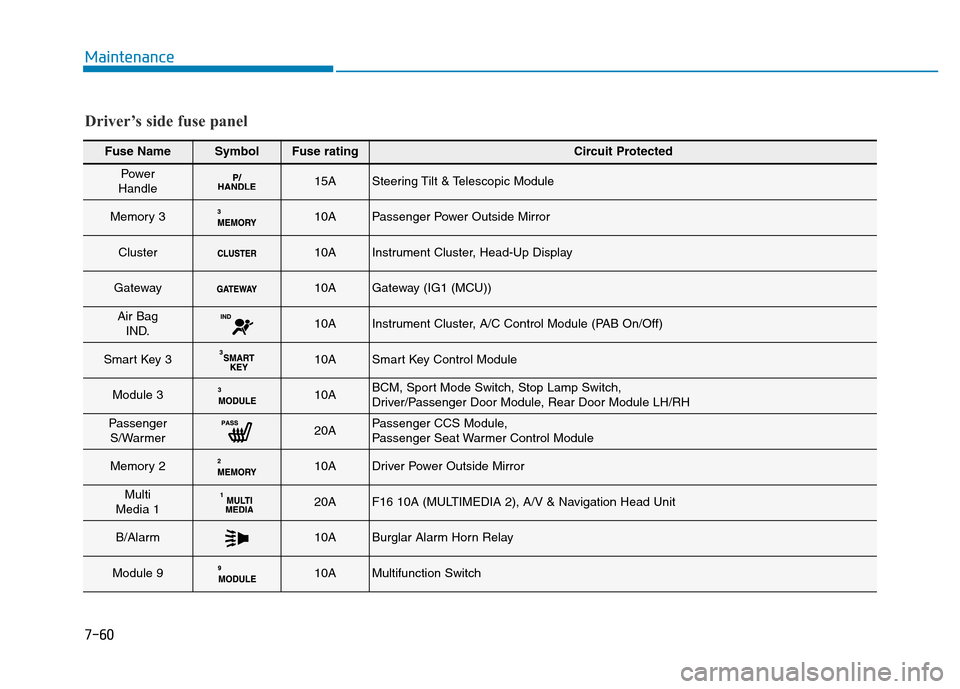
Fuse NameSymbolFuse ratingCircuit Protected
Power
Handle15ASteering Tilt & Telescopic Module
Memory 310APassenger Power Outside Mirror
Cluster10AInstrument Cluster, Head-Up Display
Gateway10AGateway (IG1 (MCU))
Air Bag
IND.10AInstrument Cluster, A/C Control Module (PAB On/Off)
Smart Key 310ASmart Key Control Module
Module 310ABCM, Sport Mode Switch, Stop Lamp Switch,
Driver/Passenger Door Module, Rear Door Module LH/RH
Passenger
S/Warmer20APassenger CCS Module,
Passenger Seat Warmer Control Module
Memory 210ADriver Power Outside Mirror
Multi
Media 120AF16 10A (MULTIMEDIA 2), A/V & Navigation Head Unit
B/Alarm10ABurglar Alarm Horn Relay
Module 910AMultifunction Switch
Driver’s side fuse panel
Page 497 of 546
7-61
7
Maintenance
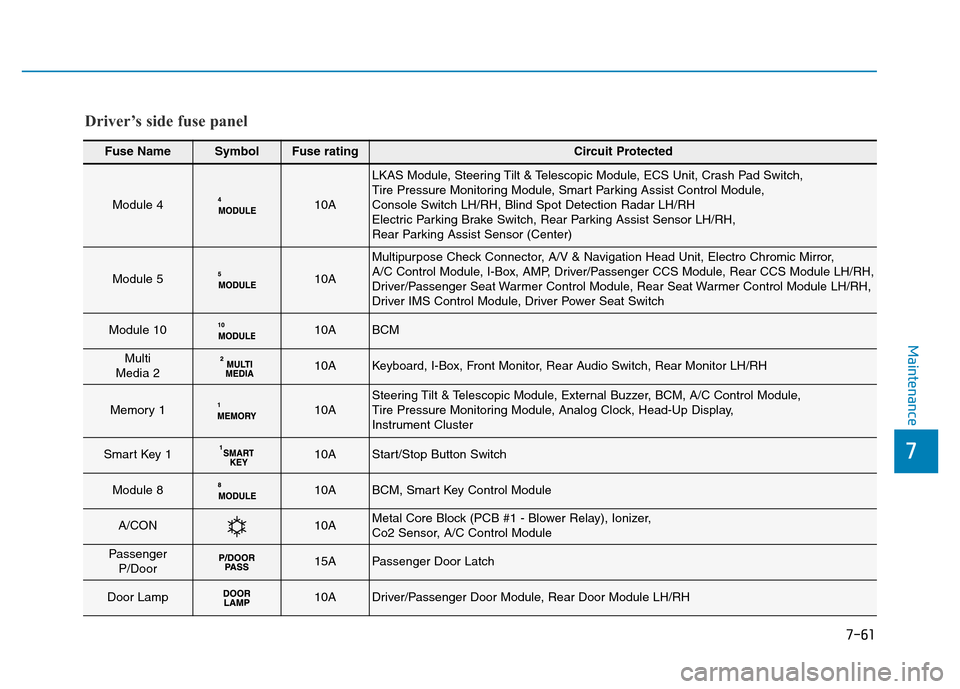
Fuse NameSymbolFuse ratingCircuit Protected
Module 410A
LKAS Module, Steering Tilt & Telescopic Module, ECS Unit, Crash Pad Switch,
Tire Pressure Monitoring Module, Smart Parking Assist Control Module,
Console Switch LH/RH, Blind Spot Detection Radar LH/RH
Electric Parking Brake Switch, Rear Parking Assist Sensor LH/RH,
Rear Parking Assist Sensor (Center)
Module 510A
Multipurpose Check Connector, A/V & Navigation Head Unit, Electro Chromic Mirror,
A/C Control Module, I-Box, AMP, Driver/Passenger CCS Module, Rear CCS Module LH/RH,
Driver/Passenger Seat Warmer Control Module, Rear Seat Warmer Control Module LH/RH,
Driver IMS Control Module, Driver Power Seat Switch
Module 1010ABCM
Multi
Media 210AKeyboard, I-Box, Front Monitor, Rear Audio Switch, Rear Monitor LH/RH
Memory 110ASteering Tilt & Telescopic Module, External Buzzer, BCM, A/C Control Module,
Tire Pressure Monitoring Module, Analog Clock, Head-Up Display,
Instrument Cluster
Smart Key 110AStart/Stop Button Switch
Module 810ABCM, Smart Key Control Module
A/CON10AMetal Core Block (PCB #1 - Blower Relay), Ionizer,
Co2 Sensor, A/C Control Module
Passenger
P/Door15APassenger Door Latch
Door Lamp10ADriver/Passenger Door Module, Rear Door Module LH/RH
Driver’s side fuse panel