ECO mode Hyundai Genesis Coupe 2011 Owner's Guide
[x] Cancel search | Manufacturer: HYUNDAI, Model Year: 2011, Model line: Genesis Coupe, Model: Hyundai Genesis Coupe 2011Pages: 343, PDF Size: 34.28 MB
Page 186 of 343
Features of your vehicle
118
4
8. AST (AUTO STORE) Button
Plays first 10 seconds of each song in
the DISC. Press the button once again to
cancel the mode.
9. Display
Displays the current time, mode, play
track number, play time, RDM, RPT and
AST status.
10. LOAD Button
Press [LOAD] button to load CDs into
available CDC slots (from 1~6).
Press [LOAD] button for 2 seconds or
longer to load into all available decks.
The last CD will play. Idle status for 10
seconds will terminate the loading
process. 11. FOLDER Button
When the loaded CD has file folders,
[FOLDER / ] buttons will operate in
the manner described below.
Press [FOLDER ] button to move
child folder of the current folder and
display the first song in the folder.
Press [ENTER] button to move to the
folder displayed. It will play the first
song in the folder.
Press [FOLDER ] button to move parent folder and display the first song
in the folder. Press [ENTER] button to
move to the folder displayed.
12. TUNE/FILE Button When the loaded CD contains MP3 or
WMA files, [TUNE/FILE / ] buttons
will operate in the manner described
below.
Press [TUNE/FILE ] button to select the next song and press [ENTER] but-
ton to play.
Press [TUNE/FILE ] button to select the previous song and press [ENTER]
button to play. 13. INFO Button
Displays the information of the current
CD TRACK in the order of DISC TITLE
➟
DISC ARTIST ➟TRACK TITLE ➟
TRACK ARTIST ➟TOTAL TRACK ➟
PLAY SCREEN ➟DISC TITLE... (not dis-
played if the information is not available
on the DISC.)
Page 188 of 343
Features of your vehicle
120
4
Using USB device
1. RANDOM Button
Press the button for less than 0.8 second
to start or stop the random playback of
the songs in the current folder.
Press the button for more than 0.8 sec-
ond to randomly play the entire songs in
the USB device. Press the button again
to cancel the mode.
2. REPEAT Button
Repeats current song when the button is
pressed for less than 0.8 second.
Repeats all songs in current folder when
the button is pressed for 0.8 second or
longer.
3. SEEK/TRACK Button
Press the [SEEK/TRACK ] button
for less than 0.8 second to play from the beginning of the song currently
played. Press the button for less than0.8 second and and press again within
1 second to play the previous track.
Press the button for 0.8 second or
longer to play songs reverse direction
in fast speed. Press the [SEEK/TRACK ] button
for less than 0.8 second to move to the
next track. Press the button for 0.8 sec-
ond or longer to play the song in for-
ward direction in fast speed.
4. AUX Button
If USB or AUX is connected, it switches
to USB or AUX mode to play the song. If
there is no USB or AUX device connect-
ed, then it displays the message "No
Media" and returns to the previous mode.
5. AST (AUTO STORE) Button
Scans each song in the USB device for
10 seconds. Press the button once againto cancel scanning.
6. Display
Displays the current time, mode, play
track number, play time, RDM, RPT and
AST status. 7. FOLDER Button
Press [FOLDER ] button to move
child folder of the current folder and
display the first song in the folder.
Press [ENTER] button to move to the
folder displayed. It will play the first
song in the folder.
Press [FOLDER ] button to move parent folder and display the first song
in the folder. Press [ENTER] button to
move to the folder displayed.
8. TUNE/FILE Button
Press [TUNE/FILE ] button to select the next song and press [ENTER] but-
ton to play.
Press [TUNE/FILE ] button to select the previous song and press [ENTER]
button to play.
9. INFO Button
Displays the information of the file cur-
rently played in the order of FILE NAME➟ TITLE ➟ARTIST ➟ALBUM ➟FOLD-
ER ➟TOTAL FILE ➟NORMAL DISPLAY
➟ FILE NAME... (Displays no information
if the file has no song information.)
Page 189 of 343
4121
Features of your vehicle
CAUTION IN USING USB DEVICE
To use an external USB device,make sure the device is not con-
nected when starting up the vehi-cle. Connect the device afterstarting up.
If you start the engine when the USB device is connected, it maydamage the USB device. (USBflashdrives are very sensitive to electric shock.)
If the engine is started up or turned off while the external USBdevice is connected, the externalUSB device may not work.
It may not play inauthentic MP3 or WMA files.
1) It can only play MP3 files with the compression rate between8Kbps~320Kbps.
2) It can only play WMA music files with the compression rate
between 8Kbps~320Kbps.
Take precautions for static elec- tricity when connecting or dis-connecting the external USBdevice.
(Continued)
(Continued) An encrypted MP3 PLAYER is not recognizable.
Depending on the condition of the external USB device, the con-
nected external USB device can be unrecognizable.
When the formatted byte/sector setting of External USB device isnot either 512BYTE or 2048BYTE,
then the device will not be recog- nized.
Use only a USB device formatted to FAT 12/16/32.
USB devices without USB I/F authentication may not be recog-nizable.
Make sure the USB connection terminal does not come in con-tact with the human body or other
objects.
If you repeatedly connect or dis- connect the USB device in a shortperiod of time, it may break thedevice.
You may hear a strange noise when connecting or disconnect-ing a USB device.
(Continued)(Continued) If you disconnect the external USB device during playback inUSB mode, the external USBdevice can be damaged or may
malfunction. Therefore, discon-nect the external USB device when the audio is turned off or in
another mode. (e.g, Radio or CD)
Depending on the type and capacity of the external USBdevice or the type of the filesstored in the device, there is a dif-
ference in the time taken forrecognition of the device.
Do not use the USB device for purposes other than playingmusic files.
Use of USB accessories such as rechargers or heaters using USBI/F may lower performance orcause trouble.
If you use devices such as a USB hub purchased separately, thevehicle’s audio system may not recognize the USB device. In thatcase, connect the USB device
directly to the multimedia termi- nal of the vehicle.
(Continued)
Page 192 of 343
Features of your vehicle
124
4
Using iPod
Using an iPod when the exclusive cable
is connected to the multiple terminal
inside the console on the right hand side
of the driver's seat.
1. RANDOM Button
Press the button for less than 0.8 second
to to activate or deactivate the random
playback of the songs within the current
category. Press the button for longer than
0.8 second to randomly play all songs in
the entire album of the iPod. Press the
button once again to cancel the mode.
2. REPEAT Button
Press the button to repeat the song cur-
rently played.
3. SEEK/TRACK Button
Press the [SEEK/TRACK ] button
for less than 0.8 second to play from the beginning of the song currently
played. Press the button for less than0.8 second and press again within 1
second to play the previous track.
Press the button for 0.8 second or
longer to play songs reverse direction
in fast speed. Press the [SEEK/TRACK ] button
for less than 0.8 second to move to the
next track. Press the button for 0.8 sec-
ond or longer to play the song in for-
ward direction in fast speed.
4. iPod Button
If iPod is connected, it switches to the
iPod mode from the previous mode to
play the song files stored in the iPod.
5. AST (AUTO STORE) Button
Scans each song in the iPod for 10 sec-
onds. Press the button once again tocancel scanning.
6. Display
Displays the current time, mode, play
track number, play time, RDM, RPT and
AST status. 7. FOLDER Button
Press [FOLDER ] button to move
the category and display the first song
in the category. Press [ENTER] button
to move to the category displayed. It
will play the first song in the folder.
Press [FOLDER ] button to move the category and display the first song
in the category. Press [ENTER] button
to move to the category displayed.
(PLAYLISTS ➟ARTISTS ➟ALBUMS
➟ GENRES ➟SONGS ➟COM-
POSERS ➟PLAYLIST...)
8. TUNE/FILE Button
Press [TUNE/FILE ] button to select the next song and press [ENTER] but-
ton to play.
Press [TUNE/FILE ] button to select the previous song and press [ENTER]
button to play.
9. INFO Button
Displays the information of the file cur-
rently played in the order of TITLE ➟
ARTIST ➟ALBUM ➟NORMAL DIS-
PLAY ➟TITLE... (Displays no information
if the file has no song information.)
Page 222 of 343
529
Driving your vehicle
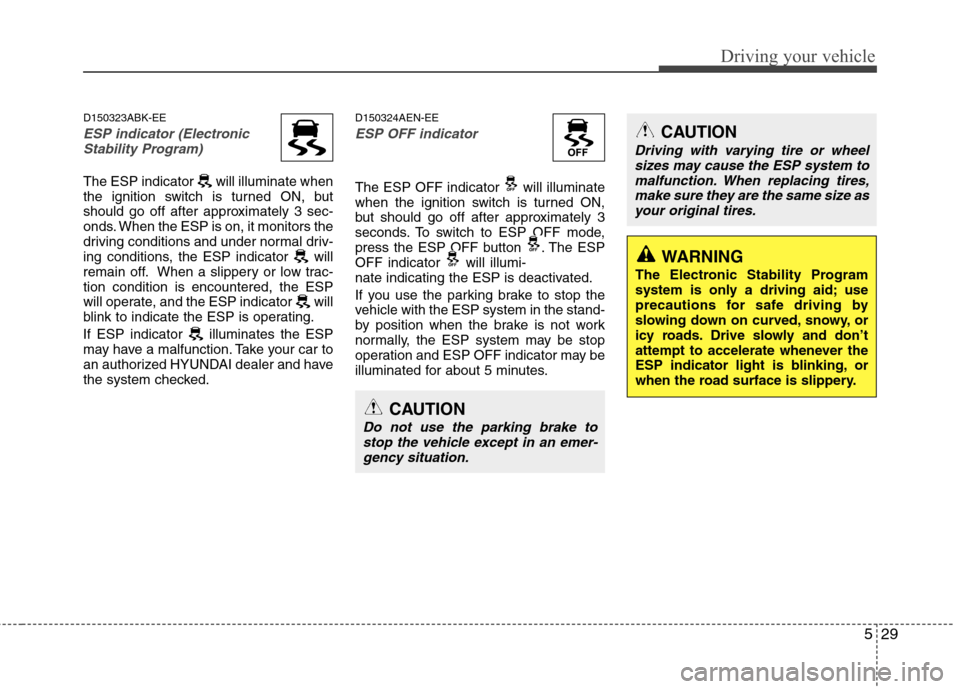
D150323ABK-EE
ESP indicator (ElectronicStability Program)
The ESP indicator will illuminate when
the ignition switch is turned ON, but
should go off after approximately 3 sec-
onds. When the ESP is on, it monitors the
driving conditions and under normal driv-
ing conditions, the ESP indicator will
remain off. When a slippery or low trac-tion condition is encountered, the ESP
will operate, and the ESP indicator will
blink to indicate the ESP is operating.
If ESP indicator illuminates the ESP
may have a malfunction. Take your car to
an authorized HYUNDAI dealer and have
the system checked. D150324AEN-EE
ESP OFF indicator
The ESP OFF indicator will illuminate
when the ignition switch is turned ON,
but should go off after approximately 3
seconds. To switch to ESP OFF mode,
press the ESP OFF button . The ESP
OFF indicator will illumi-
nate indicating the ESP is deactivated.
If you use the parking brake to stop the
vehicle with the ESP system in the stand-
by position when the brake is not work
normally, the ESP system may be stop
operation and ESP OFF indicator may be
illuminated for about 5 minutes.
CAUTION
Driving with varying tire or wheel
sizes may cause the ESP system to
malfunction. When replacing tires, make sure they are the same size asyour original tires.
CAUTION
Do not use the parking brake to stop the vehicle except in an emer-
gency situation.
WARNING
The Electronic Stability Program
system is only a driving aid; use
precautions for safe driving by
slowing down on curved, snowy, or
icy roads. Drive slowly and don’t
attempt to accelerate whenever the
ESP indicator light is blinking, or
when the road surface is slippery.
Page 229 of 343
Driving your vehicle
36
5
E100000AUN
Your vehicle's fuel economy depends
mainly on your style of driving, where you
drive and when you drive.
Each of these factors affects how many
miles (kilometers) you can get from a gal-
lon (liter) of fuel. To operate your vehicle
as economically as possible, use the fol-
lowing driving suggestions to help save
money in both fuel and repairs:
Drive smoothly. Accelerate at a moder-
ate rate. Don't make "jack-rabbit" starts or full-throttle shifts and maintain a
steady cruising speed. Don't race
between stoplights. Try to adjust your
speed to that of the other traffic so you
don't have to change speeds unneces-
sarily. Avoid heavy traffic whenever
possible. Always maintain a safe dis-
tance from other vehicles so you can
avoid unnecessary braking. This also
reduces brake wear.
Drive at a moderate speed. The faster you drive, the more fuel your car uses.
Driving at a moderate speed, especial-
ly on the highway, is one of the most
effective ways to reduce fuel consump-tion. Don't "ride" the brake or clutch pedal.
This can increase fuel consumption
and also increase wear on these com-
ponents. In addition, driving with your
foot resting on the brake pedal may
cause the brakes to overheat, which
reduces their effectiveness and may
lead to more serious consequences.
Take care of your tires. Keep them inflated to the recommended pressure.
Incorrect inflation, either too much or
too little, results in unnecessary tire
wear. Check the tire pressures at leastonce a month.
Be sure that the wheels are aligned correctly. Improper alignment can
result from hitting curbs or driving too
fast over irregular surfaces. Poor align-
ment causes faster tire wear and may
also result in other problems as well as
greater fuel consumption. Keep your car in good condition. For
better fuel economy and reduced
maintenance costs, maintain your carin accordance with the maintenance
schedule in section 7. If you drive your
car in severe conditions, more frequentmaintenance is required (see section 7
for details).
Keep your car clean. For maximum service, your vehicle should be kept
clean and free of corrosive materials. It
is especially important that mud, dirt,
ice, etc. not be allowed to accumulate
on the underside of the car. This extra
weight can result in increased fuel con-
sumption and also contribute to corro-sion.
Travel lightly. Don't carry unnecessary weight in your car. Weight reduces fuel
economy.
Don't let the engine idle longer than necessary. If you are waiting (and not
in traffic), turn off your engine and
restart only when you're ready to go.
ECONOMICAL OPERATION
Page 342 of 343
Index
8
I
Rear seat ···································································3-11
Seat warmer ································································3-8
Shift lock system ···························································5-19
Side impact air bag ························································3-41
Side repeater light bulb replacement ·····························7-57
Smart key ·········································································4-5
Smooth cornering ···························································5-39
Snow tires ······································································5-42Spare tire Compact spare tire ···················································6-13
Compact spare tire replacement ·······························7-39
Removing and storing the spare tire ··························6-8
Special driving conditions ·············································5-38 Driving at night ························································5-39
Driving in flooded areas ···········································5-40
Driving in the rain ····················································5-40
Hazardous driving conditions ··································5-38
Highway driving ·······················································5-41
Rocking the vehicle ··················································5-38
Smooth cornering ·····················································5-39
Speedometer ···································································4-40
Sports mode ···································································5-18
Starting difficulties, see engine will not start ··················6-3
Starting the engine ····················································5-6, 5-9
Steering wheel ·······························································4-31 Horn ··········································································4-32
Power steering ··························································4-31
Tilt steering ······························································4-32 Steering wheel audio control ·········································4-98
Storage compartment ·····················································4-90
Center console storage ·············································4-90
Glove box ·································································4-90
Sunglass holder ························································4-91
Sunvisor ·········································································4-93
Sunroof············································································4-28
Tachometer ·····································································4-40
Tether anchor system ·····················································3-28
Theft-alarm system ························································4-11
Tilt steering ····································································4-32
Tire specification and pressure label ·······························8-7
Tires and wheels ·····················································7-34, 8-3 Checking tire inflation pressure ·······························7-35
Compact spare tire replacement ·······························7-39
Recommended cold tire inflation pressures ·············7-34
Tire care ···································································7-34
Tire maintenance ······················································7-40
Tire replacement ·······················································7-39
Tire rotation ······························································7-36
Tire sidewall labeling ···············································7-40
Tire traction ······························································7-40
Wheel alignment and tire balance ····························7-37
Wheel replacement ···················································7-38
Towing ···········································································6-15
T