ECO mode Hyundai Genesis Coupe 2013 User Guide
[x] Cancel search | Manufacturer: HYUNDAI, Model Year: 2013, Model line: Genesis Coupe, Model: Hyundai Genesis Coupe 2013Pages: 414, PDF Size: 38.89 MB
Page 178 of 414
Features of your vehicle
112
4
System operation
Ventilation
1. Set the mode to the position.
2. Set the air intake control to the outside
(fresh) air position.
3. Set the temperature control to the desired position.
4. Set the fan speed control to the desired speed.
Heating
1. Set the mode to the position.
2. Set the air intake control to the outside(fresh) air position.
3. Set the temperature control to the desired position.
4. Set the fan speed control to the desired speed.
5. If dehumidified heating is desired, turn the air conditioning system (if equipped) on.
If the windshield fogs up, set the mode to the or
push the front defrost but-
ton ( ). Operation Tips
To keep dust or unpleasant fumes from
entering the car through the ventilation
system, temporarily set the air intakecontrol to the recirculated air position.
Be sure to return the control to the
fresh air position when the irritation
has passed to keep fresh air in the
vehicle. This will help keep the driver
alert and comfortable.
Air for the heating/cooling system is drawn in through the grilles just ahead
of the windshield. Care should be
taken that these are not blocked by
leaves, snow, ice or other obstructions.
To prevent interior fog on the wind- shield, set the air intake control to the
fresh air position and fan speed to the
desired position, turn on the air condi-tioning system, and adjust the temper-
ature control to desired temperature.
Air conditioning (if equipped)
HYUNDAI Air Conditioning Systems are
filled with environmentally friendly
R-134a refrigerant.
1. Start the engine. Push the air condi- tioning button.
2. Set the mode to the position.
3. Set the air intake control to the outside air or recirculat-ed air position.
4. Adjust the fan speed control and tem-
perature control to maintain maximum
comfort.
Page 196 of 414
Features of your vehicle
130
4
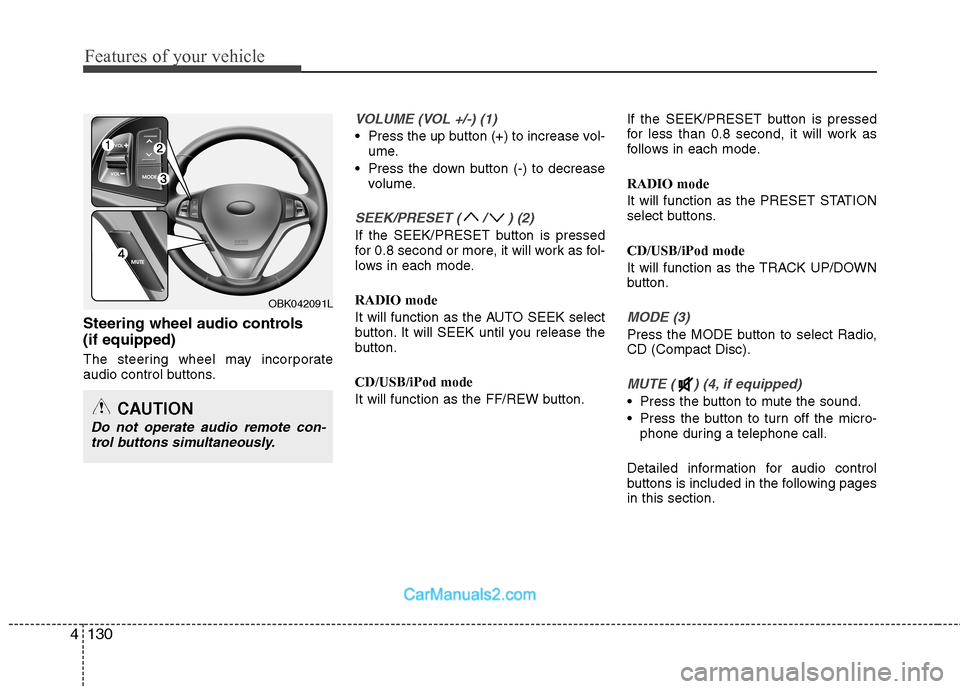
Steering wheel audio controls (if equipped)
The steering wheel may incorporate
audio control buttons.
VOLUME (VOL +/-) (1)
Press the up button (+) to increase vol-
ume.
Press the down button (-) to decrease volume.
SEEK/PRESET ( / ) (2)
If the SEEK/PRESET button is pressed
for 0.8 second or more, it will work as fol-
lows in each mode. RADIO mode
It will function as the AUTO SEEK select
button. It will SEEK until you release the
button. CD/USB/iPod mode
It will function as the FF/REW button. If the SEEK/PRESET button is pressed
for less than 0.8 second, it will work as
follows in each mode. RADIO mode
It will function as the PRESET STATION
select buttons. CD/USB/iPod mode
It will function as the TRACK UP/DOWN
button.
MODE (3)
Press the MODE button to select Radio, CD (Compact Disc).
MUTE ( ) (4, if equipped)
Press the button to mute the sound.
Press the button to turn off the micro-
phone during a telephone call.
Detailed information for audio control
buttons is included in the following pagesin this section.
OBK042091L
CAUTION
Do not operate audio remote con- trol buttons simultaneously.
Page 205 of 414
4139
Features of your vehicle
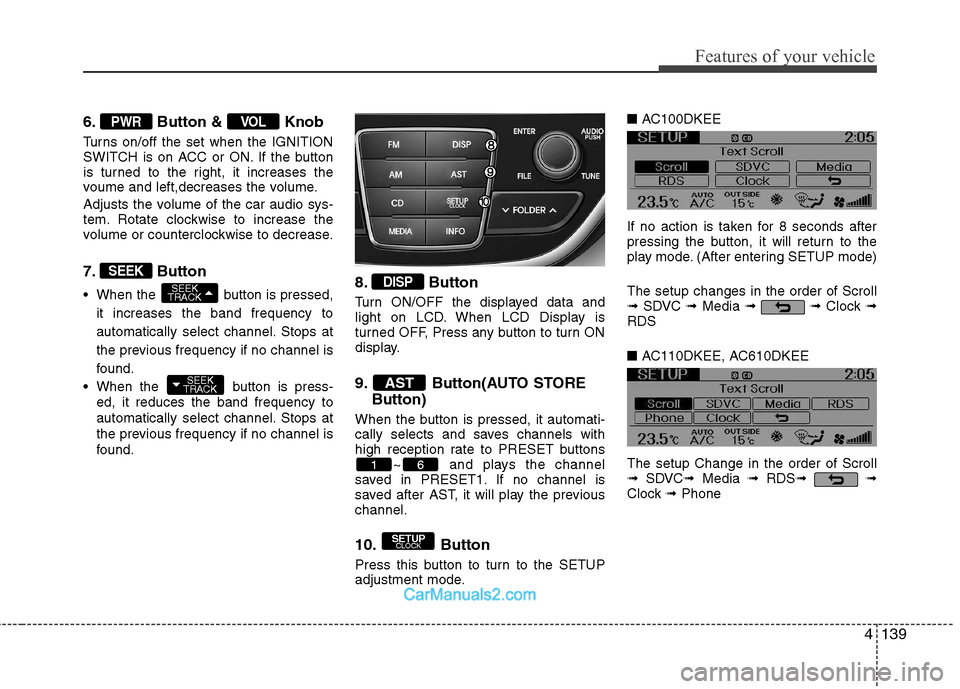
6. Button & Knob
Turns on/off the set when the IGNITION
SWITCH is on ACC or ON. If the button
is turned to the right, it increases the
voume and left,decreases the volume.
Adjusts the volume of the car audio sys-
tem. Rotate clockwise to increase the
volume or counterclockwise to decrease.
7. Button
When the button is pressed,it increases the band frequency to
automatically select channel. Stops at
the previous frequency if no channel is
found.
When the button is press- ed, it reduces the band frequency to
automatically select channel. Stops at
the previous frequency if no channel is
found. 8. Button
Turn ON/OFF the displayed data and
light on LCD. When LCD Display is
turned OFF, Press any button to turn ON
display.
9. Button(AUTO STORE
Button)
When the button is pressed, it automati-
cally selects and saves channels with
high reception rate to PRESET buttons ~ and plays the channel
saved in PRESET1. If no channel is
saved after AST, it will play the previouschannel.
10. Button
Press this button to turn to the SETUP
adjustment mode. ■
AC100DKEE
If no action is taken for 8 seconds after
pressing the button, it will return to the
play mode. (After entering SETUP mode) The setup changes in the order of Scroll ➟ SDVC ➟Media ➟ ➟ Clock ➟
RDS ■ AC110DKEE, AC610DKEE
The setup Change in the order of Scroll ➟ SDVC ➟Media ➟ RDS ➟ ➟
Clock ➟Phone
SETUP
CLOCK
61
AST
DISP
SEEK
TRACK
SEEK
TRACK
SEEK
VOLPWR
Page 208 of 414
Features of your vehicle
142
4
Select this item to enter Clock setup
mode. (12/24Hr.,Auto, Time)
Select “12/24 Hr.” button to enter Time
Format menu.
Select “Auto” button to enter Automatic
RDS Time menu.
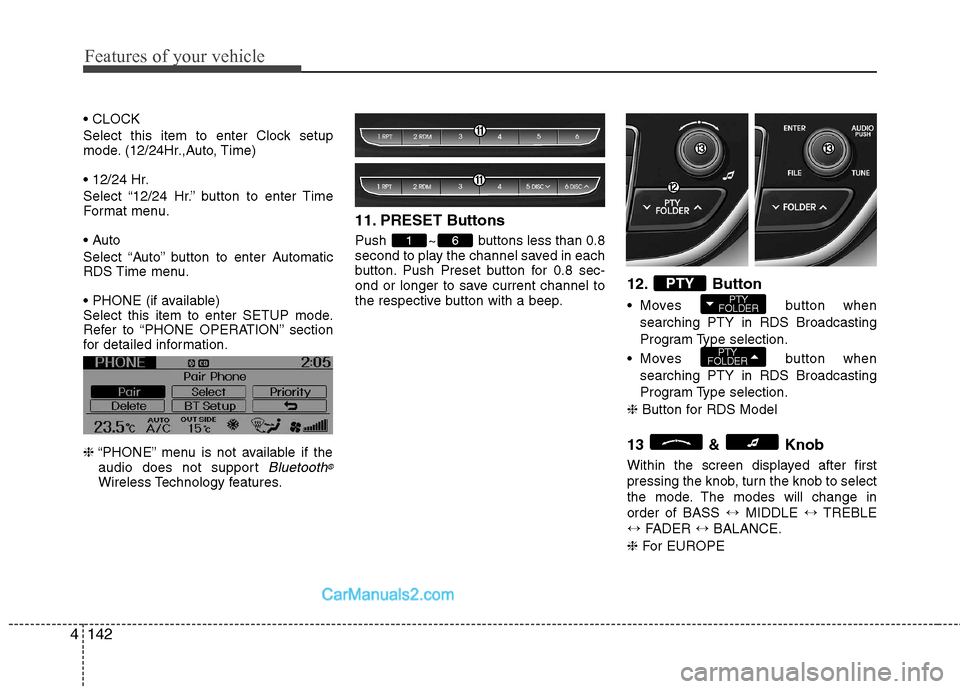
Select this item to enter SETUP mode.
Refer to “PHONE OPERATION” section
for detailed information. ❈ “PHONE” menu is not available if the
audio does not support
Bluetooth®
Wireless Technology features. 11. PRESET Buttons
Push ~ buttons less than 0.8
second to play the channel saved in each
button. Push Preset button for 0.8 sec-
ond or longer to save current channel to
the respective button with a beep.
12. Button
Moves button
when
searching PTY in RDS Broadcasting
Program Type selection.
Moves button when
searching PTY in RDS Broadcasting
Program Type selection.
❈ Button for RDS Model
13 & Knob
Within the screen displayed after first
pressing the knob, turn the knob to select
the mode. The modes will change inorder of BASS ↔MIDDLE ↔TREBLE
↔ FADER ↔BALANCE.
❈ For EUROPE
PTY
FOLDER
PTY
FOLDERPTY
61
Page 210 of 414
Features of your vehicle
144
4
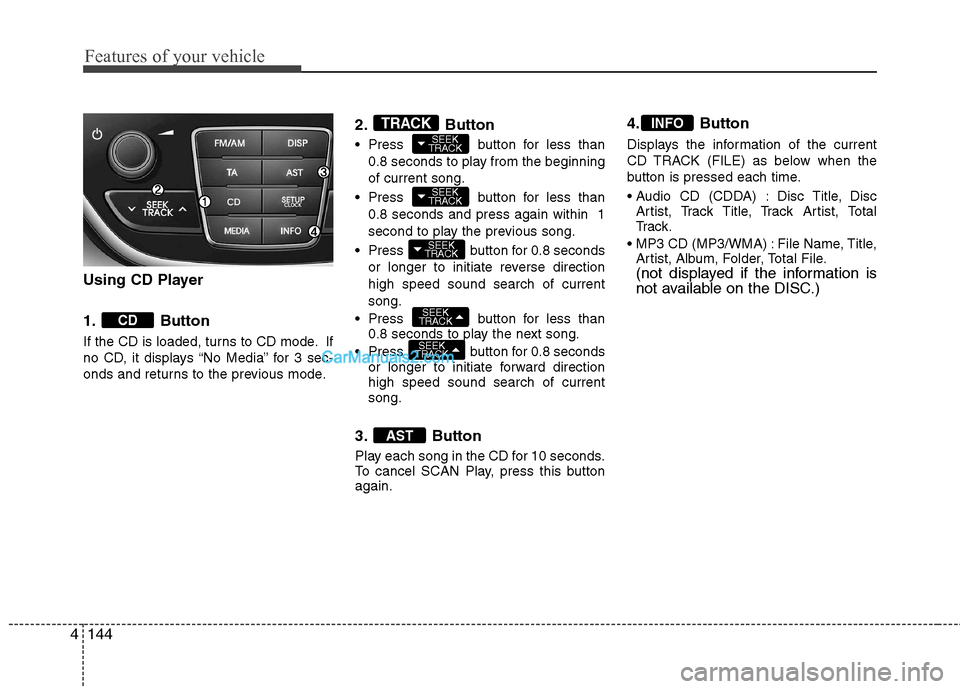
Using CD Player
1. Button
If the CD is loaded, turns to CD mode. If
no CD, it displays “No Media” for 3 sec-
onds and returns to the previous mode. 2. Button
Press button for less than
0.8 seconds to play from the beginning of current song.
Press button for less than 0.8 seconds and press again within 1
second to play the previous song.
Press button for 0.8 seconds or longer to initiate reverse directionhigh speed sound search of currentsong.
Press button for less than 0.8 seconds to play the next song.
Press button for 0.8 seconds or longer to initiate forward direction high speed sound search of currentsong.
3. Button
Play each song in the CD for 10 seconds.
To cancel SCAN Play, press this buttonagain. 4. Button
Displays the information of the current
CD TRACK (FILE) as below when the
button is pressed each time.
Disc Title, Disc
Artist, Track Title, Track Artist, Total
Tr a c k .
File Name, Title, Artist, Album, Folder, Total File.
(not displayed if the information is
not available on the DISC.)
INFO
AST
SEEK
TRACK
SEEK
TRACK
SEEK
TRACK
SEEK
TRACK
SEEK
TRACKTRACK
CD
Page 211 of 414
4145
Features of your vehicle
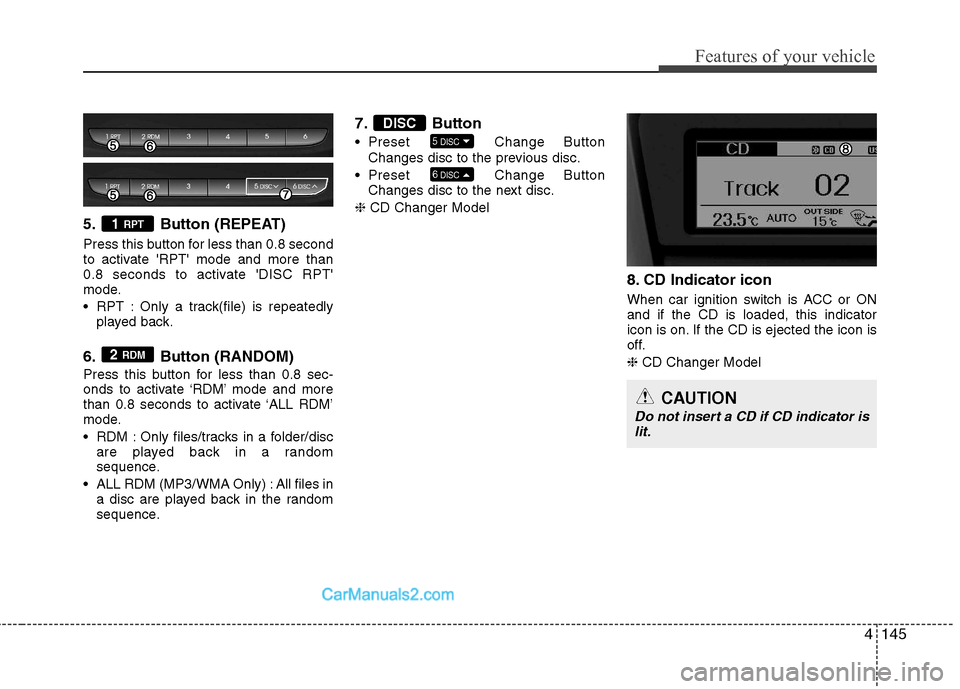
5. Button (REPEAT)
Press this button for less than 0.8 second
to activate 'RPT' mode and more than
0.8 seconds to activate 'DISC RPT'
mode.
RPT : Only a track(file) is repeatedlyplayed back.
6. Button (RANDOM)
Press this button for less than 0.8 sec-
onds to activate ‘RDM’ mode and more
than 0.8 seconds to activate ‘ALL RDM’
mode.
RDM : Only files/tracks in a folder/disc are played back in a random
sequence.
ALL RDM (MP3/WMA Only) : All files in a disc are played back in the random
sequence. 7. Button
Preset Change
Button
Changes disc to the previous disc.
Preset Change Button
Changes disc to the next disc.
❈ CD Changer Model
8. CD Indicator icon
When car ignition switch is ACC or ON and if the CD is loaded, this indicator
icon is on. If the CD is ejected the icon is
off. ❈CD Changer Model
6
DISC
5DISC
DISC
2 RDM
1 RPT
CAUTION
Do not insert a CD if CD indicator is
lit.
Page 212 of 414
Features of your vehicle
146
4
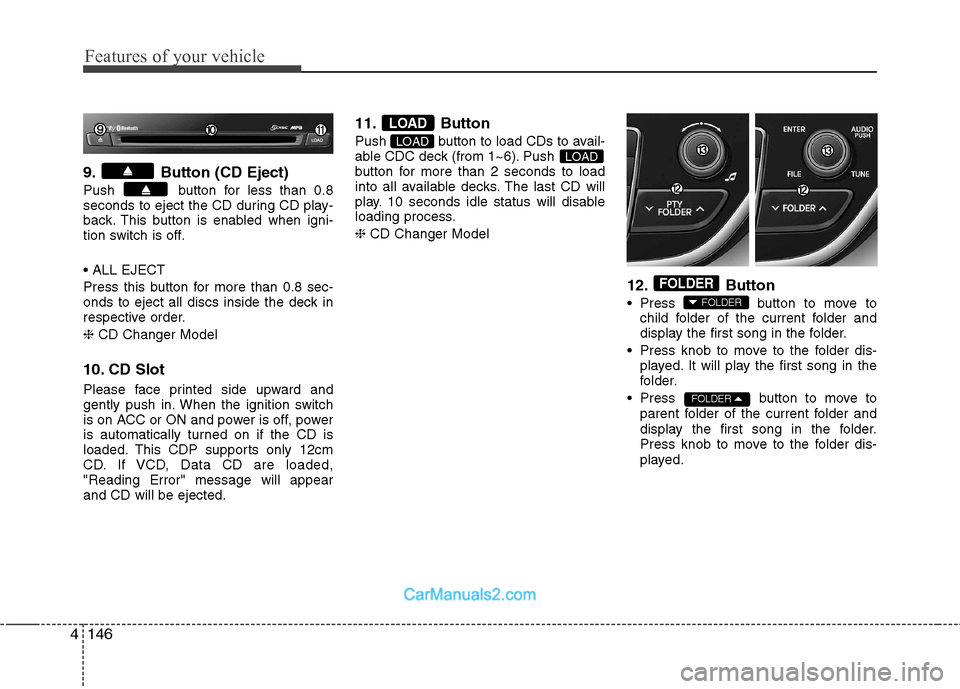
9. Button (CD Eject)
Push button for less than 0.8
seconds to eject the CD during CD play-
back. This button is enabled when igni-
tion switch is off.
Press this button for more than 0.8 sec-
onds to eject all discs inside the deck in
respective order. ❈ CD Changer Model
10. CD Slot
Please face printed side upward and
gently push in. When the ignition switch
is on ACC or ON and power is off, power
is automatically turned on if the CD is
loaded. This CDP supports only 12cm
CD. If VCD, Data CD are loaded,"Reading Error" message will appearand CD will be ejected. 11. Button
Push button to load CDs to avail-
able CDC deck (from 1~6). Push
button for more than 2 seconds to load
into all available decks. The last CD will
play. 10 seconds idle status will disable
loading process. ❈
CD Changer Model
12. Button
Press button to move tochild folder of the current folder and
display the first song in the folder.
Press knob to move to the folder dis- played. It will play the first song in the
folder.
Press button to move to parent folder of the current folder and
display the first song in the folder.
Press knob to move to the folder dis-
played.
FOLDER
FOLDER
FOLDER
LOADLOAD
LOAD
Page 214 of 414
Features of your vehicle
148
4
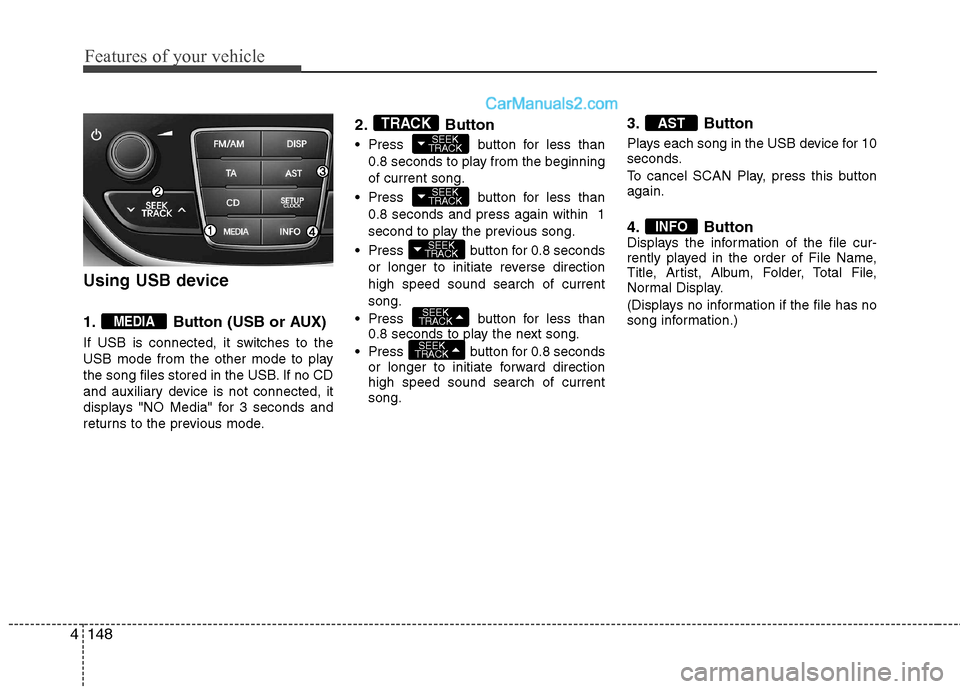
Using USB device
1. Button (USB or AUX)
If USB is connected, it switches to the
USB mode from the other mode to play
the song files stored in the USB. If no CD
and auxiliary device is not connected, it
displays "NO Media" for 3 seconds and
returns to the previous mode. 2. Button
Press button for less than
0.8 seconds to play from the beginning of current song.
Press button for less than 0.8 seconds and press again within 1
second to play the previous song.
Press button for 0.8 seconds or longer to initiate reverse directionhigh speed sound search of currentsong.
Press button for less than 0.8 seconds to play the next song.
Press button for 0.8 seconds or longer to initiate forward direction high speed sound search of currentsong. 3. Button
Plays each song in the USB device for 10
seconds.
To cancel SCAN Play, press this button again.
4. Button
Displays the information of the file cur-
rently played in the order of File Name,
Title, Artist, Album, Folder, Total File,
Normal Display.
(Displays no information if the file has no
song information.)
INFO
AST
SEEK
TRACK
SEEK
TRACK
SEEK
TRACK
SEEK
TRACK
SEEK
TRACKTRACK
MEDIA
Page 215 of 414
4149
Features of your vehicle
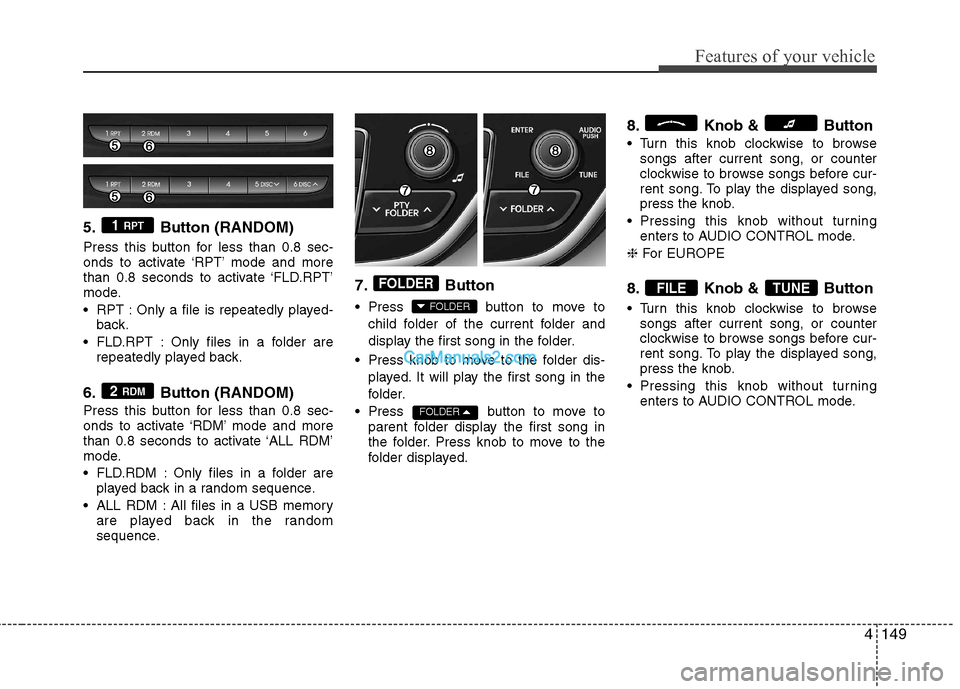
5. Button (RANDOM)
Press this button for less than 0.8 sec-
onds to activate ‘RPT’ mode and more
than 0.8 seconds to activate ‘FLD.RPT’
mode.
RPT : Only a file is repeatedly played-back.
FLD.RPT : Only files in a folder are repeatedly played back.
6. Button (RANDOM)
Press this button for less than 0.8 sec-
onds to activate ‘RDM’ mode and more
than 0.8 seconds to activate ‘ALL RDM’
mode.
FLD.RDM : Only files in a folder are played back in a random sequence.
ALL RDM : All files in a USB memory are played back in the random
sequence. 7. Button
Press button to move to
child folder of the current folder and
display the first song in the folder.
Press knob to move to the folder dis- played. It will play the first song in the
folder.
Press button to move to parent folder display the first song in
the folder. Press knob to move to the
folder displayed. 8. Knob & Button
Turn this knob clockwise to browse
songs after current song, or counter
clockwise to browse songs before cur-
rent song. To play the displayed song,
press the knob.
Pressing this knob without turning enters to AUDIO CONTROL mode.
❈ For EUROPE
8. Knob & Button
Turn this knob clockwise to browse songs after current song, or counter
clockwise to browse songs before cur-
rent song. To play the displayed song,
press the knob.
Pressing this knob without turning enters to AUDIO CONTROL mode.
TUNEFILE
FOLDER
FOLDER
FOLDER
2 RDM
1 RPT
Page 216 of 414
Features of your vehicle
150
4
CAUTION IN USING USB DEVICE
To use an external USB device,
make sure the device is not con-
nected when starting up the vehi-cle. Connect the device afterstarting up.
If you start the engine when the USB device is connected, it maydamage the USB device. (USBflashdrives are very sensitive to electric shock.)
If the engine is started up or turned off while the external USBdevice is connected, the externalUSB device may not work.
It may not play inauthentic MP3 or WMA files.
1) It can only play MP3 files with the compression rate between8Kbps~320Kbps.
2) It can only play WMA music files with the compression rate
between 8Kbps~320Kbps.
Take precautions for static elec- tricity when connecting or dis-connecting the external USBdevice.
(Continued)
(Continued) An encrypted MP3 PLAYER is not recognizable.
Depending on the condition of the external USB device, the con-
nected external USB device can be unrecognizable.
When the formatted byte/sector setting of External USB device isnot either 512BYTE or 2048BYTE,
then the device will not be recog- nized.
Use only a USB device formatted to FAT 12/16/32.
USB devices without USB I/F authentication may not be recog-nizable.
Make sure the USB connection terminal does not come in con-tact with the human body or other
objects.
If you repeatedly connect or dis- connect the USB device in a shortperiod of time, it may break thedevice.
You may hear a strange noise when connecting or disconnect-ing a USB device.
(Continued)(Continued) If you disconnect the external USB device during playback inUSB mode, the external USBdevice can be damaged or may
malfunction. Therefore, discon-nect the external USB device when the audio is turned off or in
another mode. (e.g, Radio or CD)
Depending on the type and capacity of the external USBdevice or the type of the filesstored in the device, there is a dif-
ference in the time taken forrecognition of the device.
Do not use the USB device for purposes other than playingmusic files.
Playing videos through the USB is not supported.
Use of USB accessories such as rechargers or heaters using USBI/F may lower performance or
cause trouble.
(Continued)