ECO mode Hyundai Genesis Coupe 2013 Owner's Guide
[x] Cancel search | Manufacturer: HYUNDAI, Model Year: 2013, Model line: Genesis Coupe, Model: Hyundai Genesis Coupe 2013Pages: 414, PDF Size: 38.89 MB
Page 218 of 414
Features of your vehicle
152
4
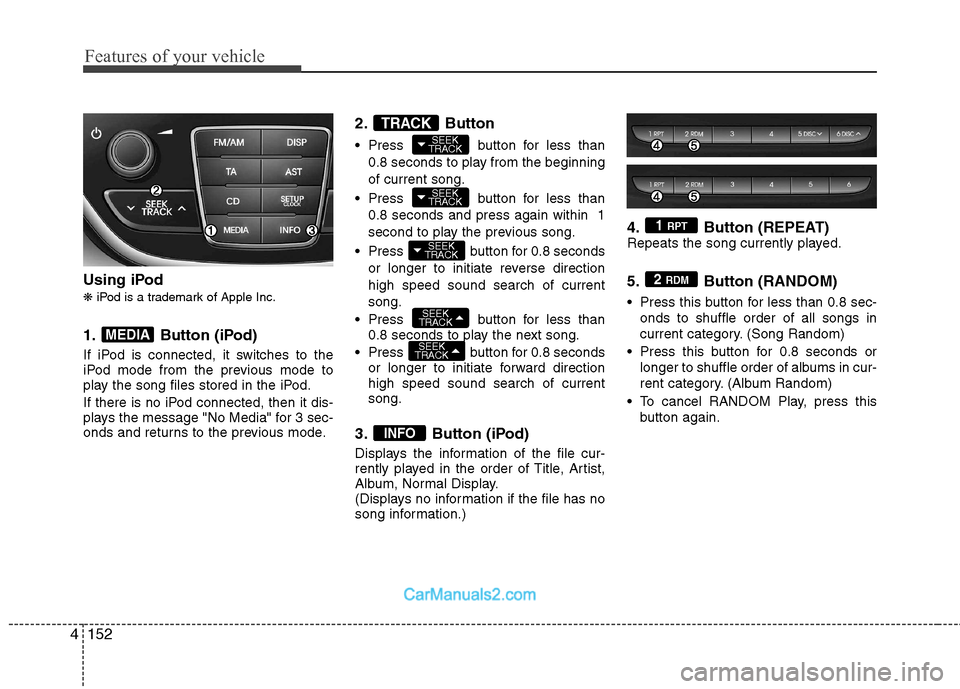
Using iPod ❋ iPod is a trademark of Apple Inc.
1. Button (iPod)
If iPod is connected, it switches to the
iPod mode from the previous mode to
play the song files stored in the iPod.
If there is no iPod connected, then it dis-
plays the message "No Media" for 3 sec-
onds and returns to the previous mode. 2. Button
Press button for less than
0.8 seconds to play from the beginning of current song.
Press button for less than 0.8 seconds and press again within 1
second to play the previous song.
Press button for 0.8 seconds or longer to initiate reverse directionhigh speed sound search of currentsong.
Press button for less than 0.8 seconds to play the next song.
Press button for 0.8 seconds or longer to initiate forward direction high speed sound search of currentsong.
3. Button (iPod)
Displays the information of the file cur-
rently played in the order of Title, Artist,
Album, Normal Display.
(Displays no information if the file has no
song information.) 4. Button (REPEAT)
Repeats the song currently played.
5. Button (RANDOM)
Press this button for less than 0.8 sec-
onds to shuffle order of all songs in
current category. (Song Random)
Press this button for 0.8 seconds or longer to shuffle order of albums in cur-
rent category. (Album Random)
To cancel RANDOM Play, press this button again.2 RDM
1 RPT
INFO
SEEK
TRACK
SEEK
TRACK
SEEK
TRACK
SEEK
TRACK
SEEK
TRACKTRACK
MEDIA
Page 226 of 414
Features of your vehicle
160
4
Bluetooth ®Wireless Technology
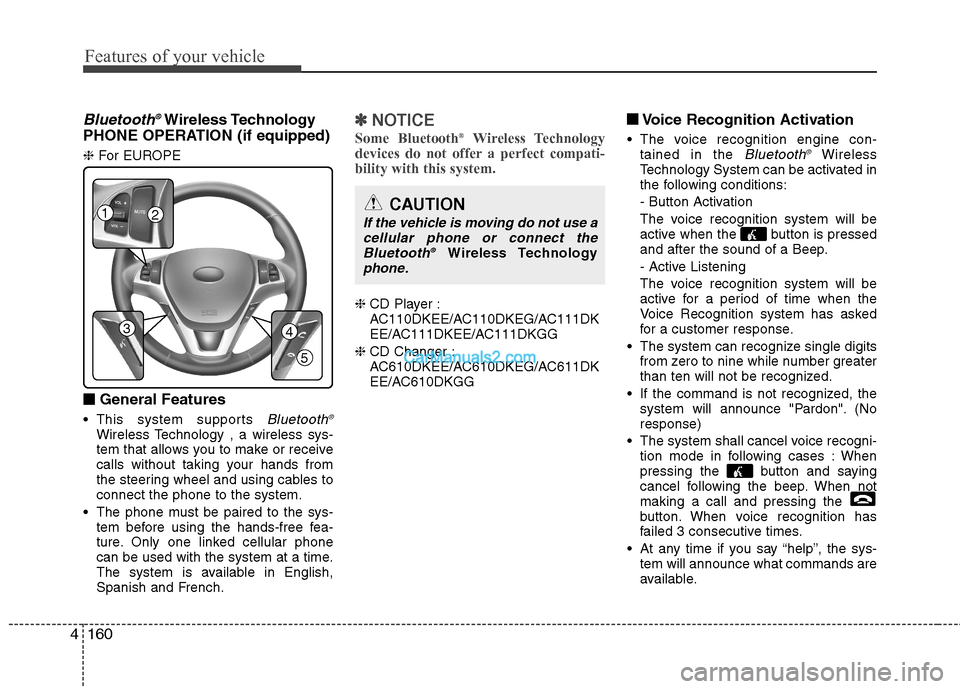
PHONE OPERATION (if equipped) ❈ For EUROPE
■
■ General Features
This system supports
Bluetooth ®Wireless Technology , a wireless sys-
tem that allows you to make or receive
calls without taking your hands from
the steering wheel and using cables toconnect the phone to the system.
The phone must be paired to the sys- tem before using the hands-free fea-
ture. Only one linked cellular phone
can be used with the system at a time.
The system is available in English,
Spanish and French.
✽✽ NOTICE
Some Bluetooth ®
Wireless Technology
devices do not offer a perfect compati- bility with this system.
❈ CD Player :
AC110DKEE/AC110DKEG/AC111DK
EE/AC111DKEE/AC111DKGG
❈ CD Changer :
AC610DKEE/AC610DKEG/AC611DK
EE/AC610DKGG ■
■
Voice Recognition Activation
The voice recognition engine con- tained in the
Bluetooth ®Wireless
Technology System can be activated in
the following conditions:
- Button Activation
The voice recognition system will be
active when the button is pressed
and after the sound of a Beep.
- Active Listening
The voice recognition system will be
active for a period of time when the
Voice Recognition system has asked
for a customer response.
The system can recognize single digits from zero to nine while number greater
than ten will not be recognized.
If the command is not recognized, the system will announce "Pardon". (Noresponse)
The system shall cancel voice recogni- tion mode in following cases : When
pressing the button and saying
cancel following the beep. When notmaking a call and pressing the
button. When voice recognition has
failed 3 consecutive times.
At any time if you say “help”, the sys- tem will announce what commands are
available.
12
34
5
CAUTION
If the vehicle is moving do not use a
cellular phone or connect theBluetooth ®
Wireless Technologyphone.
Page 230 of 414
Features of your vehicle
164
4
Dialing by Number
The system will make a phone call by
dialing the spoken numbers.
The system can recognize single digits
from zero to nine.
1. Press the button.
2. Say “Call”.
3. Say “Number”.
4. Say “
5. Say “
6. Say “Dial”.
✽✽ Tip
A shortcut to each of the following func- tions is available.1. Say “Dial number”.2. Say “Dial
■ Receiving a phone call
When receiving a phone call, a ring tone is heard and the system changes to tele-
phone mode. When receiving a phone
call, the phone number and the message
“Incoming” will be displayed.
Press the send switch to take the call.
or “- ” on the steering volume controls.
Volume adjustment cannot be made using the audio system.
The received call can be transferredfrom the hands-free system to the cel-lular phone that is connected to
Bluetooth®Wireless Technology.
For details, please refer to you user's
manual for the cellular phone or go to
the Key matrix in this manual (nextpage). ■
Talking on the phone
When talking on the phone, the display
will differ depending on whether or not
the vehicle is in motion.
Number and "active call" is displayed.When the call is finished, press the end
switch.
✽✽ NOTICE
In the following situations, your voice
may not reach the other party:
1. When talking alternately with the other party on the phone. If you talkat the same time, the voice may not
reach the other parties. (This is not amalfunction.)
2. When keeping the volume of incom-
ing voice to a low level. Otherwise,
high volumes may result in an echo.When you talk on the phone, speak
clearly towards the microphone.
3. When driving on a rough road.
4. When driving at high speeds.
5. When the window is open.
6. When the air conditioning vents are facing the microphone.
7. When the sound of the air condition-
ing fan is loud.
Page 232 of 414
Features of your vehicle
166
4
Min Volume mininmum
Max Volume maxinmum
Auto Store Automatically selects and saves
channels
Loading CD Loading CD
Reading CD Reading CD
Ejecting CD Ejecting CD
Insert CD Insert CD
Disc Check It is just the warning. After initial
boot, And then push CD button
Audio will check the disk
Changing CD Changing CD
No Disc Empty CD in audio
Disc Full All 6 disces have already beeninserted.
Eject a previously inserted CD
to insert new CD
Track Audio CD song order
No Media Empty media file in CD
Disc Title Disc title name
Disc Artist Disc artist name
Track Title Track Title name
Track Artist Track artist name
Total Tracks Number of tracks in the CD SCAN All the songs on the CD are
played 10 seconds sequentially
RPT Audio play mode of Reapeat
RDM Audio play mode of Random
NO Song Empty song File in USB
Reading USB Reading USB
File Name File Name,MP3 file currently
being played
Title Song name,MP3 file currently
being played
Artist Artist name,MP3 file currently
being played
Album Album name,MP3 file currently
being played
Folder This is a folder name, MP3 file currently being played is in this
folder
Total Files Total number of files being
played
Loading IPOD Loading IPOD
Folder Menu If you push the up/down key in the foilder key, you can enter
the Menu mode
Connected Connecting aux
MP3 Play Play MP3 in phone paired
Please Wait Please Wait
Pairing Fail Audio & Phone connection
have failed
Connecting Connecting Audio & Phone
Connection Audio & Phone connection
have succeed
Connection FailedAudio & Phone connection
have failed
Call EndedHang up the your mobile phone
Complete
Page 267 of 414
Driving your vehicle
32
5
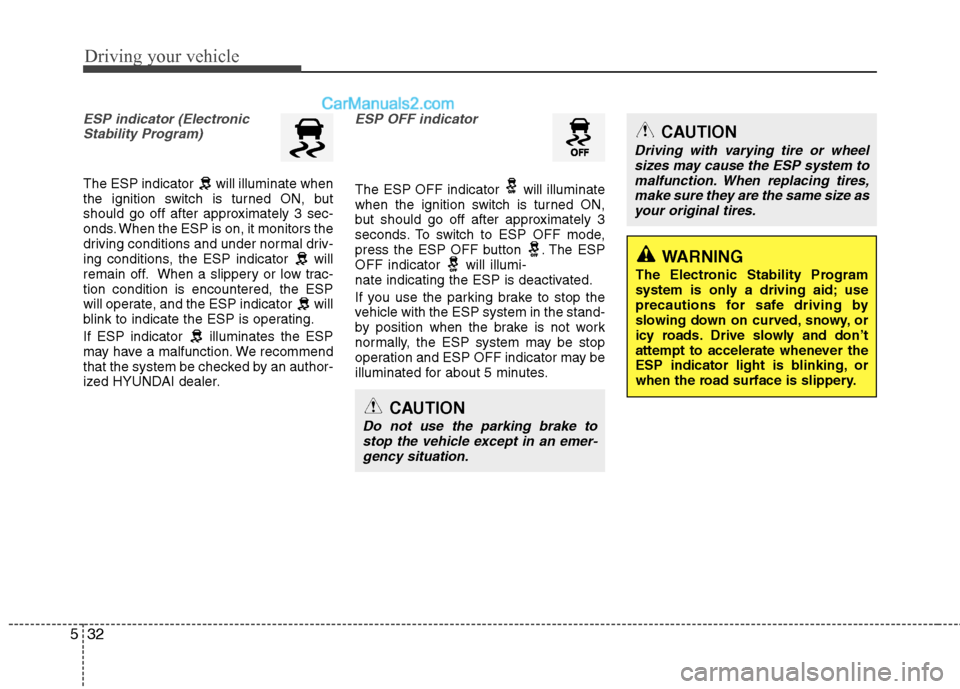
ESP indicator (Electronic
Stability Program)
The ESP indicator will illuminate when
the ignition switch is turned ON, but
should go off after approximately 3 sec-
onds. When the ESP is on, it monitors the
driving conditions and under normal driv-
ing conditions, the ESP indicator will
remain off. When a slippery or low trac-tion condition is encountered, the ESP
will operate, and the ESP indicator will
blink to indicate the ESP is operating.
If ESP indicator illuminates the ESP
may have a malfunction. We recommend
that the system be checked by an author-
ized HYUNDAI dealer.
ESP OFF indicator
The ESP OFF indicator will illuminate
when the ignition switch is turned ON,
but should go off after approximately 3
seconds. To switch to ESP OFF mode,
press the ESP OFF button . The ESP
OFF indicator will illumi-
nate indicating the ESP is deactivated.
If you use the parking brake to stop the
vehicle with the ESP system in the stand-
by position when the brake is not work
normally, the ESP system may be stop
operation and ESP OFF indicator may be
illuminated for about 5 minutes.
CAUTION
Do not use the parking brake to
stop the vehicle except in an emer- gency situation.
CAUTION
Driving with varying tire or wheelsizes may cause the ESP system to
malfunction. When replacing tires, make sure they are the same size asyour original tires.
WARNING
The Electronic Stability Program
system is only a driving aid; use
precautions for safe driving by
slowing down on curved, snowy, or
icy roads. Drive slowly and don’t
attempt to accelerate whenever the
ESP indicator light is blinking, or
when the road surface is slippery.
Page 274 of 414
539
Driving your vehicle
Your vehicle's fuel economy depends
mainly on your style of driving, where you
drive and when you drive.
Each of these factors affects how many
miles (kilometers) you can get from a gal-
lon (liter) of fuel. To operate your vehicle
as economically as possible, use the fol-
lowing driving suggestions to help save
money in both fuel and repairs:
Drive smoothly. Accelerate at a moder-ate rate. Don't make "jack-rabbit" starts or full-throttle shifts and maintain a
steady cruising speed. Don't race
between stoplights. Try to adjust your
speed to that of the other traffic so you
don't have to change speeds unneces-
sarily. Avoid heavy traffic whenever
possible. Always maintain a safe dis-
tance from other vehicles so you can
avoid unnecessary braking. This also
reduces brake wear.
Drive at a moderate speed. The faster you drive, the more fuel your car uses.
Driving at a moderate speed, especial-
ly on the highway, is one of the most
effective ways to reduce fuel consump-tion. Don't "ride" the brake or clutch pedal.
This can increase fuel consumption
and also increase wear on these com-
ponents. In addition, driving with your
foot resting on the brake pedal may
cause the brakes to overheat, which
reduces their effectiveness and may
lead to more serious consequences.
Take care of your tires. Keep them inflated to the recommended pressure.
Incorrect inflation, either too much or
too little, results in unnecessary tire
wear. Check the tire pressures at leastonce a month.
Be sure that the wheels are aligned correctly. Improper alignment can
result from hitting curbs or driving too
fast over irregular surfaces. Poor align-
ment causes faster tire wear and may
also result in other problems as well as
greater fuel consumption. Keep your car in good condition. For
better fuel economy and reduced
maintenance costs, maintain your carin accordance with the maintenance
schedule in section 7. If you drive your
car in severe conditions, more frequentmaintenance is required (see section 7
for details).
Keep your car clean. For maximum service, your vehicle should be kept
clean and free of corrosive materials. It
is especially important that mud, dirt,
ice, etc. not be allowed to accumulate
on the underside of the car. This extra
weight can result in increased fuel con-
sumption and also contribute to corro-sion.
Travel lightly. Don't carry unnecessary weight in your car. Weight reduces fuel
economy.
Don't let the engine idle longer than necessary. If you are waiting (and not
in traffic), turn off your engine and
restart only when you're ready to go.
ECONOMICAL OPERATION
Page 358 of 414
751
Maintenance
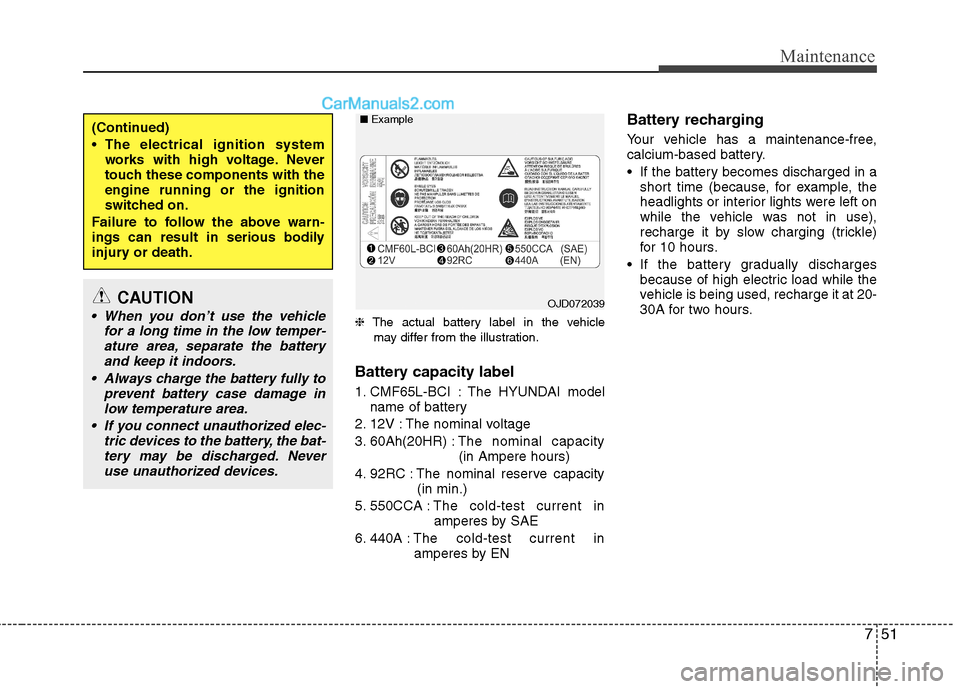
❈The actual battery label in the vehicle
may differ from the illustration.
Battery capacity label
1. CMF65L-BCI : The HYUNDAI model name of battery
2. 12V : The nominal voltage
3. 60Ah(20HR) : The nominal capacity
(in Ampere hours)
4. 92RC : The nominal reserve capacity (in min.)
5. 550CCA : The cold-test current in
amperes by SAE
6. 440A : The cold-test current in
amperes by EN Battery recharging
Your vehicle has a maintenance-free,
calcium-based battery.
If the battery becomes discharged in a
short time (because, for example, the
headlights or interior lights were left on
while the vehicle was not in use),
recharge it by slow charging (trickle)
for 10 hours.
If the battery gradually discharges because of high electric load while the
vehicle is being used, recharge it at 20-
30A for two hours.
(Continued)
The electrical ignition systemworks with high voltage. Never
touch these components with theengine running or the ignition
switched on.
Failure to follow the above warn-
ings can result in serious bodily
injury or death.
CAUTION
When you don’t use the vehicle for a long time in the low temper-ature area, separate the batteryand keep it indoors.
Always charge the battery fully to prevent battery case damage in
low temperature area.
If you connect unauthorized elec- tric devices to the battery, the bat-tery may be discharged. Neveruse unauthorized devices.OJD072039
■
Example