display Hyundai Genesis Coupe 2013 Owner's Guide
[x] Cancel search | Manufacturer: HYUNDAI, Model Year: 2013, Model line: Genesis Coupe, Model: Hyundai Genesis Coupe 2013Pages: 414, PDF Size: 38.89 MB
Page 205 of 414
4139
Features of your vehicle
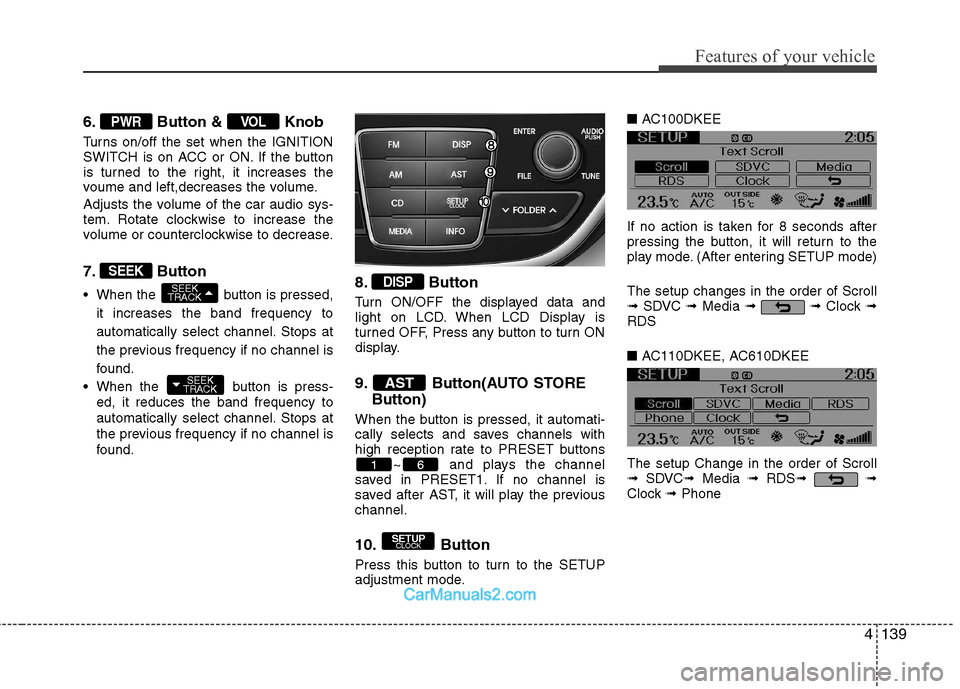
6. Button & Knob
Turns on/off the set when the IGNITION
SWITCH is on ACC or ON. If the button
is turned to the right, it increases the
voume and left,decreases the volume.
Adjusts the volume of the car audio sys-
tem. Rotate clockwise to increase the
volume or counterclockwise to decrease.
7. Button
When the button is pressed,it increases the band frequency to
automatically select channel. Stops at
the previous frequency if no channel is
found.
When the button is press- ed, it reduces the band frequency to
automatically select channel. Stops at
the previous frequency if no channel is
found. 8. Button
Turn ON/OFF the displayed data and
light on LCD. When LCD Display is
turned OFF, Press any button to turn ON
display.
9. Button(AUTO STORE
Button)
When the button is pressed, it automati-
cally selects and saves channels with
high reception rate to PRESET buttons ~ and plays the channel
saved in PRESET1. If no channel is
saved after AST, it will play the previouschannel.
10. Button
Press this button to turn to the SETUP
adjustment mode. ■
AC100DKEE
If no action is taken for 8 seconds after
pressing the button, it will return to the
play mode. (After entering SETUP mode) The setup changes in the order of Scroll ➟ SDVC ➟Media ➟ ➟ Clock ➟
RDS ■ AC110DKEE, AC610DKEE
The setup Change in the order of Scroll ➟ SDVC ➟Media ➟ RDS ➟ ➟
Clock ➟Phone
SETUP
CLOCK
61
AST
DISP
SEEK
TRACK
SEEK
TRACK
SEEK
VOLPWR
Page 206 of 414
Features of your vehicle
140
4
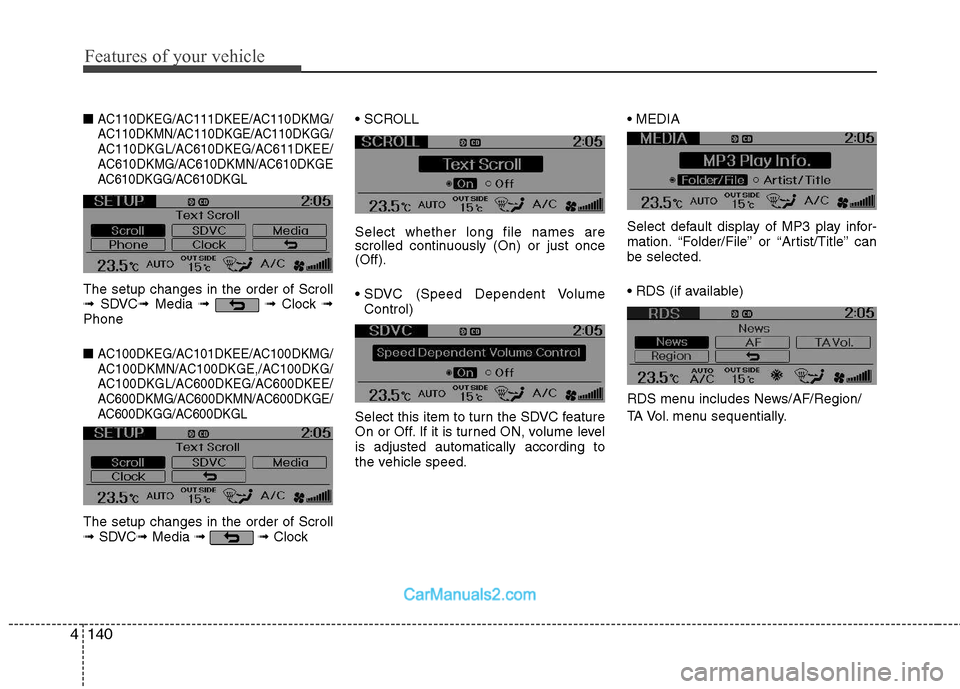
■ AC110DKEG/AC111DKEE/AC110DKMG/
AC110DKMN/AC110DKGE/AC110DKGG/
AC110DKGL/AC610DKEG/AC611DKEE/
AC610DKMG/AC610DKMN/AC610DKGE
AC610DKGG/AC610DKGL
The setup changes in the order of Scroll➟ SDVC ➟Media ➟ ➟ Clock ➟
Phone ■
AC100DKEG/AC101DKEE/AC100DKMG/
AC100DKMN/AC100DKGE,/AC100DKG/
AC100DKGL/AC600DKEG/AC600DKEE/
AC600DKMG/AC600DKMN/AC600DKGE/
AC600DKGG/AC600DKGL
The setup changes in the order of Scroll➟ SDVC ➟Media ➟➟ Clock Select whether long file names are
scrolled continuously (On) or just once(Off).
Control)
Select this item to turn the SDVC feature
On or Off. If it is turned ON, volume levelis adjusted automatically according to
the vehicle speed.
Select default display of MP3 play infor-
mation. “Folder/File” or “Artist/Title” canbe selected.
RDS menu includes News/AF/Region/
TA Vol. menu sequentially.
Page 208 of 414
Features of your vehicle
142
4
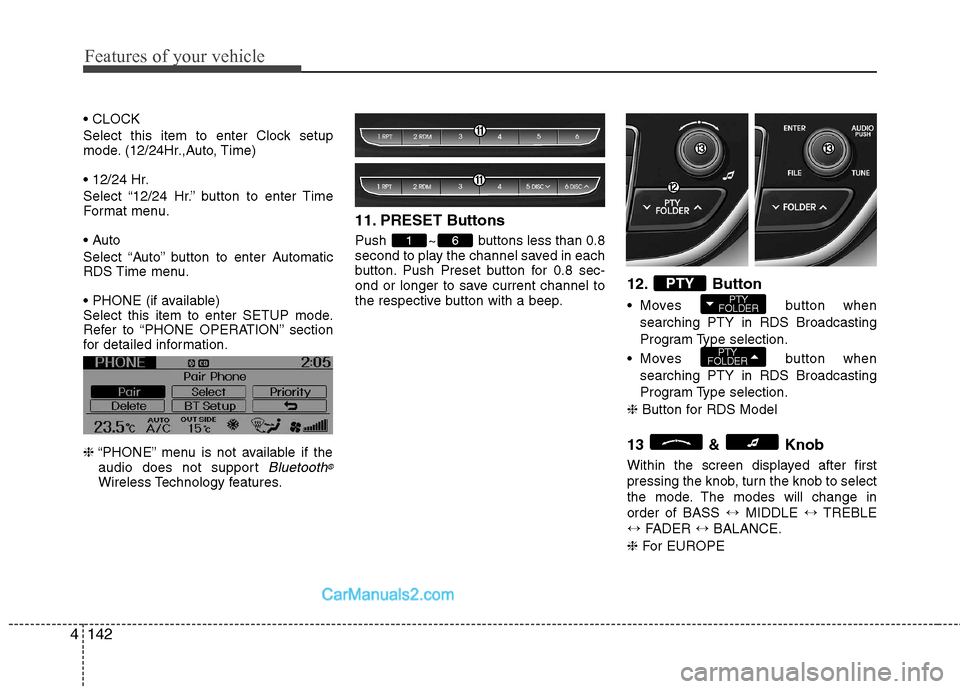
Select this item to enter Clock setup
mode. (12/24Hr.,Auto, Time)
Select “12/24 Hr.” button to enter Time
Format menu.
Select “Auto” button to enter Automatic
RDS Time menu.
Select this item to enter SETUP mode.
Refer to “PHONE OPERATION” section
for detailed information. ❈ “PHONE” menu is not available if the
audio does not support
Bluetooth®
Wireless Technology features. 11. PRESET Buttons
Push ~ buttons less than 0.8
second to play the channel saved in each
button. Push Preset button for 0.8 sec-
ond or longer to save current channel to
the respective button with a beep.
12. Button
Moves button
when
searching PTY in RDS Broadcasting
Program Type selection.
Moves button when
searching PTY in RDS Broadcasting
Program Type selection.
❈ Button for RDS Model
13 & Knob
Within the screen displayed after first
pressing the knob, turn the knob to select
the mode. The modes will change inorder of BASS ↔MIDDLE ↔TREBLE
↔ FADER ↔BALANCE.
❈ For EUROPE
PTY
FOLDER
PTY
FOLDERPTY
61
Page 209 of 414
4143
Features of your vehicle
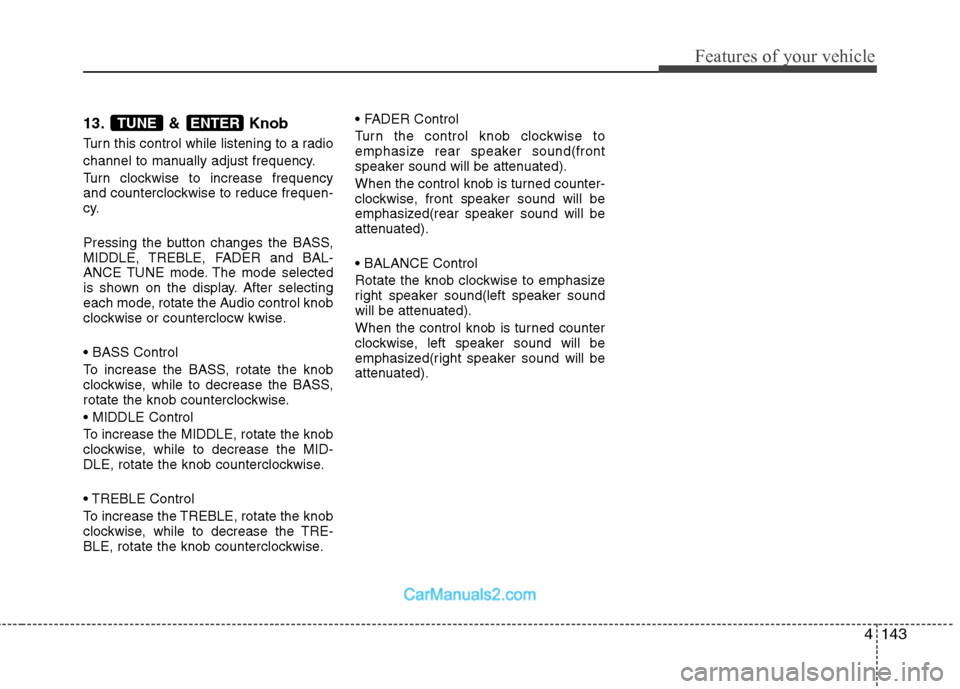
13. & Knob
Turn this control while listening to a radio
channel to manually adjust frequency.
Turn clockwise to increase frequency
and counterclockwise to reduce frequen-
cy.
Pressing the button changes the BASS,
MIDDLE, TREBLE, FADER and BAL-
ANCE TUNE mode. The mode selected
is shown on the display. After selecting
each mode, rotate the Audio control knob
clockwise or counterclocw kwise.
To increase the BASS, rotate the knob
clockwise, while to decrease the BASS,
rotate the knob counterclockwise.
To increase the MIDDLE, rotate the knob
clockwise, while to decrease the MID-
DLE, rotate the knob counterclockwise.
Control
To increase the TREBLE, rotate the knob
clockwise, while to decrease the TRE-
BLE, rotate the knob counterclockwise.
Turn the control knob clockwise to
emphasize rear speaker sound(front
speaker sound will be attenuated).
When the control knob is turned counter-
clockwise, front speaker sound will be
emphasized(rear speaker sound will be
attenuated).
Rotate the knob clockwise to emphasize
right speaker sound(left speaker sound
will be attenuated).
When the control knob is turned counter
clockwise, left speaker sound will be
emphasized(right speaker sound will be
attenuated).ENTERTUNE
Page 210 of 414
Features of your vehicle
144
4
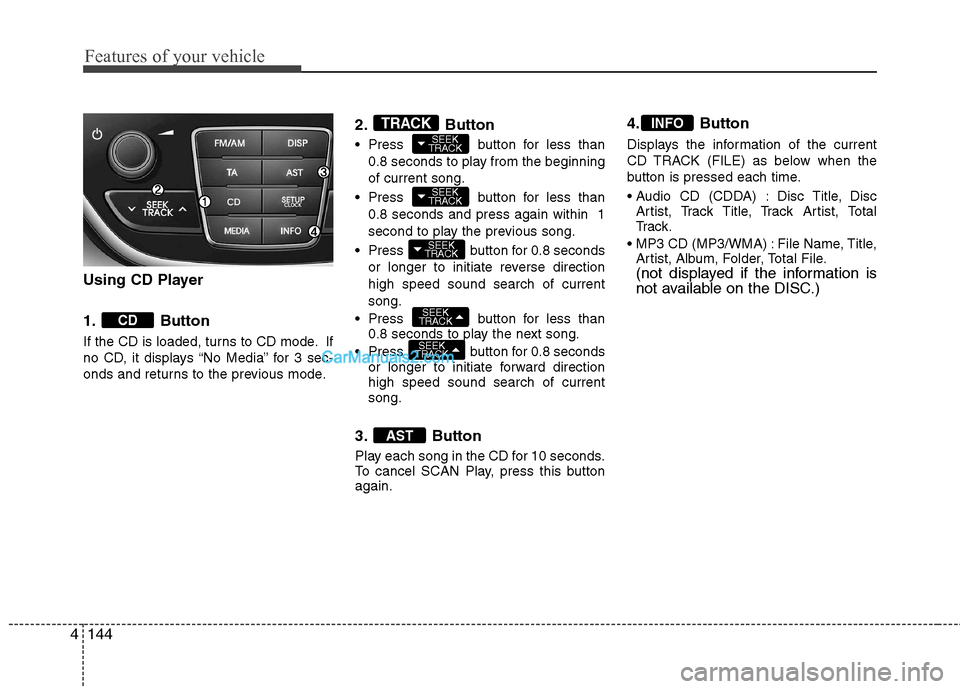
Using CD Player
1. Button
If the CD is loaded, turns to CD mode. If
no CD, it displays “No Media” for 3 sec-
onds and returns to the previous mode. 2. Button
Press button for less than
0.8 seconds to play from the beginning of current song.
Press button for less than 0.8 seconds and press again within 1
second to play the previous song.
Press button for 0.8 seconds or longer to initiate reverse directionhigh speed sound search of currentsong.
Press button for less than 0.8 seconds to play the next song.
Press button for 0.8 seconds or longer to initiate forward direction high speed sound search of currentsong.
3. Button
Play each song in the CD for 10 seconds.
To cancel SCAN Play, press this buttonagain. 4. Button
Displays the information of the current
CD TRACK (FILE) as below when the
button is pressed each time.
Disc Title, Disc
Artist, Track Title, Track Artist, Total
Tr a c k .
File Name, Title, Artist, Album, Folder, Total File.
(not displayed if the information is
not available on the DISC.)
INFO
AST
SEEK
TRACK
SEEK
TRACK
SEEK
TRACK
SEEK
TRACK
SEEK
TRACKTRACK
CD
Page 212 of 414
Features of your vehicle
146
4
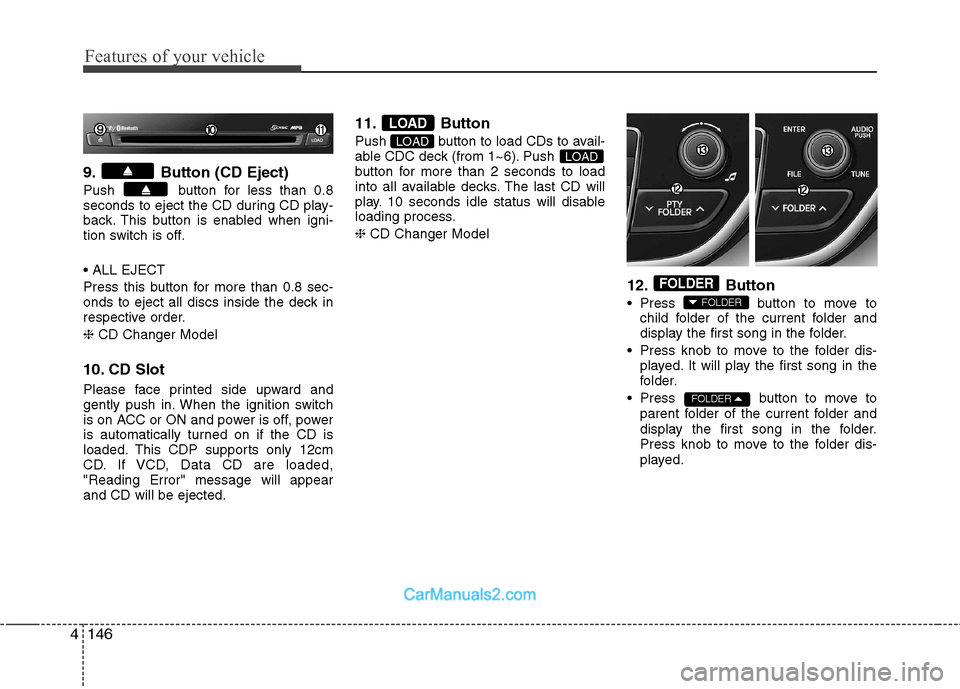
9. Button (CD Eject)
Push button for less than 0.8
seconds to eject the CD during CD play-
back. This button is enabled when igni-
tion switch is off.
Press this button for more than 0.8 sec-
onds to eject all discs inside the deck in
respective order. ❈ CD Changer Model
10. CD Slot
Please face printed side upward and
gently push in. When the ignition switch
is on ACC or ON and power is off, power
is automatically turned on if the CD is
loaded. This CDP supports only 12cm
CD. If VCD, Data CD are loaded,"Reading Error" message will appearand CD will be ejected. 11. Button
Push button to load CDs to avail-
able CDC deck (from 1~6). Push
button for more than 2 seconds to load
into all available decks. The last CD will
play. 10 seconds idle status will disable
loading process. ❈
CD Changer Model
12. Button
Press button to move tochild folder of the current folder and
display the first song in the folder.
Press knob to move to the folder dis- played. It will play the first song in the
folder.
Press button to move to parent folder of the current folder and
display the first song in the folder.
Press knob to move to the folder dis-
played.
FOLDER
FOLDER
FOLDER
LOADLOAD
LOAD
Page 213 of 414
4147
Features of your vehicle
13. & Knob
Turn this knob clockwise to browsesongs after current song, or counter-
clockwise to browse songs before cur-
rent song. To play the displayed song,
press the knob.
Pressing this knob without turning enters to AUDIO CONTROL mode.
❈ For EUROPE
13. & Knob
Turn this knob clockwise to browse songs after current song, or counter-
clockwise to browse songs before cur-
rent song. To play the displayed song,
press the knob.
Pressing this knob without turning enters to AUDIO CONTROL mode. NOTE:
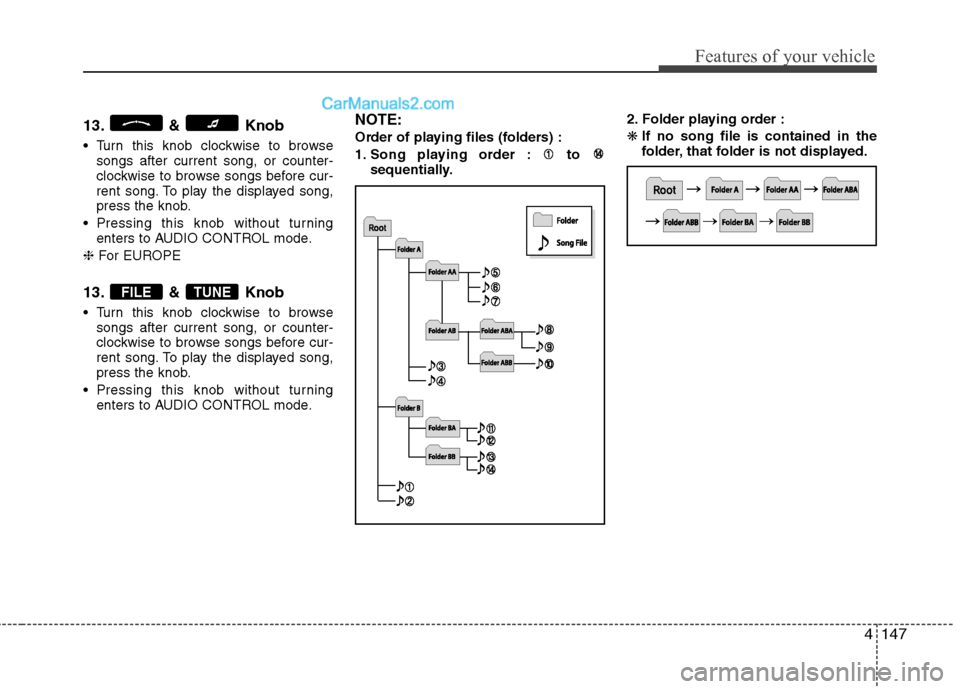
Order of playing files (folders) :
1. Song playing order : to
sequentially. 2. Folder playing order :❋
If no song file is contained in the
folder, that folder is not displayed.
TUNEFILE
Page 214 of 414
Features of your vehicle
148
4
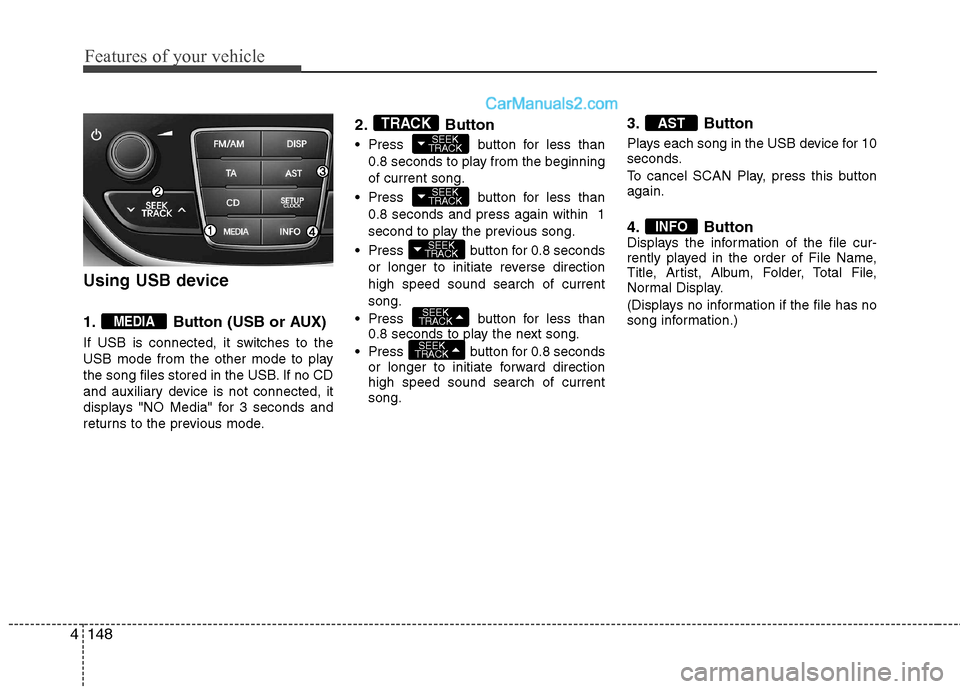
Using USB device
1. Button (USB or AUX)
If USB is connected, it switches to the
USB mode from the other mode to play
the song files stored in the USB. If no CD
and auxiliary device is not connected, it
displays "NO Media" for 3 seconds and
returns to the previous mode. 2. Button
Press button for less than
0.8 seconds to play from the beginning of current song.
Press button for less than 0.8 seconds and press again within 1
second to play the previous song.
Press button for 0.8 seconds or longer to initiate reverse directionhigh speed sound search of currentsong.
Press button for less than 0.8 seconds to play the next song.
Press button for 0.8 seconds or longer to initiate forward direction high speed sound search of currentsong. 3. Button
Plays each song in the USB device for 10
seconds.
To cancel SCAN Play, press this button again.
4. Button
Displays the information of the file cur-
rently played in the order of File Name,
Title, Artist, Album, Folder, Total File,
Normal Display.
(Displays no information if the file has no
song information.)
INFO
AST
SEEK
TRACK
SEEK
TRACK
SEEK
TRACK
SEEK
TRACK
SEEK
TRACKTRACK
MEDIA
Page 215 of 414
4149
Features of your vehicle
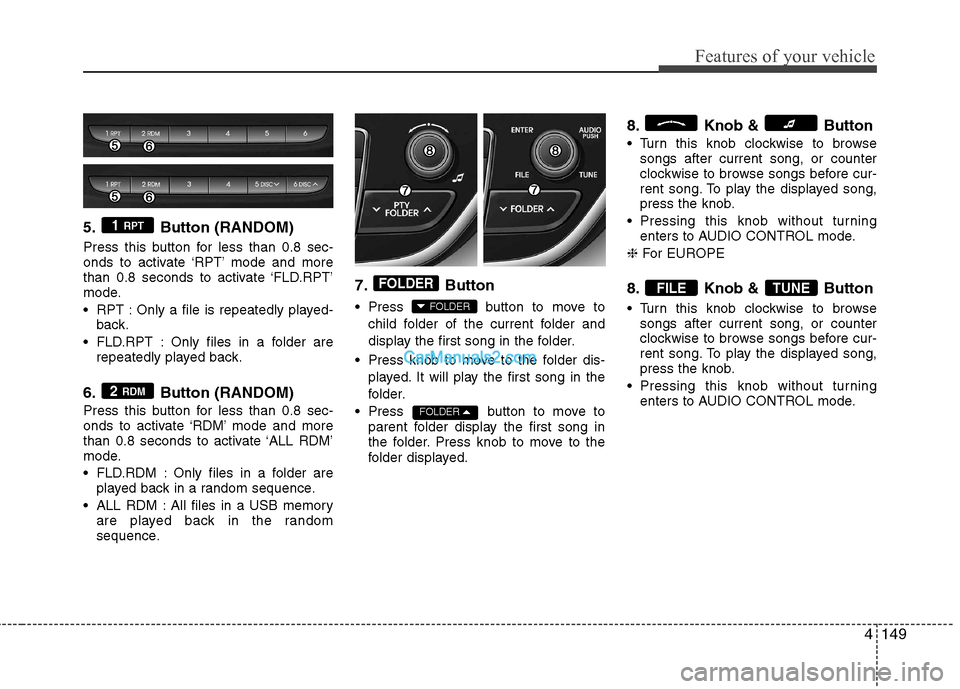
5. Button (RANDOM)
Press this button for less than 0.8 sec-
onds to activate ‘RPT’ mode and more
than 0.8 seconds to activate ‘FLD.RPT’
mode.
RPT : Only a file is repeatedly played-back.
FLD.RPT : Only files in a folder are repeatedly played back.
6. Button (RANDOM)
Press this button for less than 0.8 sec-
onds to activate ‘RDM’ mode and more
than 0.8 seconds to activate ‘ALL RDM’
mode.
FLD.RDM : Only files in a folder are played back in a random sequence.
ALL RDM : All files in a USB memory are played back in the random
sequence. 7. Button
Press button to move to
child folder of the current folder and
display the first song in the folder.
Press knob to move to the folder dis- played. It will play the first song in the
folder.
Press button to move to parent folder display the first song in
the folder. Press knob to move to the
folder displayed. 8. Knob & Button
Turn this knob clockwise to browse
songs after current song, or counter
clockwise to browse songs before cur-
rent song. To play the displayed song,
press the knob.
Pressing this knob without turning enters to AUDIO CONTROL mode.
❈ For EUROPE
8. Knob & Button
Turn this knob clockwise to browse songs after current song, or counter
clockwise to browse songs before cur-
rent song. To play the displayed song,
press the knob.
Pressing this knob without turning enters to AUDIO CONTROL mode.
TUNEFILE
FOLDER
FOLDER
FOLDER
2 RDM
1 RPT
Page 218 of 414
Features of your vehicle
152
4
Using iPod ❋ iPod is a trademark of Apple Inc.
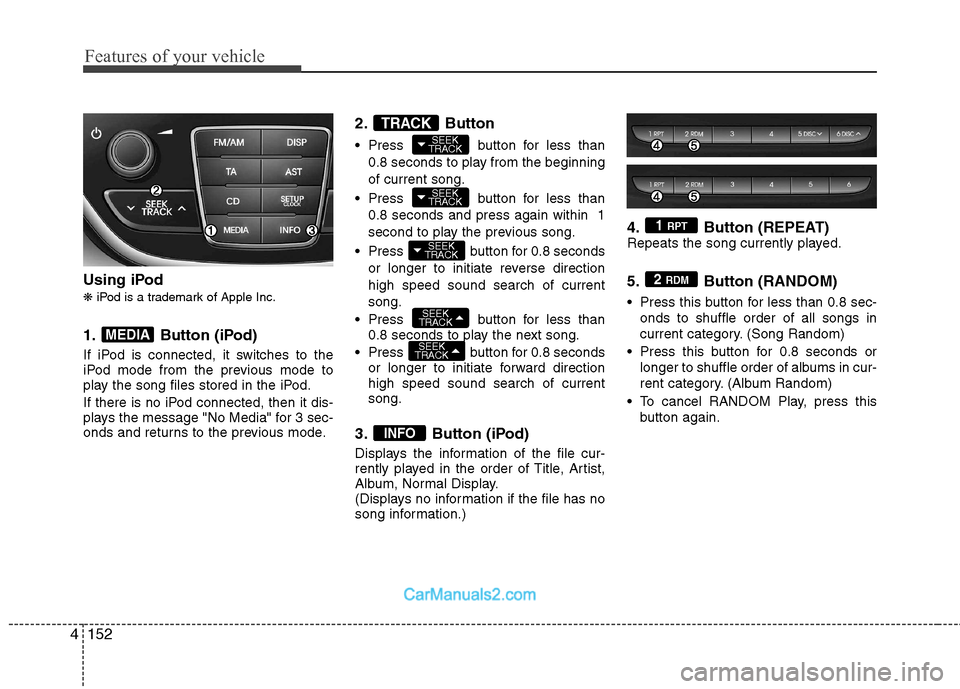
1. Button (iPod)
If iPod is connected, it switches to the
iPod mode from the previous mode to
play the song files stored in the iPod.
If there is no iPod connected, then it dis-
plays the message "No Media" for 3 sec-
onds and returns to the previous mode. 2. Button
Press button for less than
0.8 seconds to play from the beginning of current song.
Press button for less than 0.8 seconds and press again within 1
second to play the previous song.
Press button for 0.8 seconds or longer to initiate reverse directionhigh speed sound search of currentsong.
Press button for less than 0.8 seconds to play the next song.
Press button for 0.8 seconds or longer to initiate forward direction high speed sound search of currentsong.
3. Button (iPod)
Displays the information of the file cur-
rently played in the order of Title, Artist,
Album, Normal Display.
(Displays no information if the file has no
song information.) 4. Button (REPEAT)
Repeats the song currently played.
5. Button (RANDOM)
Press this button for less than 0.8 sec-
onds to shuffle order of all songs in
current category. (Song Random)
Press this button for 0.8 seconds or longer to shuffle order of albums in cur-
rent category. (Album Random)
To cancel RANDOM Play, press this button again.2 RDM
1 RPT
INFO
SEEK
TRACK
SEEK
TRACK
SEEK
TRACK
SEEK
TRACK
SEEK
TRACKTRACK
MEDIA