steering Hyundai Genesis Coupe 2013 Owner's Guide
[x] Cancel search | Manufacturer: HYUNDAI, Model Year: 2013, Model line: Genesis Coupe, Model: Hyundai Genesis Coupe 2013Pages: 414, PDF Size: 38.89 MB
Page 146 of 414
Features of your vehicle
80
4
Battery saver function
The purpose of this feature is to pre-
vent the battery from being dis-
charged. The system automatically
turns off the position lights when the
driver removes the ignition key (or
turns off the engine) and opens the
driver-side door.
With this feature, the position lights will be turned off automatically if the driver
parks on the side of road at night.
If necessary, to keep the lights on
when the ignition key is removed, (or
turns off the engine) perform the fol-
lowing:
1) Open the driver-side door.
2) Turn the position lights OFF and ON again using the light switch on the
steering column. Headlight escort function (if equipped)
If you turn the ignition switch to the ACC or OFF position with the headlights ON,the headlights (and/or tail lights) remain
on for about 20 minutes. However, if the
driver’s door is opened and closed, the
headlights are turned off after 30 sec-
onds.
The headlights can be turned off by
pressing the lock button on the transmit-
ter (or smart key) twice or turning the
light switch to the OFF or Auto position.
However, if you turn the light switch to the
Auto position when it is dark outside, the
headlights will not be turned off.
Headlight welcome function (if equipped)
When the headlight is ON or AUTO posi-
tion and all doors (and trunk) are closed
and locked, if you press the door unlock
button on the transmitter (or the smart
key), the position light will come on for
about 15 seconds. At this time, if you
press the door lock or unlock button on
the transmitter (or smart key), the posi-
tion light will turn off immediately.
LIGHTING
CAUTION
If the driver gets out of the vehicle
through other doors (except dri-ver’s door), the battery saver func-
tion does not operate and the head-light escort function does not turnoff automatically. Therefore, it caus-es the battery to be discharged. In
this case, make sure to turn off the lamp before getting out of the vehi-cle.
Page 192 of 414
![Hyundai Genesis Coupe 2013 Owners Guide Features of your vehicle
126
4
Digital clock
Whenever the battery terminals or relat-
ed fuses are disconnected, you must
reset the time.
Setup the clock
With audio off
1. Press the [SETUP] or [Clo](/img/35/14690/w960_14690-191.png "Hyundai Genesis Coupe 2013 Owners Guide Features of your vehicle
126
4
Digital clock
Whenever the battery terminals or relat-
ed fuses are disconnected, you must
reset the time.
Setup the clock
With audio off
1. Press the [SETUP] or [Clo")
Features of your vehicle
126
4
Digital clock
Whenever the battery terminals or relat-
ed fuses are disconnected, you must
reset the time.
Setup the clock
With audio off
1. Press the [SETUP] or [Clock] button(1)
until the clock of the display blinks.
2. Set the clock by turning the knob(2) and press it.
With audio on
1. Press the [SETUP] or [Clock] button (1).
2. Select the clock menu by turning the knob (2).
3. Set the clock by turning the knob(2) and press it.
WARNING
Do not adjust the clock while driv-
ing. You may lose your steering
control and cause an accident that
results in severe personal injury ordeath.
OBK042111
WARNING
Do not put a finger or a foreign ele-
ment (pin, etc.) into a power outlet
and do not touch with a wet hand.
You may get an electric shock.
Page 196 of 414
Features of your vehicle
130
4
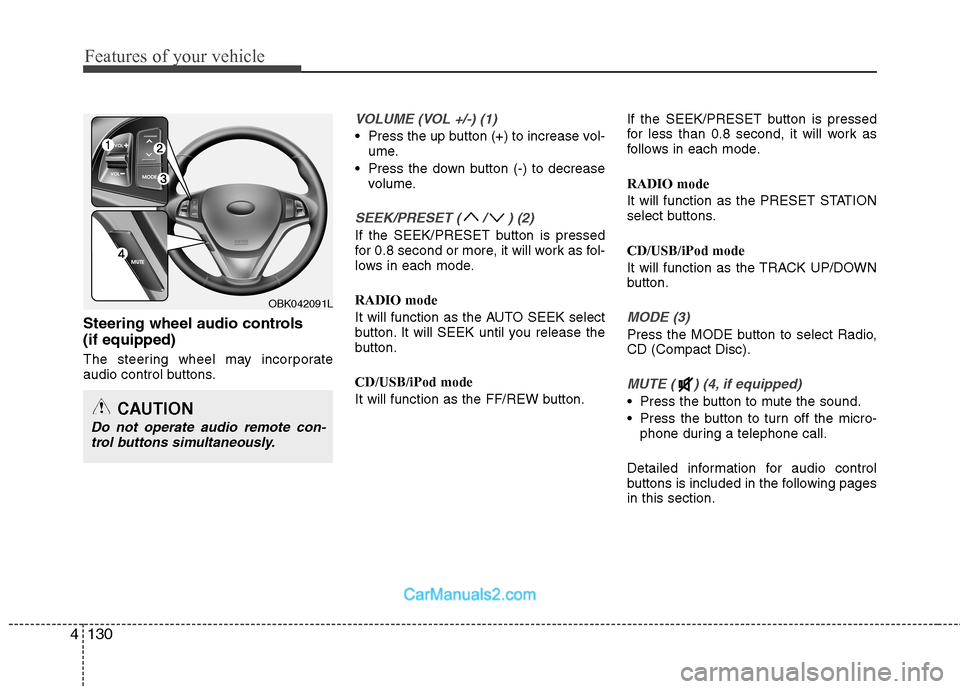
Steering wheel audio controls (if equipped)
The steering wheel may incorporate
audio control buttons.
VOLUME (VOL +/-) (1)
Press the up button (+) to increase vol-
ume.
Press the down button (-) to decrease volume.
SEEK/PRESET ( / ) (2)
If the SEEK/PRESET button is pressed
for 0.8 second or more, it will work as fol-
lows in each mode. RADIO mode
It will function as the AUTO SEEK select
button. It will SEEK until you release the
button. CD/USB/iPod mode
It will function as the FF/REW button. If the SEEK/PRESET button is pressed
for less than 0.8 second, it will work as
follows in each mode. RADIO mode
It will function as the PRESET STATION
select buttons. CD/USB/iPod mode
It will function as the TRACK UP/DOWN
button.
MODE (3)
Press the MODE button to select Radio, CD (Compact Disc).
MUTE ( ) (4, if equipped)
Press the button to mute the sound.
Press the button to turn off the micro-
phone during a telephone call.
Detailed information for audio control
buttons is included in the following pagesin this section.
OBK042091L
CAUTION
Do not operate audio remote con- trol buttons simultaneously.
Page 224 of 414
Features of your vehicle
158
4
■■
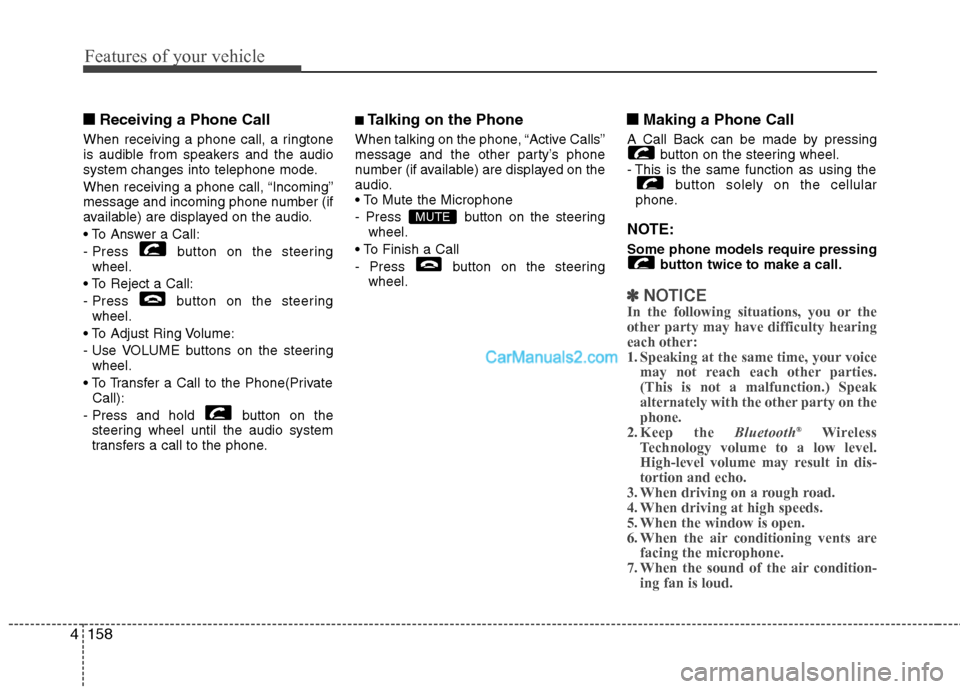
Receiving a Phone Call
When receiving a phone call, a ringtone
is audible from speakers and the audio
system changes into telephone mode.
When receiving a phone call, “Incoming”
message and incoming phone number (if
available) are displayed on the audio.
- Press button on the steering wheel.
- Press button on the steering wheel.
- Use VOLUME buttons on the steering wheel.
Call):
- Press and hold button on the steering wheel until the audio system
transfers a call to the phone. ■
Talking on the Phone
When talking on the phone, “Active Calls”
message and the other party’s phone
number (if available) are displayed on the
audio.
- Press button on the steering wheel.
- Press button on the steering wheel. ■■
Making a Phone Call
A Call Back can be made by pressing button on the steering wheel.
- This is the same function as using the
button solely on the cellular
phone.
NOTE: Some phone models require pressing button twice to make a call.
✽✽NOTICE
In the following situations, you or the
other party may have difficulty hearingeach other:
1. Speaking at the same time, your voice
may not reach each other parties.(This is not a malfunction.) Speak
alternately with the other party on thephone.
2. Keep the Bluetooth®
Wireless
Technology volume to a low level.
High-level volume may result in dis-tortion and echo.
3. When driving on a rough road.
4. When driving at high speeds.
5. When the window is open.
6. When the air conditioning vents are
facing the microphone.
7. When the sound of the air condition-
ing fan is loud.
MUTE
Page 226 of 414
Features of your vehicle
160
4
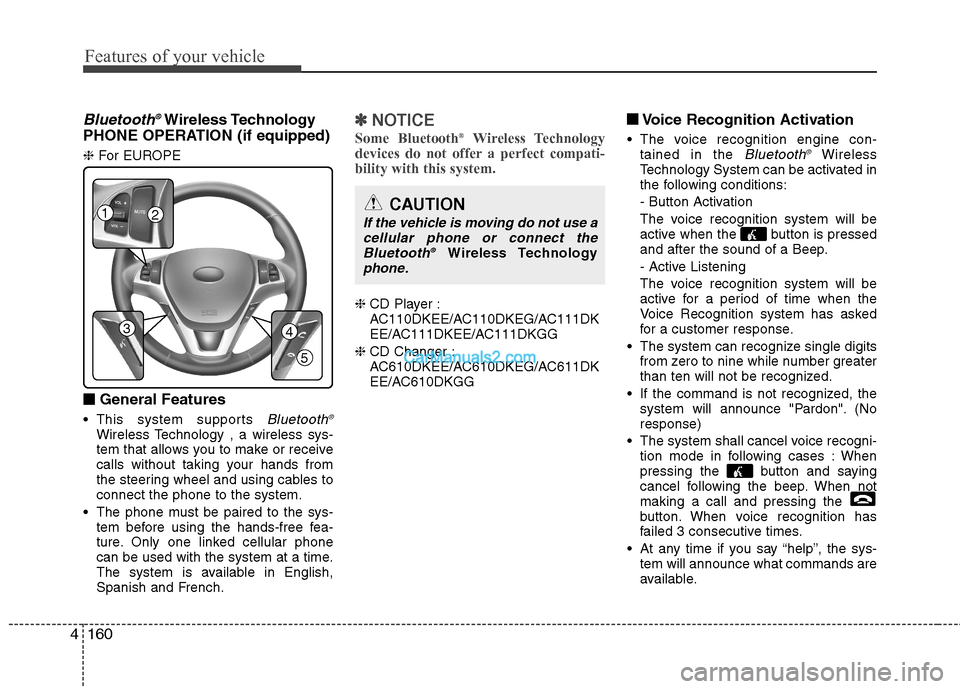
Bluetooth ®Wireless Technology
PHONE OPERATION (if equipped) ❈ For EUROPE
■
■ General Features
This system supports
Bluetooth ®Wireless Technology , a wireless sys-
tem that allows you to make or receive
calls without taking your hands from
the steering wheel and using cables toconnect the phone to the system.
The phone must be paired to the sys- tem before using the hands-free fea-
ture. Only one linked cellular phone
can be used with the system at a time.
The system is available in English,
Spanish and French.
✽✽ NOTICE
Some Bluetooth ®
Wireless Technology
devices do not offer a perfect compati- bility with this system.
❈ CD Player :
AC110DKEE/AC110DKEG/AC111DK
EE/AC111DKEE/AC111DKGG
❈ CD Changer :
AC610DKEE/AC610DKEG/AC611DK
EE/AC610DKGG ■
■
Voice Recognition Activation
The voice recognition engine con- tained in the
Bluetooth ®Wireless
Technology System can be activated in
the following conditions:
- Button Activation
The voice recognition system will be
active when the button is pressed
and after the sound of a Beep.
- Active Listening
The voice recognition system will be
active for a period of time when the
Voice Recognition system has asked
for a customer response.
The system can recognize single digits from zero to nine while number greater
than ten will not be recognized.
If the command is not recognized, the system will announce "Pardon". (Noresponse)
The system shall cancel voice recogni- tion mode in following cases : When
pressing the button and saying
cancel following the beep. When notmaking a call and pressing the
button. When voice recognition has
failed 3 consecutive times.
At any time if you say “help”, the sys- tem will announce what commands are
available.
12
34
5
CAUTION
If the vehicle is moving do not use a
cellular phone or connect theBluetooth ®
Wireless Technologyphone.
Page 230 of 414
Features of your vehicle
164
4
Dialing by Number
The system will make a phone call by
dialing the spoken numbers.
The system can recognize single digits
from zero to nine.
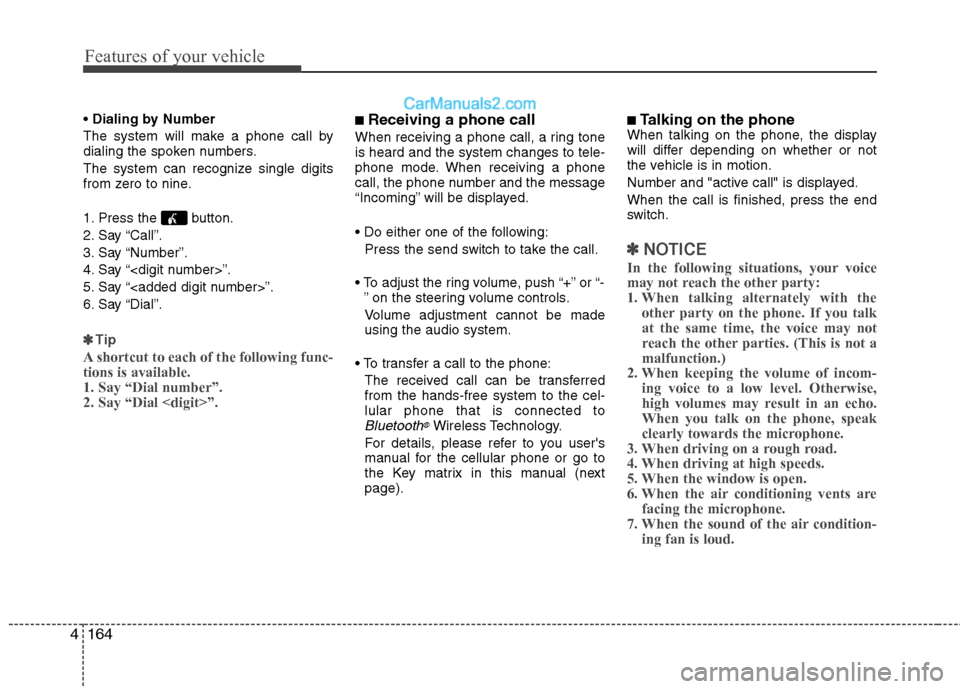
1. Press the button.
2. Say “Call”.
3. Say “Number”.
4. Say “
5. Say “
6. Say “Dial”.
✽✽ Tip
A shortcut to each of the following func- tions is available.1. Say “Dial number”.2. Say “Dial
■ Receiving a phone call
When receiving a phone call, a ring tone is heard and the system changes to tele-
phone mode. When receiving a phone
call, the phone number and the message
“Incoming” will be displayed.
Press the send switch to take the call.
or “- ” on the steering volume controls.
Volume adjustment cannot be made using the audio system.
The received call can be transferredfrom the hands-free system to the cel-lular phone that is connected to
Bluetooth®Wireless Technology.
For details, please refer to you user's
manual for the cellular phone or go to
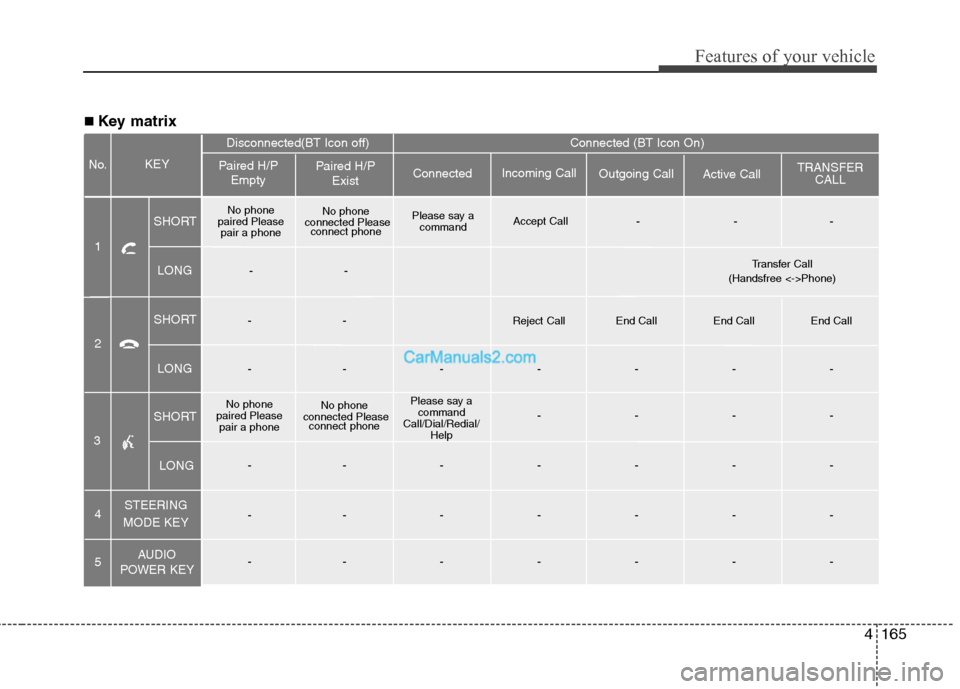
the Key matrix in this manual (nextpage). ■
Talking on the phone
When talking on the phone, the display
will differ depending on whether or not
the vehicle is in motion.
Number and "active call" is displayed.When the call is finished, press the end
switch.
✽✽ NOTICE
In the following situations, your voice
may not reach the other party:
1. When talking alternately with the other party on the phone. If you talkat the same time, the voice may not
reach the other parties. (This is not amalfunction.)
2. When keeping the volume of incom-
ing voice to a low level. Otherwise,
high volumes may result in an echo.When you talk on the phone, speak
clearly towards the microphone.
3. When driving on a rough road.
4. When driving at high speeds.
5. When the window is open.
6. When the air conditioning vents are facing the microphone.
7. When the sound of the air condition-
ing fan is loud.
Page 231 of 414
4165
Features of your vehicle
■ Key matrix
No.
Disconnected(BT Icon off) Connected (BT Icon On)
Paired H/P Empty Paired H/P
Exist
1 SHORT
LONG
SHORT
LONG
STEERING
MODE KEY
AUDIO
POWER KEY Incoming Call
Outgoing Call Active CallTRANSFER
CALL
Connected
KEY
--
Reject Call End Call End Call End Call
-------
No phone
paired Please pair a phone No phone
connected Please connect phone Please say a
command
Call/Dial/Redial/ Help ----
-------
-------
-------
No phone
paired Please pair a phone No phone
connected Please connect phone Please say a
command Accept Call
---
4 5
2
3
SHORT
LONG
-- Transfer Call
(Handsfree <->Phone)
Page 233 of 414
4167
Features of your vehicle
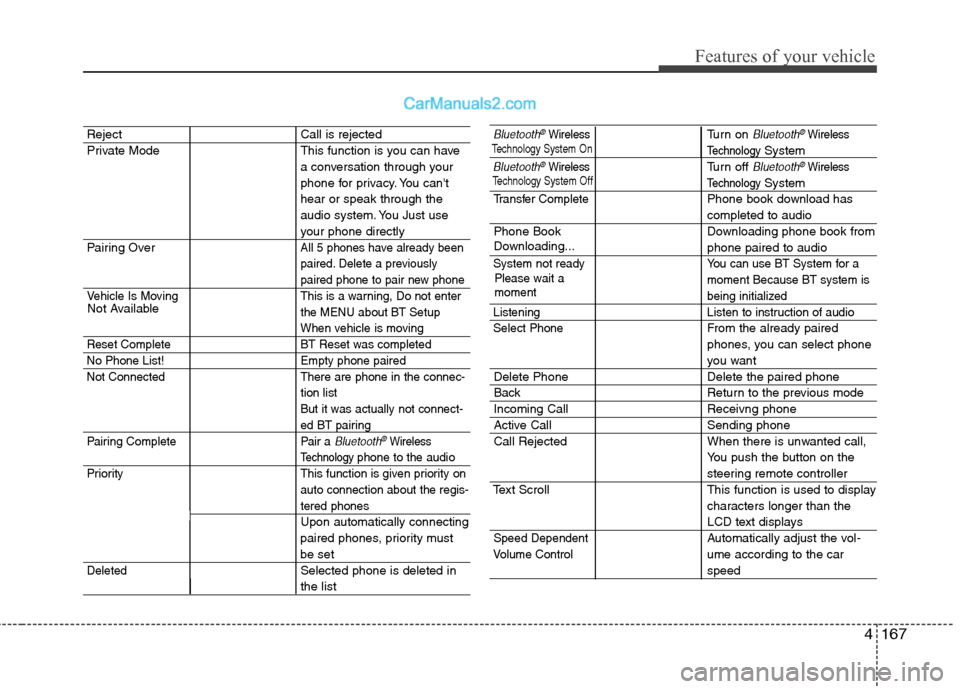
Reject Call is rejected
Private Mode This function is you can havea conversation through your
phone for privacy. You can'thear or speak through the
audio system. You Just use
your phone directly
Pairing Over
All 5 phones have already been
paired. Delete a previously
paired phone to pair new phone
Vehicle Is Moving This is a warning, Do not enter the MENU about BT Setup
When vehicle is moving
Reset Complete BT Reset was completed
No Phone List! Empty phone paired
Not Connected There are phone in the connec- tion list
But it was actually not connect-
ed BT pairing
Pairing Complete Pair a
Bluetooth®Wireless
Technology phone to the audio
Priority This function is given priority on auto connection about the regis-
tered phones
Upon automatically connecting
paired phones, priority must
be set
DeletedSelected phone is deleted in
the list
Bluetooth®WirelessTurn on Bluetooth®Wireless
TechnologySystem
Bluetooth®WirelessTurn off Bluetooth®Wireless
TechnologySystem
Transfer CompletePhone book download has
completed to audio
Phone Book Downloading phone book from
phone paired to audio
System not ready You can use BT System for a moment Because BT system is
being initialized
Listening Listen to instruction of audio Select Phone
From the already paired
phones, you can select phone
you want
Delete Phone Delete the paired phone
Back Return to the previous mode
Incoming Call Receivng phone
Active Call Sending phone
Call Rejected When there is unwanted call,You push the button on the
steering remote controller
Text Scroll This function is used to display characters longer than the
LCD text displays
Speed DependentAutomatically adjust the vol- ume according to the car
speed
Not Available
Please wait a moment
Volume Control
Downloading...
Technology System Off
Technology
System On
Page 239 of 414
Driving your vehicle
4
5
WARNING - Driving under
the influence of alcohol or drugs
Drinking and driving is dangerous.
Drunk driving is the number one
contributor to the highway death
toll each year. Even a small amount
of alcohol will affect your reflexes,
perceptions and judgment. Drivingwhile under the influence of drugs
is as dangerous or more dangerousthan driving drunk.
You are much more likely to have a
serious accident if you drink or
take drugs and drive.
If you are drinking or taking drugs,
don’t drive. Do not ride with a driv-er who has been drinking or taking
drugs. Choose a designated driveror call a cab.WARNING
When you intend to park or stop the vehicle with the engine on, be careful not to depress the accel-
erator pedal for a long period of
time. It may overheat the engine
or exhaust system and cause fire.
When you make a sudden stop or turn the steering wheel rapidly,
loose objects may drop on the
floor and it could interfere with
the operation of the foot pedals,
possibly causing an accident.
Keep all things in the vehicle
safely stored.
If you do not focus on driving, it may cause an accident. Be care-
ful when operating what may dis-
turb driving such as audio or
heater. It is the responsibility of
the driver to always drive safely.
Page 240 of 414
55
Driving your vehicle
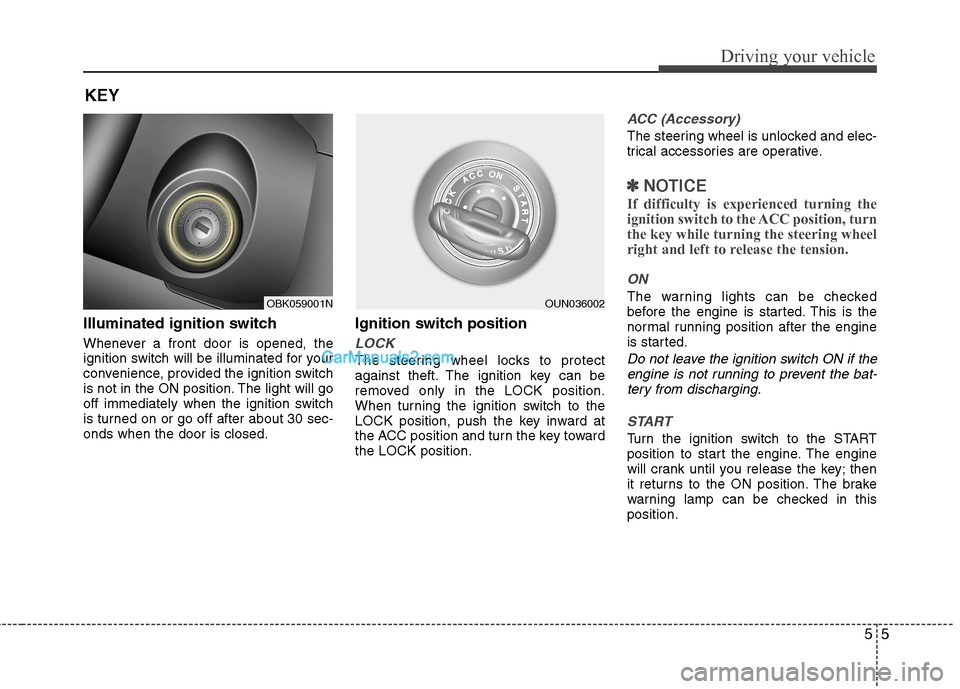
Illuminated ignition switch
Whenever a front door is opened, the
ignition switch will be illuminated for your
convenience, provided the ignition switch
is not in the ON position. The light will go
off immediately when the ignition switch
is turned on or go off after about 30 sec-onds when the door is closed.Ignition switch position
LOCK
The steering wheel locks to protect
against theft. The ignition key can be
removed only in the LOCK position.
When turning the ignition switch to the
LOCK position, push the key inward at
the ACC position and turn the key towardthe LOCK position.
ACC (Accessory)
The steering wheel is unlocked and elec-
trical accessories are operative.
✽✽
NOTICE
If difficulty is experienced turning the
ignition switch to the ACC position, turnthe key while turning the steering wheel
right and left to release the tension.
ON
The warning lights can be checked
before the engine is started. This is the
normal running position after the engine
is started.
Do not leave the ignition switch ON if the engine is not running to prevent the bat-tery from discharging.
START
Turn the ignition switch to the START
position to start the engine. The engine
will crank until you release the key; then
it returns to the ON position. The brake
warning lamp can be checked in thisposition.
KEY
OBK059001NOUN036002