audio Hyundai Genesis Coupe 2013 Owner's Manual
[x] Cancel search | Manufacturer: HYUNDAI, Model Year: 2013, Model line: Genesis Coupe, Model: Hyundai Genesis Coupe 2013Pages: 414, PDF Size: 38.89 MB
Page 68 of 414
Windshield defrosting and defogging / 4-115Storage compartments / 4-119Interior features / 4-121Audio system / 4-4-127
Features of your vehicle4
Page 191 of 414
4125
Features of your vehicle
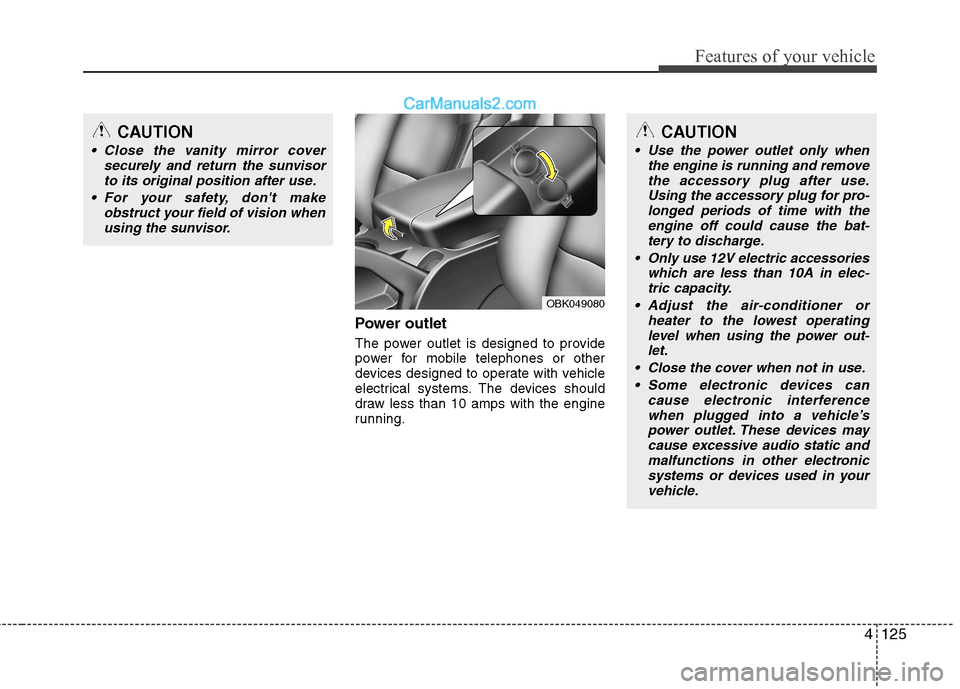
Power outlet
The power outlet is designed to provide
power for mobile telephones or other
devices designed to operate with vehicle
electrical systems. The devices should
draw less than 10 amps with the engine
running.
CAUTION
Close the vanity mirror coversecurely and return the sunvisor
to its original position after use.
For your safety, don't make obstruct your field of vision whenusing the sunvisor.
OBK049080
CAUTION
Use the power outlet only when the engine is running and remove
the accessory plug after use. Using the accessory plug for pro-longed periods of time with theengine off could cause the bat-
tery to discharge.
Only use 12V electric accessories which are less than 10A in elec-tric capacity.
Adjust the air-conditioner or heater to the lowest operatinglevel when using the power out-let.
Close the cover when not in use. Some electronic devices can cause electronic interferencewhen plugged into a vehicle’spower outlet. These devices may cause excessive audio static and
malfunctions in other electronicsystems or devices used in your vehicle.
Page 192 of 414
![Hyundai Genesis Coupe 2013 Owners Manual Features of your vehicle
126
4
Digital clock
Whenever the battery terminals or relat-
ed fuses are disconnected, you must
reset the time.
Setup the clock
With audio off
1. Press the [SETUP] or [Clo](/img/35/14690/w960_14690-191.png "Hyundai Genesis Coupe 2013 Owners Manual Features of your vehicle
126
4
Digital clock
Whenever the battery terminals or relat-
ed fuses are disconnected, you must
reset the time.
Setup the clock
With audio off
1. Press the [SETUP] or [Clo")
Features of your vehicle
126
4
Digital clock
Whenever the battery terminals or relat-
ed fuses are disconnected, you must
reset the time.
Setup the clock
With audio off
1. Press the [SETUP] or [Clock] button(1)
until the clock of the display blinks.
2. Set the clock by turning the knob(2) and press it.
With audio on
1. Press the [SETUP] or [Clock] button (1).
2. Select the clock menu by turning the knob (2).
3. Set the clock by turning the knob(2) and press it.
WARNING
Do not adjust the clock while driv-
ing. You may lose your steering
control and cause an accident that
results in severe personal injury ordeath.
OBK042111
WARNING
Do not put a finger or a foreign ele-
ment (pin, etc.) into a power outlet
and do not touch with a wet hand.
You may get an electric shock.
Page 194 of 414
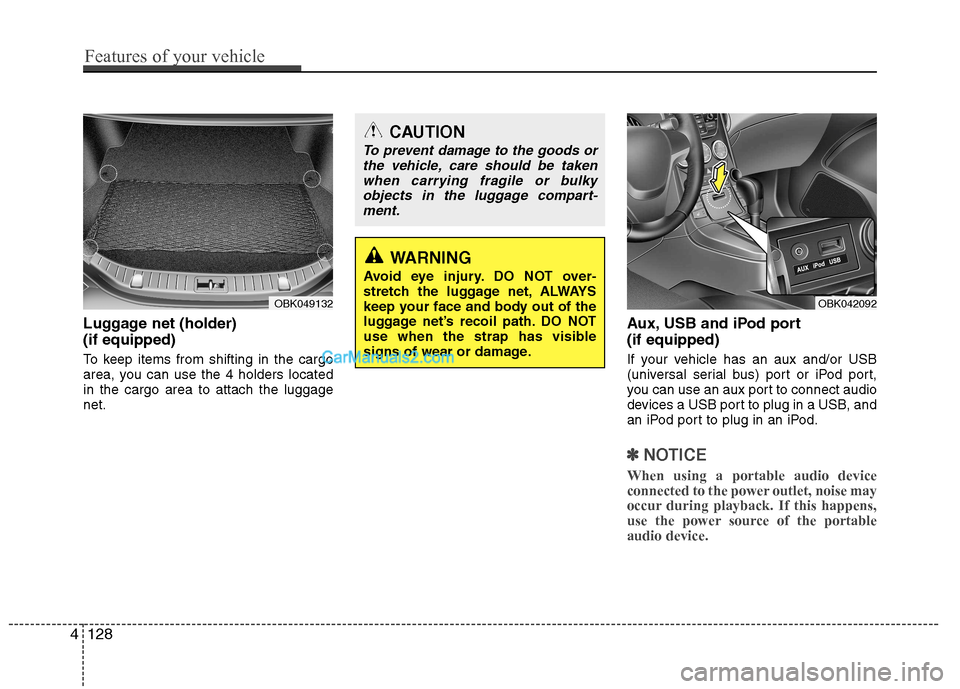
Luggage net (holder) (if equipped)
To keep items from shifting in the cargo
area, you can use the 4 holders locatedin the cargo area to attach the luggagenet.Aux, USB and iPod port (if equipped)
If your vehicle has an aux and/or USB
(universal serial bus) port or iPod port,
you can use an aux port to connect audio
devices a USB port to plug in a USB, and
an iPod port to plug in an iPod.
✽✽
NOTICE
When using a portable audio device
connected to the power outlet, noise may
occur during playback. If this happens,
use the power source of the portableaudio device.
OBK049132
CAUTION
To prevent damage to the goods or the vehicle, care should be taken
when carrying fragile or bulkyobjects in the luggage compart-ment.
WARNING
Avoid eye injury. DO NOT over-
stretch the luggage net, ALWAYS
keep your face and body out of the
luggage net’s recoil path. DO NOT
use when the strap has visible
signs of wear or damage.
OBK042092
4128
Features of your vehicle
Page 195 of 414
4129
Features of your vehicle
AUDIO SYSTEM
✽✽NOTICE
If you install an aftermarket HID head
lamp, your vehicle’s audio and electron-ic device may malfunction.
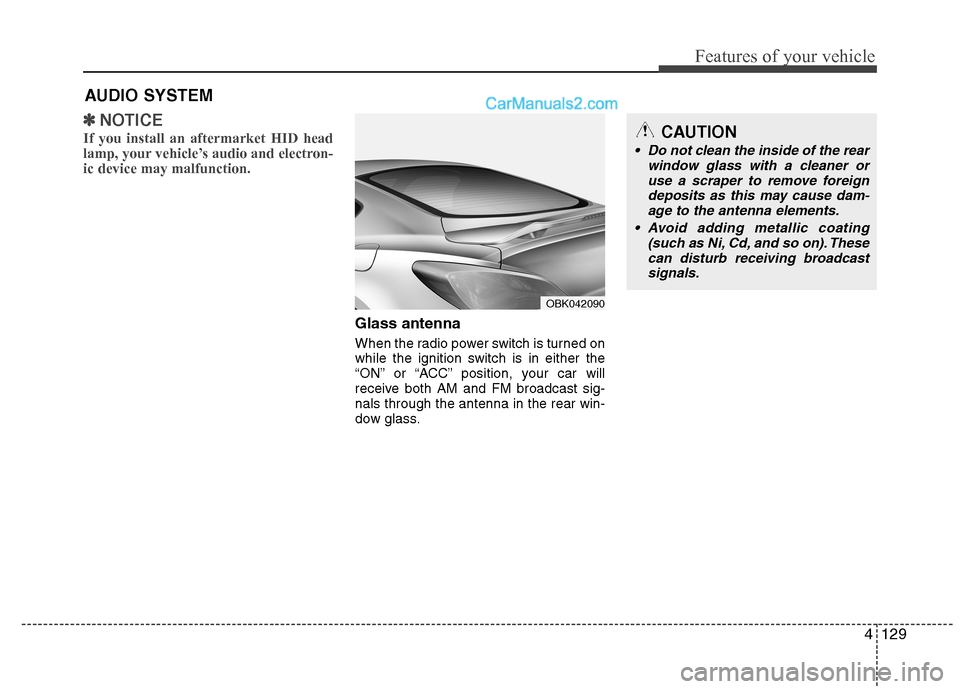
Glass antenna
When the radio power switch is turned on
while the ignition switch is in either the
“ON” or “ACC” position, your car will
receive both AM and FM broadcast sig-nals through the antenna in the rear win-
dow glass.
OBK042090
CAUTION
• Do not clean the inside of the rear window glass with a cleaner or
use a scraper to remove foreign deposits as this may cause dam-age to the antenna elements.
Avoid adding metallic coating (such as Ni, Cd, and so on). Thesecan disturb receiving broadcastsignals.
Page 196 of 414
Features of your vehicle
130
4
Steering wheel audio controls (if equipped)
The steering wheel may incorporate
audio control buttons.
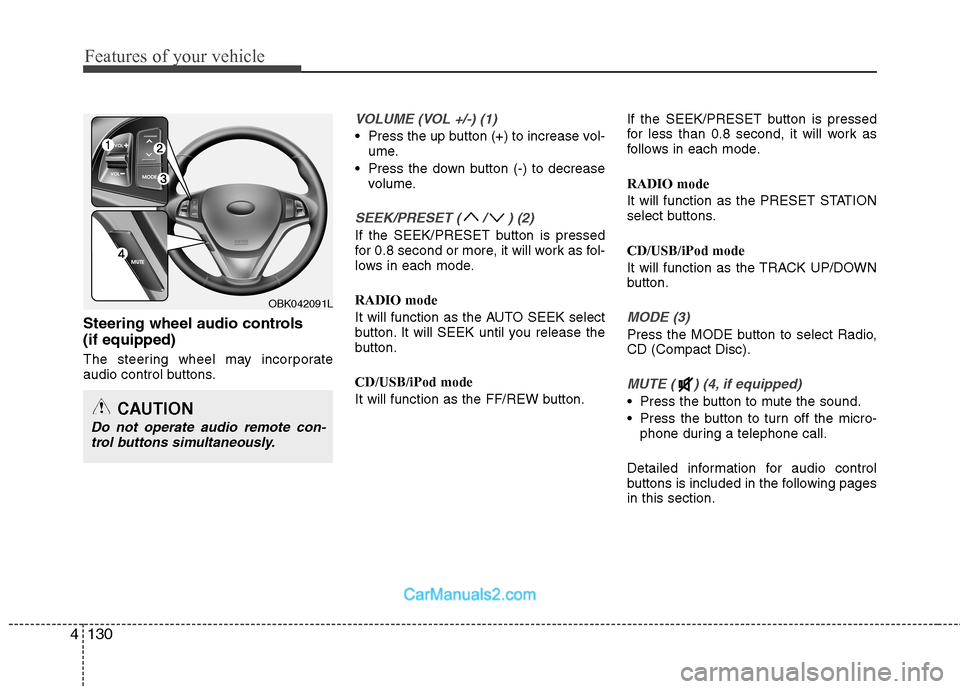
VOLUME (VOL +/-) (1)
Press the up button (+) to increase vol-
ume.
Press the down button (-) to decrease volume.
SEEK/PRESET ( / ) (2)
If the SEEK/PRESET button is pressed
for 0.8 second or more, it will work as fol-
lows in each mode. RADIO mode
It will function as the AUTO SEEK select
button. It will SEEK until you release the
button. CD/USB/iPod mode
It will function as the FF/REW button. If the SEEK/PRESET button is pressed
for less than 0.8 second, it will work as
follows in each mode. RADIO mode
It will function as the PRESET STATION
select buttons. CD/USB/iPod mode
It will function as the TRACK UP/DOWN
button.
MODE (3)
Press the MODE button to select Radio, CD (Compact Disc).
MUTE ( ) (4, if equipped)
Press the button to mute the sound.
Press the button to turn off the micro-
phone during a telephone call.
Detailed information for audio control
buttons is included in the following pagesin this section.
OBK042091L
CAUTION
Do not operate audio remote con- trol buttons simultaneously.
Page 197 of 414
4131
Features of your vehicle
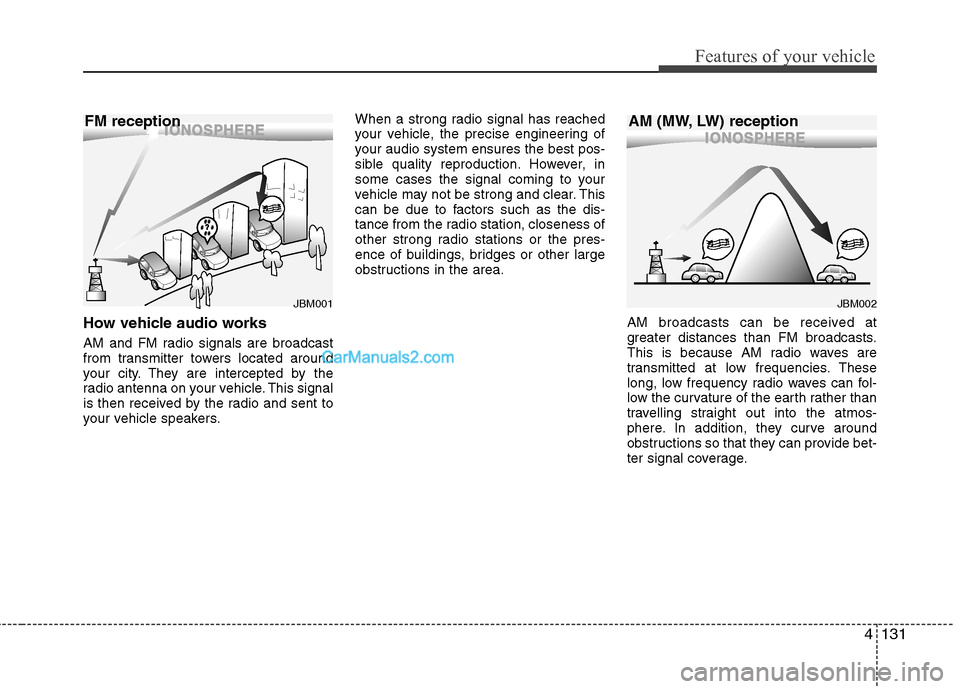
How vehicle audio works
AM and FM radio signals are broadcast
from transmitter towers located around
your city. They are intercepted by the
radio antenna on your vehicle. This signal
is then received by the radio and sent to
your vehicle speakers.When a strong radio signal has reached
your vehicle, the precise engineering of
your audio system ensures the best pos-
sible quality reproduction. However, in
some cases the signal coming to your
vehicle may not be strong and clear. This
can be due to factors such as the dis-
tance from the radio station, closeness of
other strong radio stations or the pres-
ence of buildings, bridges or other large
obstructions in the area.
AM broadcasts can be received at
greater distances than FM broadcasts.
This is because AM radio waves are
transmitted at low frequencies. These
long, low frequency radio waves can fol-
low the curvature of the earth rather than
travelling straight out into the atmos-
phere. In addition, they curve around
obstructions so that they can provide bet-
ter signal coverage.
JBM002
AM (MW, LW) receptionJBM001
FM reception
Page 199 of 414
4133
Features of your vehicle
Using a cellular phone or a two-wayradio
When a cellular phone is used inside the
vehicle, noise may be produced from the
audio equipment. This does not meanthat something is wrong with the audio
equipment. In such a case, use the cellu-
lar phone at a place as far as possiblefrom the audio equipment. Care of discs
If the temperature inside the vehicle is
too high, open the vehicle windows for
ventilation before using your vehicle
audio.
It is illegal to copy and use MP3/WMA files without permission. Use CDs that
are created only by lawful means.
Do not apply volatile agents such as benzene and thinner, normal cleaners
and magnetic sprays made for ana-
logue disc onto CDs.
To prevent the disc surface from get- ting damaged. Hold and carry CDs bythe edges or the edges of the center
hole only.
Clean the disc surface with a piece of soft cloth before playback (wipe it fromthe center to the outside edge).
Do not damage the disc surface or attach pieces of sticky tape or paperonto it.
Make sure objects other than CDs are not inserted into the CD player (Do not
insert more than one CD at a time).
Keep CDs in their cases after use to protect them from scratches or dirt. Depending on the type of CD-R/CD-
RW CDs, certain CDs may not operate
normally according to manufacturingcompanies or making and recording
methods. In such circumstances, if you
still continue to use those CDs, they
may cause the malfunction of your
vehicle audio system.
✽✽ NOTICE - Playing an
Incompatible Copy
Protected Audio CD
Some copy protected CDs, which do not comply with the international audio CDstandards (Red Book), may not play on
your vehicle audio. Please note that if
you try to play copy protected CDs and
the CD player does not perform correct-ly the CDs maybe defective, not the CD
player.
WARNING
Do not use a cellular phone while
driving. Stop at a safe location to
use a cellular phone.
Page 204 of 414
Features of your vehicle
138
4
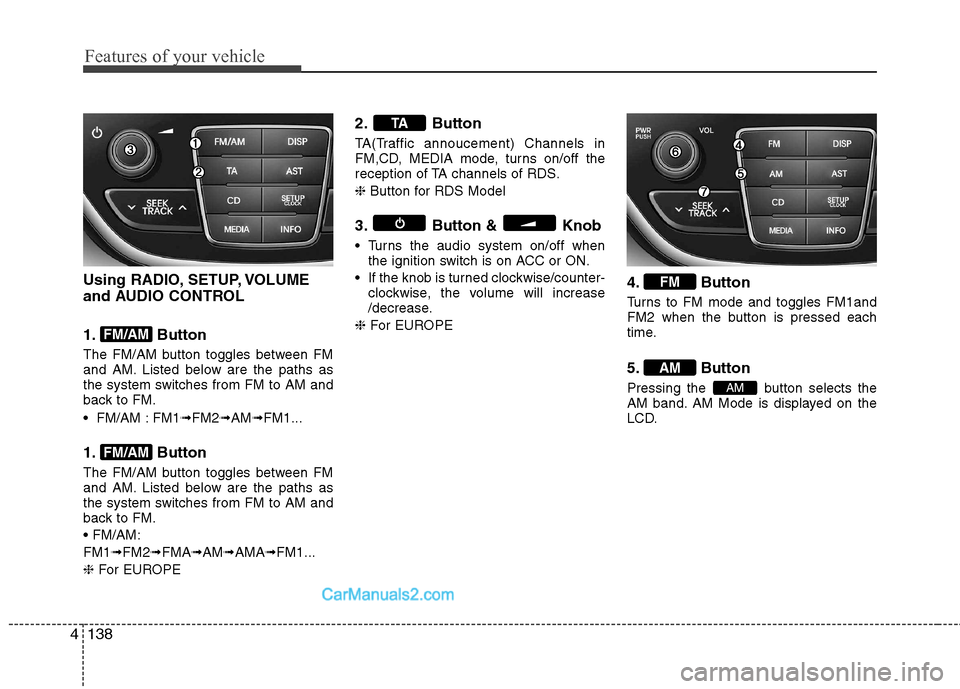
Using RADIO, SETUP, VOLUME
and AUDIO CONTROL
1. Button
The FM/AM button toggles between FM
and AM. Listed below are the paths as
the system switches from FM to AM and
back to FM.
FM/AM : FM1 ➟FM2 ➟AM ➟FM1...
1. Button
The FM/AM button toggles between FM
and AM. Listed below are the paths as
the system switches from FM to AM and
back to FM. FM1 ➟FM2 ➟FMA ➟AM ➟AMA ➟FM1...
❈ For EUROPE 2. Button
TA(Traffic annoucement) Channels in
FM,CD, MEDIA mode, turns on/off the
reception of TA channels of RDS. ❈
Button for RDS Model
3. Button & Knob
Turns the audio system on/off when the ignition switch is on ACC or ON.
If the knob is turned clockwise/counter- clockwise, the volume will increase
/decrease.
❈ For EUROPE 4. Button
Turns to FM mode and toggles FM1and
FM2 when the button is pressed each
time.
5. Button
Pressing the button selects the
AM band. AM Mode is displayed on the
LCD.
AM
AM
FM
TA
FM/AM
FM/AM
Page 205 of 414
4139
Features of your vehicle
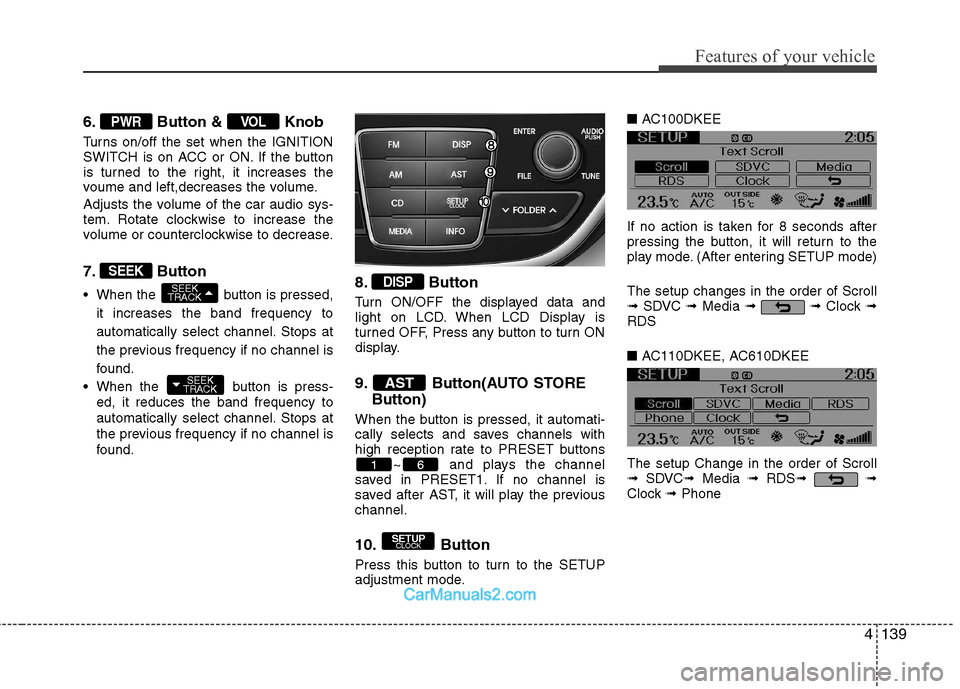
6. Button & Knob
Turns on/off the set when the IGNITION
SWITCH is on ACC or ON. If the button
is turned to the right, it increases the
voume and left,decreases the volume.
Adjusts the volume of the car audio sys-
tem. Rotate clockwise to increase the
volume or counterclockwise to decrease.
7. Button
When the button is pressed,it increases the band frequency to
automatically select channel. Stops at
the previous frequency if no channel is
found.
When the button is press- ed, it reduces the band frequency to
automatically select channel. Stops at
the previous frequency if no channel is
found. 8. Button
Turn ON/OFF the displayed data and
light on LCD. When LCD Display is
turned OFF, Press any button to turn ON
display.
9. Button(AUTO STORE
Button)
When the button is pressed, it automati-
cally selects and saves channels with
high reception rate to PRESET buttons ~ and plays the channel
saved in PRESET1. If no channel is
saved after AST, it will play the previouschannel.
10. Button
Press this button to turn to the SETUP
adjustment mode. ■
AC100DKEE
If no action is taken for 8 seconds after
pressing the button, it will return to the
play mode. (After entering SETUP mode) The setup changes in the order of Scroll ➟ SDVC ➟Media ➟ ➟ Clock ➟
RDS ■ AC110DKEE, AC610DKEE
The setup Change in the order of Scroll ➟ SDVC ➟Media ➟ RDS ➟ ➟
Clock ➟Phone
SETUP
CLOCK
61
AST
DISP
SEEK
TRACK
SEEK
TRACK
SEEK
VOLPWR