ECO mode HYUNDAI GENESIS COUPE 2014 User Guide
[x] Cancel search | Manufacturer: HYUNDAI, Model Year: 2014, Model line: GENESIS COUPE, Model: HYUNDAI GENESIS COUPE 2014Pages: 438, PDF Size: 40.35 MB
Page 153 of 438
469
Features of your vehicle
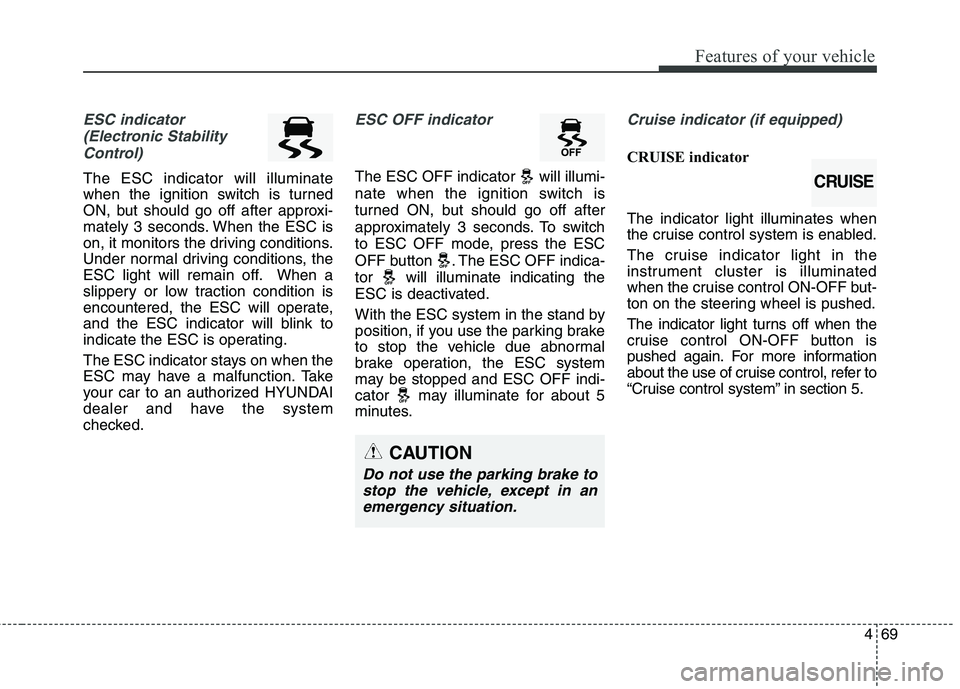
ESC indicator
(Electronic Stability
Control)
The ESC indicator will illuminate
when the ignition switch is turned
ON, but should go off after approxi-
mately 3 seconds. When the ESC is
on, it monitors the driving conditions.
Under normal driving conditions, the
ESC light will remain off. When a
slippery or low traction condition is
encountered, the ESC will operate,
and the ESC indicator will blink to
indicate the ESC is operating.
The ESC indicator stays on when the
ESC may have a malfunction. Take
your car to an authorized HYUNDAI
dealer and have the system
checked.
ESC OFF indicator
The ESC OFF indicator will illumi-
nate when the ignition switch is
turned ON, but should go off after
approximately 3 seconds. To switch
to ESC OFF mode, press the ESC
OFF button . The ESC OFF indica-
tor will illuminate indicating the
ESC is deactivated.
With the ESC system in the stand by
position, if you use the parking brake
to stop the vehicle due abnormal
brake operation, the ESC system
may be stopped and ESC OFF indi-
cator may illuminate for about 5
minutes.
Cruise indicator (if equipped)
CRUISE indicator
The indicator light illuminates when
the cruise control system is enabled.
The cruise indicator light in the
instrument cluster is illuminated
when the cruise control ON-OFF but-
ton on the steering wheel is pushed.
The indicator light turns off when the
cruise control ON-OFF button is
pushed again. For more information
about the use of cruise control, refer to
“Cruise control system” in section 5.
CAUTION
Do not use the parking brake to
stop the vehicle, except in an
emergency situation.
CRUISE
Page 180 of 438
Features of your vehicle
96 4
Temperature unit conversion
You can switch the temperature mode
between Centigrade to Fahrenheit as
follows:
While pressing the OFF button, press
the MAX A/C button for 4 seconds or
more.
The display will change from
Centigrade to Fahrenheit, or from
Fahrenheit to Centigrade.
If the battery has been discharged or
disconnected, the temperature mode
display will reset to Centigrade.
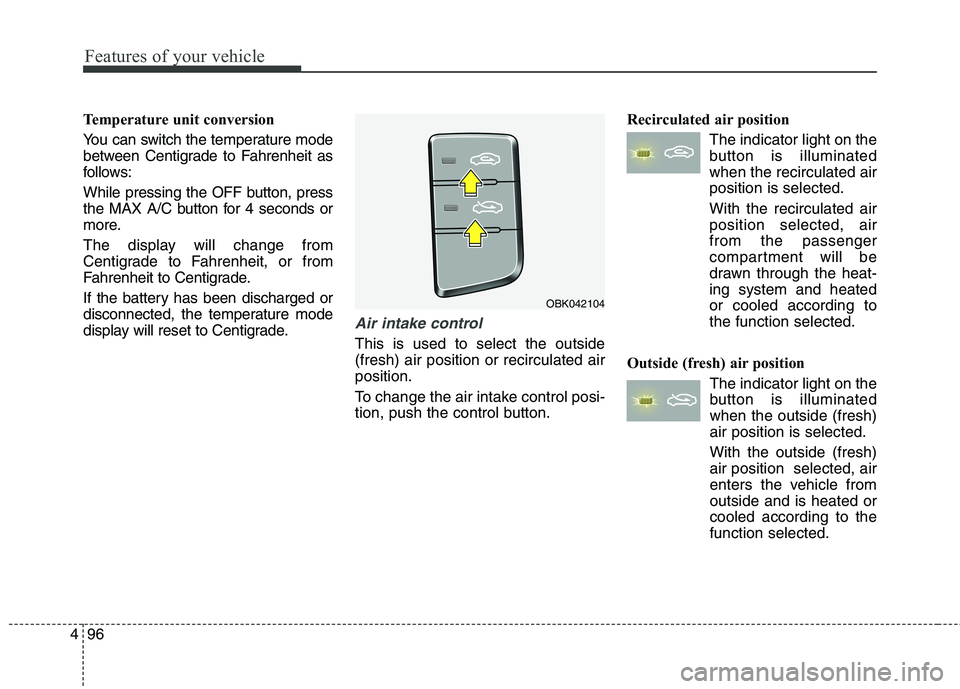
Air intake control
This is used to select the outside
(fresh) air position or recirculated air
position.
To change the air intake control posi-
tion, push the control button.Recirculated air position
The indicator light on the
button is illuminated
when the recirculated air
position is selected.
With the recirculated air
position selected, air
from the passenger
compartment will be
drawn through the heat-
ing system and heated
or cooled according to
the function selected.
Outside (fresh) air position
The indicator light on the
button is illuminated
when the outside (fresh)
air position is selected.
With the outside (fresh)
air position selected, air
enters the vehicle from
outside and is heated or
cooled according to the
function selected.
OBK042104
Page 184 of 438
Features of your vehicle
100 4
Air conditioning system operation tips
If the vehicle has been parked in
direct sunlight during hot weather,
open the windows for a short time
to let the hot air inside the vehicle
escape.
To help reduce moisture inside of
the windows on rainy or humid
days, decrease the humidity inside
the vehicle by operating the air
conditioning system.
During air conditioning system
operation, you may occasionally
notice a slight change in engine
speed as the air conditioning com-
pressor cycles. This is a normal
system operation characteristic.
Use the air conditioning system
every month, even if only for a few
minutes, to ensure maximum sys-
tem performance. When using the air conditioning
system, you may notice clear water
dripping (or even puddling) on the
ground under the passenger side
of the vehicle. This is a normal sys-
tem operation characteristic.
Operating the air conditioning sys-
tem in the recirculated air position
provides maximum cooling, how-
ever, continual operation in this
mode may cause the air inside the
vehicle to become stale.
During cooling operation, you may
occasionally notice a misty air flow
because of rapid cooling and
humid air intake. This is a normal
system operation characteristic.
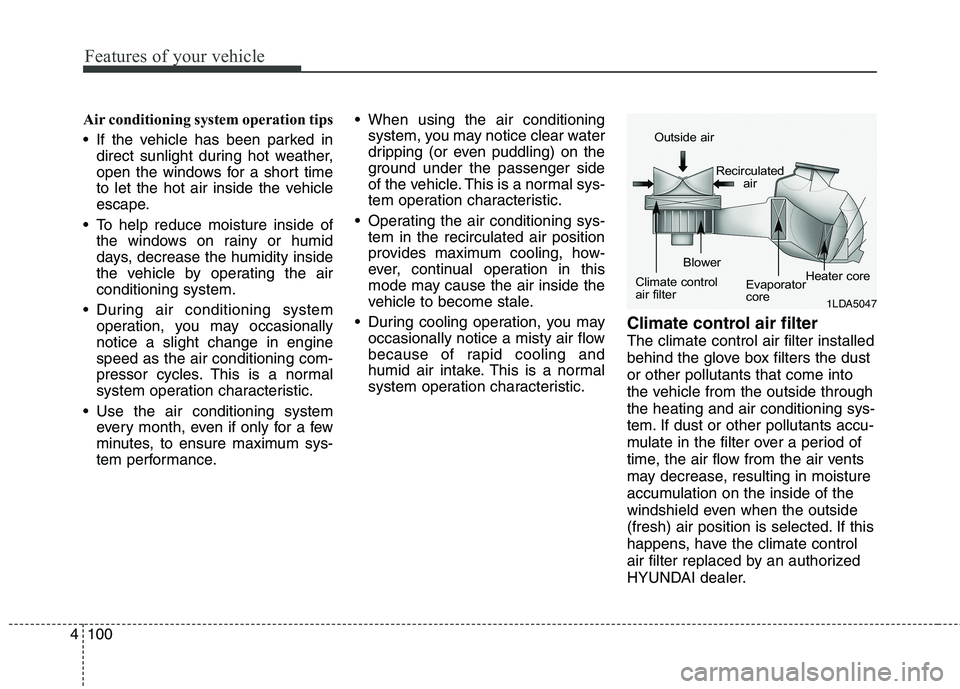
Climate control air filter
The climate control air filter installed
behind the glove box filters the dust
or other pollutants that come into
the vehicle from the outside through
the heating and air conditioning sys-
tem. If dust or other pollutants accu-
mulate in the filter over a period of
time, the air flow from the air vents
may decrease, resulting in moisture
accumulation on the inside of the
windshield even when the outside
(fresh) air position is selected. If this
happens, have the climate control
air filter replaced by an authorized
HYUNDAI dealer.
1LDA5047
Outside air
Recirculated
air
Climate control
air filterBlower
Evaporator
coreHeater core
Page 191 of 438
4107
Features of your vehicle
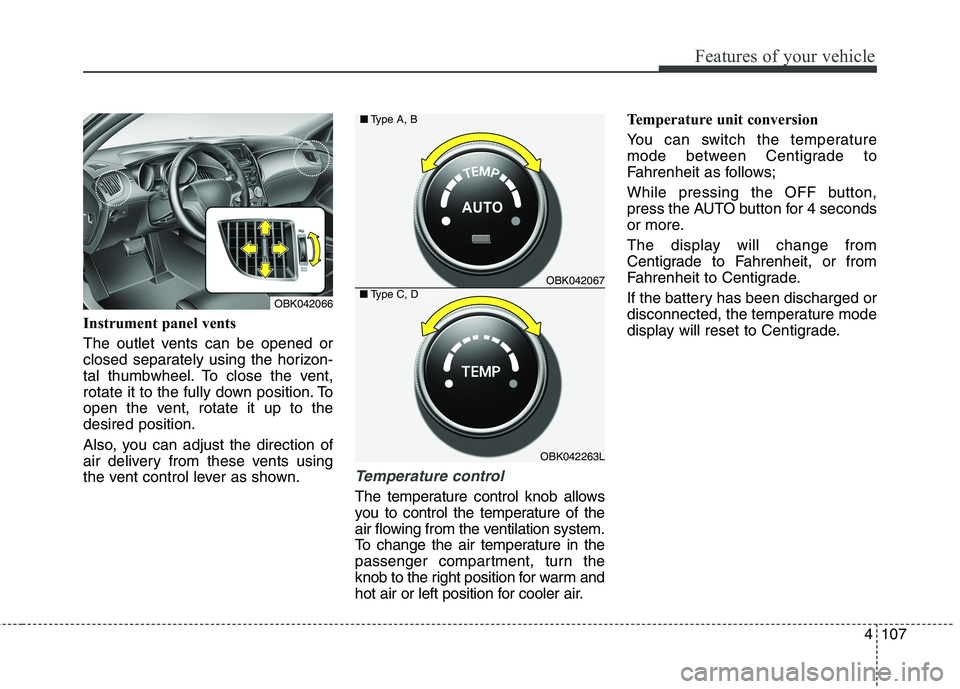
Instrument panel vents
The outlet vents can be opened or
closed separately using the horizon-
tal thumbwheel. To close the vent,
rotate it to the fully down position. To
open the vent, rotate it up to the
desired position.
Also, you can adjust the direction of
air delivery from these vents using
the vent control lever as shown.
Temperature control
The temperature control knob allows
you to control the temperature of the
air flowing from the ventilation system.
To change the air temperature in the
passenger compartment, turn the
knob to the right position for warm and
hot air or left position for cooler air.Temperature unit conversion
You can switch the temperature
mode between Centigrade to
Fahrenheit as follows;
While pressing the OFF button,
press the AUTO button for 4 seconds
or more.
The display will change from
Centigrade to Fahrenheit, or from
Fahrenheit to Centigrade.
If the battery has been discharged or
disconnected, the temperature mode
display will reset to Centigrade.
OBK042067
OBK042263L ■Type A, B
■Type C, DOBK042066
Page 196 of 438
Features of your vehicle
112 4
Air conditioning system operation tips
If the vehicle has been parked in
direct sunlight during hot weather,
open the windows for a short time
to let the hot air inside the vehicle
escape.
To help reduce moisture inside of
the windows on rainy or humid
days, decrease the humidity inside
the vehicle by operating the air
conditioning system.
During air conditioning system
operation, you may occasionally
notice a slight change in engine
speed as the air conditioning com-
pressor cycles. This is a normal
system operation characteristic.
Use the air conditioning system
every month, even if only for a few
minutes, to ensure maximum sys-
tem performance. When using the air conditioning
system, you may notice clear water
dripping (or even puddling) on the
ground under the passenger side
of the vehicle. This is a normal sys-
tem operation characteristic.
Operating the air conditioning sys-
tem in the recirculated air position
provides maximum cooling, how-
ever, continual operation in this
mode may cause the air inside the
vehicle to become stale.
During cooling operation, you may
occasionally notice a misty air flow
because of rapid cooling and
humid air intake. This is a normal
system operation characteristics.
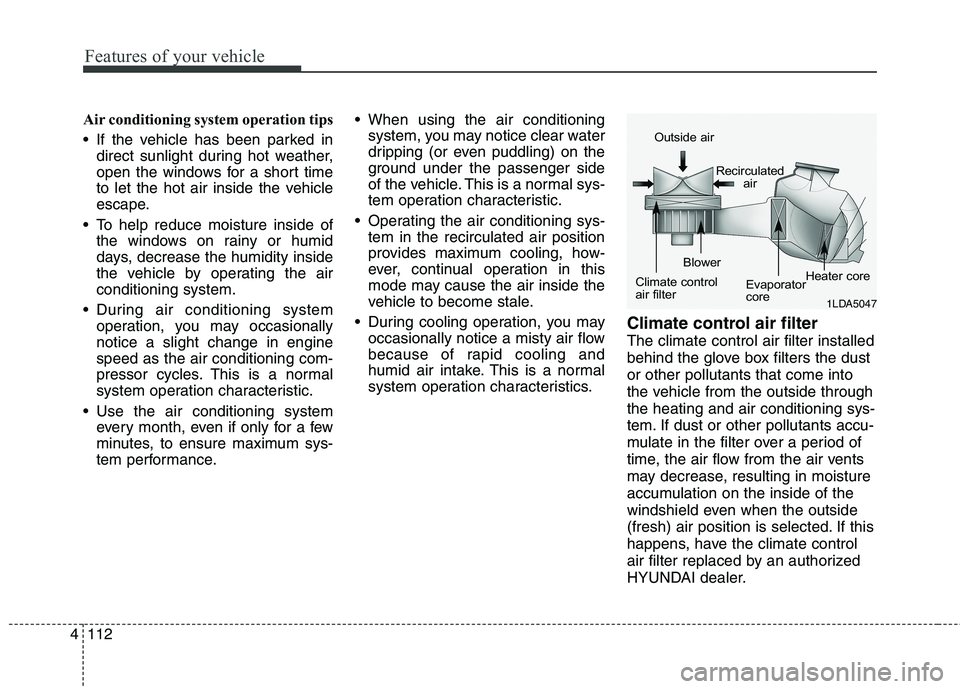
Climate control air filter
The climate control air filter installed
behind the glove box filters the dust
or other pollutants that come into
the vehicle from the outside through
the heating and air conditioning sys-
tem. If dust or other pollutants accu-
mulate in the filter over a period of
time, the air flow from the air vents
may decrease, resulting in moisture
accumulation on the inside of the
windshield even when the outside
(fresh) air position is selected. If this
happens, have the climate control
air filter replaced by an authorized
HYUNDAI dealer.
1LDA5047
Outside air
Recirculated
air
Climate control
air filterBlower
Evaporator
coreHeater core
Page 213 of 438
4129
Features of your vehicle
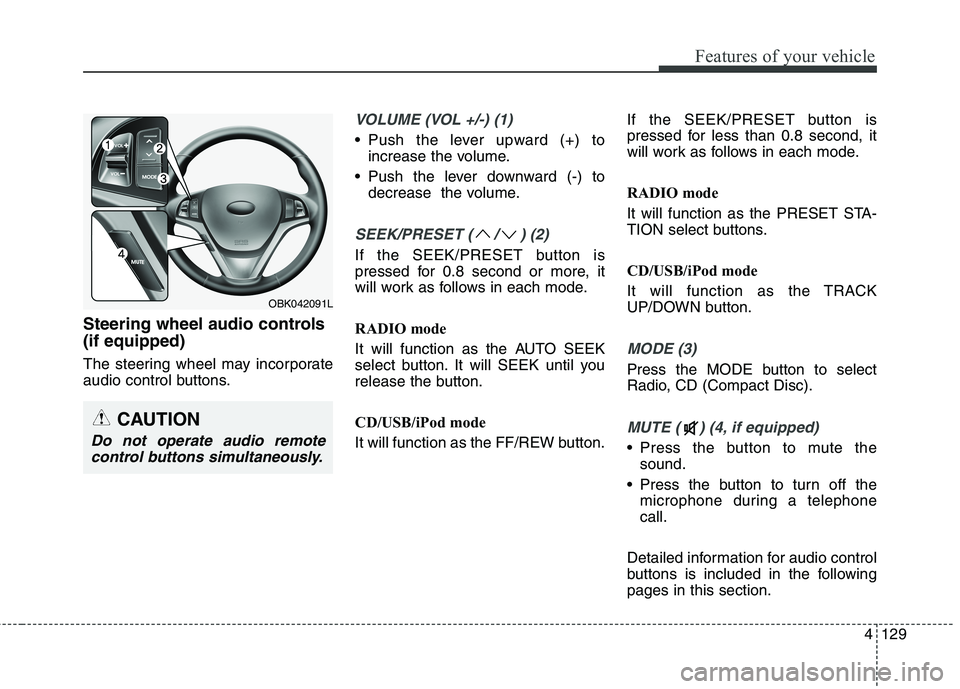
Steering wheel audio controls
(if equipped)
The steering wheel may incorporate
audio control buttons.
VOLUME (VOL +/-) (1)
Push the lever upward (+) to
increase the volume.
Push the lever downward (-) to
decrease the volume.
SEEK/PRESET ( / ) (2)
If the SEEK/PRESET button is
pressed for 0.8 second or more, it
will work as follows in each mode.
RADIO mode
It will function as the AUTO SEEK
select button. It will SEEK until you
release the button.
CD/USB/iPod mode
It will function as the FF/REW button.If the SEEK/PRESET button is
pressed for less than 0.8 second, it
will work as follows in each mode.
RADIO mode
It will function as the PRESET STA-
TION select buttons.
CD/USB/iPod mode
It will function as the TRACK
UP/DOWN button.
MODE (3)
Press the MODE button to select
Radio, CD (Compact Disc).
MUTE ( ) (4, if equipped)
Press the button to mute the
sound.
Press the button to turn off the
microphone during a telephone
call.
Detailed information for audio control
buttons is included in the following
pages in this section.
CAUTION
Do not operate audio remote
control buttons simultaneously.
OBK042091L
Page 222 of 438
Features of your vehicle
138 4
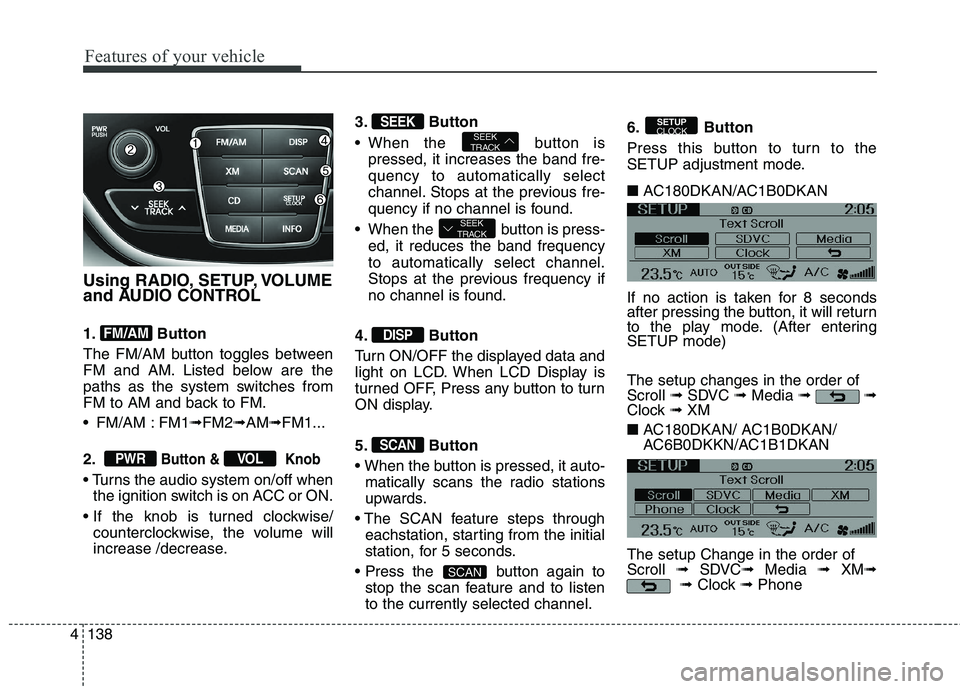
Using RADIO, SETUP, VOLUME
and AUDIO CONTROL
1. Button
The FM/AM button toggles between
FM and AM. Listed below are the
paths as the system switches from
FM to AM and back to FM.
FM/AM : FM1➟FM2➟AM➟FM1...
2.
Button & Knob
the ignition switch is on ACC or ON.
counterclockwise, the volume will
increase /decrease.3. Button
When the button is
pressed, it increases the band fre-
quency to automatically select
channel. Stops at the previous fre-
quency if no channel is found.
When the button is press-
ed, it reduces the band frequency
to automatically select channel.
Stops at the previous frequency if
no channel is found.
4. Button
Turn ON/OFF the displayed data and
light on LCD. When LCD Display is
turned OFF, Press any button to turn
ON display.
5. Button
matically scans the radio stations
upwards.
eachstation, starting from the initial
station, for 5 seconds.
button again to
stop the scan feature and to listen
to the currently selected channel.6. Button
Press this button to turn to the
SETUP adjustment mode.
■ AC180DKAN/AC1B0DKAN
If no action is taken for 8 seconds
after pressing the button, it will return
to the play mode. (After entering
SETUP mode)
The setup changes in the order of
Scroll ➟SDVC ➟Media ➟ ➟
Clock ➟ XM
■ AC180DKAN/ AC1B0DKAN/
AC6B0DKKN/AC1B1DKAN
The setup Change in the order of
Scroll ➟SDVC➟Media ➟ XM➟
➟Clock ➟Phone
SETUP
CLOCK
SCAN
SCAN
DISP
SEEK
TRACK
SEEK
TRACKSEEK
VOLPWR
FM/AM
Page 224 of 438
Features of your vehicle
140 4
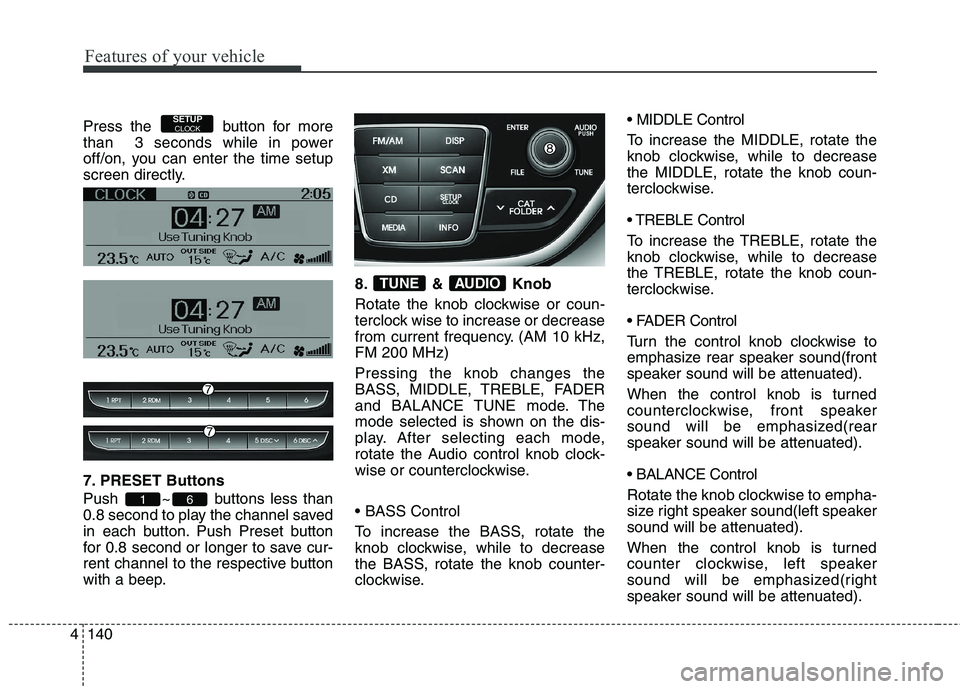
Press the button for more
than 3 seconds while in power
off/on, you can enter the time setup
screen directly.
7. PRESET Buttons
Push ~ buttons less than
0.8 second to play the channel saved
in each button. Push Preset button
for 0.8 second or longer to save cur-
rent channel to the respective button
with a beep.8. & Knob
Rotate the knob clockwise or coun-
terclock wise to increase or decrease
from current frequency. (AM 10 kHz,
FM 200 MHz)
Pressing the knob changes the
BASS, MIDDLE, TREBLE, FADER
and BALANCE TUNE mode. The
mode selected is shown on the dis-
play. After selecting each mode,
rotate the Audio control knob clock-
wise or counterclockwise.
To increase the BASS, rotate the
knob clockwise, while to decrease
the BASS, rotate the knob counter-
clockwise. MIDDLE Control
To increase the MIDDLE, rotate the
knob clockwise, while to decrease
the MIDDLE, rotate the knob coun-
terclockwise.
Control
To increase the TREBLE, rotate the
knob clockwise, while to decrease
the TREBLE, rotate the knob coun-
terclockwise.
Turn the control knob clockwise to
emphasize rear speaker sound(front
speaker sound will be attenuated).
When the control knob is turned
counterclockwise, front speaker
sound will be emphasized(rear
speaker sound will be attenuated).
Rotate the knob clockwise to empha-
size right speaker sound(left speaker
sound will be attenuated).
When the control knob is turned
counter clockwise, left speaker
sound will be emphasized(right
speaker sound will be attenuated).
AUDIOTUNE
61
SETUPCLOCK
Page 225 of 438
4141
Features of your vehicle
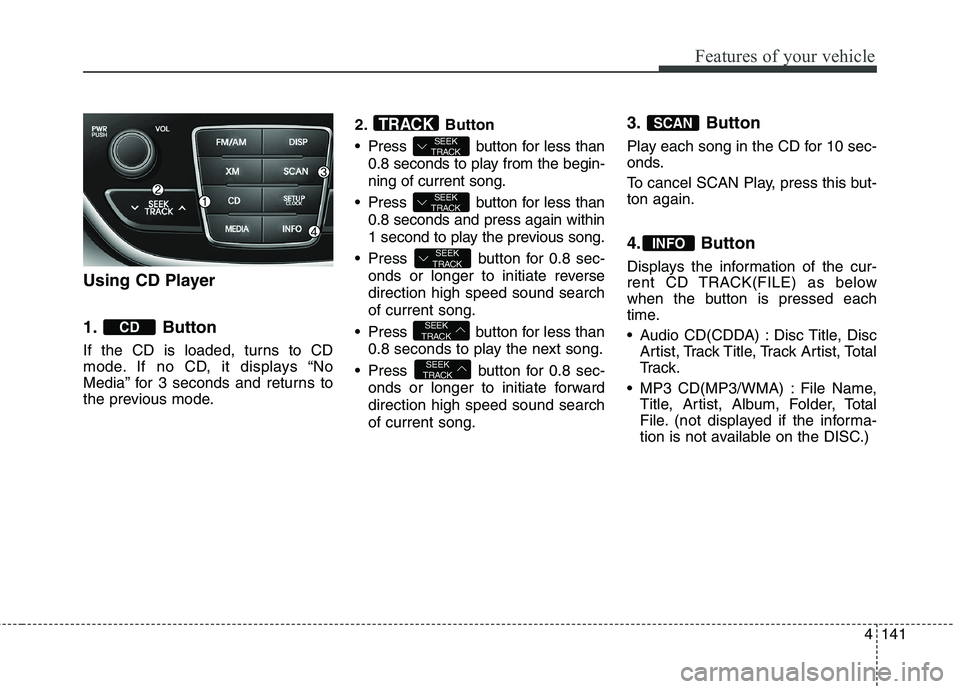
Using CD Player
1. Button
If the CD is loaded, turns to CD
mode. If no CD, it displays “No
Media” for 3 seconds and returns to
the previous mode.2. Button
Press button for less than
0.8 seconds to play from the begin-
ning of current song.
Press button for less than
0.8 seconds and press again within
1 second to play the previous song.
Press button for 0.8 sec-
onds or longer to initiate reverse
direction high speed sound search
of current song.
Press button for less than
0.8 seconds to play the next song.
Press button for 0.8 sec-
onds or longer to initiate forward
direction high speed sound search
of current song.
3. Button
Play each song in the CD for 10 sec-
onds.
To cancel SCAN Play, press this but-
ton again.
4. Button
Displays the information of the cur-
rent CD TRACK(FILE) as below
when the button is pressed each
time.
Audio CD(CDDA) : Disc Title, Disc
Artist, Track Title, Track Artist, Total
Tr a c k .
MP3 CD(MP3/WMA) : File Name,
Title, Artist, Album, Folder, Total
File. (not displayed if the informa-
tion is not available on the DISC.)
INFO
SCAN
SEEK
TRACK
SEEK
TRACK
SEEK
TRACK
SEEK
TRACK
SEEK
TRACKTRACK
CD
Page 226 of 438
Features of your vehicle
142 4
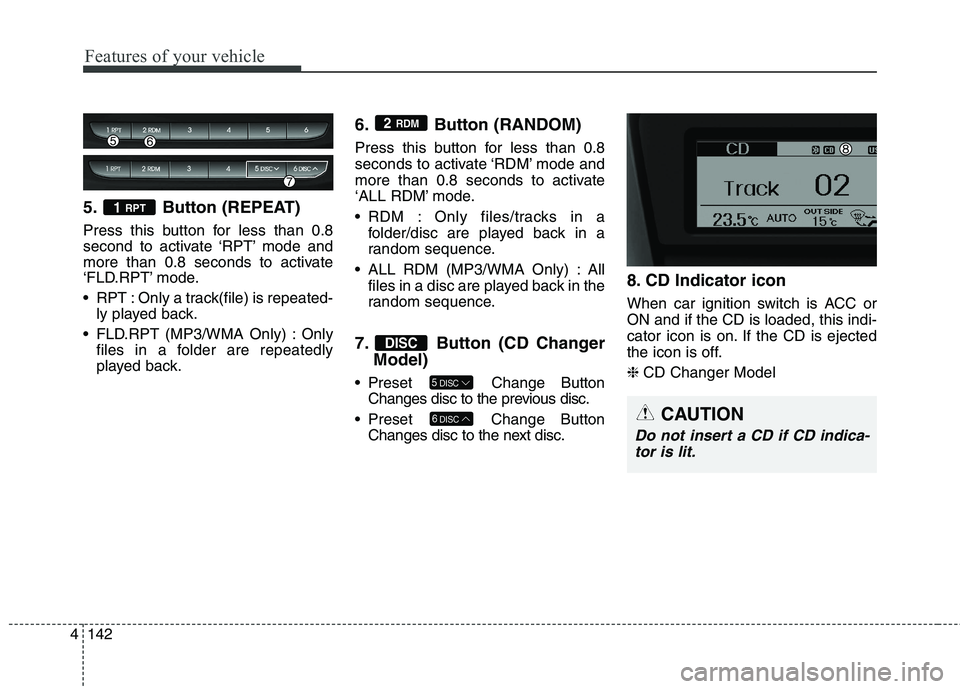
5. Button (REPEAT)
Press this button for less than 0.8
second to activate ‘RPT’ mode and
more than 0.8 seconds to activate
‘FLD.RPT’ mode.
RPT : Only a track(file) is repeated-
ly played back.
FLD.RPT (MP3/WMA Only) : Only
files in a folder are repeatedly
played back.
6. Button (RANDOM)
Press this button for less than 0.8
seconds to activate ‘RDM’ mode and
more than 0.8 seconds to activate
‘ALL RDM’ mode.
RDM : Only files/tracks in a
folder/disc are played back in a
random sequence.
ALL RDM (MP3/WMA Only) : All
files in a disc are played back in the
random sequence.
7. Button (CD Changer
Model)
Preset Change Button
Changes disc to the previous disc.
Preset Change Button
Changes disc to the next disc.
8. CD Indicator icon
When car ignition switch is ACC or
ON and if the CD is loaded, this indi-
cator icon is on. If the CD is ejected
the icon is off.
❈CD Changer Model
6DISC
5DISC
DISC
2 RDM
1 RPT
CAUTION
Do not insert a CD if CD indica-
tor is lit.