Esc HYUNDAI GENESIS G70 2019 Owner's Guide
[x] Cancel search | Manufacturer: HYUNDAI, Model Year: 2019, Model line: GENESIS G70, Model: HYUNDAI GENESIS G70 2019Pages: 516, PDF Size: 12.84 MB
Page 333 of 516
5-84
Driving your vehicle
FCA Warning Message and
System Control
The FCA produces warning mes-
sages and warning alarms in accor-
dance with the collision risk levels,
such as abrupt stopping of the vehi-
cle in front, insufficient braking dis-
tance, or pedestrian, cyclist detec-
tion. Also, it controls the brakes in
accordance with the collision risk lev-
els.
The driver can select the initial warn-
ing activation time in the User
Settings in the LCD display. The
options for the initial Forward Collision
Warning include EARLY, NORMAL, or
LATE initial warning time.
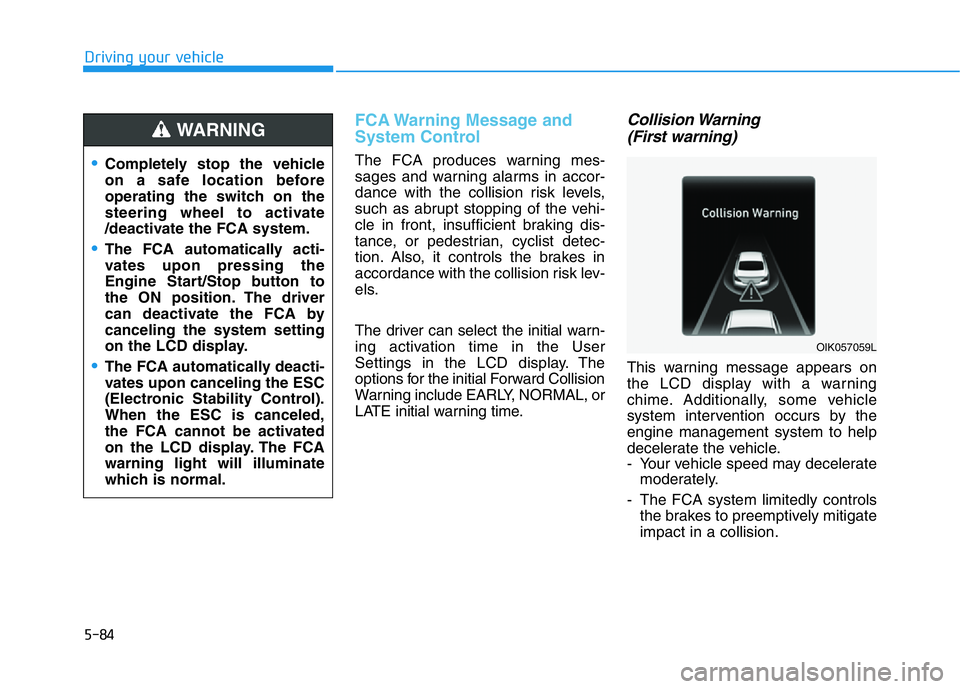
Collision Warning
(First warning)
This warning message appears on
the LCD display with a warning
chime. Additionally, some vehicle
system intervention occurs by the
engine management system to help
decelerate the vehicle.
- Your vehicle speed may decelerate
moderately.
- The FCA system limitedly controls
the brakes to preemptively mitigate
impact in a collision.
•Completely stop the vehicle
on a safe location before
operating the switch on the
steering wheel to activate
/deactivate the FCA system.
•The FCA automatically acti-
vates upon pressing the
Engine Start/Stop button to
the ON position. The driver
can deactivate the FCA by
canceling the system setting
on the LCD display.
•The FCA automatically deacti-
vates upon canceling the ESC
(Electronic Stability Control).
When the ESC is canceled,
the FCA cannot be activated
on the LCD display. The FCA
warning light will illuminate
which is normal.
WARNING
OIK057059L
Page 336 of 516
5-87
Driving your vehicle
5
• NEVER install any accessories
or stickers on the front wind-
shield, nor tint the front wind-
shield.
• NEVER locate any reflective
objects (i.e. white paper, mirror)
over the dashboard. Any light
reflection may cause a malfunc-
tion of the system.
• Pay extreme caution to keep the
camera out of water.
• NEVER disassemble the camera
assembly, nor apply any impact
on the camera assembly.
• Playing the vehicle audio sys-
tem at high volume may offset
the system warning sounds.
Information
Have the system checked by an
authorized retailer of Genesis
Branded products when:
• The windshield glass is replaced.
• The sensor cover or sensor gets
damaged or replaced.
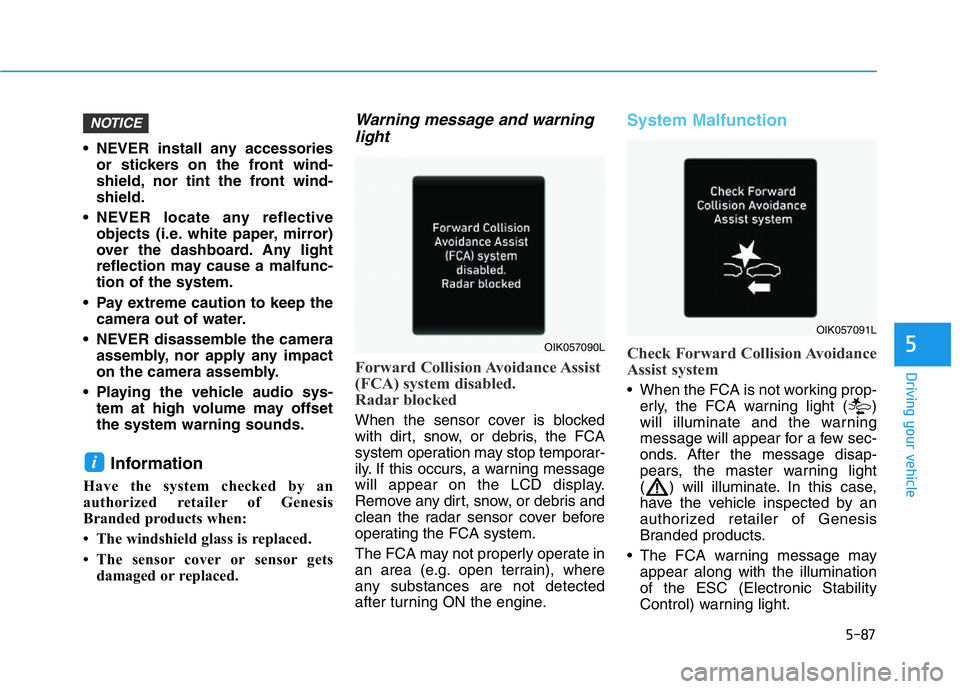
Warning message and warning
light
Forward Collision Avoidance Assist
(FCA) system disabled.
Radar blocked
When the sensor cover is blocked
with dirt, snow, or debris, the FCA
system operation may stop temporar-
ily. If this occurs, a warning message
will appear on the LCD display.
Remove any dirt, snow, or debris and
clean the radar sensor cover before
operating the FCA system.
The FCA may not properly operate in
an area (e.g. open terrain), where
any substances are not detected
after turning ON the engine.
System Malfunction
Check Forward Collision Avoidance
Assist system
• When the FCA is not working prop-
erly, the FCA warning light ( )
will illuminate and the warning
message will appear for a few sec-
onds. After the message disap-
pears, the master warning light
( ) will illuminate. In this case,
have the vehicle inspected by an
authorized retailer of Genesis
Branded products.
• The FCA warning message may
appear along with the illumination
of the ESC (Electronic Stability
Control) warning light.
i
NOTICE
OIK057090L
OIK057091L
Page 350 of 516
5-101
Driving your vehicle
5
The LKA system will not be in the
ENABLED state and/or the steering
wheel will not be assisted when:
• The turn signal is turned on before
changing a lane. If you change
lanes without the turn signal on, the
steering wheel might be controlled.
• The vehicle is not driven in the mid-
dle of the lane when the system is
turned on or right after changing a
lane.
• ESC (Electronic Stability Control) or
VSM (Vehicle Stability Management)
is activated.
• The vehicle is driven on a sharp
curve.
• Vehicle speed is below 35 mph
(56 km/h) and over 110 mph (177
km/h).
• The vehicle makes sharp lane
changes.
• The vehicle brakes suddenly.
• The lane is very wide or narrow.
• There are more than two lane lines
on the road. (e.g. construction area)
• Only one side of the lane marker is
detected.
• Radius of a curve is too small.• The vehicle is driven on a steep
incline.
• The steering wheel is turned sud-
denly.
Limitations of the System
The LKA system may operate pre-
maturely even if the vehicle does not
depart from the intended lane, OR,
the LKA system may not warn you if
the vehicle leaves the intended lane
under the following circumstances:
When the lane and road condi-
tions are poor
• It is difficult to distinguish the lane
marker from the road because the
lane marker is covered with dust or
sand.
• It is difficult to distinguish the color
of the lane marker from the road.
• There are markings on the road
surface that look like a lane marker
that is inadvertently being detected
by the camera.
• The lane marker is indistinct or
damaged.
• The lane marker is merged or
divided. (e.g. tollgate) • The lane number increases or
decreases or the lane marker are
crossing complicatedly.
• There are more than two lane
markers on the road in front of you.
• The lane marker is very thick or
thin.
• The lane is very wide or narrow.
• The lane marker ahead is not visible
due to rain, snow, water on the
road, damaged or stained road sur-
face, or other factors.
• The shadow is on the lane marker
by a median strip, trees, guardrail,
noise barriers, etc.
• The lane markers are complicated
or a structure substitutes for the
lines such as a construction area.
• There are crosswalk signs or other
symbols on the road.
• The lane marker in a tunnel is
stained with oil, etc.
• The lane suddenly disappears
such as at the intersection.
Page 360 of 516
5-111
Driving your vehicle
5
To temporarily accelerate with
the Cruise Control ON
Depress the accelerator pedal. When
you take your foot off the accelerator,
the vehicle will return to the previ-
ously set speed.
If you push the toggle switch down
(SET-) at the increased speed, the
Cruise Control will maintain the
increased speed.
Cruise Control will be canceled
when:
• Depressing the brake pedal.
• Depressing the clutch pedal. (for
manual transmission vehicle)
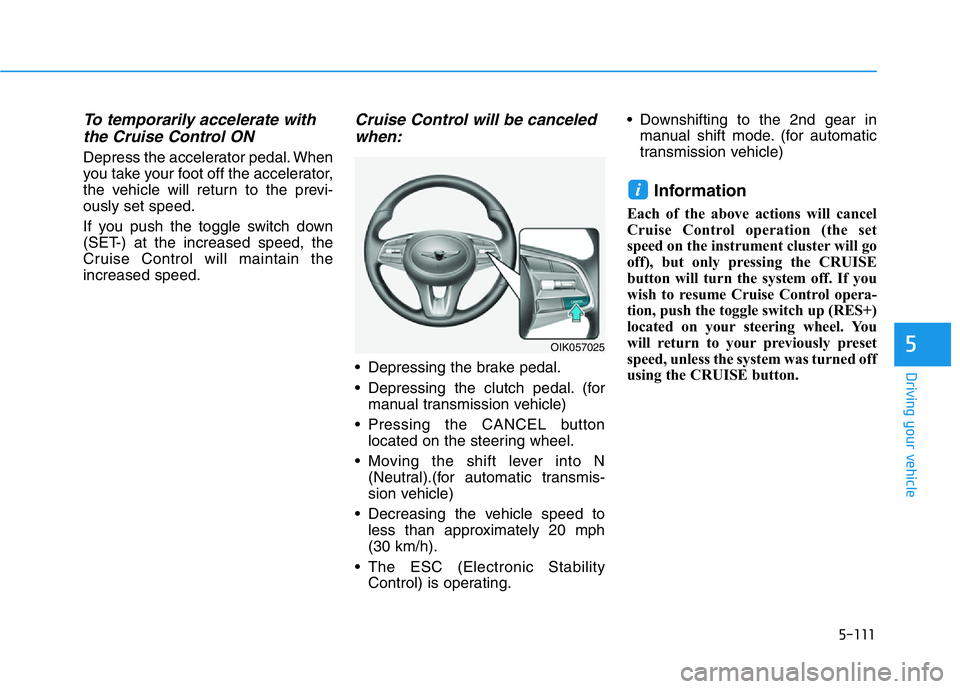
• Pressing the CANCEL button
located on the steering wheel.
• Moving the shift lever into N
(Neutral).(for automatic transmis-
sion vehicle)
• Decreasing the vehicle speed to
less than approximately 20 mph
(30 km/h).
• The ESC (Electronic Stability
Control) is operating.• Downshifting to the 2nd gear in
manual shift mode. (for automatic
transmission vehicle)
Information
Each of the above actions will cancel
Cruise Control operation (the set
speed on the instrument cluster will go
off), but only pressing the CRUISE
button will turn the system off. If you
wish to resume Cruise Control opera-
tion, push the toggle switch up (RES+)
located on your steering wheel. You
will return to your previously preset
speed, unless the system was turned off
using the CRUISE button.
i
OIK057025
Page 366 of 516
5-117
Driving your vehicle
5
Smart Cruise Control set speed
will be temporarily canceled
when:
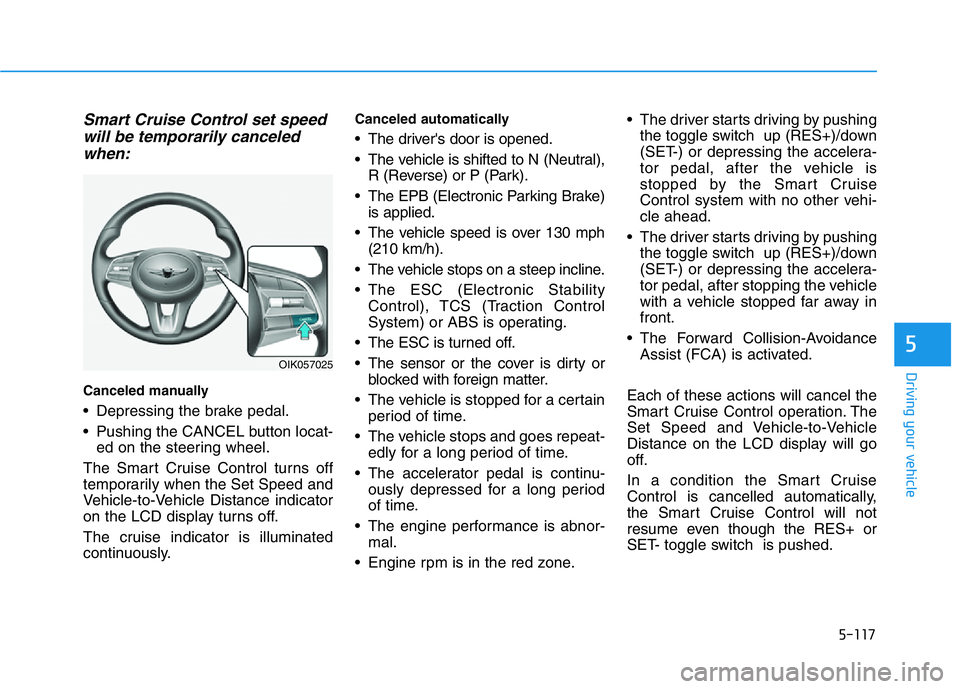
Canceled manually
• Depressing the brake pedal.
• Pushing the CANCEL button locat-
ed on the steering wheel.
The Smart Cruise Control turns off
temporarily when the Set Speed and
Vehicle-to-Vehicle Distance indicator
on the LCD display turns off.
The cruise indicator is illuminated
continuously.
Canceled automatically
• The driver's door is opened.
• The vehicle is shifted to N (Neutral),
R (Reverse) or P (Park).
• The EPB (Electronic Parking Brake)
is applied.
• The vehicle speed is over 130 mph
(210 km/h).
• The vehicle stops on a steep incline.
• The ESC (Electronic Stability
Control), TCS (Traction Control
System) or ABS is operating.
• The ESC is turned off.
• The sensor or the cover is dirty or
blocked with foreign matter.
• The vehicle is stopped for a certain
period of time.
• The vehicle stops and goes repeat-
edly for a long period of time.
• The accelerator pedal is continu-
ously depressed for a long period
of time.
• The engine performance is abnor-
mal.
• Engine rpm is in the red zone.• The driver starts driving by pushing
the toggle switch up (RES+)/down
(SET-) or depressing the accelera-
tor pedal, after the vehicle is
stopped by the Smart Cruise
Control system with no other vehi-
cle ahead.
• The driver starts driving by pushing
the toggle switch up (RES+)/down
(SET-) or depressing the accelera-
tor pedal, after stopping the vehicle
with a vehicle stopped far away in
front.
• The Forward Collision-Avoidance
Assist (FCA) is activated.
Each of these actions will cancel the
Smart Cruise Control operation. The
Set Speed and Vehicle-to-Vehicle
Distance on the LCD display will go
off.
In a condition the Smart Cruise
Control is cancelled automatically,
the Smart Cruise Control will not
resume even though the RES+ or
SET- toggle switch is pushed.
OIK057025
Page 380 of 516
5-131
Driving your vehicle
5
Information
The ESC system must be turned OFF
before rocking the vehicle.
If you are still stuck after rocking
the vehicle a few times, have the
vehicle pulled out by a tow vehicle
to avoid engine overheating, pos-
sible damage to the transmission,
and tire damage. See "Towing" in
chapter 6.
Smooth Cornering
Avoid braking or gear changing in
corners, especially when roads are
wet. Ideally, corners should always
be taken under gentle acceleration.
Driving at Night
Night driving presents more hazards
than driving in the daylight. Here are
some important tips to remember:
• Slow down and keep more dis-
tance between you and other vehi-
cles, as it may be more difficult to
see at night, especially in areas
where there may not be any street
lights.
• Adjust your mirrors to reduce the
glare from other driver's head-
lamps.
• Keep your headlamps clean and
properly aimed. Dirty or improperly
aimed headlamps will make it
much more difficult to see at night.
• Avoid staring directly at the head-
lamps of oncoming vehicles. You
could be temporarily blinded, and it
will take several seconds for your
eyes to readjust to the darkness.
Driving in the Rain
Rain and wet roads can make driving
dangerous. Here are a few things to
consider when driving in the rain or
on slick pavement:
• Slow down and allow extra follow-
ing distance. A heavy rainfall
makes it harder to see and increas-
es the distance needed to stop
your vehicle.
• Turn OFF your Cruise Control.
• Replace your windshield wiper
blades when they show signs of
streaking or missing areas on the
windshield.
• Tires should be properly main-
tained with at least 2/32nds of an
inch of tread depth. If your tires do
not have enough tread, making a
quick stop on wet pavement can
cause a skid and possibly lead to
an accident.See "Tire
Replacement" in chapter 7.
• Turn on your headlamps to make it
easier for others to see you.
NOTICE
i
Page 385 of 516
5-136
Driving your vehicle
Winter Precautions
Use high quality ethylene glycol
coolant
Your vehicle is delivered with high
quality ethylene glycol coolant in the
cooling system. It is the only type of
coolant that should be used because
it helps prevent corrosion in the cool-
ing system, lubricates the water
pump and prevents freezing. Be sure
to replace or replenish your coolant
in accordance with the maintenance
schedule in chapter 7. Before winter,
have your coolant tested to assure
that its freezing point is sufficient for
the temperatures anticipated during
the winter.
Change to "winter weight" oil if
necessary
In some climates it is recommended
that a lower viscosity "winter weight"
oil be used during cold weather. See
chapter 8 for recommendations. If
you aren't sure what weight oil you
should use, consult an authorized
retailer of Genesis Branded prod-
ucts.
Check battery and cables
Winter puts additional burdens on
the battery system. Visually inspect
the battery and cables as described
in chapter 7. The level of charge in
your battery can be checked by an
authorized retailer of Genesis
Branded products or a service sta-
tion.
Check spark plugs and ignition
system
Inspect your spark plugs as
described in chapter 7 and replace
them if necessary. Also check all
ignition wiring and components to be
sure they are not cracked, worn or
damaged in any way.
Use approved window washer
anti-freeze in system
To keep the water in the window
washer system from freezing, add an
approved window washer anti-freeze
solution in accordance with instruc-
tions on the container. Window wash-
er anti-freeze is available from an
authorized retailer of Genesis
Branded products and most auto
parts outlets. Do not use engine
coolant or other types of anti-freeze
as these may damage the paint fin-
ish.
Page 416 of 516
6-23
What to do in an emergency
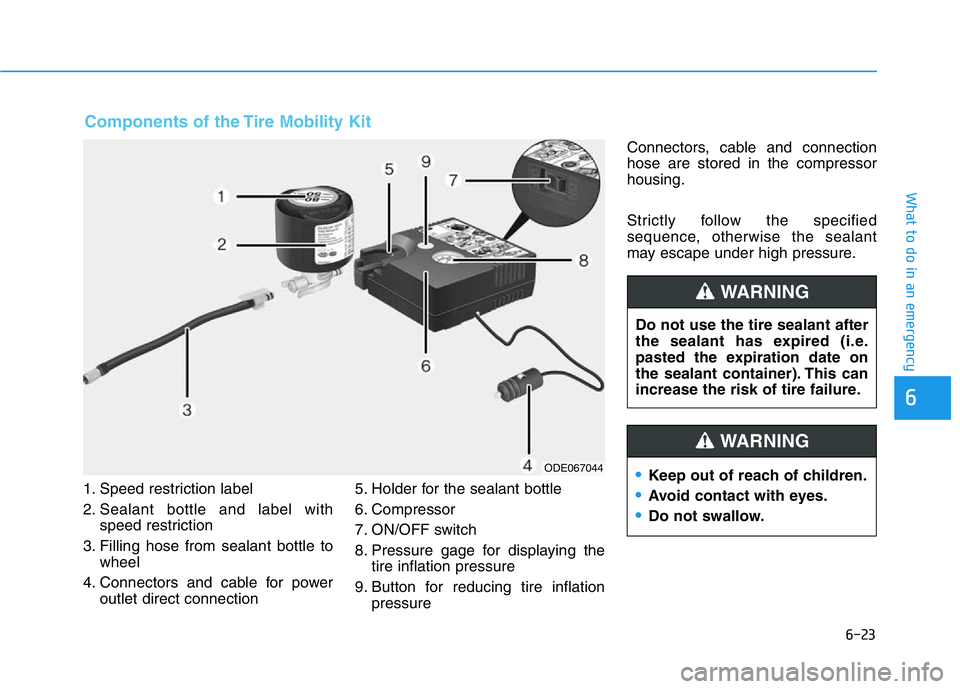
1. Speed restriction label
2. Sealant bottle and label with
speed restriction
3. Filling hose from sealant bottle to
wheel
4. Connectors and cable for power
outlet direct connection5. Holder for the sealant bottle
6. Compressor
7. ON/OFF switch
8. Pressure gage for displaying the
tire inflation pressure
9. Button for reducing tire inflation
pressureConnectors, cable and connection
hose are stored in the compressor
housing.
Strictly follow the specified
sequence, otherwise the sealant
may escape under high pressure.
6
ODE067044
Components of the Tire Mobility Kit
Do not use the tire sealant after
the sealant has expired (i.e.
pasted the expiration date on
the sealant container). This can
increase the risk of tire failure.
WARNING
•Keep out of reach of children.
•Avoid contact with eyes.
•Do not swallow.
WARNING
Page 463 of 516
7-39
7
Maintenance
Tire Maintenance
In addition to proper inflation, correct
wheel alignment helps to decrease
tire wear. If you find a tire is worn
unevenly, have your dealer check the
wheel alignment.
When you have new tires installed,
make sure they are balanced. This
will increase vehicle ride comfort and
tire life. Additionally, a tire should
always be rebalanced if it is removed
from the wheel.
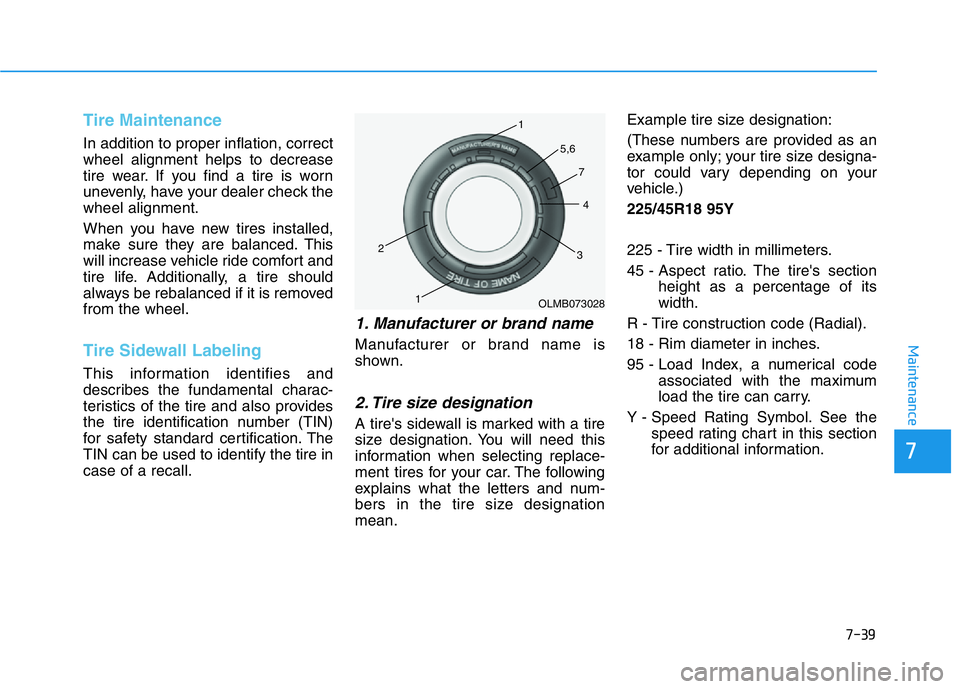
Tire Sidewall Labeling
This information identifies and
describes the fundamental charac-
teristics of the tire and also provides
the tire identification number (TIN)
for safety standard certification. The
TIN can be used to identify the tire in
case of a recall.
1. Manufacturer or brand name
Manufacturer or brand name is
shown.
2. Tire size designation
A tire's sidewall is marked with a tire
size designation. You will need this
information when selecting replace-
ment tires for your car. The following
explains what the letters and num-
bers in the tire size designation
mean.Example tire size designation:
(These numbers are provided as an
example only; your tire size designa-
tor could vary depending on your
vehicle.)
225/45R18 95Y
225 - Tire width in millimeters.
45 - Aspect ratio. The tire's section
height as a percentage of its
width.
R - Tire construction code (Radial).
18 - Rim diameter in inches.
95 - Load Index, a numerical code
associated with the maximum
load the tire can carry.
Y - Speed Rating Symbol. See the
speed rating chart in this section
for additional information.
OLMB073028 1
1 2
34 5,6
7
Page 476 of 516
7-52
Maintenance
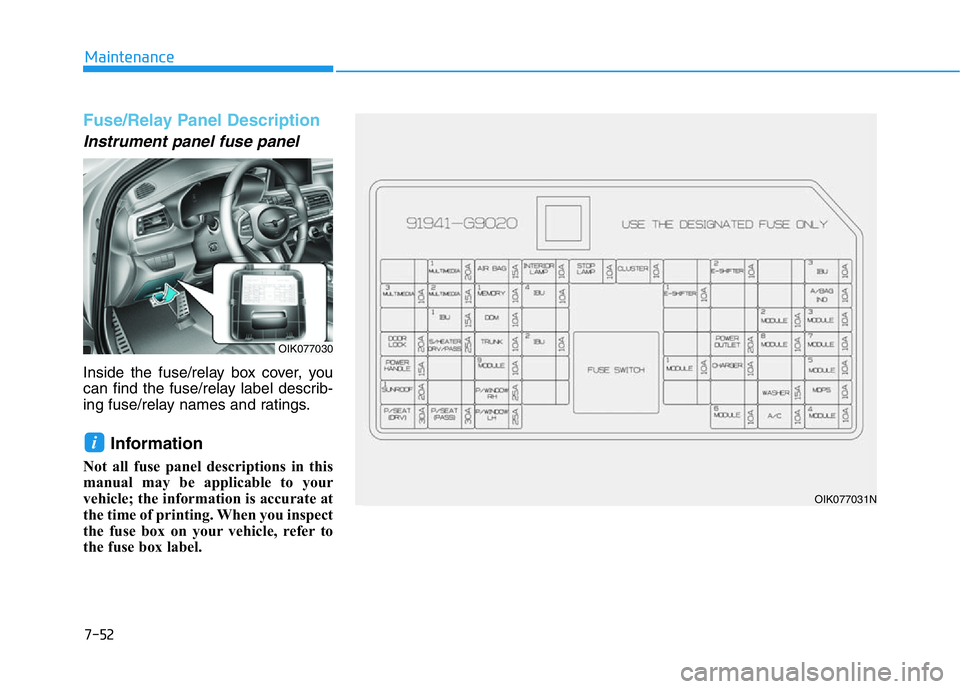
Fuse/Relay Panel Description
Instrument panel fuse panel
Inside the fuse/relay box cover, you
can find the fuse/relay label describ-
ing fuse/relay names and ratings.
Information
Not all fuse panel descriptions in this
manual may be applicable to your
vehicle; the information is accurate at
the time of printing. When you inspect
the fuse box on your vehicle, refer to
the fuse box label.
i
OIK077030
OIK077031N