engine Hyundai Grandeur 2002 Owner's Guide
[x] Cancel search | Manufacturer: HYUNDAI, Model Year: 2002, Model line: Grandeur, Model: Hyundai Grandeur 2002Pages: 230, PDF Size: 3.82 MB
Page 132 of 230
DRIVING YOUR HYUNDAI 2- 3
C020A01A-AAT BEFORE STARTING THE EN- GINE Before you start the engine, you should always:
1. Look around the vehicle to be sure
there are no flat tires, puddles of oil, water or other indications of pos- sible trouble.
2. After entering the car, check to be
sure the parking brake is engaged.
3. Check that all windows, and lights are clean.
4. Check that the interior and exterior
mirrors are clean and in position.
5. Check your seat, seatback and
headrest to be sure they are in theirproper positions.
6. Lock all the doors.
7. Fasten your seat belt and be sure
that all other occupants have fas- tened theirs.
8. Turn off all lights and accessories that are not needed.
9. When you turn the ignition switch to "ON", check that all appropriatewarning lights are operating andthat you have sufficient fuel. C030A01A-GAT COMBINATION IGNITION SWITCHTo Start the Engine
o If your Hyundai is equipped with a
manual transaxle, place the shift lever in neutral and depress the clutch pedal fully.
o If your Hyundai has an automatic
transaxle, place the shift lever in "P" (park).
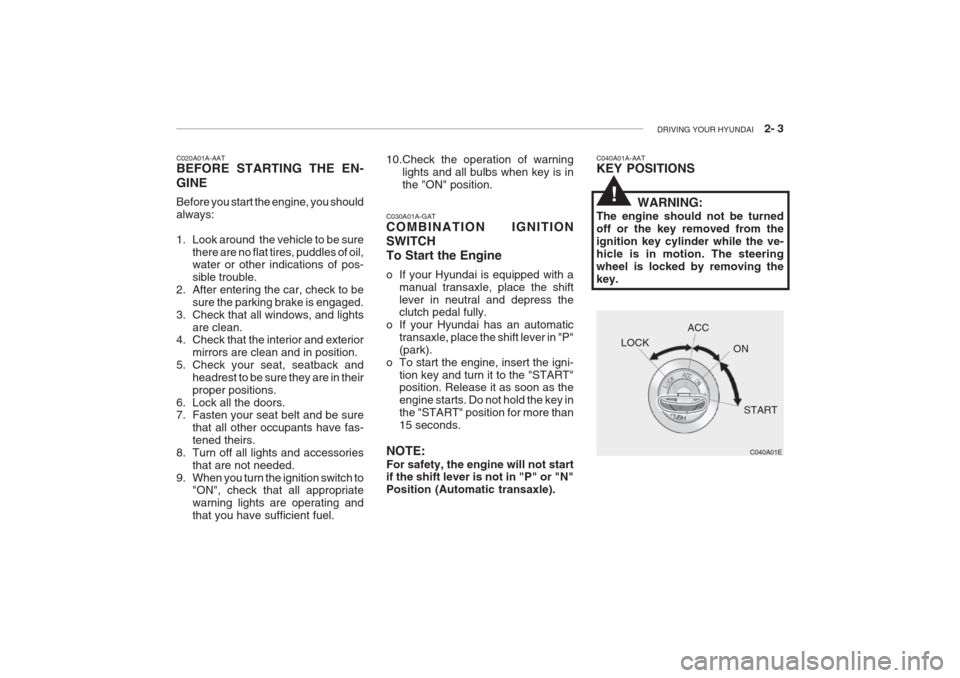
o To start the engine, insert the igni- tion key and turn it to the "START" position. Release it as soon as the engine starts. Do not hold the key inthe "START" position for more than15 seconds.
NOTE: For safety, the engine will not start if the shift lever is not in "P" or "N" Position (Automatic transaxle).
10.Check the operation of warning
lights and all bulbs when key is inthe "ON" position.C040A01A-AAT KEY POSITIONS
WARNING:
The engine should not be turned off or the key removed from theignition key cylinder while the ve-hicle is in motion. The steeringwheel is locked by removing thekey.
C040A01E
LOCK
ACC
ON
START
!
Page 133 of 230
2- 4 DRIVING YOUR HYUNDAI
C070C01E
C070C01A-AAT
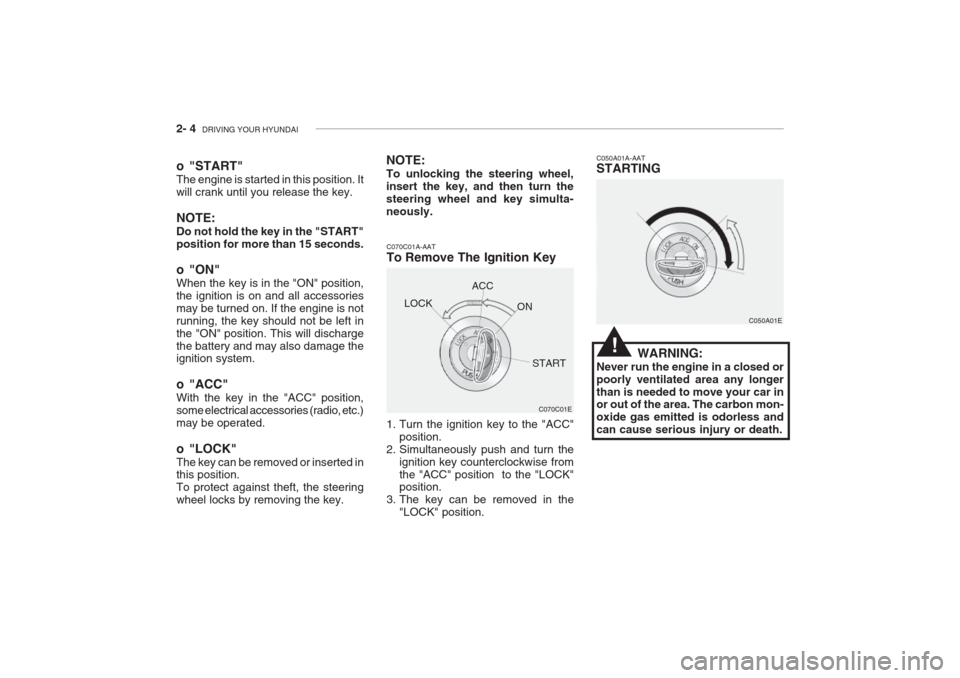
To Remove The Ignition Key
1. Turn the ignition key to the "ACC"
position.
2. Simultaneously push and turn the ignition key counterclockwise from the "ACC" position to the "LOCK" position.
3. The key can be removed in the "LOCK" position. C050A01A-AAT STARTING
C050A01E
WARNING:
Never run the engine in a closed or poorly ventilated area any longerthan is needed to move your car in or out of the area. The carbon mon- oxide gas emitted is odorless andcan cause serious injury or death.
LOCK
ACC
ON
START
o "START" The engine is started in this position. It will crank until you release the key. NOTE: Do not hold the key in the "START" position for more than 15 seconds.
o "ON" When the key is in the "ON" position, the ignition is on and all accessoriesmay be turned on. If the engine is notrunning, the key should not be left inthe "ON" position. This will dischargethe battery and may also damage the ignition system.
o "ACC" With the key in the "ACC" position, some electrical accessories (radio, etc.)may be operated.
o "LOCK" The key can be removed or inserted in this position. To protect against theft, the steeringwheel locks by removing the key. NOTE: To unlocking the steering wheel, insert the key, and then turn thesteering wheel and key simulta-neously.
!
Page 134 of 230
DRIVING YOUR HYUNDAI 2- 5
C050B01A-GAT Normal Conditions: The Starting Procedure:
1. Insert key, and fasten the seat belt.
2. Depress the clutch pedal fully and
place the gearshift lever (manualtransaxle) in neutral or the selectorlever (automatic transaxle) in "P" (park) position.
3. After turning the ignition key to the "ON" position, make certain all warn- ing lights and gauges are function-ing properly before starting the en-gine.
WARNING:
Be sure that the clutch is fully de-pressed when starting a manualtransaxle vehicle. Otherwise, thereis the potential to cause damage tothe vehicle or injury to someone inside or outside the vehicle as a result of the forward or backwardmovement of the vehicle that willoccur if the clutch is not depressedwhen the vehicle is started. 4. Turn the ignition key to the "Start"
position and release it when theengine starts.
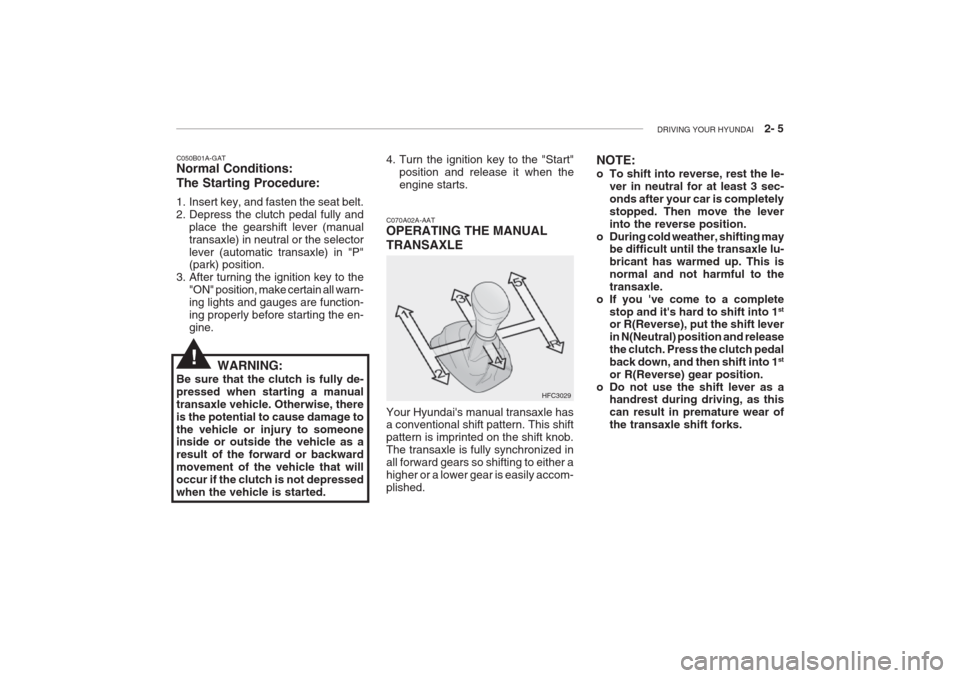
C070A02A-AAT OPERATING THE MANUAL TRANSAXLE
HFC3029
Your Hyundai's manual transaxle has a conventional shift pattern. This shift pattern is imprinted on the shift knob.The transaxle is fully synchronized inall forward gears so shifting to either ahigher or a lower gear is easily accom-plished. NOTE:
o To shift into reverse, rest the le-
ver in neutral for at least 3 sec- onds after your car is completelystopped. Then move the leverinto the reverse position.
o During cold weather, shifting may be difficult until the transaxle lu-bricant has warmed up. This isnormal and not harmful to thetransaxle.
o If you 've come to a complete
stop and it's hard to shift into 1 st
or R(Reverse), put the shift leverin N(Neutral) position and releasethe clutch. Press the clutch pedalback down, and then shift into 1 st
or R(Reverse) gear position.
o Do not use the shift lever as a handrest during driving, as thiscan result in premature wear ofthe transaxle shift forks.
!
Page 135 of 230
2- 6 DRIVING YOUR HYUNDAI
C070D02A-AAT Good Driving Practices
o Never take the car out of gear and
coast down a hill. This is extremely hazardous. Always leave the car ingear.
o Don't "ride" the brakes. This can cause them to overheat and mal-function. Instead, when you are driv-ing down a long hill, slow down andshift to a lower gear. When you dothis, engine braking will help slowthe car.
o Slow down before shifting to a lower
gear. This will help avoid over-rev-ving the engine, which can causedamage.
o Slow down when you encounter
cross winds. This gives you much better control of your car.
o Be sure the car is completely stopped
before you attempt to shift into re- verse. The transaxle can be dam-aged if you do not. To shift intoreverse, depress the clutch, move the shift lever to neutral, wait three seconds, then shift to the reverseposition.
C070B01A-AAT Using the Clutch The clutch should be pressed all the way to the floor before shifting, thenreleased slowly. The clutch pedalshould always be used after fully re- turning to the original position. Do not rest your foot on the clutch pedal whiledriving. This can cause unnecessarywear. Do not partially engage the clutchto hold the car on an incline. Thiscauses unnecessary wear. Use the parking brake to hold the car on an incline. Do not operate the clutch pedalrapidly and repeatedly. CAUTION:
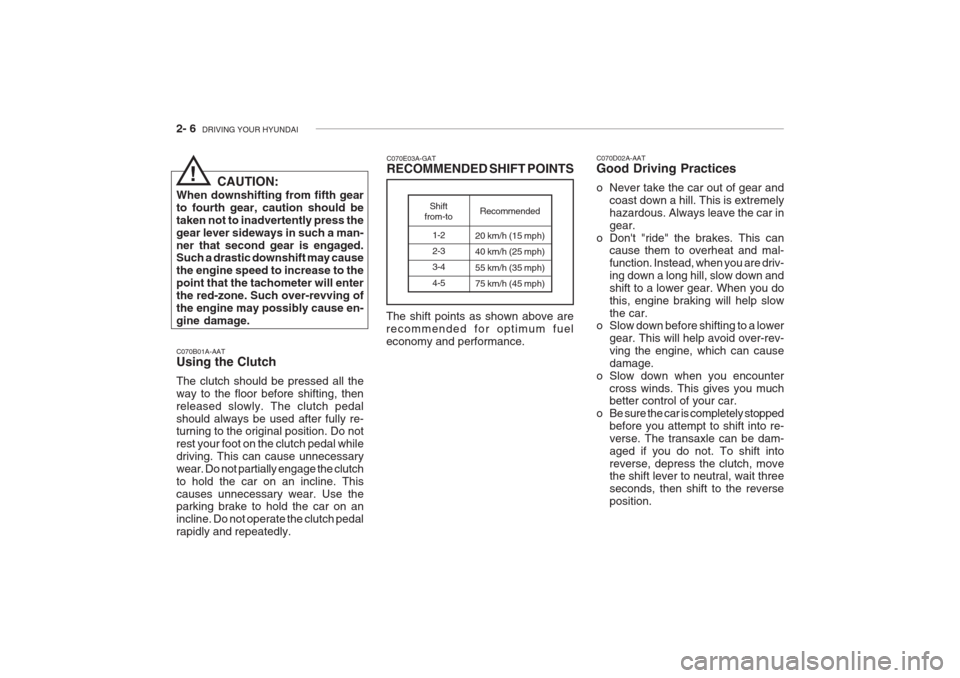
When downshifting from fifth gearto fourth gear, caution should betaken not to inadvertently press thegear lever sideways in such a man-ner that second gear is engaged. Such a drastic downshift may cause the engine speed to increase to thepoint that the tachometer will enterthe red-zone. Such over-revving ofthe engine may possibly cause en-gine damage. C070E03A-GAT RECOMMENDED SHIFT POINTS
1-2 2-33-4 4-5
Shift
from-to Recommended
20 km/h (15 mph) 40 km/h (25 mph) 55 km/h (35 mph) 75 km/h (45 mph)
The shift points as shown above are recommended for optimum fueleconomy and performance.
!
Page 137 of 230
2- 8 DRIVING YOUR HYUNDAI
C090C01A-AAT o R(Reverse): Use for backing up the vehicle. Bring the car to a complete stop before shift- ing the selector lever to "R" position. C090D02A-AAT o N (Neutral): In the "N" position, the transaxle is in neutral, which means that no gearsare engaged. The engine can be startedwith the shift lever in "N" position,although this is not recommended ex- cept if the engine stalls while the car is moving.
C090E01L-GAT o D (Drive): Use for normal driving. This position is
used for most city and highway driving,for starting from a full stop to maximumspeed. The transaxle will automati-cally shift through a four/five gearsequency, giving best economy and power.
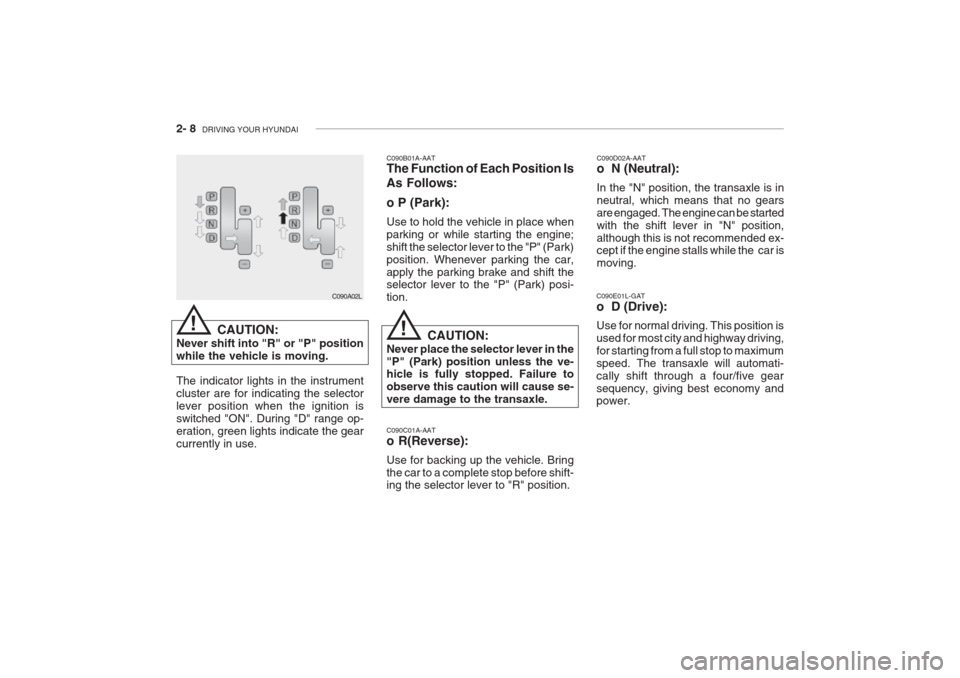
C090B01A-AAT The Function of Each Position Is As Follows: o P (Park): Use to hold the vehicle in place when parking or while starting the engine;shift the selector lever to the "P" (Park)position. Whenever parking the car,apply the parking brake and shift the selector lever to the "P" (Park) posi- tion.
CAUTION:
Never place the selector lever in the"P" (Park) position unless the ve- hicle is fully stopped. Failure to observe this caution will cause se-vere damage to the transaxle.
C090A02L
CAUTION:
Never shift into "R" or "P" positionwhile the vehicle is moving. The indicator lights in the instrument cluster are for indicating the selectorlever position when the ignition isswitched "ON". During "D" range op-eration, green lights indicate the gearcurrently in use.
!!
Page 138 of 230
DRIVING YOUR HYUNDAI 2- 9
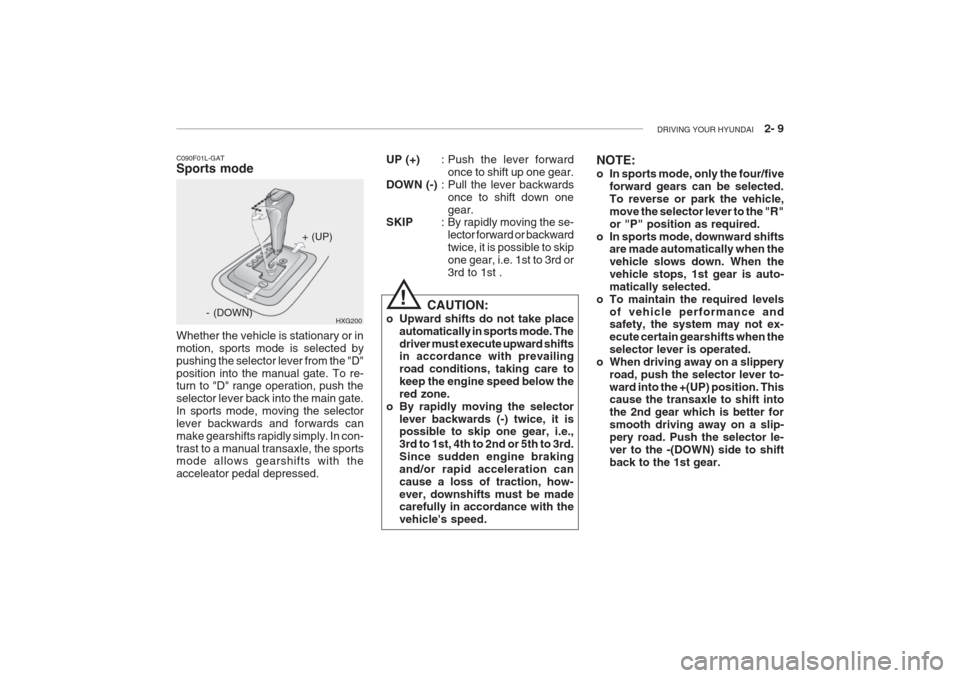
C090F01L-GAT Sports mode Whether the vehicle is stationary or in motion, sports mode is selected bypushing the selector lever from the "D"position into the manual gate. To re-
turn to "D" range operation, push the selector lever back into the main gate.In sports mode, moving the selectorlever backwards and forwards canmake gearshifts rapidly simply. In con-trast to a manual transaxle, the sports mode allows gearshifts with the acceleator pedal depressed. HXG200
+ (UP)
- (DOWN) UP (+)
: Push the lever forward
once to shift up one gear.
DOWN (-) : Pull the lever backwards
once to shift down onegear.
SKIP : By rapidly moving the se-
lector forward or backwardtwice, it is possible to skipone gear, i.e. 1st to 3rd or3rd to 1st . NOTE:
o In sports mode, only the four/five
forward gears can be selected. To reverse or park the vehicle,move the selector lever to the "R"or "P" position as required.
o In sports mode, downward shifts are made automatically when thevehicle slows down. When thevehicle stops, 1st gear is auto-matically selected.
o To maintain the required levels
of vehicle performance and safety, the system may not ex- ecute certain gearshifts when theselector lever is operated.
o When driving away on a slippery road, push the selector lever to-ward into the +(UP) position. This cause the transaxle to shift into the 2nd gear which is better forsmooth driving away on a slip-pery road. Push the selector le-ver to the -(DOWN) side to shiftback to the 1st gear.
! CAUTION:
o Upward shifts do not take place automatically in sports mode. The driver must execute upward shifts in accordance with prevailing road conditions, taking care tokeep the engine speed below thered zone.
o By rapidly moving the selector lever backwards (-) twice, it is possible to skip one gear, i.e., 3rd to 1st, 4th to 2nd or 5th to 3rd.Since sudden engine brakingand/or rapid acceleration can
cause a loss of traction, how-ever, downshifts must be made carefully in accordance with the vehicle's speed.
Page 139 of 230
2- 10 DRIVING YOUR HYUNDAI
C090H01L-GAT NOTE:
o For smooth and safe operation,
depress the brake pedal when shifting from "Neutral" positionor "Park" position to a forward orreverse gear.
o The ignition key must be in the "ON" position and the brake pedalfully depressed in order to movethe shift lever from the "P" (Park)position to any of the other posi-tions.
o It is always possible to shift from "R", "N", "D" position to "P" po-sition. The vehicle must be fullystopped to avoid transaxle dam-age. C090I01L-GAT
CAUTION:
o Shift into "R" and "P" position only when the vehicle has com-pletely stopped.
o Do not accelerate the engine in reverse or any of the forwardpositions with the brakes applied.
o Always apply the footbrake when
shifting from "P" or "N", to "R" or"D" position.
o Do not use the "P" (Park) posi- tion in place of the parking brake.Always set the parking brake,shift the transaxle into "P" (Park)position and turn off the ignitionwhen you leave the vehicle, evenmomentarily. Never leave the ve- hicle unattended while the en- gine is running.
o Check the automatic transaxle fluid level regularly, and add fluidas necessary.
o See the maintenance schedule for the proper fluid reco-mendation. C090N01Y-AAT Good Driving Practices
o Never move the gear selector lever
from "P" or "N" to any other position with the accelerator pedal de-pressed.
o Never move the gear selector lever into "P" when the vehicle is in mo-tion.
o Be sure the car is completely stopped
before you attempt to shift into "R".
o Never take the car out of gear and
coast down a hill. This may be ex- tremely hazardous. Always leave the car in gear when moving.
o Do not "ride" the brakes. This can cause them to overheat and mal-function. Instead, when you are driv-ing down a long hill, slow down and shift to a lower gear. When you do this, engine braking will help slowthe car.
o Slow down before shifting to a lower gear. Otherwise, the lower gear maynot be engaged.
o Always use the parking brake. Do
not depend on placing the transaxlein "P" to keep the car from moving.
!
Page 140 of 230
DRIVING YOUR HYUNDAI 2- 11
C120A02A-AAT ANTI-LOCK BRAKE SYSTEM (If installed) The Anti-Lock Brake System (ABS) is designed to prevent wheel lock-upduring sudden braking or on hazard-ous road surfaces. The ABS controlmodule monitors the wheel speed and controls the pressure applied to each brake. Thus, in emergency situationsor on slick roads, ABS will increasevehicle control during braking. NOTE: During ABS operation, a slight pul- sation may be felt in the brake pedal when the brakes are applied. Also, a noise may be heard in the enginecompartment while driving. Theseconditions are normal and indicatethat the anti-lock brake system isfunctioning properly. WARNING:
ABS will not prevent accidents due to improper or dangerous driving maneuvers. Even though vehiclecontrol is improved during emer-gency braking, always maintain asafe distance between you and ob-jects ahead. Vehicle speeds should always be reduced during extreme road conditions.The braking distance for carsequipped with an anti-lock brakingsystem may be longer than for thosewithout it in the following road con- ditions.
o Driving on rough, gravel or snow- covered roads.
o Driving with tire chains installed.
o Driving on roads where the road surface is pitted or has different surface height.
During these conditions the vehicle should be driven at reduced speeds.The safety features of an ABSequipped vehicle should not be tested by high speed driving or cornering. This could endanger thesafety of yourself or others.
o Exercise extreme caution when driv-
ing on a slippery surface. Be espe-cially careful when braking, acceler-ating or shifting gears. On a slipperysurface, an abrupt change in vehi- cle speed can cause the drive wheels to lose traction and the vehicle to goout of control.
CAUTION:
o The risk of rollover is greatly in- creased if you lose control of your vehicle at highway speeds.
o Loss of control often occurs if two or more wheels drop off the roadway and the driver oversteersto reenter the roadway.
o In the event your vehicle leaves the roadway, do not steer sharply.Instead, slow down before pull-ing back into the travel lanes.
o In a collision crash, an unbelted person is significantly more likelyto die than a person wearing a seatbelt.
!
!
Page 141 of 230
2- 12 DRIVING YOUR HYUNDAI
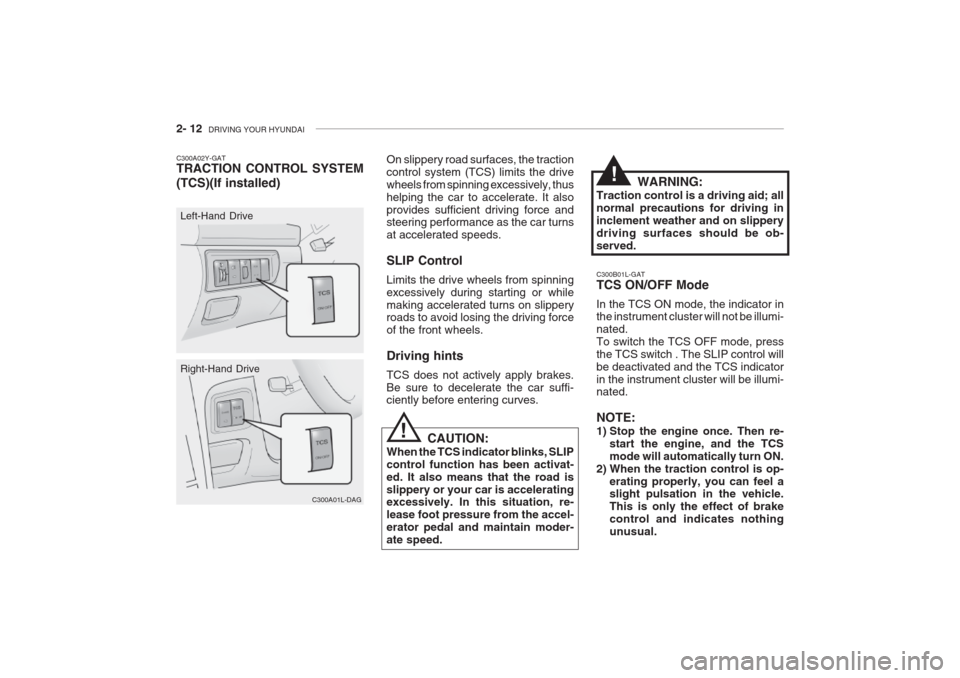
C300B01L-GAT TCS ON/OFF Mode In the TCS ON mode, the indicator in the instrument cluster will not be illumi- nated.To switch the TCS OFF mode, pressthe TCS switch . The SLIP control willbe deactivated and the TCS indicatorin the instrument cluster will be illumi- nated. NOTE:
1) Stop the engine once. Then re-
start the engine, and the TCS mode will automatically turn ON.
2) When the traction control is op- erating properly, you can feel a slight pulsation in the vehicle. This is only the effect of brakecontrol and indicates nothingunusual.
On slippery road surfaces, the tractioncontrol system (TCS) limits the drivewheels from spinning excessively, thushelping the car to accelerate. It alsoprovides sufficient driving force and steering performance as the car turns at accelerated speeds. SLIP Control Limits the drive wheels from spinning excessively during starting or whilemaking accelerated turns on slippery roads to avoid losing the driving force of the front wheels. Driving hints TCS does not actively apply brakes. Be sure to decelerate the car suffi- ciently before entering curves.
CAUTION:
When the TCS indicator blinks, SLIP control function has been activat-ed. It also means that the road isslippery or your car is accelerating excessively. In this situation, re- lease foot pressure from the accel-erator pedal and maintain moder-ate speed.
C300A01L-DAG
Right-Hand Drive
C300A02Y-GAT TRACTION CONTROL SYSTEM (TCS)(If installed)
C300A01L
Left-Hand Drive WARNING:
Traction control is a driving aid; all normal precautions for driving ininclement weather and on slipperydriving surfaces should be ob-served.
!
!
Page 142 of 230
DRIVING YOUR HYUNDAI 2- 13
NOTE:
1) When TCS illuminates, traction
control is automatically deacti- vated for safety.
2) This warning function is not pro- vided when in the TCS-OFF mode.
3) When the engine starts, a click is
heard from the engine compart-ment; however, this is only thesound of traction control beingchecked.
4) When moving out of the mud or
fresh snow, pressing the accel-erator pedal may not cause theengine speed to increase.
C300D02L-GAT Indicator and Warning The indicator should illuminate when
the ignition key is turned ON or START but should go out after three seconds. If the indicators do not illuminate or goout after three seconds, have themchecked by an authorized dealer. Should there be any unusual condi- tions in the device, TCS illuminates asa warning.If TCS illuminates, pull your car to asafe place and stop the engine.Then, start the engine again to check if the TCS indicator goes out. If the indicator do not go out after three seconds even after the engine hasbeen started, have your car checkedby an authorized Hyundai dealer. C130A01A-AAT GOOD BRAKING PRACTICES
WARNING:
Nothing should be carried on top of the cargo area cover behind therear seat. If there were an accidentor a sudden stop, such objectscould move forward and cause dam- age to the vehicle or injure the oc- cupants.
o After being parked, check to be sure the parking brake is not engaged and that the parking brake indicator light is out before driving away.
o Driving through water may get the brakes wet. They can also get wet when the car is washed. Wet brakescan be dangerous! Your car will notstop as quickly if the brakes are wet. Wet brakes cause the car to pull toone side. To dry the brakes, applythe brakes lightly until the braking
action returns to normal, taking careto keep the car under control at all times. If the braking action does not return to normal, stop as soon as it
is safe to do so and call your Hyundaidealer for assistance.
o Don't coast down hills with the car out of gear. This is extremely haz- ardous. Keep the car in gear at all times, use the brakes to slow down,then shift to a lower gear so thatengine braking will help you main-tain a safe speed.
o Don't "ride" the brake pedal. Rest- ing your foot on the brake pedalwhile driving can be dangerous be-cause it can result in the brakes
overheating and losing their effec-tiveness. It also increases the wearof the brake components.
o If a tire goes flat while you are
driving, apply the brakes gently and
keep the car pointed straight aheadwhile you slow down. When you are
moving slowly enough for it to besafe to do so, pull off the road and stop in a safe place.
!