radio controls Hyundai H-1 (Grand Starex) 2006 Owner's Manual
[x] Cancel search | Manufacturer: HYUNDAI, Model Year: 2006, Model line: H-1 (Grand Starex), Model: Hyundai H-1 (Grand Starex) 2006Pages: 284, PDF Size: 12.21 MB
Page 118 of 284
2
INSTRUMENTS AND CONTROLS
49STEREO SOUND SYSTEM
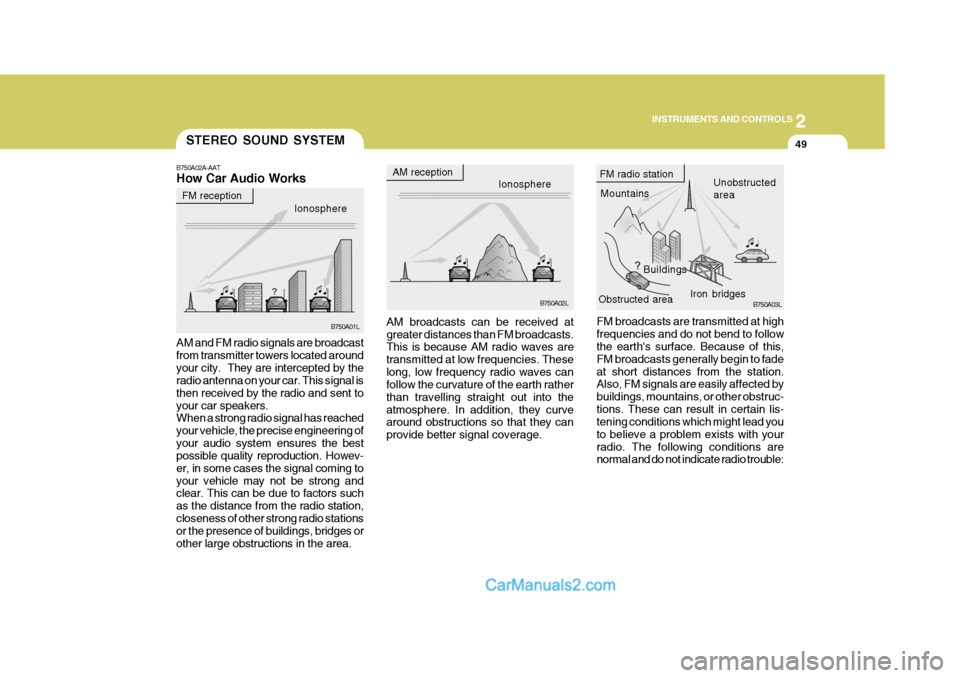
B750A02A-AAT How Car Audio Works
FM broadcasts are transmitted at high frequencies and do not bend to follow the earth's surface. Because of this, FM broadcasts generally begin to fadeat short distances from the station. Also, FM signals are easily affected by buildings, mountains, or other obstruc-tions. These can result in certain lis- tening conditions which might lead you to believe a problem exists with yourradio. The following conditions are normal and do not indicate radio trouble:
AM broadcasts can be received at greater distances than FM broadcasts. This is because AM radio waves are transmitted at low frequencies. Theselong, low frequency radio waves can follow the curvature of the earth rather than travelling straight out into theatmosphere. In addition, they curve around obstructions so that they can provide better signal coverage.
AM and FM radio signals are broadcastfrom transmitter towers located aroundyour city. They are intercepted by the radio antenna on your car. This signal is then received by the radio and sent toyour car speakers. When a strong radio signal has reached your vehicle, the precise engineering ofyour audio system ensures the best possible quality reproduction. Howev- er, in some cases the signal coming toyour vehicle may not be strong and clear. This can be due to factors such as the distance from the radio station,closeness of other strong radio stations or the presence of buildings, bridges or other large obstructions in the area. Ionosphere
B750A02L
AM reception
Mountains
Buildings Unobstructed area
FM radio station
B750A03L
Ionosphere
FM reception
B750A01L Obstructed area
Iron bridges
Page 119 of 284
2 INSTRUMENTS AND CONTROLS
50
!
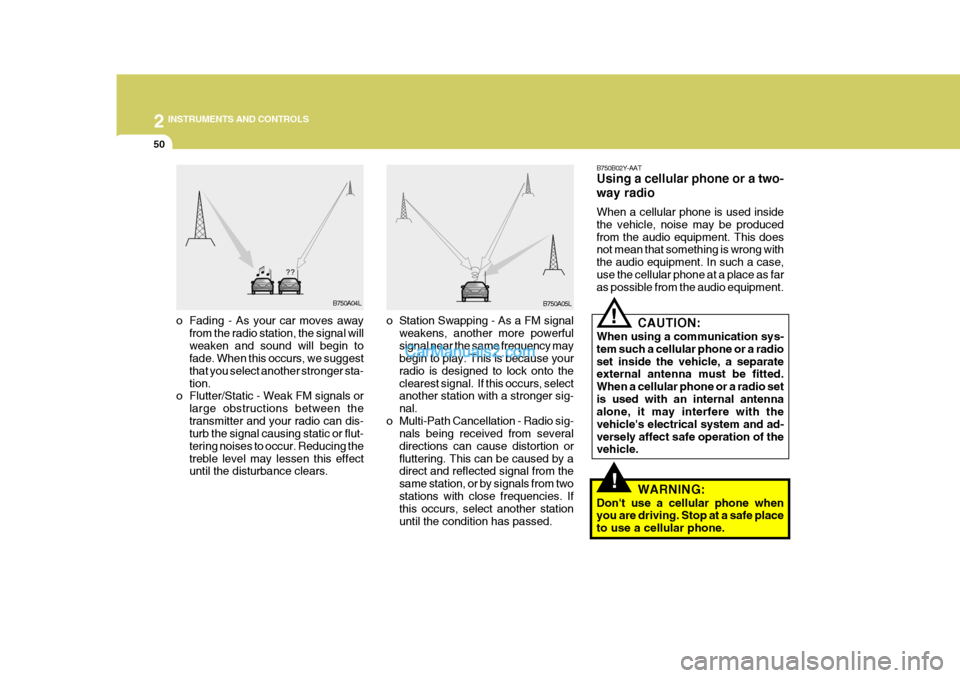
o Station Swapping - As a FM signal
weakens, another more powerful signal near the same frequency may begin to play. This is because your radio is designed to lock onto theclearest signal. If this occurs, select another station with a stronger sig- nal.
o Multi-Path Cancellation - Radio sig- nals being received from severaldirections can cause distortion orfluttering. This can be caused by a direct and reflected signal from the same station, or by signals from twostations with close frequencies. If this occurs, select another station until the condition has passed.
o Fading - As your car moves away
from the radio station, the signal willweaken and sound will begin to fade. When this occurs, we suggest that you select another stronger sta-tion.
o Flutter/Static - Weak FM signals or
large obstructions between thetransmitter and your radio can dis- turb the signal causing static or flut- tering noises to occur. Reducing thetreble level may lessen this effect until the disturbance clears. B750B02Y-AAT Using a cellular phone or a two- way radio When a cellular phone is used inside the vehicle, noise may be producedfrom the audio equipment. This does not mean that something is wrong with the audio equipment. In such a case,use the cellular phone at a place as far as possible from the audio equipment.!
CAUTION:
When using a communication sys- tem such a cellular phone or a radioset inside the vehicle, a separate external antenna must be fitted. When a cellular phone or a radio setis used with an internal antenna alone, it may interfere with the vehicle's electrical system and ad-versely affect safe operation of the vehicle.
WARNING:
Don't use a cellular phone whenyou are driving. Stop at a safe place to use a cellular phone.
B750A04L
B750A05L
Page 120 of 284
2
INSTRUMENTS AND CONTROLS
51AUDIO SYSTEM
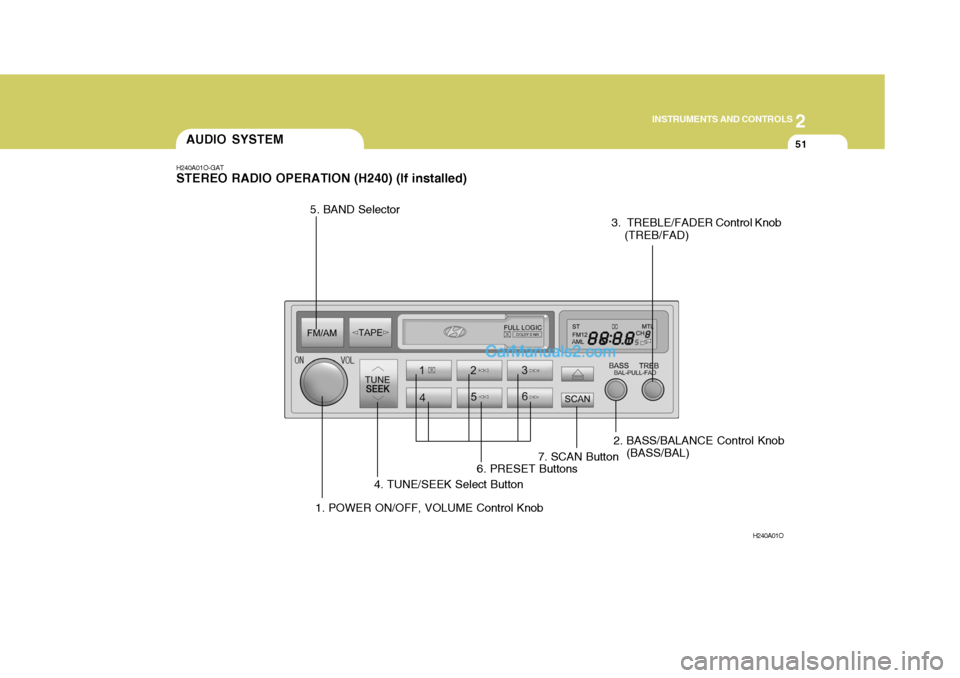
H240A01O-GAT STEREO RADIO OPERATION (H240) (If installed)
H240A01O
1. POWER ON/OFF, VOLUME Control Knob2. BASS/BALANCE Control Knob
(BASS/BAL)
3. TREBLE/FADER Control Knob
(TREB/FAD)
4. TUNE/SEEK Select Button
5. BAND Selector
6. PRESET Buttons7. SCAN Button
Page 121 of 284
2 INSTRUMENTS AND CONTROLS
52
H240B03O-GAT
1. POWER ON-OFF Control Knob The radio unit may be operated when the ignition key is in the "ACC" or "ON"position. Press the knob to switch the power on. The LCD shows the radio frequency in the radio mode or thetape direction indicator in the tape mode. To switch the power off, press the knob again. VOLUME Control Rotate the knob clockwise to increase the volume and turn the knob counter- clockwise to reduce the volume. 2. BASS Control Knob Press to pop the knob out and turn to the left or right for the desired bass tone. BAL (Balance Control) Knob Pull the bass control knob further out. Turn the control knob clockwise to emphasize right speaker sound (left speaker sound will be attenuated).When the control knob is turned coun- terclockwise, left speaker sound will beemphasized (right speaker sound willbe attenuated). 3. TREB (Treble Control) Knob Press to pop the knob out and turn to the left or right for the desired treble tone. FAD (Fader Control) Knob Pull the treble control knob further out. Turn the control knob counterclock-wise to emphasize front speaker sound (rear speaker sound will be attenu- ated).When the control knob is turned clock- wise, rear speaker sound will be em- phasized (front speaker sound will beattenuated). 4. TUNE (Manual) Select Button Press the ( ) side or ( ) side to increase or to decrease the frequency. Press either button and hold down to continu- ously scroll. Release button once thedesired station is reached.
SEEK Operation (Automatic Channel Selection) Press the TUNE select button 0.5 sec or more. Releasing it will automaticallytune to the next available station with a beep sound. When the ( ) side is pressed longerthan 0.5 second, releasing will auto- matically tune to the next higher fre- quency and when the ( ) side ispressed longer than 0.5 second and releasing will automatically tune to the next lower frequency. 5. BAND Selector Pressing the button changes the AM, FM1 and FM2 bands. The modeselected is displayed on LCD.
6. PRESET station select button Six (6) stations for AM, FM1 and FM2 respectively can be preset in the elec- tronic memory circuit on this unit.
FM/AM
Page 122 of 284
2
INSTRUMENTS AND CONTROLS
53
HOW TO PRESET STATIONS Six AM and twelve FM stations may be programmed into the memory of theradio. Then, by simply pressing the band select button and/or one of the six station select buttons, you mayrecall any of these stations instantly. To program the stations, follow these steps:
o Press band selector to set the band for AM, FM1, or FM2.
o Select the desired station to be stored by seek or manual tuning.
o Determine the preset station select button you wish to use to access that station.
o Press the station select button for more than two seconds. A selectbutton indicator will show in the dis- play indicating which select buttonyou have depressed. The frequency display will flash after it has been stored into the memory with beepsound. You should then release the button, and proceed to program the next desired station. A total of 18stations can be programmed by se- lecting one AM and two FM stations per button. o When completed, any preset sta-
tion may be recalled by selectingAM, FM1 or FM2 band and the appropriate station button.
7. SCAN Button When the scan button is pressed, the frequency will be increased and the receivable stations will be tuned in oneafter another, receiving each station for 5 seconds. To stop scanning, press the scan button again.
! CAUTION:
o Do not place beverages close to the audio system. The playback mechanism may be damaged if you spill them.
o Do not impact on the audio sys- tem, or the playback mechanismcould be damaged.
Page 125 of 284
2 INSTRUMENTS AND CONTROLS
56
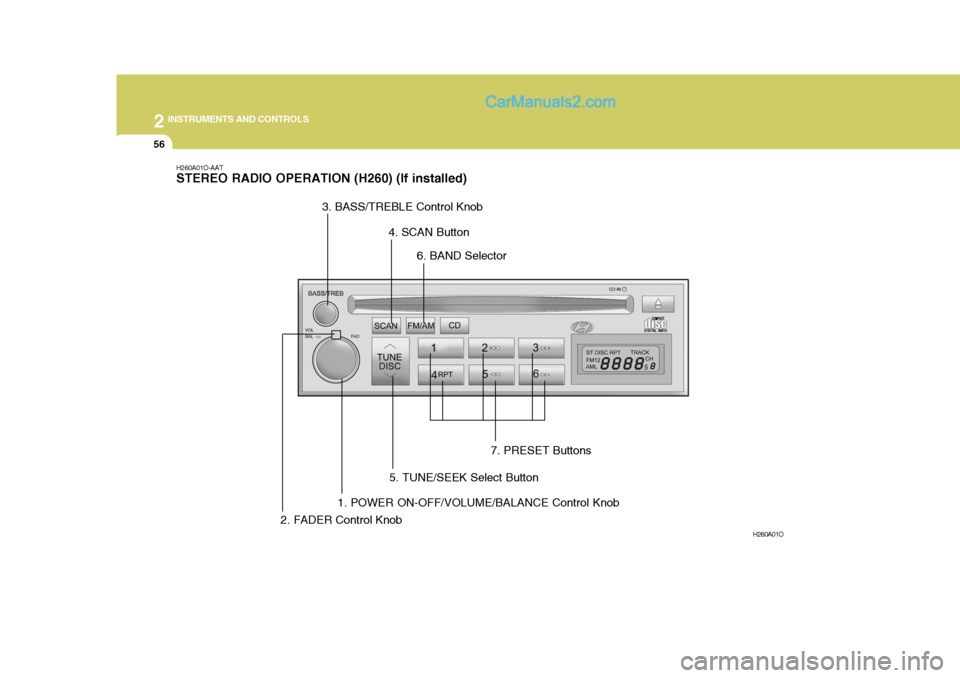
H260A01O-AAT STEREO RADIO OPERATION (H260) (If installed)
H260A01O
1. POWER ON-OFF/VOLUME/BALANCE Control Knob
2. FADER Control Knob 3. BASS/TREBLE Control Knob
4. SCAN Button
5. TUNE/SEEK Select Button 6. BAND Selector
7. PRESET Buttons
Page 126 of 284
2
INSTRUMENTS AND CONTROLS
57
H260B03E-AAT
1. POWER ON-OFF Control Knob
The radio unit may be operated when the ignition key is in the "ACC" or "ON"position. Press the knob to switch the power on. The LCD shows the radio frequency in the radio mode or the CDtrack indicator in either the CD mode. To switch the power off, press the knob again. VOLUME Control Rotate the knob clockwise to increase the volume and turn the knob counter-clockwise to reduce the volume. BALANCE Control Pull and turn the control knob clock- wise to emphasize right speaker sound (left speaker sound will be attenuated).When the control knob is turned coun- terclockwise, left speaker sound will be emphasized (right speaker soundwill be attenuated). 2. FAD (Fader Control) Knob Turn the control knob counterclock- wise to emphasize front speaker sound(rear speaker sound will be attenu- ated). When the control knob is turned clockwise, rear speaker sound will beemphasized (front speaker sound will be attenuated).
3. BASS Control Knob Press to pop the knob out and turn to the left or right for the desired basstone. TREB (Treble Control) Knob Pull the bass control knob further out. Turn to the left or right for the desired treble tone.
4. SCAN Button When the scan button is pressed, the frequency will increase and the receiv-able stations will be tuned in one after another, receiving each station for 5 seconds. To stop scanning, press thescan button again.5. TUNE (Manual) Select Button Press the ( ) side or ( ) side to increase or to decrease the frequency.Press either button and hold down to continuously scroll. Release button once the desired station is reached. SEEK Operation (Automatic Channel Selection) Press the TUNE select button for 0.5 sec or more. Releasing it will automati-cally tune to the next available station with a beep sound. When the ( ) side is pressed longerthan 0.5 second, releasing will auto- matically tune to the next higher fre- quency and when the ( ) side ispressed longer than 0.5 second, re- leasing will automatically tune the next lower frequency. 6. BAND Selector Pressing the button changes the AM, FM1 and FM2 bands. The mode selected is displayed on LCD.
FM/AM
Page 127 of 284
2 INSTRUMENTS AND CONTROLS
58
7. PRESET Station SelectButton
Six (6) stations for AM, FM1 or FM2 respectively can be preset in the elec-tronic memory circuit on this unit. HOW TO PRESET STATIONS Six AM and twelve FM stations may be programmed into the memory of the radio. Then, by simply pressing the band select button and/or one of thesix station select buttons, you may recall any of these stations instantly. To program the stations, follow thesesteps:
o Press band selector to set the band for AM, FM1 or FM2.
o Select the desired station to be
stored by seek, scan or manual tuning.
o Determine the preset station select
button you wish to use to accessthat station. o Press the station select button for
more than two seconds. A selectbutton indicator will show in the dis- play indicating which select button you have depressed. The frequencydisplay will flash after it has been stored into the memory. You should then release the button,and proceed to program the next desired station. A total of 18 sta- tions can be programmed by select-ing one AM and two FM stations per button.
o When completed, any preset sta- tion may be recalled by selectingAM, FM1 or FM2 band and the appropriate station button.
! CAUTION:
o Do not place beverages close to the audio system. The playback mechanism may be damaged if you spill them.
o Do not impact on the audio sys- tem, or the playback mechanismcould be damaged.
Page 129 of 284
2 INSTRUMENTS AND CONTROLS
60
B260D03O-AAT
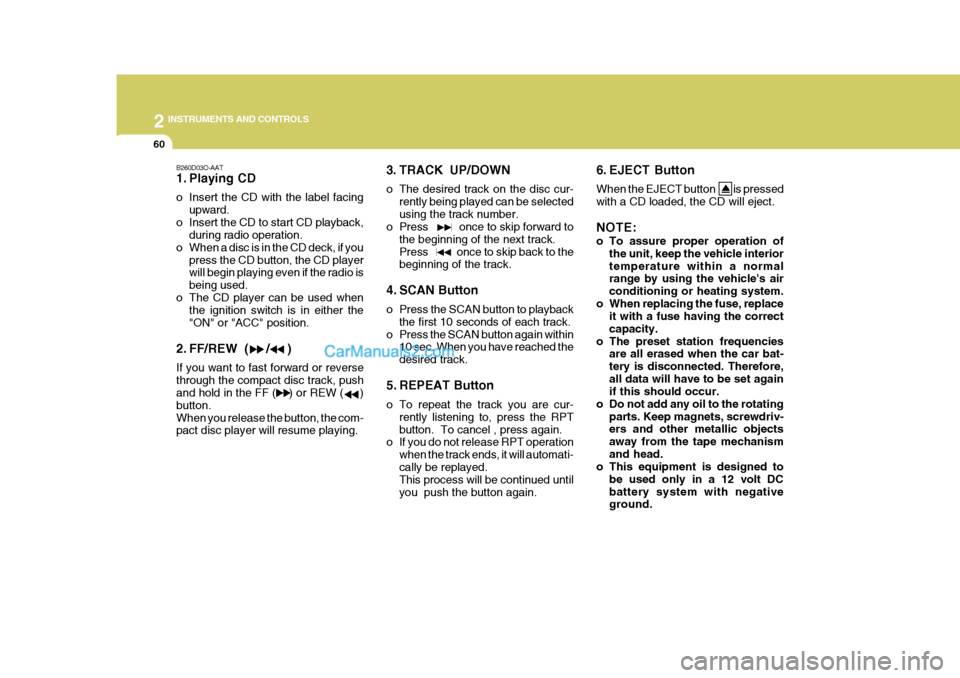
1. Playing CD
o Insert the CD with the label facingupward.
o Insert the CD to start CD playback, during radio operation.
o When a disc is in the CD deck, if you press the CD button, the CD player will begin playing even if the radio is being used.
o The CD player can be used when the ignition switch is in either the"ON" or "ACC" position.
2. FF/REW ( / ) If you want to fast forward or reverse through the compact disc track, push and hold in the FF ( ) or REW ( ) button.When you release the button, the com- pact disc player will resume playing. 3. TRACK UP/DOWN
o The desired track on the disc cur-
rently being played can be selected using the track number.
o Press once to skip forward to
the beginning of the next track.Press once to skip back to the beginning of the track.
4. SCAN Button
o Press the SCAN button to playback the first 10 seconds of each track.
o Press the SCAN button again within 10 sec. When you have reached the desired track.
5. REPEAT Button
o To repeat the track you are cur- rently listening to, press the RPT button. To cancel , press again.
o If you do not release RPT operation
when the track ends, it will automati-cally be replayed. This process will be continued until you push the button again. 6. EJECT Button When the EJECT button is pressed with a CD loaded, the CD will eject. NOTE:
o To assure proper operation of
the unit, keep the vehicle interior temperature within a normal range by using the vehicle's air conditioning or heating system.
o When replacing the fuse, replace it with a fuse having the correctcapacity.
o The preset station frequencies are all erased when the car bat-tery is disconnected. Therefore,all data will have to be set again if this should occur.
o Do not add any oil to the rotating parts. Keep magnets, screwdriv-ers and other metallic objects away from the tape mechanismand head.
o This equipment is designed to
be used only in a 12 volt DCbattery system with negative ground.
Page 131 of 284
2 INSTRUMENTS AND CONTROLS
62
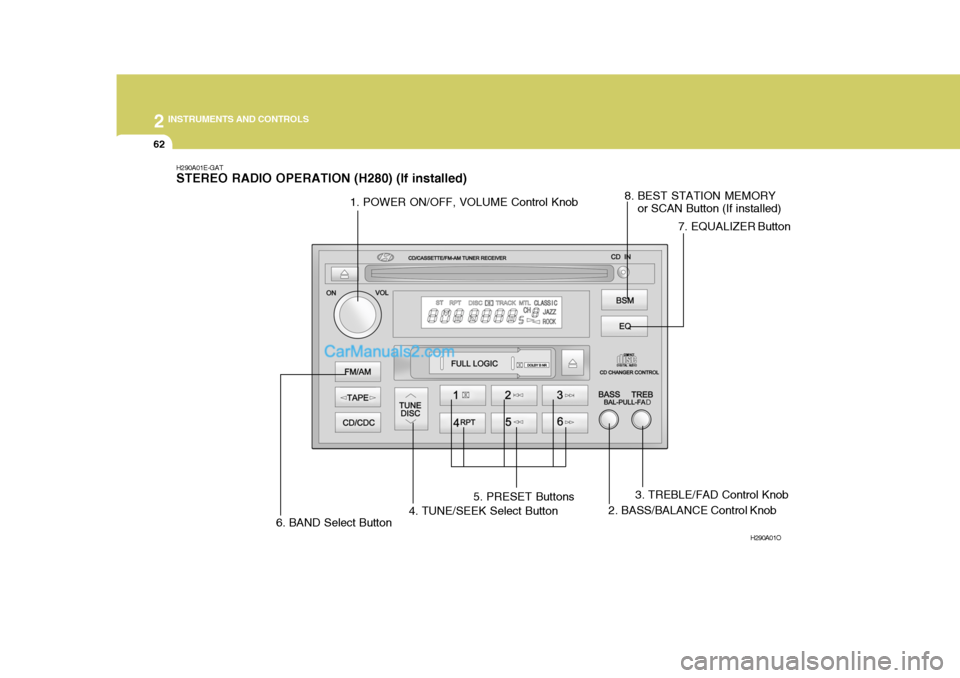
H290A01E-GAT STEREO RADIO OPERATION (H280) (If installed)
H290A01O
1. POWER ON/OFF, VOLUME Control Knob2. BASS/BALANCE Control Knob
4. TUNE/SEEK Select Button 5. PRESET Buttons
6. BAND Select Button 7. EQUALIZER Button
8. BEST STATION MEMORY
or SCAN Button (If installed)
3. TREBLE/FAD Control Knob