CD player Hyundai H-1 (Grand Starex) 2011 Owner's Manual - RHD (UK, Australia)
[x] Cancel search | Manufacturer: HYUNDAI, Model Year: 2011, Model line: H-1 (Grand Starex), Model: Hyundai H-1 (Grand Starex) 2011Pages: 346, PDF Size: 39.27 MB
Page 153 of 346
483
Features of your vehicle
Using a cellular phone or a two-wayradio
When a cellular phone is used inside the
vehicle, noise may be produced from the
audio equipment. This does not meanthat something is wrong with the audio
equipment. In such a case, use the cellu-
lar phone at a place as far as possiblefrom the audio equipment. Care of disc (if equipped)
If the temperature inside the car is too
high, open the car windows for ventila-
tion before using your car audio.
It is illegal to copy and use MP3/WMA/ AAC/WAVE files without permission.
Use CDs that are created only by law-
ful means.
Do not apply volatile agents such as benzene and thinner, normal cleaners
and magnetic sprays made for ana-
logue disc onto CDs.
To prevent the disc surface from get- ting damaged. Hold and carry CDs bythe edges or the edges of the center
hole only.
Clean the disc surface with a piece of soft cloth before playback (wipe it fromthe center to the outside edge).
Do not damage the disc surface or attach pieces of sticky tape or paperonto it.
Make sure on undesirable matter other than CDs are inserted into the CD
player (Do not insert more than oneCD at a time).
Keep CDs in their cases after use to protect them from scratches or dirt. Depending on the type of CD-R/CD-
RW CDs, certain CDs may not operate
normally according to manufacturingcompanies or making and recording
methods. In such circumstances, if you
still continue to use those CDs, they
may cause the malfunction of your caraudio system.
✽✽ NOTICE - Playing an
Incompatible Copy-Protected
Audio CD
Some copy protected CDs, which do not
comply with the international audio CD
standards (Red Book), may not play on
your car audio. Please note that if you
try to play copy protected CDs and the
CD player does not perform correctly
the CDs maybe defective, not the CD
player.
CAUTION
When using a communication sys- tem such a cellular phone or a radio set inside the vehicle, a separateexternal antenna must be fitted.When a cellular phone or a radio set
is used with an internal antennaalone, it may interfere with the vehi-cle's electrical system and adverse-ly affect safe operation of the vehi-
cle.
WARNING
Don't use a cellular phone when
you are driving. You should stop at
a safe place to use a cellular phone.
Page 154 of 346
Features of your vehicle
84
4
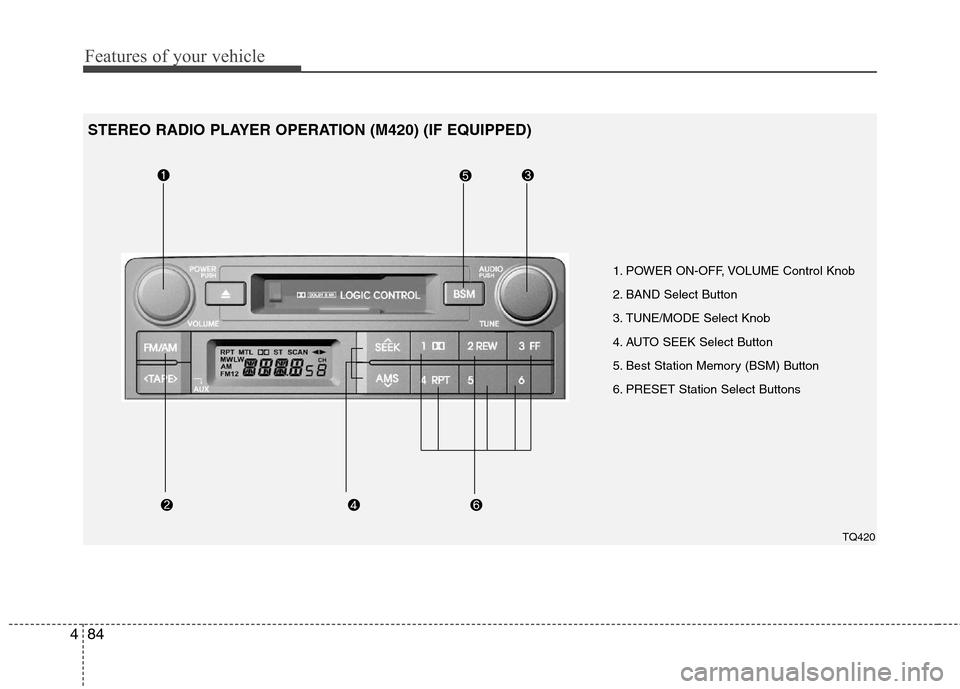
1. POWER ON-OFF, VOLUME Control Knob
2. BAND Select Button
3. TUNE/MODE Select Knob
4. AUTO SEEK Select Button
5. Best Station Memory (BSM) Button
6. PRESET Station Select Buttons
TQ420
STEREO RADIO PLAYER OPERATION (M420) (IF EQUIPPED)
Page 158 of 346
Features of your vehicle
88
4
1. TAPE PROGRAM/AUX Button
This allows you to play the reverse side
of the tape by merely pressing the pro-
gram button. The PLAY and an arrow will
appear in the display to show the tapedirection.
If you press this button more than 0.8
second. you can change to AUX mode.
AUX mode is available only when AUX jack is plugged in and will change back
to the last mode if you pull it out.
2. TAPE EJECT Button
When the button is pressed with a cassette loaded, the cassette will eject.
When the button is pressed during FF/REW mode, the cassette will eject.
3. DOLBY Button
If you get background noise during tape
PLAY, you can reduce this considerably
by merely pressing the DOLBY button. If
you want to cancel the DOLBY feature,
press the button again.
4. REPEAT (RPT) Button
To repeat the track you are currently listening to, press the RPT button. To cancel , press again. If you do not release RPT operation
when the track ends, it will automati-
cally be replayed.
This process will continue until you
push the button again.
5. AUTO MUSIC Search (AMS) Button
Press the button to find the starting point
of each song in a prerecorded music
tape. The quiet space between songs
(must have at least a 4 sec. gap) can be
identified by the AUTO MUSIC Search
button.
Pressing the will play the begin- ning of the next music segment.
Pressing the will start replay at the beginning of the music just listened to.
To stop FF or REW action, press the button again.
6. FF/REW Button
Fast forward tape winding starts when the FF button is pressed during PLAY
or REW mode.
PLAY starts when the FF button is pressed again during FF mode.
Tape rewinding starts when the REW button is pressed during PLAY or
FF mode. PLAY starts when the REW button
pressed again during REW mode.
✽✽ NOTICE
When using a portable audio device
connected to the power outlet, noise may
occur during playback. If this happens,
use the orignal power source of the
portable audio device(e.g., batteries).
CAUTION
Do not insert anything like coins into the player slot as damage tothe unit may occur.
Do not place beverages close to the audio system. The playbackmechanism may be damaged ifyou spill them.
Do not strike or allow anything to impact the audio system, damageto the system mechanisms couldoccur.
When no device is connected to the AUX cable, please pull out the
cable from the JACK on the car.(AUX MODE is operational andnoise may heard in the AUX MODE.)
Page 159 of 346
489
Features of your vehicle
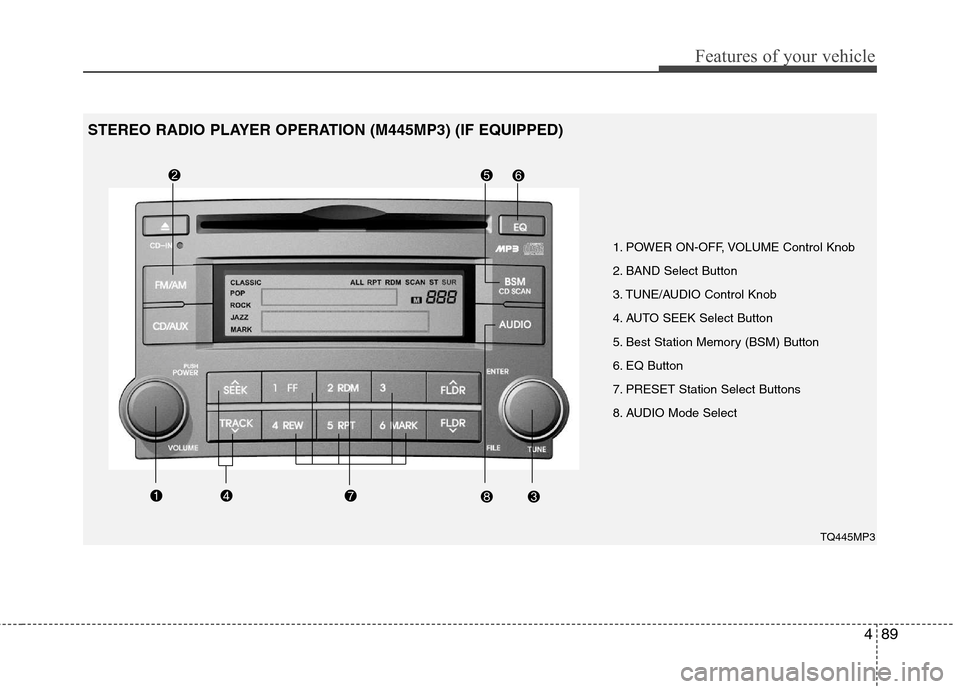
1. POWER ON-OFF, VOLUME Control Knob
2. BAND Select Button
3. TUNE/AUDIO Control Knob
4. AUTO SEEK Select Button
5. Best Station Memory (BSM) Button
6. EQ Button
7. PRESET Station Select Buttons
8. AUDIO Mode SelectTQ445MP3
STEREO RADIO PLAYER OPERATION (M445MP3) (IF EQUIPPED)
Page 162 of 346
Features of your vehicle
92
4
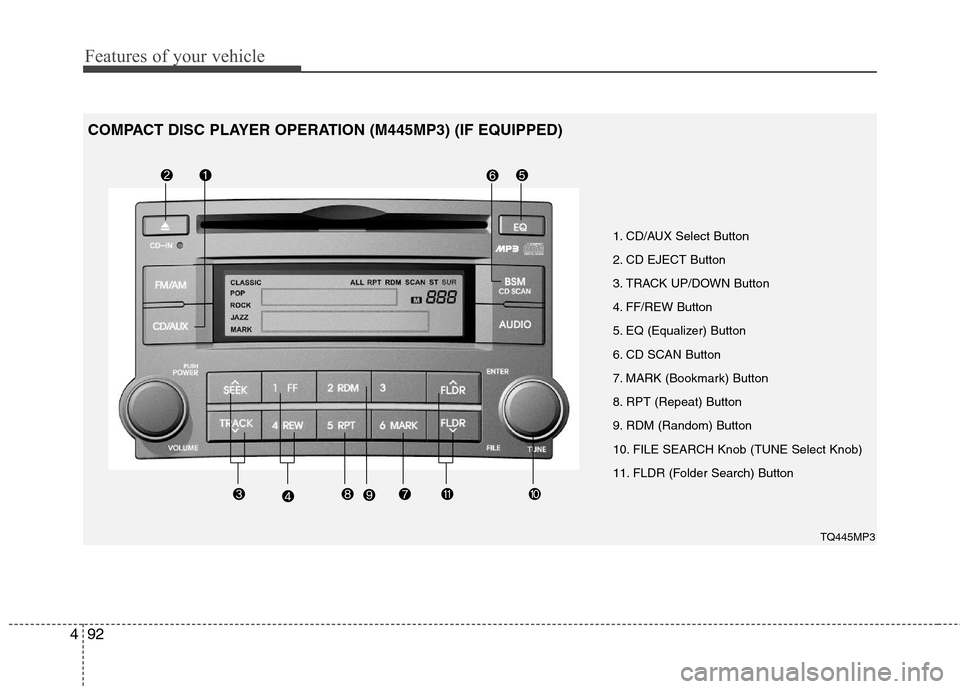
1. CD/AUX Select Button
2. CD EJECT Button
3. TRACK UP/DOWN Button
4. FF/REW Button
5. EQ (Equalizer) Button
6. CD SCAN Button
7. MARK (Bookmark) Button
8. RPT (Repeat) Button
9. RDM (Random) Button
10. FILE SEARCH Knob (TUNE Select Knob)
11. FLDR (Folder Search) Button
TQ445MP3
COMPACT DISC PLAYER OPERATION (M445MP3) (IF EQUIPPED)
Page 163 of 346
493
Features of your vehicle
1. CD/AUX Select Button
Insert the CD with the label facingupward.
Insert the CD to start CD playback, during radio operation.
When a disc is in the CD deck, if you press the CD button the CD player will
begin playing even if the radio player isbeing used.
The CD player can be used when the ignition switch is in either the “ON” or
“ACC” position.
Push the CD button to start CD play- back without pushing Power ON-OFF
control knob. (Only when a CD is in the
deck.)
If you press this button you can change to AUX mode.
AUX mode is available only when AUX jack is plugged in and change back to
last mode if you pull it out.
2. CD EJECT Button
When the EJECT button is pressed with a CD loaded, the CD will eject.
To eject all of the discs, press this but- ton for one second or more.✽✽ NOTICE
Do not stick paper or tape etc., on the label side or the recording side of any
discs, as it may cause a malfunction.
The unit cannot play a CD- R(Recordable CD) and CD-
RW(Rewritable CD) that is not final-
ized. Please refer to the manual of CD-
R/CD-RW recoder or CD-R/CD-RW
software for more information on
finalization process.
Depending on the recording status,
some CD-Rs/CD-RWs may not be
played on this unit.
3. TRACK UP/DOWN Button
The desired track on the disc currentlybeing played can be selected using the
track number.
Press button once to skip forward to the beginning of the next track.
Press within a second after play-
back begins to quickly move backward
through a CD.
If you press after more than a sec-
ond, it will take you to the beginning of
the track you are now listening to. 4. FF/REW Button
If you want to fast forward or reverse
through the compact disc track, push and
hold the FF or REW button.
When you release the button, the com-
pact disc player will resume playing.
5. EQ (Equalizer) Button
Press the EQ button to select the CLAS-
SIC, POP, JAZZ, ROCK and DEFEAT
MODE for the desired tone quality. Each
press of the button changes the display
as follows;
6. CD SCAN Button
Press the CD SCAN button to playback
the first 10 seconds of each track.
Press the CD SCAN button again with- in 10 sec. when you have reached the
desired track.
To playback the first 10 seconds of each track in the selected folder, Press
the CD SCAN button within a second.(MP3 CD only) CLASSIC ➟POP ➟ROCK ➟JAZZ ➟DEFEAT
Page 164 of 346
Features of your vehicle
94
4
7. MARK (Bookmark) Button
When the CD player unit is operating, the
desired track on the disc can be book-
marked by using the MARK button.
Press the MARK button for more than
one second to bookmark the desired
track. "M" will be displayed on the LCD
and "MEMORY NO." will display for
approximately five seconds with a
beep sound. To play the bookmarked
tracks, press the MARK button withinone second and select the book-
marked track to play.
To erase a bookmarked track, press the MARK button for more than one
second. This will erase the bookmarkwith a beep sound.
If you want to delete all tracks stored on
Mark Memory, press FILE SEARCH
knob in the Mark Play mode for more
than one second. You will hear a beep
sound and all tracks will be deleted from
Mark Memory with "MARK DELETE
ALL" displayed on the LCD.
✽✽ NOTICE
Tracks stored on Mark Memory will be
automatically erased after you eject CDs
that contain those tracks.
8. RPT (Repeat) Button
To repeat the track you are currently listening to, press the RPT button. To
cancel, press it again. If it is pressed
for more than one second, it will repeat
all tracks within the currently played
CD.
To repeat the music within currently played folder, press the RPT button for
more than one second. Then it willrepeat in sequential order within the
currently played folder. To cancel,
press it again. (MP3 CD only)
If you do not release RPT operation when the track ends, it will automati-
cally be replayed. This process will
continue until you push the buttonagain.
9. RDM (Random) Button
To listen to the music in random order, press the RDM Button with a beep
sound for more than one second. Tocancel, press it again.
To listen to the music within the cur- rently played folder in random order,press the RDM Button within one sec-ond. To cancel, press it again within one
second. If it is pressed for more than
one second, it will be played in random
order within currently played CD (MP3CD only).
10. FILE SEARCH Knob (TUNE Select Knob)
You can move through the track by turning the FILE SEARCH knob clock-
wise or counterclockwise.
After moving through the desired file, press the FILE SEARCH knob to play-
back in the selected file.
If you do not press the FILE SEARCH knob within five seconds, the filesearching function will be released.
11. FLDR (FOLDER Search) Button
You can move through the folder by pushing the FLDR button to up ( )
and down ( ).
After moving the desired folder, press the FILE SEARCH knob to play back in
the selected folder. If you do not pressthe FILE SEARCH knob within 5 sec-
onds, the folder searching function will
be released. It is not operated in a sin-
gle folder.
Page 165 of 346
495
Features of your vehicle
✽✽NOTICE
When using a portable audio device connected to power outlet, noise may
occur during playback.
If this happens, use the original power
source of the portable audio device
(e.g., batteries).
To assure proper operation of the unit,
keep the vehicle interior temperature
within a normal range by using the
vehicle’s air conditioning or heating
system.
When replacing the fuse, replace it with a fuse having the correct capaci-
ty.
All stored bookmarks are all erased
when the car battery is disconnected
or power to the vehicle is lost. If this
occurs, the bookmarks will have to be
reset.
Do not add any oil to the rotating parts. Keep magnets, screwdrivers
and other metallic objects away from
the tape mechanism and head.CAUTION
Do not insert warped or poor
quality discs into the CD player
as damage to the unit may occur.
Do not insert anything like coins into the player slot as damage tothe unit may occur.
Do not place beverages close to the audio system. The playbackmechanism may be damaged ifyou spill them.
Do not strike or allow anything to impact the audio system, damage
to the system mechanisms couldoccur.
Off-road or rough surface driving may cause the compact disc toskip. Do not use the compact disc
when driving in such conditionsas damage to the compact discface could occur.
Do not attempt to grab or pull the compact disc out while the disc isbeing pulled into the audio unitby the self-loading mechanism.Damage to the audio unit and
compact disc could occur.
This equipment is designed to be used only in a 12 volt DC batterysystem with negative ground.
This unit is made of precision parts. Do not attempt to disas-semble or adjust any parts.
When driving your vehicle, be sure to keep the volume of the
unit set low enough to allow youto hear sounds coming from the outside.
Do not expose this equipment (including the speakers and tape)to water or excessive moisture.
Avoid using recorded compact discs in your audio unit. Originalcompact discs are recommended.
The unit is not sure of playing CD- RW (Rewritable).
When using the EQ function, turn off the EQ function of the deviceon the AUX input.
When no device is connected to the AUX cable, please pull out thecable from the JACK on the car.(AUX MODE is operational and noise may heard in the AUX
MODE.)
Page 170 of 346
Features of your vehicle
100
4
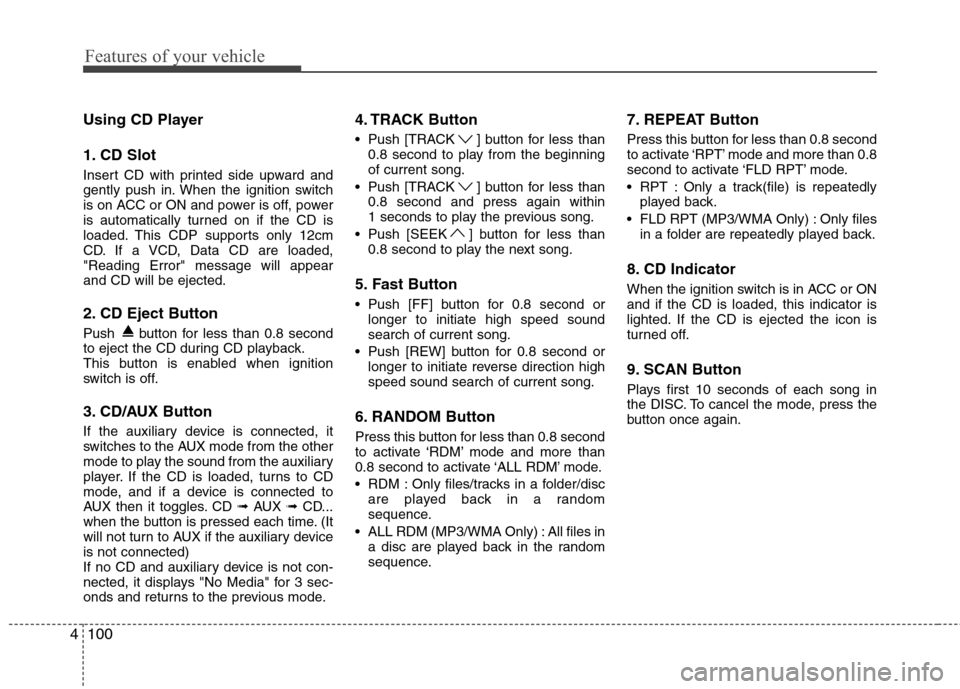
Using CD Player
1. CD Slot
Insert CD with printed side upward and
gently push in. When the ignition switch
is on ACC or ON and power is off, power
is automatically turned on if the CD is
loaded. This CDP supports only 12cm
CD. If a VCD, Data CD are loaded,"Reading Error" message will appearand CD will be ejected.
2. CD Eject Button
Push button for less than 0.8 second
to eject the CD during CD playback.
This button is enabled when ignition
switch is off.
3. CD/AUX Button
If the auxiliary device is connected, it
switches to the AUX mode from the other
mode to play the sound from the auxiliary
player. If the CD is loaded, turns to CD
mode, and if a device is connected to
AUX then it toggles. CD ➟AUX ➟CD...
when the button is pressed each time. (It
will not turn to AUX if the auxiliary deviceis not connected)
If no CD and auxiliary device is not con-
nected, it displays "No Media" for 3 sec-
onds and returns to the previous mode. 4. TRACK Button
Push [TRACK ] button for less than
0.8 second to play from the beginning of current song.
Push [TRACK ] button for less than 0.8 second and press again within
1 seconds to play the previous song.
Push [SEEK ] button for less than 0.8 second to play the next song.
5. Fast Button
Push [FF] button for 0.8 second or longer to initiate high speed sound search of current song.
Push [REW] button for 0.8 second or longer to initiate reverse direction highspeed sound search of current song.
6. RANDOM Button
Press this button for less than 0.8 second
to activate ‘RDM’ mode and more than
0.8 second to activate ‘ALL RDM’ mode.
RDM : Only files/tracks in a folder/disc are played back in a random
sequence.
ALL RDM (MP3/WMA Only) : All files in a disc are played back in the random
sequence. 7. REPEAT Button
Press this button for less than 0.8 second
to activate ‘RPT’ mode and more than 0.8
second to activate ‘FLD RPT’ mode.
RPT : Only a track(file) is repeatedly
played back.
FLD RPT (MP3/WMA Only) : Only files in a folder are repeatedly played back.
8. CD Indicator
When the ignition switch is in ACC or ON and if the CD is loaded, this indicator is
lighted. If the CD is ejected the icon is
turned off.
9. SCAN Button
Plays first 10 seconds of each song in
the DISC. To cancel the mode, press the
button once again.
Page 175 of 346
4105
Features of your vehicle
CAUTION IN USING USB DEVICE
To use an external USB device,make sure the device is not con-
nected when starting up the vehi-cle. Connect the device afterstarting the vehicle.
If you start the engine when the USB device is connected, it maydamage the USB device. (USBflashdrives are very sensitive toelectric shock.)
If the engine is started up or turned off while the external USBdevice is connected, the externalUSB device may not work.
It may not play inauthentic MP3 or WMA files.
1) It can only play MP3 files with the compression rate between8Kbps~320Kbps.
2) It can only play WMA music files with the compression rate
between 8 Kbps~320 Kbps.
Take precautions for static elec- tricity when connecting or dis-connecting the external USBdevice.
(Continued)
(Continued) An encoded MP3 PLAYER is not recognizable.
Depending on the condition of the external USB device, the con-nected external USB device canbe unrecognizable.
When the formatted byte/sector setting of External USB devices is
not either 512BYTE or 2048BYTE, then the device will not be recog-nized.
Use only a USB device formatted to FAT 12/16/32.
USB devices without USB I/F authentication may not be recog-nizable.
Make sure the USB connection terminal does not come in con-
tact with the people or otherobjects.
If you repeatedly connect and dis- connect the USB device in a short
period of time, you may cause damage to the device.
You may hear a strange noise when connecting or disconnect-ing a USB device.
(Continued)(Continued) If you disconnect a external USB device during playback in USBmode, the external USB devicecan be damaged or may malfunc-
tion. Therefore, disconnect theexternal USB device when the audio is turned off or in another
mode (e.g, Radio or CD).
Depending on the type and capacity of the external USBdevice or the type of files storedon the device there may be a
delay in the recognition of thedevice. This is not an indicator of trouble.
Do not use the USB device for purpose other than playing music
files.
Use of USB accessories such as recharges or heaters using USBI/F may lower performance or
cause trouble.
(Continued)