engine Hyundai H-1 (Grand Starex) 2016 - RHD (UK, Australia) Service Manual
[x] Cancel search | Manufacturer: HYUNDAI, Model Year: 2016, Model line: H-1 (Grand Starex), Model: Hyundai H-1 (Grand Starex) 2016Pages: 332, PDF Size: 6.89 MB
Page 126 of 332
Features of your vehicle
58 4
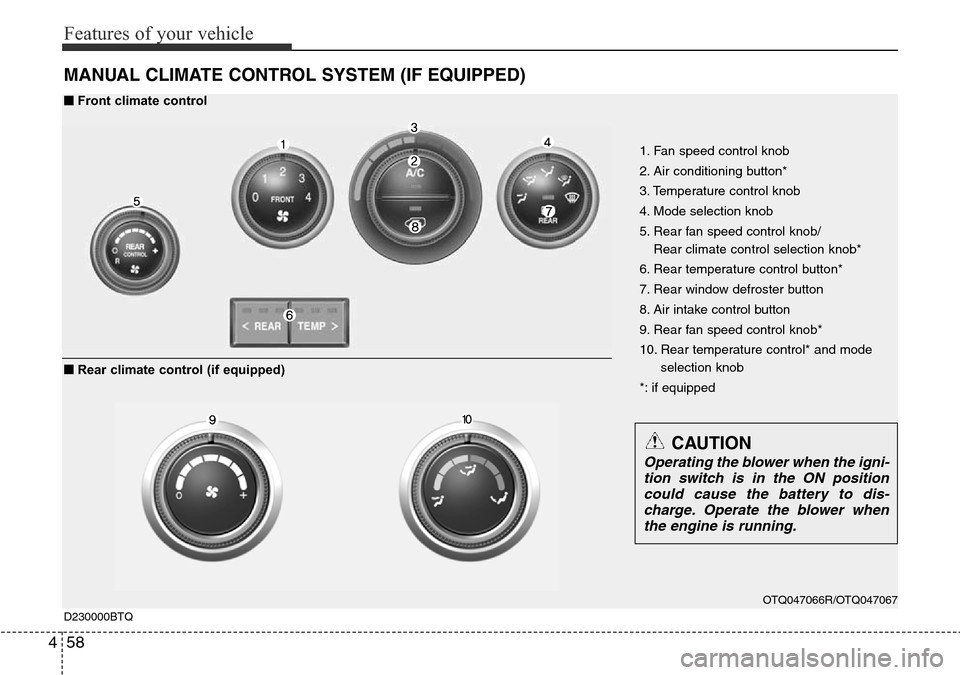
MANUAL CLIMATE CONTROL SYSTEM (IF EQUIPPED)
OTQ047066R/OTQ047067
1. Fan speed control knob
2. Air conditioning button*
3. Temperature control knob
4. Mode selection knob
5. Rear fan speed control knob/
Rear climate control selection knob*
6. Rear temperature control button*
7. Rear window defroster button
8. Air intake control button
9. Rear fan speed control knob*
10. Rear temperature control* and mode
selection knob
*: if equipped
D230000BTQ
■Front climate control
■Rear climate control (if equipped)
CAUTION
Operating the blower when the igni-
tion switch is in the ON position
could cause the battery to dis-
charge. Operate the blower when
the engine is running.
Page 127 of 332
459
Features of your vehicle
D230100ATQ
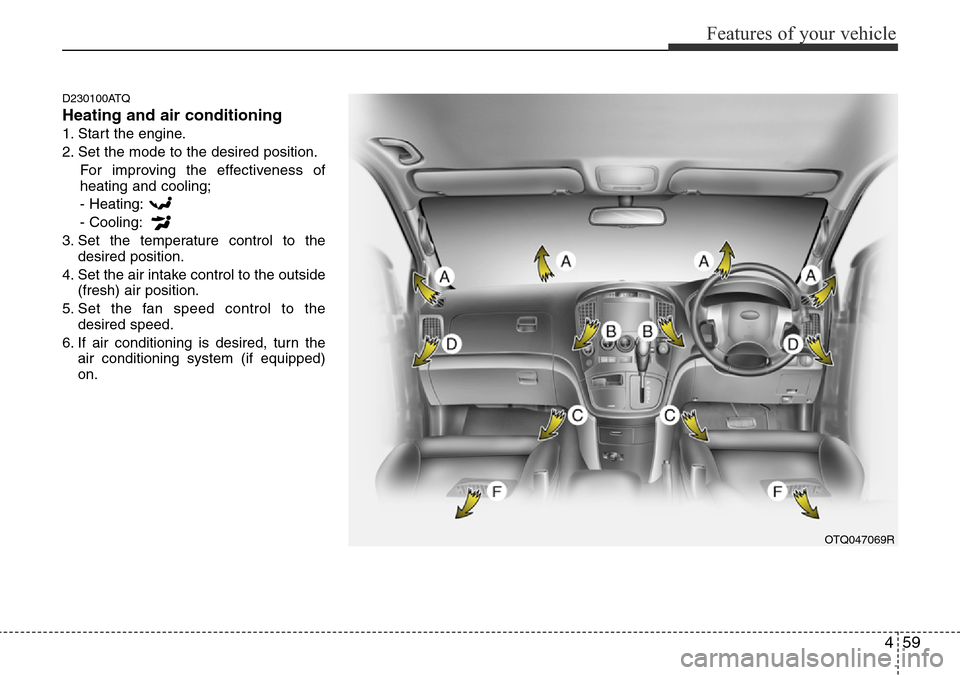
Heating and air conditioning
1. Start the engine.
2. Set the mode to the desired position.
For improving the effectiveness of
heating and cooling;
- Heating:
- Cooling:
3. Set the temperature control to the
desired position.
4. Set the air intake control to the outside
(fresh) air position.
5. Set the fan speed control to the
desired speed.
6. If air conditioning is desired, turn the
air conditioning system (if equipped)
on.
OTQ047069R
Page 134 of 332
Features of your vehicle
66 4
D230503BFD
Air conditioning (if equipped)
All HYUNDAI Air Conditioning Systems
are filled with environmentally friendly
R-134a refrigerant.
1. Start the engine. Push the air condi-
tioning button.
2. Set the mode to the position.
3. Set the air intake control to the outside
air or recirculated air position.
4. Adjust the fan speed control and tem-
perature control to maintain maximum
comfort.
• When maximum cooling is desired, set
the temperature control to the extreme
left position, then set the fan speed
control to the highest speed.
✽NOTICE
• When using the air conditioning sys-
tem, monitor the temperature gauge
closely whilst driving up hills or in
heavy traffic when outside tempera-
tures are high. Air conditioning sys-
tem operation may cause engine over-
heating. Continue to use the blower
fan but turn the air conditioning sys-
tem off if the temperature gauge indi-
cates engine overheating.
• When opening the windows in humid
weather air conditioning may create
water droplets inside the vehicle.
Since excessive water droplets may
cause damage to electrical equipment,
air conditioning should only be run
with the windows closed.
Air conditioning system operation tips
• If the vehicle has been parked in direct
sunlight during hot weather, open the
windows for a short time to let the hot
air inside the vehicle escape.
• To help reduce moisture inside of the
windows on rainy or humid days,
decrease the humidity inside the vehi-
cle by operating the air conditioning
system.
• During air conditioning system opera-
tion, you may occasionally notice a
slight change in engine speed as the
air conditioning compressor cycles.
This is a normal system operation
characteristic.
• Use the air conditioning system every
month only for a few minutes to ensure
maximum system performance.
Page 135 of 332
467
Features of your vehicle
• When using the air conditioning sys-
tem, you may notice clear water drip-
ping (or even puddling) on the ground
under the passenger side of the vehi-
cle. This is a normal system operation
characteristic.
• Operating the air conditioning system
in the recirculated air position provides
maximum cooling, however, continual
operation in this mode may cause the
air inside the vehicle to become stale.
• During cooling operation, you may
occasionally notice a misty air flow
because of rapid cooling and humid air
intake. This is a normal system opera-
tion characteristics.D230504ATQ-EA
Fuel-fired Heater (if equipped)
The low fuel consumption fuel-fired
heater supplies additional heat to the
interior compartment to assist with cabin
heating during engine warm-up.
The following 3 conditions should be met
at the same time for automatic operation
of the fuel-fired heater.
• Engine running.
• Ambient temperature is lower than 5°C.
• Coolant temperature is lower than
68°C.
A cleaning process of the fuel-fired
heater will be performed automatically
when the heater is not operated due to
increase of coolant temperature and igni-
tion off.
During cleaning process, supplied fuel in
the heater will be burnt completely and
any smoke will be expelled. It is a neces-
sary process for next operation and dura-
bility of the heater and takes about 1~3
minutes.
✽NOTICE
• The following symptoms will occur
and it is normal.
- A white smoke may come out from
the fuel-fired heater exhaust pipe
during operation of the heater.
However, when an excessive black
smoke is discharged, the fuel-fired
heater should be inspected.
- A “buk-buk” noise from the heater is
a noise to form flame for combus-
tion.
- When the heater is operated at full
load, a “Wooing” noise occurs.
- When shutting off the engine during
heater operation, a “Wing” noise
occurs to perform the cleaning
process.
• When refuelling, stop operation of the
fuel-fired heater by shutting off the
engine.
Page 143 of 332
475
Features of your vehicle
D280400BTQ
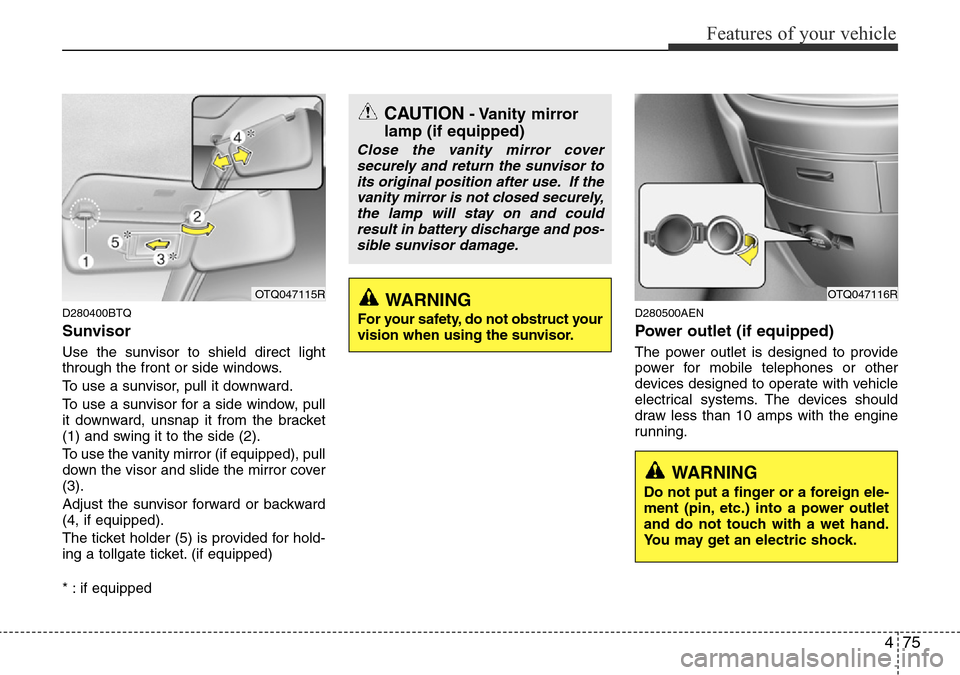
Sunvisor
Use the sunvisor to shield direct light
through the front or side windows.
To use a sunvisor, pull it downward.
To use a sunvisor for a side window, pull
it downward, unsnap it from the bracket
(1) and swing it to the side (2).
To use the vanity mirror (if equipped), pull
down the visor and slide the mirror cover
(3).
Adjust the sunvisor forward or backward
(4, if equipped).
The ticket holder (5) is provided for hold-
ing a tollgate ticket. (if equipped)
* : if equipped
D280500AEN
Power outlet (if equipped)
The power outlet is designed to provide
power for mobile telephones or other
devices designed to operate with vehicle
electrical systems. The devices should
draw less than 10 amps with the engine
running.
OTQ047115ROTQ047116R
CAUTION- Vanity mirror
lamp (if equipped)
Close the vanity mirror cover
securely and return the sunvisor to
its original position after use. If the
vanity mirror is not closed securely,
the lamp will stay on and could
result in battery discharge and pos-
sible sunvisor damage.
WARNING
Do not put a finger or a foreign ele-
ment (pin, etc.) into a power outlet
and do not touch with a wet hand.
You may get an electric shock.
WARNING
For your safety, do not obstruct your
vision when using the sunvisor.
Page 144 of 332
Features of your vehicle
76 4
D280600AEN
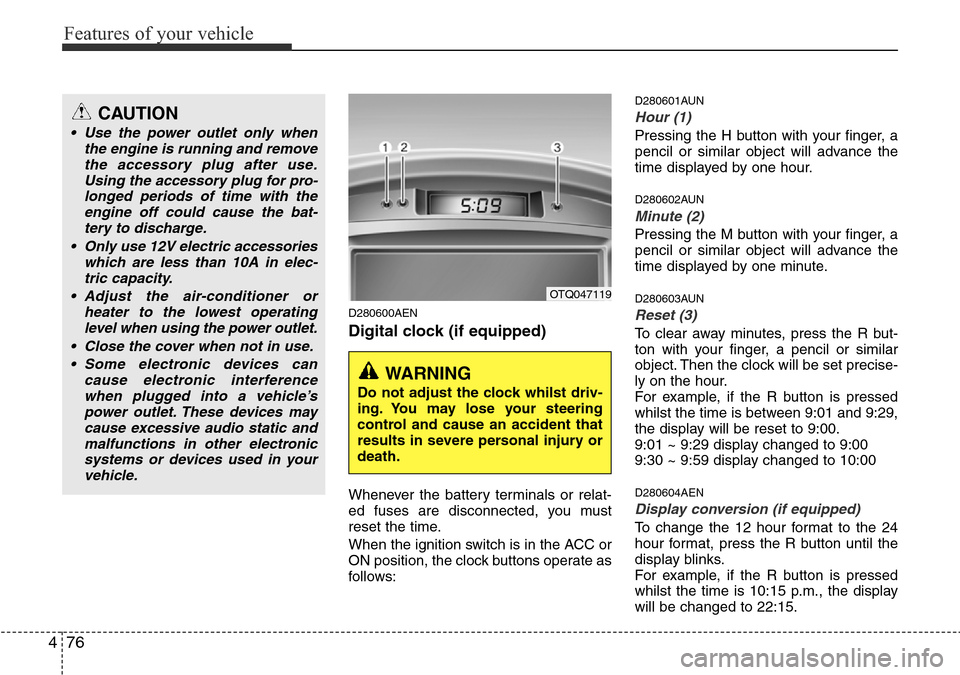
Digital clock (if equipped)
Whenever the battery terminals or relat-
ed fuses are disconnected, you must
reset the time.
When the ignition switch is in the ACC or
ON position, the clock buttons operate as
follows:
D280601AUN
Hour (1)
Pressing the H button with your finger, a
pencil or similar object will advance the
time displayed by one hour.
D280602AUN
Minute (2)
Pressing the M button with your finger, a
pencil or similar object will advance the
time displayed by one minute.
D280603AUN
Reset (3)
To clear away minutes, press the R but-
ton with your finger, a pencil or similar
object. Then the clock will be set precise-
ly on the hour.
For example, if the R button is pressed
whilst the time is between 9:01 and 9:29,
the display will be reset to 9:00.
9:01 ~ 9:29 display changed to 9:00
9:30 ~ 9:59 display changed to 10:00
D280604AEN
Display conversion (if equipped)
To change the 12 hour format to the 24
hour format, press the R button until the
display blinks.
For example, if the R button is pressed
whilst the time is 10:15 p.m., the display
will be changed to 22:15.
OTQ047119
WARNING
Do not adjust the clock whilst driv-
ing. You may lose your steering
control and cause an accident that
results in severe personal injury or
death.
CAUTION
• Use the power outlet only when
the engine is running and remove
the accessory plug after use.
Using the accessory plug for pro-
longed periods of time with the
engine off could cause the bat-
tery to discharge.
• Only use 12V electric accessories
which are less than 10A in elec-
tric capacity.
• Adjust the air-conditioner or
heater to the lowest operating
level when using the power outlet.
• Close the cover when not in use.
• Some electronic devices can
cause electronic interference
when plugged into a vehicle’s
power outlet. These devices may
cause excessive audio static and
malfunctions in other electronic
systems or devices used in your
vehicle.
Page 148 of 332
Features of your vehicle
80 4
D300600AHM-EE
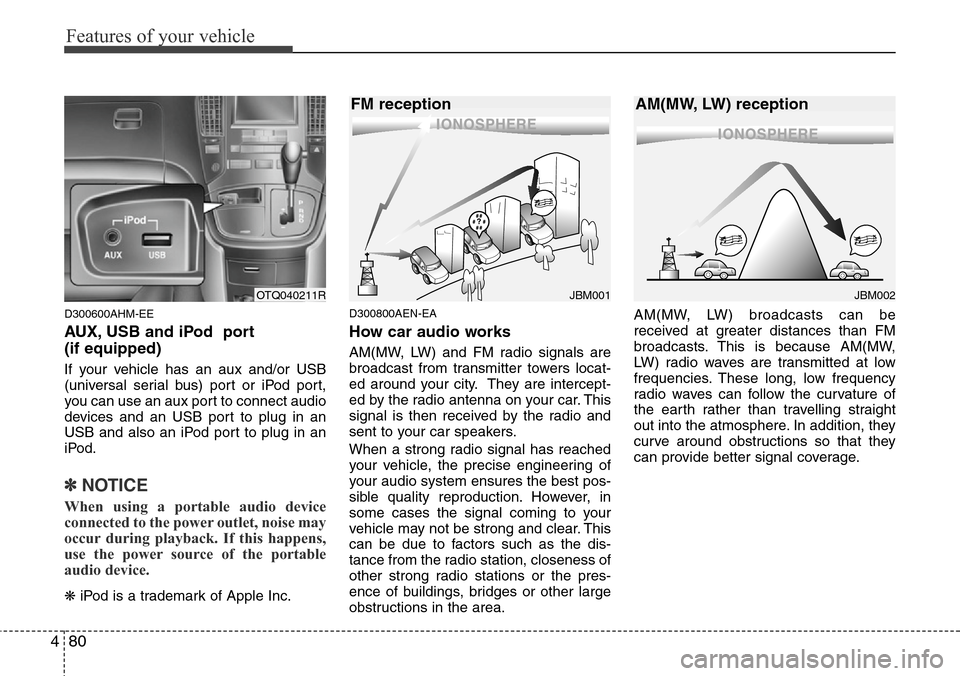
AUX, USB and iPod port
(if equipped)
If your vehicle has an aux and/or USB
(universal serial bus) port or iPod port,
you can use an aux port to connect audio
devices and an USB port to plug in an
USB and also an iPod port to plug in an
iPod.
✽NOTICE
When using a portable audio device
connected to the power outlet, noise may
occur during playback. If this happens,
use the power source of the portable
audio device.
❋iPod is a trademark of Apple Inc.
D300800AEN-EA
How car audio works
AM(MW, LW) and FM radio signals are
broadcast from transmitter towers locat-
ed around your city. They are intercept-
ed by the radio antenna on your car. This
signal is then received by the radio and
sent to your car speakers.
When a strong radio signal has reached
your vehicle, the precise engineering of
your audio system ensures the best pos-
sible quality reproduction. However, in
some cases the signal coming to your
vehicle may not be strong and clear. This
can be due to factors such as the dis-
tance from the radio station, closeness of
other strong radio stations or the pres-
ence of buildings, bridges or other large
obstructions in the area.AM(MW, LW) broadcasts can be
received at greater distances than FM
broadcasts. This is because AM(MW,
LW) radio waves are transmitted at low
frequencies. These long, low frequency
radio waves can follow the curvature of
the earth rather than travelling straight
out into the atmosphere. In addition, they
curve around obstructions so that they
can provide better signal coverage.
JBM002
AM(MW, LW) reception
JBM001
FM reception
OTQ040211R
Page 172 of 332
Features of your vehicle
104 4
CAUTION IN USING USB
DEVICE
• To use an external USB device,
make sure the device is not con-
nected when starting up the vehi-
cle. Connect the device after
starting the vehicle.
• If you start the engine when the
USB device is connected, it may
damage the USB device. (USB
flashdrives are very sensitive to
electric shock.)
• If the engine is started up or
turned off whilst the external USB
device is connected, the external
USB device may not work.
• It may not play inauthentic MP3 or
WMA files.
1) It can only play MP3 files with
the compression rate between
8Kbps~320Kbps.
2) It can only play WMA music
files with the compression rate
between 8 Kbps~320 Kbps.
• Take precautions for static elec-
tricity when connecting or dis-
connecting the external USB
device.
(Continued)
(Continued)
• An encoded MP3 PLAYER is not
recognizable.
• Depending on the condition of
the external USB device, the con-
nected external USB device can
be unrecognizable.
• When the formatted byte/sector
setting of External USB devices is
not either 512BYTE or 2048BYTE,
then the device will not be recog-
nized.
• Use only a USB device formatted
to FAT 12/16/32.
• USB devices without USB I/F
authentication may not be recog-
nizable.
• Make sure the USB connection
terminal does not come in con-
tact with the people or other
objects.
• If you repeatedly connect and dis-
connect the USB device in a short
period of time, you may cause
damage to the device.
• You may hear a strange noise
when connecting or disconnect-
ing a USB device.
(Continued)(Continued)
• If you disconnect a external USB
device during playback in USB
mode, the external USB device
can be damaged or may malfunc-
tion. Therefore, disconnect the
external USB device when the
audio is turned off or in another
mode (e.g, Radio or CD).
• Depending on the type and
capacity of the external USB
device or the type of files stored
on the device there may be a
delay in the recognition of the
device. This is not an indicator of
trouble.
• Do not use the USB device for
purpose other than playing music
files.
• Use of USB accessories such as
recharges or heaters using USB
I/F may lower performance or
cause trouble.
(Continued)
Page 181 of 332
4113
Features of your vehicle
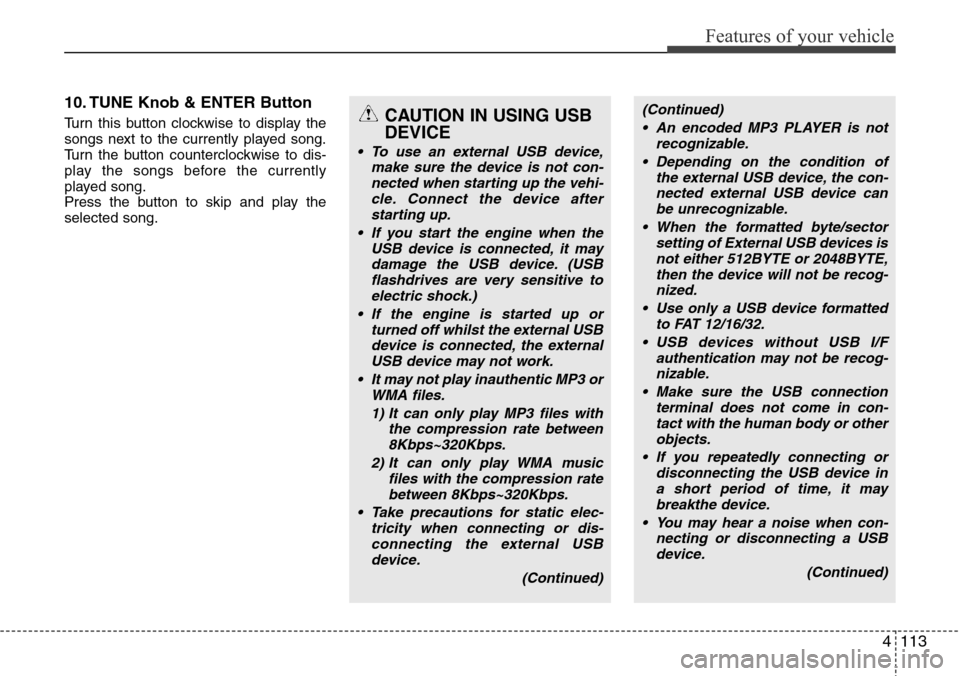
10. TUNE Knob & ENTER Button
Turn this button clockwise to display the
songs next to the currently played song.
Turn the button counterclockwise to dis-
play the songs before the currently
played song.
Press the button to skip and play the
selected song.CAUTION IN USING USB
DEVICE
• To use an external USB device,
make sure the device is not con-
nected when starting up the vehi-
cle. Connect the device after
starting up.
• If you start the engine when the
USB device is connected, it may
damage the USB device. (USB
flashdrives are very sensitive to
electric shock.)
• If the engine is started up or
turned off whilst the external USB
device is connected, the external
USB device may not work.
• It may not play inauthentic MP3 or
WMA files.
1) It can only play MP3 files with
the compression rate between
8Kbps~320Kbps.
2) It can only play WMA music
files with the compression rate
between 8Kbps~320Kbps.
• Take precautions for static elec-
tricity when connecting or dis-
connecting the external USB
device.
(Continued)
(Continued)
• An encoded MP3 PLAYER is not
recognizable.
• Depending on the condition of
the external USB device, the con-
nected external USB device can
be unrecognizable.
• When the formatted byte/sector
setting of External USB devices is
not either 512BYTE or 2048BYTE,
then the device will not be recog-
nized.
• Use only a USB device formatted
to FAT 12/16/32.
• USB devices without USB I/F
authentication may not be recog-
nizable.
• Make sure the USB connection
terminal does not come in con-
tact with the human body or other
objects.
• If you repeatedly connecting or
disconnecting the USB device in
a short period of time, it may
breakthe device.
• You may hear a noise when con-
necting or disconnecting a USB
device.
(Continued)
Page 186 of 332
5
Before driving / 5-3
Key positions / 5-4
Starting the engine / 5-6
Manual transmission / 5-8
Automatic transmission / 5-11
Brake system / 5-18
Locking differential / 5-28
Economical operation / 5-29
Special driving conditions / 5-31
Winter driving / 5-36
Trailer towing / 5-40
Vehicle weight / 5-48
Driving your vehicle