fog Hyundai H350 2016 User Guide
[x] Cancel search | Manufacturer: HYUNDAI, Model Year: 2016, Model line: H350, Model: Hyundai H350 2016Pages: 473, PDF Size: 26.4 MB
Page 179 of 473
3-117
Convenient features of your vehicle
3
System operation
Ventilation
1. Set the mode to the position.
2. Set the air intake control to theoutside (fresh) air position.
3. Set the temperature control to the desired position.
4. Set the fan speed control to the desired speed.
Heating
1. Set the mode to the position.
2. Set the air intake control to theoutside (fresh) air position.
3. Set the temperature control to the desired position.
4. Set the fan speed control to the desired speed.
5. If dehumidified heating is desired, turn the air conditioning system (if equipped) on.
If the windshield fogs up, set the mode to the or position.
Operation Tips
To keep dust or unpleasant fumesfrom entering the vehicle through
the ventilation system, temporarily
set the air intake control to the
recirculated air position. Be sure to
return the control to the fresh air
position when the irritation has
passed to keep fresh air in the
vehicle. This will help keep the driv-
er alert and comfortable.
Air for the heating/cooling system is drawn in through the grilles just
ahead of the windshield. Care
should be taken that these are not
blocked by leaves, snow, ice or
other obstructions.
To prevent interior fog on the wind- shield, set the air intake control to
the fresh air position and fan speed
to the desired position, turn on theair conditioning system, and adjust
the temperature control to desired
temperature.
Air conditioning (if equipped)
HYUNDAI Air Conditioning Systems
are filled with environmentally friend-
ly R-134a refrigerant.
1. Start the engine. Push the air con- ditioning button.
2. Set the mode to the position.
3. Set the air intake control to the outside air or recirculated air posi- tion.
4. Adjust the fan speed control and temperature control to maintain
maximum comfort.
When maximum cooling is desired, set the temperature control to the
extreme left position, then set the
fan speed control to the highestspeed.
Page 183 of 473
3-121
Convenient features of your vehicle
3
For maximum defrosting, set thetemperature control to the extreme
right/hot position and the fan speedcontrol to the highest speed.
If warm air to the floor is desired while defrosting or defogging, setthe mode to the floor-defrost posi-tion.
Before driving, clear all snow and ice from the windshield, rear win-
dow, outside rear view mirrors, and
all side windows.
Clear all snow and ice from the hood and air inlet in the cowl grill to
improve heater and defroster effi-ciency and to reduce the probabili-
ty of fogging up the inside of thewindshield.To defog inside windshield
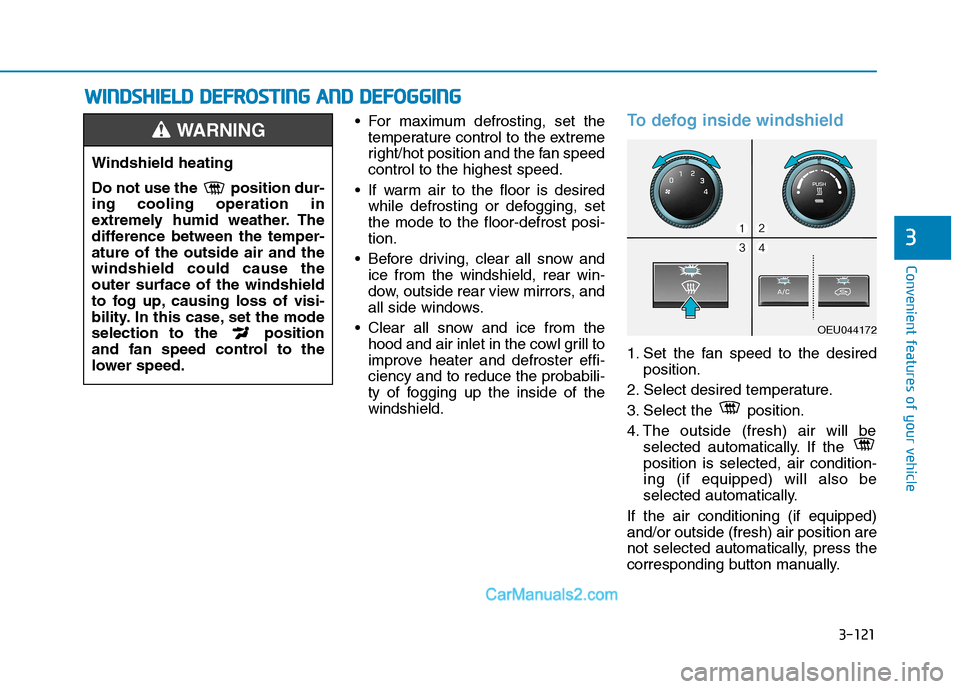
1. Set the fan speed to the desired position.
2. Select desired temperature.
3. Select the position.
4. The outside (fresh) air will be selected automatically. If the position is selected, air condition-ing (if equipped) will also be
selected automatically.
If the air conditioning (if equipped)and/or outside (fresh) air position are
not selected automatically, press the
corresponding button manually.
Windshield heating
Do not use the position dur- ing cooling operation in
extremely humid weather. The
difference between the temper-ature of the outside air and thewindshield could cause theouter surface of the windshield
to fog up, causing loss of visi-
bility. In this case, set the mode
selection to the position
and fan speed control to the
lower speed.
WARNING
WW IINN DDSSHH IIEE LLDD DD EEFFRR OO SSTT IINN GG AA NN DD DD EEFFOO GGGGIINN GG
OEU044172
Page 311 of 473
5-40
Driving your vehicle
DRIVER'S ATTENTION
The LDWS may not warn you even
if the vehicle leaves the lane, or may
warn you even if the vehicle does not
leave the lane when:
The lane can't be visible due tosnow, rain, stain, a puddle or other
factors.
The brightness outside changes suddenly such as tunnel enter/exit.
The headlamps are not on at night or in a tunnel, or light level is low.
It is difficult to distinguish the color of the lane marking from the
road or the lane line is damaged or
indistinct.
Driving on a steep grade or a curve.
Light such as street light, sunlight or oncoming vehicle light reflects
from the water on the road.
The lens or windshield is covered with foreign matter.
The sensor cannot detect the lane because of fog, heavy rain, or
heavy snow. (Continued)(Continued)
The surrounding of the inside rear
view mirror temperature is high
due to direct sun light.
The lane is very wide or narrow.
The windshield is fogged by humid air in the vehicle.
A shadow is on the lane line.
There is a mark that looks like a lane line.
There is a boundary structure, such as a concrete barrier.
The distance from the vehicle ahead is very short or the vehicle
ahead drives covering the lane
line.
The vehicle vibrates heavily due to road conditions.
The number of lanes increases or decreases or the lane lines are
crossing.
Putting something on the dash- board.
Driving with the sun in front of you.
Driving in areas under construc- tion.
There are more than two lane lines.
Active ECO operation
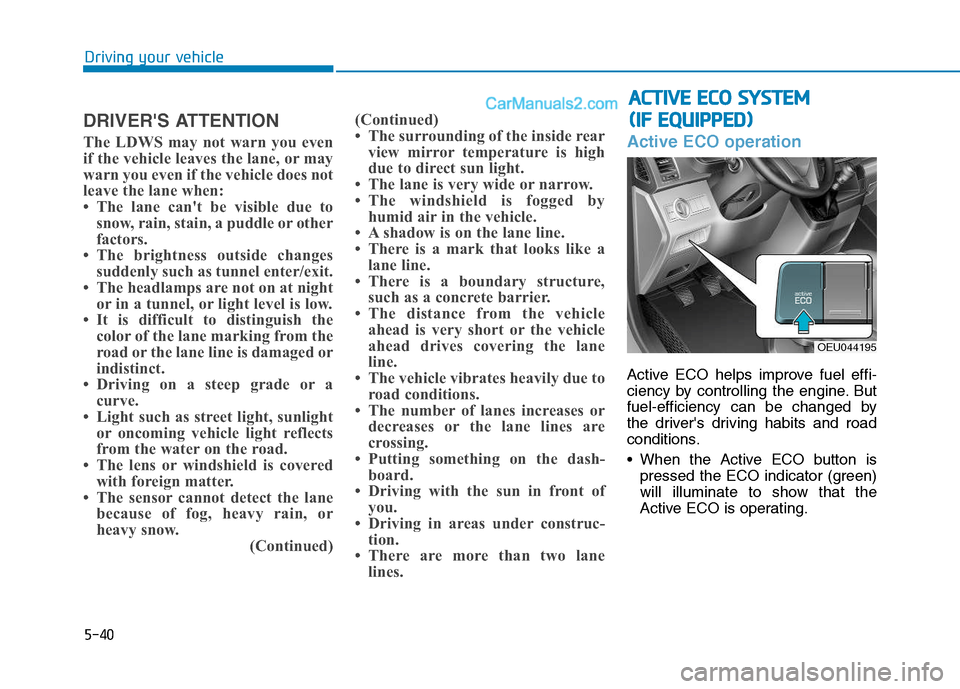
Active ECO helps improve fuel effi-
ciency by controlling the engine. But
fuel-efficiency can be changed by
the driver's driving habits and road
conditions.
When the Active ECO button ispressed the ECO indicator (green)
will illuminate to show that the
Active ECO is operating.
AACCTT IIVV EE EE CCOO SS YY SSTT EEMM
(
( IIFF EE QQ UUIIPP PP EEDD ))
OEU044195
Page 365 of 473
7
Tire rotation ....................................................................7-44
Wheel alignment and tire balance ..............................7-45
Tire replacement .............................................................7-46
Wheel replacement ........................................................7-47
Tire traction ......................................................................7-47
Tire maintenance ...........................................................7-47
Tire sidewall labeling ......................................................7-48
Fuses ......................................................................7-50 Inner panel fuse replacement ......................................7-52
Alternator fuse ................................................................7-54
Multi fuse ..........................................................................7-54
Fuse/Relay panel description ......................................7-55
Light bulbs.............................................................7-67 Headlight, position light, turn signal light, front fog
light bulb replacement ...................................................7-68Headlight and front fog light aiming (for Europe) ..7-70
Side marker lamp ............................................................7-75
Rear combination light bulbs replacement ...............7-75
High mounted stop light bulb replacement ..............7-78
License plate light bulb replacement .........................7-78
Interior light bulb replacement ....................................7-78
Appearance care ..................................................7-79 Exterior care ....................................................................7-79
Interior care......................................................................7-85 Emission control system .....................................7-87
Crankcase emission control system ...........................7-87
Evaporative emission control system.........................7-87
Exhaust emission control system ...............................7-88
Page 431 of 473
7-68
Maintenance
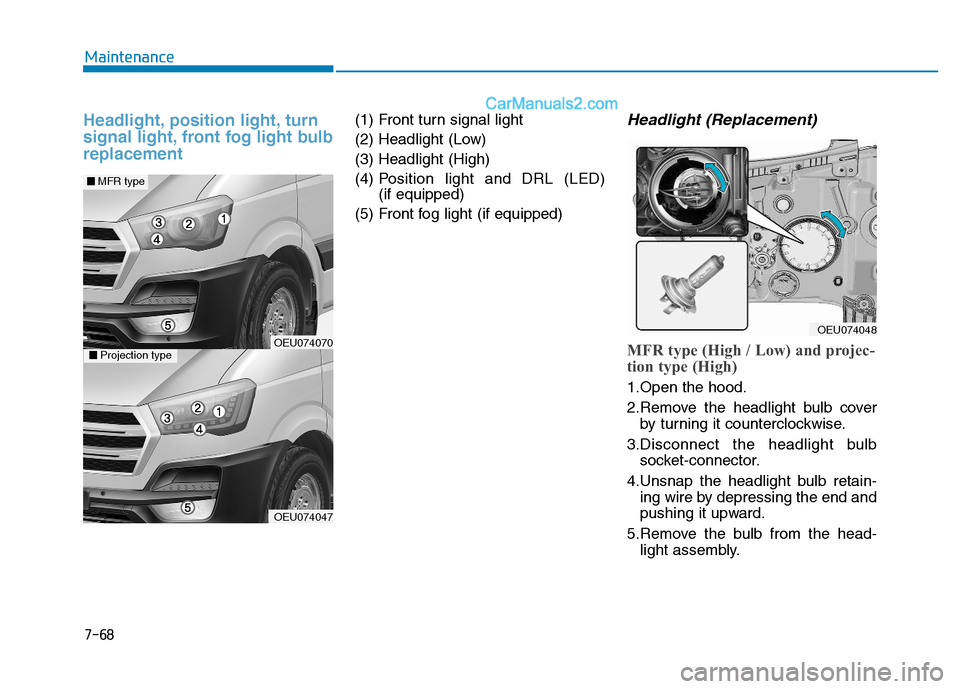
Headlight, position light, turn
signal light, front fog light bulbreplacement(1) Front turn signal light
(2) Headlight (Low)(3) Headlight (High)(4) Position light and DRL (LED)
(if equipped)
(5) Front fog light (if equipped)Headlight (Replacement)
MFR type (High / Low) and projec-
tion type (High)
1.Open the hood.
2.Remove the headlight bulb cover by turning it counterclockwise.
3.Disconnect the headlight bulb socket-connector.
4.Unsnap the headlight bulb retain- ing wire by depressing the end and
pushing it upward.
5.Remove the bulb from the head- light assembly.
OEU074048
OEU074047
OEU074070
■■MFR type
■■Projection type
Page 433 of 473
7-70
Maintenance
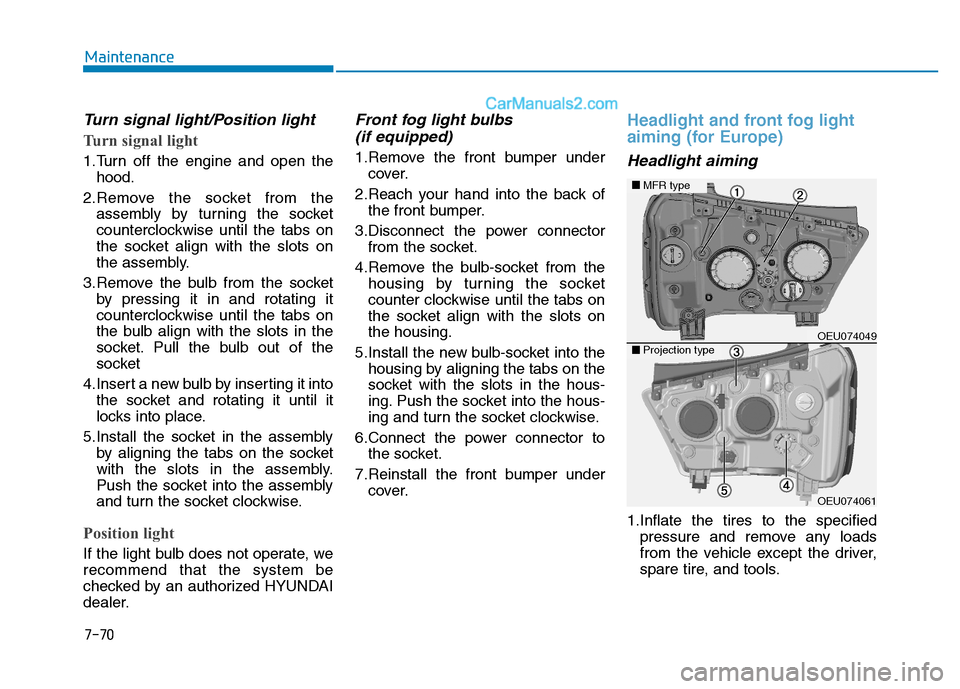
Turn signal light/Position light
Turn signal light
1.Turn off the engine and open thehood.
2.Remove the socket from the assembly by turning the socket
counterclockwise until the tabs on
the socket align with the slots on
the assembly.
3.Remove the bulb from the socket by pressing it in and rotating it
counterclockwise until the tabs on
the bulb align with the slots in the
socket. Pull the bulb out of the
socket
4.Insert a new bulb by inserting it into the socket and rotating it until it
locks into place.
5.Install the socket in the assembly by aligning the tabs on the socket
with the slots in the assembly.
Push the socket into the assembly
and turn the socket clockwise.
Position light
If the light bulb does not operate, we recommend that the system be
checked by an authorized HYUNDAI
dealer.
Front fog light bulbs
(if equipped)
1.Remove the front bumper under cover.
2.Reach your hand into the back of the front bumper.
3.Disconnect the power connector from the socket.
4.Remove the bulb-socket from the housing by turning the socket
counter clockwise until the tabs on
the socket align with the slots onthe housing.
5.Install the new bulb-socket into the housing by aligning the tabs on the
socket with the slots in the hous-
ing. Push the socket into the hous-
ing and turn the socket clockwise.
6.Connect the power connector to the socket.
7.Reinstall the front bumper under cover.
Headlight and front fog light
aiming (for Europe)
Headlight aiming
1.Inflate the tires to the specified
pressure and remove any loads
from the vehicle except the driver,
spare tire, and tools.
OEU074061
OEU074049■■Projection type
■■MFR type
Page 434 of 473
7-71
7
Maintenance
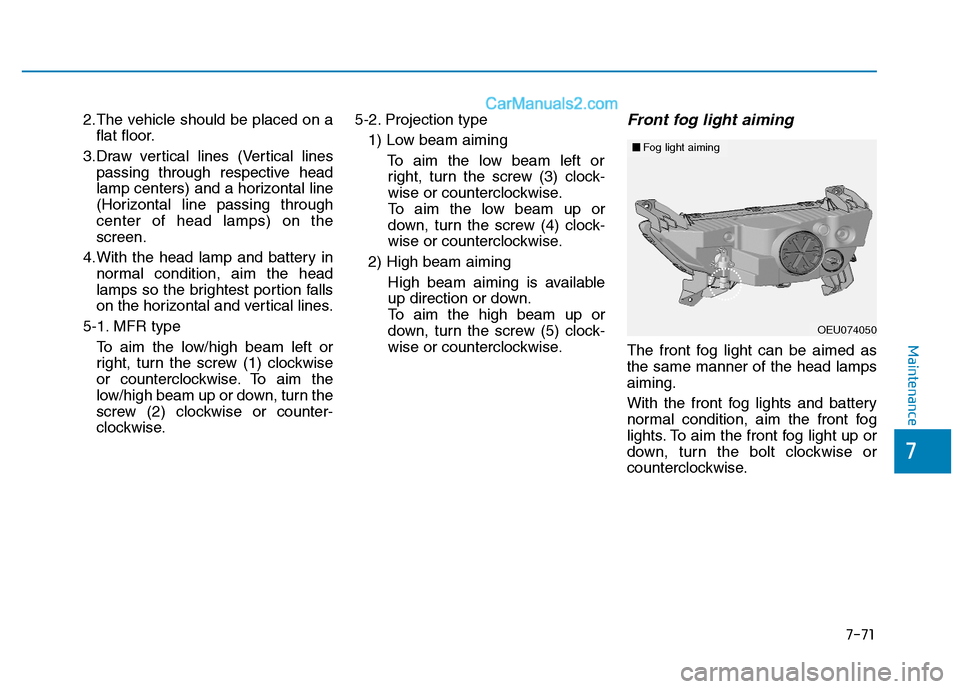
2.The vehicle should be placed on aflat floor.
3.Draw vertical lines (Vertical lines passing through respective head
lamp centers) and a horizontal line
(Horizontal line passing throughcenter of head lamps) on thescreen.
4.With the head lamp and battery in normal condition, aim the head
lamps so the brightest portion falls
on the horizontal and vertical lines.
5-1. MFR type To aim the low/high beam left or
right, turn the screw (1) clockwise
or counterclockwise. To aim the
low/high beam up or down, turn the
screw (2) clockwise or counter-
clockwise. 5-2. Projection type
1) Low beam aiming
To aim the low beam left orright, turn the screw (3) clock-
wise or counterclockwise.
To aim the low beam up or
down, turn the screw (4) clock-
wise or counterclockwise.
2) High beam aiming High beam aiming is available
up direction or down.
To aim the high beam up or
down, turn the screw (5) clock-
wise or counterclockwise.Front fog light aiming
The front fog light can be aimed asthe same manner of the head lampsaiming.
With the front fog lights and battery
normal condition, aim the front fog
lights. To aim the front fog light up or
down, turn the bolt clockwise or
counterclockwise.
OEU074050
■■Fog light aiming
Page 435 of 473
7-72
Maintenance
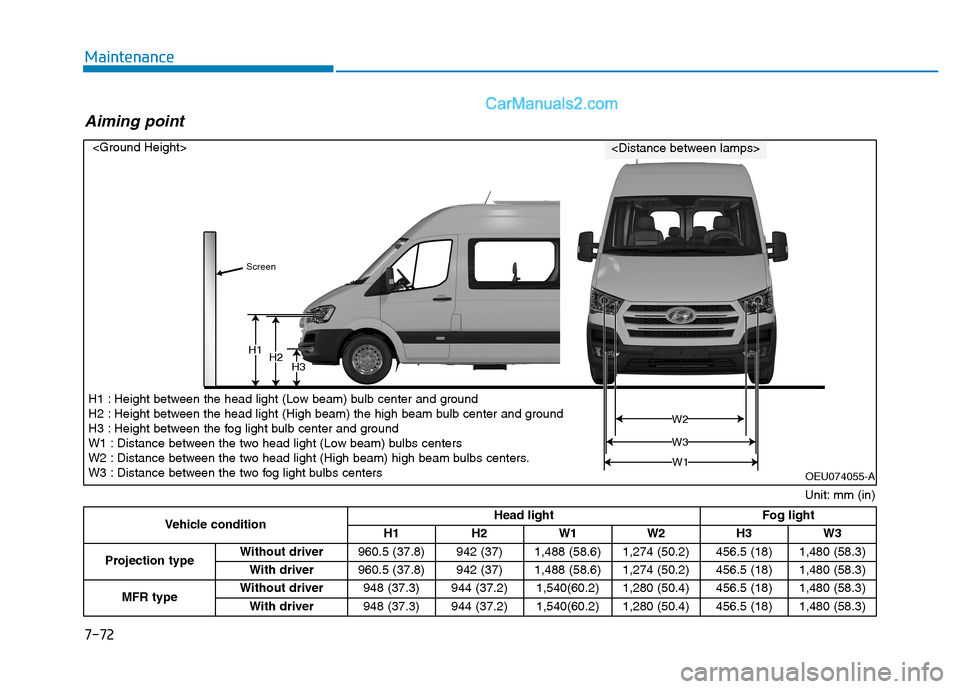
H1H2H3
W1
W 3
W2
Vehicle condition Head light
Fog light
H1 H2 W1 W2 H3 W3
Projection type Without driver
960.5 (37.8) 942 (37) 1,488 (58.6) 1,274 (50.2) 456.5 (18) 1,480 (58.3)
With driver 960.5 (37.8) 942 (37) 1,488 (58.6) 1,274 (50.2) 456.5 (18) 1,480 (58.3)
MFR type Without driver
948 (37.3) 944 (37.2) 1,540(60.2) 1,280 (50.4) 456.5 (18) 1,480 (58.3)
With driver 948 (37.3) 944 (37.2) 1,540(60.2) 1,280 (50.4) 456.5 (18) 1,480 (58.3)
Unit: mm (in)
H1 : Height between the head light (Low beam) bulb center and ground
H2 : Height between the head light (High beam) the high beam bulb center and ground
H3 : Height between the fog light bulb center and ground
W1 : Distance between the two head light (Low beam) bulbs centers
W2 : Distance between the two head light (High beam) high beam bulbs centers.
W3 : Distance between the two fog light bulbs centers
Aiming point
OEU074055-A
Page 437 of 473
7-74
Maintenance
Front fog light
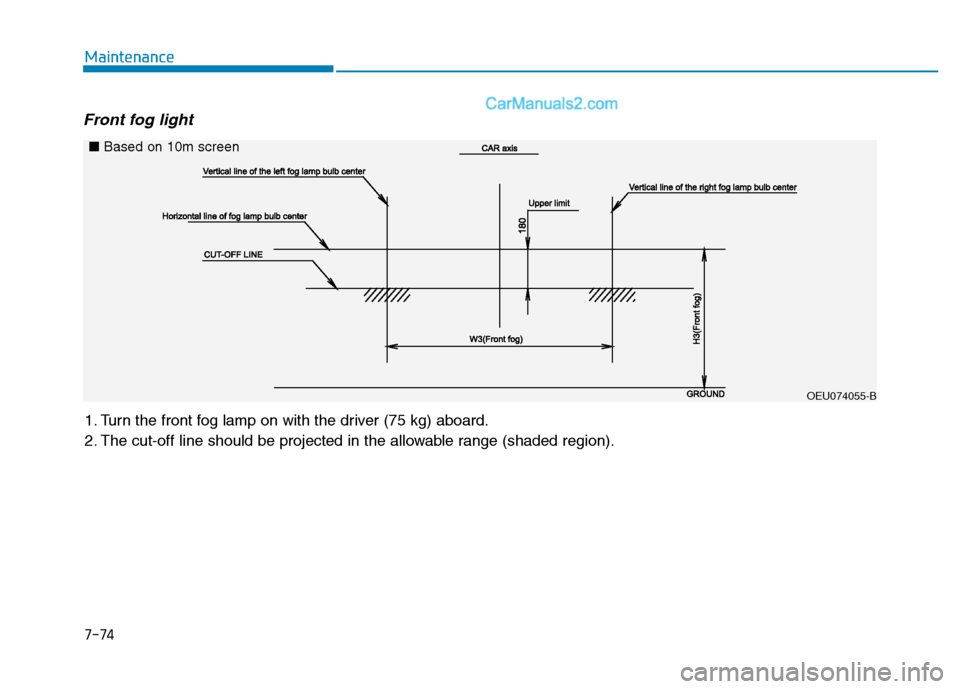
1. Turn the front fog lamp on with the driver (75 kg) aboard.
2. The cut-off line should be projected in the allowable range (shaded region).
OEU074055-B
■
Based on 10m screen
Page 438 of 473
7-75
7
Maintenance
Side marker lamp
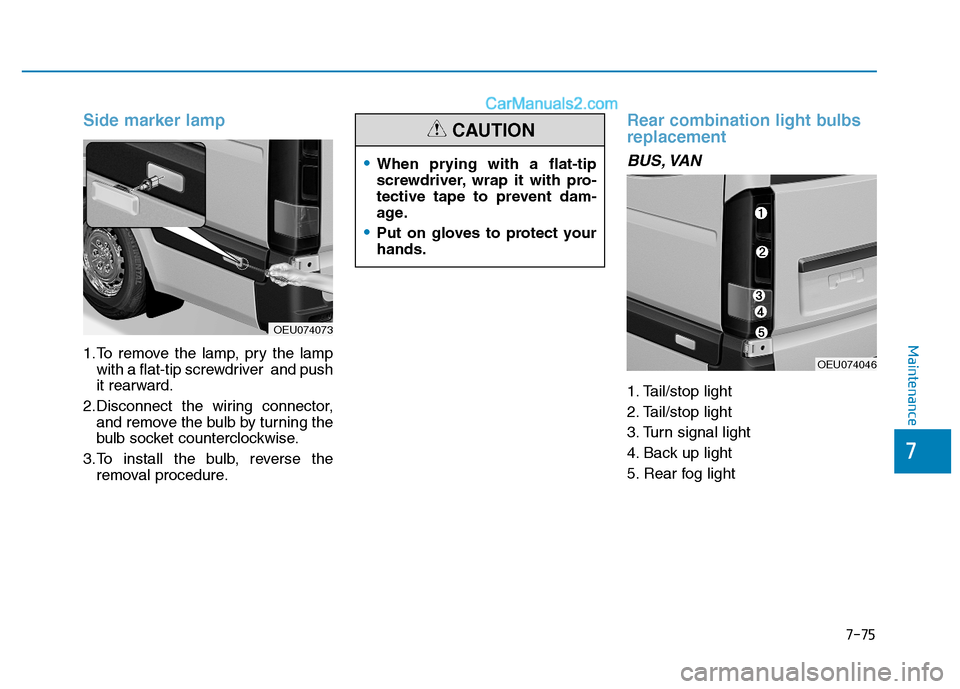
1.To remove the lamp, pry the lampwith a flat-tip screwdriver and push
it rearward.
2.Disconnect the wiring connector, and remove the bulb by turning the
bulb socket counterclockwise.
3.To install the bulb, reverse the removal procedure.
Rear combination light bulbs replacement
BUS, VAN
1. Tail/stop light
2. Tail/stop light
3. Turn signal light
4. Back up light
5. Rear fog light
OEU074046
OEU074073
When prying with a flat-tip
screwdriver, wrap it with pro-
tective tape to prevent dam-
age.
Put on gloves to protect your hands.
CAUTION