Time Hyundai H350 2016 Owner's Guide
[x] Cancel search | Manufacturer: HYUNDAI, Model Year: 2016, Model line: H350, Model: Hyundai H350 2016Pages: 473, PDF Size: 26.4 MB
Page 116 of 473
3-54
Convenient features of your vehicle
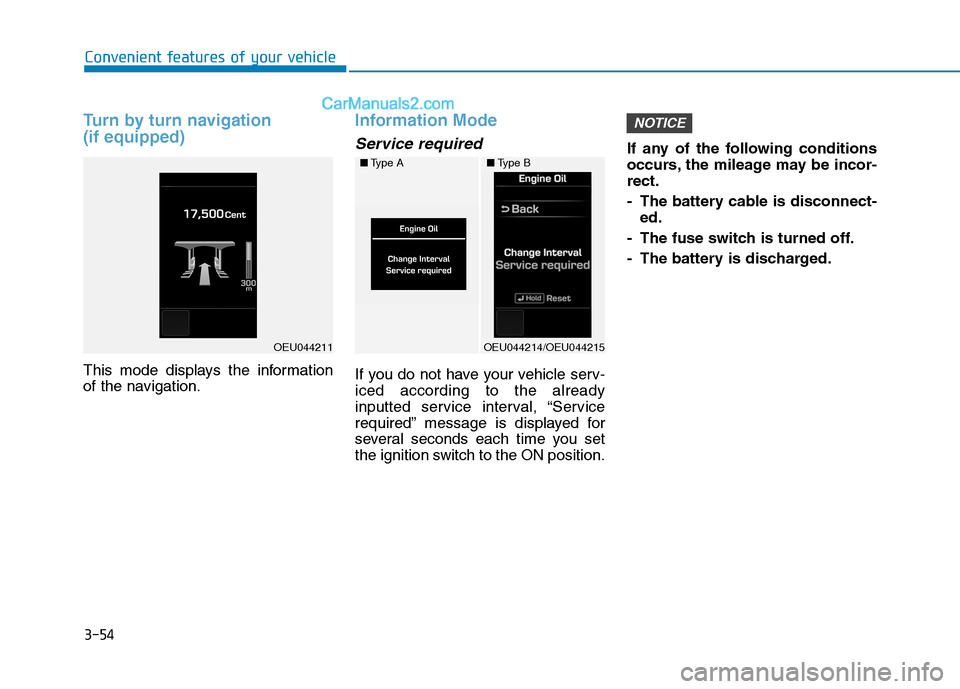
Turn by turn navigation (if equipped)
This mode displays the information
of the navigation.
Information Mode
Service required
If you do not have your vehicle serv- iced according to the already
inputted service interval, “Service
required” message is displayed for
several seconds each time you set
the ignition switch to the ON position.If any of the following conditions
occurs, the mileage may be incor-rect.
- The battery cable is disconnect-
ed.
- The fuse switch is turned off.
- The battery is discharged.
NOTICE
■ Type A
OEU044214/OEU044215
■Type B
OEU044211
Page 118 of 473
3-56
Convenient features of your vehicle
Door
Auto Door Lock (if equipped)
Off:The auto door lock operation willbe deactivated.
Enable on speed: All doors will be automaticallylocked when the vehicle speed
exceeds 15km/h (9.3mph).
Auto Door Unlock (if equipped)
Key Out or Power Off:
All doors will be automaticallyunlocked when the ignition key is
removed from ignition switch to theOFF position.
Driver Door Unlock:
All doors will be automatically
unlocked if the driver's door is
unlocked.
Light
Head Lamp Delay (if equipped)
If this item is checked, the headlamp
delay will be activated.
Welcome Light (if equipped)
When it is selected, the headlamp
welcome function automatically acti-
vates.
Auto Triple Turn (if equipped)
When it is selected, the auto triple
turn function activates.
External Lamp Check (if equipped)
When it is selected, the external
lamps automatically activate.
* It monitors all external lamps,except the back-up lights.
Sound
The sound volume can be adjusted
from level 0 (OFF) to 3.
Cluster
Shift gear
It is turned ON or OFF.
Unit Settings
Time unit
The time unit can be converted from
12 hours to 24 hours, and vice versa.
Temperature unit
The temperature unit can be convert-
ed from °C to °F, and vice versa.
Page 119 of 473
3-57
Convenient features of your vehicle
3
AFC setting
It can be automatically or manually
reset to the default. ❇AFC : Average Fuel Consumption
Language setting
A preferred language can be chosen
on the LCD display.
Current time
The time can be adjusted.
Alarm
The alarm, idle-rpm time, break time can be set in.
Equipment cycle(Maintenance)
Engine oil, fuel filter
The maintenance alarm can be
turned ON or OFF. Also, the driving
distance for an oil/filter maintenance
alarm can be set in.
User Menu
The maintenance alarm message
displays on the LCD display, as arbi-
trarily set in.
Warning Messages
In below cases, the warning mes-
sage displays for 10 seconds. Some
messages will be saved in the infor-
mation group after few seconds dis-
playing for future reference.
Page 121 of 473
3-59
Convenient features of your vehicle
3
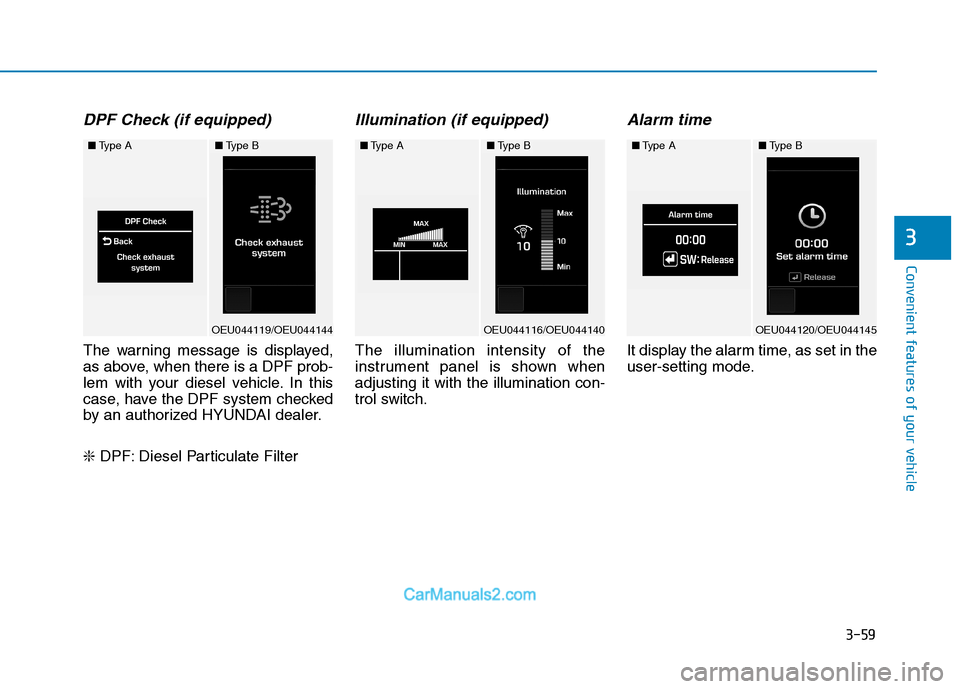
DPF Check (if equipped)
The warning message is displayed,
as above, when there is a DPF prob-
lem with your diesel vehicle. In this
case, have the DPF system checked
by an authorized HYUNDAI dealer. ❇DPF: Diesel Particulate Filter
Illumination (if equipped)
The illumination intensity of the
instrument panel is shown whenadjusting it with the illumination con-
trol switch.
Alarm time
It display the alarm time, as set in the
user-setting mode.
■Type A
OEU044119/OEU044144
■Type B■Type A
OEU044116/OEU044140
■Type B■Type A
OEU044120/OEU044145
■Type B
Page 122 of 473
3-60
Convenient features of your vehicle
Excessive Idle RPM
It displays the idle-rpm hour, as set in
the user-setting mode.
Brake time
It displays the breaking hour, as set
in the user-setting mode.
Overview
Description
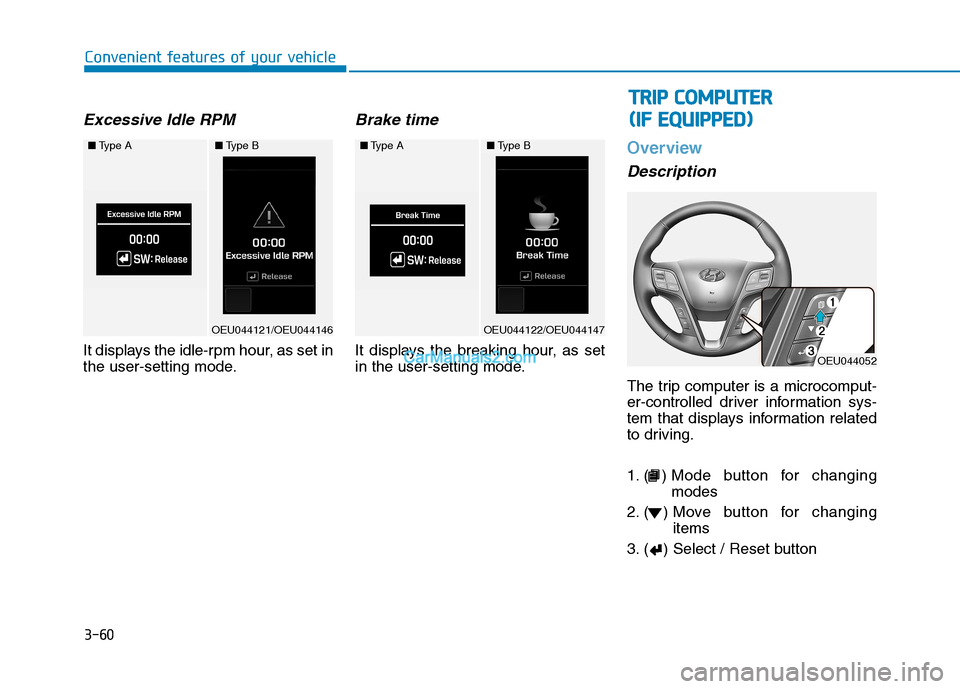
The trip computer is a microcomput-
er-controlled driver information sys-
tem that displays information related
to driving.
1. ( ) Mode button for changingmodes
2. ( ) Move button for changing items
3. ( ) Select / Reset button
■ Type A
OEU044121/OEU044146
■Type B■Type A
OEU044122/OEU044147
■Type B
OEU044052
TT RR IIPP CC OO MM PPUU TTEERR
(
( IIFF EE QQ UUIIPP PPEEDD ))
Page 123 of 473
3-61
Convenient features of your vehicle
3
Some driving information stored
in the trip computer (for example
Average Vehicle Speed) resets if
the battery is disconnected.
Trip Modes
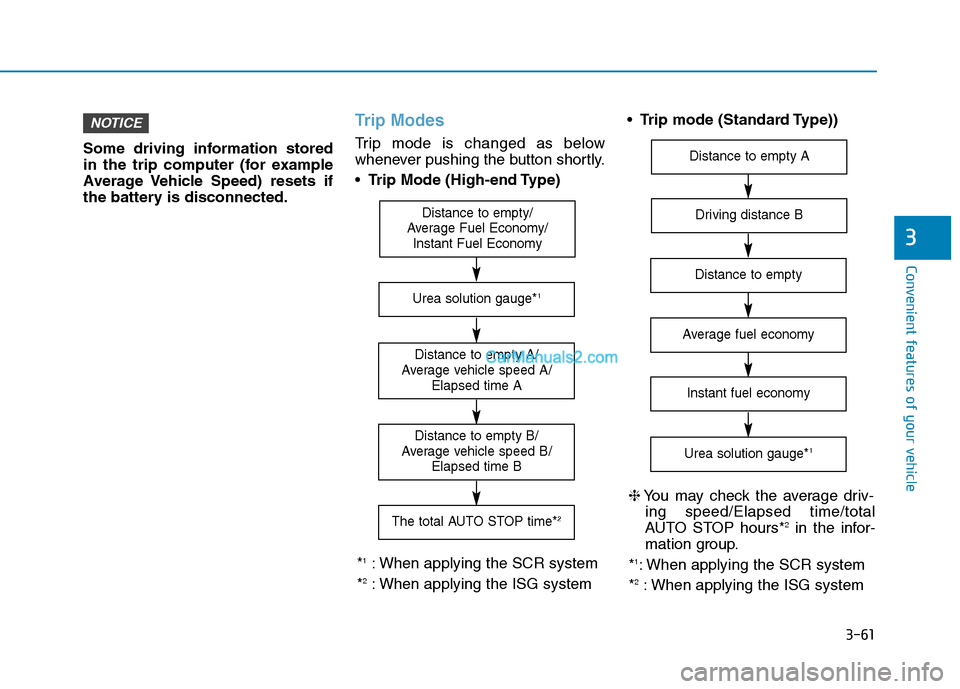
Trip mode is changed as below
whenever pushing the button shortly. Trip Mode (High-end Type)
Trip mode (Standard Type))
NOTICE
Distance to empty/
Average Fuel Economy/ Instant Fuel Economy
Distance to empty A/
Average vehicle speed A/ Elapsed time A
The total AUTO STOP time* 2
Distance to empty B/
Average vehicle speed B/ Elapsed time B
Urea solution gauge* 1
*1
: When applying the SCR system
* 2
: When applying the ISG system
Driving distance B
Distance to empty A
Average fuel economy
Instant fuel economy
Urea solution gauge* 1
Distance to empty
❈
You may check the average driv-
ing speed/Elapsed time/total
AUTO STOP hours* 2
in the infor-
mation group.
* 1
: When applying the SCR system
* 2
: When applying the ISG system
Page 124 of 473
3-62
Convenient features of your vehicle
In the trip computer mode on the
LCD display, the trip mode can be
adjusted by pressing the ( ) button.
By pressing the button ( ), you can
select the desired trip mode. ❈For controlling the LCD modes,
refer to "LCD Display Control" in
this chapter.Driving distance / Average
vehicle speed / Elapsed time
Driving distance (1)
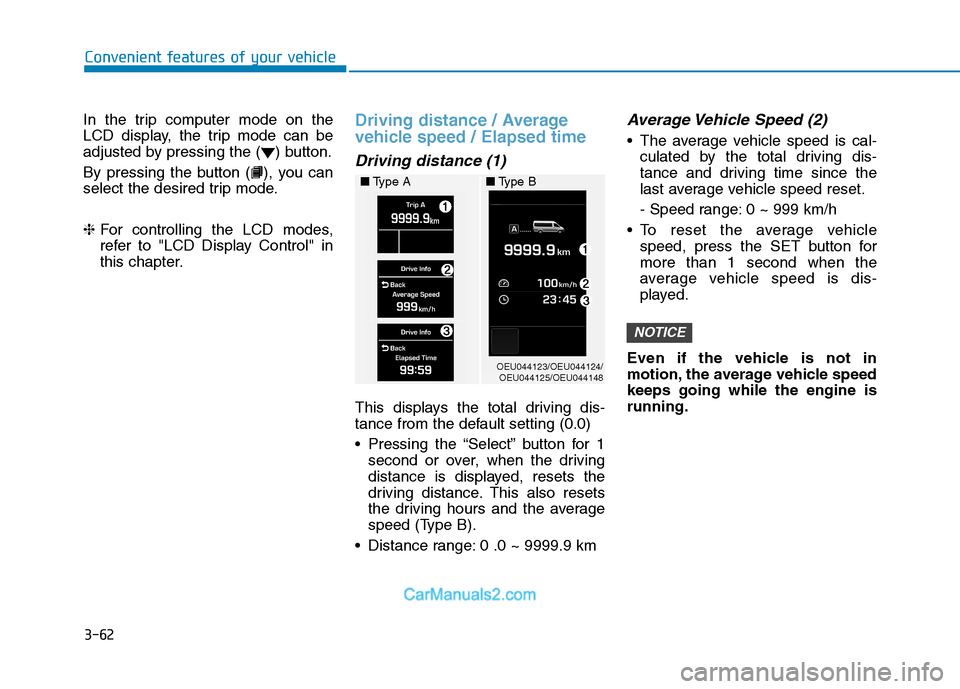
This displays the total driving dis-
tance from the default setting (0.0)
Pressing the “Select” button for 1
second or over, when the driving
distance is displayed, resets the
driving distance. This also resets
the driving hours and the average
speed (Type B).
Distance range: 0 .0 ~ 9999.9 km
Average Vehicle Speed (2)
The average vehicle speed is cal- culated by the total driving dis-
tance and driving time since the
last average vehicle speed reset.
- Speed range: 0 ~ 999 km/h
To reset the average vehicle speed, press the SET button for more than 1 second when the
average vehicle speed is dis-
played.
Even if the vehicle is not in
motion, the average vehicle speedkeeps going while the engine isrunning.
NOTICE
OEU044123/OEU044124/ OEU044125/OEU044148
■
Type A ■Type B
Page 125 of 473
3-63
Convenient features of your vehicle
3
Elapsed Time (3)
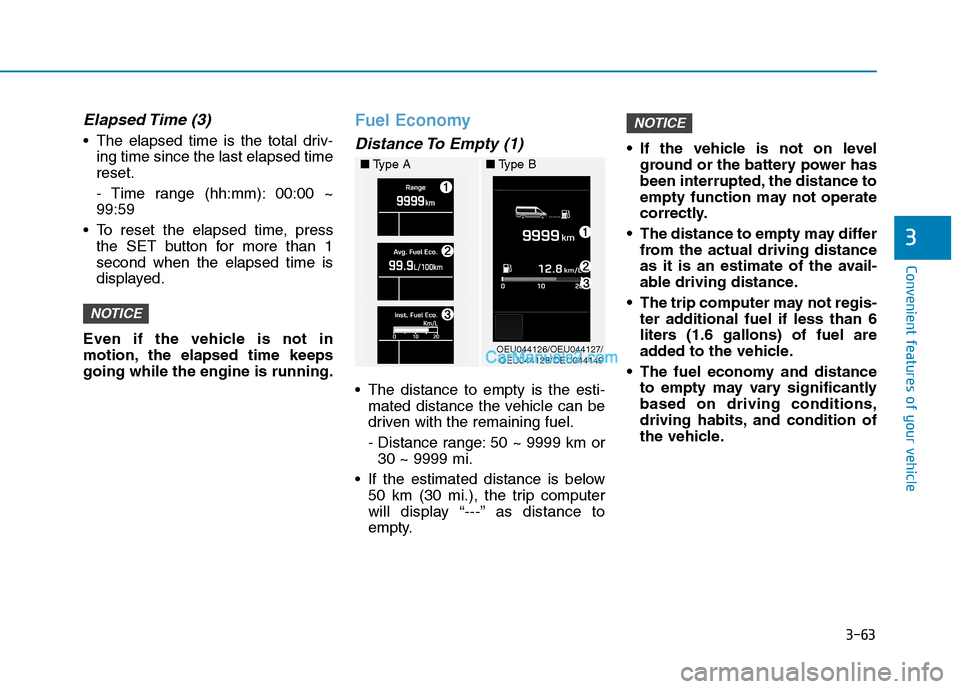
The elapsed time is the total driv-ing time since the last elapsed time reset.
- Time range (hh:mm): 00:00 ~ 99:59
To reset the elapsed time, press the SET button for more than 1second when the elapsed time is
displayed.
Even if the vehicle is not in
motion, the elapsed time keepsgoing while the engine is running.
Fuel Economy
Distance To Empty (1)
The distance to empty is the esti- mated distance the vehicle can be
driven with the remaining fuel.
- Distance range: 50 ~ 9999 km or30 ~ 9999 mi.
If the estimated distance is below 50 km (30 mi.), the trip computer
will display “---” as distance to
empty. If the vehicle is not on level
ground or the battery power has
been interrupted, the distance to
empty function may not operate
correctly.
The distance to empty may differ from the actual driving distance
as it is an estimate of the avail-
able driving distance.
The trip computer may not regis- ter additional fuel if less than 6
liters (1.6 gallons) of fuel are
added to the vehicle.
The fuel economy and distance to empty may vary significantlybased on driving conditions,
driving habits, and condition of
the vehicle.
NOTICE
NOTICE
OEU044126/OEU044127/OEU044128/OEU044149
■
Type A ■Type B
Page 130 of 473
3-68
Convenient features of your vehicle
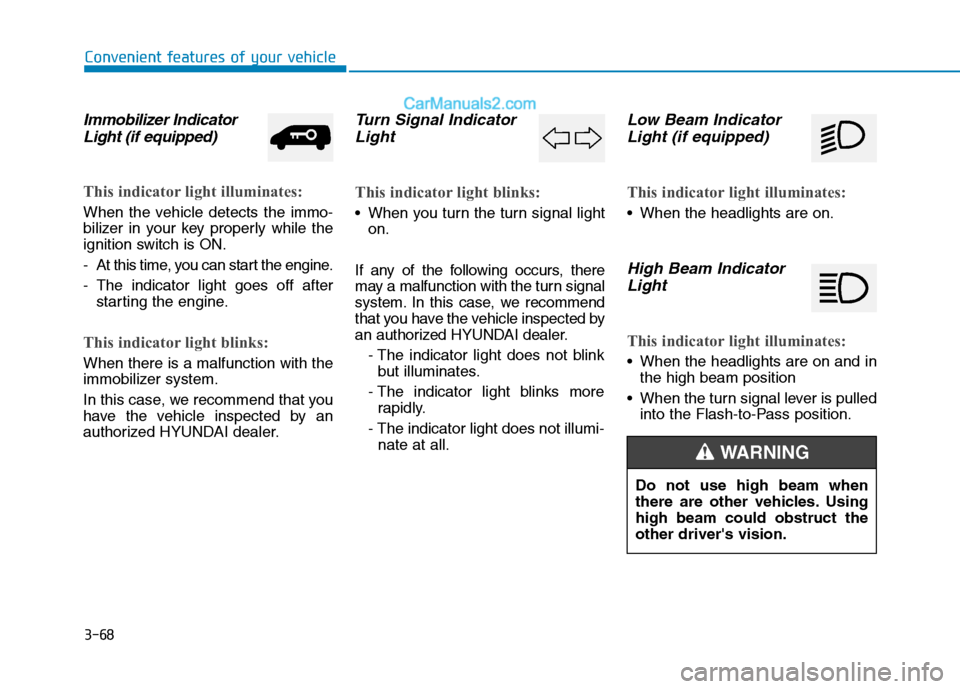
Immobilizer IndicatorLight (if equipped)
This indicator light illuminates:
When the vehicle detects the immo-
bilizer in your key properly while the
ignition switch is ON.
- At this time, you can start the engine.
- The indicator light goes off after starting the engine.
This indicator light blinks:
When there is a malfunction with the
immobilizer system.
In this case, we recommend that you
have the vehicle inspected by an
authorized HYUNDAI dealer.
Turn Signal Indicator
Light
This indicator light blinks:
When you turn the turn signal light on.
If any of the following occurs, there
may a malfunction with the turn signal
system. In this case, we recommend
that you have the vehicle inspected by
an authorized HYUNDAI dealer. - The indicator light does not blinkbut illuminates.
- The indicator light blinks more rapidly.
- The indicator light does not illumi- nate at all.
Low Beam Indicator
Light (if equipped)
This indicator light illuminates:
When the headlights are on.
High Beam Indicator
Light
This indicator light illuminates:
When the headlights are on and in the high beam position
When the turn signal lever is pulled into the Flash-to-Pass position.
Do not use high beam when
there are other vehicles. Usinghigh beam could obstruct theother driver's vision.
WARNING
Page 131 of 473
3-69
Convenient features of your vehicle
3
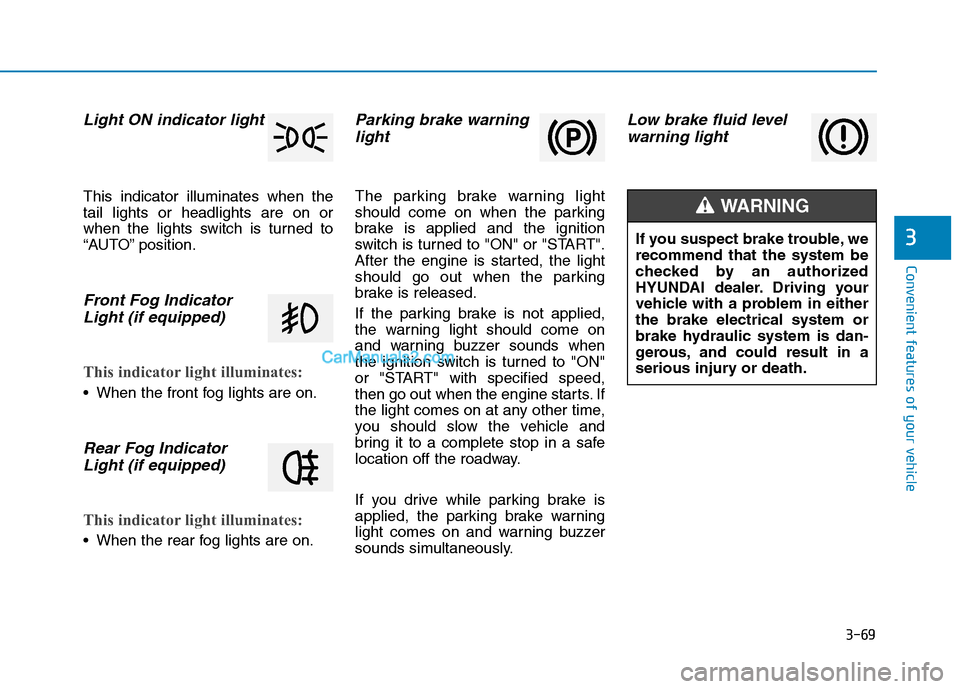
Light ON indicator light
This indicator illuminates when the tail lights or headlights are on or
when the lights switch is turned to
“AUTO” position.
Front Fog IndicatorLight (if equipped)
This indicator light illuminates:
When the front fog lights are on.
Rear Fog IndicatorLight (if equipped)
This indicator light illuminates:
When the rear fog lights are on.
Parking brake warninglight
The parking brake warning light
should come on when the parking
brake is applied and the ignition
switch is turned to "ON" or "START".
After the engine is started, the light
should go out when the parking
brake is released.
If the parking brake is not applied,
the warning light should come on
and warning buzzer sounds when
the ignition switch is turned to "ON"
or "START" with specified speed,
then go out when the engine starts. If
the light comes on at any other time,
you should slow the vehicle and
bring it to a complete stop in a safe
location off the roadway.
If you drive while parking brake is
applied, the parking brake warning
light comes on and warning buzzer
sounds simultaneously.
Low brake fluid levelwarning light
If you suspect brake trouble, we recommend that the system be
checked by an authorized
HYUNDAI dealer. Driving your
vehicle with a problem in eitherthe brake electrical system or
brake hydraulic system is dan-
gerous, and could result in a
serious injury or death.
WARNING