phone Hyundai H350 2016 Owner's Guide
[x] Cancel search | Manufacturer: HYUNDAI, Model Year: 2016, Model line: H350, Model: Hyundai H350 2016Pages: 473, PDF Size: 26.4 MB
Page 221 of 473
![Hyundai H350 2016 Owners Guide 4-29
Multimedia System
4
Bluetooth®Wireless
Technology System Off
This feature is used when you do not wish to use the
Bluetooth®Wireless
Technology system.
Select [Bluetooth System Off] Set
thro](/img/35/14880/w960_14880-220.png "Hyundai H350 2016 Owners Guide 4-29
Multimedia System
4
Bluetooth®Wireless
Technology System Off
This feature is used when you do not wish to use the
Bluetooth®Wireless
Technology system.
Select [Bluetooth System Off] Set
thro")
4-29
Multimedia System
4
Bluetooth®Wireless
Technology System Off
This feature is used when you do not wish to use the
Bluetooth®Wireless
Technology system.
Select [Bluetooth System Off] Set
through TUNE knob ❈ If a phone is already connected, disconnect the currently connect-
ed phone and turn the
Bluetooth®
Wireless Technology system off.
Using the Bluetooth®Wireless
Technology System
To use Bluetooth®Wireless Technology
when the system is currently off, fol-
low these next steps.
Turning On Bluetooth ®
Wireless
Technology through the
Key
Press the key ScreenGuidance ❈ Moves to the screen where
Bluetooth ®
Wireless Technology
functions can be used and dis-
plays guidance. Turning On Bluetooth
®
Wireless
Technology through the
Key
Press the key Select[Phone] ➀ A screen asking whether to turn on
Bluetooth®Wireless Technology will
be displayed.
➁ On the screen, select to turn on
Bluetooth®Wireless Technology
and display guidance.
❈ If the Bluetooth ®
Wireless
Technology system is turned on,
the system will automatically try toconnect the most recently con-nected Bluetooth ®
Wireless
Technology mobile phone.
Bluetooth®Wireless Technology
connection may become inter-
mittently disconnected in some
mobile phones. Follow these
next steps to try again.
1) Turn the
Bluetooth®Wireless
Technology function within the
mobile phone ON/OFF and try
to connect again.
2) Turn the mobile phone power ON/OFF and try to connect
again.
3) Completely remove the mobile phone battery, reboot, and then
try to connect again.
4) Reboot the audio system and try to connect again
5) Delete all paired devices in your mobile phone and the audio
system and pair again for use.
NOTICE
YES
SETUP
CLOCK
SETUP
CLOCK
PHONE
PHONE
Page 233 of 473
4-41
Multimedia System
4
BBlluu eettoo ootthh®®WW iirr ee llee ssss
T
T eecchh nnoo lloo ggyy AAUU DDIIOO
(
( iiff ee qq uu iipp ppeedd ))
What is Bluetooth®Wireless
Technology?
Bluetooth®Wireless Technology
allows devices to be connected in a
short distance, including hands-free
devices, stereo headsets, wireless
remote controllers, etc. For more
information, visit the
Bluetooth®
Wireless Technology website at
www.Bluetooth.com
Before using Bluetooth®Wireless
Technology audio features
Bluetooth® Wireless Technology
audio may not be supported depending on the compatibility of
your
Bluetooth®Wireless
Technology mobile phone.
In order to use
Bluetooth®Wireless
Technology audio, you must firstpair and connect the
Bluetooth®
Wireless Technology mobile
phone. The
Bluetooth®word mark and
logos are registered trademarks
owned by
Bluetooth®SIG, Inc. and
any use of such marks is under
license. Other trademarks and trade
names are those of their respective
owners. A
Bluetooth®enabled cell
phone is required to use
Bluetooth®
Wireless Technology
Bluetooth®Wireless Technology
audio can be used only when the
[Audio Streaming] of Phone is
turned On.
❈ Setting
Bluetooth®Wireless
Technology Audio Streaming :
Press the key Select[Phone] through the tune knob
Select [Audio Streaming] through
the TUNE knob Set /
Starting Bluetooth®Wireless
Technology Audio
key to change the mode in order of CD ➟USB ➟
AUX ➟My Music ➟BT Audio.
If BT Audio is selected,
Bluetooth®
Wireless Technology audio will
start playing.
❈ Audio may not automatically start
playing in some mobile phones.
MEDIA
OffOn
SETUP
Page 234 of 473
4-42
Multimedia System
Using the Bluetooth®Wireless
Technology audio features
Press the TUNE knob to play and pause the current song. ❈ The title / artist info may not be
supported in some mobile phone.
When it is not supported, no title /
no artist will be displayed.
Press of to play previous or
next song. ❈ The previous song / next song /
play / pause functions may not be
supported in some mobile
phones.
PP HH OO NNEE ((iiff ee qq uu iipp pp eedd ))
Before using the Bluetooth®Wireless
Technology
phone features
Bluetooth®Wireless
Technology
phone, you must first
pair and connect the
Bluetooth®
Wireless Technologymobile phone.
connected, it is not possible to
enter Phone mode. Once a phoneis paired or connected, the guid-
ance screen will be displayed.
tion (IGN/ACC ON), the
Bluetooth®
Wireless Technologyphone will be
automatically connected. Even if
you are outside, the
Bluetooth®
Wireless Technologyphone will be
automatically connected once you
are in the vicinity of the vehicle. If you
do not want automatic
Bluetooth®
Wireless Technologyphone connec-
tion, set the
Bluetooth®Wireless
Technology
power to OFF.
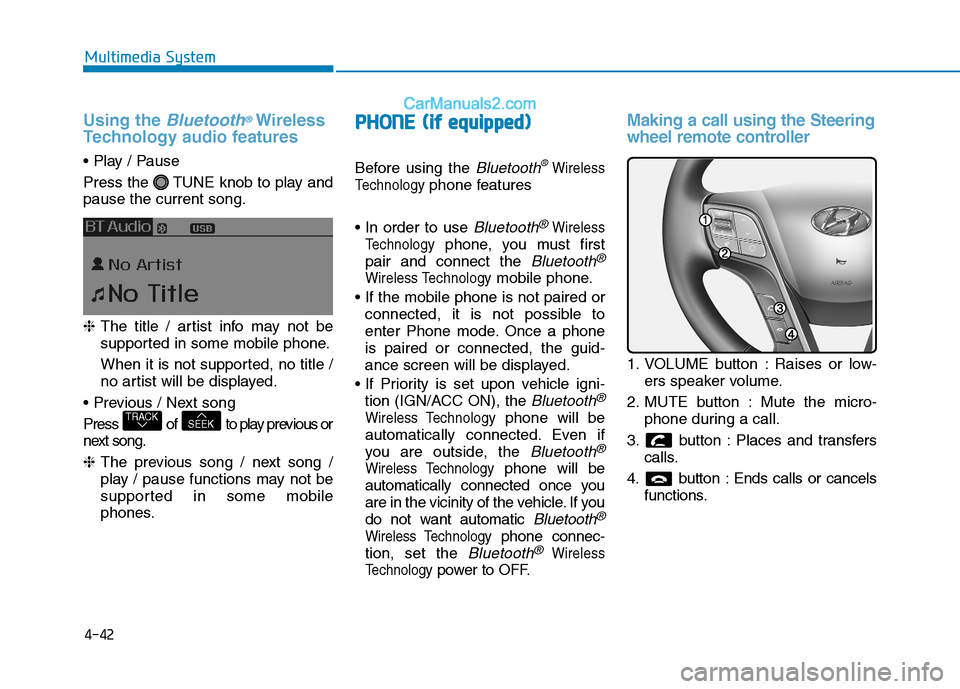
Making a call using the Steering
wheel remote controller
1. VOLUME button : Raises or low- ers speaker volume.
2. MUTE button : Mute the micro- phone during a call.
3. button : Places and transfers calls.
4. button : Ends calls or cancels functions.
SEEKTRACK
Page 235 of 473
4-43
Multimedia System
4
➀Shortly press (under 0.8 seconds)
the key on the steering
remote controller.
➁ The call history list will be dis-
played on the screen.
➂ Press the key again to con-
nect a call to the selected number.
number
➀ Press and hold (over 0.8 seconds)
the key on the steering
remote controller.
➁ The most recently called numberis redialed.Phone MENU (for RDS model)
Press the key to display three
menus (Call History, Phone Book,Phone Setup).
Call history
Press the key Set [
History] through the TUNE knob
or key.
The call history is displayed and can
be used to select a number and
make a call.
If call history does not exist, a screen
asking whether to download call his-
tory is displayed. (The download fea-
ture may not be supported in somemobile phones)
Phone Book
Press the key Set [ P.
Book] through the TUNE knob or
key.
The phone book is displayed and
can be used to select a number and
make a call. ❈ If more than one number is saved
to one contact, then a screen
showing the mobile phone num-
ber, Home and office number is
displayed. Select the desired num-
ber to make the call.
❈ If phone book do not exist, a
screen asking whether to down-
load phone book is displayed.
(The download feature may not be
supported in some mobilephones)
2 RDM
PHONE
1 RPT
PHONE
PHONE
Page 236 of 473
![Hyundai H350 2016 Owners Guide 4-44
Multimedia System
Phone Setup
Press the key Set [ Setup]
through the TUNE knob or
key. The
Bluetooth®Wireless Technology
mobile phone setup screen is dis-
played. For more information, ref](/img/35/14880/w960_14880-235.png "Hyundai H350 2016 Owners Guide 4-44
Multimedia System
Phone Setup
Press the key Set [ Setup]
through the TUNE knob or
key. The
Bluetooth®Wireless Technology
mobile phone setup screen is dis-
played. For more information, ref")
4-44
Multimedia System
Phone Setup
Press the key Set [ Setup]
through the TUNE knob or
key. The
Bluetooth®Wireless Technology
mobile phone setup screen is dis-
played. For more information, refer to“Phone Setup”.
Phone MENU
Press the key to display three
menus (Call History, Contacts,Phone Setup).
Call history
Press the key Set [
History] through the TUNE knob
or key.
The call history is displayed and can
be used to select a number and
make a call.
If call history does not exist, a screen
asking whether to download call his-
tory is displayed. (The download fea-
ture may not be supported in somemobile phones)
Contacts
Press the key Set [Contacts ] through the TUNE knob
or key.
The Contacts are displayed and can
be used to select a number and
make a call. ❈ If more than one number is saved
to one contact, then a screen
showing the mobile phone num-
ber, Home and office number is
displayed. Select the desired num-
ber to make the call.
❈ If Contacts do not exist, a screen
asking whether to download
Contacts is displayed. (The down-
load feature may not be supportedin some mobile phones)
2 RDM
PHONE
1 RPT
PHONE
PHONE3
PHONE
Page 237 of 473
![Hyundai H350 2016 Owners Guide 4-45
Multimedia System
4
Phone Setup
Press the key Set [
Setup] through the TUNE knob orkey.
The
Bluetooth®Wireless Technology
mobile phone setup screen is dis-
played. For more information, refe](/img/35/14880/w960_14880-236.png "Hyundai H350 2016 Owners Guide 4-45
Multimedia System
4
Phone Setup
Press the key Set [
Setup] through the TUNE knob orkey.
The
Bluetooth®Wireless Technology
mobile phone setup screen is dis-
played. For more information, refe")
4-45
Multimedia System
4
Phone Setup
Press the key Set [
Setup] through the TUNE knob orkey.
The
Bluetooth®Wireless Technology
mobile phone setup screen is dis-
played. For more information, refer to“Phone Setup”. Information - Using the
Bluetooth®
Wireless Technology CELLU- AR PHONE
Do not use a cellular phone or per- form Bluetooth ®
Wireless Technology
settings (e.g. pairing a phone) while
driving.
Some Bluetooth ®
Wireless Technology
-enabled phones may not be recog-
nized by the system or fully compati-
ble with the system.
Before using Bluetooth®
Wireless
Technology related features of the
audio system, refer your phone's
User's Manual for phone-side
Bluetooth ®
Wireless Technology oper-
ations.
The phone must be paired to the audio system to use Bluetooth®
Wireless Technology related features.
You will not be able to use the hands- free feature when your phone (in the
vehicle) is outside of the cellular serv-
ice area (e.g. in a tunnel, in a under-
ground, in a mountainous area, etc.).
(Continued)(Continued)
If the cellular phone signal is poor or
the vehicles interior noise is too loud,
it may be difficult to hear the other
person's voice during a call.
Do not place the phone near or inside metallic objects, otherwise communi-
cations with Bluetooth®
Wireless
Technology system or cellular service
stations can be disturbed.
While a phone is connected through Bluetooth ®
Wireless Technology your
phone may discharge quicker than
usual for additional Bluetooth®
Wireless Technology-related opera-
tions.
Some cellular phones or other devices may cause interference noise or mal-
function to audio system. In this case,
store the device in a different location
may resolve the condition.
Phone contact names should be saved in English or they may not be dis-
played correctly.
(Continued)
i
3
PHONE
Page 238 of 473
4-46
Multimedia System
(Continued)
If Priority is set upon vehicle igni-tion(IGN/ACC ON), the Bluetooth®
Wireless Technology phone will be
automatically connected.
Even if you are outside, the
Bluetooth ®
Wireless Technology
phone will be automatically connect-
ed once you are in the vicinity of the
vehicle.
If you do not want automatic
Bluetooth ®
Wireless Technology con-
nection, turn the Bluetooth®
Wireless
Technology feature off.
The hands-free call volume and qual- ity may differ depending on the
mobile phone type.
Bluetooth ®
Wireless Technology fea-
tures can be used only when the
mobile phone has been paired and
connected with the device. For more
information on pairing and connect-
ing Bluetooth ®
Wireless Technology
enabled mobile phones, refer to the
"Phone Setup" section.
(Continued)(Continued)
When a
Bluetooth®
Wireless
Technology mobile phone is connect-
ed, a ( ) icon will appear at the top
of the screen. If a ( ) icon is not dis-
played, this indicates that a
Bluetooth ®
Wireless Technology
enabled device has not been connect-
ed. You must connect the device
before use. For more information on
Bluetooth ®
Wireless Technology
mobile phones, refer to the "Phone
Setup" section.
Pairing and connecting a Bluetooth®
Wireless Technology enabled mobile
phone will work only when the
Bluetooth ®
Wireless Technology
option within your mobile phone has
been turned on. (Methods of turning
on the Bluetooth®
Wireless
Technology enabled feature may dif-
fer depending on the mobile phone.)
(Continued)(Continued)
In some mobile phones, starting the
ignition while talking through
Bluetooth ®
Wireless Technology
enabled handsfree call will result in
the call becoming disconnected.
(Switch the call back to your mobile
phone when starting the ignition.)
Some features may not be supported in some Bluetooth®
Wireless
Technology mobile phone and
devices.
Bluetooth ®
Wireless Technology
enabled operation may be unstable
depending on the communication
state.
Placing the audio system within an electromagnetic environment may
result in noise interference.
Page 244 of 473
4-52
Multimedia System
(Continued)
The device may not support normaloperation if MP3 Players, cellular
phones, digital cameras, or other
electronic devices (USB devices not
recognized as portable disk drives)
are connected to the device.
This product does guarantees proper operation of only standard (METAL
COVER TYPE) USB MEMORY.
The device may not support normal operation when using formats such
as HDD Type, CF, or SD Memory.
The device will not support files locked by DRM (Digital Rights
Management).
This product does not recognize SD Type USB MEMORY STICK, CF
Type USB MEMORY STICK and
other USB MEMORY STICKS con-
nected to a different Adaptor.
(Continued)(Continued)
This product does not guarantee
proper operation of USB HDD or
USB MEMORY with defective con-
nection caused by vehicle vibrations.
UBS memory products used as key
chains and mobile phone accessories
(i-stick type) may cause damage to
the USB Jack. Refrain from using
such products.
USB CONNECTOR PIN wear and tear can lead to inferior USB signal
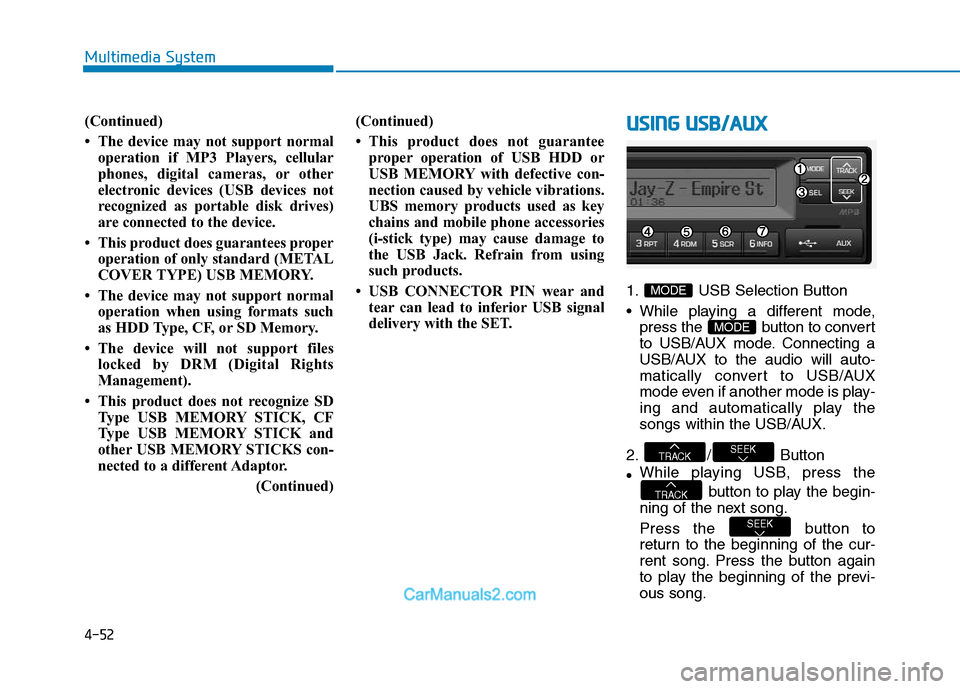
delivery with the SET.UUSSIINN GG UU SSBB //AA UU XX
1. USB Selection Button
While playing a different mode,
press the button to convert
to USB/AUX mode. Connecting a
USB/AUX to the audio will auto-
matically convert to USB/AUX
mode even if another mode is play-
ing and automatically play the
songs within the USB/AUX.
2. / Button While playing USB, press the
button to play the begin-
ning of the next song.
Press the button to
return to the beginning of the cur-
rent song. Press the button again
to play the beginning of the previ-ous song.
SEEK
TRACK
SEEKTRACK
MODE
MODE
Page 249 of 473
4-57
Multimedia System
4
SSYY SSTT EEMM CC OO NNTTRR OO LLLL EE RR SS AA NN DD
F
F UU NNCCTT IIOO NNSS
❈ Display and settings may differ
depending on the selected audio.
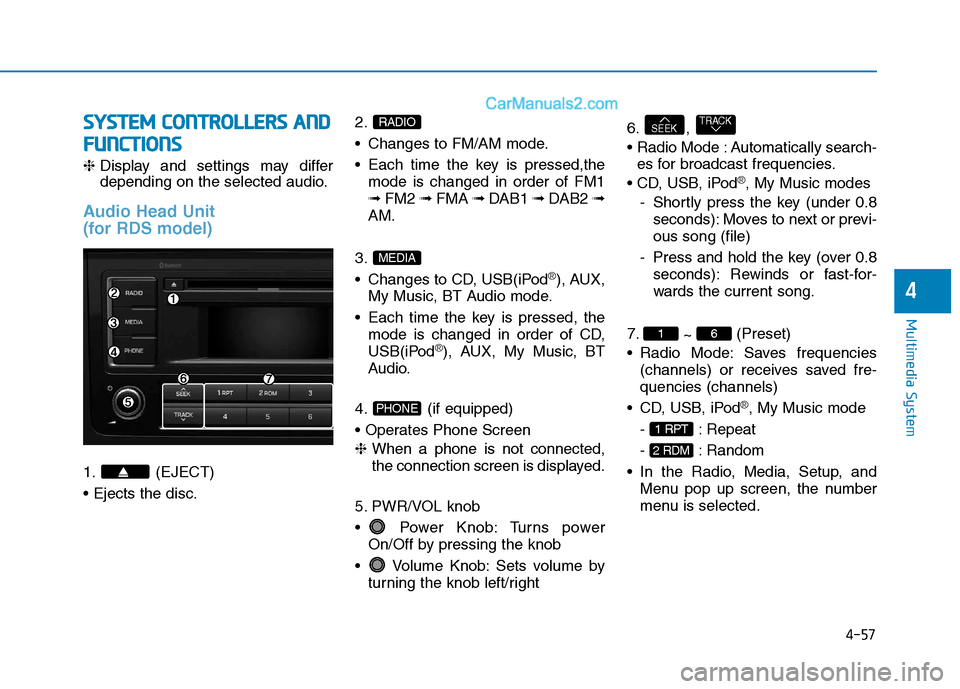
Audio Head Unit
(for RDS model)
1. (EJECT) 2.
Changes to FM/AM mode.
Each time the key is pressed,the
mode is changed in order of FM1 ➟ FM2 ➟ FMA ➟ DAB1 ➟ DAB2 ➟
AM.
3.
Changes to CD, USB(iPod
®), AUX,
My Music, BT Audio mode.
Each time the key is pressed, the mode is changed in order of CD,
USB(iPod
®), AUX, My Music, BT
Audio.
4. (if equipped)
❈ When a phone is not connected,
the connection screen is displayed.
5. PWR/VOL knob
Power Knob: Turns power On/Off by pressing the knob
Volume Knob: Sets volume by turning the knob left/right 6. ,
Automatically search-
es for broadcast frequencies.
®, My Music modes
- Shortly press the key (under 0.8 seconds): Moves to next or previ- ous song (file)
- Press and hold the key (over 0.8 seconds): Rewinds or fast-for-
wards the current song.
7. ~ (Preset)
Radio Mode: Saves frequencies (channels) or receives saved fre-quencies (channels)
®, My Music mode
- : Repeat
- : Random
Menu pop up screen, the number
menu is selected.
2 RDM
1 RPT
61
TRACKSEEK
PHONE
MEDIA
RADIO
Page 250 of 473
4-58
Multimedia System
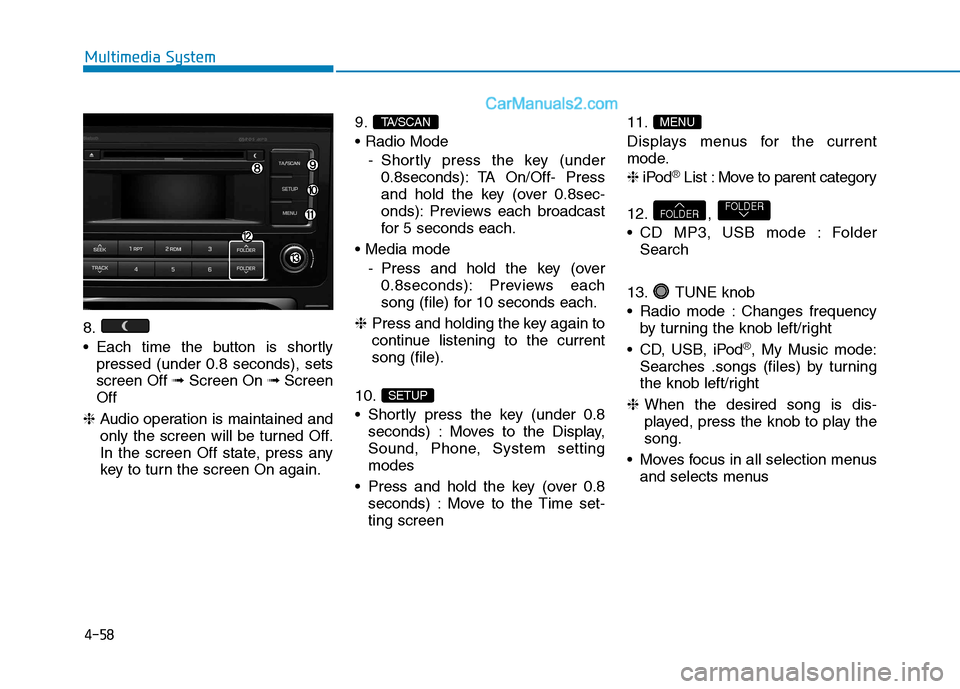
8.
Each time the button is shortlypressed (under 0.8 seconds), sets screen Off ➟Screen On ➟Screen
Off
❈ Audio operation is maintained and
only the screen will be turned Off.
In the screen Off state, press any
key to turn the screen On again. 9.
- Shortly press the key (under0.8seconds): TA On/Off- Press
and hold the key (over 0.8sec-
onds): Previews each broadcast
for 5 seconds each.
- Press and hold the key (over0.8seconds): Previews each
song (file) for 10 seconds each.
❈ Press and holding the key again to
continue listening to the currentsong (file).
10.
Shortly press the key (under 0.8 seconds) : Moves to the Display,
Sound, Phone, System settingmodes
Press and hold the key (over 0.8 seconds) : Move to the Time set-ting screen 11.
Displays menus for the current
mode. ❈
iPod
®List : Move to parent category
12. ,
CD MP3, USB mode : Folder Search
13. TUNE knob
Radio mode : Changes frequency by turning the knob left/right
CD, USB, iPod
®, My Music mode:
Searches .songs (files) by turning
the knob left/right
❈ When the desired song is dis-
played, press the knob to play thesong.
Moves focus in all selection menus and selects menus
FOLDERFOLDER
MENU
SETUP
TA/SCAN