Key Hyundai H350 2016 Workshop Manual
[x] Cancel search | Manufacturer: HYUNDAI, Model Year: 2016, Model line: H350, Model: Hyundai H350 2016Pages: 473, PDF Size: 26.4 MB
Page 228 of 473
4-36
Multimedia System
Folder Search : MP3 CD, USB Mode
While file is playing /(Folder Up) key
Searches the next folder.
While file is playing / (Folder Down) key
❈ If a folder is selected by pressing
the TUNE knob, the first file
within the selected folder will be
played.
Searching Songs (File)
Turning TUNE knob : Searches for songs (files)
Pressing TUNE knob : Plays selected song (file).
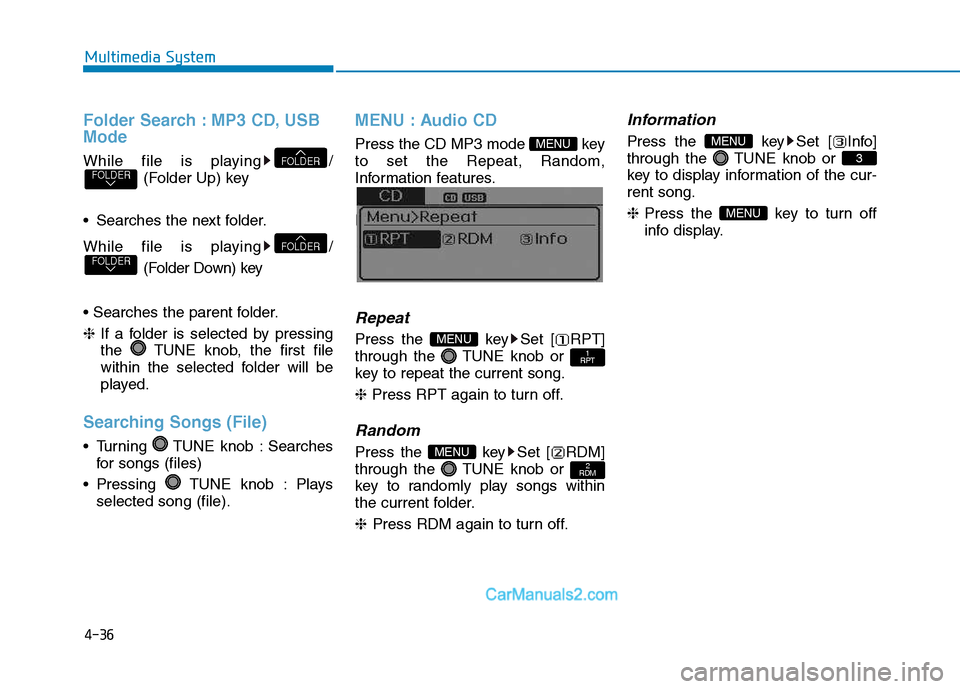
MENU : Audio CD
Press the CD MP3 mode key to set the Repeat, Random,
Information features.
Information features.
Repeat
Press the key Set [ RPT]
through the TUNE knob or
key to repeat the current song. ❈ Press RPT again to turn off.
Random
Press the key Set [ RDM]
through the TUNE knob or
key to randomly play songs within
the current folder. ❈ Press RDM again to turn off.
Information
Press the key Set [ Info]
through the TUNE knob or
key to display information of the cur-rent song. ❈Press the key to turn off
info display.
MENU
3
MENU
2
RDMMENU
1
RPTMENU
MENU
FOLDERFOLDER
FOLDERFOLDER
Page 229 of 473
4-37
Multimedia System
4
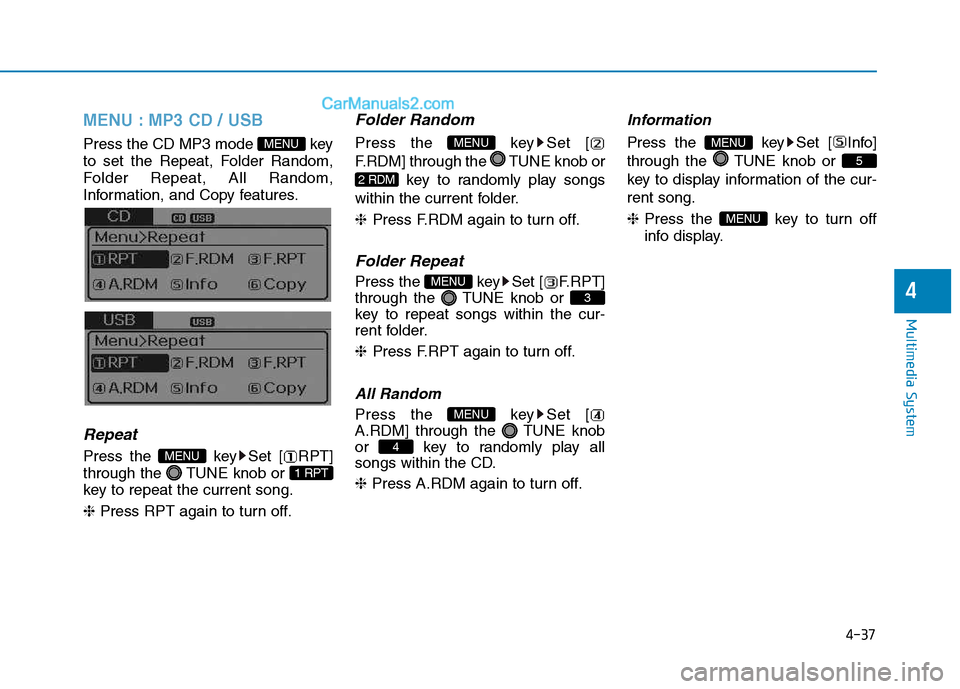
MENU : MP3 CD / USB
Press the CD MP3 mode key
to set the Repeat, Folder Random,
Folder Repeat, All Random,
Information, and Copy features.
Information, and Copy features.
Repeat
Press the key Set [ RPT]
through the TUNE knob or
key to repeat the current song. ❈ Press RPT again to turn off.
Folder Random
Press the key Set [
F.RDM] through the TUNE knob or
key to randomly play songs
within the current folder. ❈ Press F.RDM again to turn off.
Folder Repeat
Press the key Set [ F.RPT]
through the TUNE knob or
key to repeat songs within the cur-
rent folder. ❈Press F.RPT again to turn off.
All Random
Press the key Set [
A.RDM] through the TUNE knob
or key to randomly play all
songs within the CD. ❈ Press A.RDM again to turn off.
Information
Press the key Set [ Info]
through the TUNE knob or
key to display information of the cur-rent song. ❈ Press the key to turn off
info display.
MENU
5
MENU
4
MENU
3
MENU
2 RDM
MENU
1 RPT
MENU
MENU
Page 230 of 473
![Hyundai H350 2016 Workshop Manual 4-38
Multimedia System
Copy
Press the key Set [ Copy]
through the TUNE knob or
key.This is used to copy the currentsong into My Music. You can playthe copied Music in My Music
mode.
❈ If another](/img/35/14880/w960_14880-229.png "Hyundai H350 2016 Workshop Manual 4-38
Multimedia System
Copy
Press the key Set [ Copy]
through the TUNE knob or
key.This is used to copy the currentsong into My Music. You can playthe copied Music in My Music
mode.
❈ If another")
4-38
Multimedia System
Copy
Press the key Set [ Copy]
through the TUNE knob or
key.This is used to copy the currentsong into My Music. You can playthe copied Music in My Music
mode.
❈ If another key is pressed while
copying is in progress, a pop up
asking you whether to cancel
copying is displayed.
❈ If another media is connected or
inserted (USB, CD, iPod
®, AUX)
while copying is in progress, copy- ing is canceled.
❈ Music will not be played while
copying is in progress.
MENU : iPod®
In iPod®mode, press the key to
set the Repeat, Random, Information
and Search features.
Repeat
Press the key Set [ RPT]
through the TUNE knob or
key to repeat the current song. ❈ Press RPT again to turn repeat
off.
Random
Press the key Set [ RDM]
through the TUNE knob or
key.
Plays all songs within the currently
playing category in random order. ❈Press RDM again to turn off.
Information
Press the key Set [ Info]
through the TUNE knob or
key.
Displays information of the current song. ❈Press the key to turn off
info display.
Search
Press the key Set [
Search] through the TUNE knob
or key.
Displays iPod
®category list.
❈ Searching iPod
®category is
key pressed, move to par-
ent category.
MENU
4
MENU
MENU
3
MENU
2 RDM
MENU
1 RPT
MENU
MENU6
MENU
Page 231 of 473
4-39
Multimedia System
4
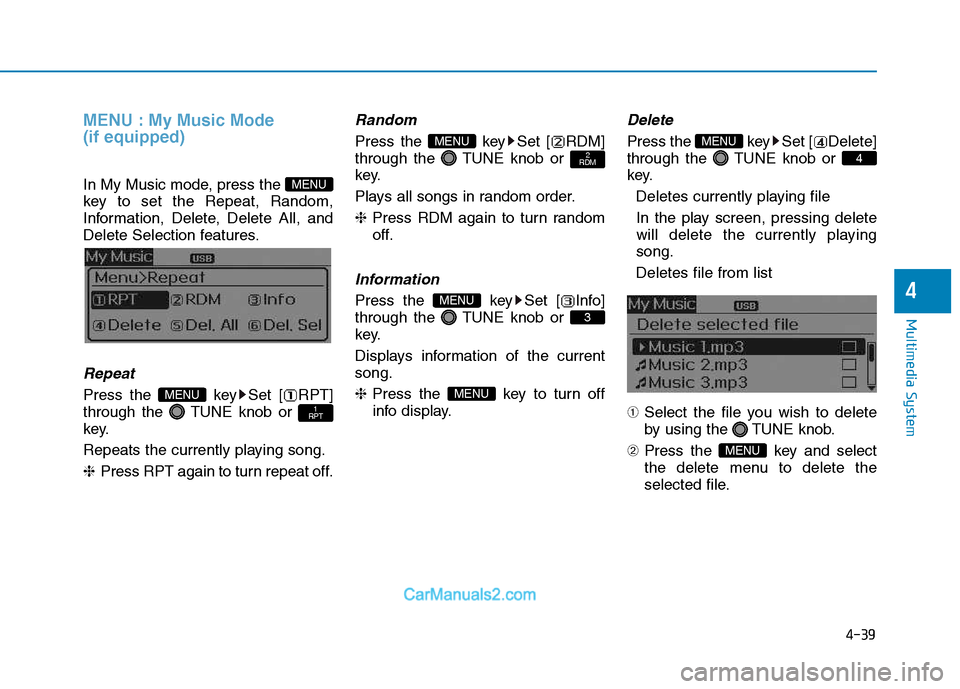
MENU : My Music Mode (if equipped)
In My Music mode, press the
key to set the Repeat, Random,
Information, Delete, Delete All, and
Delete Selection features.
Repeat
Press the key Set [ RPT]
through the TUNE knob or
key.
Repeats the currently playing song.❈Press RPT again to turn repeat off.
Random
Press the key Set [ RDM]
through the TUNE knob or
key.
Plays all songs in random order.❈Press RDM again to turn random
off.
Information
Press the key Set [ Info]
through the TUNE knob or
key.
Displays information of the current song. ❈ Press the key to turn off
info display.
Delete
Press the key Set [ Delete]
through the TUNE knob or
key.
Deletes currently playing file
In the play screen, pressing delete
will delete the currently playingsong.
Deletes file from list
➀ Select the file you wish to delete
by using the TUNE knob.
➁ Press the key and select
the delete menu to delete the
selected file.
MENU
4
MENU
MENU
3
MENU
2
RDMMENU
1
RPTMENU
MENU
Page 232 of 473
![Hyundai H350 2016 Workshop Manual 4-40
Multimedia System
Delete All
Press the key Set [ Del.All]
through the TUNE knob or
key. Deletes all songs of My Music.
Delete Selection
Press the key Set [
Del.Sel] through the TUNE knob
o](/img/35/14880/w960_14880-231.png "Hyundai H350 2016 Workshop Manual 4-40
Multimedia System
Delete All
Press the key Set [ Del.All]
through the TUNE knob or
key. Deletes all songs of My Music.
Delete Selection
Press the key Set [
Del.Sel] through the TUNE knob
o")
4-40
Multimedia System
Delete All
Press the key Set [ Del.All]
through the TUNE knob or
key. Deletes all songs of My Music.
Delete Selection
Press the key Set [
Del.Sel] through the TUNE knob
or key. Songs within My Music are selected and deleted. ➀Select the songs you wish to
delete from the list. ➁
After selecting, press the
key and select the delete menu.
Information - Using the My Music
Even if memory is available, a maxi- mum of 6,000 songs can be stored.
The same song can be copied up to 1,000 times.
Memory info can be checked in the System menu of Setup.
AUX
AUX is used to play external MEDIA
currently connected with the AUX
terminal.
AUX mode will automatically start
when an external device is connect-
ed with the AUX terminal.
If an external device is connected,
you can also press the key to
change to AUX mode. ❈ AUX mode cannot be started
unless there is an external device
connected to the AUX terminal.
Information
- Using the AUX
Fully insert the AUX cable into the
AUX terminal for use.
i
MEDIAi
MENU
6
MENU
5
MENU
Page 233 of 473
4-41
Multimedia System
4
BBlluu eettoo ootthh®®WW iirr ee llee ssss
T
T eecchh nnoo lloo ggyy AAUU DDIIOO
(
( iiff ee qq uu iipp ppeedd ))
What is Bluetooth®Wireless
Technology?
Bluetooth®Wireless Technology
allows devices to be connected in a
short distance, including hands-free
devices, stereo headsets, wireless
remote controllers, etc. For more
information, visit the
Bluetooth®
Wireless Technology website at
www.Bluetooth.com
Before using Bluetooth®Wireless
Technology audio features
Bluetooth® Wireless Technology
audio may not be supported depending on the compatibility of
your
Bluetooth®Wireless
Technology mobile phone.
In order to use
Bluetooth®Wireless
Technology audio, you must firstpair and connect the
Bluetooth®
Wireless Technology mobile
phone. The
Bluetooth®word mark and
logos are registered trademarks
owned by
Bluetooth®SIG, Inc. and
any use of such marks is under
license. Other trademarks and trade
names are those of their respective
owners. A
Bluetooth®enabled cell
phone is required to use
Bluetooth®
Wireless Technology
Bluetooth®Wireless Technology
audio can be used only when the
[Audio Streaming] of Phone is
turned On.
❈ Setting
Bluetooth®Wireless
Technology Audio Streaming :
Press the key Select[Phone] through the tune knob
Select [Audio Streaming] through
the TUNE knob Set /
Starting Bluetooth®Wireless
Technology Audio
key to change the mode in order of CD ➟USB ➟
AUX ➟My Music ➟BT Audio.
If BT Audio is selected,
Bluetooth®
Wireless Technology audio will
start playing.
❈ Audio may not automatically start
playing in some mobile phones.
MEDIA
OffOn
SETUP
Page 235 of 473
4-43
Multimedia System
4
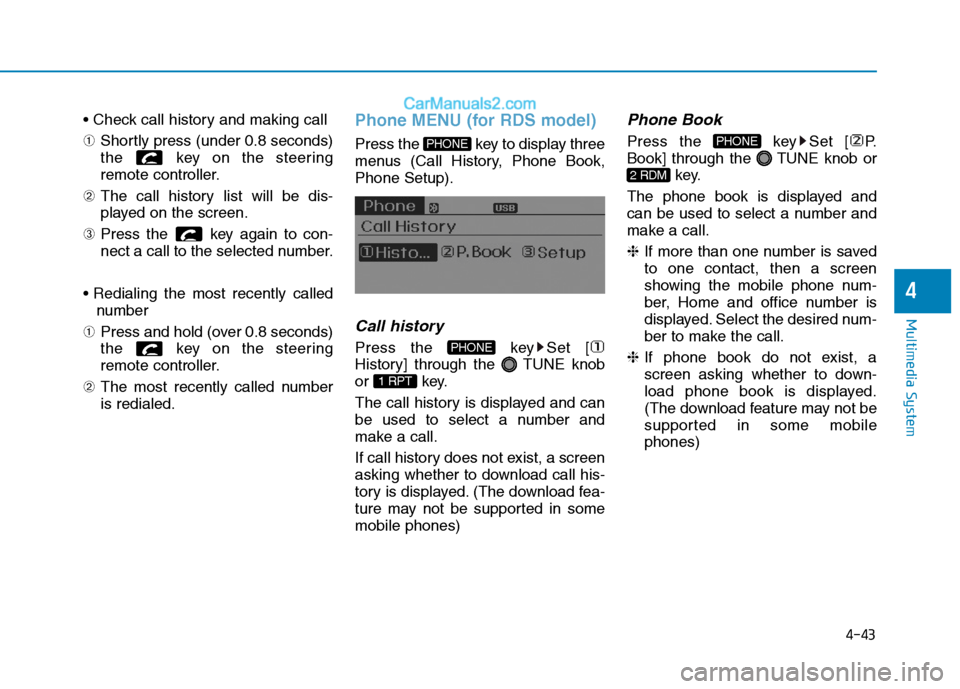
➀Shortly press (under 0.8 seconds)
the key on the steering
remote controller.
➁ The call history list will be dis-
played on the screen.
➂ Press the key again to con-
nect a call to the selected number.
number
➀ Press and hold (over 0.8 seconds)
the key on the steering
remote controller.
➁ The most recently called numberis redialed.Phone MENU (for RDS model)
Press the key to display three
menus (Call History, Phone Book,Phone Setup).
Call history
Press the key Set [
History] through the TUNE knob
or key.
The call history is displayed and can
be used to select a number and
make a call.
If call history does not exist, a screen
asking whether to download call his-
tory is displayed. (The download fea-
ture may not be supported in somemobile phones)
Phone Book
Press the key Set [ P.
Book] through the TUNE knob or
key.
The phone book is displayed and
can be used to select a number and
make a call. ❈ If more than one number is saved
to one contact, then a screen
showing the mobile phone num-
ber, Home and office number is
displayed. Select the desired num-
ber to make the call.
❈ If phone book do not exist, a
screen asking whether to down-
load phone book is displayed.
(The download feature may not be
supported in some mobilephones)
2 RDM
PHONE
1 RPT
PHONE
PHONE
Page 236 of 473
![Hyundai H350 2016 Workshop Manual 4-44
Multimedia System
Phone Setup
Press the key Set [ Setup]
through the TUNE knob or
key. The
Bluetooth®Wireless Technology
mobile phone setup screen is dis-
played. For more information, ref](/img/35/14880/w960_14880-235.png "Hyundai H350 2016 Workshop Manual 4-44
Multimedia System
Phone Setup
Press the key Set [ Setup]
through the TUNE knob or
key. The
Bluetooth®Wireless Technology
mobile phone setup screen is dis-
played. For more information, ref")
4-44
Multimedia System
Phone Setup
Press the key Set [ Setup]
through the TUNE knob or
key. The
Bluetooth®Wireless Technology
mobile phone setup screen is dis-
played. For more information, refer to“Phone Setup”.
Phone MENU
Press the key to display three
menus (Call History, Contacts,Phone Setup).
Call history
Press the key Set [
History] through the TUNE knob
or key.
The call history is displayed and can
be used to select a number and
make a call.
If call history does not exist, a screen
asking whether to download call his-
tory is displayed. (The download fea-
ture may not be supported in somemobile phones)
Contacts
Press the key Set [Contacts ] through the TUNE knob
or key.
The Contacts are displayed and can
be used to select a number and
make a call. ❈ If more than one number is saved
to one contact, then a screen
showing the mobile phone num-
ber, Home and office number is
displayed. Select the desired num-
ber to make the call.
❈ If Contacts do not exist, a screen
asking whether to download
Contacts is displayed. (The down-
load feature may not be supportedin some mobile phones)
2 RDM
PHONE
1 RPT
PHONE
PHONE3
PHONE
Page 237 of 473
![Hyundai H350 2016 Workshop Manual 4-45
Multimedia System
4
Phone Setup
Press the key Set [
Setup] through the TUNE knob orkey.
The
Bluetooth®Wireless Technology
mobile phone setup screen is dis-
played. For more information, refe](/img/35/14880/w960_14880-236.png "Hyundai H350 2016 Workshop Manual 4-45
Multimedia System
4
Phone Setup
Press the key Set [
Setup] through the TUNE knob orkey.
The
Bluetooth®Wireless Technology
mobile phone setup screen is dis-
played. For more information, refe")
4-45
Multimedia System
4
Phone Setup
Press the key Set [
Setup] through the TUNE knob orkey.
The
Bluetooth®Wireless Technology
mobile phone setup screen is dis-
played. For more information, refer to“Phone Setup”. Information - Using the
Bluetooth®
Wireless Technology CELLU- AR PHONE
Do not use a cellular phone or per- form Bluetooth ®
Wireless Technology
settings (e.g. pairing a phone) while
driving.
Some Bluetooth ®
Wireless Technology
-enabled phones may not be recog-
nized by the system or fully compati-
ble with the system.
Before using Bluetooth®
Wireless
Technology related features of the
audio system, refer your phone's
User's Manual for phone-side
Bluetooth ®
Wireless Technology oper-
ations.
The phone must be paired to the audio system to use Bluetooth®
Wireless Technology related features.
You will not be able to use the hands- free feature when your phone (in the
vehicle) is outside of the cellular serv-
ice area (e.g. in a tunnel, in a under-
ground, in a mountainous area, etc.).
(Continued)(Continued)
If the cellular phone signal is poor or
the vehicles interior noise is too loud,
it may be difficult to hear the other
person's voice during a call.
Do not place the phone near or inside metallic objects, otherwise communi-
cations with Bluetooth®
Wireless
Technology system or cellular service
stations can be disturbed.
While a phone is connected through Bluetooth ®
Wireless Technology your
phone may discharge quicker than
usual for additional Bluetooth®
Wireless Technology-related opera-
tions.
Some cellular phones or other devices may cause interference noise or mal-
function to audio system. In this case,
store the device in a different location
may resolve the condition.
Phone contact names should be saved in English or they may not be dis-
played correctly.
(Continued)
i
3
PHONE
Page 244 of 473
4-52
Multimedia System
(Continued)
The device may not support normaloperation if MP3 Players, cellular
phones, digital cameras, or other
electronic devices (USB devices not
recognized as portable disk drives)
are connected to the device.
This product does guarantees proper operation of only standard (METAL
COVER TYPE) USB MEMORY.
The device may not support normal operation when using formats such
as HDD Type, CF, or SD Memory.
The device will not support files locked by DRM (Digital Rights
Management).
This product does not recognize SD Type USB MEMORY STICK, CF
Type USB MEMORY STICK and
other USB MEMORY STICKS con-
nected to a different Adaptor.
(Continued)(Continued)
This product does not guarantee
proper operation of USB HDD or
USB MEMORY with defective con-
nection caused by vehicle vibrations.
UBS memory products used as key
chains and mobile phone accessories
(i-stick type) may cause damage to
the USB Jack. Refrain from using
such products.
USB CONNECTOR PIN wear and tear can lead to inferior USB signal
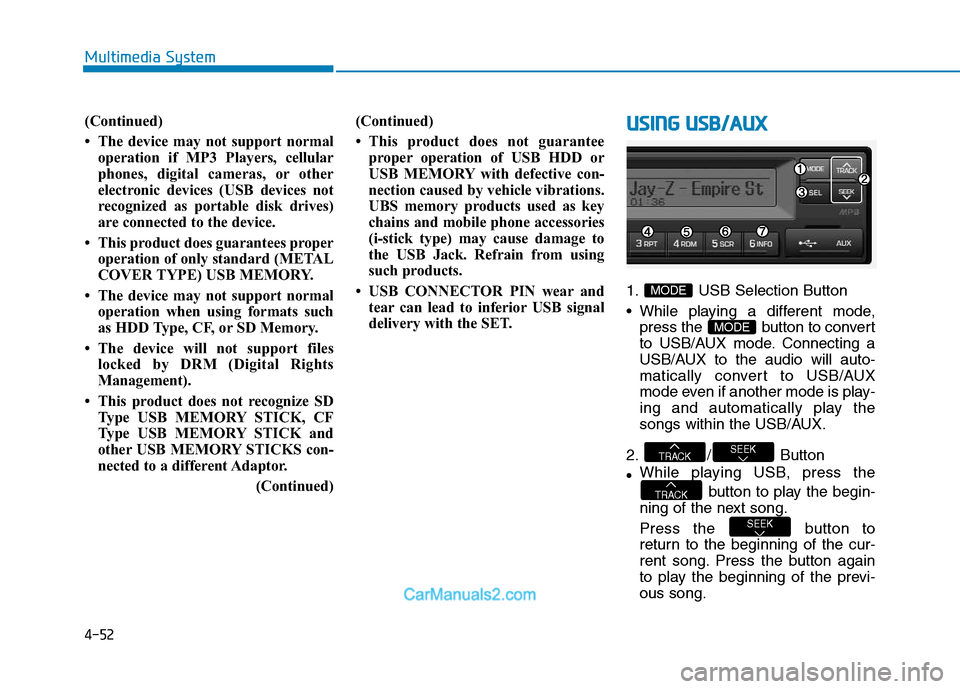
delivery with the SET.UUSSIINN GG UU SSBB //AA UU XX
1. USB Selection Button
While playing a different mode,
press the button to convert
to USB/AUX mode. Connecting a
USB/AUX to the audio will auto-
matically convert to USB/AUX
mode even if another mode is play-
ing and automatically play the
songs within the USB/AUX.
2. / Button While playing USB, press the
button to play the begin-
ning of the next song.
Press the button to
return to the beginning of the cur-
rent song. Press the button again
to play the beginning of the previ-ous song.
SEEK
TRACK
SEEKTRACK
MODE
MODE