battery HYUNDAI I10 2017 User Guide
[x] Cancel search | Manufacturer: HYUNDAI, Model Year: 2017, Model line: I10, Model: HYUNDAI I10 2017Pages: 343, PDF Size: 9.14 MB
Page 120 of 343
459
Features of your vehicle
Battery saver function (if equipped)
• The purpose of this feature is to pre-
vent the battery from being dis-
charged. The system automatically
turns off the exterior lights when the
driver removes the ignition key and
opens the driver-side door.
• With this feature, the parking lights will
turn off automatically if the driver parks
on the side of road at night.
If necessary, to keep the lights on
when the ignition key is removed, per-
form the following :
1) Open the driver-side door.
2) Turn the parking lights OFF and ON
again using the light switch on the
steering column.
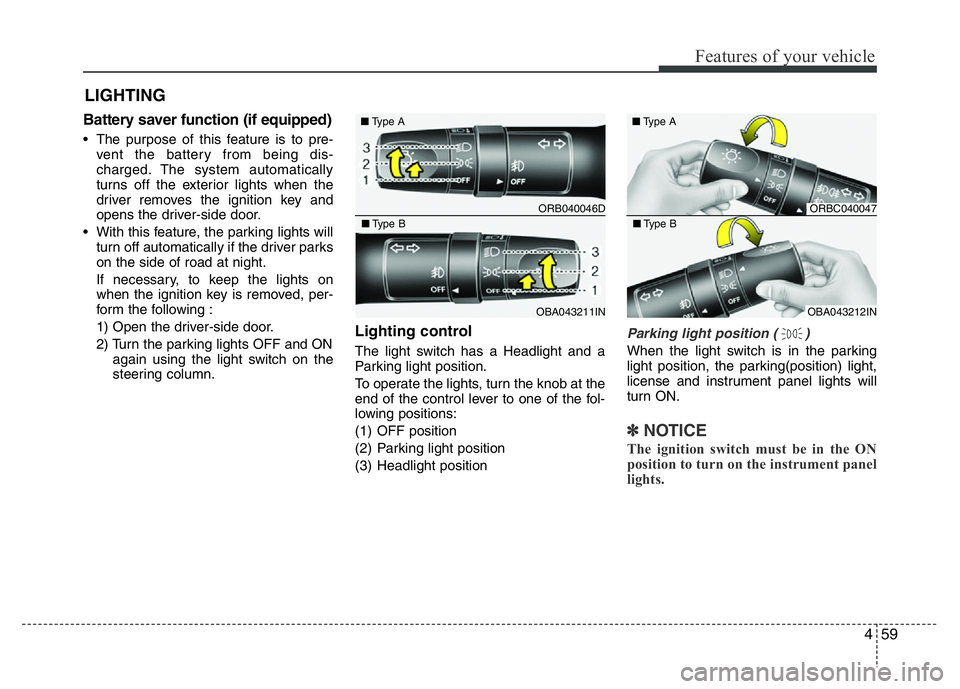
Lighting control
The light switch has a Headlight and a
Parking light position.
To operate the lights, turn the knob at the
end of the control lever to one of the fol-
lowing positions:
(1) OFF position
(2) Parking light position
(3) Headlight position
Parking light position ( )
When the light switch is in the parking
light position, the parking(position) light,
license and instrument panel lights will
turn ON.
✽NOTICE
The ignition switch must be in the ON
position to turn on the instrument panel
lights.
LIGHTING
ORB040046D ■Type A
OBA043211IN ■Type B
ORBC040047 ■Type A
OBA043212IN ■Type B
Page 121 of 343
Features of your vehicle
60 4
WARNING
Do not use high beam when there
are other vehicles. Using high beam
could obstruct the other driver's
vision.
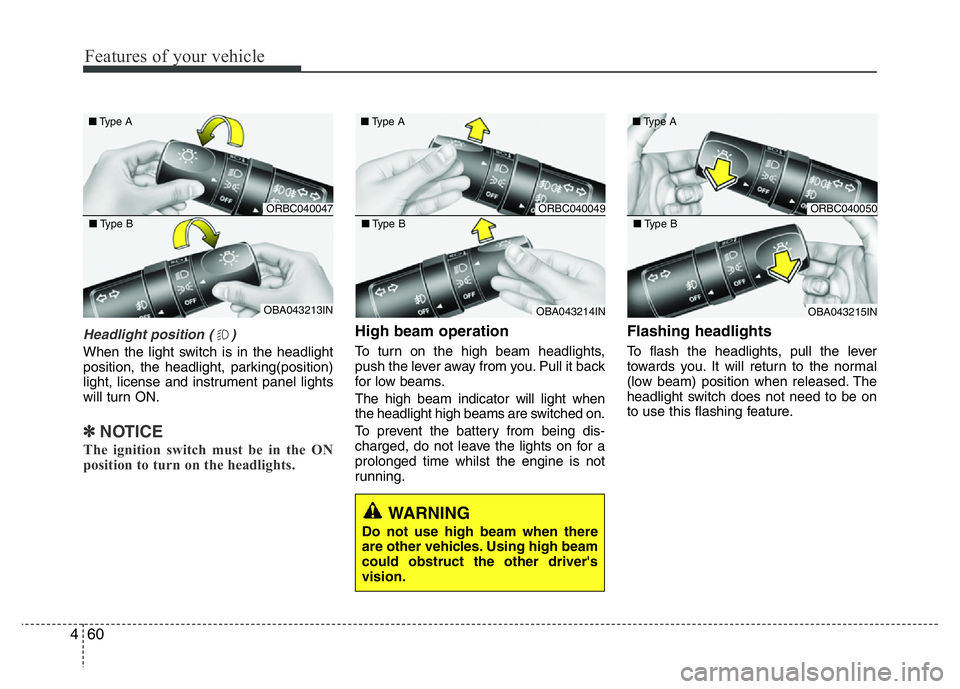
Headlight position ( )
When the light switch is in the headlight
position, the headlight, parking(position)
light, license and instrument panel lights
will turn ON.
✽NOTICE
The ignition switch must be in the ON
position to turn on the headlights.
High beam operation
To turn on the high beam headlights,
push the lever away from you. Pull it back
for low beams.
The high beam indicator will light when
the headlight high beams are switched on.
To prevent the battery from being dis-
charged, do not leave the lights on for a
prolonged time whilst the engine is not
running.
Flashing headlights
To flash the headlights, pull the lever
towards you. It will return to the normal
(low beam) position when released. The
headlight switch does not need to be on
to use this flashing feature.
ORBC040047 ■Type A
OBA043213IN ■Type B
ORBC040049 ■Type A
OBA043214IN ■Type B
ORBC040050 ■Type A
OBA043215IN ■Type B
Page 123 of 343
Features of your vehicle
62 4
✽NOTICE
The ignition switch must be in the ON
position to turn on the front fog light.
CAUTION
When in operation, the fog lights
consume large amounts of vehicle
electrical power. Only use the fog
lights when visibility is poor or
unnecessary battery and generator
drain could occur.
■Type B
■Type A
■Type D
■Type C
ORBC040052/ORB040052D/OTA040219R/ORBI041052
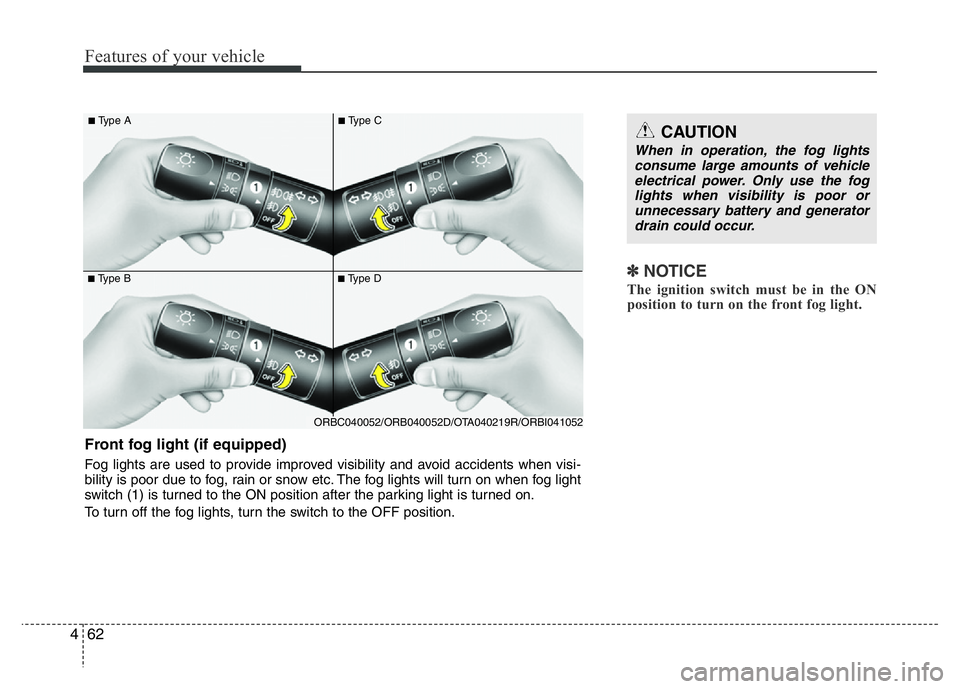
Front fog light (if equipped)
Fog lights are used to provide improved visibility and avoid accidents when visi-
bility is poor due to fog, rain or snow etc. The fog lights will turn on when fog light
switch (1) is turned to the ON position after the parking light is turned on.
To turn off the fog lights, turn the switch to the OFF position.
Page 129 of 343
Features of your vehicle
68 4
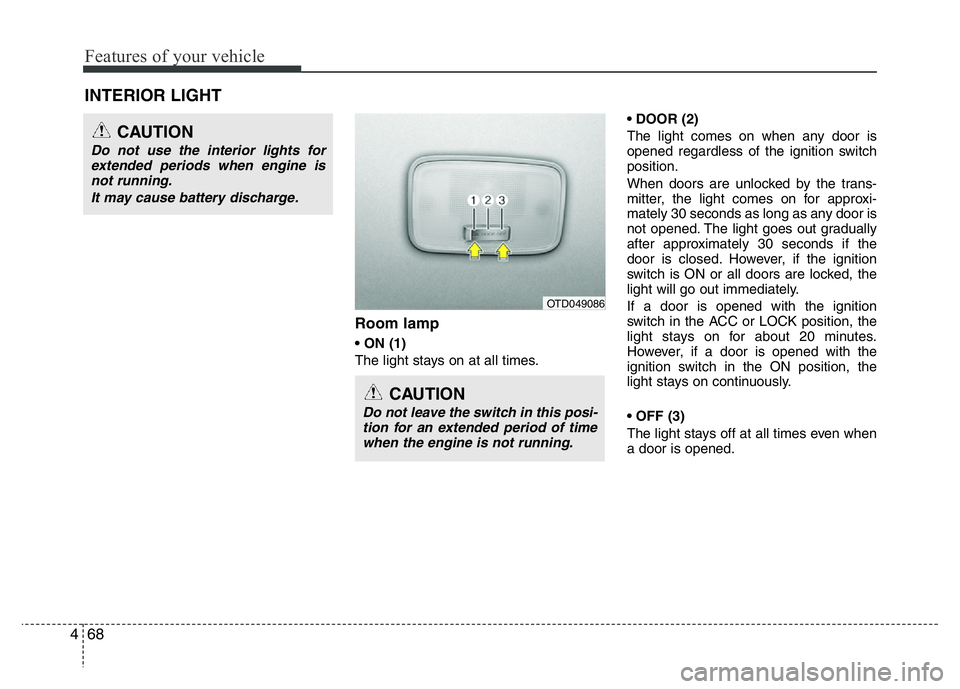
Room lamp
• ON (1)
The light stays on at all times.• DOOR (2)
The light comes on when any door is
opened regardless of the ignition switch
position.
When doors are unlocked by the trans-
mitter, the light comes on for approxi-
mately 30 seconds as long as any door is
not opened. The light goes out gradually
after approximately 30 seconds if the
door is closed. However, if the ignition
switch is ON or all doors are locked, the
light will go out immediately.
If a door is opened with the ignition
switch in the ACC or LOCK position, the
light stays on for about 20 minutes.
However, if a door is opened with the
ignition switch in the ON position, the
light stays on continuously.
• OFF (3)
The light stays off at all times even when
a door is opened.
INTERIOR LIGHT
CAUTION
Do not use the interior lights for
extended periods when engine is
not running.
It may cause battery discharge.
CAUTION
Do not leave the switch in this posi-
tion for an extended period of time
when the engine is not running.
OTD049086
Page 131 of 343
Features of your vehicle
70 4
✽NOTICE
If you want to defrost and defog the
front windshield, refer to “Windshield
defrosting and defogging” in this chap-
ter.
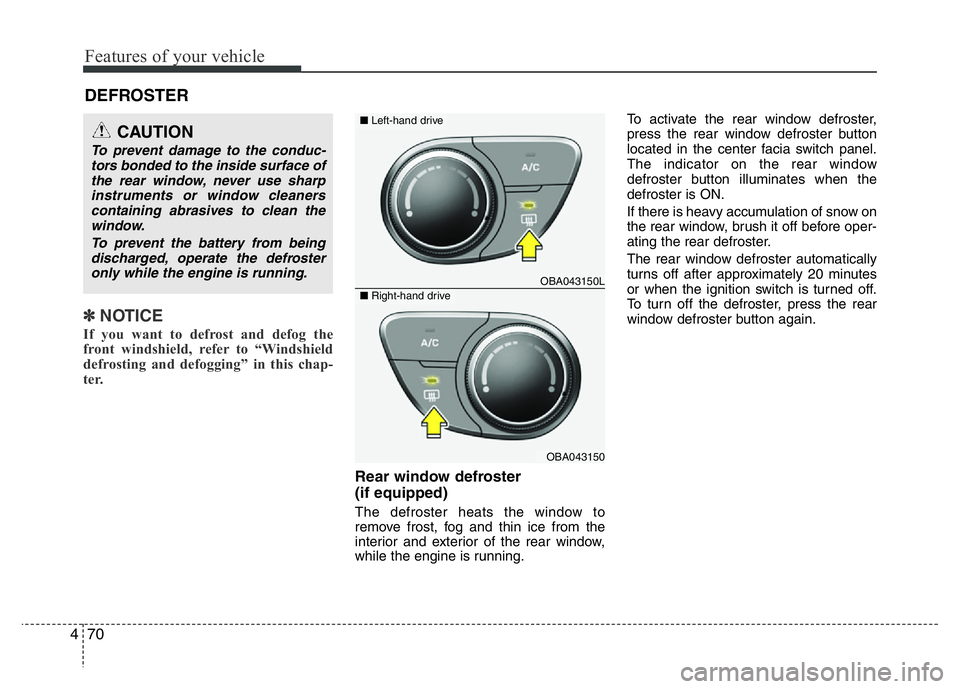
Rear window defroster
(if equipped)
The defroster heats the window to
remove frost, fog and thin ice from the
interior and exterior of the rear window,
while the engine is running.To activate the rear window defroster,
press the rear window defroster button
located in the center facia switch panel.
The indicator on the rear window
defroster button illuminates when the
defroster is ON.
If there is heavy accumulation of snow on
the rear window, brush it off before oper-
ating the rear defroster.
The rear window defroster automatically
turns off after approximately 20 minutes
or when the ignition switch is turned off.
To turn off the defroster, press the rear
window defroster button again.
DEFROSTER
CAUTION
To prevent damage to the conduc-
tors bonded to the inside surface of
the rear window, never use sharp
instruments or window cleaners
containing abrasives to clean the
window.
To prevent the battery from being
discharged, operate the defroster
only while the engine is running.
OBA043150L
OBA043150
■Left-hand drive
■Right-hand drive
Page 156 of 343
495
Features of your vehicle
WARNING
• Do not stare at the screen while
driving. Staring at the screen for
prolonged periods of time could
lead to traffic accidents.
• Do not disassemble, assemble, or
modify the audio system. Such
acts could result in accidents,
fire, or electric shock.
• Using the phone while driving
may lead to a lack of attention of
traffic conditions and increase
the likelihood of accidents. Use
the phone feature after parking
the vehicle.
• Heed caution not to spill water or
introduce foreign objects into the
device. Such acts could lead to
smoke, fire, or product malfunc-
tion.
(Continued)
(Continued)
• Driving while distracted can result in
a loss of vehicle control that may
lead to an accident, severe personal
injury, and death. The driver’s pri-
mary responsibility is in the safe and
legal operation of a vehicle, and use
of any handheld devices, other
equipment, or vehicle systems
which take the driver’s eyes, atten-
tion and focus away from the safe
operation of a vehicle or which are
not permissible by law should never
be used during operation of the
vehicle.(Continued)
• Please refrain from use if the
screen is blank or no sound can
be heard as these signs may indi-
cate product malfunction.
Continued use in such conditions
could lead to accidents(fires,
electric shock) or product mal-
functions.
• Do not touch the antenna during
thunder or lightening as such
acts may lead to lightning
induced electric shock.
• Do not stop or park in parking-
restricted areas to operate the
product. Such acts could lead to
traffic accidents.
• Use the system with the vehicle
ignition turned on. Prolonged use
with the ignition turned off could
result in battery discharge.
(Continued)
Page 157 of 343
Features of your vehicle
96 4
(Continued)
• Turn on the car ignition before
using this device. Do not operate
the audio system for long periods
of time with the ignition turned off
as such operations may lead to
battery discharge.
• Do not subject the device to
severe shock or impact. Direct
pressure onto the front side of
the monitor may cause damage to
the LCD or touch screen.
• When cleaning the device, make
sure to turn off the device and
use a dry and smooth cloth.
Never use tough materials, chem-
ical cloths, or solvents (alcohol,
benzene, thinners, etc.) as such
materials may damage the device
panel or cause color/quality dete-
rioration
(Continued)(Continued)
• Do not place beverages close to
the audio system. Spilling bever-
ages may lead to system mal-
function.
• In case of product malfunction,
please contact your place of pur-
chase or After Service center.
• Placing the audio system within
an electromagnetic environment
may result in noise interference.
• Prevent caustic solutions such as
perfume and cosmetic oil from
contacting the dashboard
because they may cause damage
or discoloration.CAUTION
• Operating the device while driv-
ing could lead to accidents due to
a lack of attention to external sur-
roundings. First park the vehicle
before operating the device.
• Adjust the volume to levels that
allow the driver to hear sounds
from outside of the vehicle.
Driving in a state where external
sounds cannot be heard may lead
to accidents.
• Pay attention to the volume set-
ting when turning the device on.
A sudden output of extreme vol-
ume upon turning the device on
could lead to hearing impairment.
(Adjust the volume to a suitable
levels before turning off the
device.)
(Continued)
Page 160 of 343
499
Features of your vehicle
✽NOTICE - USING THE iPod®
DEVICE
• Some iPod®models may not sup-
port communication protocol and
files may not properly play.
Supported iPod
®models:
- iPod®Mini
- iPod®4th (Photo) ~ 6th (Classic)
generation
- iPod
®Nano 1st~4th generation
- iPod®Touch 1st~2nd generation
• The order of search or playback of
songs in the iPod
®can be different
from the order searched in the
audio system.
• If the iPod
®disabled due to its
own malfunction, reset the iPod®.
(Reset: Refer to iPod®manual)
• An iPod®may not operate nor-
mally on low battery.
(Continued)(Continued)
• Some iPod
®devices, such as the
iPhone®, can be connected
through the Bluetooth®Wireless
Technology interface. The device
must have audio Bluetooth
®
Wireless Technology capability
(such as for stereo headphone
Bluetooth
®Wireless Technology ).
The device can play, but it will not
be controlled by the audio system.
• To use iPod
®features within the
audio, use the cable provided upon
purchasing an iPod
®d device.
• Skipping or improper operation may
occur depending on the characteris-
tics of your iPod
®/iPhone®device.
• If your iPhone®is connected to both
the Bluetooth®Wireless Technology
and USB, the sound may not be prop-
erly played. In your iPhone
®, select
the Dock connector orBluetooth®
Wireless Technology to change the
sound output (source).
(Continued)
(Continued)
• When connecting iPod®with theiPod®Power Cable, insert the connec-
tor to the multimedia socket complete-
ly. If not inserted completely, communi-
cations between
iPod®and audio may
be interrupted.
• When adjusting the sound effects of
the
iPod®and the audio system, the
sound effects of both devices will over-
lap and might reduce or distort the
quality of the sound.
• Deactivate (turn off) the equalizer
function of an
iPod®when adjusting
the audio system’s volume, and turn
off the equalizer of the audio system
when using the equalizer of an
iPod®.
• When not using iPod®with car audio,
detach the iPod®cable from iPod®.
Otherwise, iPod®may remain in
accessory mode, and may not work
properly.
Page 176 of 343
![HYUNDAI I10 2017 User Guide 4115
Features of your vehicle
System Settings
Press the key Select [System]
Memory Information
(if equipped)
Displays currently used memory and
total system memory.
Select [Memory Information] OK
T](/img/35/56220/w960_56220-175.png "HYUNDAI I10 2017 User Guide 4115
Features of your vehicle
System Settings
Press the key Select [System]
Memory Information
(if equipped)
Displays currently used memory and
total system memory.
Select [Memory Information] OK
T")
4115
Features of your vehicle
System Settings
Press the key Select [System]
Memory Information
(if equipped)
Displays currently used memory and
total system memory.
Select [Memory Information] OK
The currently used memory is displayed
on the left side while the total system
memory is displayed on the right side.
SETUP
CLOCK
CAUTION
Bluetooth®Wireless Technology
connection may become intermit-
tently disconnected in some mobile
phones. Follow these next steps to
try again.
1) Turn the Bluetooth
®Wireless
Technology function within the
mobile phone ON/OFF and try to
connect again.
2) Turn the mobile phone power
ON/OFF and try to connect again.
3) Completely remove the mobile
phone battery, reboot, and then
try to connect again.
4) Reboot the audio system and try
to connect again
5) Delete all paired devices in your
mobile phone and the audio sys-
tem and pair again for use.
Page 197 of 343
Driving your vehicle
4 5
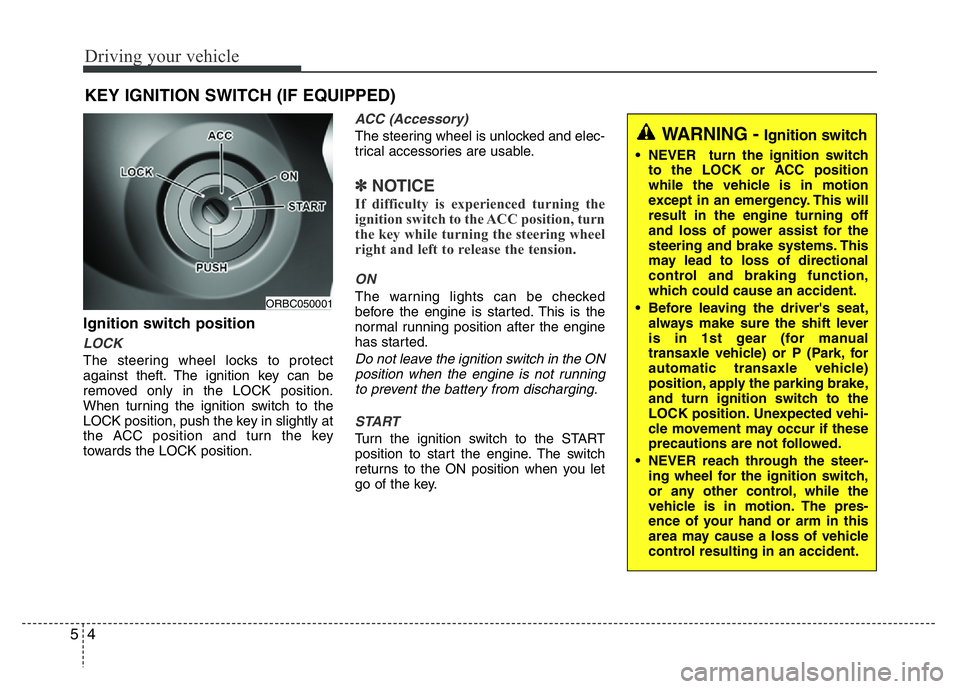
Ignition switch position
LOCK
The steering wheel locks to protect
against theft. The ignition key can be
removed only in the LOCK position.
When turning the ignition switch to the
LOCK position, push the key in slightly at
the ACC position and turn the key
towards the LOCK position.
ACC (Accessory)
The steering wheel is unlocked and elec-
trical accessories are usable.
✽NOTICE
If difficulty is experienced turning the
ignition switch to the ACC position, turn
the key while turning the steering wheel
right and left to release the tension.
ON
The warning lights can be checked
before the engine is started. This is the
normal running position after the engine
has started.
Do not leave the ignition switch in the ON
position when the engine is not running
to prevent the battery from discharging.
START
Turn the ignition switch to the START
position to start the engine. The switch
returns to the ON position when you let
go of the key.
KEY IGNITION SWITCH (IF EQUIPPED)
ORBC050001
WARNING - Ignition switch
• NEVER turn the ignition switch
to the LOCK or ACC position
while the vehicle is in motion
except in an emergency. This will
result in the engine turning off
and loss of power assist for the
steering and brake systems. This
may lead to loss of directional
control and braking function,
which could cause an accident.
• Before leaving the driver's seat,
always make sure the shift lever
is in 1st gear (for manual
transaxle vehicle) or P (Park, for
automatic transaxle vehicle)
position, apply the parking brake,
and turn ignition switch to the
LOCK position. Unexpected vehi-
cle movement may occur if these
precautions are not followed.
• NEVER reach through the steer-
ing wheel for the ignition switch,
or any other control, while the
vehicle is in motion. The pres-
ence of your hand or arm in this
area may cause a loss of vehicle
control resulting in an accident.