battery HYUNDAI I10 2017 Owners Manual
[x] Cancel search | Manufacturer: HYUNDAI, Model Year: 2017, Model line: I10, Model: HYUNDAI I10 2017Pages: 343, PDF Size: 9.14 MB
Page 16 of 343
Your vehicle at a glance
6 2
ENGINE COMPARTMENT
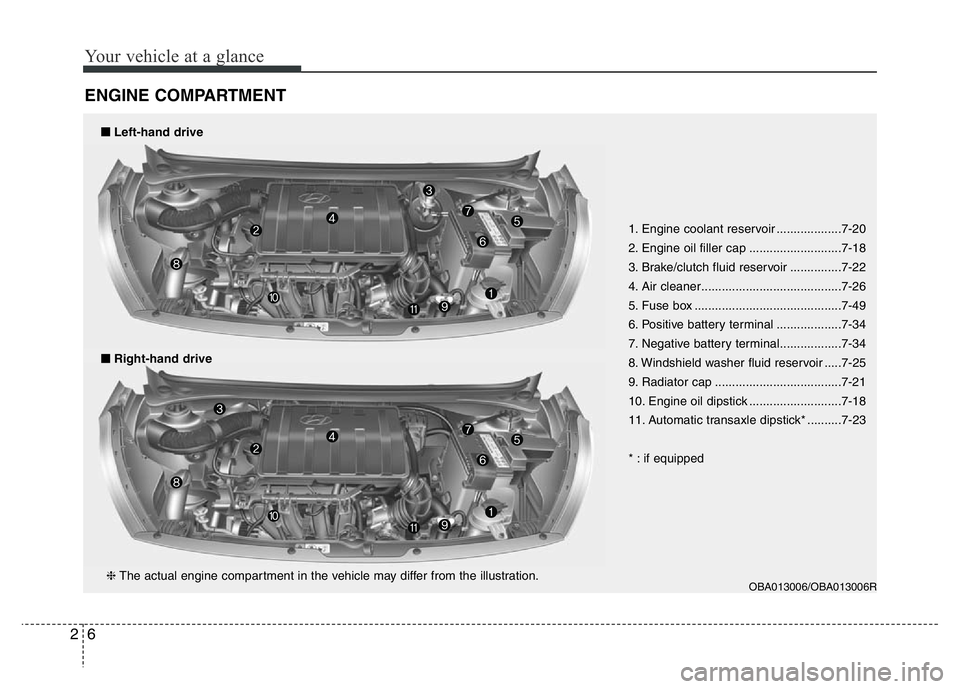
1. Engine coolant reservoir ...................7-20
2. Engine oil filler cap ...........................7-18
3. Brake/clutch fluid reservoir ...............7-22
4. Air cleaner.........................................7-26
5. Fuse box ...........................................7-49
6. Positive battery terminal ...................7-34
7. Negative battery terminal..................7-34
8. Windshield washer fluid reservoir .....7-25
9. Radiator cap .....................................7-21
10. Engine oil dipstick ...........................7-18
11. Automatic transaxle dipstick* ..........7-23
* : if equipped
■Right-hand drive
■Left-hand drive
OBA013006/OBA013006R❈The actual engine compartment in the vehicle may differ from the illustration.
Page 62 of 343
Features of your vehicle
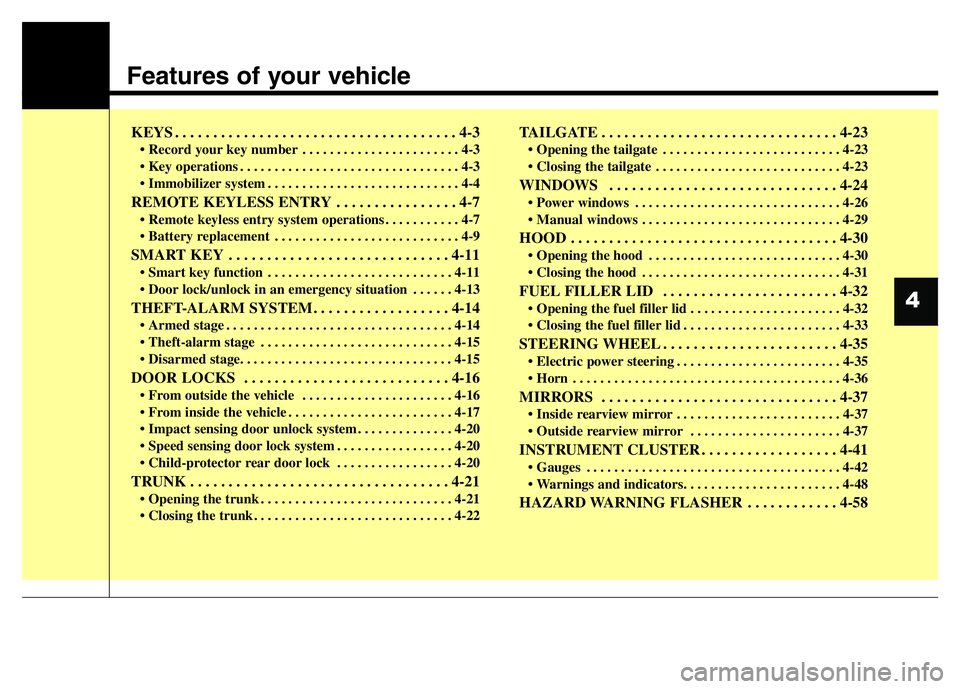
KEYS . . . . . . . . . . . . . . . . . . . . . . . . . . . . . . . . . . . . . 4-3
• Record your key number . . . . . . . . . . . . . . . . . . . . . . . 4-3
• Key operations . . . . . . . . . . . . . . . . . . . . . . . . . . . . . . . . 4-3
• Immobilizer system . . . . . . . . . . . . . . . . . . . . . . . . . . . . 4-4
REMOTE KEYLESS ENTRY . . . . . . . . . . . . . . . . 4-7
• Remote keyless entry system operations . . . . . . . . . . . 4-7
• Battery replacement . . . . . . . . . . . . . . . . . . . . . . . . . . . 4-9
SMART KEY . . . . . . . . . . . . . . . . . . . . . . . . . . . . . 4-11
• Smart key function . . . . . . . . . . . . . . . . . . . . . . . . . . . 4-11
• Door lock/unlock in an emergency situation . . . . . . 4-13
THEFT-ALARM SYSTEM . . . . . . . . . . . . . . . . . . 4-14
• Armed stage . . . . . . . . . . . . . . . . . . . . . . . . . . . . . . . . . 4-14
• Theft-alarm stage . . . . . . . . . . . . . . . . . . . . . . . . . . . . 4-15
• Disarmed stage. . . . . . . . . . . . . . . . . . . . . . . . . . . . . . . 4-15
DOOR LOCKS . . . . . . . . . . . . . . . . . . . . . . . . . . . 4-16
• From outside the vehicle . . . . . . . . . . . . . . . . . . . . . . 4-16
• From inside the vehicle . . . . . . . . . . . . . . . . . . . . . . . . 4-17
• Impact sensing door unlock system . . . . . . . . . . . . . . 4-20
• Speed sensing door lock system . . . . . . . . . . . . . . . . . 4-20
• Child-protector rear door lock . . . . . . . . . . . . . . . . . 4-20
TRUNK . . . . . . . . . . . . . . . . . . . . . . . . . . . . . . . . . . 4-21
• Opening the trunk . . . . . . . . . . . . . . . . . . . . . . . . . . . . 4-21
• Closing the trunk . . . . . . . . . . . . . . . . . . . . . . . . . . . . . 4-22
TAILGATE . . . . . . . . . . . . . . . . . . . . . . . . . . . . . . . 4-23
• Opening the tailgate . . . . . . . . . . . . . . . . . . . . . . . . . . 4-23
• Closing the tailgate . . . . . . . . . . . . . . . . . . . . . . . . . . . 4-23
WINDOWS . . . . . . . . . . . . . . . . . . . . . . . . . . . . . . 4-24
• Power windows . . . . . . . . . . . . . . . . . . . . . . . . . . . . . . 4-26
• Manual windows . . . . . . . . . . . . . . . . . . . . . . . . . . . . . 4-29
HOOD . . . . . . . . . . . . . . . . . . . . . . . . . . . . . . . . . . . 4-30
• Opening the hood . . . . . . . . . . . . . . . . . . . . . . . . . . . . 4-30
• Closing the hood . . . . . . . . . . . . . . . . . . . . . . . . . . . . . 4-31
FUEL FILLER LID . . . . . . . . . . . . . . . . . . . . . . . 4-32
• Opening the fuel filler lid . . . . . . . . . . . . . . . . . . . . . . 4-32
• Closing the fuel filler lid . . . . . . . . . . . . . . . . . . . . . . . 4-33
STEERING WHEEL . . . . . . . . . . . . . . . . . . . . . . . 4-35
• Electric power steering . . . . . . . . . . . . . . . . . . . . . . . . 4-35
• Horn . . . . . . . . . . . . . . . . . . . . . . . . . . . . . . . . . . . . . . . 4-36
MIRRORS . . . . . . . . . . . . . . . . . . . . . . . . . . . . . . . 4-37
• Inside rearview mirror . . . . . . . . . . . . . . . . . . . . . . . . 4-37
• Outside rearview mirror . . . . . . . . . . . . . . . . . . . . . . 4-37
INSTRUMENT CLUSTER . . . . . . . . . . . . . . . . . . 4-41
• Gauges . . . . . . . . . . . . . . . . . . . . . . . . . . . . . . . . . . . . . 4-42
• Warnings and indicators. . . . . . . . . . . . . . . . . . . . . . . 4-48
HAZARD WARNING FLASHER . . . . . . . . . . . . 4-58
4
Page 63 of 343
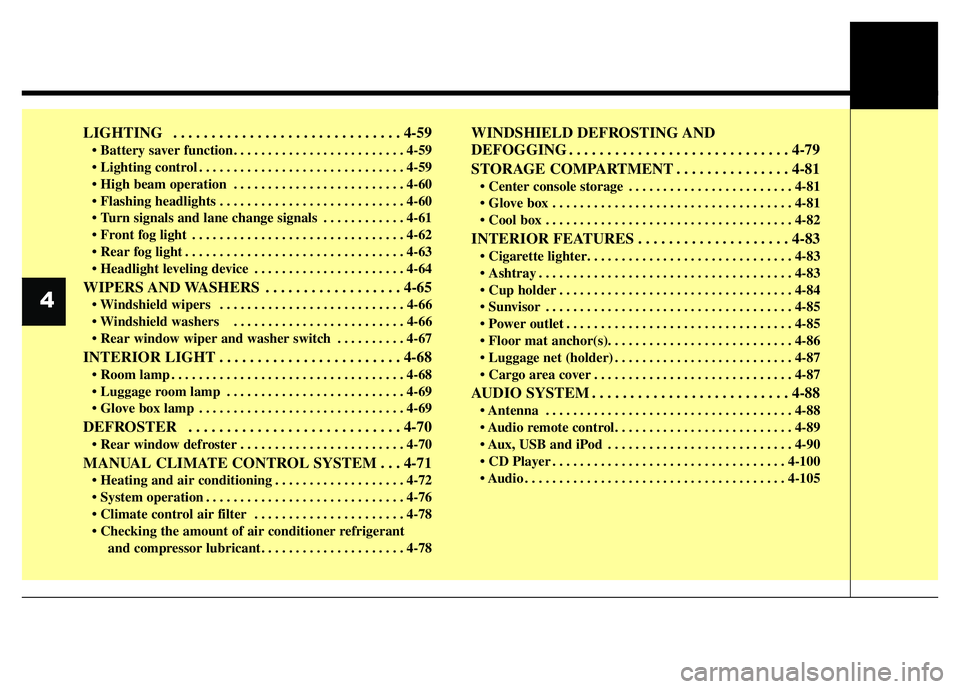
LIGHTING . . . . . . . . . . . . . . . . . . . . . . . . . . . . . . 4-59
• Battery saver function. . . . . . . . . . . . . . . . . . . . . . . . . 4-59
• Lighting control . . . . . . . . . . . . . . . . . . . . . . . . . . . . . . 4-59
• High beam operation . . . . . . . . . . . . . . . . . . . . . . . . . 4-60
• Flashing headlights . . . . . . . . . . . . . . . . . . . . . . . . . . . 4-60
• Turn signals and lane change signals . . . . . . . . . . . . 4-61
• Front fog light . . . . . . . . . . . . . . . . . . . . . . . . . . . . . . . 4-62
• Rear fog light . . . . . . . . . . . . . . . . . . . . . . . . . . . . . . . . 4-63
• Headlight leveling device . . . . . . . . . . . . . . . . . . . . . . 4-64
WIPERS AND WASHERS . . . . . . . . . . . . . . . . . . 4-65
• Windshield wipers . . . . . . . . . . . . . . . . . . . . . . . . . . . 4-66
• Windshield washers . . . . . . . . . . . . . . . . . . . . . . . . . 4-66
• Rear window wiper and washer switch . . . . . . . . . . 4-67
INTERIOR LIGHT . . . . . . . . . . . . . . . . . . . . . . . . 4-68
• Room lamp . . . . . . . . . . . . . . . . . . . . . . . . . . . . . . . . . . 4-68
• Luggage room lamp . . . . . . . . . . . . . . . . . . . . . . . . . . 4-69
• Glove box lamp . . . . . . . . . . . . . . . . . . . . . . . . . . . . . . 4-69
DEFROSTER . . . . . . . . . . . . . . . . . . . . . . . . . . . . 4-70
• Rear window defroster . . . . . . . . . . . . . . . . . . . . . . . . 4-70
MANUAL CLIMATE CONTROL SYSTEM . . . 4-71
• Heating and air conditioning . . . . . . . . . . . . . . . . . . . 4-72
• System operation . . . . . . . . . . . . . . . . . . . . . . . . . . . . . 4-76
• Climate control air filter . . . . . . . . . . . . . . . . . . . . . . 4-78
• Checking the amount of air conditioner refrigerant
and compressor lubricant. . . . . . . . . . . . . . . . . . . . . 4-78
WINDSHIELD DEFROSTING AND
DEFOGGING . . . . . . . . . . . . . . . . . . . . . . . . . . . . . 4-79
STORAGE COMPARTMENT . . . . . . . . . . . . . . . 4-81
• Center console storage . . . . . . . . . . . . . . . . . . . . . . . . 4-81
• Glove box . . . . . . . . . . . . . . . . . . . . . . . . . . . . . . . . . . . 4-81
• Cool box . . . . . . . . . . . . . . . . . . . . . . . . . . . . . . . . . . . . 4-82
INTERIOR FEATURES . . . . . . . . . . . . . . . . . . . . 4-83
• Cigarette lighter. . . . . . . . . . . . . . . . . . . . . . . . . . . . . . 4-83
• Ashtray . . . . . . . . . . . . . . . . . . . . . . . . . . . . . . . . . . . . . 4-83
• Cup holder . . . . . . . . . . . . . . . . . . . . . . . . . . . . . . . . . . 4-84
• Sunvisor . . . . . . . . . . . . . . . . . . . . . . . . . . . . . . . . . . . . 4-85
• Power outlet . . . . . . . . . . . . . . . . . . . . . . . . . . . . . . . . . 4-85
• Floor mat anchor(s). . . . . . . . . . . . . . . . . . . . . . . . . . . 4-86
• Luggage net (holder) . . . . . . . . . . . . . . . . . . . . . . . . . . 4-87
• Cargo area cover . . . . . . . . . . . . . . . . . . . . . . . . . . . . . 4-87
AUDIO SYSTEM . . . . . . . . . . . . . . . . . . . . . . . . . . 4-88
• Antenna . . . . . . . . . . . . . . . . . . . . . . . . . . . . . . . . . . . . 4-88
• Audio remote control. . . . . . . . . . . . . . . . . . . . . . . . . . 4-89
• Aux, USB and iPod . . . . . . . . . . . . . . . . . . . . . . . . . . . 4-90
• CD Player . . . . . . . . . . . . . . . . . . . . . . . . . . . . . . . . . . 4-100
• Audio . . . . . . . . . . . . . . . . . . . . . . . . . . . . . . . . . . . . . . 4-105
4
Page 69 of 343
Features of your vehicle
8 4
✽NOTICE
The doors will not lock if a door is
opened.
Unlock (2)
1. Press the unlock button.
2. The hazard warning lights will blink
twice to indicate that all doors are
unlocked.
Tailgate/trunk unlock (3, if equipped)
1. Press the tailgate/trunk unlock button
for more than 1 second.
2. The hazard warning light will blink
twice to indicate the tailgate/trunk is
unlocked.
✽NOTICE
• After unlocking the tailgate/trunk, the
tailgate/trunk will lock automatically
unless it is opened within 30 seconds.
• Once the tailgate/trunk is opened and
then closed, the tailgate/trunk will
lock automatically.
• The word "HOLD" is written on the
button to inform you that you must
press and hold the button.
Transmitter precautions
✽NOTICE
The transmitter will not work if any of
following occurs:
• The mechanical key is in the ignition
switch.
• You exceed the operating distance
limit (about 10 m [30 feet]).
• The battery in the transmitter is
weak.
• Other vehicles or objects may be
blocking the signal.
• The weather is extremely cold.
• The transmitter is close to a radio
transmitter such as a radio station or
an airport which can interfere with
normal operation of the transmitter.
When the transmitter does not work
correctly, open and close the door with
the ignition key. If you have a problem
with the transmitter, we recommend
that you contact an authorized
HYUNDAI dealer.
(Continued)(Continued)
• If the transmitter is in close proximity
to your cell phone or smart phone, the
signal from the transmitter could be
blocked by normal operation of your
cell phone or smart phone. This is
especially important when the phone
is active such as making call, receiving
calls, text messaging, and/or sending/
receiving emails. Avoid placing the
transmitter and your cell phone or
smart phone in the same pants or
jacket pocket and maintain adequate
distance between the two devices.
Page 70 of 343
49
Features of your vehicle
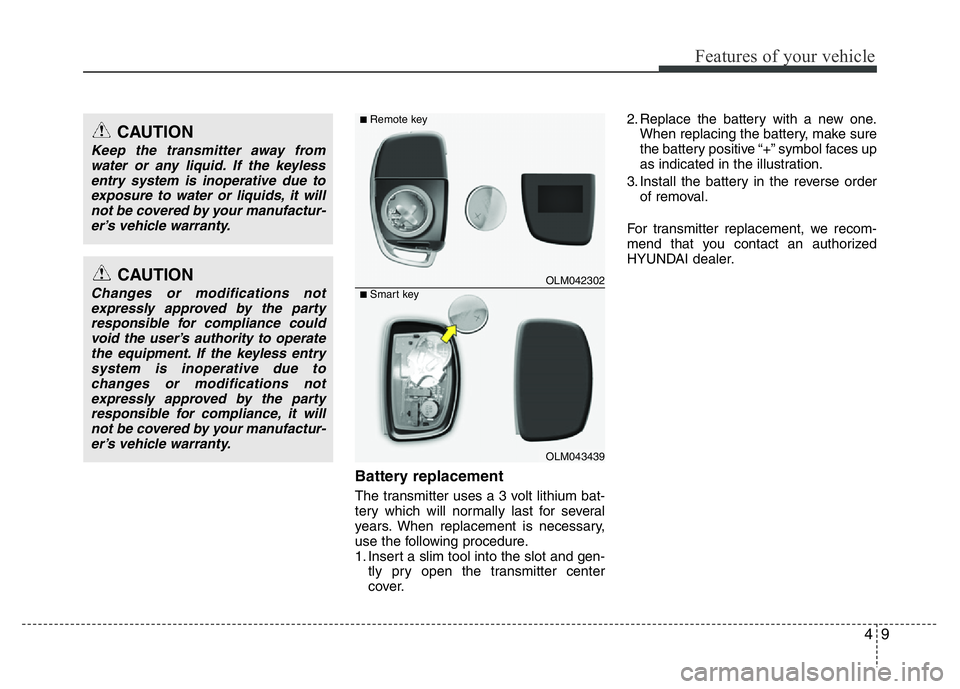
Battery replacement
The transmitter uses a 3 volt lithium bat-
tery which will normally last for several
years. When replacement is necessary,
use the following procedure.
1. Insert a slim tool into the slot and gen-
tly pry open the transmitter center
cover.2. Replace the battery with a new one.
When replacing the battery, make sure
the battery positive “+” symbol faces up
as indicated in the illustration.
3. Install the battery in the reverse order
of removal.
For transmitter replacement, we recom-
mend that you contact an authorized
HYUNDAI dealer.
CAUTION
Changes or modifications not
expressly approved by the party
responsible for compliance could
void the user’s authority to operate
the equipment. If the keyless entry
system is inoperative due to
changes or modifications not
expressly approved by the party
responsible for compliance, it will
not be covered by your manufactur-
er’s vehicle warranty.
CAUTION
Keep the transmitter away from
water or any liquid. If the keyless
entry system is inoperative due to
exposure to water or liquids, it will
not be covered by your manufactur-
er’s vehicle warranty.
OLM042302
OLM043439
■Remote key
■Smart key
Page 71 of 343
Features of your vehicle
10 4
✽NOTICE
An inappropriately disposed battery
can be harmful to the environment and
human health. Dispose the battery
according to your local law(s) or regula-
tion.CAUTION
• The keyless entry system trans-
mitter is designed to give you
years of trouble-free use, howev-
er it can malfunction if exposed to
moisture or static electricity.
If you are unsure how to use your
transmitter or replace the battery,
we recommend that you contact
an authorized HYUNDAI dealer.
• Using the wrong battery can
cause the transmitter to malfunc-
tion. Be sure to use the correct
battery.
• To avoid damaging the transmit-
ter, don't drop it, get it wet, or
expose it to heat or sunlight.
Page 100 of 343
439
Features of your vehicle
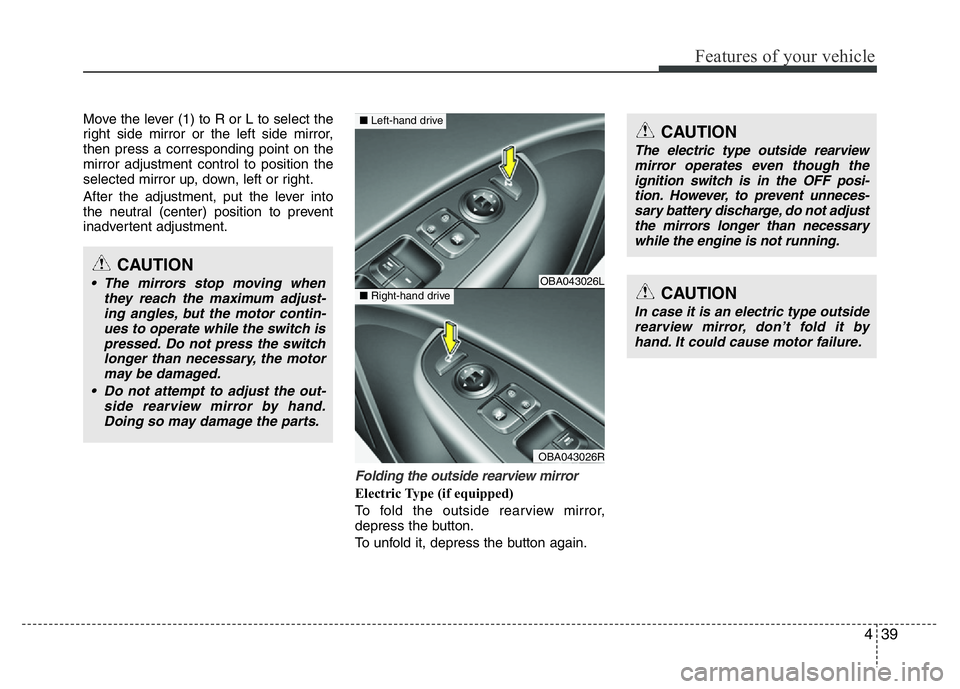
Move the lever (1) to R or L to select the
right side mirror or the left side mirror,
then press a corresponding point on the
mirror adjustment control to position the
selected mirror up, down, left or right.
After the adjustment, put the lever into
the neutral (center) position to prevent
inadvertent adjustment.
Folding the outside rearview mirror
Electric Type (if equipped)
To fold the outside rearview mirror,
depress the button.
To unfold it, depress the button again.
CAUTION
• The mirrors stop moving when
they reach the maximum adjust-
ing angles, but the motor contin-
ues to operate while the switch is
pressed. Do not press the switch
longer than necessary, the motor
may be damaged.
• Do not attempt to adjust the out-
side rearview mirror by hand.
Doing so may damage the parts.OBA043026L
OBA043026R
■Left-hand drive
■Right-hand driveCAUTION
In case it is an electric type outside
rearview mirror, don’t fold it by
hand. It could cause motor failure.
CAUTION
The electric type outside rearview
mirror operates even though the
ignition switch is in the OFF posi-
tion. However, to prevent unneces-
sary battery discharge, do not adjust
the mirrors longer than necessary
while the engine is not running.
Page 106 of 343
445
Features of your vehicle
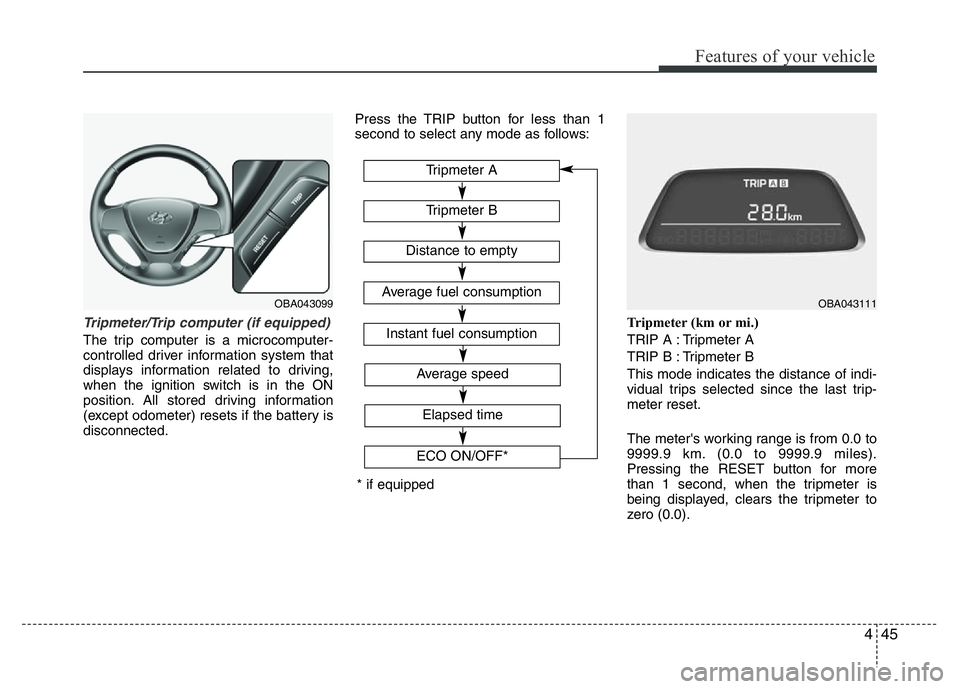
Tripmeter/Trip computer (if equipped)
The trip computer is a microcomputer-
controlled driver information system that
displays information related to driving,
when the ignition switch is in the ON
position. All stored driving information
(except odometer) resets if the battery is
disconnected.Press the TRIP button for less than 1
second to select any mode as follows:
Tripmeter (km or mi.)
TRIP A : Tripmeter A
TRIP B : Tripmeter B
This mode indicates the distance of indi-
vidual trips selected since the last trip-
meter reset.
The meter's working range is from 0.0 to
9999.9 km. (0.0 to 9999.9 miles).
Pressing the RESET button for more
than 1 second, when the tripmeter is
being displayed, clears the tripmeter to
zero (0.0).
OBA043099
* if equippedTripmeter B
Instant fuel consumption
Tripmeter A
Distance to empty
Average fuel consumption
Elapsed time
Average speed
ECO ON/OFF*
OBA043111
Page 108 of 343
447
Features of your vehicle
✽NOTICE
• If the vehicle is not on level ground or
the battery power has been interrupt-
ed, the “Distance to empty” function
may not operate correctly.
The trip computer may not register
additional fuel if less than 6 liters (1.6
gallons) of fuel are added to the vehicle.
• The fuel consumption and distance to
empty may vary significantly based
on driving conditions, driving habits,
and condition of the vehicle.
• The distance to empty is an estimate
of the available driving distance. This
may differ from the actual driving dis-
tance available.
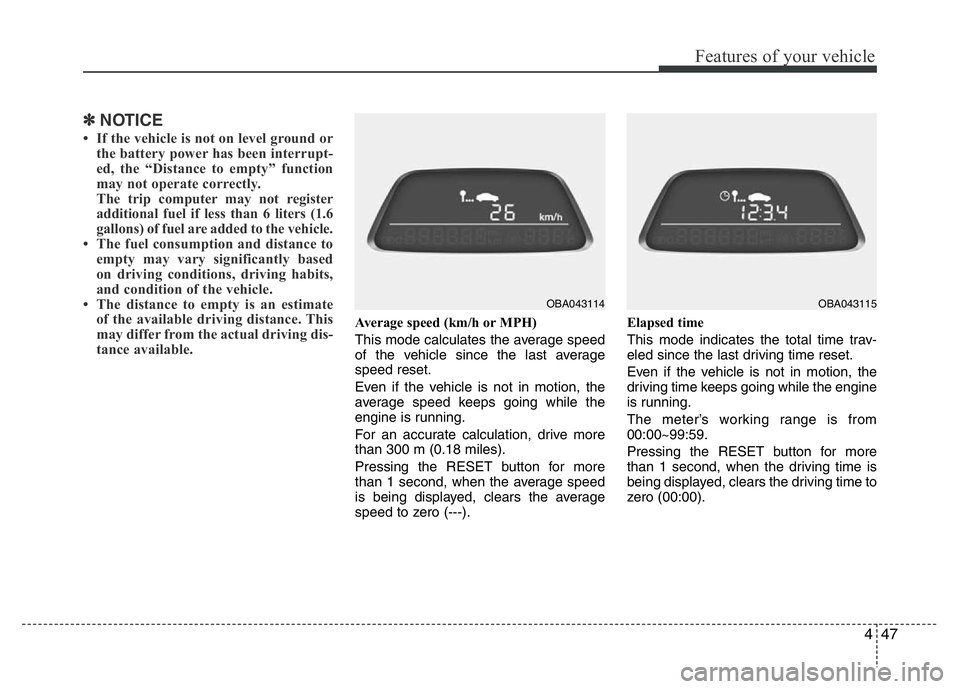
Average speed (km/h or MPH)
This mode calculates the average speed
of the vehicle since the last average
speed reset.
Even if the vehicle is not in motion, the
average speed keeps going while the
engine is running.
For an accurate calculation, drive more
than 300 m (0.18 miles).
Pressing the RESET button for more
than 1 second, when the average speed
is being displayed, clears the average
speed to zero (---).Elapsed time
This mode indicates the total time trav-
eled since the last driving time reset.
Even if the vehicle is not in motion, the
driving time keeps going while the engine
is running.
The meter’s working range is from
00:00~99:59.
Pressing the RESET button for more
than 1 second, when the driving time is
being displayed, clears the driving time to
zero (00:00).
OBA043114OBA043115
Page 115 of 343
Features of your vehicle
54 4
Immobilizer indicator
(if equipped)
Without smart key system
This indicator illuminates when the
immobilizer key is inserted and turned to
the ON position to start the engine. At
this time, you can start the engine. The
light goes off after the engine runs. If this
light blinks when the ignition switch is in
the ON position before starting the
engine, we recommend that the system
be checked by an authorized HYUNDAI
dealer.
With smart key system
If any of the following occurs in a vehicle
equipped with the smart key, the immobi-
lizer indicator illuminates blinks or goes
off.
• When the smart key is in the vehicle, if
the engine start/stop button is in the
ACC or ON position, the indicator will
illuminate for approximately 30 sec-
onds to indicate that you are able to
start the engine. However, when the
smart key is not in the vehicle, if the
engine start/stop button is pressed, the
indicator will blink for a few seconds to
indicate that you are not be able to
start the engine.• If the indicator illuminates only for 2
seconds and goes out when the
engine start/stop button is turned to
ON position with the smart key in the
vehicle, have the system checked by
an authorized HYUNDAI dealer.
• When the battery is weak, if the engine
start/stop button is pressed, the indica-
tor will blink and you are not able to
start the engine. However, you are able
to start the engine by inserting the
smart key in the smart key holder. Also,
if the smart key system related parts
have a problem, the indicator will blink.
Low fuel level warning
light
This warning light indicates the fuel tank
is nearly empty. When it comes on, you
should add fuel as soon as possible.
Driving with the fuel level warning light on
or with the fuel level below “E” can cause
the engine to misfire and damage the
catalytic converter (if equipped).
Malfunction indicator light
(MIL) (check engine light)
This indicator is part of the Engine
Control System which monitors various
emission control system components. If
this indicator illuminates while driving, it
indicates that a potential malfunction has
been detected somewhere in the emis-
sion control system.
This indicator will also illuminates when
the ignition switch is turned to the ON
position, and will go off in a few seconds
after the engine is started. If it illuminates
while driving, or does not illuminate when
the ignition switch is turned to the ON
position, we recommend that the system
be checked by an authorized HYUNDAI
dealer.
Generally, your vehicle will continue to be
drivable, we recommend that the system
be checked by an authorized HYUNDAI
dealer.