rear HYUNDAI I30 2014 Repair Manual
[x] Cancel search | Manufacturer: HYUNDAI, Model Year: 2014, Model line: I30, Model: HYUNDAI I30 2014Pages: 635, PDF Size: 40.66 MB
Page 158 of 635
Features of your vehicle
80
4
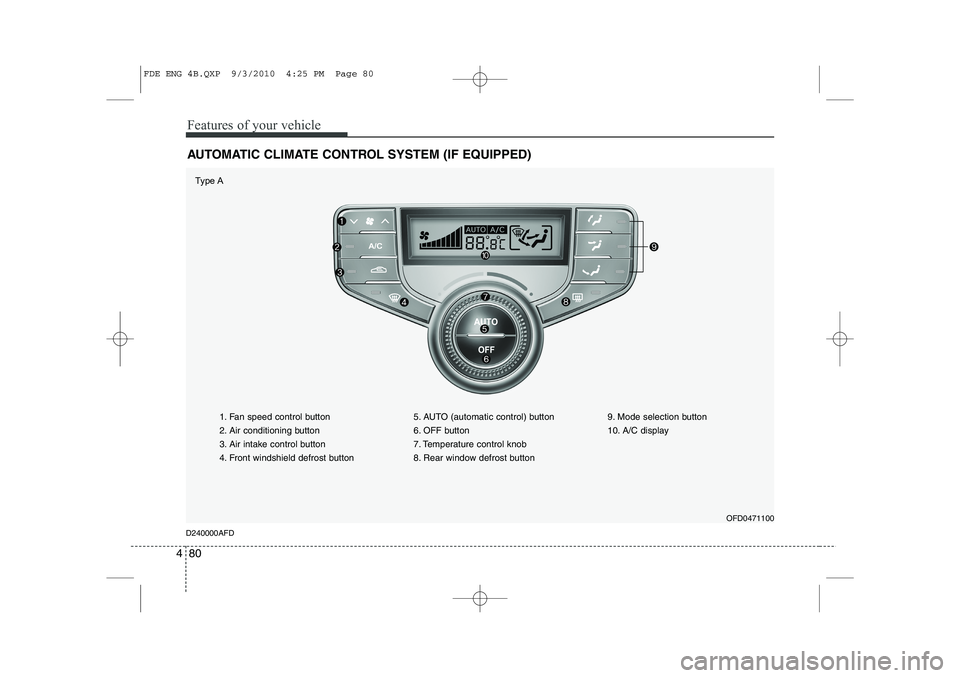
AUTOMATIC CLIMATE CONTROL SYSTEM (IF EQUIPPED)
1. Fan speed control button
2. Air conditioning button
3. Air intake control button
4. Front windshield defrost button 5. AUTO (automatic control) button
6. OFF button
7. Temperature control knob
8. Rear window defrost button9. Mode selection button
10. A/C display
OFD0471100
D240000AFD
Type A
FDE ENG 4B.QXP 9/3/2010 4:25 PM Page 80
Page 166 of 635
Features of your vehicle
88
4
D240208AUN
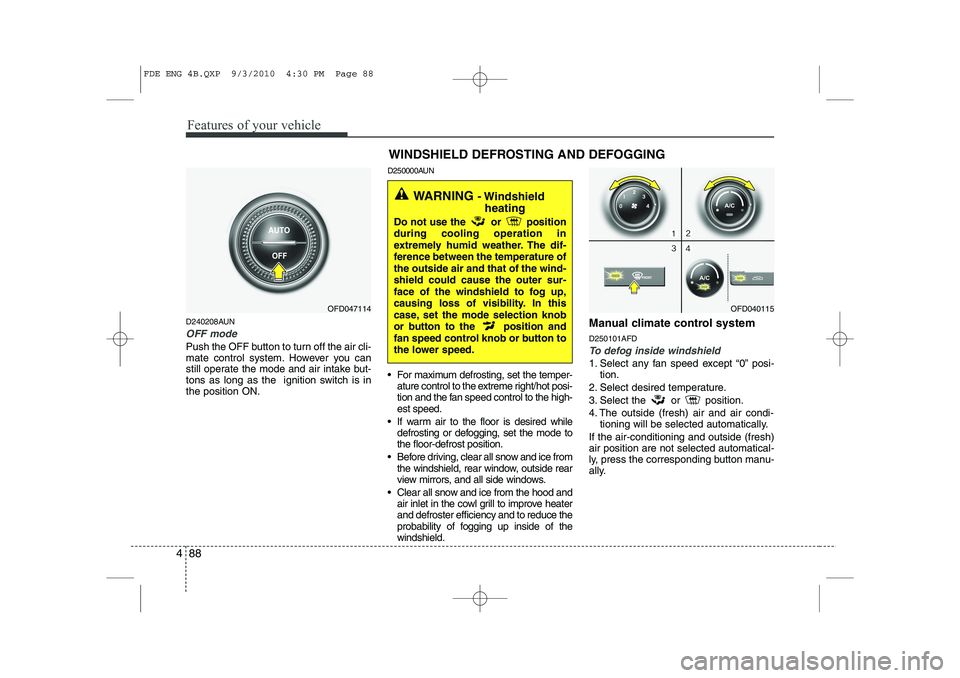
OFF mode
Push the OFF button to turn off the air cli-
mate control system. However you can
still operate the mode and air intake but-
tons as long as the ignition switch is inthe position ON. D250000AUN
For maximum defrosting, set the temper-
ature control to the extreme right/hot posi-
tion and the fan speed control to the high-est speed.
If warm air to the floor is desired while defrosting or defogging, set the mode tothe floor-defrost position.
Before driving, clear all snow and ice from the windshield, rear window, outside rear
view mirrors, and all side windows.
Clear all snow and ice from the hood and air inlet in the cowl grill to improve heaterand defroster efficiency and to reduce the
probability of fogging up inside of thewindshield. Manual climate control system D250101AFDTo defog inside windshield
1. Select any fan speed except “0” posi-
tion.
2. Select desired temperature.
3. Select the or position.
4. The outside (fresh) air and air condi- tioning will be selected automatically.
If the air-conditioning and outside (fresh) air position are not selected automatical-
ly, press the corresponding button manu-
ally.
OFD047114 WINDSHIELD DEFROSTING AND DEFOGGINGOFD040115
WARNING
- Windshield
heating
Do not use the or position during cooling operation in
extremely humid weather. The dif-
ference between the temperature ofthe outside air and that of the wind-shield could cause the outer sur-
face of the windshield to fog up,
causing loss of visibility. In this
case, set the mode selection knob
or button to the position and
fan speed control knob or button to
the lower speed.
FDE ENG 4B.QXP 9/3/2010 4:30 PM Page 88
Page 172 of 635
Features of your vehicle
94
4
D270400AFD
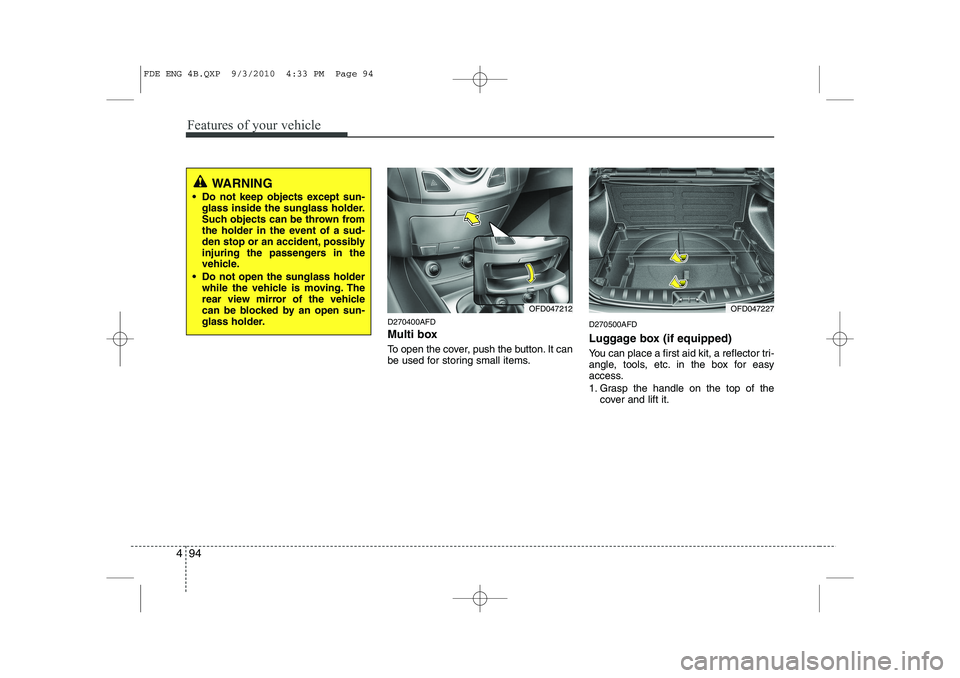
Multi box
To open the cover, push the button. It can
be used for storing small items. D270500AFD
Luggage box (if equipped)
You can place a first aid kit, a reflector tri-
angle, tools, etc. in the box for easy
access.
1. Grasp the handle on the top of the
cover and lift it.
WARNING
Do not keep objects except sun- glass inside the sunglass holder.
Such objects can be thrown from
the holder in the event of a sud-
den stop or an accident, possibly
injuring the passengers in the
vehicle.
Do not open the sunglass holder while the vehicle is moving. The
rear view mirror of the vehicle
can be blocked by an open sun-
glass holder.
OFD047227OFD047212
FDE ENG 4B.QXP 9/3/2010 4:33 PM Page 94
Page 175 of 635
497
Features of your vehicle
D280301AFD
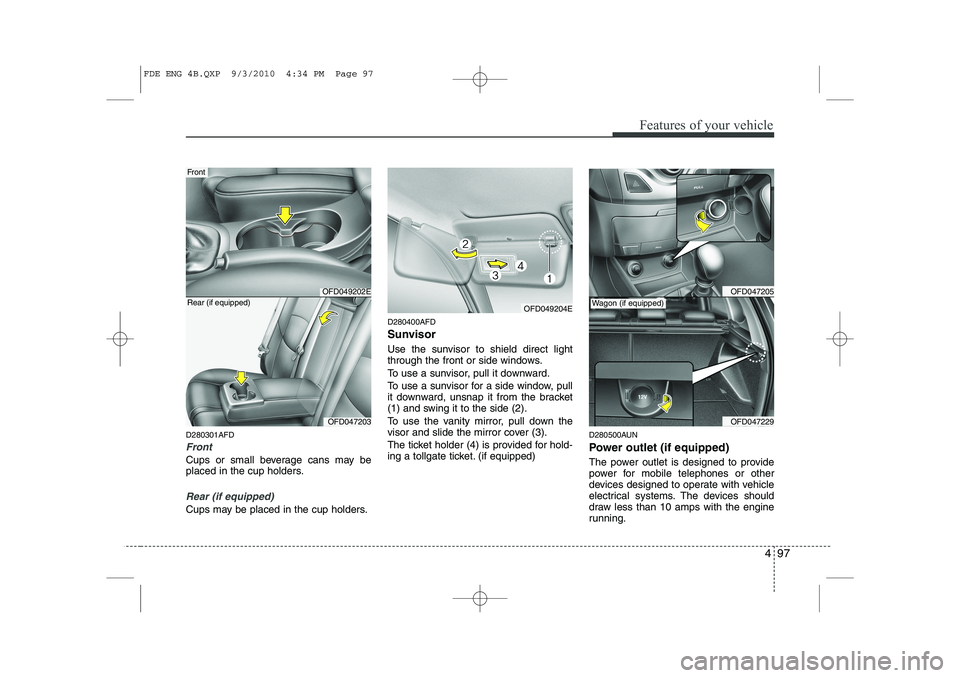
Front
Cups or small beverage cans may be
placed in the cup holders.
Rear (if equipped)
Cups may be placed in the cup holders.D280400AFD
Sunvisor
Use the sunvisor to shield direct light
through the front or side windows.
To use a sunvisor, pull it downward.
To use a sunvisor for a side window, pull
it downward, unsnap it from the bracket
(1) and swing it to the side (2).
To use the vanity mirror, pull down the
visor and slide the mirror cover (3).
The ticket holder (4) is provided for hold-
ing a tollgate ticket. (if equipped)
D280500AUN
Power outlet (if equipped)
The power outlet is designed to provide
power for mobile telephones or other
devices designed to operate with vehicle
electrical systems. The devices should
draw less than 10 amps with the engine
running.
OFD049204E
OFD049202E
Front
OFD047203
Rear (if equipped)OFD047205
OFD047229
Wagon (if equipped)
FDE ENG 4B.QXP 9/3/2010 4:34 PM Page 97
Page 179 of 635
4 101
Features of your vehicle
D281000AFD
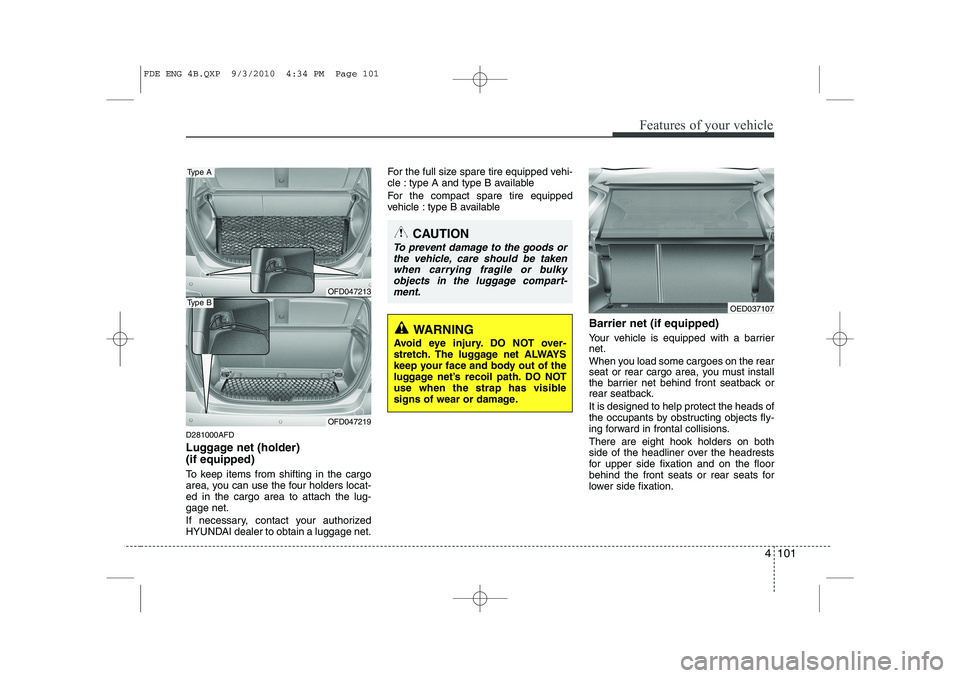
Luggage net (holder) (if equipped)
To keep items from shifting in the cargo
area, you can use the four holders locat-ed in the cargo area to attach the lug-gage net.
If necessary, contact your authorized
HYUNDAI dealer to obtain a luggage net.For the full size spare tire equipped vehi-
cle : type A and type B available
For the compact spare tire equipped
vehicle : type B available
Barrier net (if equipped)
Your vehicle is equipped with a barrier net.
When you load some cargoes on the rear
seat or rear cargo area, you must install
the barrier net behind front seatback or
rear seatback. It is designed to help protect the heads of
the occupants by obstructing objects fly-
ing forward in frontal collisions. There are eight hook holders on both
side of the headliner over the headrests
for upper side fixation and on the floor
behind the front seats or rear seats for
lower side fixation.
CAUTION
To prevent damage to the goods orthe vehicle, care should be takenwhen carrying fragile or bulkyobjects in the luggage compart- ment.
WARNING
Avoid eye injury. DO NOT over-
stretch. The luggage net ALWAYS
keep your face and body out of the
luggage net’s recoil path. DO NOT
use when the strap has visible
signs of wear or damage.
OFD047213
Type A
OFD047219
Type BOED037107
FDE ENG 4B.QXP 9/3/2010 4:34 PM Page 101
Page 180 of 635
Features of your vehicle
102
4
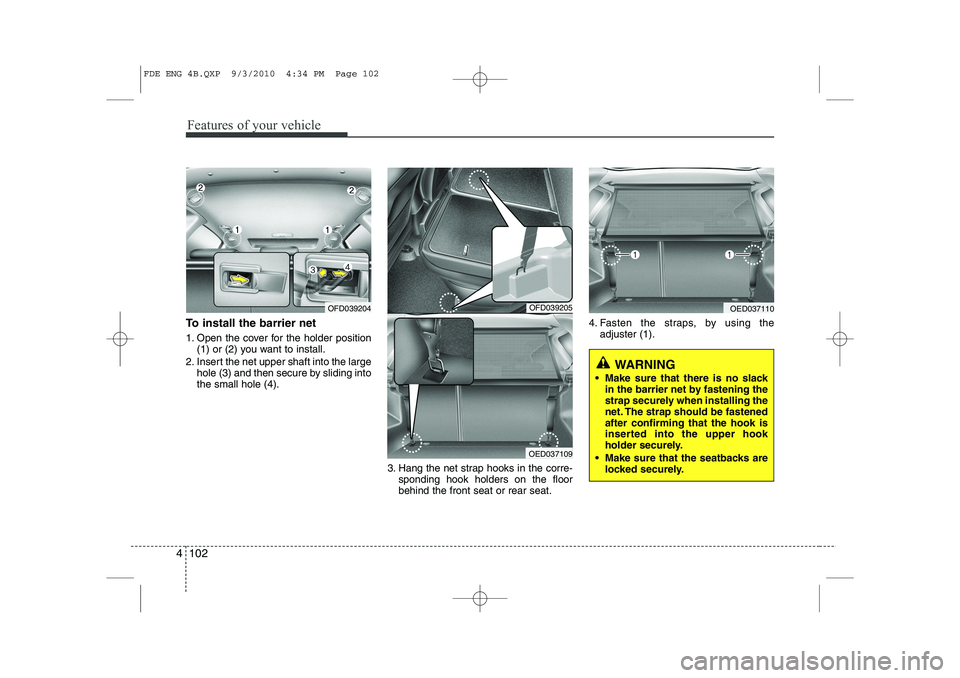
To install the barrier net
1. Open the cover for the holder position
(1) or (2) you want to install.
2. Insert the net upper shaft into the large hole (3) and then secure by sliding into the small hole (4).
3. Hang the net strap hooks in the corre-sponding hook holders on the floorbehind the front seat or rear seat. 4. Fasten the straps, by using the
adjuster (1).
OFD039204OFD039205
OED037109
OED037110
WARNING
Make sure that there is no slack in the barrier net by fastening the
strap securely when installing the
net. The strap should be fastenedafter confirming that the hook is
inserted into the upper hook
holder securely.
Make sure that the seatbacks are locked securely.
FDE ENG 4B.QXP 9/3/2010 4:34 PM Page 102
Page 181 of 635
4 103
Features of your vehicle
To remove the barrier net
1. Loosen the straps by using the strapadjusters and remove the strap hooks
from the hook holders.
2. Remove the net upper shaft by pulling it through the large holes.
3. Remove the barrier net.
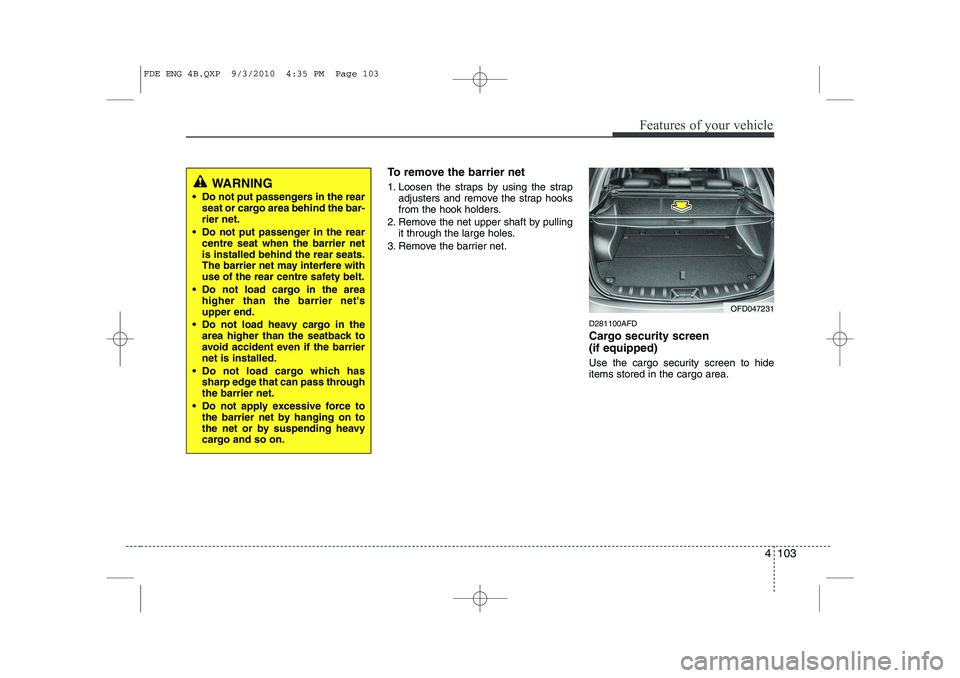
D281100AFD
Cargo security screen (if equipped)
Use the cargo security screen to hide items stored in the cargo area.
WARNING
Do not put passengers in the rear seat or cargo area behind the bar- rier net.
Do not put passenger in the rear centre seat when the barrier netis installed behind the rear seats.
The barrier net may interfere with
use of the rear centre safety belt.
Do not load cargo in the area higher than the barrier net'supper end.
Do not load heavy cargo in the area higher than the seatback to
avoid accident even if the barriernet is installed.
Do not load cargo which has sharp edge that can pass throughthe barrier net.
Do not apply excessive force to the barrier net by hanging on to
the net or by suspending heavy
cargo and so on.
OFD047231
FDE ENG 4B.QXP 9/3/2010 4:35 PM Page 103
Page 246 of 635
E020100AUN
Before entering vehicle
• Be sure that all windows, outside mir-ror(s), and outside lights are clean.
Check the condition of the tires.
Check under the vehicle for any sign of leaks.
Be sure there are no obstacles behind you if you intend to back up.
E020200AUN
Necessary inspections
Fluid levels, such as engine oil, engine
coolant, brake fluid, and washer fluid
should be checked on a regular basis,
with the exact interval depending on the
fluid. Further details are provided in
Section 7, “Maintenance”.
E020300AUN
Before starting
Close and lock all doors.
Position the seat so that all controls are easily reached.
Adjust the inside and outside rearview mirrors. Be sure that all lights work.
Check all gauges.
Check the operation of warning lights
when the ignition switch is turned to the ON position.
Release the parking brake and make sure the brake warning light goes out.
For safe operation, be sure you are famil-
iar with your vehicle and its equipment.
53
Driving your vehicle
BEFORE DRIVING
WARNING
All passengers must be properly
belted whenever the vehicle is mov-
ing. Refer to “Seat belts” in section
3 for more information on their
proper use.
WARNING
Always check the surrounding
areas near your vehicle for people,
especially children, before putting a
car into “Drive” or “Reverse”.
WARNING
When you intend to park or stop the
vehicle with the engine on, be care-ful not to depress the accelerator
pedal for a long period of time. It
may overheat the engine or exhaust
system and cause fire.
WARNING - Driving under
the influence of alcohol or drugs
Drinking and driving is dangerous.
Drunk driving is the number one
contributor to the highway death
toll each year. Even a small amount
of alcohol will affect your reflexes,
perceptions and judgement.Driving while under the influence of
drugs is as dangerous or more dan-
gerous than driving drunk.
You are much more likely to have a
serious accident if you drink or
take drugs and drive.
If you are drinking or taking drugs,
don’t drive. Do not ride with a driv-er who has been drinking or taking
drugs. Choose a designated driveror call a cab.
Page 261 of 635
Driving your vehicle
18
5
E070102AUN
Disc brakes wear indicator
Your vehicle has disc brakes.
When your brake pads are worn and new
pads are required, you will hear a high-
pitched warning sound from your front
brakes or rear brakes (if equipped). You
may hear this sound come and go or it
may occur whenever you depress the
brake pedal.
Please remember that some driving con-
ditions or climates may cause a brake
squeal when you first apply (or lightly
apply) the brakes. This is normal and
does not indicate a problem with your
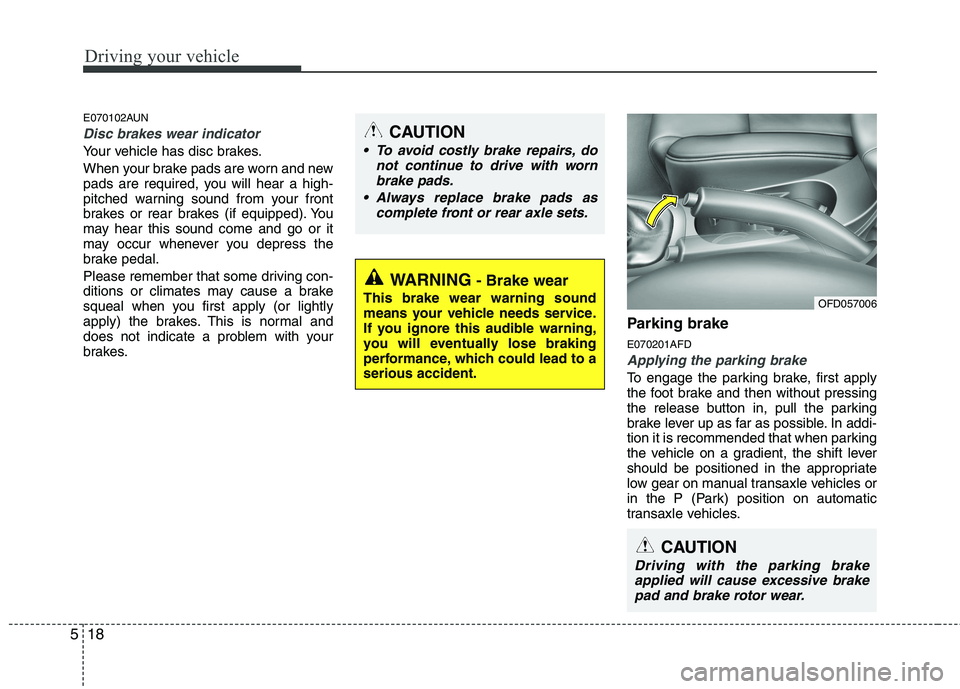
brakes. Parking brake E070201AFD
Applying the parking brake
To engage the parking brake, first apply
the foot brake and then without pressing
the release button in, pull the parking
brake lever up as far as possible. In addi-
tion it is recommended that when parking
the vehicle on a gradient, the shift lever
should be positioned in the appropriate
low gear on manual transaxle vehicles or
in the P (Park) position on automatic
transaxle vehicles.
WARNING
- Brake wear
This brake wear warning sound
means your vehicle needs service.
If you ignore this audible warning,
you will eventually lose braking
performance, which could lead to aserious accident.
CAUTION
To avoid costly brake repairs, do not continue to drive with worn
brake pads.
Always replace brake pads as complete front or rear axle sets.
CAUTION
Driving with the parking brakeapplied will cause excessive brake
pad and brake rotor wear.
OFD057006
Page 269 of 635
Driving your vehicle
26
5
If your car is equipped with an auto-
matic transaxle, don't let your car
creep forward. To avoid creeping for-
ward, keep your foot firmly on the
brake pedal when the car is stopped.
Use caution when parking on a hill. Firmly engage the parking brake and
place the gear selector lever in P (auto-
matic transaxle) or in first or reverse
gear (manual transaxle). If your car is
facing downhill, turn the front wheels
into the curb to help keep the car from
rolling. If your car is facing uphill, turn
the front wheels away from the curb to
help keep the car from rolling. If there
is no curb or if it is required by other
conditions to keep the car from rolling,
block the wheels.
Under some conditions your parking brake can freeze in the engaged posi-
tion. This is most likely to happen when
there is an accumulation of snow or ice
around or near the rear brakes or if the
brakes are wet. If there is a risk that the
parking brake may freeze, apply it only
temporarily while you put the gear
selector lever in P (automatic
transaxle) or in first or reverse gear
(manual transaxle) and block the rear
wheels so the car cannot roll. Then
release the parking brake. Do not hold the vehicle on the upgrade
with the accelerator pedal. This can
cause the transaxle to overheat.
Always use the brake pedal or parking
brake.