chapter 7 HYUNDAI I30 2016 Owner's Guide
[x] Cancel search | Manufacturer: HYUNDAI, Model Year: 2016, Model line: I30, Model: HYUNDAI I30 2016Pages: 659, PDF Size: 17.14 MB
Page 212 of 659
3-62
Convenient features of your vehicle
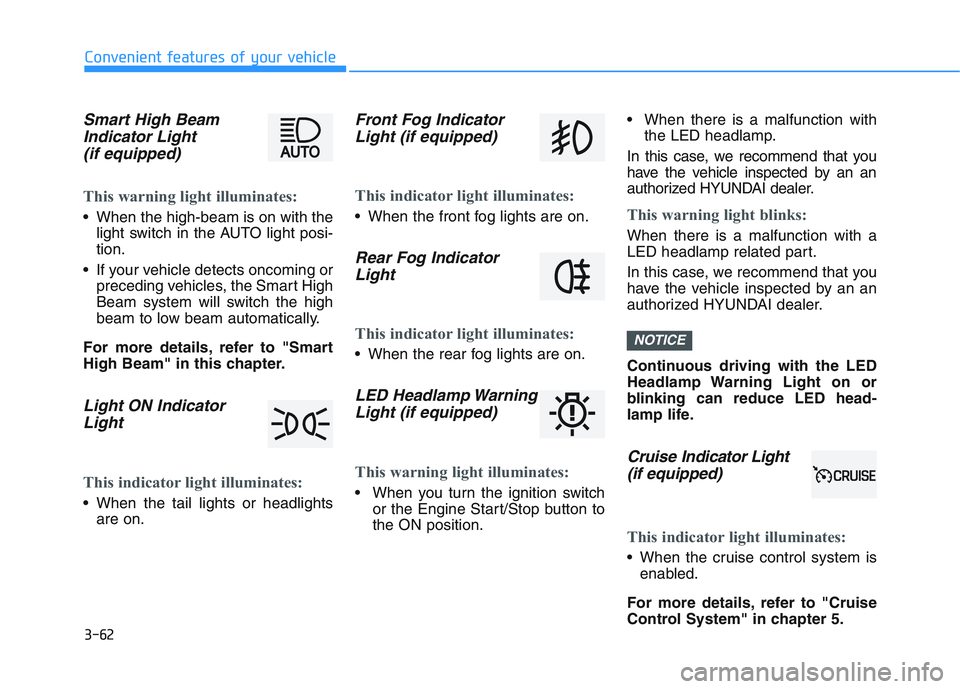
Smart High BeamIndicator Light(if equipped)
This warning light illuminates:
When the high-beam is on with the
light switch in the AUTO light posi-
tion.
If your vehicle detects oncoming or preceding vehicles, the Smart High
Beam system will switch the high
beam to low beam automatically.
For more details, refer to "Smart
High Beam" in this chapter.
Light ON Indicator Light
This indicator light illuminates:
When the tail lights or headlights
are on.
Front Fog IndicatorLight (if equipped)
This indicator light illuminates:
When the front fog lights are on.
Rear Fog IndicatorLight
This indicator light illuminates:
When the rear fog lights are on.
LED Headlamp WarningLight (if equipped)
This warning light illuminates:
When you turn the ignition switch
or the Engine Start/Stop button to
the ON position. When there is a malfunction with
the LED headlamp.
In this case, we recommend that you
have the vehicle inspected by an an
authorized HYUNDAI dealer.
This warning light blinks:
When there is a malfunction with a
LED headlamp related part.
In this case, we recommend that you
have the vehicle inspected by an an
authorized HYUNDAI dealer.
Continuous driving with the LED
Headlamp Warning Light on or
blinking can reduce LED head-
lamp life.
Cruise In dicator Light
(if equipped)
This indicator light illuminates:
When the cruise control system is
enabled.
For more details, refer to "Cruise
Control System" in chapter 5.
NOTICE
Page 213 of 659
3-63
Convenient features of your vehicle
3
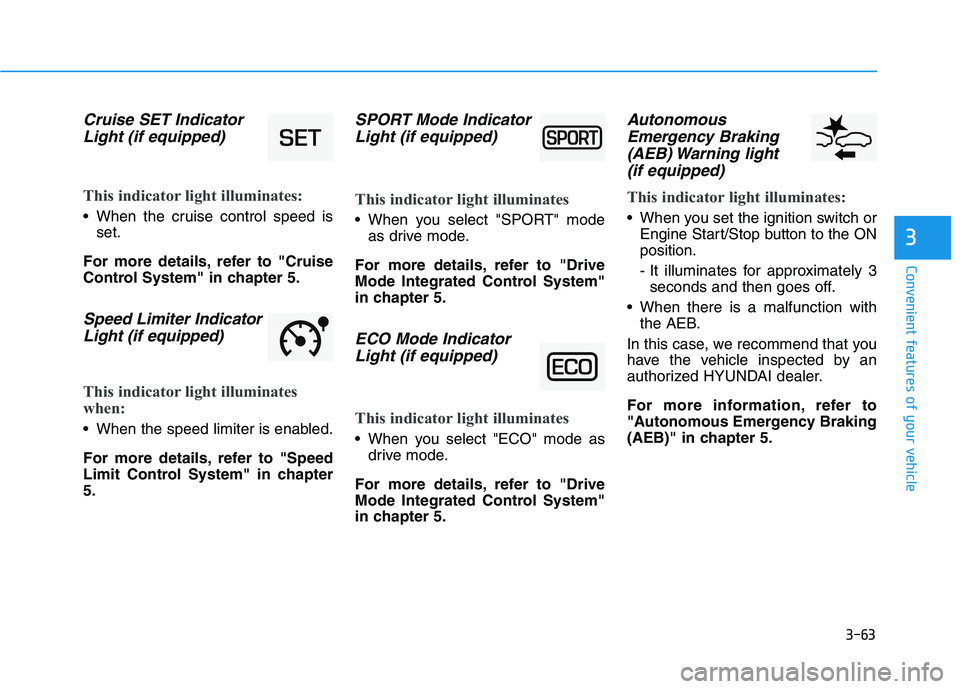
Cruise SET IndicatorLight (if equipped)
This indicator light illuminates:
When the cruise control speed is
set.
For more details, refer to "Cruise
Control System" in chapter 5.
Speed Limiter Indicator Light (if equipped)
This indicator light illuminates
when:
When the speed limiter is enabled.
For more details, refer to "Speed
Limit Control System" in chapter
5.
SPORT Mode IndicatorLight (if equipped)
This indicator light illuminates
When you select "SPORT" mode
as drive mode.
For more details, refer to "Drive
Mode Integrated Control System"
in chapter 5.
ECO Mode Indicator Light (if equipped)
This indicator light illuminates
When you select "ECO" mode as
drive mode.
For more details, refer to "Drive
Mode Integrated Control System"
in chapter 5.
Autonomous Emergency Braking(AEB) Warning light (if equipped)
This indicator light illuminates:
When you set the ignition switch or
Engine Start/Stop button to the ON
position.
- It illuminates for approximately 3seconds and then goes off.
When there is a malfunction with the AEB.
In this case, we recommend that you
have the vehicle inspected by an
authorized HYUNDAI dealer.
For more information, refer to
"Autonomous Emergency Braking
(AEB)" in chapter 5.
Page 214 of 659
![HYUNDAI I30 2016 Owners Guide 3-64
Convenient features of your vehicle
Lane Departure WarningSystem (LDWS)Indicator Light (if equipped)
This indicator light illuminates:
• [Green] When you activate the lane
departure warning sys](/img/35/56151/w960_56151-213.png "HYUNDAI I30 2016 Owners Guide 3-64
Convenient features of your vehicle
Lane Departure WarningSystem (LDWS)Indicator Light (if equipped)
This indicator light illuminates:
• [Green] When you activate the lane
departure warning sys")
3-64
Convenient features of your vehicle
Lane Departure WarningSystem (LDWS)Indicator Light (if equipped)
This indicator light illuminates:
• [Green] When you activate the lane
departure warning system.
[White] When system operating conditions are not satisfied.
[Yellow] When there is a malfunc- tion with the lane departure warn-
ing system.
In this case, we recommend that
you have the vehicle inspected by
an authorized HYUNDAI dealer.
For more details, refer to "Lane
Departure Warning System (LDWS)"
in chapter 5.
Lane Keeping Assist System (LKAS)Indicator Light(if equipped)
This indicator light illuminates:
[Green] When the system operat-
ing conditions are satisfied.
[White] The system operating con- ditions are not satisfied.
[Yellow] When there is a malfunc- tion with the lane keeping assist
system.
In this case, we recommend you to
have your vehicle inspected by an
authorized HYUNDAI dealer.
For more details, refer to "Lane
Keeping Assist System (LKAS)" in
chapter 5.
Icy Road Warning Light (if equipped)
This warning light is to warn the driver
the road may be icy.
When the temperature on the out-
side temperature gauge is approxi-
mately below 4°C (40°F), the Icy
Road Warning Light and Outside
Temperature Gauge blinks and then
illuminates. Also, the warning chime
sounds 1 time.
Information
If the icy road warning light appears
while driving, you should drive more
attentively and safely refraining from
over-speeding, rapid acceleration, sud-
den braking or sharp turning, etc.
i
Page 218 of 659
3-68
Convenient features of your vehicle
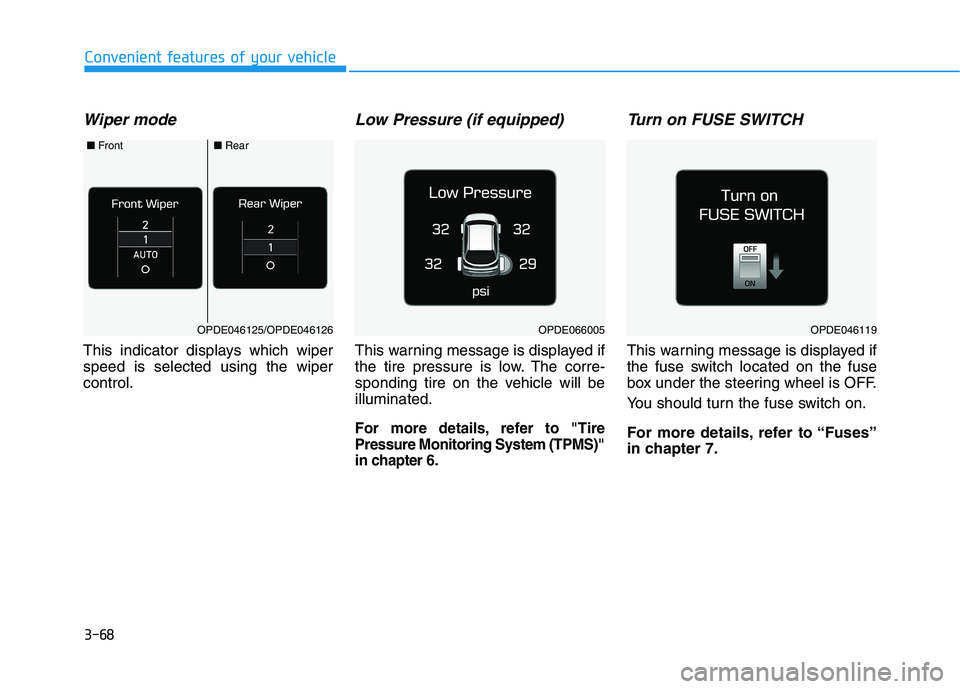
Wiper mode
This indicator displays which wiper
speed is selected using the wiper
control.
Low Pressure (if equipped)
This warning message is displayed if
the tire pressure is low. The corre-
sponding tire on the vehicle will be
illuminated.
For more details, refer to "Tire
Pressure Monitoring System (TPMS)"
in chapter 6.
Turn on FUSE SWITCH
This warning message is displayed if
the fuse switch located on the fuse
box under the steering wheel is OFF.
You should turn the fuse switch on.
For more details, refer to “Fuses”
in chapter 7.
OPDE046119OPDE066005OPDE046125/OPDE046126
■Front■Rear
Page 219 of 659
3-69
Convenient features of your vehicle
3
Heated Steering Wheel turnedoff (if equipped)
This message is displayed if you turn
off the heated steering wheel.
For more details, refer to “Heated
Steering Wheel” in this chapter.
Low washer fluid (if equipped)
This warning message is displayed
if the washer fluid level in the reser-
voir is nearly empty.
Have the washer fluid reservoir
refilled.
Low fuel
This warning message is displayed if
the fuel tank is almost out of fuel.
When this message is displayed, the
low fuel level warning light in the
cluster will come on.
It is recommended to look for the
nearest fueling station and refuel as
soon as possible.
Add fuel as soon as possible.
Engine has overheated (if equipped)
This warning message is displayed
when the engine coolant tempera-
ture is above 120°C (248°F). This
means that the engine is overheated
and may be damaged.
If your vehicle is overheated, refer
to “Overheating” in chapter 6.
Check exhaust system(for Diesel engine)
This warning message is displayed if
the DPF system has a malfunction.
At this time, DPF warning light also
blinks.
In this case, we recommend that you
have the DPF system checked by an
authorized HYUNDAI dealer.
For more details, refer to “Warning
Lights” in this chapter.
Check headlight (if equipped)
This warning message is displayed if
the headlamps are not operating
properly. The headlamp bulb may
need to be replaced.
Information
Make sure to replace the burned out
bulb with a new one of the same wattage
rating.
Check headlamp LED(if equipped)
This warning message is displayed if
there is a problem with the LED
headlamp. We recommend you to
have the vehicle inspected by an
authorized HYUNDAI dealer.
Check headlamp FAN(if equipped)
This warning message is displayed if
there is a problem with headlamp
fan. We recommend you to have the
vehicle inspected by an authorized
HYUNDAI dealer.
i
Page 220 of 659
3-70
Convenient features of your vehicle
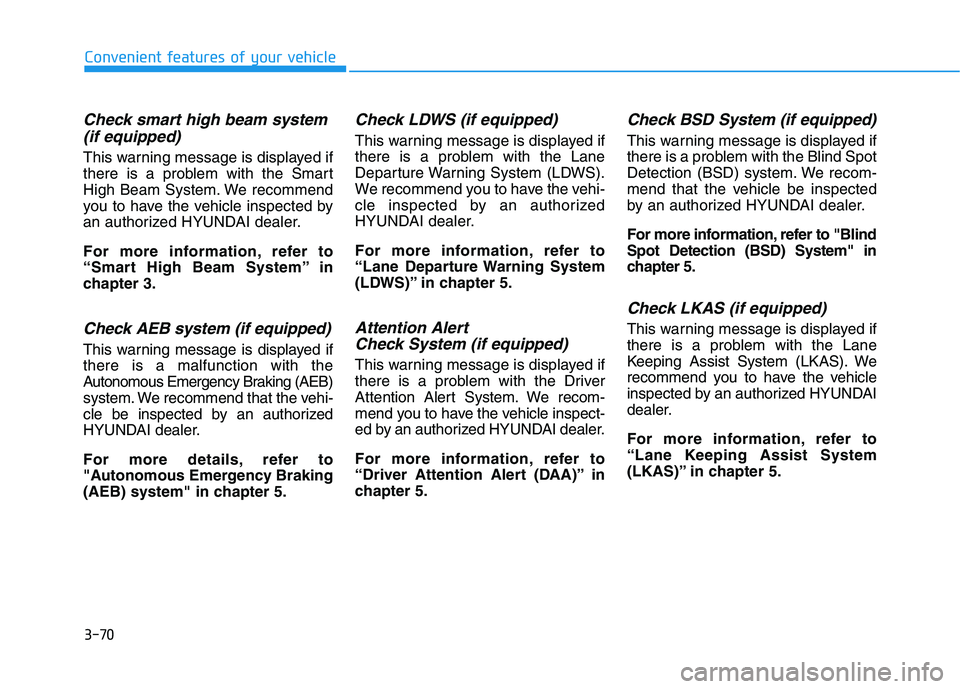
Check smart high beam system(if equipped)
This warning message is displayed if
there is a problem with the Smart
High Beam System. We recommend
you to have the vehicle inspected by
an authorized HYUNDAI dealer.
For more information, refer to
“Smart High Beam System” in
chapter 3.
Check AEB system (if equipped)
This warning message is displayed if
there is a malfunction with the
Autonomous Emergency Braking (AEB)
system. We recommend that the vehi-
cle be inspected by an authorized
HYUNDAI dealer.
For more details, refer to
"Autonomous Emergency Braking
(AEB) system" in chapter 5.
Check LDWS (if equipped)
This warning message is displayed if
there is a problem with the Lane
Departure Warning System (LDWS).
We recommend you to have the vehi-
cle inspected by an authorized
HYUNDAI dealer.
For more information, refer to
“Lane Departure Warning System
(LDWS)” in chapter 5.
Attention Alert Check System (if equipped)
This warning message is displayed if
there is a problem with the Driver
Attention Alert System. We recom-
mend you to have the vehicle inspect-
ed by an authorized HYUNDAI dealer.
For more information, refer to
“Driver Attention Alert (DAA)” in
chapter 5.
Check BSD System (if equipped)
This warning message is displayed if
there is a problem with the Blind Spot
Detection (BSD) system. We recom-
mend that the vehicle be inspected
by an authorized HYUNDAI dealer.
For more information, refer to "Blind
Spot Detection (BSD) System" in
chapter 5.
Check LKAS (if equipped)
This warning message is displayed if
there is a problem with the Lane
Keeping Assist System (LKAS). We
recommend you to have the vehicle
inspected by an authorized HYUNDAI
dealer.
For more information, refer to
“Lane Keeping Assist System
(LKAS)” in chapter 5.
Page 222 of 659
3-72
Convenient features of your vehicle
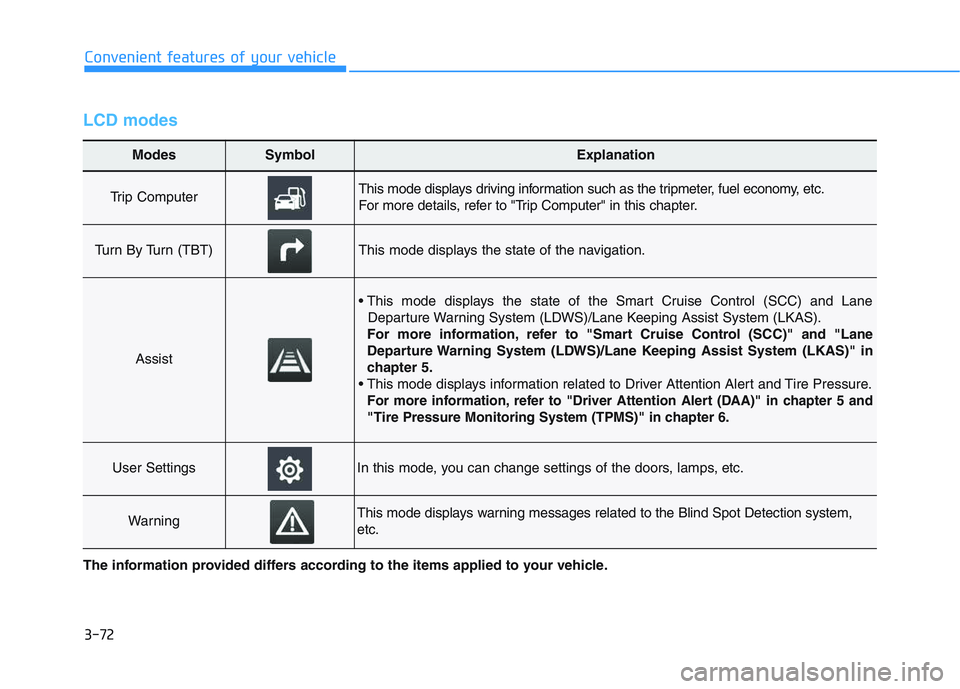
LCD modes
Modes SymbolExplanation
Trip Computer This mode displays driving information such as the tripmeter, fuel economy, etc.
For more details, refer to "Trip Computer" in this chapter.
Turn By Turn (TBT)This mode displays the state of the navigation.
Assist
• This mode displays the state of the Smart Cruise Control (SCC) and LaneDeparture Warning System (LDWS)/Lane Keeping Assist System (LKAS).
For more information, refer to "Smart Cruise Control (SCC)" and "Lane
Departure Warning System (LDWS)/Lane Keeping Assist System (LKAS)" in
chapter 5.
For more information, refer to "Driver Attention Alert (DAA)"in chapter 5 and
"Tire Pressure Monitoring System (TPMS)"in chapter 6.
User SettingsIn this mode, you can change settings of the doors, lamps, etc.
WarningThis mode displays warning messages related to the Blind Spot Detection system,
etc.
The information provided differs according to the items applied to your vehicle.
Page 223 of 659
3-73
Convenient features of your vehicle
3
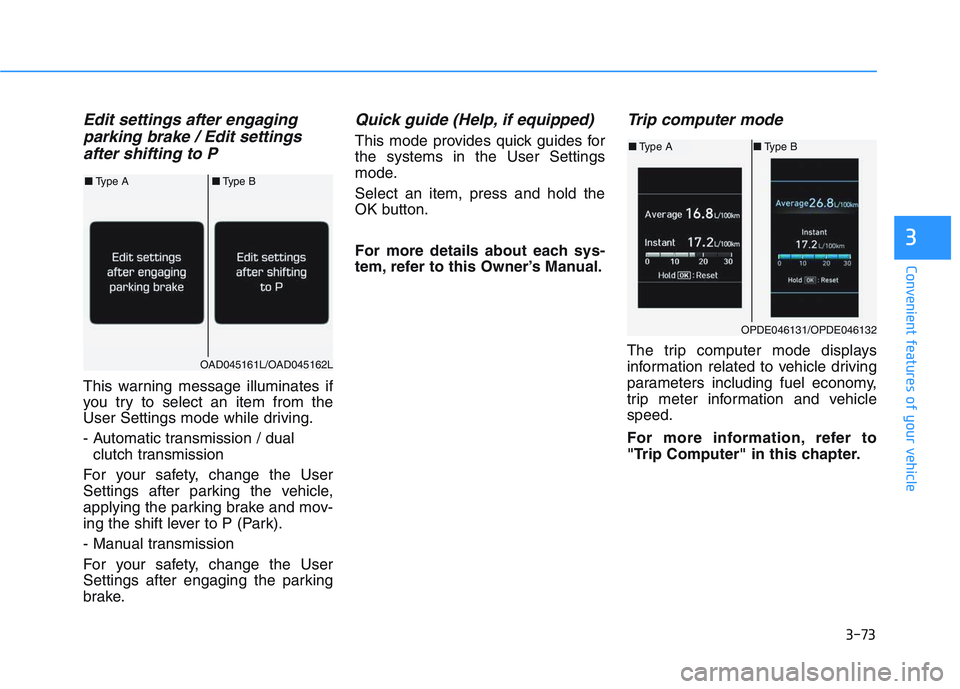
Edit settings after engaging parking brake / Edit settingsafter shifting to P
This warning message illuminates if
you try to select an item from the
User Settings mode while driving.
- Automatic transmission / dual
clutch transmission
For your safety, change the User
Settings after parking the vehicle,
applying the parking brake and mov-
ing the shift lever to P (Park).
- Manual transmission
For your safety, change the User
Settings after engaging the parking
brake.
Quick guide (Help, if equipped)
This mode provides quick guides for
the systems in the User Settings
mode.
Select an item, press and hold the
OK button.
For more details about each sys-
tem, refer to this Owner’s Manual.
Trip computer mode
The trip computer mode displays
information related to vehicle driving
parameters including fuel economy,
trip meter information and vehicle
speed.
For more information, refer to
"Trip Computer" in this chapter.
OPDE046131/OPDE046132
■ Type A ■Type B
OAD045161L/OAD045162L
■Type A ■Type B
Page 224 of 659
3-74
Convenient features of your vehicle
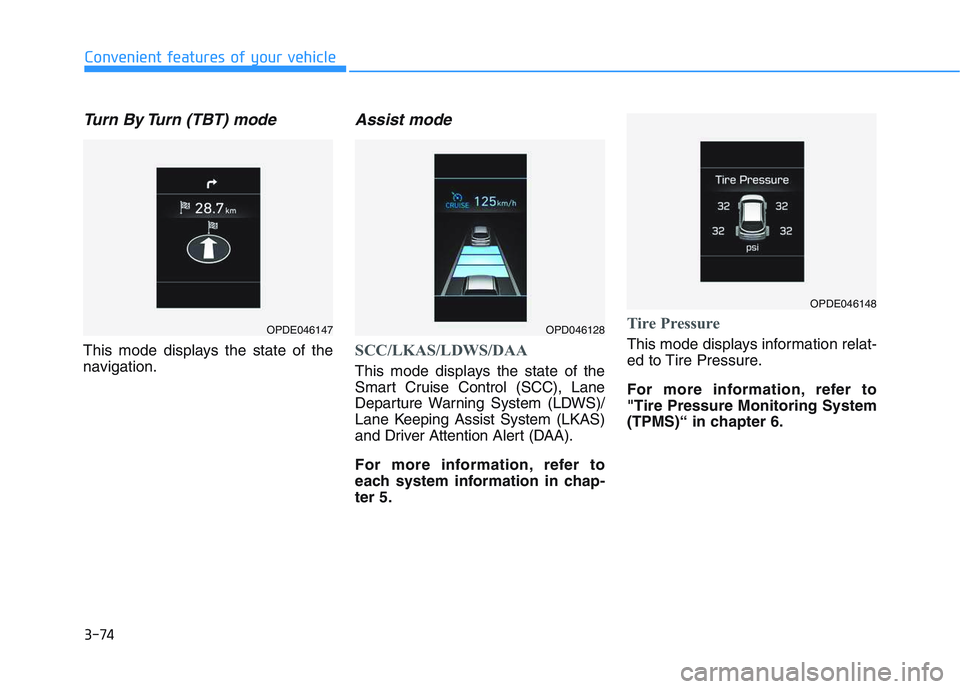
Turn By Turn (TBT) mode
This mode displays the state of the
navigation.
Assist mode
SCC/LKAS/LDWS/DAA
This mode displays the state of the
Smart Cruise Control (SCC), Lane
Departure Warning System (LDWS)/
Lane Keeping Assist System (LKAS)
and Driver Attention Alert (DAA).
For more information, refer to
each system information in chap-
ter 5.
Tire Pressure
This mode displays information relat-
ed to Tire Pressure.
For more information, refer to
"Tire Pressure Monitoring System
(TPMS)“ in chapter 6.
OPDE046147OPD046128
OPDE046148
Page 225 of 659
3-75
Convenient features of your vehicle
3
Warning message mode
If one of followings occurs, warning
messages will be displayed in the
information mode for several seconds.
- Low washer fluid (if equipped)
- Smart high beam malfunction (if equipped)
- Blind Spot Detection (BSD) mal- function (if equipped)
- Autonomous Emergency Braking (AEB) malfunction (if equipped)
- Speed Limit Information Function (SLIF) malfunction (if equipped)
- Advanced Smart Cruise Control malfunction (if equipped)
- Tire Pressure Monitoring System (TPMS, if equipped)
User settings mode
In this mode, you can change the
setting of the instrument cluster,
doors, lamps, etc.
1. Driving Assist
2. Door
3. Lights
4. Sound
5. Convenience
6. Service Interval
7. Other Features
8. Reset
The information provided differs
according to the items applied to
your vehicle.
1. Driving Assist
- Lane Departure Warning/StandardLKA/Active LKA
To adjust the sensitivity of the Lane
Keeping Assist System.
For more information, refer to the
"Lane Keeping Assist System" in
chapter 5.
To adjust the sensitivity of the Driver
Attention Alert (DAA).
- Off/Normal/Early
For more information, refer to the
"Driver Attention Alert (DAA)" in
chapter 5.
- Slow/Normal/Fast
To adjust the sensitivity of the
Smart Cruise Control system.
For more information, refer to the
"Smart Cruise Control" in chapter 5.
To activate or deactivate the
Autonomous Emergency Braking
(AEB).
For more information, refer to
"Autonomous Emergency Braking
(AEB)" in chapter 5.