Transmission HYUNDAI I30 2023 User Guide
[x] Cancel search | Manufacturer: HYUNDAI, Model Year: 2023, Model line: I30, Model: HYUNDAI I30 2023Pages: 533, PDF Size: 59.13 MB
Page 157 of 533
3-74
Convenient features of your vehicle
2. Door
- Disable: The auto door lock opera-
tion will be cancelled.
- Enable on Speed: All doors will be
automatically locked when the vehi-
cle speed exceeds 15km/h.
- Enable on Shift: All doors will be
automatically locked if the automat-
ic transmission/dual clutch trans-
mission shift lever is shifted from
the P (Park) position to the R
(Reverse), N (Neutral), or D (Drive)
position.
- Disable: The auto door unlock oper-
ation will be cancelled.
- Vehicle Off: All doors will be auto-
matically unlocked when the
Engine Start/Stop button is set to
the OFF position (if equipped with
smart key).- On Key Out: All doors will be auto-
matically unlocked when the igni-
tion key is removed from the igni-
tion switch (if equipped with remote
key).
- On Shift to P: All doors will be auto-
matically unlocked if the automatic
transmission/dual clutch transmis-
sion shift lever is shifted to the P
(Park) position.
- Driver Door Unlock: All doors will be
automatically unlocked when the
driver’s door is opened.
To activate or deactivate the horn
feedback.
If the horn feedback is activated,
after locking the door by pressing the
lock button on the remote key, and
pressing it again within 4 seconds,
the horn feedback sound will operate
once to indicate that all doors are
locked (if equipped with remote key).3. Lights
- Off: The one touch turn signal func-
tion will be deactivated.
- 3, 5, 7 Flashes: The turn signal indi-
cator will blink 3, 5, or 7 times when
the turn signal lever is moved slightly.
For more information, refer to
"Lighting" in this chapter.
To activate or deactivate the head-
lamp delay function.
For more information, refer to
"Lighting" in this chapter
To activate or deactivate the wel-
come light function.
For more information, refer to
"Lighting" in this chapter.
Page 158 of 533
3-75
Convenient features of your vehicle
3
4. Sound
Warning)
- Softer/Louder
To adjust the Volume for Parking
Distance Warning system volume.
To activate or deactivate the Blind-
Spot Collision Warning sound.
For more information, refer to
"Blind-Spot Collision Warning
(BCW)" in chapter 5.
To activate or deactivate the wel-
come sound.5. Convenience
To activate or deactivate the wireless
charging system in the front seat.
For more information, refer to
"Wireless Charging System" in
this chapter.
To activate or deactivate the Wiper/
Light mode.
When activated, the LCD display
shows the selected Wiper/Light
mode whenever you changed the
mode.
To activate or deactivate the rear
wiper whilst the vehicle is in reverse
with the front wiper ON.
To activate or deactivate the gear
position pop-up.
When activated, the gear position
will be displayed on the display (if
equipped with automatic transmis-
sion/dual clutch transmission).
6. Service Interval
To activate or deactivate the service
interval function.
If the service interval menu is acti-
vated, you may adjust the time and
distance.
Information
To use the service interval menu, con-
sult an authorised HYUNDAI dealer.
i
Page 266 of 533
Driving your vehicle
Before driving.........................................................5-5
Before entering the vehicle ...........................................5-5
Before starting...................................................................5-5
Key ignition switch ............................................................5-7
Ignition switch ........................................................5-7
Engine Start/Stop button ..............................................5-11
Manual transmission............................................5-20
Manual transmission operation ..................................5-20
Good driving practices ..................................................5-22
Automatic transmission .......................................5-24
Automatic transmission operation ..............................5-24
Parking ...............................................................................5-29
Good driving practices ...................................................5-29
Dual clutch transmission .....................................5-31
Dual clutch transmission operation ............................5-31
Parking ...............................................................................5-39
Good driving practices ..................................................5-39
Braking system.....................................................5-41
Power brakes ...................................................................5-41
Disc brakes wear indicator ...........................................5-42
Parking brake (hand type) ............................................5-42
Electronic Parking Brake (EPB)...................................5-44
Auto hold ...........................................................................5-49
Anti-lock Brake System (ABS) ....................................5-53
Electronic Stability Control (ESC)................................5-55
Vehicle Stability Management (VSM).........................5-58
Hill-Start Assist Control (HAC) ....................................5-60
Emergency Stop Signal (ESS) ......................................5-60
Good braking practices..................................................5-61
Drive mode integrated control system .............5-62
Blind-spot collision warning (BCW) system ....5-64
BCW ....................................................................................5-65
RCCW (Rear cross-traffic collision warning) ...........5-67
Detecting sensor .............................................................5-69
Limitations of the system .............................................5-71
5
Page 272 of 533
5-7
Driving your vehicle
5
I IG
GN
NI
IT
TI
IO
ON
N
S
SW
WI
IT
TC
CH
H
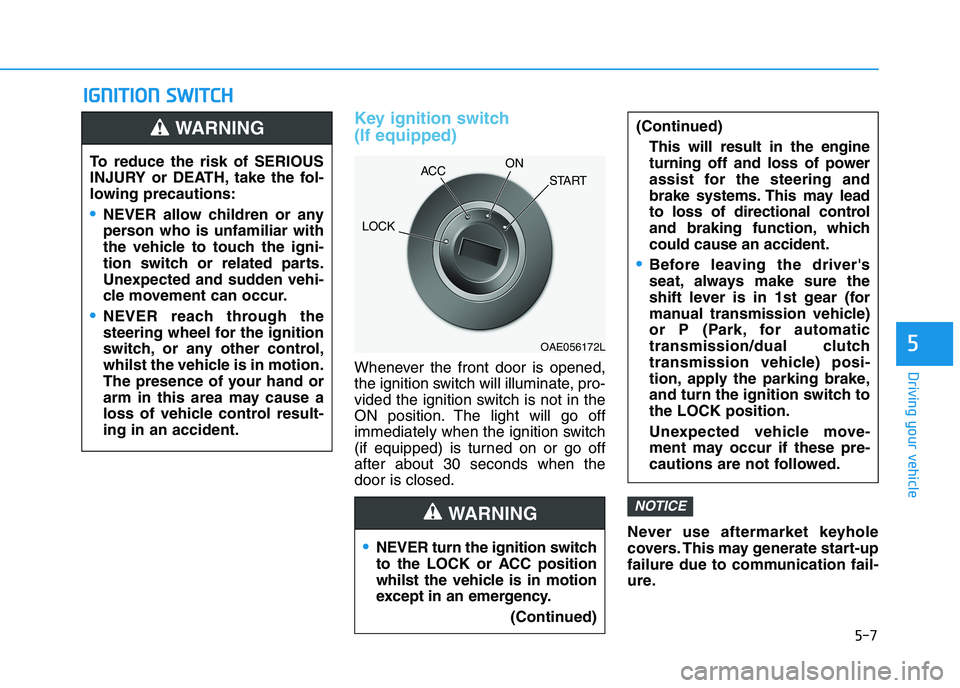
Key ignition switch
(If equipped)
Whenever the front door is opened,
the ignition switch will illuminate, pro-
vided the ignition switch is not in the
ON position. The light will go off
immediately when the ignition switch
(if equipped) is turned on or go off
after about 30 seconds when the
door is closed.
Never use aftermarket keyhole
covers. This may generate start-up
failure due to communication fail-
ure.
NOTICE
NEVER turn the ignition switch
to the LOCK or ACC position
whilst the vehicle is in motion
except in an emergency.
(Continued)
(Continued)
This will result in the engine
turning off and loss of power
assist for the steering and
brake systems. This may lead
to loss of directional control
and braking function, which
could cause an accident.
Before leaving the driver's
seat, always make sure the
shift lever is in 1st gear (for
manual transmission vehicle)
or P (Park, for automatic
transmission/dual clutch
transmission vehicle) posi-
tion, apply the parking brake,
and turn the ignition switch to
the LOCK position.
Unexpected vehicle move-
ment may occur if these pre-
cautions are not followed.
WARNING
To reduce the risk of SERIOUS
INJURY or DEATH, take the fol-
lowing precautions:
NEVER allow children or any
person who is unfamiliar with
the vehicle to touch the igni-
tion switch or related parts.
Unexpected and sudden vehi-
cle movement can occur.
NEVER reach through the
steering wheel for the ignition
switch, or any other control,
whilst the vehicle is in motion.
The presence of your hand or
arm in this area may cause a
loss of vehicle control result-
ing in an accident.
WARNING
OAE056172L
LOCKACCON
START
Page 274 of 533
5-9
Driving your vehicle
5
Starting the engine Starting the petrol engine
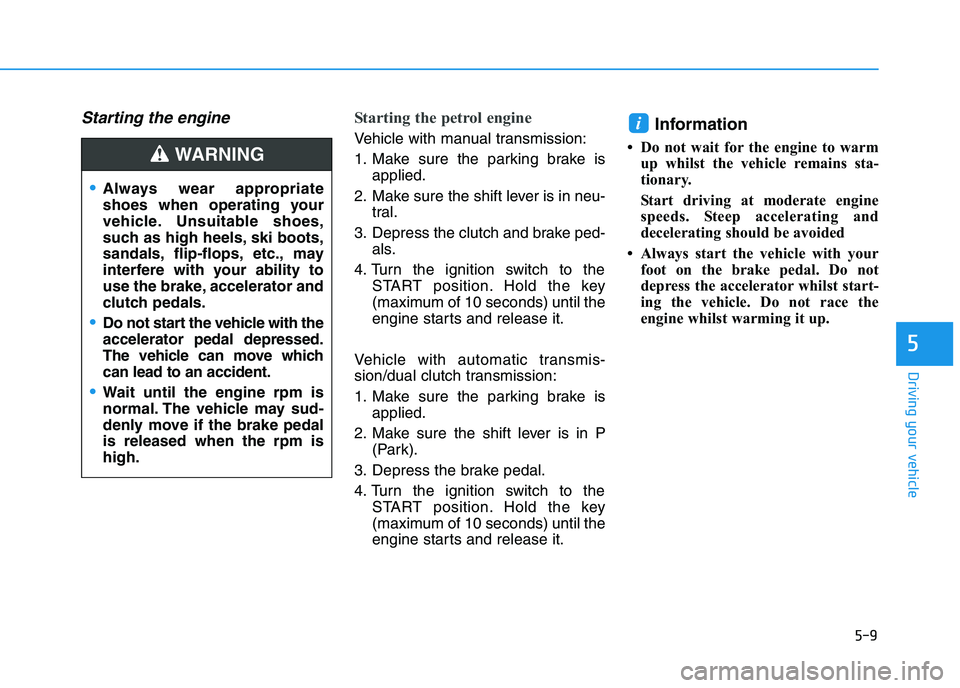
Vehicle with manual transmission:
1. Make sure the parking brake is
applied.
2. Make sure the shift lever is in neu-
tral.
3. Depress the clutch and brake ped-
als.
4. Turn the ignition switch to the
START position. Hold the key
(maximum of 10 seconds) until the
engine starts and release it.
Vehicle with automatic transmis-
sion/dual clutch transmission:
1. Make sure the parking brake is
applied.
2. Make sure the shift lever is in P
(Park).
3. Depress the brake pedal.
4. Turn the ignition switch to the
START position. Hold the key
(maximum of 10 seconds) until the
engine starts and release it.Information
• Do not wait for the engine to warm
up whilst the vehicle remains sta-
tionary.
Start driving at moderate engine
speeds. Steep accelerating and
decelerating should be avoided
• Always start the vehicle with your
foot on the brake pedal. Do not
depress the accelerator whilst start-
ing the vehicle. Do not race the
engine whilst warming it up.
i
Always wear appropriate
shoes when operating your
vehicle. Unsuitable shoes,
such as high heels, ski boots,
sandals, flip-flops, etc., may
interfere with your ability to
use the brake, accelerator and
clutch pedals.
Do not start the vehicle with the
accelerator pedal depressed.
The vehicle can move which
can lead to an accident.
Wait until the engine rpm is
normal. The vehicle may sud-
denly move if the brake pedal
is released when the rpm is
high.
WARNING
Page 275 of 533
5-10
Driving your vehicle
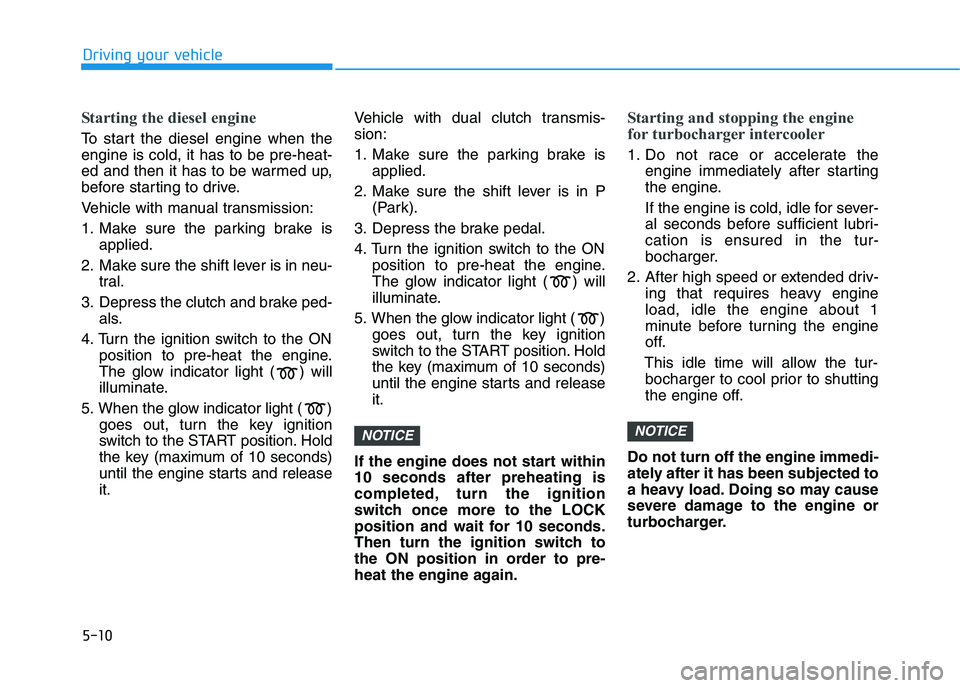
Starting the diesel engine
To start the diesel engine when the
engine is cold, it has to be pre-heat-
ed and then it has to be warmed up,
before starting to drive.
Vehicle with manual transmission:
1. Make sure the parking brake is
applied.
2. Make sure the shift lever is in neu-
tral.
3. Depress the clutch and brake ped-
als.
4. Turn the ignition switch to the ON
position to pre-heat the engine.
The glow indicator light ( ) will
illuminate.
5. When the glow indicator light ( )
goes out, turn the key ignition
switch to the START position. Hold
the key (maximum of 10 seconds)
until the engine starts and release
it.Vehicle with dual clutch transmis-
sion:
1. Make sure the parking brake is
applied.
2. Make sure the shift lever is in P
(Park).
3. Depress the brake pedal.
4. Turn the ignition switch to the ON
position to pre-heat the engine.
The glow indicator light ( ) will
illuminate.
5. When the glow indicator light ( )
goes out, turn the key ignition
switch to the START position. Hold
the key (maximum of 10 seconds)
until the engine starts and release
it.
If the engine does not start within
10 seconds after preheating is
completed, turn the ignition
switch once more to the LOCK
position and wait for 10 seconds.
Then turn the ignition switch to
the ON position in order to pre-
heat the engine again.
Starting and stopping the engine
for turbocharger intercooler
1. Do not race or accelerate the
engine immediately after starting
the engine.
If the engine is cold, idle for sever-
al seconds before sufficient lubri-
cation is ensured in the tur-
bocharger.
2. After high speed or extended driv-
ing that requires heavy engine
load, idle the engine about 1
minute before turning the engine
off.
This idle time will allow the tur-
bocharger to cool prior to shutting
the engine off.
Do not turn off the engine immedi-
ately after it has been subjected to
a heavy load. Doing so may cause
severe damage to the engine or
turbocharger.
NOTICENOTICE
Page 277 of 533
5-12
Driving your vehicle
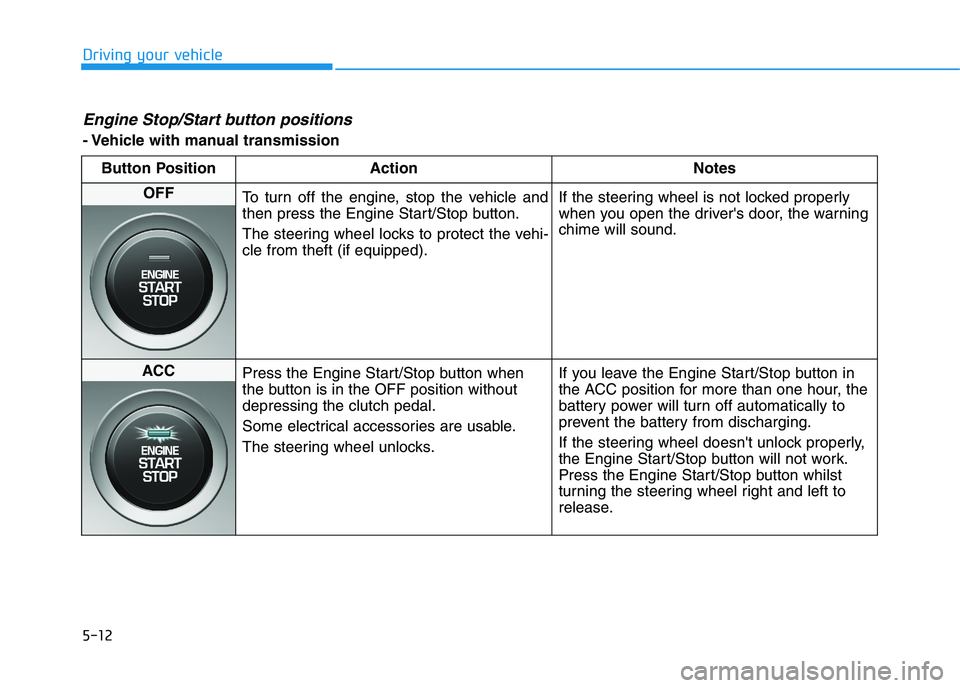
Engine Stop/Start button positions
- Vehicle with manual transmission
Button Position Action Notes
OFF
To turn off the engine, stop the vehicle and
then press the Engine Start/Stop button.
The steering wheel locks to protect the vehi-
cle from theft (if equipped).If the steering wheel is not locked properly
when you open the driver's door, the warning
chime will sound.
ACC
Press the Engine Start/Stop button when
the button is in the OFF position without
depressing the clutch pedal.
Some electrical accessories are usable.
The steering wheel unlocks.If you leave the Engine Start/Stop button in
the ACC position for more than one hour, the
battery power will turn off automatically to
prevent the battery from discharging.
If the steering wheel doesn't unlock properly,
the Engine Start/Stop button will not work.
Press the Engine Start/Stop button whilst
turning the steering wheel right and left to
release.
Page 278 of 533
5-13
Driving your vehicle
5
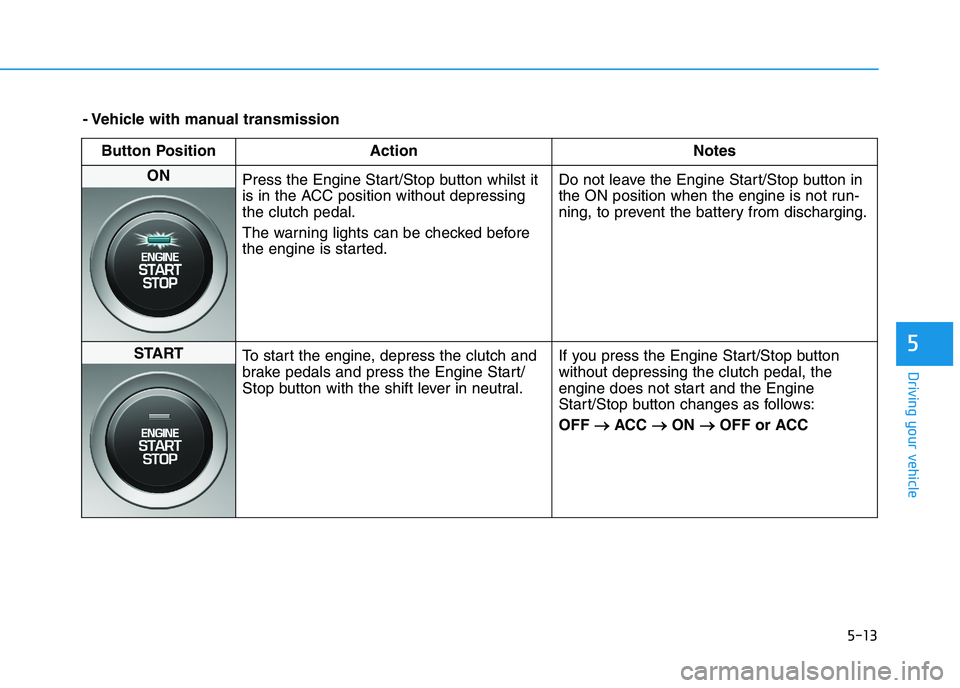
- Vehicle with manual transmission
Button Position Action Notes
ON
Press the Engine Start/Stop button whilst it
is in the ACC position without depressing
the clutch pedal.
The warning lights can be checked before
the engine is started.Do not leave the Engine Start/Stop button in
the ON position when the engine is not run-
ning, to prevent the battery from discharging.
START
To start the engine, depress the clutch and
brake pedals and press the Engine Start/
Stop button with the shift lever in neutral.If you press the Engine Start/Stop button
without depressing the clutch pedal, the
engine does not start and the Engine
Start/Stop button changes as follows:
OFF → →
ACC → →
ON → →
OFF or ACC
Page 279 of 533
5-14
Driving your vehicle
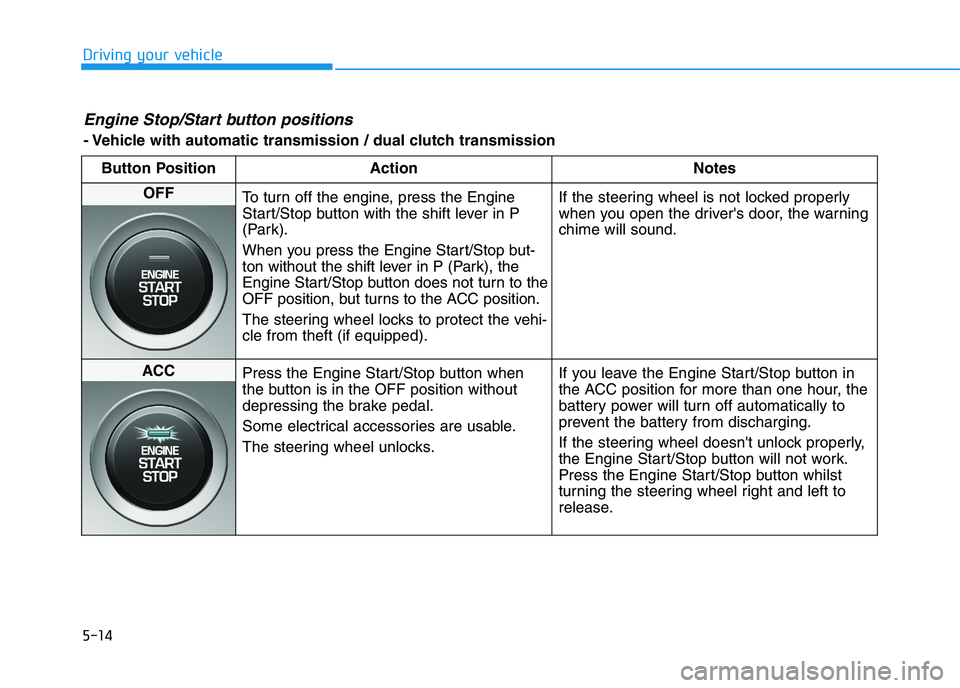
Engine Stop/Start button positions
- Vehicle with automatic transmission / dual clutch transmission
Button Position Action Notes
OFF
To turn off the engine, press the Engine
Start/Stop button with the shift lever in P
(Park).
When you press the Engine Start/Stop but-
ton without the shift lever in P (Park), the
Engine Start/Stop button does not turn to the
OFF position, but turns to the ACC position.
The steering wheel locks to protect the vehi-
cle from theft (if equipped).If the steering wheel is not locked properly
when you open the driver's door, the warning
chime will sound.
ACC
Press the Engine Start/Stop button when
the button is in the OFF position without
depressing the brake pedal.
Some electrical accessories are usable.
The steering wheel unlocks.If you leave the Engine Start/Stop button in
the ACC position for more than one hour, the
battery power will turn off automatically to
prevent the battery from discharging.
If the steering wheel doesn't unlock properly,
the Engine Start/Stop button will not work.
Press the Engine Start/Stop button whilst
turning the steering wheel right and left to
release.
Page 280 of 533
5-15
Driving your vehicle
5
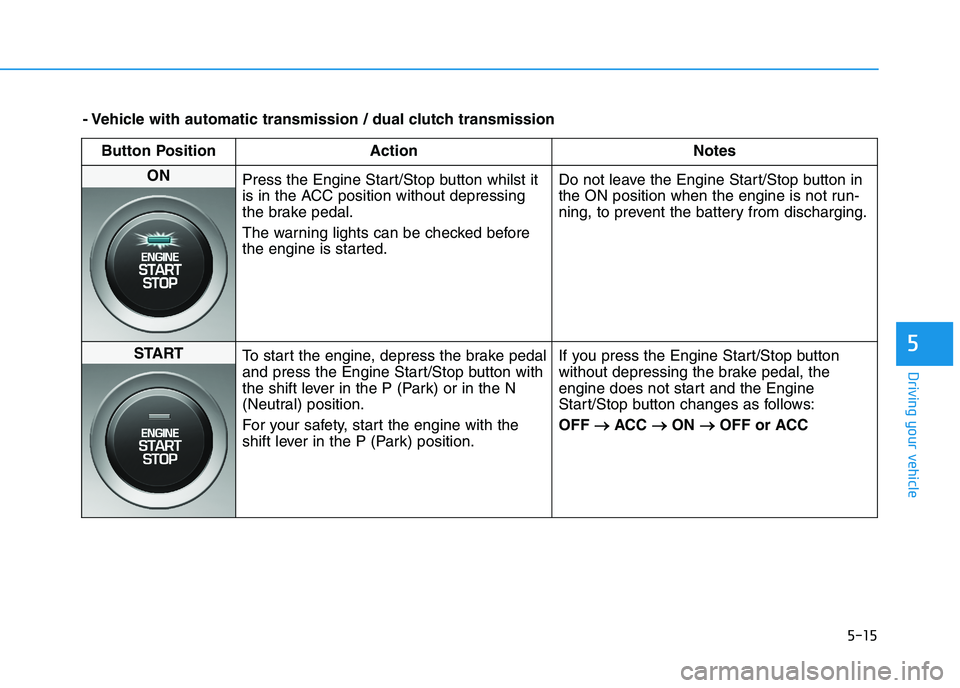
- Vehicle with automatic transmission / dual clutch transmission
Button Position Action Notes
ON
Press the Engine Start/Stop button whilst it
is in the ACC position without depressing
the brake pedal.
The warning lights can be checked before
the engine is started.Do not leave the Engine Start/Stop button in
the ON position when the engine is not run-
ning, to prevent the battery from discharging.
START
To start the engine, depress the brake pedal
and press the Engine Start/Stop button with
the shift lever in the P (Park) or in the N
(Neutral) position.
For your safety, start the engine with the
shift lever in the P (Park) position.If you press the Engine Start/Stop button
without depressing the brake pedal, the
engine does not start and the Engine
Start/Stop button changes as follows:
OFF → →
ACC → →
ON → →
OFF or ACC