battery HYUNDAI I30 2023 User Guide
[x] Cancel search | Manufacturer: HYUNDAI, Model Year: 2023, Model line: I30, Model: HYUNDAI I30 2023Pages: 533, PDF Size: 59.13 MB
Page 95 of 533
3-12
Convenient features of your vehicle
To unlock the doors, press the button
on the outside door handle whilst
carrying the smart key with you or
press the door unlock button on the
smart key.
Once the doors are unlocked, they
may be opened by pulling the door
handle.
When closing the door, push the
door by hand. Make sure that doors
are closed securely.
Information
• In cold and wet climates, door lock
and door mechanisms may not work
properly due to freezing conditions.
• If the door is locked/unlocked multi-
ple times in rapid succession with
either the vehicle key or door lock
switch, the system may stop operat-
ing temporarily in order to protect
the circuit and prevent damage to
system components.
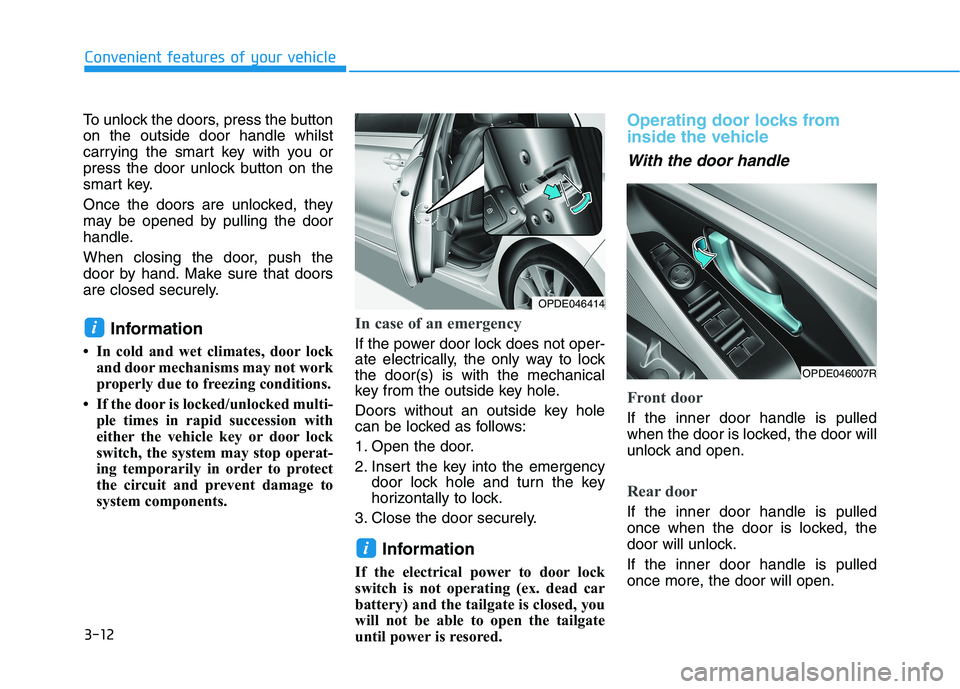
In case of an emergency
If the power door lock does not oper-
ate electrically, the only way to lock
the door(s) is with the mechanical
key from the outside key hole.
Doors without an outside key hole
can be locked as follows:
1. Open the door.
2. Insert the key into the emergency
door lock hole and turn the key
horizontally to lock.
3. Close the door securely.
Information
If the electrical power to door lock
switch is not operating (ex. dead car
battery) and the tailgate is closed, you
will not be able to open the tailgate
until power is resored.
Operating door locks from
inside the vehicle
With the door handle
Front door
If the inner door handle is pulled
when the door is locked, the door will
unlock and open.
Rear door
If the inner door handle is pulled
once when the door is locked, the
door will unlock.
If the inner door handle is pulled
once more, the door will open.
i
i
OPDE046007R
OPDE046414
Page 107 of 533
3-24
The electric type outside rearview
mirror operates even though the
ignition switch is in the OFF posi-
tion. However, to prevent unnec-
essary battery discharge, do not
adjust the mirrors longer than
necessary whilst the engine is not
running.
Do not fold the electric type out-
side rearview mirror by hand. It
could cause motor failure.
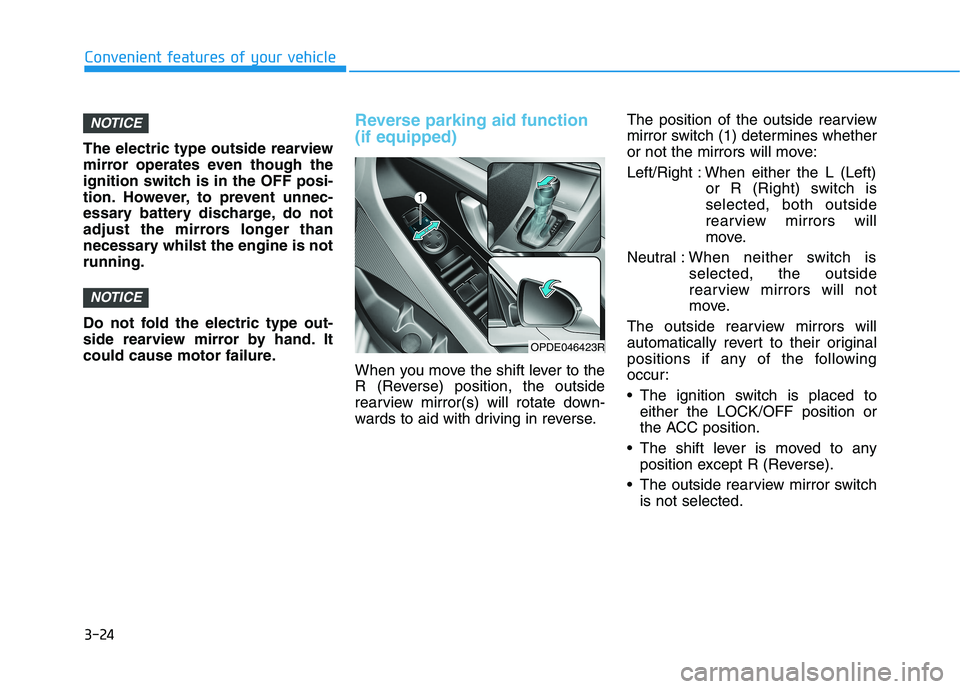
Reverse parking aid function
(if equipped)
When you move the shift lever to the
R (Reverse) position, the outside
rearview mirror(s) will rotate down-
wards to aid with driving in reverse.The position of the outside rearview
mirror switch (1) determines whether
or not the mirrors will move:
Left/Right : When either the L (Left)
or R (Right) switch is
selected, both outside
rearview mirrors will
move.
Neutral :When neither switch is
selected, the outside
rearview mirrors will not
move.
The outside rearview mirrors will
automatically revert to their original
positions if any of the following
occur:
The ignition switch is placed to
either the LOCK/OFF position or
the ACC position.
The shift lever is moved to any
position except R (Reverse).
The outside rearview mirror switch
is not selected.
NOTICE
NOTICE
Convenient features of your vehicle
OPDE046423R
Page 116 of 533
3-33
Convenient features of your vehicle
3
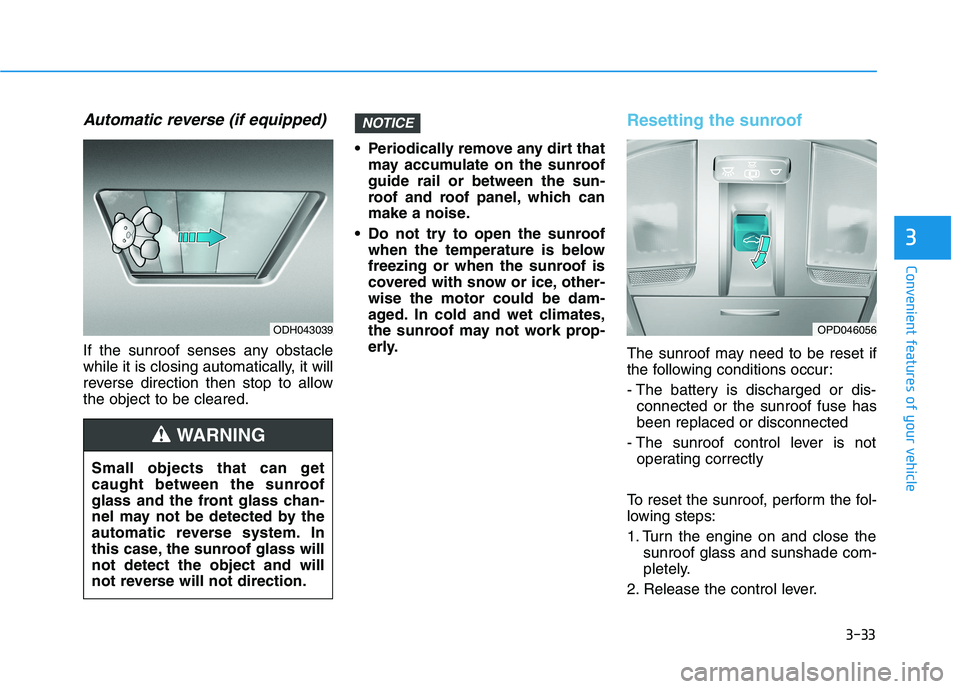
Automatic reverse (if equipped)
If the sunroof senses any obstacle
while it is closing automatically, it will
reverse direction then stop to allow
the object to be cleared. Periodically remove any dirt that
may accumulate on the sunroof
guide rail or between the sun-
roof and roof panel, which can
make a noise.
Do not try to open the sunroof
when the temperature is below
freezing or when the sunroof is
covered with snow or ice, other-
wise the motor could be dam-
aged. In cold and wet climates,
the sunroof may not work prop-
erly.
Resetting the sunroof
The sunroof may need to be reset if
the following conditions occur:
- The battery is discharged or dis-
connected or the sunroof fuse has
been replaced or disconnected
- The sunroof control lever is not
operating correctly
To reset the sunroof, perform the fol-
lowing steps:
1. Turn the engine on and close the
sunroof glass and sunshade com-
pletely.
2. Release the control lever.
NOTICE
Small objects that can get
caught between the sunroof
glass and the front glass chan-
nel may not be detected by the
automatic reverse system. In
this case, the sunroof glass will
not detect the object and will
not reverse will not direction.
WARNING
OPD046056ODH043039
Page 129 of 533
3-46
Convenient features of your vehicle
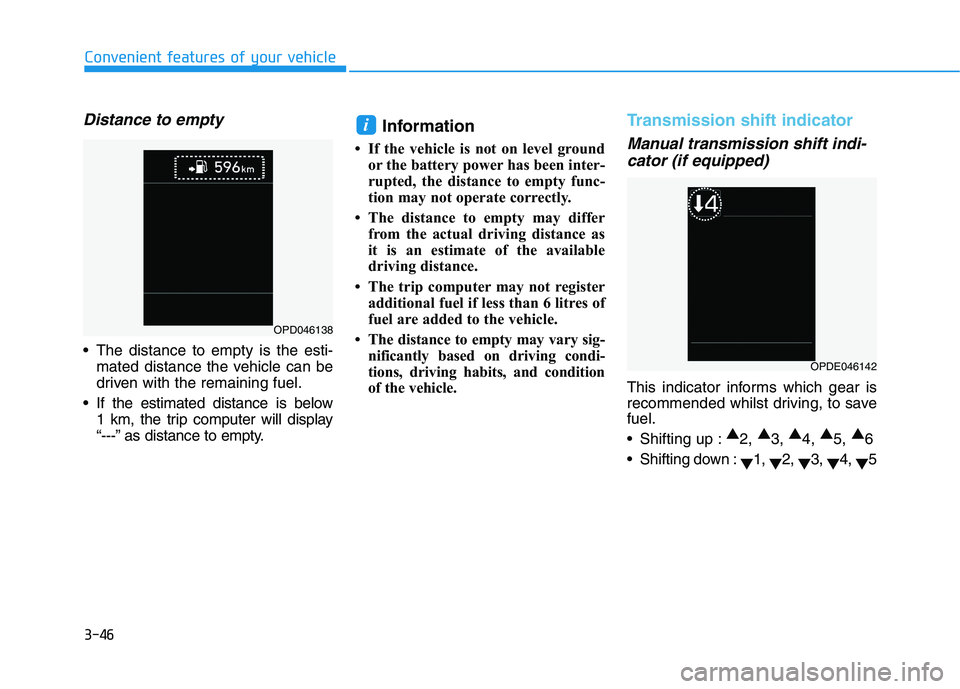
Distance to empty
The distance to empty is the esti-
mated distance the vehicle can be
driven with the remaining fuel.
If the estimated distance is below
1 km, the trip computer will display
“---” as distance to empty.
Information
• If the vehicle is not on level ground
or the battery power has been inter-
rupted, the distance to empty func-
tion may not operate correctly.
• The distance to empty may differ
from the actual driving distance as
it is an estimate of the available
driving distance.
• The trip computer may not register
additional fuel if less than 6 litres of
fuel are added to the vehicle.
• The distance to empty may vary sig-
nificantly based on driving condi-
tions, driving habits, and condition
of the vehicle.
Transmission shift indicator
Manual transmission shift indi-
cator (if equipped)
This indicator informs which gear is
recommended whilst driving, to save
fuel.
Shifting up :▲
2, ▲
3, ▲
4, ▲
5, ▲
6
Shifting down :
▼1,
▼2,
▼3,
▼4,
▼5
i
OPD046138
OPDE046142
Page 139 of 533
3-56
Convenient features of your vehicle
Exhaust System (DPF)
Warning Light
(for diesel engine)
(if equipped)
This warning light illuminates:
When there is a malfunction with
the Diesel Particulate Filter (DPF)
system.
When this warning light illumi-
nates, it may turn off after driving
the vehicle:
- at more than 60 km/h, or
- above 2nd gear with 1500 ~ 2500
engine rpm for a certain time (for
about 25 minutes).
If this warning light blinks in spite of
the procedure (at this time LCD
warning message will be displayed),
we recommend that you have the
DPF system checked by an autho-
rised HYUNDAI dealer.
If you continue to drive with the
DPF warning light blinking for a
long time, the DPF system can be
damaged and fuel consumption
can worsen.
Glow Indicator Light
(for diesel engine)
This indicator light illuminates:
When the engine is being preheat-
ed with the ignition switch or
Engine Start/Stop button in the ON
position.
- The engine can be started after
the glow indicator light goes off.
- The illumination time varies
depending on the the engine
coolant temperature, air tempera-
ture, and battery condition.
If the indicator light remains on or
blinks after the engine has warmed
up or whilst driving, there may be a
malfunction with the engine preheat-
ing system.
In this case, we recommend that you
have the vehicle inspected by an
authorised HYUNDAI dealer.
Information
If the engine does not start within 10
seconds after the preheating is com-
pleted, set the ignition switch or
Engine Start/Stop button to the
LOCK or OFF position for 10 seconds
and then to the ON position in order
to preheat the engine again.
i
NOTICE
Page 141 of 533
3-58
Convenient features of your vehicle
Immobiliser Indicator
Light (with smart key)
(if equipped)
This indicator light illuminates for
up to 30 seconds:
When the vehicle detects the
smart key in the vehicle with the
Engine Start/Stop button in the
ACC or ON position.
- At this time, you can start the
engine.
- The indicator light goes off after
starting the engine.
This indicator light blinks for a few
seconds:
When the smart key is not in the
vehicle.
- At this time, you cannot start the
engine.
This indicator light illuminates for
2 seconds and goes off:
If the smart key is in the vehicle
and the Engine Start/Stop button is
ON, but the vehicle cannot detect
the smart key.
In this case, we recommend that
you have the vehicle inspected by
an authorised HYUNDAI dealer.
This indicator light blinks:
When the battery voltage of the
smart key is low.
- At this time, you cannot start the
engine. However, you can start
the engine if you press the
Engine Start/Stop button with the
smart key.(For more details,
refer to "Starting the Engine"
in chapter 5).
When there is a malfunction with
the immobiliser system.
In this case, we recommend that
you have the vehicle inspected by
an authorised HYUNDAI dealer.
Turn Signal Indicator
Light
This indicator light blinks:
When you operate the turn signals.
If any of the following occur, there may
be a malfunction with the turn signal
system.
- The turn signal indicator light illumi-
nates but does not blink
- The turn signal indicator light blinks
rapidly
- The turn signal indicator light does
not illuminate at all
If any of these conditions occur, we
recommend that you have your vehi-
cle inspected by an authorised
HYUNDAI dealer.
Page 145 of 533
3-62
Convenient features of your vehicle
Icy Road Warning Light
(if equipped)
This warning light is to warn the driver
the road may be icy.
When the temperature on the out-
side temperature gauge is approxi-
mately below 4°C (40°F), the Icy
Road Warning Light and Outside
Temperature Gauge blinks and then
illuminates. Also, the warning chime
sounds 1 time.
Information
If the icy road warning light appears
whilst driving, you should drive more
attentively and safely refraining from
over-speeding, rapid acceleration, sud-
den braking or sharp turning, etc.
LCD display messages
Shift to P (for smart key system
and automatic transmission/
dual clutch transmission)
This warning message is displayed if
you try to turn off the engine without
the shift lever in P (Park) position.
At this time, the Engine Start/Stop
button turns to the ACC position (If
you press the Engine Start/Stop but-
ton once more, it will turn to the ON
position).
Low Key Battery
(for smart key system)
This warning message is displayed if
the battery of the smart key is dis-
charged whilst the Engine Start/Stop
button changes to the OFF position.
i
Page 159 of 533
3-76
Convenient features of your vehicle
If the service interval is activated and
the time and distance is adjusted,
messages are displayed in the fol-
lowing situations each time the vehi-
cle is turned on.
- Service in
: Displayed to inform the driver the
remaining kilometres and days to
service.
- Service required
: Displayed when the kilometres
and days to service has been
reached or passed.
Information
If any of the following conditions
occur, the kilometres and number of
days to service may be incorrect.
- The battery cable is disconnected.
- The fuse switch is turned off.
- The battery is discharged.7. Other Features
- Off: The average fuel economy will
not reset automatically whenever
refuelling.
- After Ignition: The average fuel
economy will reset automatically
whenever it has passed 4 hours
after turning OFF the engine.
- After Refuelling: The average fuel
economy will reset automatically
when refuelling.
For more information, refer to
"Trip Computer" in this chapter.
To select the fuel economy unit.
(km/L, L/100km)
To select the temperature unit
(°C,°F).
To select the tyre pressure unit (psi,
kPa, bar).
To select language.8. Reset
You can reset the menus in the User
Settings Mode. All menus in the User
Settings Mode are initialised, except
language and service interval.
i
Page 160 of 533
3-77
Convenient features of your vehicle
3
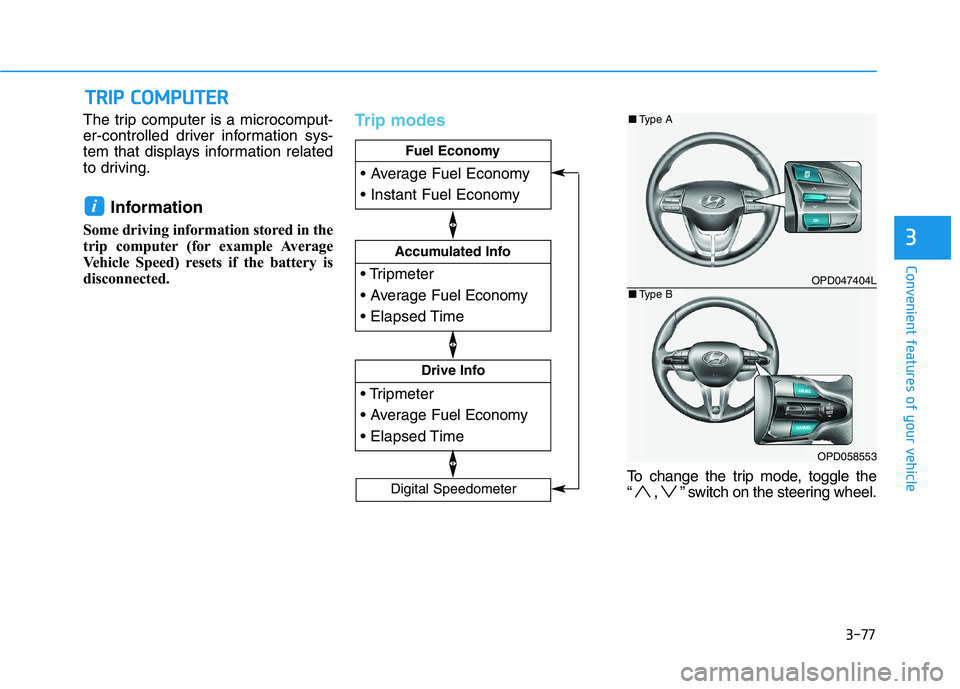
The trip computer is a microcomput-
er-controlled driver information sys-
tem that displays information related
to driving.
Information
Some driving information stored in the
trip computer (for example Average
Vehicle Speed) resets if the battery is
disconnected.
Trip modes
To change the trip mode, toggle the
“ , ” switch on the steering wheel.
i
T TR
RI
IP
P
C
CO
OM
MP
PU
UT
TE
ER
R
Drive Info
Accumulated Info
Fuel Economy
Digital Speedometer
OPD047404L
OPD058553
■Type A
■Type B
Page 167 of 533
3-84
One-touch turn signal function
To activate a one-touch turn signal
function, move the turn signal lever
slightly and then release it. The lane
change signals will blink 3, 5 or 7
times.
You can activate/deactivate the One
Touch Turn Signal function or choose
the number of blinks (3, 5, or 7) from
the User Settings mode on the LCD
display.For more details, refer to
"LCD Display" in this chapter.
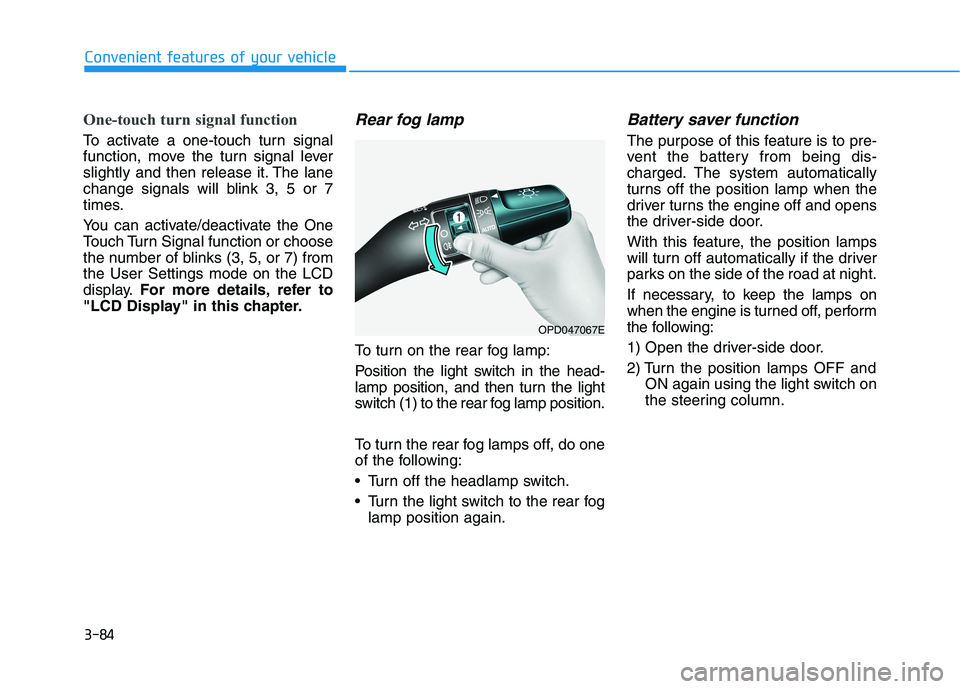
Rear fog lamp
To turn on the rear fog lamp:
Position the light switch in the head-
lamp position, and then turn the light
switch (1) to the rear fog lamp position.
To turn the rear fog lamps off, do one
of the following:
• Turn off the headlamp switch.
Turn the light switch to the rear fog
lamp position again.
Battery saver function
The purpose of this feature is to pre-
vent the battery from being dis-
charged. The system automatically
turns off the position lamp when the
driver turns the engine off and opens
the driver-side door.
With this feature, the position lamps
will turn off automatically if the driver
parks on the side of the road at night.
If necessary, to keep the lamps on
when the engine is turned off, perform
the following:
1) Open the driver-side door.
2) Turn the position lamps OFF and
ON again using the light switch on
the steering column.
Convenient features of your vehicle
OPD047067E