ignition HYUNDAI I30 2023 Service Manual
[x] Cancel search | Manufacturer: HYUNDAI, Model Year: 2023, Model line: I30, Model: HYUNDAI I30 2023Pages: 533, PDF Size: 59.13 MB
Page 168 of 533
3-85
Convenient features of your vehicle
3
Headlamp delay function
(if equipped)
If you place the ignition switch to the
ACC or OFF position with the head-
lamps ON, the headlamps (and/or
position lamps) remain on for about 5
minutes. However, with the engine off
if the driver’s door is opened and
closed, the headlamps (and/or posi-
tion lamps) are turned off after 15
seconds.
The headlamps (and/or position
lamps) can be turned off by pressing
the lock button on the remote key or
smart key twice or turning the light
switch to the OFF or AUTO position.
However, if you turn the light switch
to the AUTO position when it is dark
outside, the headlamps will not be
turned off.
You can activate or deactivate the
Headlamp Delay function from the
User Settings mode on the LCD dis-
play.For more details, refer to
"LCD Display" in this chapter.If the driver gets out of the vehicle
through other doors (except dri-
ver's door), the battery saver func-
tion does not operate and the
headlamp delay function does not
turn off automatically. Therefore, It
causes the battery to be dis-
charged. In this case, make sure to
turn off the lamp before getting out
of the vehicle.
Daytime running light (DRL)
(if equipped)
The Daytime Running Lights (DRL)
can make it easier for others to see
the front of your vehicle during the
day, especially after dawn and before
sunset.
The DRL system will turn the dedi-
cated lamp OFF when:
1. The headlamps are in the ON
position.
2. The position lamp switch is in the
ON position.
3. The engine is turned off.
NOTICE
Page 172 of 533

3-89
Convenient features of your vehicle
3
Front map lamp
Press either lens to turn the map
lamp on or off. This light produces a
spot beam for convenient use as a
map lamp at night or as a personal
lamp for the driver and the front pas-
senger.
Front passenger compartment lamp
Press the button to turn ON the
passenger compartment lamp for
the front/rear seats.
Press the button to turn OFF the
passenger compartment lamp for
the front/rear seats.
Front door lamp ( )
The front or rear passenger compart-
ment lamps come on when the front
or rear doors are opened, if the
engine is running or not.
When doors are unlocked by the
remote key or smart key, the front
and rear lamps come on for approxi-
mately 30 seconds as long as any
door is not opened. The front and
rear passenger compartment lamps
go out gradually after approximately
30 seconds if the door is closed.
However, if the ignition switch is in
the ON position or all doors are
locked, the front and rear lamps will
turn off. If a door is opened with the
ignition switch in the ACC position or
the OFF position, the front and rear
lamps stay on for about 20 minutes.
Page 176 of 533
3-93
Convenient features of your vehicle
3
AUTO (Automatic) control
(if equipped)
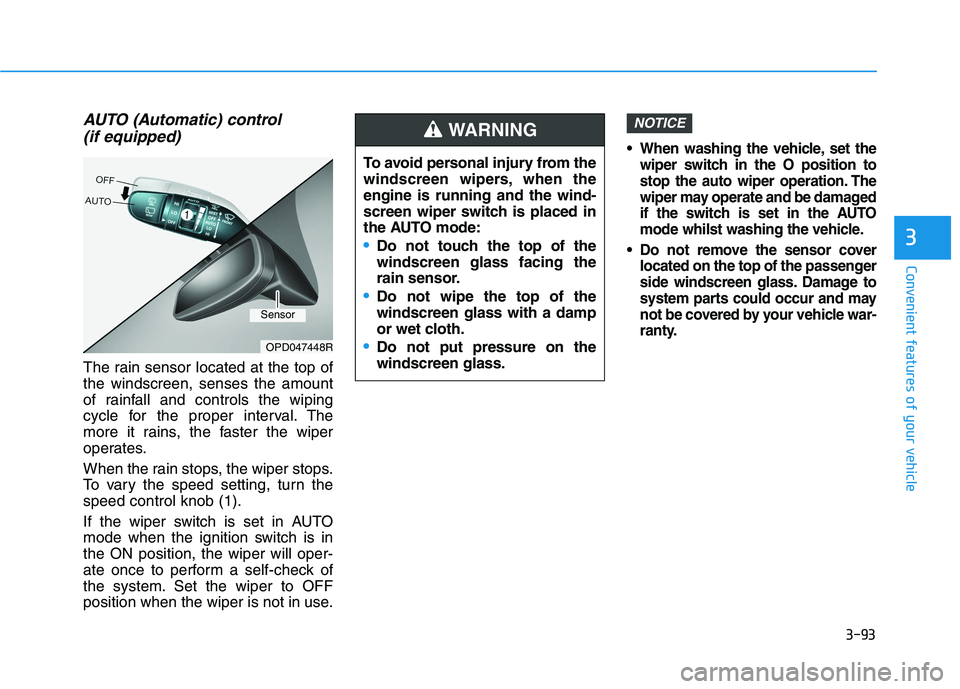
The rain sensor located at the top of
the windscreen, senses the amount
of rainfall and controls the wiping
cycle for the proper interval. The
more it rains, the faster the wiper
operates.
When the rain stops, the wiper stops.
To vary the speed setting, turn the
speed control knob (1).
If the wiper switch is set in AUTO
mode when the ignition switch is in
the ON position, the wiper will oper-
ate once to perform a self-check of
the system. Set the wiper to OFF
position when the wiper is not in use.
When washing the vehicle, set the
wiper switch in the O position to
stop the auto wiper operation. The
wiper may operate and be damaged
if the switch is set in the AUTO
mode whilst washing the vehicle.
Do not remove the sensor cover
located on the top of the passenger
side windscreen glass. Damage to
system parts could occur and may
not be covered by your vehicle war-
ranty.
NOTICE
OPD047448R
To avoid personal injury from the
windscreen wipers, when the
engine is running and the wind-
screen wiper switch is placed in
the AUTO mode:
Do not touch the top of the
windscreen glass facing the
rain sensor.
Do not wipe the top of the
windscreen glass with a damp
or wet cloth.
Do not put pressure on the
windscreen glass.
WARNING
Sensor
Page 181 of 533
3-98
Convenient features of your vehicle
Operation of the Parking
Distance Warning (Reverse)
system
Operating condition
This system will activate when
reversing, with the ignition switch in
the ON position. However, if vehicle
speed exceeds 5 km/h, the system
may not detect objects.
If vehicle speed exceeds 10 km/h,
the system will not warn you even
though objects are detected.
When more than two objects are
sensed at the same time, the clos-
est one will be recognised first.
Types of warning sound and indicator
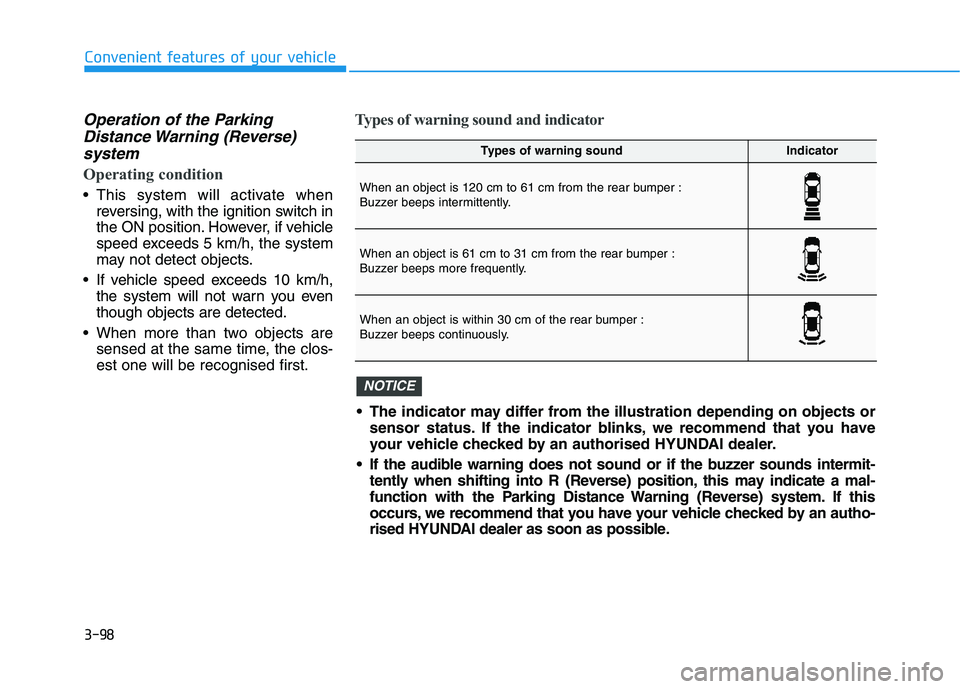
Types of warning soundIndicator
When an object is 120 cm to 61 cm from the rear bumper :
Buzzer beeps intermittently.
When an object is 61 cm to 31 cm from the rear bumper :
Buzzer beeps more frequently.
When an object is within 30 cm of the rear bumper :
Buzzer beeps continuously.
The indicator may differ from the illustration depending on objects or
sensor status. If the indicator blinks, we recommend that you have
your vehicle checked by an authorised HYUNDAI dealer.
If the audible warning does not sound or if the buzzer sounds intermit-
tently when shifting into R (Reverse) position, this may indicate a mal-
function with the Parking Distance Warning (Reverse) system. If this
occurs, we recommend that you have your vehicle checked by an autho-
rised HYUNDAI dealer as soon as possible.
NOTICE
Page 187 of 533

3-104
Convenient features of your vehicle
D DE
EF
FR
RO
OS
ST
TE
ER
R
To prevent damage to the conduc-
tors bonded to the inside surface
of the rear window, never use
sharp instruments or window
cleaners containing abrasives to
clean the window.
Information
If you want to defrost and defog the
front windscreen, refer to
“Windscreen Defrosting and
Defogging” in this chapter.
Rear window defroster
The defroster heats the window to
remove frost, fog and thin ice from
the interior and exterior of the rear
window, whilst the engine is running. To activate the rear window defroster,
press the rear window defroster but-
ton located in the centre facia switch
panel. The indicator on the rear win-
dow defroster button illuminates
when the defroster is ON.
To turn off the defroster, press the
rear window defroster button again.
Information
• If there is heavy accumulation of
snow on the rear window, brush it off
before operating the rear defroster.
• The rear window defroster automati-
cally turns off after approximately 20
minutes or when the ignition switch is
in the OFF position.
Outside mirror defroster
(if equipped)
If your vehicle is equipped with out-
side mirror defrosters, they will oper-
ate at the same time you turn on the
rear window defroster.
NOTICE
ii
OPD046318
OPDE046319R
■Manual climate control system
■Automatic climate control system
Page 193 of 533

3-110
Convenient features of your vehicle
Blower speed control
Turn the knob to the right to increase
the blower speed and airflow. Turn
the knob to the left to decrease blow-
er speed and airflow.
Setting the blower speed control
knob to the “0” position turns off the
blower.
Operating the blower when the
ignition switch is in the ON posi-
tion could cause the battery to
discharge. Operate the blower
when the engine is running.
Air conditioning (A/C)
(if equipped)
Press the A/C button to turn the air
conditioning system on (indicator
light will illuminate). Press the button
again to turn the air conditioning sys-
tem off.
System operation
Ventilation
1. Set the mode to the position.
2. Set the air intake control to the
outside (fresh) air position.
3. Set the temperature control to the
desired position.
4. Set the blower speed control to the
desired speed.
Heating
1. Set the mode to the position.
2. Set the air intake control to the
outside (fresh) air position.
3. Set the temperature control to the
desired position.
4. Set the blower speed control to the
desired speed.
5. If dehumidified heating is desired,
turn the air conditioning system (if
equipped) on.
If the windscreen fogs up, set the
mode to the or position.
NOTICE
OPD046314
OPD046311
Page 204 of 533
3-121
Convenient features of your vehicle
3
Blower speed control
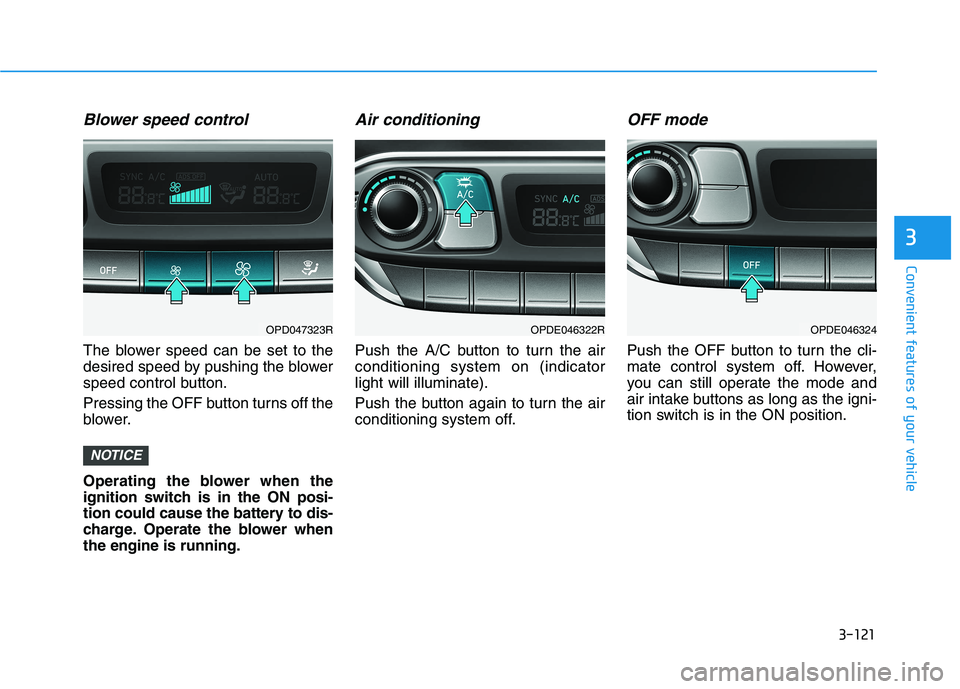
The blower speed can be set to the
desired speed by pushing the blower
speed control button.
Pressing the OFF button turns off the
blower.
Operating the blower when the
ignition switch is in the ON posi-
tion could cause the battery to dis-
charge. Operate the blower when
the engine is running.
Air conditioning
Push the A/C button to turn the air
conditioning system on (indicator
light will illuminate).
Push the button again to turn the air
conditioning system off.
OFF mode
Push the OFF button to turn the cli-
mate control system off. However,
you can still operate the mode and
air intake buttons as long as the igni-
tion switch is in the ON position.
NOTICE
OPDE046322ROPDE046324OPD047323R
Page 211 of 533
3-128
Convenient features of your vehicle
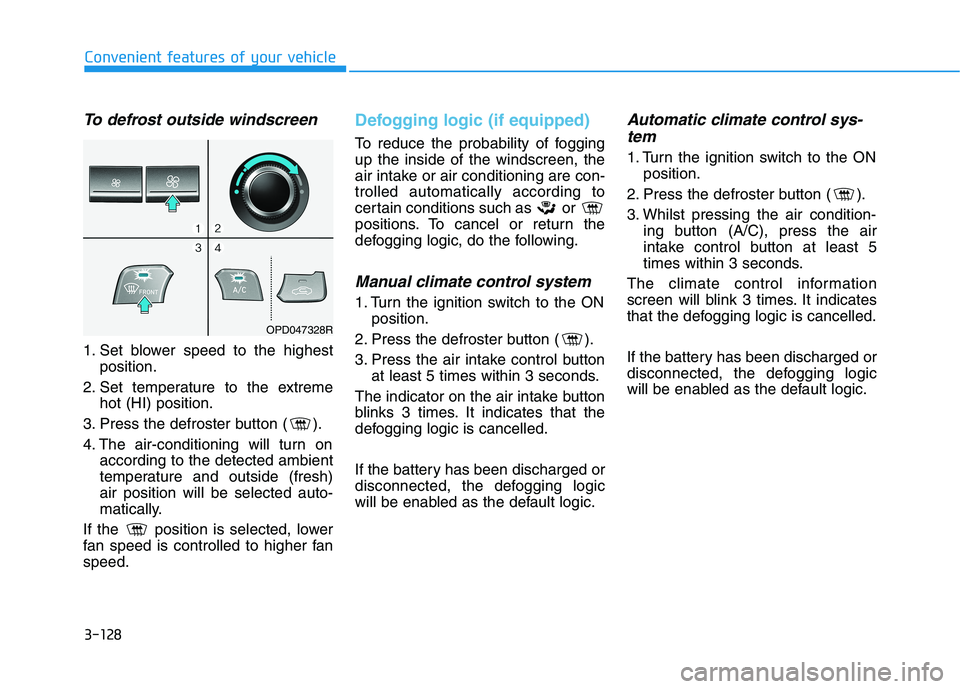
To defrost outside windscreen
1. Set blower speed to the highest
position.
2. Set temperature to the extreme
hot (HI) position.
3. Press the defroster button ( ).
4. The air-conditioning will turn on
according to the detected ambient
temperature and outside (fresh)
air position will be selected auto-
matically.
If the position is selected, lower
fan speed is controlled to higher fan
speed.
Defogging logic (if equipped)
To reduce the probability of fogging
up the inside of the windscreen, the
air intake or air conditioning are con-
trolled automatically according to
certain conditions such as or
positions. To cancel or return the
defogging logic, do the following.
Manual climate control system
1. Turn the ignition switch to the ON
position.
2. Press the defroster button ( ).
3. Press the air intake control button
at least 5 times within 3 seconds.
The indicator on the air intake button
blinks 3 times. It indicates that the
defogging logic is cancelled.
If the battery has been discharged or
disconnected, the defogging logic
will be enabled as the default logic.
Automatic climate control sys-
tem
1. Turn the ignition switch to the ON
position.
2. Press the defroster button ( ).
3. Whilst pressing the air condition-
ing button (A/C), press the air
intake control button at least 5
times within 3 seconds.
The climate control information
screen will blink 3 times. It indicates
that the defogging logic is cancelled.
If the battery has been discharged or
disconnected, the defogging logic
will be enabled as the default logic.
OPD047328R
Page 213 of 533
3-130
Convenient features of your vehicle
C CL
LI
IM
MA
AT
TE
E
C
CO
ON
NT
TR
RO
OL
L
A
AD
DD
DI
IT
TI
IO
ON
NA
AL
L
F
FE
EA
AT
TU
UR
RE
ES
S
Cluster ionizer (if equipped)
When the ignition switch is in the ON
position, the clean air function turns
on automatically.
Also, the clean air function turns off
automatically, when the ignition
switch is in the OFF position.
Automatic ventilation
(if equipped)
When the ignition switch is in the ON
position or when the engine is run-
ning and the outside temperature is
low, the automatic ventilation feature
will activate if the recirculated air
intake position is selected for more
than 30 minutes whilst A/C is on. In
this condition, the air intake position
will automatically switch to the out-
side (fresh) air position.
To cancel or set the Automatic
Ventilation
When the air conditioning system is
on, select Face Level mode and
whilst pressing the A/C button, press
the recirculated air position button for
three seconds.
When the automatic ventilation is set,
the air intake control button (recircu-
lated air position) indicator will blink 6
times. When cancelled, the air intake
control button (recirculated air posi-
tion) indicator will blink 3 times.
Sunroof inside air recirculation
(if equipped)
When the sunroof is opened, outside
(fresh) air will be automatically
selected. At this time, if you press the
air intake control button, recirculated
air position will be selected but will
change back to outside (fresh) air
after 3 minutes. When the sunroof is
closed, the air intake position will
return to the original position that
was selected.
Page 221 of 533
3-138
Convenient features of your vehicle
To charge a mobile phone
The wireless mobile phone charging
system charges only the Qi-enabled
mobile phones ( ). Read the label
on the mobile phone accessory
cover or visit your mobile phone
manufacturer’s website to check
whether your mobile phone supports
the Qi technology.
The wireless charging process starts
when you put a Qi-enabled mobile
phone on the wireless charging unit.
1. Remove other items, including the
smart key, from the wireless charg-
ing unit. If not, the wireless charg-
ing process may be interrupted.
2. The indicator illuminates in orange
during the charging process. The
indicator colour changes to green,
when the charging process is
completed.
3. You can turn ON or OFF the wire-
less charging function in the User
Settings mode on the instrument
cluster. For further information,
refer to “LCD display Modes” in
this chapter.Slightly change the mobile phone
position, when the mobile phone is
not being charged. Make sure that
the indicator illuminates in orange.
The indicator colour may not change
to green depending on the mobile
phone type, even though the charg-
ing process has been completed.
The indicator blinks orange for 10
seconds when there is a malfunction
with the wireless charging system.
In this case, temporarily stop the
charging process, and re-attempt to
wirelessly charge your mobile phone
again.
The system warns you with a mes-
sage on the LCD display if you do not
remove the cellular phone from the
wireless charging unit, when the front
door is open and the ignition switch is
in the OFF position.
The wireless mobile phone
charging system may not sup-
port certain mobile phones,
which are not verified for the Qi
specification ( ).
(Continued)(Continued)
Locate your mobile phone well in
the middle of the wireless mobile
phone charging system. Even
when your mobile phone locates
slightly to one side, the charging
speed may decrease.
The wireless charging process
may temporarily stop, when a
smart key function operates (i.e.
starting the engine, opening the
doors, closing the doors).
For certain mobile phones, the
indicator colour may not change
to green, even when the wireless
charging process is properly
completed.
The wireless charging process may
temporarily stop, when tempera-
ture abnormally increases inside
the wireless mobile phone charg-
ing system. The wireless charging
process restarts, when tempera-
ture falls to a certain level.
The wireless charging process
may temporarily stop when there
is any metallic item, such as a
coin, between the wireless
mobile phone charging system
and a mobile phone.
NOTICE