ignition HYUNDAI I30 2023 Manual PDF
[x] Cancel search | Manufacturer: HYUNDAI, Model Year: 2023, Model line: I30, Model: HYUNDAI I30 2023Pages: 533, PDF Size: 59.13 MB
Page 330 of 533
5-65
Driving your vehicle
BCW (if equipped)
Operating conditions
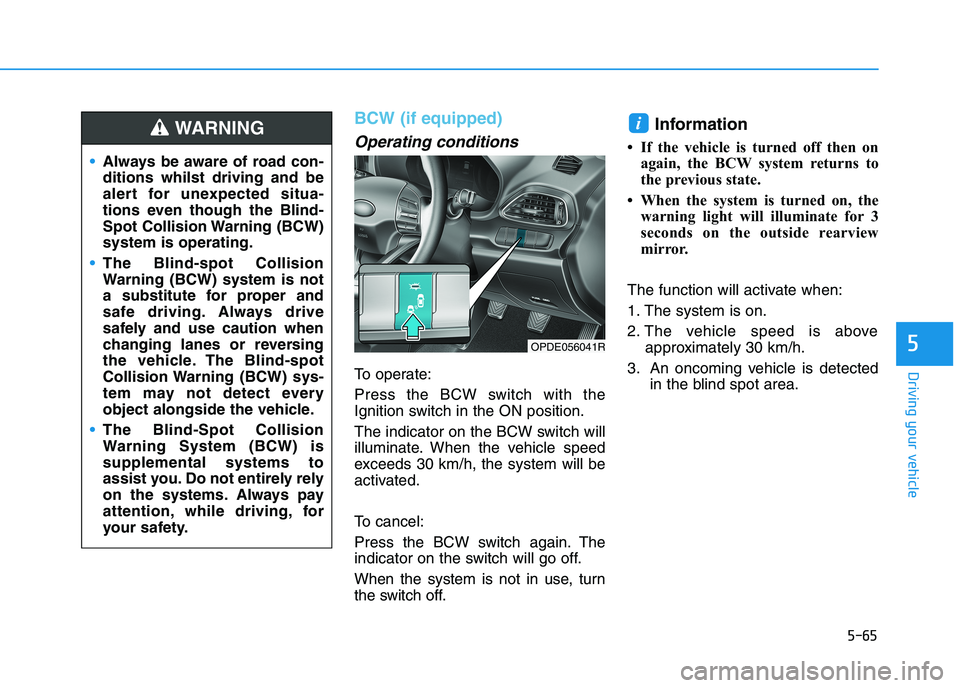
To operate:
Press the BCW switch with the
Ignition switch in the ON position.
The indicator on the BCW switch will
illuminate. When the vehicle speed
exceeds 30 km/h, the system will be
activated.
To cancel:
Press the BCW switch again. The
indicator on the switch will go off.
When the system is not in use, turn
the switch off.
Information
• If the vehicle is turned off then on
again, the BCW system returns to
the previous state.
• When the system is turned on, the
warning light will illuminate for 3
seconds on the outside rearview
mirror.
The function will activate when:
1. The system is on.
2. The vehicle speed is above
approximately 30 km/h.
3. An oncoming vehicle is detected
in the blind spot area.
i
5
Always be aware of road con-
ditions whilst driving and be
alert for unexpected situa-
tions even though the Blind-
Spot Collision Warning (BCW)
system is operating.
The Blind-spot Collision
Warning (BCW) system is not
a substitute for proper and
safe driving. Always drive
safely and use caution when
changing lanes or reversing
the vehicle. The Blind-spot
Collision Warning (BCW) sys-
tem may not detect every
object alongside the vehicle.
The Blind-Spot Collision
Warning System (BCW) is
supplemental systems to
assist you. Do not entirely rely
on the systems. Always pay
attention, while driving, for
your safety.
WARNING
OPDE056041R
Page 341 of 533
5-76
Driving your vehicle
The Forward Collision-Avoidance
Assist (FCA) system is designed to
help detect and monitor the vehicle
ahead or detect a pedestrian (if
equipped) in the roadway through
radar signals and camera recognition
to warn the driver that a collision is
imminent, and if necessary, apply
emergency braking.
System setting and activation
System setting
The driver can activate the FCA by
placing the ignition switch in the
ON position and by selecting:
"User Settings →Driver
Assistance →FCA (Forward
Collision-Avoidance Assist)"
The FCA deactivates, when the driv-
er cancels the system setting.
F FO
OR
RW
WA
AR
RD
D
C
CO
OL
LL
LI
IS
SI
IO
ON
N
A
AS
SS
SI
IS
ST
T
(
(F
FC
CA
A)
)
S
SY
YS
ST
TE
EM
M
( (F
FR
RO
ON
NT
T
R
RA
AD
DA
AR
R
+
+
F
FR
RO
ON
NT
T
C
CA
AM
ME
ER
RA
A)
)
(
(I
IF
F
E
EQ
QU
UI
IP
PP
PE
ED
D)
)
Take the following precautions
when using the Forward
Collision-Avoidance Assist
(FCA) system:
This system is only a supple-
mental system and it is not
intended to, nor does it
replace the need for extreme
care and attention of the driv-
er. The sensing range and
objects detectable by the sen-
sors are limited. Pay attention
to the road conditions at all
times.
NEVER drive too fast and
drive in accordance with the
road conditions.
Always drive cautiously to
prevent unexpected and sud-
den situations from occur-
ring. FCA does not stop the
vehicle completely and is not
a collision avoidance system.
WARNING
Page 355 of 533
5-90
Driving your vehicle
LKA system Operation
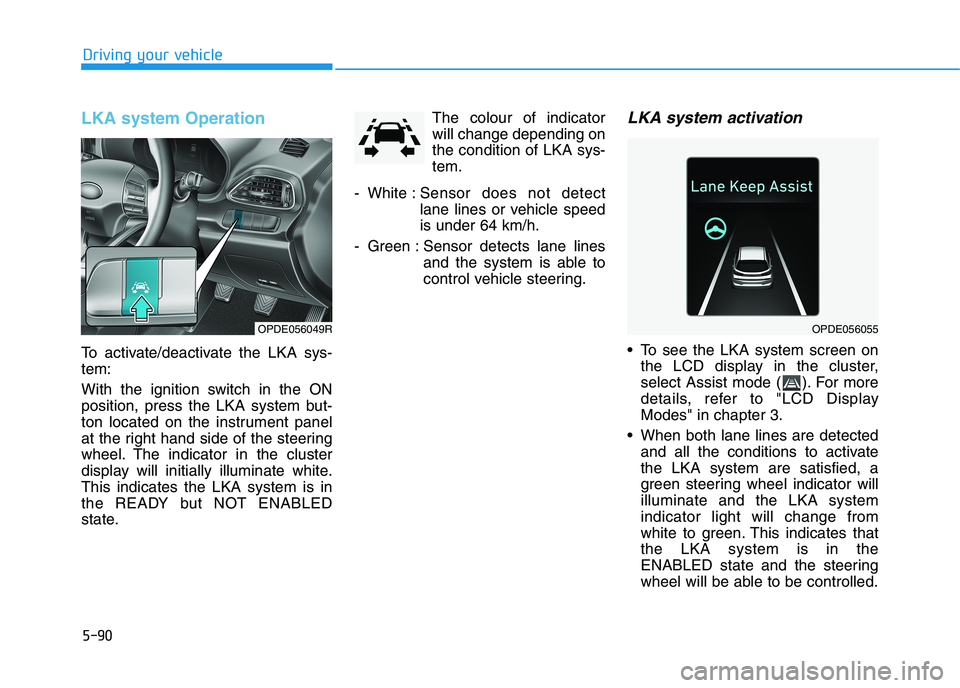
To activate/deactivate the LKA sys-
tem:
With the ignition switch in the ON
position, press the LKA system but-
ton located on the instrument panel
at the right hand side of the steering
wheel. The indicator in the cluster
display will initially illuminate white.
This indicates the LKA system is in
the READY but NOT ENABLED
state.The colour of indicator
will change depending on
the condition of LKA sys-
tem.
- White :Sensor does not detect
lane lines or vehicle speed
is under 64 km/h.
- Green : Sensor detects lane lines
and the system is able to
control vehicle steering.
LKA system activation
To see the LKA system screen on
the LCD display in the cluster,
select Assist mode ( ). For more
details, refer to "LCD Display
Modes" in chapter 3.
When both lane lines are detected
and all the conditions to activate
the LKA system are satisfied, a
green steering wheel indicator will
illuminate and the LKA system
indicator light will change from
white to green. This indicates that
the LKA system is in the
ENABLED state and the steering
wheel will be able to be controlled.
OPDE056055OPDE056049R
Page 358 of 533
5-93
Driving your vehicle
5Information
• Even though the steering is assisted
by the system, the driver can still
steer to control the steering wheel.
• The steering wheel may feel heavier
when the steering wheel is assisted
by the system than when it is not.
Warning Light and Message
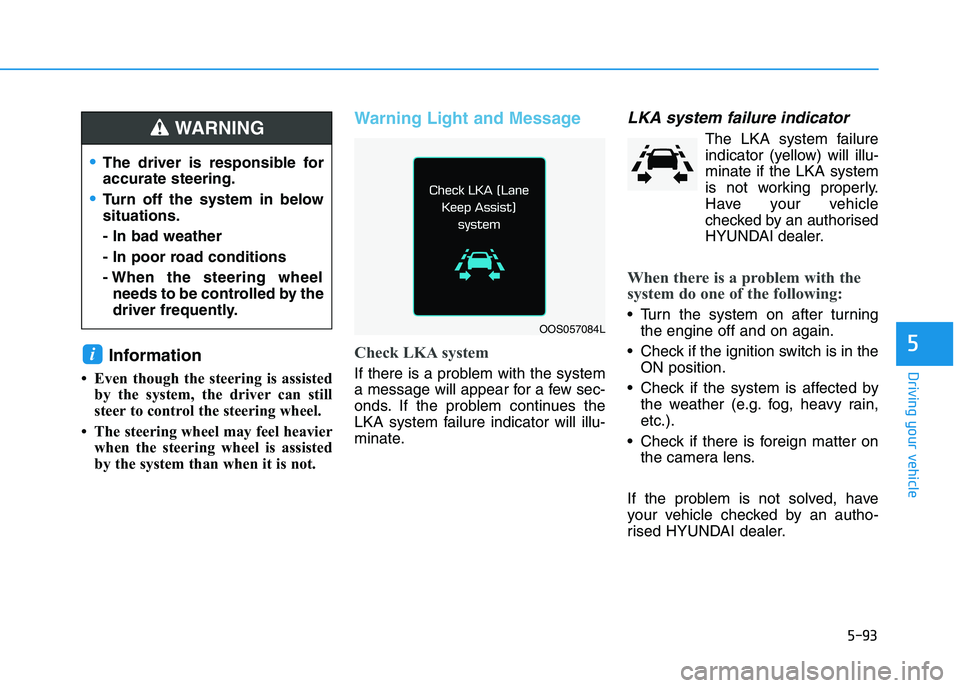
Check LKA system
If there is a problem with the system
a message will appear for a few sec-
onds. If the problem continues the
LKA system failure indicator will illu-
minate.
LKA system failure indicator
The LKA system failure
indicator (yellow) will illu-
minate if the LKA system
is not working properly.
Have your vehicle
checked by an authorised
HYUNDAI dealer.
When there is a problem with the
system do one of the following:
Turn the system on after turning
the engine off and on again.
Check if the ignition switch is in the
ON position.
Check if the system is affected by
the weather (e.g. fog, heavy rain,
etc.).
Check if there is foreign matter on
the camera lens.
If the problem is not solved, have
your vehicle checked by an autho-
rised HYUNDAI dealer.
i
OOS057084L
The driver is responsible for
accurate steering.
Turn off the system in below
situations.
- In bad weather
- In poor road conditions
- When the steering wheel
needs to be controlled by the
driver frequently.
WARNING
Page 366 of 533
5-101
Driving your vehicle
5
Information
• During normal cruise control opera-
tion, when the SET switch is activat-
ed or reactivated after applying the
brakes, the cruise control will acti-
vate after approximately 3 seconds.
This delay is normal.
• Before activating the cruise control
function, the system will check to
verify that the brake switch is oper-
ating normally. Depress the brake
pedal at least once after turning ON
the ignition or starting the vehicle.
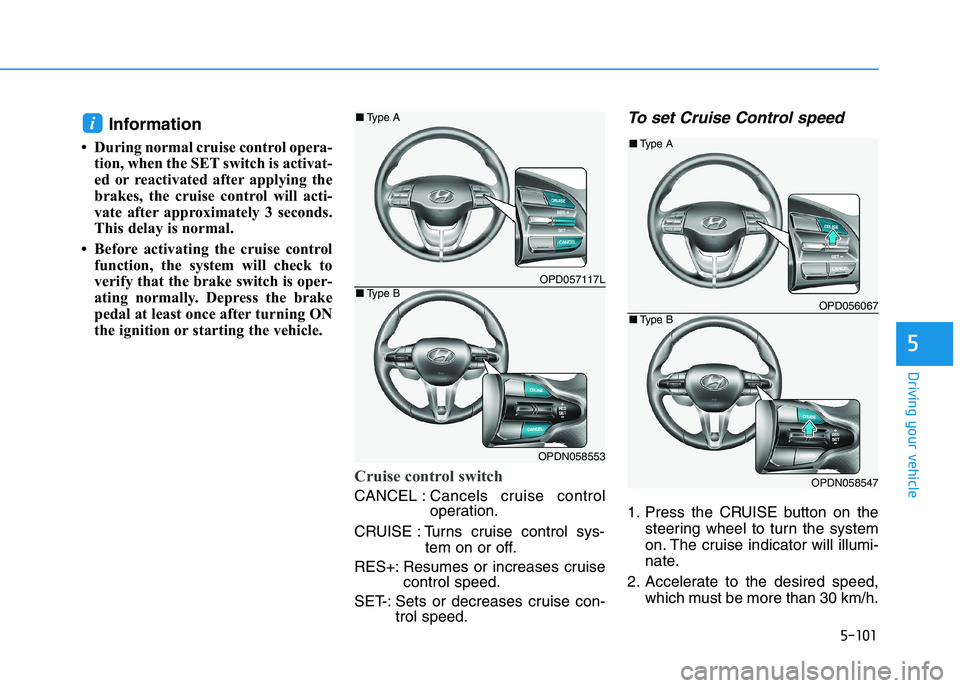
Cruise control switch
CANCEL :Cancels cruise control
operation.
CRUISE : Turns cruise control sys-
tem on or off.
RES+: Resumes or increases cruise
control speed.
SET-: Sets or decreases cruise con-
trol speed.
To set Cruise Control speed
1. Press the CRUISE button on the
steering wheel to turn the system
on. The cruise indicator will illumi-
nate.
2. Accelerate to the desired speed,
which must be more than 30 km/h.
i
OPD057117L
OPDN058553
■Type A
■Type BOPD056067
OPDN058547
■Type A
■Type B
Page 395 of 533
5-130
Driving your vehicle
Use wire chains less than 12 mm
wide to prevent damage to the
chain’s connection.
Winter Precautions
Use high quality ethylene glycol
coolant
Your vehicle is delivered with high
quality ethylene glycol coolant in the
cooling system. It is the only type of
coolant that should be used because
it helps prevent corrosion in the cool-
ing system, lubricates the water
pump and prevents freezing. Be sure
to replace or replenish your coolant
in accordance with the maintenance
schedule in chapter 7. Before winter,
have your coolant tested to assure
that its freezing point is sufficient for
the temperatures anticipated during
the winter.
Check battery and cables
Winter temperatures affect battery
performance.Inspect the battery
and cables, as specified in the
chapter 7.The battery charging level
can be checked by an authorised
HYUNDAI dealer or in a service sta-
tion.Change to "winter weight" oil if
necessary
In some regions during winter, it is
recommended to use the "winter
weight" oil with lower viscosity. For
further information, refer to chapter
8. When you are not sure about a
type of winter weight oil, consult an
authorised HYUNDAI dealer.
Check spark plugs and ignition
system
Inspect the spark plugs, as speci-
fied in chapter 7.If necessary,
replace them. Also check all ignition
wirings and components for any
cracks, wear-out, and damage.
To prevent locks from freezing
To prevent the locks from being
frozen, spray approved de-icing fluid
or glycerin into key holes. When a
lock opening is already covered with
ice, spray approved de-icing fluid
over the ice to remove it. When an
internal part of a lock freezes, try to
thaw it with a heated key. Carefully
use the heated key to avoid an injury.
Page 408 of 533
6-2
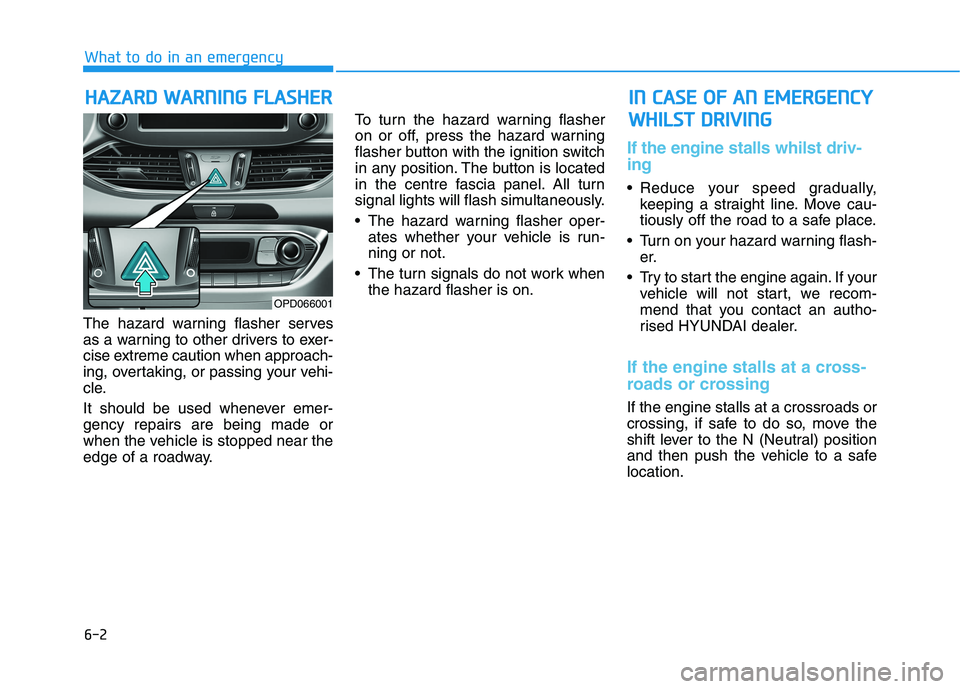
The hazard warning flasher serves
as a warning to other drivers to exer-
cise extreme caution when approach-
ing, overtaking, or passing your vehi-
cle.
It should be used whenever emer-
gency repairs are being made or
when the vehicle is stopped near the
edge of a roadway.To turn the hazard warning flasher
on or off, press the hazard warning
flasher button with the ignition switch
in any position. The button is located
in the centre fascia panel. All turn
signal lights will flash simultaneously.
• The hazard warning flasher oper-
ates whether your vehicle is run-
ning or not.
The turn signals do not work when
the hazard flasher is on.
If the engine stalls whilst driv-
ing
Reduce your speed gradually,
keeping a straight line. Move cau-
tiously off the road to a safe place.
Turn on your hazard warning flash-
er.
Try to start the engine again. If your
vehicle will not start, we recom-
mend that you contact an autho-
rised HYUNDAI dealer.
If the engine stalls at a cross-
roads or crossing
If the engine stalls at a crossroads or
crossing, if safe to do so, move the
shift lever to the N (Neutral) position
and then push the vehicle to a safe
location.
H HA
AZ
ZA
AR
RD
D
W
WA
AR
RN
NI
IN
NG
G
F
FL
LA
AS
SH
HE
ER
R
What to do in an emergency
I
IN
N
C
CA
AS
SE
E
O
OF
F
A
AN
N
E
EM
ME
ER
RG
GE
EN
NC
CY
Y
W WH
HI
IL
LS
ST
T
D
DR
RI
IV
VI
IN
NG
G
OPD066001
Page 409 of 533
6-3
What to do in an emergency
If you have a flat tyre whilst
driving
If a tyre goes flat whilst you are driv-
ing:
Take your foot off the accelerator
pedal and let the vehicle slow
down whilst driving straight ahead.
Do not apply the brakes immedi-
ately or attempt to pull off the road
as this may cause loss of vehicle
control resulting in an accident.
When the vehicle has slowed to
such a speed that it is safe to do
so, brake carefully and pull off the
road. Drive off the road as far as
possible and park on firm, level
ground. If you are on a divided
highway, do not park in the median
area between the two traffic lanes. When the vehicle is stopped, press
the hazard warning flasher button,
move the shift lever into P (Park,
for automatic transmission/dual
clutch transmission vehicle) or neu-
tral (for manual transmission vehi-
cle), apply the parking brake, and
place the ignition switch in the
LOCK/OFF position.
Have all passengers get out of the
vehicle. Be sure they all get out on
the side of the vehicle that is away
from traffic.
When changing a flat tyre, follow
the instructions provided later in
this chapter.If the engine doesn't turn over
or turns over slowly
Be sure the shift lever is in N
(Neutral) or P (Park) if it is an auto-
matic transmission/dual clutch
transmission vehicle. The engine
starts only when the shift lever is in
N (Neutral) or P (Park).
Check the battery connections to
be sure they are clean and tight.
Turn on the interior light. If the light
dims or goes out when you operate
the starter, the battery is drained.
Do not push or pull the vehicle to start
it. This could cause damage to your
vehicle.See instructions for "Jump
Starting" provided in this chapter.
6
I IF
F
T
TH
HE
E
E
EN
NG
GI
IN
NE
E
W
WI
IL
LL
L
N
NO
OT
T
S ST
TA
AR
RT
T
Push or pull starting the vehicle
may cause the catalytic con-
verter to overload which can
lead to damage to the emission
control system.
CAUTION
Page 411 of 533
6-5
What to do in an emergency
To prevent damage to your vehi-
cle:
Only use a 12-volt power supply
(battery or jumper system) to
jump start your vehicle.
Do not attempt to jump start
your vehicle by push-starting.
Information
An inappropriately disposed
battery can be harmful to the
environment and human
health. Dispose of the battery
according to your local law(s)
or regulations.
Jump starting procedure
1. Position the vehicles close enough
that the jumper cables will reach,
but do not allow the vehicles to
touch.
2. Avoid fans or any moving parts in
the engine compartment at all
times, even when the vehicles are
turned off.
3. Turn off all electrical devices such
as radios, lights, air conditioning,
etc. Put the vehicles in P (Park, for
automatic transmission/dual
clutch transmission vehicle) or
neutral (for manual transmission
vehicle), and set the parking
brake. Turn both vehicles OFF.
i
NOTICE
6
(Continued)
When lifting a plastic-cased
battery, excessive pressure
on the case may cause battery
acid to leak. Lift with a battery
carrier or with your hands on
opposite corners.
Do not attempt to jump start
your vehicle if your battery is
frozen.
NEVER attempt to recharge
the battery when the vehicle’s
battery cables are connected
to the battery.
The electrical ignition system
works with high voltage.
NEVER touch these compo-
nents with the engine running
or when the ignition switch is
in the ON position.
Do not allow the (+) and (-)
jumper cables to touch. It may
cause sparks.
The battery may rupture or
explode when you jump start
with a low or frozen battery.
Pb
Page 416 of 533
6-10
What to do in an emergency
Your vehicle has also been equipped
with a TPMS malfunction indicator to
indicate when the system is not
operating properly. The TPMS mal-
function indicator is combined with
the low tyre pressure telltale. When
the system detects a malfunction,
the telltale will flash for approximate-
ly one minute and then remain con-
tinuously illuminated. This sequence
will continue upon subsequent vehi-
cle start-ups as long as the malfunc-
tion exists. When the malfunction
indicator is illuminated, the system
may not be able to detect or signal
low tyre pressure as intended.
TPMS malfunctions may occur for a
variety of reasons, including the
installation of replacement or alter-
nate tyres or wheels on the vehicle
that prevent the TPMS from function-
ing properly. Always check the TPMS
malfunction telltale after replacing
one or more tyres or wheels on your
vehicle to ensure that the replace-
ment or alternate tyres and wheels
allow the TPMS to continue to func-
tion properly.If any of the below happens, we
recommend that the system be
checked by an authorised HYUNDAI
dealer.
1. The low tyre pressure telltale/
TPMS malfunction indicator
does not illuminate for 3 sec-
onds when the ignition switch is
turned to the ON position or the
engine is running.
2. The TPMS malfunction indicator
remains illuminated after blink-
ing for approximately 1 minute.
3. The Low tyre pressure position
telltale remains illuminated.
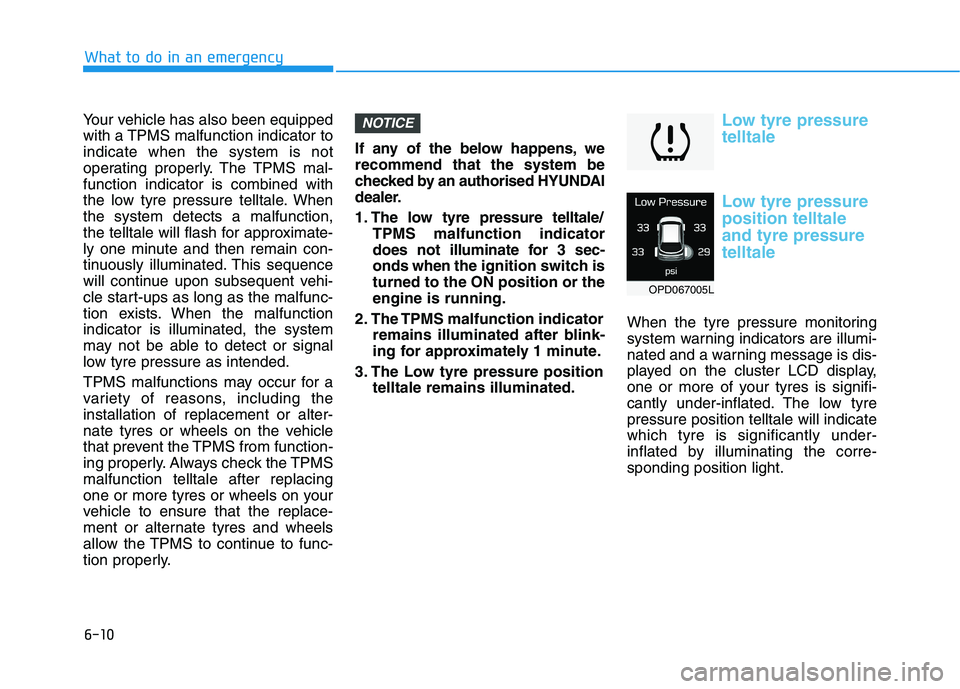
Low tyre pressure
telltale
Low tyre pressure
position telltale
and tyre pressure
telltale
When the tyre pressure monitoring
system warning indicators are illumi-
nated and a warning message is dis-
played on the cluster LCD display,
one or more of your tyres is signifi-
cantly under-inflated. The low tyre
pressure position telltale will indicate
which tyre is significantly under-
inflated by illuminating the corre-
sponding position light.
NOTICE
OPD067005L