battery HYUNDAI I800 2016 User Guide
[x] Cancel search | Manufacturer: HYUNDAI, Model Year: 2016, Model line: I800, Model: HYUNDAI I800 2016Pages: 419, PDF Size: 9.23 MB
Page 130 of 419
Features of your vehicle
56 4
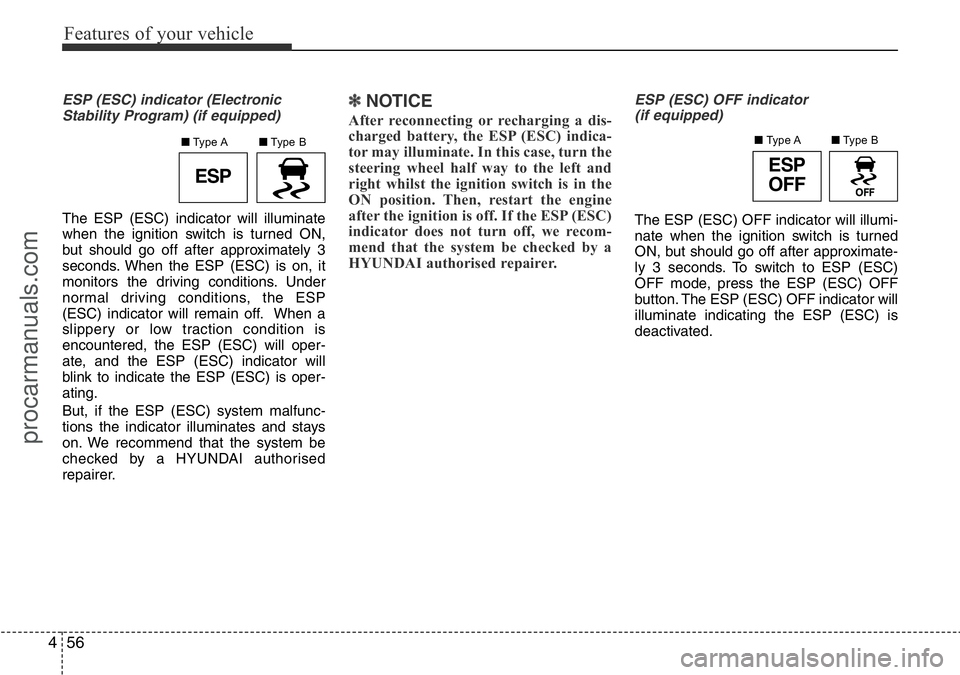
ESP (ESC) indicator (Electronic
Stability Program) (if equipped)
The ESP (ESC) indicator will illuminate
when the ignition switch is turned ON,
but should go off after approximately 3
seconds. When the ESP (ESC) is on, it
monitors the driving conditions. Under
normal driving conditions, the ESP
(ESC) indicator will remain off. When a
slippery or low traction condition is
encountered, the ESP (ESC) will oper-
ate, and the ESP (ESC) indicator will
blink to indicate the ESP (ESC) is oper-
ating.
But, if the ESP (ESC) system malfunc-
tions the indicator illuminates and stays
on. We recommend that the system be
checked by a HYUNDAI authorised
repairer.
✽NOTICE
After reconnecting or recharging a dis-
charged battery, the ESP (ESC) indica-
tor may illuminate. In this case, turn the
steering wheel half way to the left and
right whilst the ignition switch is in the
ON position. Then, restart the engine
after the ignition is off. If the ESP (ESC)
indicator does not turn off, we recom-
mend that the system be checked by a
HYUNDAI authorised repairer.
ESP (ESC) OFF indicator
(if equipped)
The ESP (ESC) OFF indicator will illumi-
nate when the ignition switch is turned
ON, but should go off after approximate-
ly 3 seconds. To switch to ESP (ESC)
OFF mode, press the ESP (ESC) OFF
button. The ESP (ESC) OFF indicator will
illuminate indicating the ESP (ESC) is
deactivated.
ESPESP
OFF
■Type B ■Type A■Type B ■Type A
procarmanuals.com
Page 131 of 419
457
Features of your vehicle
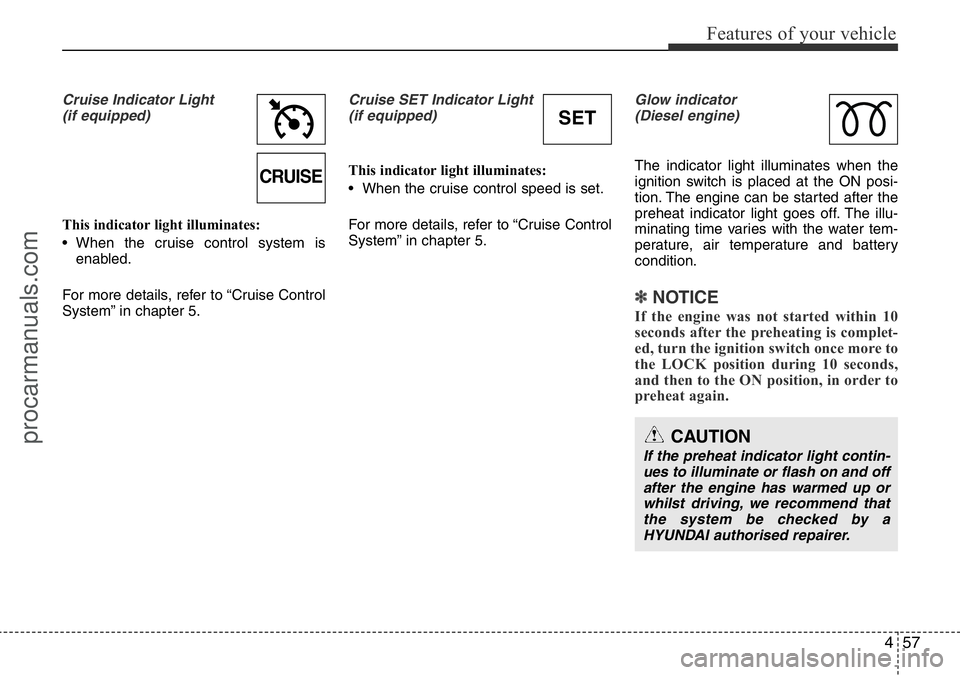
Cruise Indicator Light
(if equipped)
This indicator light illuminates:
• When the cruise control system is
enabled.
For more details, refer to “Cruise Control
System” in chapter 5.
Cruise SET Indicator Light
(if equipped)
This indicator light illuminates:
• When the cruise control speed is set.
For more details, refer to “Cruise Control
System” in chapter 5.
Glow indicator
(Diesel engine)
The indicator light illuminates when the
ignition switch is placed at the ON posi-
tion. The engine can be started after the
preheat indicator light goes off. The illu-
minating time varies with the water tem-
perature, air temperature and battery
condition.
✽NOTICE
If the engine was not started within 10
seconds after the preheating is complet-
ed, turn the ignition switch once more to
the LOCK position during 10 seconds,
and then to the ON position, in order to
preheat again.
CAUTION
If the preheat indicator light contin-
ues to illuminate or flash on and off
after the engine has warmed up or
whilst driving, we recommend that
the system be checked by a
HYUNDAI authorised repairer.
CRUISE
SET
procarmanuals.com
Page 138 of 419
Features of your vehicle
64 4
Battery saver function
• The purpose of this feature is to pre-
vent the battery from being dis-
charged. The system automatically
turns off the parking lights when the
driver removes the ignition key and
opens the driver-side door.
• With this feature, the parking lights will
be turned off automatically if the driver
parks on the side of road at night.
If necessary, to keep the lights on
when the ignition key is removed, per-
form the following:
1) Open the driver-side door.
2) Turn the parking lights OFF and ON
again using the light switch on the
steering column.
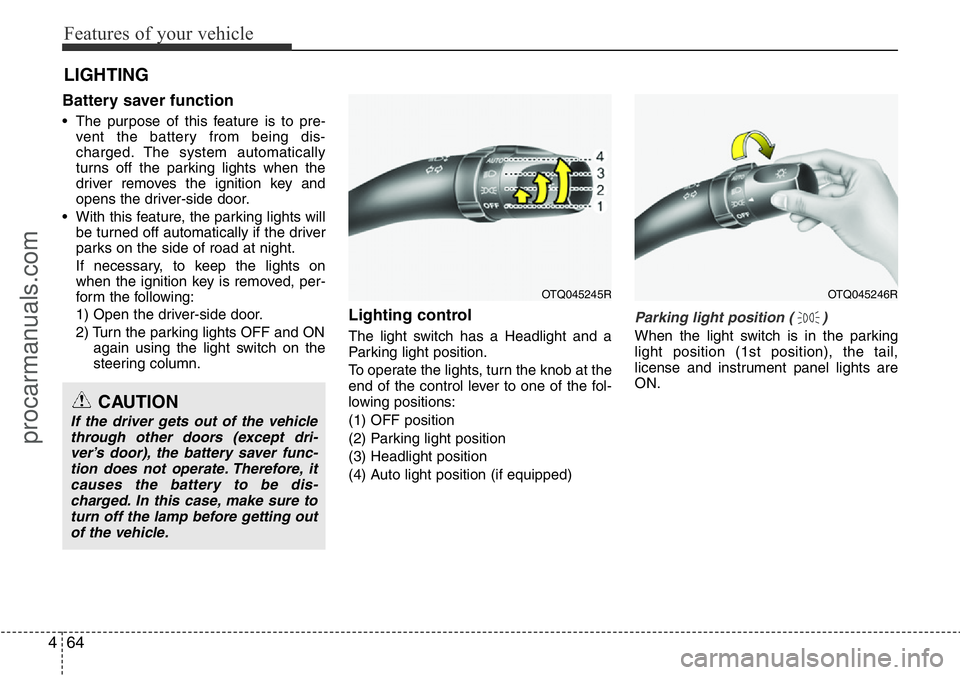
Lighting control
The light switch has a Headlight and a
Parking light position.
To operate the lights, turn the knob at the
end of the control lever to one of the fol-
lowing positions:
(1) OFF position
(2) Parking light position
(3) Headlight position
(4) Auto light position (if equipped)
Parking light position ( )
When the light switch is in the parking
light position (1st position), the tail,
license and instrument panel lights are
ON.
LIGHTING
CAUTION
If the driver gets out of the vehicle
through other doors (except dri-
ver’s door), the battery saver func-
tion does not operate. Therefore, it
causes the battery to be dis-
charged. In this case, make sure to
turn off the lamp before getting out
of the vehicle.
OTQ045245ROTQ045246R
procarmanuals.com
Page 140 of 419
Features of your vehicle
66 4
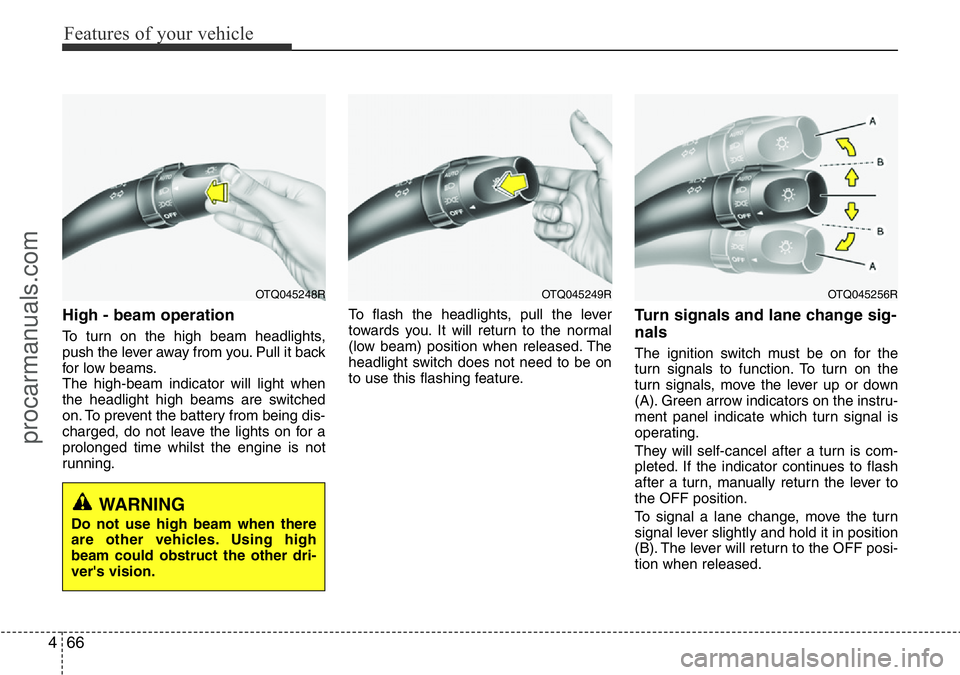
High - beam operation
To turn on the high beam headlights,
push the lever away from you. Pull it back
for low beams.
The high-beam indicator will light when
the headlight high beams are switched
on. To prevent the battery from being dis-
charged, do not leave the lights on for a
prolonged time whilst the engine is not
running.To flash the headlights, pull the lever
towards you. It will return to the normal
(low beam) position when released. The
headlight switch does not need to be on
to use this flashing feature.
Turn signals and lane change sig-
nals
The ignition switch must be on for the
turn signals to function. To turn on the
turn signals, move the lever up or down
(A). Green arrow indicators on the instru-
ment panel indicate which turn signal is
operating.
They will self-cancel after a turn is com-
pleted. If the indicator continues to flash
after a turn, manually return the lever to
the OFF position.
To signal a lane change, move the turn
signal lever slightly and hold it in position
(B). The lever will return to the OFF posi-
tion when released.
OTQ045249ROTQ045256ROTQ045248R
WARNING
Do not use high beam when there
are other vehicles. Using high
beam could obstruct the other dri-
ver's vision.
procarmanuals.com
Page 146 of 419
Features of your vehicle
72 4
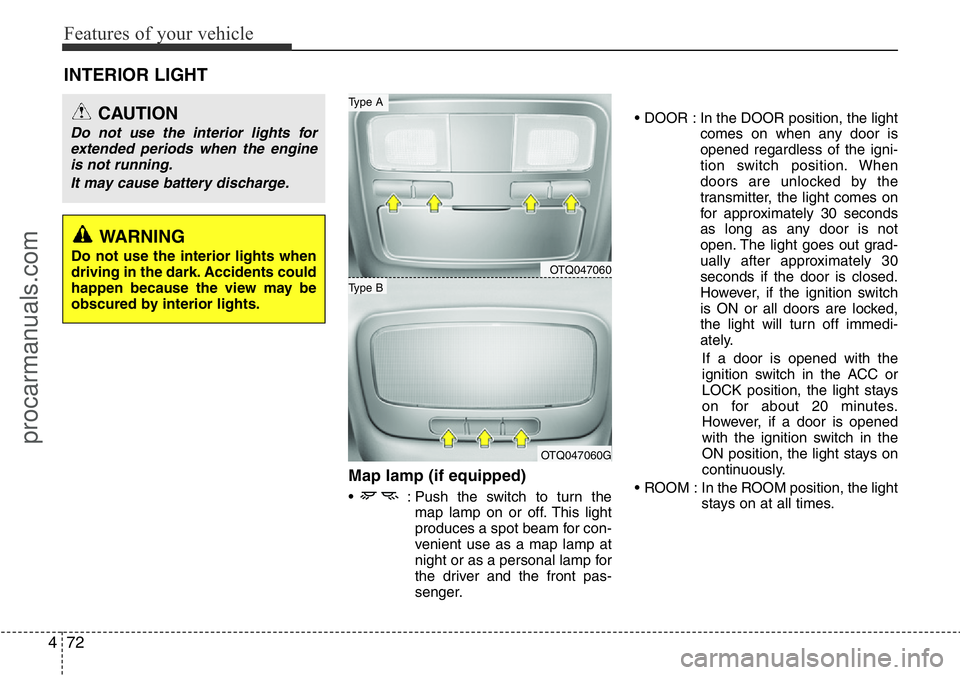
Map lamp (if equipped)
• : Push the switch to turn the
map lamp on or off. This light
produces a spot beam for con-
venient use as a map lamp at
night or as a personal lamp for
the driver and the front pas-
senger.• DOOR : In the DOOR position, the light
comes on when any door is
opened regardless of the igni-
tion switch position. When
doors are unlocked by the
transmitter, the light comes on
for approximately 30 seconds
as long as any door is not
open. The light goes out grad-
ually after approximately 30
seconds if the door is closed.
However, if the ignition switch
is ON or all doors are locked,
the light will turn off immedi-
ately.
If a door is opened with the
ignition switch in the ACC or
LOCK position, the light stays
on for about 20 minutes.
However, if a door is opened
with the ignition switch in the
ON position, the light stays on
continuously.
• ROOM : In the ROOM position, the light
stays on at all times.
INTERIOR LIGHT
CAUTION
Do not use the interior lights for
extended periods when the engine
is not running.
It may cause battery discharge.
OTQ047060
OTQ047060G
Type B
Type A
WARNING
Do not use the interior lights when
driving in the dark. Accidents could
happen because the view may be
obscured by interior lights.
procarmanuals.com
Page 149 of 419
475
Features of your vehicle
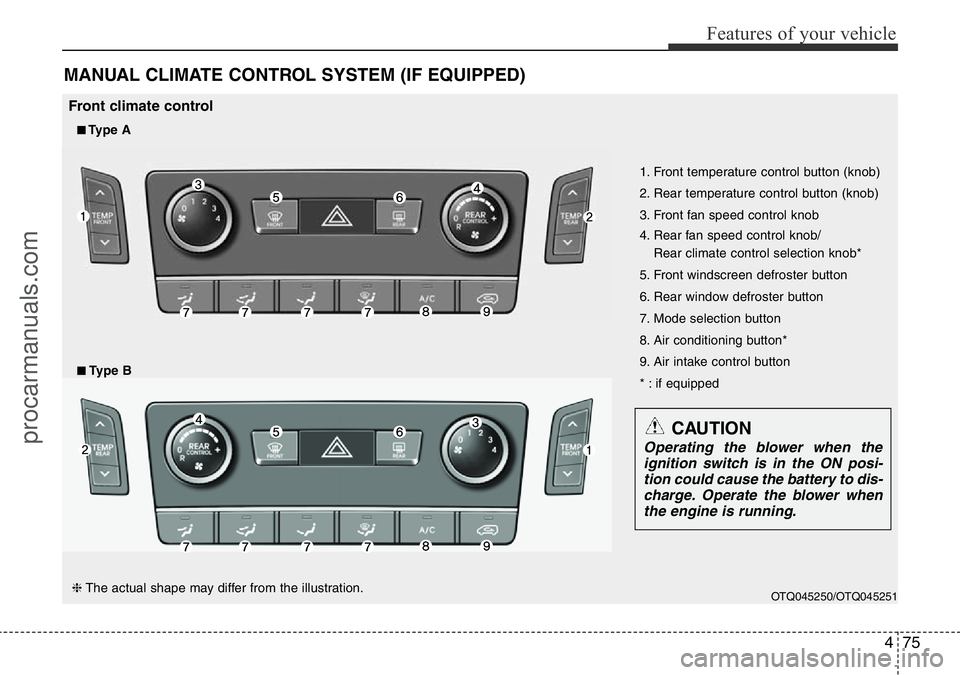
MANUAL CLIMATE CONTROL SYSTEM (IF EQUIPPED)
OTQ045250/OTQ045251
1. Front temperature control button (knob)
2. Rear temperature control button (knob)
3. Front fan speed control knob
4. Rear fan speed control knob/
Rear climate control selection knob*
5. Front windscreen defroster button
6. Rear window defroster button
7. Mode selection button
8. Air conditioning button*
9. Air intake control button
* : if equipped
■Type A
Front climate control
■Type B
CAUTION
Operating the blower when the
ignition switch is in the ON posi-
tion could cause the battery to dis-
charge. Operate the blower when
the engine is running.
❈The actual shape may differ from the illustration.
procarmanuals.com
Page 150 of 419
Features of your vehicle
76 4
OTQ045252/OTQ045253/OTQ047067
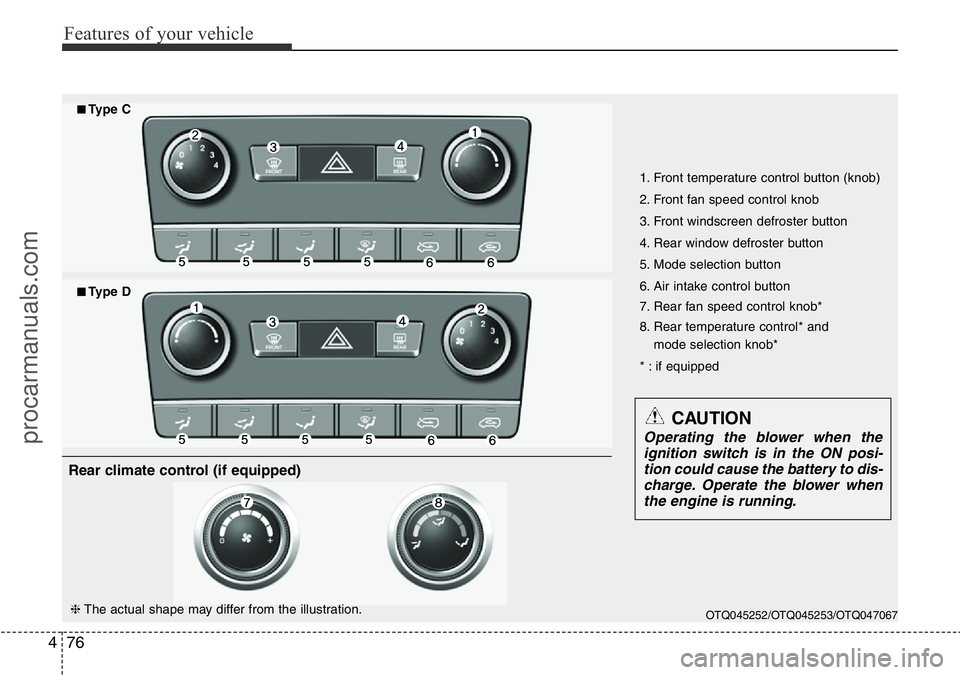
1. Front temperature control button (knob)
2. Front fan speed control knob
3. Front windscreen defroster button
4. Rear window defroster button
5. Mode selection button
6. Air intake control button
7. Rear fan speed control knob*
8. Rear temperature control* and
mode selection knob*
* : if equipped
■Type C
■Type D
CAUTION
Operating the blower when the
ignition switch is in the ON posi-
tion could cause the battery to dis-
charge. Operate the blower when
the engine is running.
❈The actual shape may differ from the illustration.
Rear climate control (if equipped)
procarmanuals.com
Page 162 of 419
Features of your vehicle
88 4
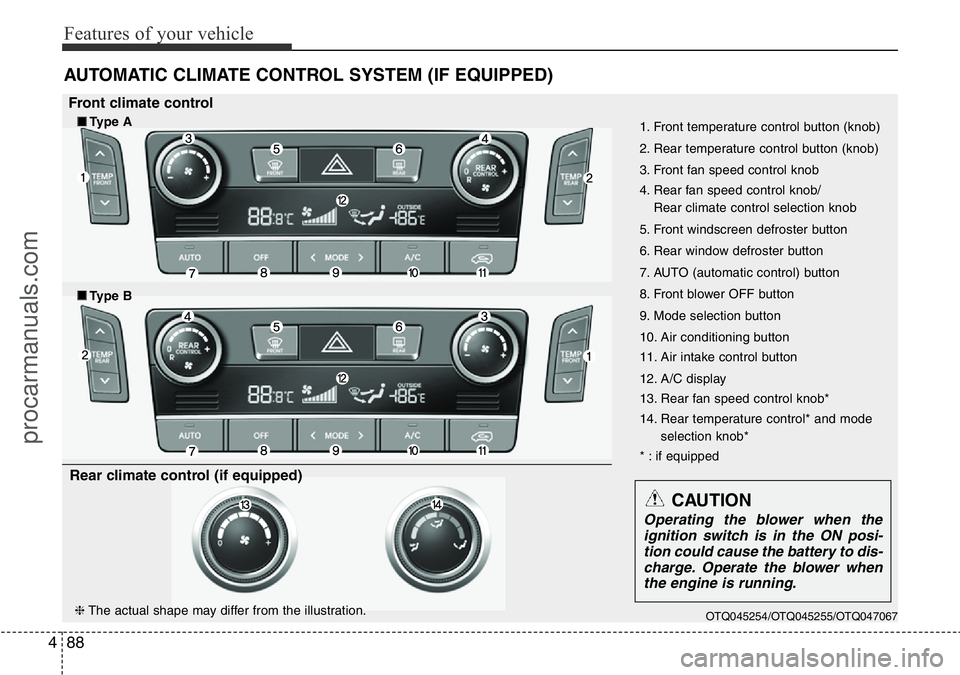
AUTOMATIC CLIMATE CONTROL SYSTEM (IF EQUIPPED)
OTQ045254/OTQ045255/OTQ047067
1. Front temperature control button (knob)
2. Rear temperature control button (knob)
3. Front fan speed control knob
4. Rear fan speed control knob/
Rear climate control selection knob
5. Front windscreen defroster button
6. Rear window defroster button
7. AUTO (automatic control) button
8. Front blower OFF button
9. Mode selection button
10. Air conditioning button
11. Air intake control button
12. A/C display
13. Rear fan speed control knob*
14. Rear temperature control* and mode
selection knob*
* : if equipped
■Type B
CAUTION
Operating the blower when the
ignition switch is in the ON posi-
tion could cause the battery to dis-
charge. Operate the blower when
the engine is running.
Front climate control
■Type A
❈The actual shape may differ from the illustration.
Rear climate control (if equipped)
procarmanuals.com
Page 176 of 419
Features of your vehicle
102 4
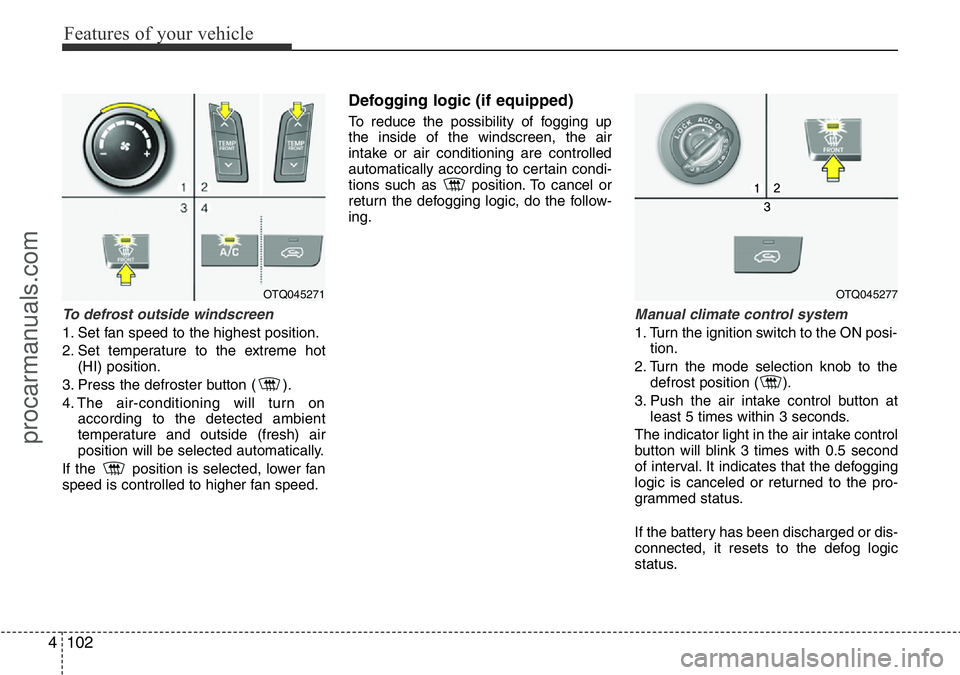
To defrost outside windscreen
1. Set fan speed to the highest position.
2. Set temperature to the extreme hot
(HI) position.
3. Press the defroster button ( ).
4. The air-conditioning will turn on
according to the detected ambient
temperature and outside (fresh) air
position will be selected automatically.
If the position is selected, lower fan
speed is controlled to higher fan speed.
Defogging logic (if equipped)
To reduce the possibility of fogging up
the inside of the windscreen, the air
intake or air conditioning are controlled
automatically according to certain condi-
tions such as position. To cancel or
return the defogging logic, do the follow-
ing.
Manual climate control system
1. Turn the ignition switch to the ON posi-
tion.
2. Turn the mode selection knob to the
defrost position ( ).
3. Push the air intake control button at
least 5 times within 3 seconds.
The indicator light in the air intake control
button will blink 3 times with 0.5 second
of interval. It indicates that the defogging
logic is canceled or returned to the pro-
grammed status.
If the battery has been discharged or dis-
connected, it resets to the defog logic
status.
OTQ045271OTQ045277
procarmanuals.com
Page 183 of 419
4109
Features of your vehicle
Front
To open the cover, press the knob on the
cover and it will slowly open.
Place a cup or small beverage can after
pulling out the blade (1).
Centre seat/Rear (if equipped)
Cups or small beverage cans may be
placed in the cup holders.
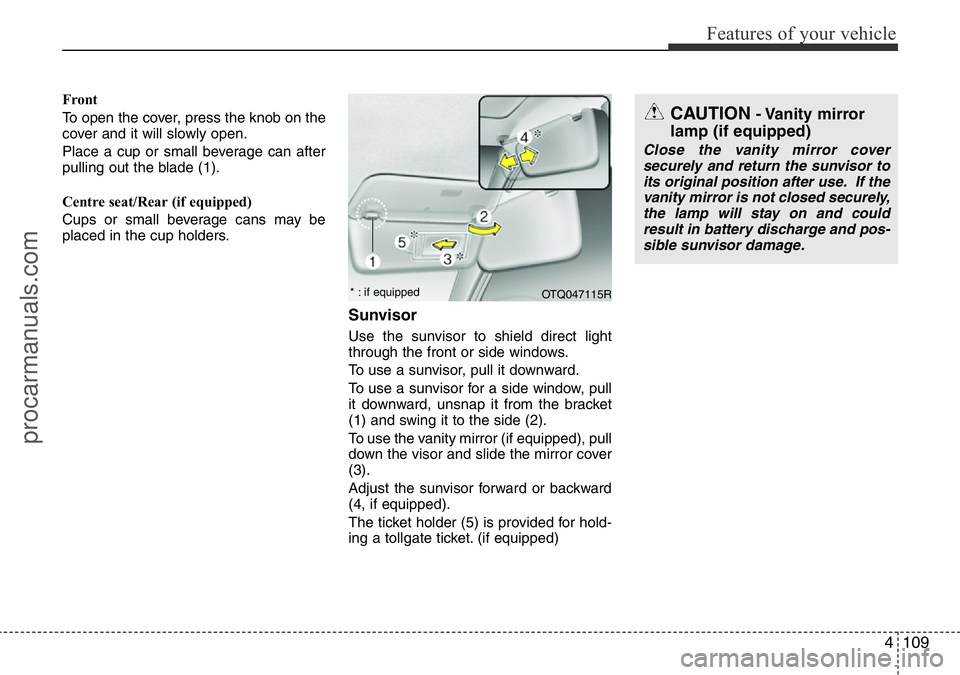
Sunvisor
Use the sunvisor to shield direct light
through the front or side windows.
To use a sunvisor, pull it downward.
To use a sunvisor for a side window, pull
it downward, unsnap it from the bracket
(1) and swing it to the side (2).
To use the vanity mirror (if equipped), pull
down the visor and slide the mirror cover
(3).
Adjust the sunvisor forward or backward
(4, if equipped).
The ticket holder (5) is provided for hold-
ing a tollgate ticket. (if equipped)
CAUTION- Vanity mirror
lamp (if equipped)
Close the vanity mirror cover
securely and return the sunvisor to
its original position after use. If the
vanity mirror is not closed securely,
the lamp will stay on and could
result in battery discharge and pos-
sible sunvisor damage.
OTQ047115R * : if equipped
procarmanuals.com