reset HYUNDAI I800 2016 User Guide
[x] Cancel search | Manufacturer: HYUNDAI, Model Year: 2016, Model line: I800, Model: HYUNDAI I800 2016Pages: 419, PDF Size: 9.23 MB
Page 188 of 419
Features of your vehicle
114 4
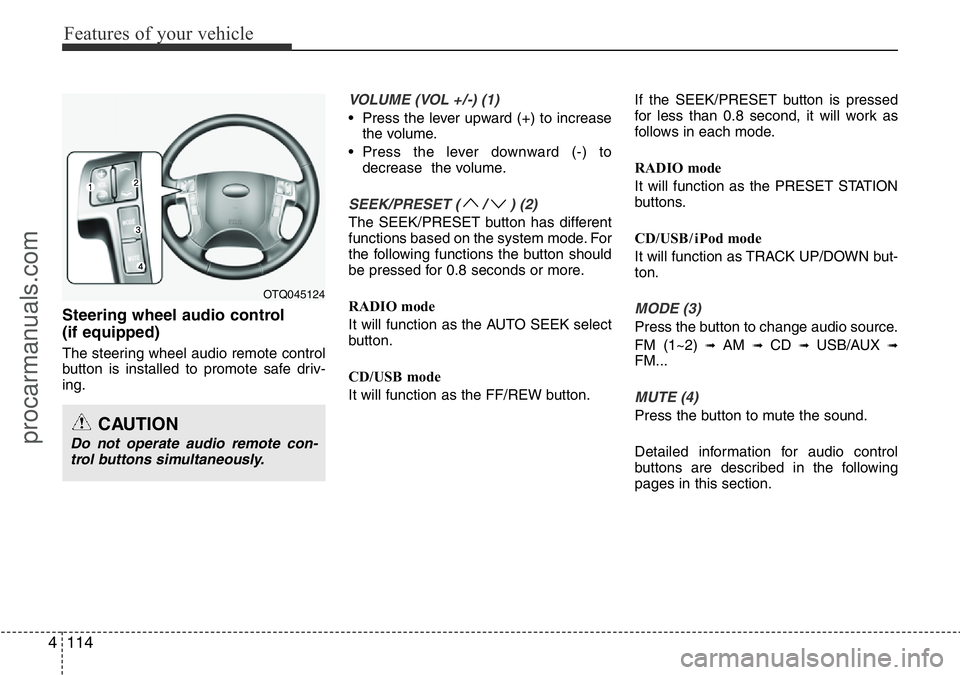
Steering wheel audio control
(if equipped)
The steering wheel audio remote control
button is installed to promote safe driv-
ing.
VOLUME (VOL +/-) (1)
• Press the lever upward (+) to increase
the volume.
• Press the lever downward (-) to
decrease the volume.
SEEK/PRESET ( / ) (2)
The SEEK/PRESET button has different
functions based on the system mode. For
the following functions the button should
be pressed for 0.8 seconds or more.
RADIO mode
It will function as the AUTO SEEK select
button.
CD/USB mode
It will function as the FF/REW button.If the SEEK/PRESET button is pressed
for less than 0.8 second, it will work as
follows in each mode.
RADIO mode
It will function as the PRESET STATION
buttons.
CD/USB / i Pod mode
It will function as TRACK UP/DOWN but-
ton.
MODE (3)
Press the button to change audio source.
FM (1~2)
➟ AM ➟ CD ➟ USB/AUX ➟FM...
MUTE (4)
Press the button to mute the sound.
Detailed information for audio control
buttons are described in the following
pages in this section.
OTQ045124
CAUTION
Do not operate audio remote con-
trol buttons simultaneously.
procarmanuals.com
Page 197 of 419
4123
Features of your vehicle
✽NOTICE - USING THE iPod®
DEVICE
• Some iPod®models may not support
communication protocol and files may
not properly play.
Supported iPod
®models:
- iPod®Mini
- iPod®4th (Photo) ~ 6th (Classic)
generation
- iPod
®Nano 1st~4th generation
- iPod®Touch 1st~2nd generation
• The order of search or playback of
songs in the iPod
®can be different
from the order searched in the audio
system.
• If the iPod
®disabled due to its own
malfunction, reset the iPod®. (Reset:
Refer to iPod®manual)
• An iPod®may not operate normally
on low battery.
(Continued)(Continued)
• Some iPod
®devices, such as the
iPhone®, can be connected through
the Bluetooth®Wireless Technology
interface. The device must have audio
Bluetooth
®Wireless Technology capa-
bility (such as for stereo headphone
Bluetooth
®Wireless Technology ). The
device can play, but it will not be con-
trolled by the audio system.
• To use iPod
®features within the
audio, use the cable provided upon
purchasing an iPod
®d device.
• Skipping or improper operation may
occur depending on the characteris-
tics of your iPod
®/iPhone®device.
• If your iPhone®is connected to both
the Bluetooth®Wireless Technology
and USB, the sound may not be prop-
erly played. In your iPhone
®, select
the Dock connector orBluetooth®
Wireless Technology to change the
sound output (source).
(Continued)(Continued)
• When connecting
iPod®with theiPod®Power Cable, insert the connec-
tor to the multimedia socket complete-
ly. If not inserted completely, communi-
cations between
iPod®and audio may
be interrupted.
• When adjusting the sound effects of
the
iPod®and the audio system, the
sound effects of both devices will over-
lap and might reduce or distort the
quality of the sound.
• Deactivate (turn off) the equalizer
function of an
iPod®when adjusting
the audio system’s volume, and turn
off the equalizer of the audio system
when using the equalizer of an
iPod®.
• When not using iPod®with car audio,
detach the iPod®cable from iPod®.
Otherwise, iPod®may remain in
accessory mode, and may not work
properly.
procarmanuals.com
Page 201 of 419
4127
Features of your vehicle
SYSTEM CONTROLLERS AND
FUNCTIONS
❈Display and settings may differ
depending on the selected audio.
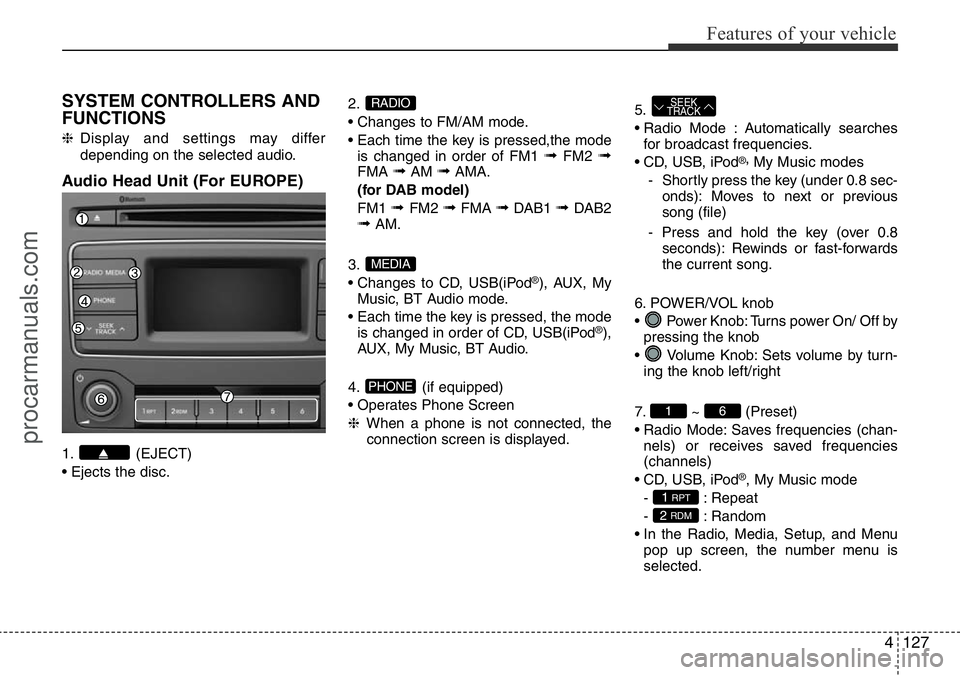
Audio Head Unit (For EUROPE)
1. (EJECT)
• Ejects the disc.2.
• Changes to FM/AM mode.
• Each time the key is pressed,the mode
is changed in order of FM1
➟FM2 ➟FMA ➟AM ➟AMA.
(for DAB model)
FM1
➟ FM2 ➟FMA ➟DAB1 ➟ DAB2➟AM.
3.
• Changes to CD, USB(iPod
®), AUX, My
Music, BT Audio mode.
• Each time the key is pressed, the mode
is changed in order of CD, USB(iPod
®),
AUX, My Music, BT Audio.
4. (if equipped)
• Operates Phone Screen
❈When a phone is not connected, the
connection screen is displayed.5.
• Radio Mode : Automatically searches
for broadcast frequencies.
• CD, USB, iPod
®,My Music modes
- Shortly press the key (under 0.8 sec-
onds): Moves to next or previous
song (file)
- Press and hold the key (over 0.8
seconds): Rewinds or fast-forwards
the current song.
6. POWER/VOL knob
• Power Knob: Turns power On/ Off by
pressing the knob
• Volume Knob: Sets volume by turn-
ing the knob left/right
7. ~ (Preset)
• Radio Mode: Saves frequencies (chan-
nels) or receives saved frequencies
(channels)
• CD, USB, iPod
®, My Music mode
- : Repeat
- : Random
• In the Radio, Media, Setup, and Menu
pop up screen, the number menu is
selected.
2 RDM
1 RPT
61
SEEK
TRACK
PHONE
MEDIA
RADIO
procarmanuals.com
Page 204 of 419
Features of your vehicle
130 4
SYSTEM CONTROLLERS AND
FUNCTIONS
❈Display and settings may differ
depending on the selected audio.
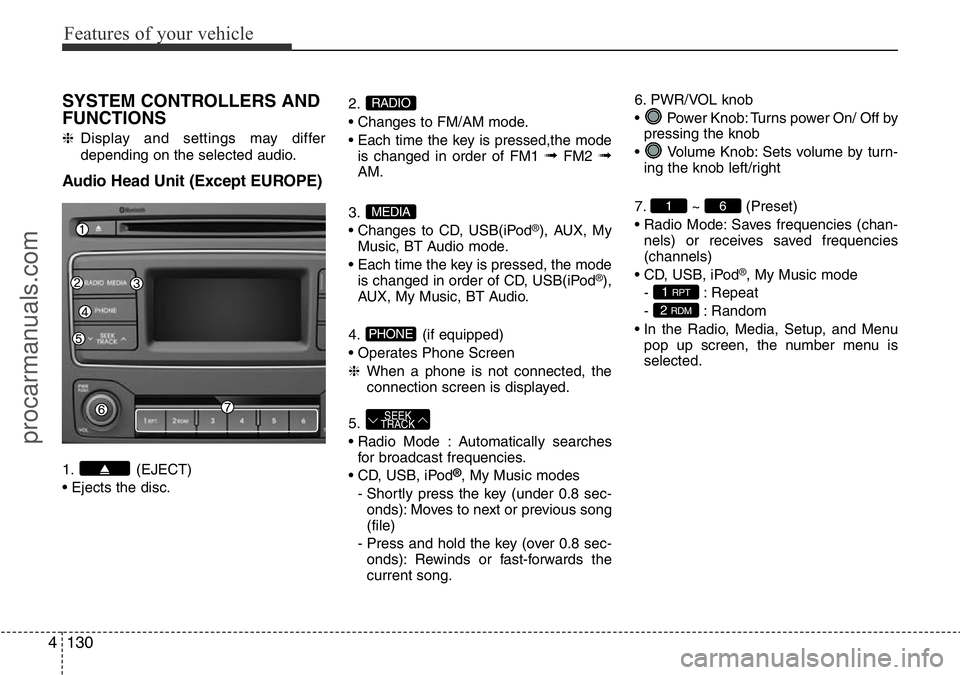
Audio Head Unit (Except EUROPE)
1. (EJECT)
• Ejects the disc.2.
• Changes to FM/AM mode.
• Each time the key is pressed,the mode
is changed in order of FM1
➟FM2 ➟AM.
3.
• Changes to CD, USB(iPod
®), AUX, My
Music, BT Audio mode.
• Each time the key is pressed, the mode
is changed in order of CD, USB(iPod
®),
AUX, My Music, BT Audio.
4. (if equipped)
• Operates Phone Screen
❈When a phone is not connected, the
connection screen is displayed.
5.
• Radio Mode : Automatically searches
for broadcast frequencies.
• CD, USB, iPod
®, My Music modes
- Shortly press the key (under 0.8 sec-
onds): Moves to next or previous song
(file)
- Press and hold the key (over 0.8 sec-
onds): Rewinds or fast-forwards the
current song.6. PWR/VOL knob
• Power Knob: Turns power On/ Off by
pressing the knob
• Volume Knob: Sets volume by turn-
ing the knob left/right
7. ~ (Preset)
• Radio Mode: Saves frequencies (chan-
nels) or receives saved frequencies
(channels)
• CD, USB, iPod
®, My Music mode
- : Repeat
- : Random
• In the Radio, Media, Setup, and Menu
pop up screen, the number menu is
selected.
2 RDM
1 RPT
61
SEEK
TRACK
PHONE
MEDIA
RADIO
procarmanuals.com
Page 219 of 419
4145
Features of your vehicle
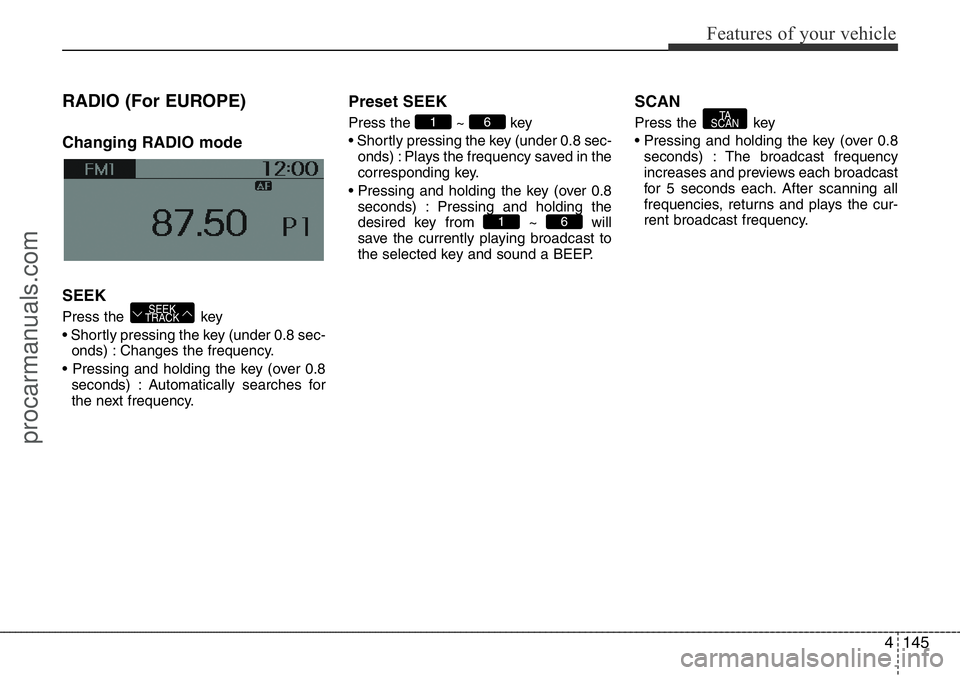
RADIO (For EUROPE)
Changing RADIO mode
SEEK
Press the key
• Shortly pressing the key (under 0.8 sec-
onds) : Changes the frequency.
• Pressing and holding the key (over 0.8
seconds) : Automatically searches for
the next frequency.
Preset SEEK
Press the ~ key
• Shortly pressing the key (under 0.8 sec-
onds) : Plays the frequency saved in the
corresponding key.
• Pressing and holding the key (over 0.8
seconds) : Pressing and holding the
desired key from ~ will
save the currently playing broadcast to
the selected key and sound a BEEP.
SCAN
Press the key
• Pressing and holding the key (over 0.8
seconds) : The broadcast frequency
increases and previews each broadcast
for 5 seconds each. After scanning all
frequencies, returns and plays the cur-
rent broadcast frequency.TA
SCAN
61
61
SEEK
TRACK
procarmanuals.com
Page 220 of 419
Features of your vehicle
146 4
Selecting through manual
search
Turn the TUNE knob left/right to adjust
the frequency.
Traffic Announcement (TA)
Shortly pressing the key (under
0.8 seconds) : Set / TA Traffic
Announcement) mode.
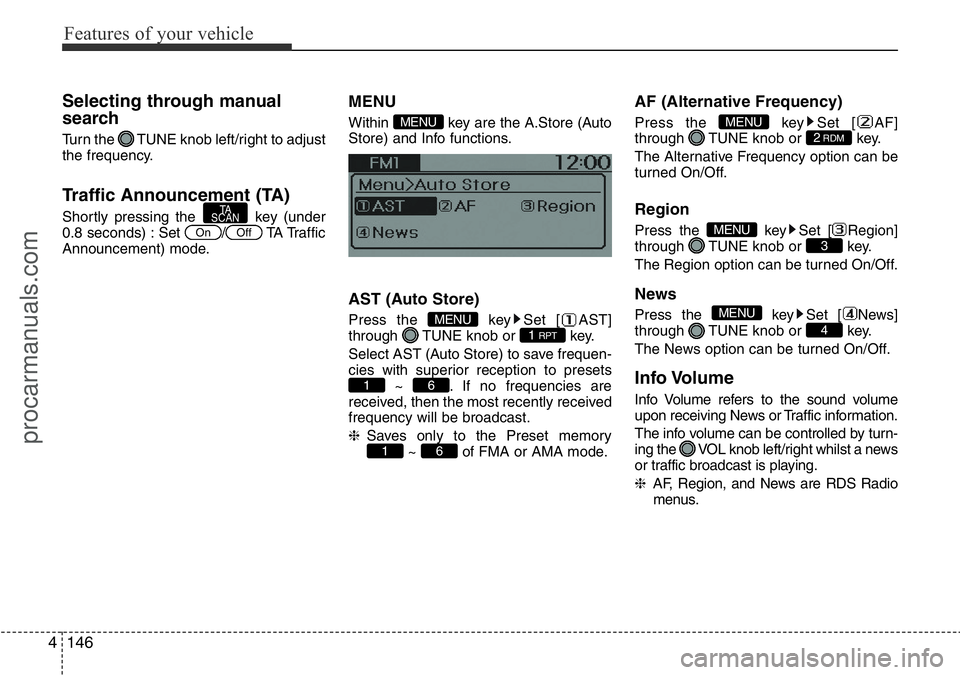
MENU
Within key are the A.Store (Auto
Store) and Info functions.
AST (Auto Store)
Press the key Set [ AST]
through TUNE knob or key.
Select AST (Auto Store) to save frequen-
cies with superior reception to presets
~ . If no frequencies are
received, then the most recently received
frequency will be broadcast.
❈Saves only to the Preset memory
~ of FMA or AMA mode.
AF (Alternative Frequency)
Press the key Set [ AF]
through TUNE knob or key.
The Alternative Frequency option can be
turned On/Off.
Region
Press the key Set [ Region]
through TUNE knob or key.
The Region option can be turned On/Off.
News
Press the key Set [ News]
through TUNE knob or key.
The News option can be turned On/Off.
Info Volume
Info Volume refers to the sound volume
upon receiving News or Traffic information.
The info volume can be controlled by turn-
ing the VOL knob left/right whilst a news
or traffic broadcast is playing.
❈AF, Region, and News are RDS Radio
menus.
4
MENU
3MENU
2RDMMENU
61
61
1 RPTMENU
MENU
OffOn
TA
SCAN
procarmanuals.com
Page 221 of 419
4147
Features of your vehicle
DAB RADIO (For DAB Model)
❈RADIO may differ depending on the
selected audio.
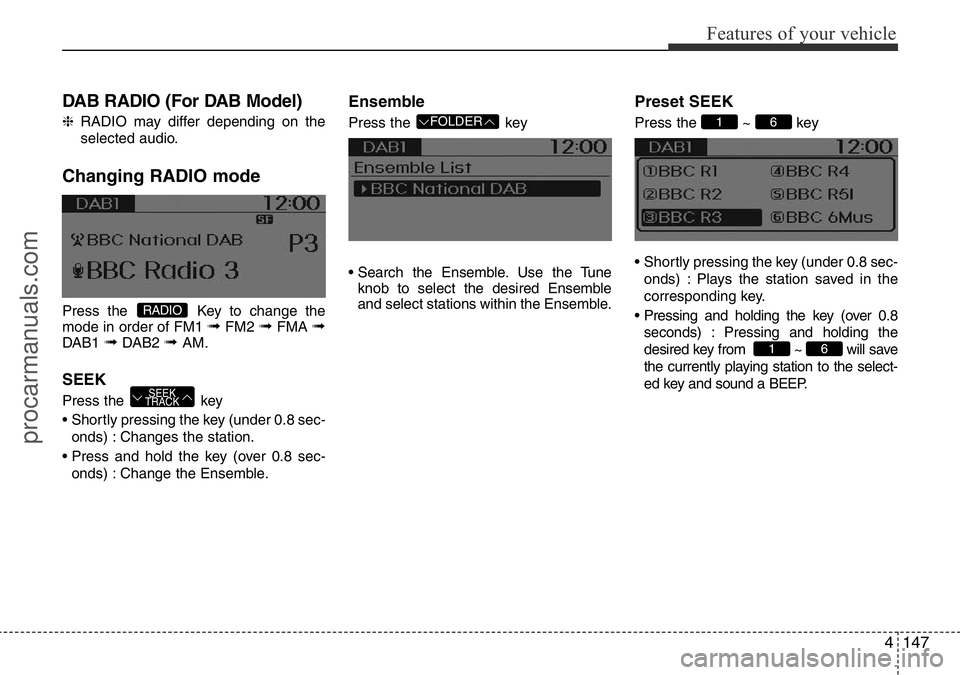
Changing RADIO mode
Press the Key to change the
mode in order of FM1 ➟FM2 ➟FMA ➟DAB1 ➟DAB2 ➟ AM.
SEEK
Press the key
• Shortly pressing the key (under 0.8 sec-
onds) : Changes the station.
• Press and hold the key (over 0.8 sec-
onds) : Change the Ensemble.
Ensemble
Press the key
• Search the Ensemble. Use the Tune
knob to select the desired Ensemble
and select stations within the Ensemble.
Preset SEEK
Press the ~ key
• Shortly pressing the key (under 0.8 sec-
onds) : Plays the station saved in the
corresponding key.
• Pressing and holding the key (over 0.8
seconds) : Pressing and holding the
desired key from ~ will save
the currently playing station to the select-
ed key and sound a BEEP.
61
61 FOLDER
SEEK
TRACK
RADIO
procarmanuals.com
Page 223 of 419
4149
Features of your vehicle
RADIO (Except EUROPE)
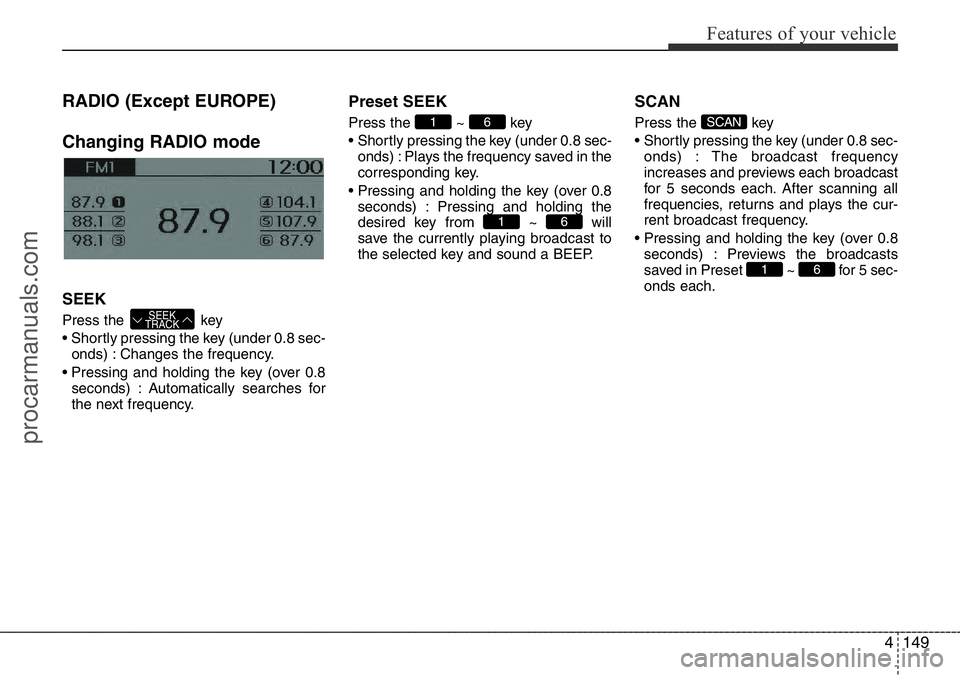
Changing RADIO mode
SEEK
Press the key
• Shortly pressing the key (under 0.8 sec-
onds) : Changes the frequency.
• Pressing and holding the key (over 0.8
seconds) : Automatically searches for
the next frequency.
Preset SEEK
Press the ~ key
• Shortly pressing the key (under 0.8 sec-
onds) : Plays the frequency saved in the
corresponding key.
• Pressing and holding the key (over 0.8
seconds) : Pressing and holding the
desired key from ~ will
save the currently playing broadcast to
the selected key and sound a BEEP.
SCAN
Press the key
• Shortly pressing the key (under 0.8 sec-
onds) : The broadcast frequency
increases and previews each broadcast
for 5 seconds each. After scanning all
frequencies, returns and plays the cur-
rent broadcast frequency.
• Pressing and holding the key (over 0.8
seconds) : Previews the broadcasts
saved in Preset ~ for 5 sec-
onds each.
61
SCAN
61
61
SEEK
TRACK
procarmanuals.com
Page 239 of 419
4165
Features of your vehicle
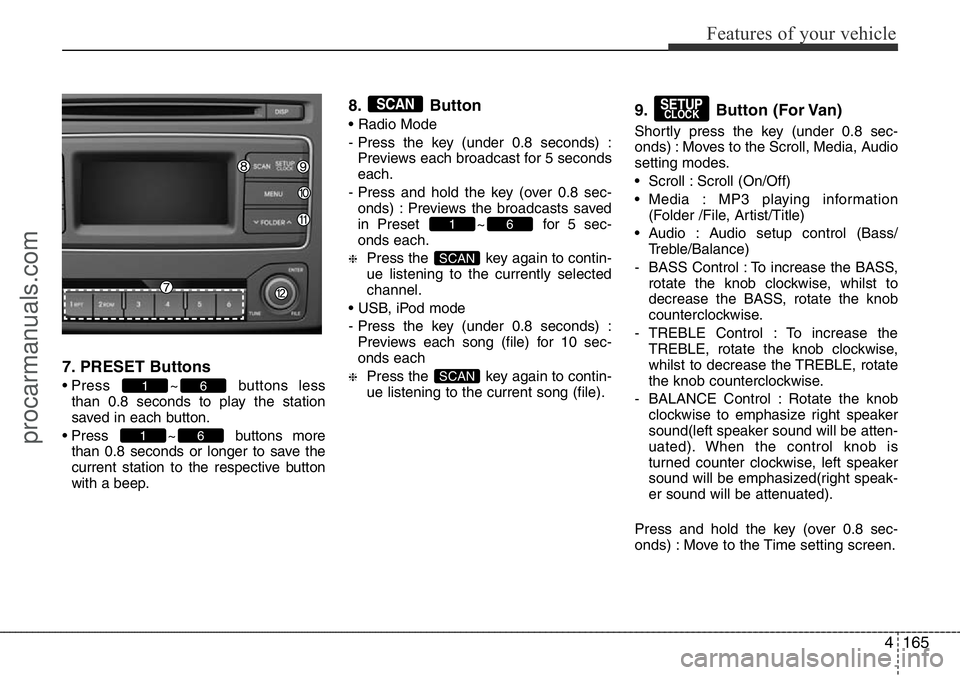
7. PRESET Buttons
• Press ~ buttons less
than 0.8 seconds to play the station
saved in each button.
• Press ~ buttons more
than 0.8 seconds or longer to save the
current station to the respective button
with a beep.
8. Button
• Radio Mode
- Press the key (under 0.8 seconds) :
Previews each broadcast for 5 seconds
each.
- Press and hold the key (over 0.8 sec-
onds) : Previews the broadcasts saved
in Preset ~ for 5 sec-
onds each.
❈Press the key again to contin-
ue listening to the currently selected
channel.
• USB, iPod mode
- Press the key (under 0.8 seconds) :
Previews each song (file) for 10 sec-
onds each
❈Press the key again to contin-
ue listening to the current song (file).
9. Button (For Van)
Shortly press the key (under 0.8 sec-
onds) : Moves to the Scroll, Media, Audio
setting modes.
• Scroll : Scroll (On/Off)
• Media : MP3 playing information
(Folder /File, Artist/Title)
• Audio : Audio setup control (Bass/
Treble/Balance)
- BASS Control : To increase the BASS,
rotate the knob clockwise, whilst to
decrease the BASS, rotate the knob
counterclockwise.
- TREBLE Control : To increase the
TREBLE, rotate the knob clockwise,
whilst to decrease the TREBLE, rotate
the knob counterclockwise.
- BALANCE Control : Rotate the knob
clockwise to emphasize right speaker
sound(left speaker sound will be atten-
uated). When the control knob is
turned counter clockwise, left speaker
sound will be emphasized(right speak-
er sound will be attenuated).
Press and hold the key (over 0.8 sec-
onds) : Move to the Time setting screen.
SETUPCLOCK
SCAN
SCAN
61
SCAN
61
61
procarmanuals.com
Page 281 of 419
535
Driving your vehicle
• Decrease the vehicle speed lower than
the memory speed by 20 km/h (12
mph).
• Decrease the vehicle speed to less
than approximately 30 km/h (19 mph).
Each of these actions will cancel cruise
control operation (the SET indicator light
in the instrument cluster will go off), but it
will not turn the system off. If you wish to
resume cruise control operation, press
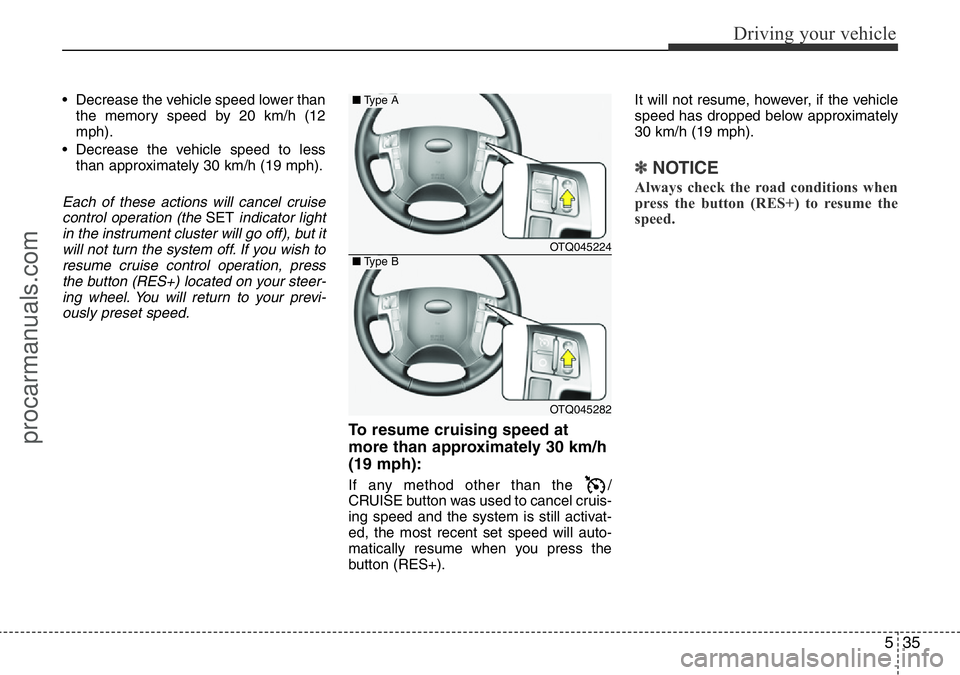
the button (RES+) located on your steer-
ing wheel. You will return to your previ-
ously preset speed.
To resume cruising speed at
more than approximately 30 km/h
(19 mph):
If any method other than the /
CRUISE button was used to cancel cruis-
ing speed and the system is still activat-
ed, the most recent set speed will auto-
matically resume when you press the
button (RES+).It will not resume, however, if the vehicle
speed has dropped below approximately
30 km/h (19 mph).
✽NOTICE
Always check the road conditions when
press the button (RES+) to resume the
speed.
OTQ045224
OTQ045282
■Type A
■Type B
procarmanuals.com