lock HYUNDAI IONIQ 2020 Owners Manual
[x] Cancel search | Manufacturer: HYUNDAI, Model Year: 2020, Model line: IONIQ, Model: HYUNDAI IONIQ 2020Pages: 561, PDF Size: 24.5 MB
Page 466 of 561
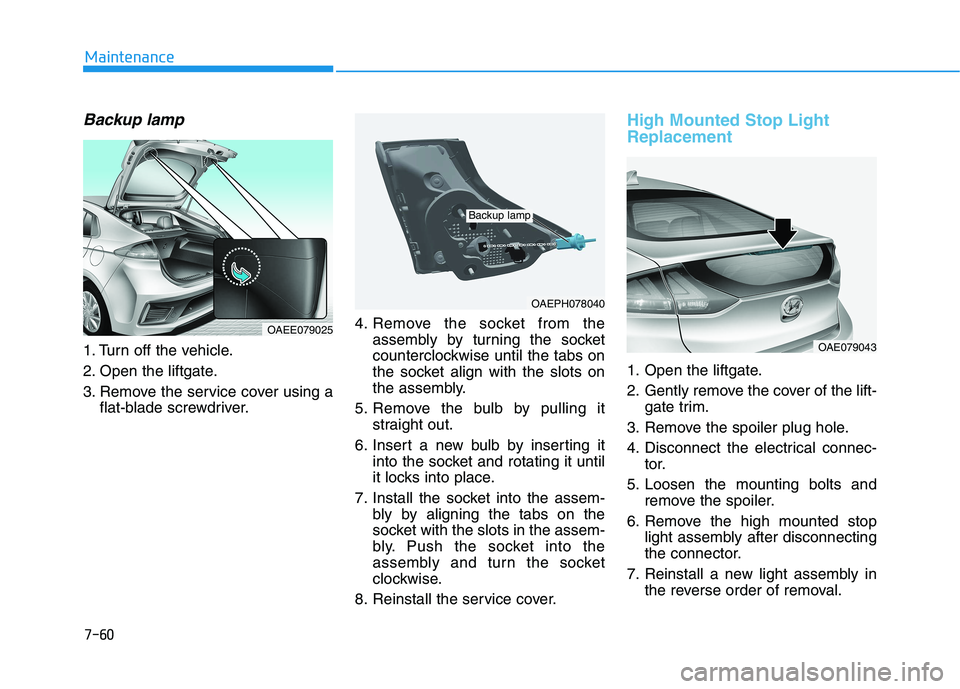
Backup lamp
1. Turn off the vehicle.
2. Open the liftgate.
3. Remove the service cover using a
flat-blade screwdriver.4. Remove the socket from the
assembly by turning the socket
counterclockwise until the tabs on
the socket align with the slots on
the assembly.
5. Remove the bulb by pulling it
straight out.
6. Insert a new bulb by inserting it
into the socket and rotating it until
it locks into place.
7. Install the socket into the assem-
bly by aligning the tabs on the
socket with the slots in the assem-
bly. Push the socket into the
assembly and turn the socket
clockwise.
8. Reinstall the service cover.
High Mounted Stop Light
Replacement
1. Open the liftgate.
2. Gently remove the cover of the lift-
gate trim.
3. Remove the spoiler plug hole.
4. Disconnect the electrical connec-
tor.
5. Loosen the mounting bolts and
remove the spoiler.
6. Remove the high mounted stop
light assembly after disconnecting
the connector.
7. Reinstall a new light assembly in
the reverse order of removal.
7-60
Maintenance
OAEPH078040
Backup lamp
OAE079043
OAEE079025
Page 470 of 561
7-64
Maintenance
Do not use strong soap, chemi-
cal detergents or hot water, and
do not wash the vehicle in direct
sunlight or when the body of the
vehicle is warm.
Be careful when washing the
side windows of your vehicle.
Especially, with high-pressure
water, water may leak through
the windows and wet the interi-
or.
To prevent damage to the plastic
parts, do not clean with chemi-
cal solvents or strong deter-
gents.
To prevent damage to the charg-
ing door, make sure to close and
lock the vehicle doors when
washing (high-pressure wash-
ing, automatic car washing, etc.)
the vehicle.
High-pressure washing
When using high-pressure wash-
ers, make sure to maintain suffi-
cient distance from the vehicle.
Insufficient clearance or excessive
pressure can lead to component
damage or water penetration.
Do not spray the camera, sensors
or its surrounding area directly with
a high pressure washer. Shock
applied from high pressure water
may cause the device to not oper-
ate normally.
Do not bring the nozzle tip close to
boots (rubber or plastic covers) or
connectors as they may be dam-
aged if they come into contact with
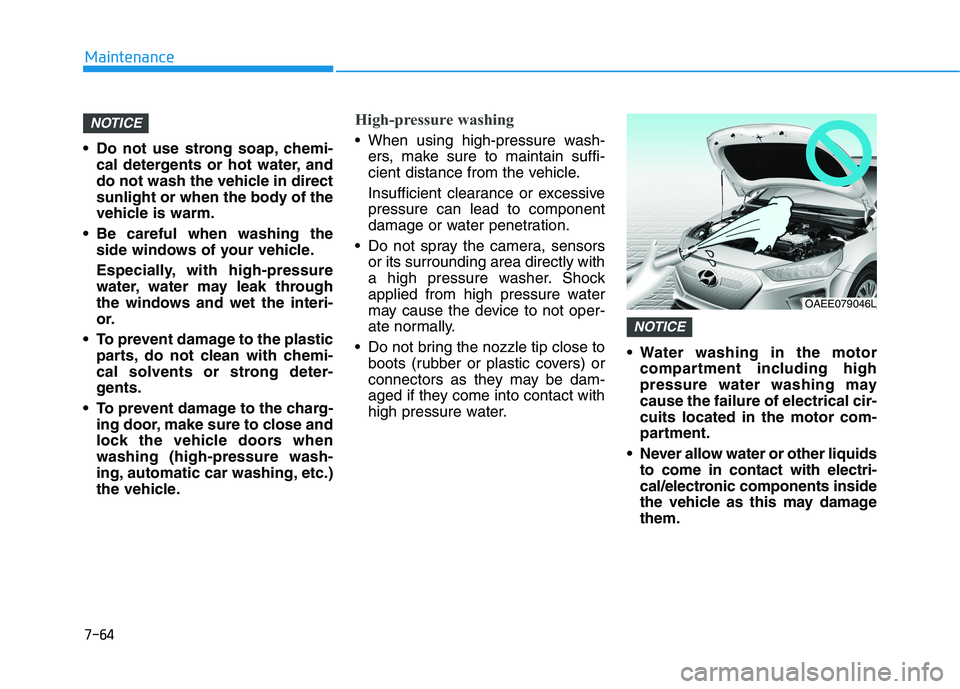
high pressure water. Water washing in the motor
compartment including high
pressure water washing may
cause the failure of electrical cir-
cuits located in the motor com-
partment.
Never allow water or other liquids
to come in contact with electri-
cal/electronic components inside
the vehicle as this may damage
them.
NOTICE
NOTICE
OAEE079046L
Page 486 of 561
8-8
Specifications, Consumer information and Reporting safety defects
The tires supplied on your new vehi-
cle are chosen to provide the best
performance for normal driving.
The tire label located on the driver’s
side center pillar gives the tire pres-
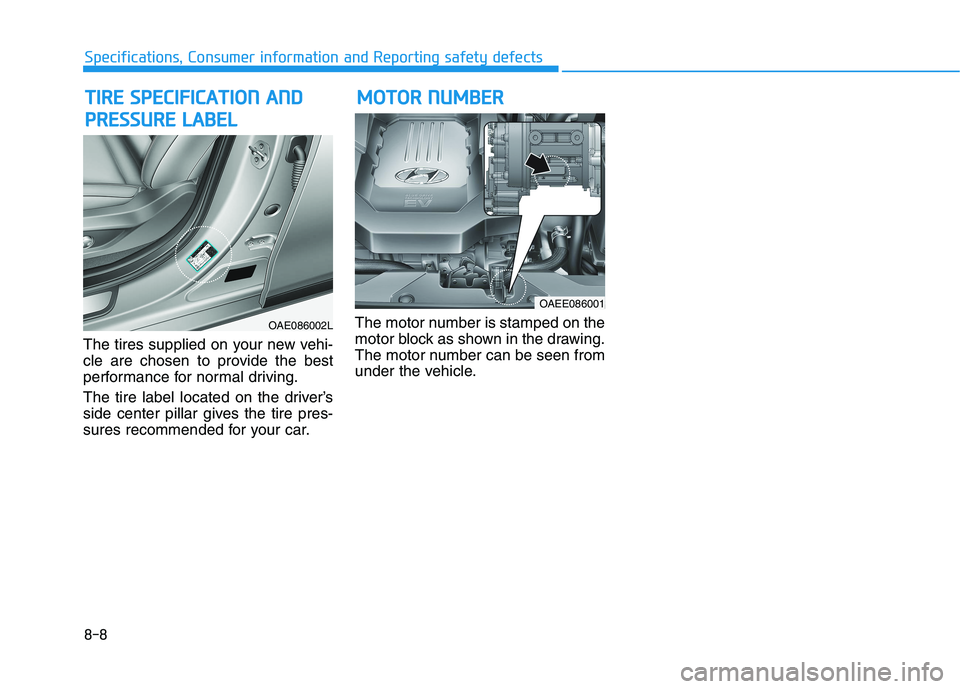
sures recommended for your car.The motor number is stamped on the
motor block as shown in the drawing.
The motor number can be seen from
under the vehicle.
M MO
OT
TO
OR
R
N
NU
UM
MB
BE
ER
R T
TI
IR
RE
E
S
SP
PE
EC
CI
IF
FI
IC
CA
AT
TI
IO
ON
N
A
AN
ND
D
P PR
RE
ES
SS
SU
UR
RE
E
L
LA
AB
BE
EL
L
OAE086002L
OAEE086001
Page 489 of 561
E El
le
ec
ct
tr
ri
ic
c
V
Ve
eh
hi
ic
cl
le
e
S
Sy
ys
st
te
em
m
O
Ov
ve
er
rv
vi
ie
ew
w
Electric Vehicle ........................................................H3
Characteristics of Electric Vehicles ......................H3
Battery Information ................................................H3
Main Components ....................................................H4
High Voltage Battery (lithium-ion polymer)........H5
High Voltage Battery Warmer System .................H6
Nearby Stations .......................................................H7
Energy Information .................................................H8
Battery information ............................................................H8
Energy consumption .........................................................H8
Charge Management ...............................................H9
Charging and climate..........................................................H9
Charging location ..............................................................H10
Charging limit .....................................................................H11
Charging current ...............................................................H11
ECO Driving ............................................................H11
CO2 reduction ....................................................................H12
Driving history ...................................................................H12
EV Settings .............................................................H12
Winter mode for the EV Battery ..................................H12
Warning ...............................................................................H13
EV route ..............................................................................H13
Charging Information ............................................H14
Charging Time Information ..................................H14
Charging Types ......................................................H15
Charging Status .....................................................H16
Locking Charging Cable ........................................H17
When the Charging Connector is Locked ...................H17
Scheduled Charging...............................................H18
Charging Precautions............................................H19
AC Charge ...............................................................H21
How to Connect AC Charger ..........................................H21
Unlock Charging Door in Emergency ..........................H24
Checking Charging Status ...............................................H25
How to Disconnect AC Charger.....................................H26
Unlock Charging Connector in Emergency ................H27
DC Charge ..............................................................H28
How to Connect DC Charger ..........................................H28
Unlock Charging Door in Emergency ..........................H30
Checking Charging Status ...............................................H31
How to Disconnect DC Charger.....................................H32
Trickle Charge ........................................................H33
How to set the charge level of the portable
charger ................................................................................H33
How to Connect Portable Charger
(ICCB: In-Cable Control Box) ..........................................H34
Page 490 of 561
Unlock Charging Door in Emergency ..........................H38
Checking Charging Status ...............................................H39
Charging Status Indicator Lamp for Portable
Charger ................................................................................H40
How to Disconnect Portable Charger
(ICCB: In-Cable Control Box) ..........................................H43
Unlock Charging Connector in Emergency ................H44
Precautions for Portable Charger
(ICCB: In-Cable Control Box) ..........................................H44
EV Charging Troubleshooting
- Steps to Consider ...............................................H45
How to Start the Vehicle ......................................H46
How to Stop the Vehicle.......................................H46
Virtual Engine Sound System ..............................H47
Distance to Empty .................................................H47
When destination is not set ...........................................H48
When destination is set...................................................H48
Tips for Improving Distance to Empty ...............H49
Power/Charge Gauge............................................H49
State of Charge (SOC) Gauge for High Voltage
Battery ...................................................................H49
Warning and Indicator Lights
(related to electric vehicle) .................................H50
Ready Indicator ................................................................H50
Service Warning Light .....................................................H51
This warning light illuminates : ......................................H51
Power Down Warning Light ...........................................H51
Charging Indicator Light..................................................H52
High Voltage Battery Level Warning Light .................H52
Regenerative Brake Warning Light ..............................H52
LCD Display Messages ..........................................H52
Shift to P to charge .........................................................H52
Remaining Time .................................................................H53
Charging Door Open ........................................................H53
Charging Stopped. Check the AC/DC charger ...........H53
Charging Stopped. Check the cable connection .......H54
Check regenerative brakes/
Stop vehicle and check regenerative brakes ............H55
Low Battery........................................................................H55
Charge immediately. Power limited ..............................H55
Low outside temperature may limit power output.
Charge EV battery/Low EV battery temperature.
Power limited .....................................................................H56
Battery Overheated! Stop safety .................................H56
Power limited .....................................................................H57
Stop vehicle and check power supply .........................H57
Check virtual engine sound System .............................H58
Check electric vehicle system .......................................H58
Energy Flow ..........................................................H58
Vehicle Stop........................................................................H59
EV Propulsion ....................................................................H59
Regeneration ......................................................................H59
Aux. Battery Saver+ .............................................H60
Mode ....................................................................................H60
System Setting...................................................................H61
Utility Mode ............................................................H61
System Setting and Activation ......................................H62
System Deactivation .........................................................H62
If an Accident Occurs ...........................................H63
Other Precautions for Electric Vehicle ..............H65
Service Plug ...........................................................H65
Page 505 of 561
H17
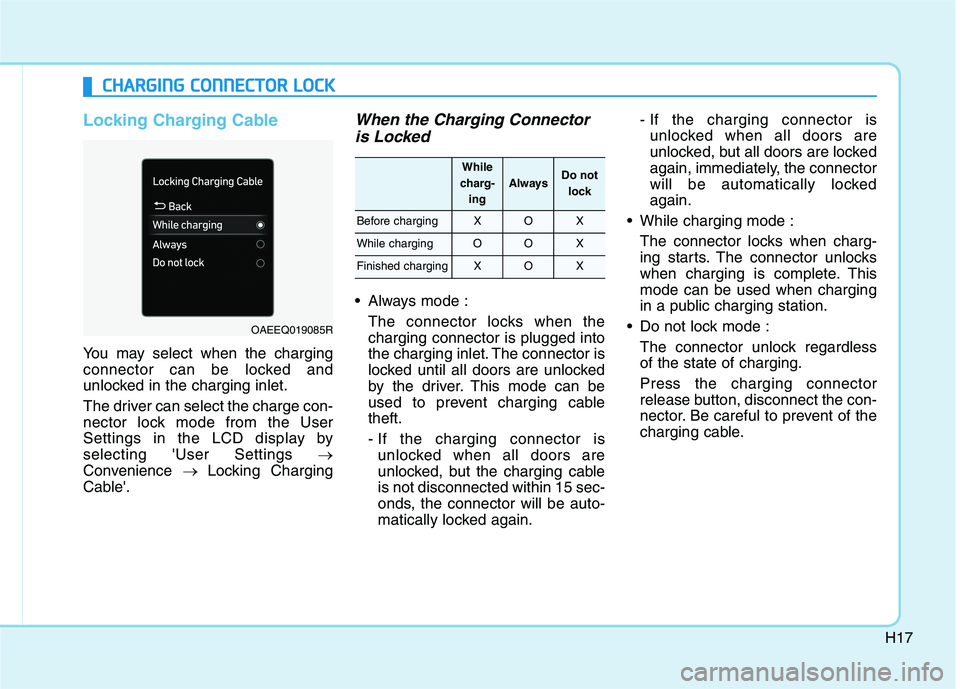
Locking Charging Cable
You may select when the charging
connector can be locked and
unlocked in the charging inlet.
The driver can select the charge con-
nector lock mode from the User
Settings in the LCD display by
selecting 'User Settings →
Convenience → Locking Charging
Cable'.
When the Charging Connector
is Locked
Always mode :
The connector locks when the
charging connector is plugged into
the charging inlet. The connector is
locked until all doors are unlocked
by the driver. This mode can be
used to prevent charging cable
theft.
- If the charging connector is
unlocked when all doors are
unlocked, but the charging cable
is not disconnected within 15 sec-
onds, the connector will be auto-
matically locked again.- If the charging connector is
unlocked when all doors are
unlocked, but all doors are locked
again, immediately, the connector
will be automatically locked
again.
While charging mode :
The connector locks when charg-
ing starts. The connector unlocks
when charging is complete. This
mode can be used when charging
in a public charging station.
Do not lock mode :
The connector unlock regardless
of the state of charging.
Press the charging connector
release button, disconnect the con-
nector. Be careful to prevent of the
charging cable.
C CH
HA
AR
RG
GI
IN
NG
G
C
CO
ON
NN
NE
EC
CT
TO
OR
R
L
LO
OC
CK
K
OAEEQ019085R
While
charg-
ing
AlwaysDo not
lock
Before chargingXOX
While chargingOOX
Finished chargingXOX
Page 510 of 561
H22
C CH
HA
AR
RG
GI
IN
NG
G
E
EL
LE
EC
CT
TR
RI
IC
C
V
VE
EH
HI
IC
CL
LE
E
(
(A
AC
C
C
CH
HA
AR
RG
GE
E)
)
(
(C
CO
ON
NT
T.
.)
)
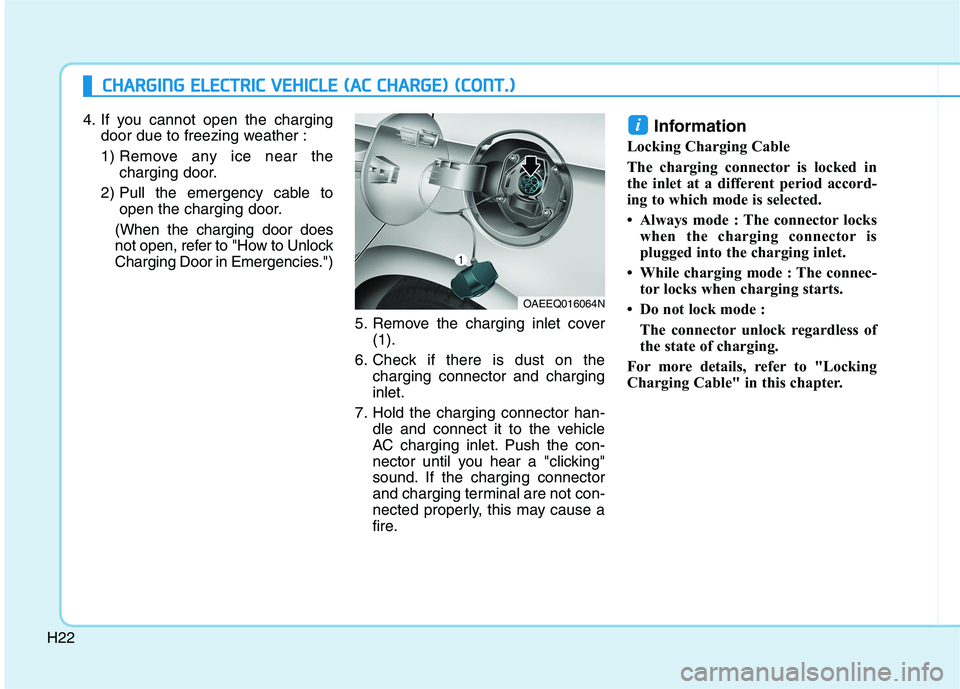
4. If you cannot open the charging
door due to freezing weather :
1) Remove any ice near the
charging door.
2) Pull the emergency cable to
open the charging door.
(When the charging door does
not open, refer to "How to Unlock
Charging Door in Emergencies.")
5. Remove the charging inlet cover
(1).
6. Check if there is dust on the
charging connector and charging
inlet.
7. Hold the charging connector han-
dle and connect it to the vehicle
AC charging inlet. Push the con-
nector until you hear a "clicking"
sound. If the charging connector
and charging terminal are not con-
nected properly, this may cause a
fire.Information
Locking Charging Cable
The charging connector is locked in
the inlet at a different period accord-
ing to which mode is selected.
• Always mode : The connector locks
when the charging connector is
plugged into the charging inlet.
• While charging mode : The connec-
tor locks when charging starts.
• Do not lock mode :
The connector unlock regardless of
the state of charging.
For more details, refer to "Locking
Charging Cable" in this chapter.
i
OAEEQ016064N
Page 512 of 561
H24
C CH
HA
AR
RG
GI
IN
NG
G
E
EL
LE
EC
CT
TR
RI
IC
C
V
VE
EH
HI
IC
CL
LE
E
(
(A
AC
C
C
CH
HA
AR
RG
GE
E)
)
(
(C
CO
ON
NT
T.
.)
)
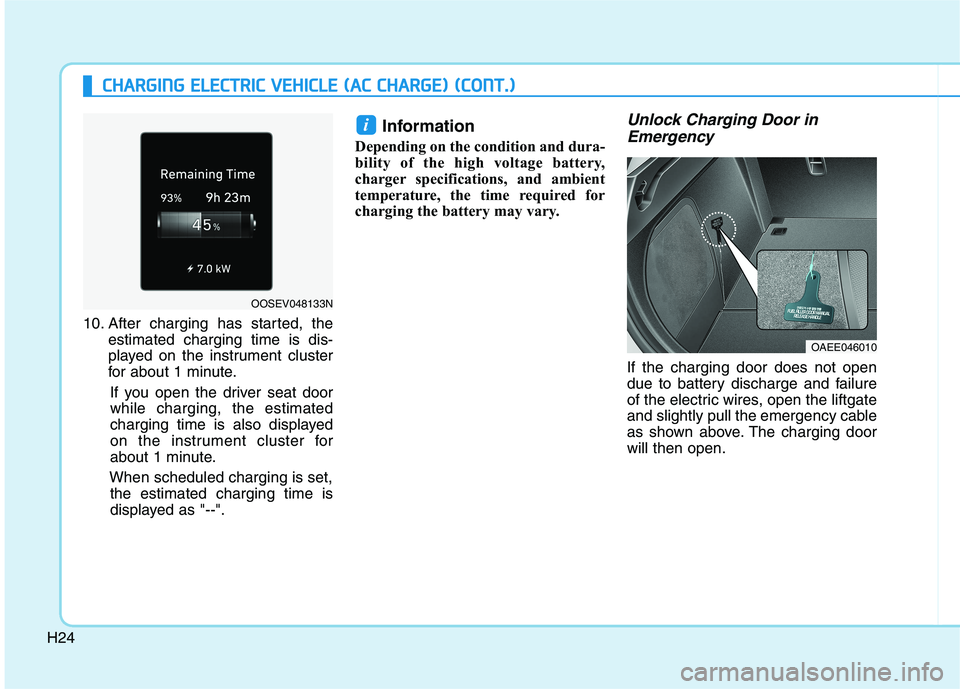
10. After charging has started, the
estimated charging time is dis-
played on the instrument cluster
for about 1 minute.
If you open the driver seat door
while charging, the estimated
charging time is also displayed
on the instrument cluster for
about 1 minute.
When scheduled charging is set,
the estimated charging time is
displayed as "--".
Information
Depending on the condition and dura-
bility of the high voltage battery,
charger specifications, and ambient
temperature, the time required for
charging the battery may vary.
Unlock Charging Door in
Emergency
If the charging door does not open
due to battery discharge and failure
of the electric wires, open the liftgate
and slightly pull the emergency cable
as shown above. The charging door
will then open.
i
OAEE046010
OOSEV048133N
Page 514 of 561
H26
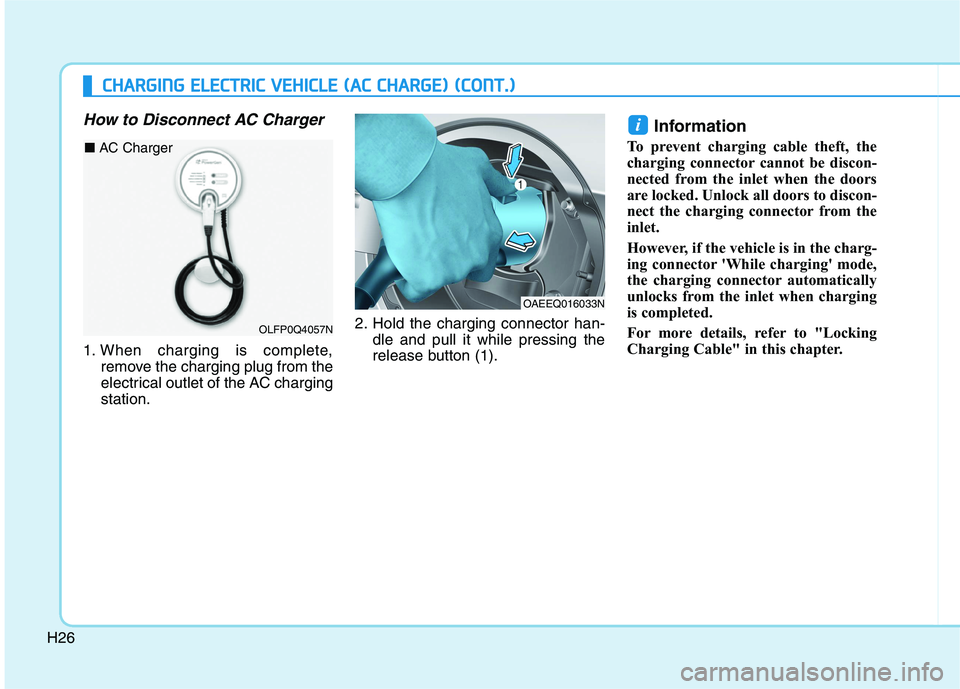
How to Disconnect AC Charger
1. When charging is complete,
remove the charging plug from the
electrical outlet of the AC charging
station.2. Hold the charging connector han-
dle and pull it while pressing the
release button (1).
Information
To prevent charging cable theft, the
charging connector cannot be discon-
nected from the inlet when the doors
are locked. Unlock all doors to discon-
nect the charging connector from the
inlet.
However, if the vehicle is in the charg-
ing connector 'While charging' mode,
the charging connector automatically
unlocks from the inlet when charging
is completed.
For more details, refer to "Locking
Charging Cable" in this chapter.
i
OAEEQ016033N
C CH
HA
AR
RG
GI
IN
NG
G
E
EL
LE
EC
CT
TR
RI
IC
C
V
VE
EH
HI
IC
CL
LE
E
(
(A
AC
C
C
CH
HA
AR
RG
GE
E)
)
(
(C
CO
ON
NT
T.
.)
)
OLFP0Q4057N
■ AC Charger
Page 515 of 561
H27
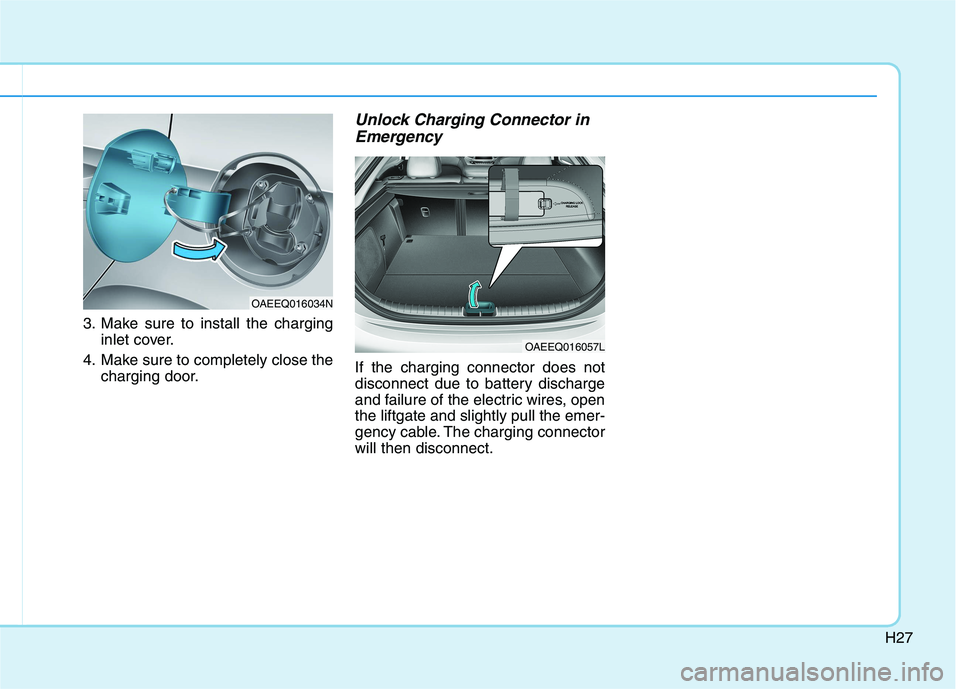
3. Make sure to install the charging
inlet cover.
4. Make sure to completely close the
charging door.
Unlock Charging Connector in
Emergency
If the charging connector does not
disconnect due to battery discharge
and failure of the electric wires, open
the liftgate and slightly pull the emer-
gency cable. The charging connector
will then disconnect.
OAEEQ016034N
OAEEQ016057L