lock HYUNDAI IONIQ 2020 Owners Manual
[x] Cancel search | Manufacturer: HYUNDAI, Model Year: 2020, Model line: IONIQ, Model: HYUNDAI IONIQ 2020Pages: 561, PDF Size: 24.5 MB
Page 517 of 561
H29
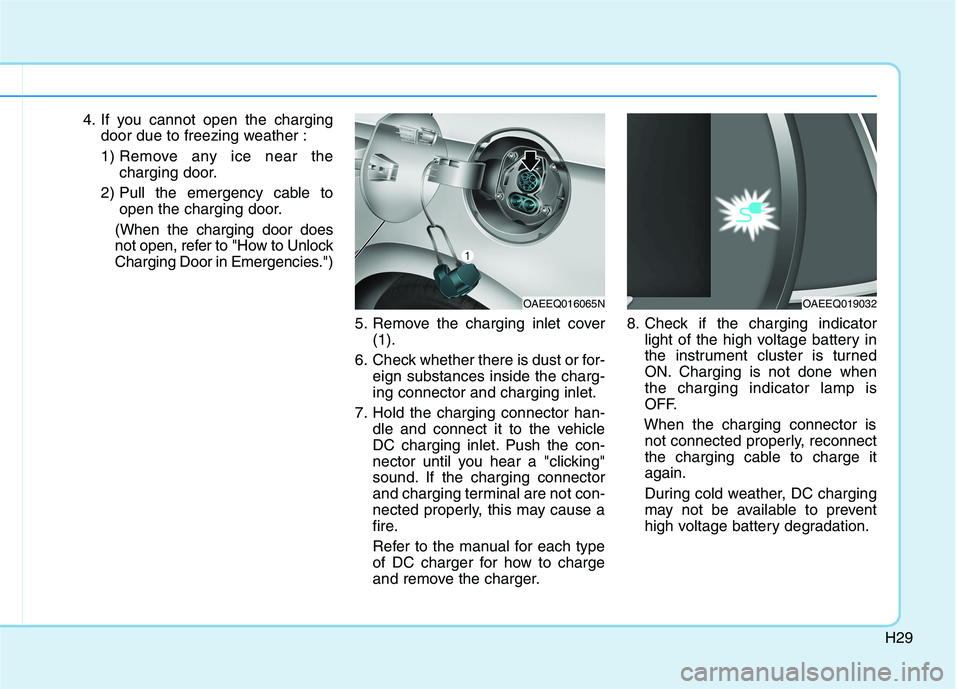
4. If you cannot open the charging
door due to freezing weather :
1) Remove any ice near the
charging door.
2) Pull the emergency cable to
open the charging door.
(When the charging door does
not open, refer to "How to Unlock
Charging Door in Emergencies.")
5. Remove the charging inlet cover
(1).
6. Check whether there is dust or for-
eign substances inside the charg-
ing connector and charging inlet.
7. Hold the charging connector han-
dle and connect it to the vehicle
DC charging inlet. Push the con-
nector until you hear a "clicking"
sound. If the charging connector
and charging terminal are not con-
nected properly, this may cause a
fire.
Refer to the manual for each type
of DC charger for how to charge
and remove the charger.8. Check if the charging indicator
light of the high voltage battery in
the instrument cluster is turned
ON. Charging is not done when
the charging indicator lamp is
OFF.
When the charging connector is
not connected properly, reconnect
the charging cable to charge it
again.
During cold weather, DC charging
may not be available to prevent
high voltage battery degradation.
OAEEQ016065NOAEEQ019032
Page 518 of 561
H30
C CH
HA
AR
RG
GI
IN
NG
G
E
EL
LE
EC
CT
TR
RI
IC
C
V
VE
EH
HI
IC
CL
LE
E
(
(D
DC
C
C
CH
HA
AR
RG
GE
E)
)
(
(C
CO
ON
NT
T.
.)
)
Information
• Even though charging is possible
with the POWER button in the
ON/START position, for your safe-
ty, start charging when the POWER
button is in the OFF position and
the vehicle shifted to P (Park).
After charging has started, you can
use electrical components such as
the radio by pressing the POWER
button to ACC or ON position.
• During charging, the gear cannot be
shifted from P (Park) to any other
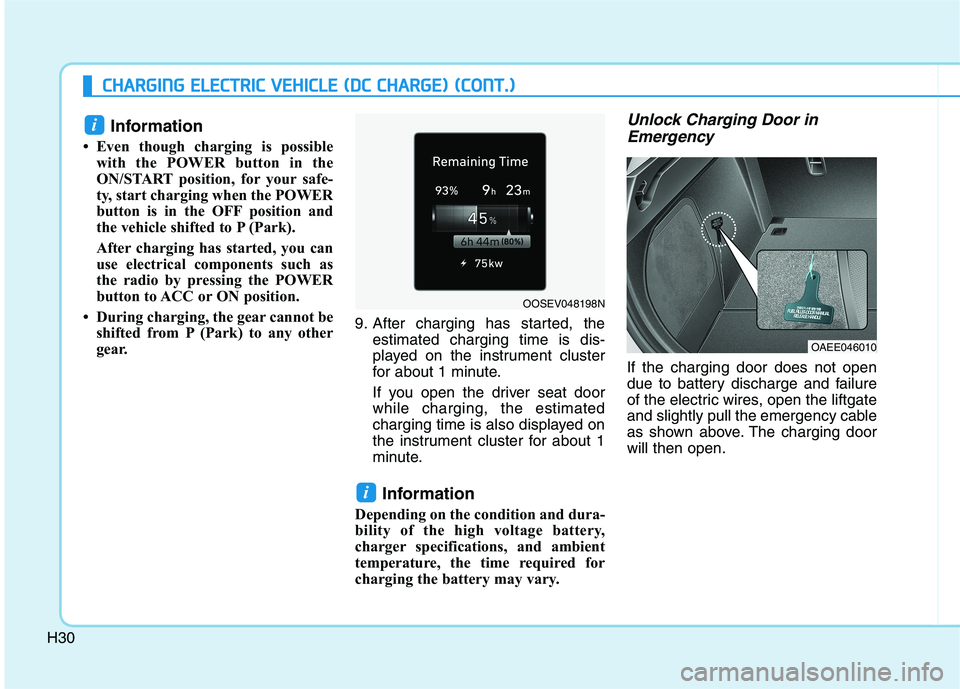
gear. 9. After charging has started, the
estimated charging time is dis-
played on the instrument cluster
for about 1 minute.
If you open the driver seat door
while charging, the estimated
charging time is also displayed on
the instrument cluster for about 1
minute.
Information
Depending on the condition and dura-
bility of the high voltage battery,
charger specifications, and ambient
temperature, the time required for
charging the battery may vary.
Unlock Charging Door in
Emergency
If the charging door does not open
due to battery discharge and failure
of the electric wires, open the liftgate
and slightly pull the emergency cable
as shown above. The charging door
will then open.
i
i
OAEE046010
OOSEV048198N
Page 524 of 561
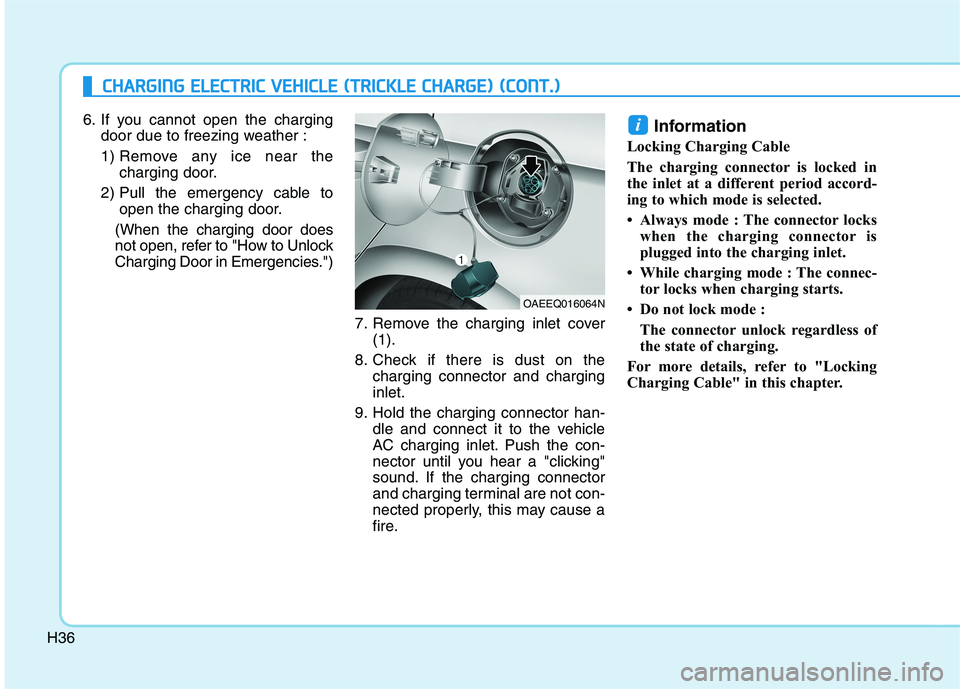
H366. If you cannot open the charging
door due to freezing weather :
1) Remove any ice near the
charging door.
2) Pull the emergency cable to
open the charging door.
(When the charging door does
not open, refer to "How to Unlock
Charging Door in Emergencies.")
7. Remove the charging inlet cover
(1).
8. Check if there is dust on the
charging connector and charging
inlet.
9. Hold the charging connector han-
dle and connect it to the vehicle
AC charging inlet. Push the con-
nector until you hear a "clicking"
sound. If the charging connector
and charging terminal are not con-
nected properly, this may cause a
fire.
Information
Locking Charging Cable
The charging connector is locked in
the inlet at a different period accord-
ing to which mode is selected.
• Always mode : The connector locks
when the charging connector is
plugged into the charging inlet.
• While charging mode : The connec-
tor locks when charging starts.
• Do not lock mode :
The connector unlock regardless of
the state of charging.
For more details, refer to "Locking
Charging Cable" in this chapter.
i
C CH
HA
AR
RG
GI
IN
NG
G
E
EL
LE
EC
CT
TR
RI
IC
C
V
VE
EH
HI
IC
CL
LE
E
(
(T
TR
RI
IC
CK
KL
LE
E
C
CH
HA
AR
RG
GE
E)
)
(
(C
CO
ON
NT
T.
.)
)
OAEEQ016064N
Page 526 of 561

H38
C CH
HA
AR
RG
GI
IN
NG
G
E
EL
LE
EC
CT
TR
RI
IC
C
V
VE
EH
HI
IC
CL
LE
E
(
(T
TR
RI
IC
CK
KL
LE
E
C
CH
HA
AR
RG
GE
E)
)
(
(C
CO
ON
NT
T.
.)
)
12. After charging has started, the
estimated charging time is dis-
played on the instrument cluster
for about 1 minute.
If you open the driver seat door
while charging, the estimated
charging time is also displayed
on the instrument cluster for
about 1 minute.
When scheduled charging is set,
the estimated charging time is
displayed as "--".
Information
Depending on the condition and dura-
bility of the high voltage battery,
charger specifications, and ambient
temperature, the time required for
charging the battery may vary.
Unlock Charging Door in
Emergency
If the charging door does not open
due to battery discharge and failure
of the electric wires, open the liftgate
and slightly pull the emergency cable
as shown above. The charging door
will then open.
i
OOSEV048133N
OAEE046010
Page 531 of 561
H43
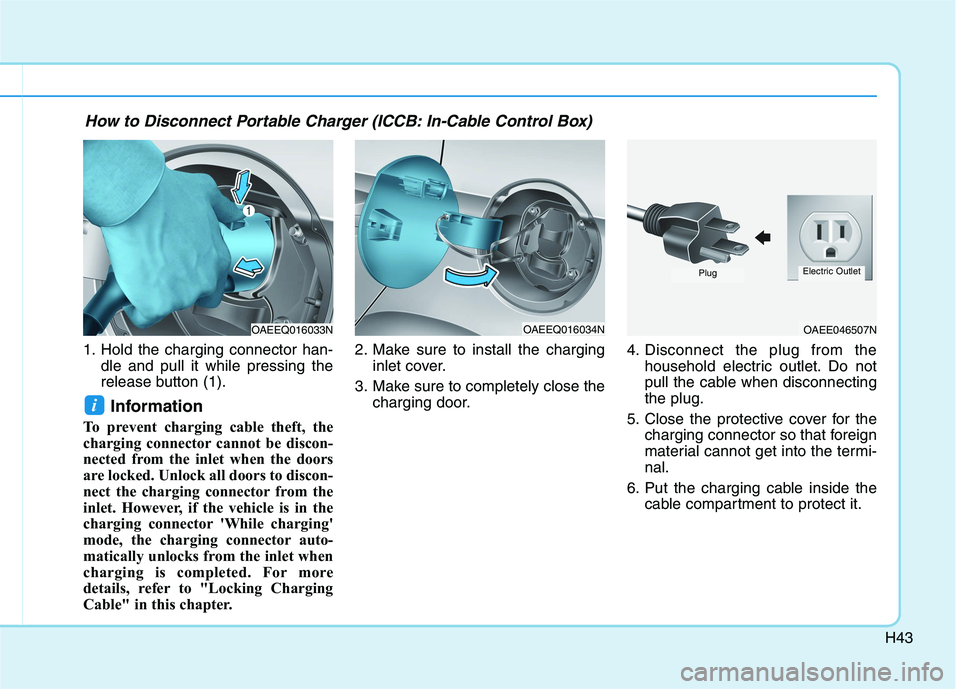
1. Hold the charging connector han-
dle and pull it while pressing the
release button (1).
Information
To prevent charging cable theft, the
charging connector cannot be discon-
nected from the inlet when the doors
are locked. Unlock all doors to discon-
nect the charging connector from the
inlet. However, if the vehicle is in the
charging connector 'While charging'
mode, the charging connector auto-
matically unlocks from the inlet when
charging is completed. For more
details, refer to "Locking Charging
Cable" in this chapter.2. Make sure to install the charging
inlet cover.
3. Make sure to completely close the
charging door.4. Disconnect the plug from the
household electric outlet. Do not
pull the cable when disconnecting
the plug.
5. Close the protective cover for the
charging connector so that foreign
material cannot get into the termi-
nal.
6. Put the charging cable inside the
cable compartment to protect it.
i
OAEEQ016033NOAEEQ016034NOAEE046507N
PlugElectric Outlet
How to Disconnect Portable Charger (ICCB: In-Cable Control Box)
Page 532 of 561
H44
C CH
HA
AR
RG
GI
IN
NG
G
E
EL
LE
EC
CT
TR
RI
IC
C
V
VE
EH
HI
IC
CL
LE
E
(
(T
TR
RI
IC
CK
KL
LE
E
C
CH
HA
AR
RG
GE
E)
)
(
(C
CO
ON
NT
T.
.)
)
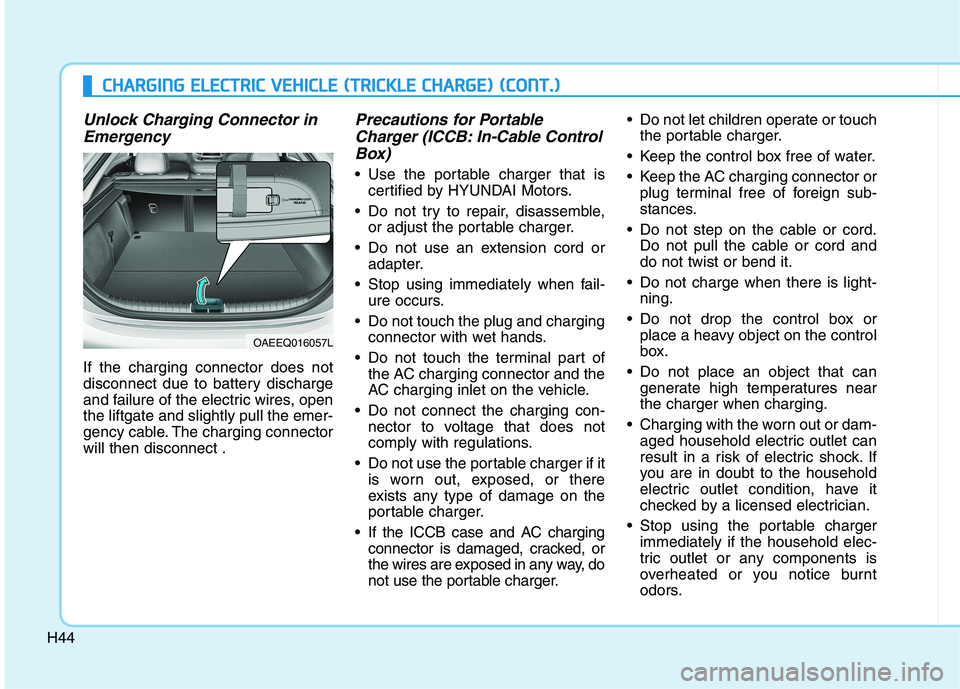
Unlock Charging Connector in
Emergency
If the charging connector does not
disconnect due to battery discharge
and failure of the electric wires, open
the liftgate and slightly pull the emer-
gency cable. The charging connector
will then disconnect .
Precautions for Portable
Charger (ICCB: In-Cable Control
Box)
Use the portable charger that is
certified by HYUNDAI Motors.
Do not try to repair, disassemble,
or adjust the portable charger.
Do not use an extension cord or
adapter.
Stop using immediately when fail-
ure occurs.
Do not touch the plug and charging
connector with wet hands.
Do not touch the terminal part of
the AC charging connector and the
AC charging inlet on the vehicle.
Do not connect the charging con-
nector to voltage that does not
comply with regulations.
Do not use the portable charger if it
is worn out, exposed, or there
exists any type of damage on the
portable charger.
If the ICCB case and AC charging
connector is damaged, cracked, or
the wires are exposed in any way, do
not use the portable charger. Do not let children operate or touch
the portable charger.
Keep the control box free of water.
Keep the AC charging connector or
plug terminal free of foreign sub-
stances.
Do not step on the cable or cord.
Do not pull the cable or cord and
do not twist or bend it.
Do not charge when there is light-
ning.
Do not drop the control box or
place a heavy object on the control
box.
Do not place an object that can
generate high temperatures near
the charger when charging.
Charging with the worn out or dam-
aged household electric outlet can
result in a risk of electric shock. If
you are in doubt to the household
electric outlet condition, have it
checked by a licensed electrician.
Stop using the portable charger
immediately if the household elec-
tric outlet or any components is
overheated or you notice burnt
odors.
OAEEQ016057L
Page 552 of 561
H64
S SA
AF
FE
ET
TY
Y
P
PR
RE
EC
CA
AU
UT
TI
IO
ON
NS
S
F
FO
OR
R
E
EL
LE
EC
CT
TR
RI
IC
C
V
VE
EH
HI
IC
CL
LE
E
(
(C
CO
ON
NT
T.
.)
)
If you cannot put out the fire
immediately, the high voltage
battery may explode. Evacuate
to a safe place and do not let
other people approach the site.
Contact the fire department and
notify them of an electric vehi-
cle fire.
If the vehicle is flooded with
water, immediately turn OFF
the vehicle and evacuate to a
safe place. Contact 911 or an
authorized HYUNDAI dealer.
WARNING
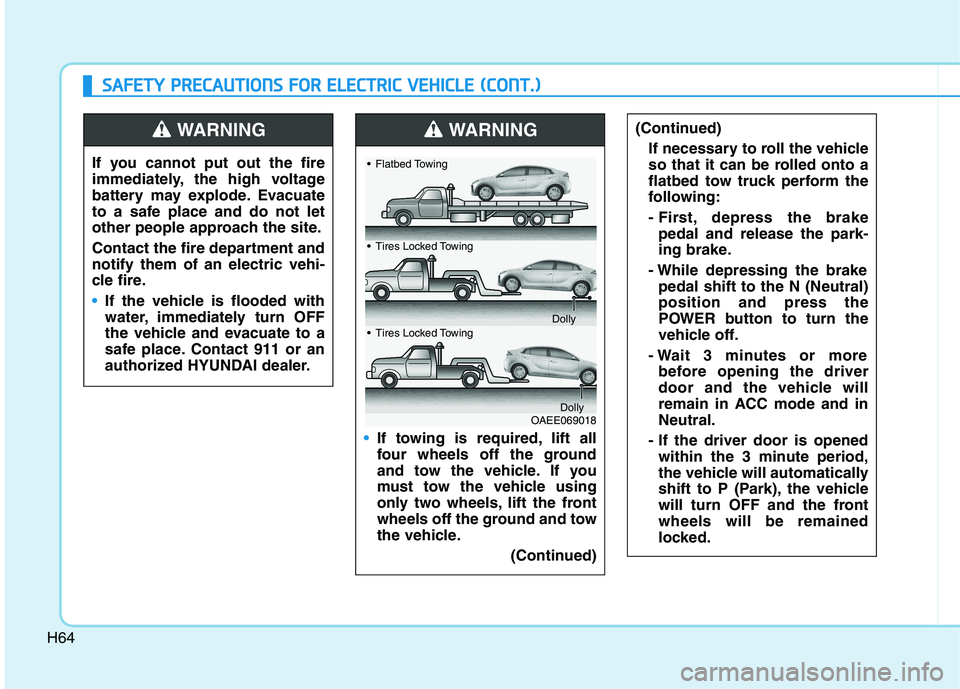
If towing is required, lift all
four wheels off the ground
and tow the vehicle. If you
must tow the vehicle using
only two wheels, lift the front
wheels off the ground and tow
the vehicle.
(Continued)
(Continued)
If necessary to roll the vehicle
so that it can be rolled onto a
flatbed tow truck perform the
following:
- First, depress the brake
pedal and release the park-
ing brake.
- While depressing the brake
pedal shift to the N (Neutral)
position and press the
POWER button to turn the
vehicle off.
- Wait 3 minutes or more
before opening the driver
door and the vehicle will
remain in ACC mode and in
Neutral.
- If the driver door is opened
within the 3 minute period,
the vehicle will automatically
shift to P (Park), the vehicle
will turn OFF and the front
wheels will be remained
locked.WARNING
OAEE069018
Flatbed Towing
Tires Locked Towing
Dolly
Tires Locked Towing
Dolly
Page 555 of 561
I-2
Accessing your vehicle .....................................................3-3
Immobilizer System .....................................................3-8
Smart Key ....................................................................3-3
Air bag - Advanced Supplemental Restraint System .....2-47
Additional Safety Precautions ....................................2-69
Air Bag Warning Labels.............................................2-70
How Does the Air Bag System Operate? ...................2-53
Occupant Classification System (OCS) .....................2-58
SRS Care ....................................................................2-68
What to Expect After an Air Bag Inflates ..................2-57
Where Are the Air Bags? ...........................................2-49
Why Didn't My Air Bag Go Off in a Collision?........2-63
Air Conditioning System ..................................................8-5
Appearance Care .............................................................7-63
Exterior Care ..............................................................7-63
Interior Care ...............................................................7-69
Automatic climate control system ................................3-119
Automatic Heating and Air Conditioning ................3-120
Manual Heating and Air Conditioning .....................3-121
System Maintenance ................................................3-130
System Operation .....................................................3-128Battery(12V) ...................................................................7-20
Battery Recharging .....................................................7-21
For Best Battery Service ............................................7-21
Reset Features ............................................................7-22
Before driving ...................................................................5-3
Before Entering the Vehicle .........................................5-3
Before Starting .............................................................5-3
Blind-spot Collision Warning (BCW) ...........................5-71
Declaration of conformity .........................................5-82
System description .....................................................5-71
System setting and operation .....................................5-72
Warning message and system control ........................5-74
Brake Fluid .....................................................................7-13
Checking the Brake Fluid Level ................................7-13
Braking system ..............................................................5-26
Anti-lock Brake System (ABS)..................................5-36
Auto Hold ...................................................................5-32
Disc Brake Wear Indicator .........................................5-27
Electronic Parking Brake (EPB) ................................5-27
Electronic Stability Control (ESC).............................5-38
Good Braking Practices..............................................5-44
Hill-Start Assist Control (HAC) .................................5-43
Power Brakes..............................................................5-26
Vehicle Stability Management (VSM) .......................5-42
Bulb Wattage .....................................................................8-3
Index
AB
Page 556 of 561
I-3
California Perchlorate Notice .........................................7-72
Child Restraint System (CRS) ........................................2-36
Children Always in the Rear ......................................2-36
Installing a Child Restraint System (CRS) ................2-39
Selecting a Child Restraint System (CRS).................2-37
Climate control additional features...............................3-135
Automatic Ventilation...............................................3-135
Climate Control Air Filter...............................................7-15
Filter Inspection..........................................................7-15
Consumer Information ......................................................8-9
Coolant ............................................................................7-12
Defroster........................................................................3-118
Rear Window Defroster ............................................3-118
Dimensions .......................................................................8-2
Distance.........................................................................5-100
Limitations of the system .........................................5-105
Sensor to detect distance to the vehicle ahead .........5-103
Door locks .........................................................................3-9
Auto Door Lock/Unlock Features ..............................3-12
Child-Protector Rear Door locks................................3-12
Operating Door Locks from Inside the Vehicle ........3-10
Operating Door Locks from Outside the Vehicle .......3-9Drive Mode Integrated Control System ........................5-45
Drive mode .................................................................5-45
Initial setting for each Drive Mode ............................5-45
Driver Attention Warning (DAW) .................................5-84
Leading Vehicle Departure Alert................................5-90
Resetting the system ..................................................5-87
System malfunction ....................................................5-87
System setting and operation .....................................5-84
System standby...........................................................5-87
Driver position memory system .....................................3-14
Easy Access Function .................................................3-15
Recalling positions from memory ..............................3-15
Storing Positions into Memory .................................3-14
Electric Vehicle Specifications .........................................8-2
Explanation of Scheduled Maintenance Items ...............7-11
Exterior features..............................................................3-49
Charging Door ............................................................3-53
Hood ...........................................................................3-49
Liftgate .......................................................................3-51
Exterior Overview.............................................................1-2
I
Index
C
DE
Page 557 of 561
I-4
Forward Collision-Avoidance assist (FCA) ..................5-46
FCA sensor (Front view camera+ Front radar) ..........5-51
FCA warning message and brake control ..................5-48
Limitations of the system ...........................................5-55
System malfunction ....................................................5-53
System setting and activation .....................................5-46
Fuses ...............................................................................7-39
Fuse/Relay Panel Description ....................................7-43
Instrument Panel Fuse Replacement ..........................7-40
Motor Compartment Panel Fuse Replacement ..........7-42
Hazard Warning Flasher ...................................................6-2
Highway Driving Assist (HDA) ...................................5-118
System Setting and Operation ..................................5-118
Warning Message .....................................................5-121
If the Vehicle Overheats....................................................6-7
If the Vehicle Will Not Start .............................................6-3
Confirm the EV Battery Is Not Low on the
Charge Gauge .............................................................6-3
If You Have a Flat Tire ...................................................6-14
With Tire Mobility Kit (TMK)...................................6-14Important Safety Precautions............................................2-2
Air Bag Hazards ...........................................................2-2
Always Wear Your Seat Belt ........................................2-2
Control Your Speed ......................................................2-3
Driver Distraction.........................................................2-2
Keep Your Vehicle in Safe Condition ..........................2-3
Restrain All Children....................................................2-2
In Case of an Emergency While Driving .........................6-2
If the Vehicle Stalls at a Crossroad or Crossing ..........6-2
If the Vehicle Stalls While Driving ..............................6-2
If you Have a Flat Tire While Driving.........................6-3
Infotainment System .........................................................4-2
Antenna ........................................................................4-2
Audio (Display Audio) / Video / Navigation System ..4-5
Bluetooth
®Wireless Technology Hands-Free..............4-4
Steering Wheel Audio Control .....................................4-3
USB and iPod
®Port .....................................................4-2
Instrument cluster ...........................................................3-54
Gauges and Meters .....................................................3-56
Instrument Cluster Control .........................................3-55
LCD Display Messages .............................................3-72
Warning and Indicator lights ......................................3-60
Instrument Panel Overview ..............................................1-5
Interior features ............................................................3-138
Cargo Security Screen ..............................................3-144
Clock ........................................................................3-142
Clothes Hanger ........................................................3-143
Cup Holder ...............................................................3-138
Floor Mat Anchor(s) .................................................3-144
Index
F
I
H