sensor HYUNDAI IONIQ 2020 Workshop Manual
[x] Cancel search | Manufacturer: HYUNDAI, Model Year: 2020, Model line: IONIQ, Model: HYUNDAI IONIQ 2020Pages: 561, PDF Size: 24.5 MB
Page 401 of 561
6-19
What to do in an emergency
6
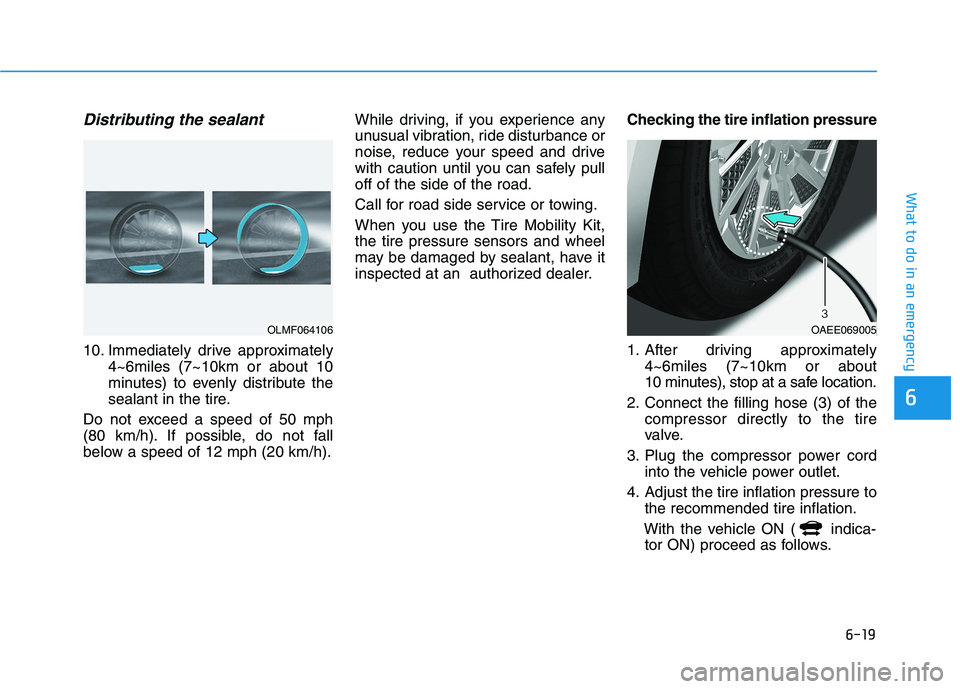
Distributing the sealant
10. Immediately drive approximately
4~6miles (7~10km or about 10
minutes) to evenly distribute the
sealant in the tire.
Do not exceed a speed of 50 mph
(80 km/h). If possible, do not fall
below a speed of 12 mph (20 km/h).While driving, if you experience any
unusual vibration, ride disturbance or
noise, reduce your speed and drive
with caution until you can safely pull
off of the side of the road.
Call for road side service or towing.
When you use the Tire Mobility Kit,
the tire pressure sensors and wheel
may be damaged by sealant, have it
inspected at an authorized dealer.Checking the tire inflation pressure
1. After driving approximately
4~6miles (7~10km or about
10 minutes), stop at a safe location.
2. Connect the filling hose (3) of the
compressor directly to the tire
valve.
3. Plug the compressor power cord
into the vehicle power outlet.
4. Adjust the tire inflation pressure to
the recommended tire inflation.
With the vehicle ON ( indica-
tor ON) proceed as follows.
OLMF064106OAEE069005
Page 402 of 561
6-20
What to do in an emergency
- To increase the inflation pressure:
Switch on the compressor, posi-
tion to "I". To check the current
inflation pressure setting, briefly
switch off the compressor.
- To reduce the inflation pressure:
Press the button (9) on the com-
pressor.
Information
The pressure gauge may show higher
than actual reading when the com-
pressor is running. To get an accurate
tire pressure, the compressor needs to
be turned off.
Information
When reinstalling the repaired or
replaced tire and wheel on the vehicle,
tighten the wheel lug nut to 11~13
kgf·m (80~94 lbf·ft).
i
i
When you use the Tire Mobility
Kit including sealant not
approved by HYUNDAI, the tire
pressure sensors may be dam-
aged by sealant. The sealant on
the tire pressure sensor and
wheel should be removed when
you replace the tire with a new
one and inspect the tire pres-
sure sensors at an authorized
dealer.
CAUTION
Page 404 of 561
6-22
What to do in an emergency
When towing your vehicle in an
emergency without wheel dollies:
1. While depressing the brake pedal
shift to the N (Neutral) position
and turn the vehicle off. The
POWER button will be in the ACC
position.
2. Release the parking brake.
Failure to shift to N (Neutral) may
cause internal damage to the vehi-
cle.
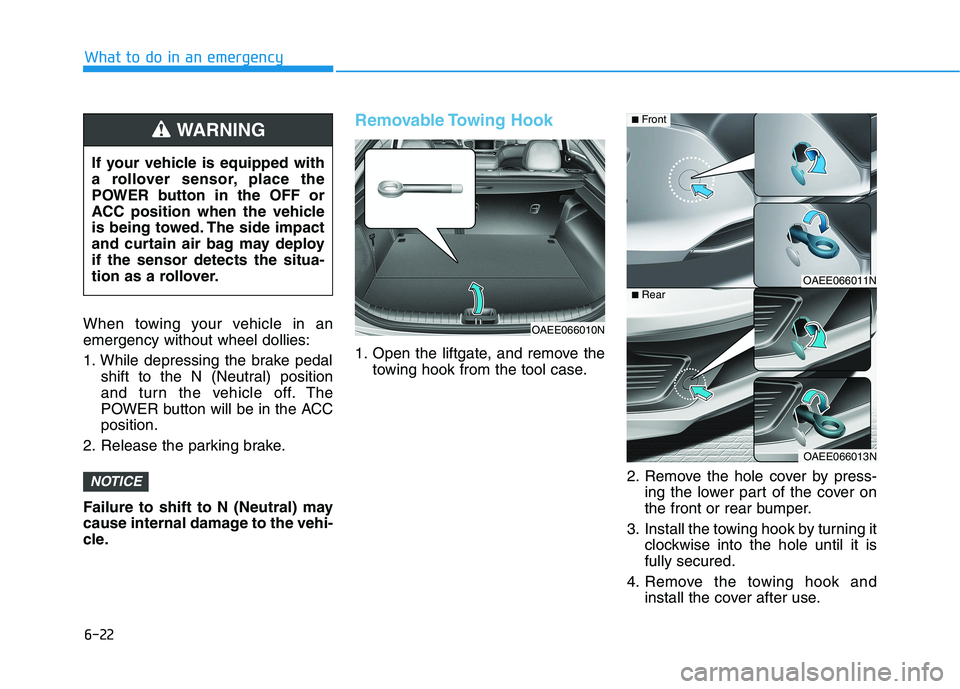
Removable Towing Hook
1. Open the liftgate, and remove the
towing hook from the tool case.
2. Remove the hole cover by press-
ing the lower part of the cover on
the front or rear bumper.
3. Install the towing hook by turning it
clockwise into the hole until it is
fully secured.
4. Remove the towing hook and
install the cover after use.
NOTICE
If your vehicle is equipped with
a rollover sensor, place the
POWER button in the OFF or
ACC position when the vehicle
is being towed. The side impact
and curtain air bag may deploy
if the sensor detects the situa-
tion as a rollover.
WARNING
OAEE066010N
OAEE066011N
OAEE066013N
■Front
■Rear
Page 450 of 561
7-44
Maintenance
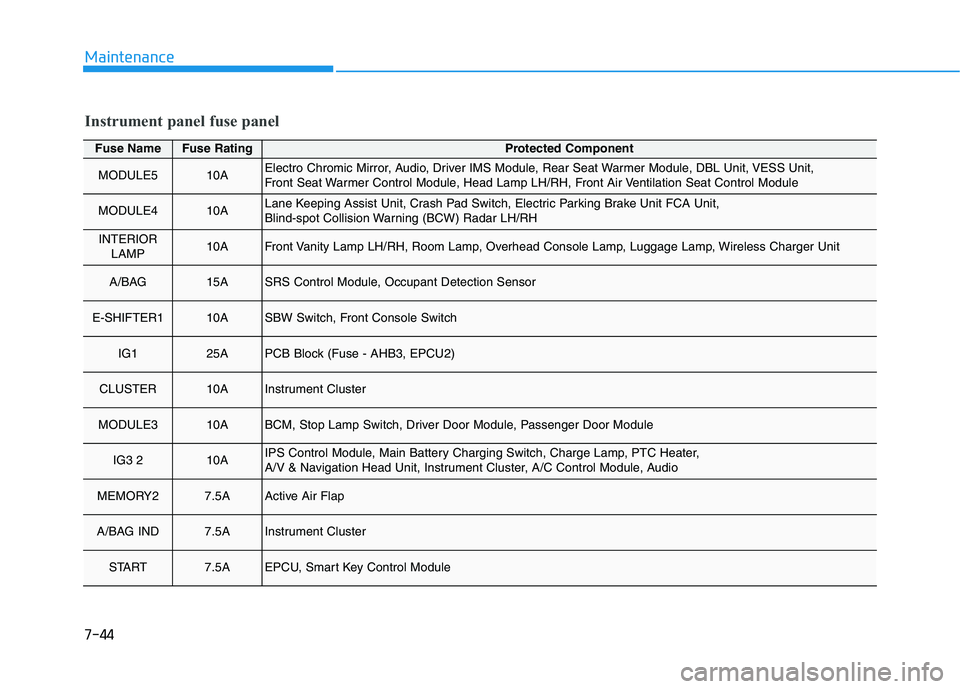
Fuse NameFuse RatingProtected Component
MODULE510AElectro Chromic Mirror, Audio, Driver IMS Module, Rear Seat Warmer Module, DBL Unit, VESS Unit,
Front Seat Warmer Control Module, Head Lamp LH/RH, Front Air Ventilation Seat Control Module
MODULE410ALane Keeping Assist Unit, Crash Pad Switch, Electric Parking Brake Unit FCA Unit,
Blind-spot Collision Warning (BCW) Radar LH/RH
INTERIOR
LAMP10AFront Vanity Lamp LH/RH, Room Lamp, Overhead Console Lamp, Luggage Lamp, Wireless Charger Unit
A/BAG 15ASRS Control Module, Occupant Detection Sensor
E-SHIFTER110ASBW Switch, Front Console Switch
IG125APCB Block (Fuse - AHB3, EPCU2)
CLUSTER10AInstrument Cluster
MODULE310ABCM, Stop Lamp Switch, Driver Door Module, Passenger Door Module
IG3 210AIPS Control Module, Main Battery Charging Switch, Charge Lamp, PTC Heater,
A/V & Navigation Head Unit, Instrument Cluster, A/C Control Module, Audio
MEMORY27.5AActive Air Flap
A/BAG IND7.5AInstrument Cluster
START7.5AEPCU, Smart Key Control Module
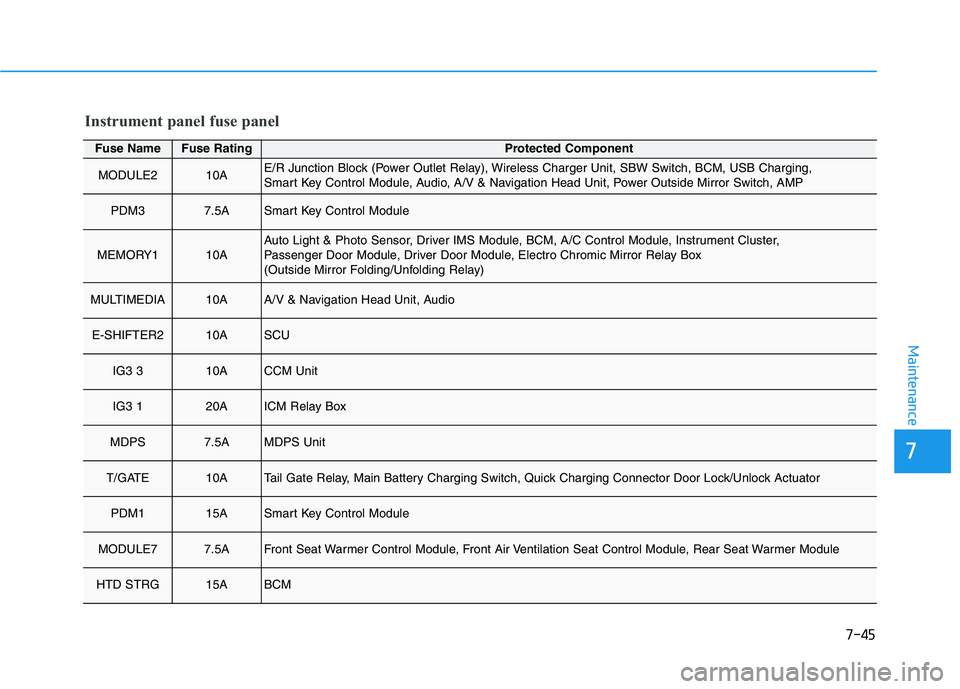
Instrument panel fuse panel
Page 451 of 561
7-45
7
Maintenance
Fuse NameFuse RatingProtected Component
MODULE210AE/R Junction Block (Power Outlet Relay), Wireless Charger Unit, SBW Switch, BCM, USB Charging,
Smart Key Control Module, Audio, A/V & Navigation Head Unit, Power Outside Mirror Switch, AMP
PDM37.5ASmart Key Control Module
MEMORY110AAuto Light & Photo Sensor, Driver IMS Module, BCM, A/C Control Module, Instrument Cluster,
Passenger Door Module, Driver Door Module, Electro Chromic Mirror Relay Box
(Outside Mirror Folding/Unfolding Relay)
MULTIMEDIA10AA/V & Navigation Head Unit, Audio
E-SHIFTER210ASCU
IG3 310ACCM Unit
IG3 120AICM Relay Box
MDPS7.5AMDPS Unit
T/GATE10ATail Gate Relay, Main Battery Charging Switch, Quick Charging Connector Door Lock/Unlock Actuator
PDM115ASmart Key Control Module
MODULE77.5AFront Seat Warmer Control Module, Front Air Ventilation Seat Control Module, Rear Seat Warmer Module
HTD STRG15ABCM
Instrument panel fuse panel
Page 470 of 561
7-64
Maintenance
Do not use strong soap, chemi-
cal detergents or hot water, and
do not wash the vehicle in direct
sunlight or when the body of the
vehicle is warm.
Be careful when washing the
side windows of your vehicle.
Especially, with high-pressure
water, water may leak through
the windows and wet the interi-
or.
To prevent damage to the plastic
parts, do not clean with chemi-
cal solvents or strong deter-
gents.
To prevent damage to the charg-
ing door, make sure to close and
lock the vehicle doors when
washing (high-pressure wash-
ing, automatic car washing, etc.)
the vehicle.
High-pressure washing
When using high-pressure wash-
ers, make sure to maintain suffi-
cient distance from the vehicle.
Insufficient clearance or excessive
pressure can lead to component
damage or water penetration.
Do not spray the camera, sensors
or its surrounding area directly with
a high pressure washer. Shock
applied from high pressure water
may cause the device to not oper-
ate normally.
Do not bring the nozzle tip close to
boots (rubber or plastic covers) or
connectors as they may be dam-
aged if they come into contact with
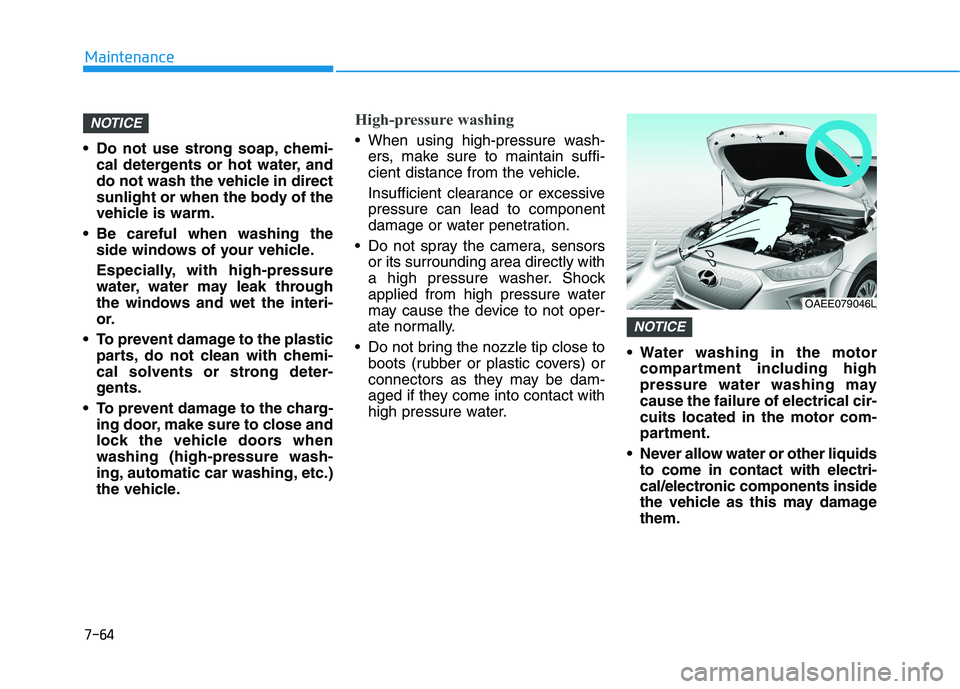
high pressure water. Water washing in the motor
compartment including high
pressure water washing may
cause the failure of electrical cir-
cuits located in the motor com-
partment.
Never allow water or other liquids
to come in contact with electri-
cal/electronic components inside
the vehicle as this may damage
them.
NOTICE
NOTICE
OAEE079046L
Page 528 of 561
H40
C CH
HA
AR
RG
GI
IN
NG
G
E
EL
LE
EC
CT
TR
RI
IC
C
V
VE
EH
HI
IC
CL
LE
E
(
(T
TR
RI
IC
CK
KL
LE
E
C
CH
HA
AR
RG
GE
E)
)
(
(C
CO
ON
NT
T.
.)
)
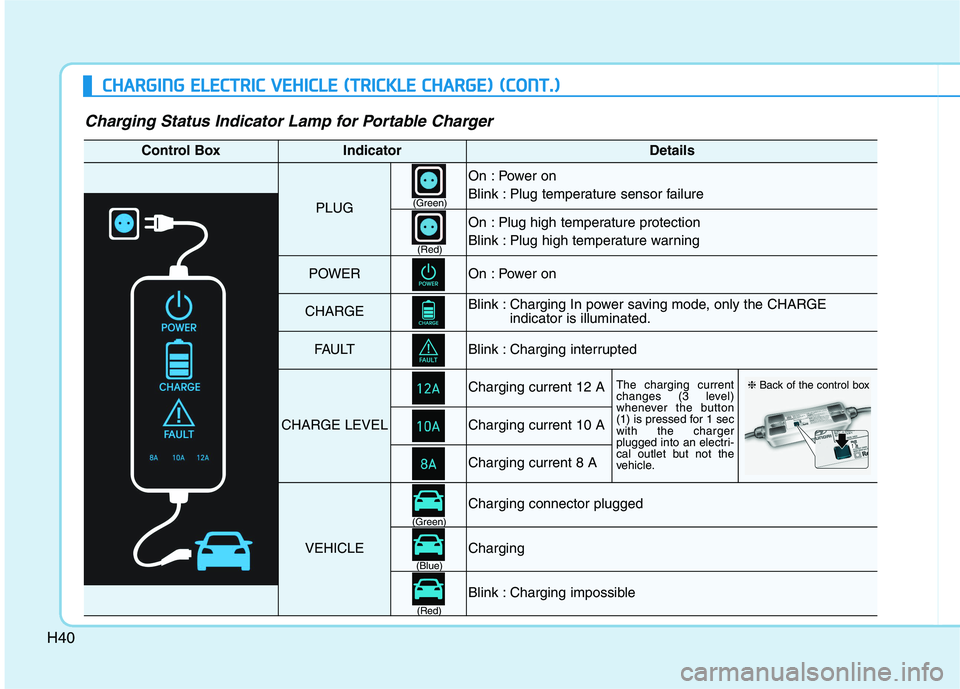
Charging Status Indicator Lamp for Portable Charger
Control BoxIndicatorDetails
PLUG
On : Power on
Blink : Plug temperature sensor failure
On : Plug high temperature protection
Blink : Plug high temperature warning
POWEROn : Power on
CHARGEBlink : Charging In power saving mode, only the CHARGE
indicator is illuminated.
FAU LTBlink : Charging interrupted
CHARGE LEVEL
Charging current 12 AThe charging current
changes (3 level)
whenever the button
(1) is pressed for 1 sec
with the charger
plugged into an electri-
cal outlet but not the
vehicle.
Charging current 10 A
Charging current 8 A
VEHICLE
Charging connector plugged
Charging
Blink : Charging impossible
(Green)
(Green)
(Blue)
(Red)(Red)
❈Back of the control box
Page 529 of 561
H41
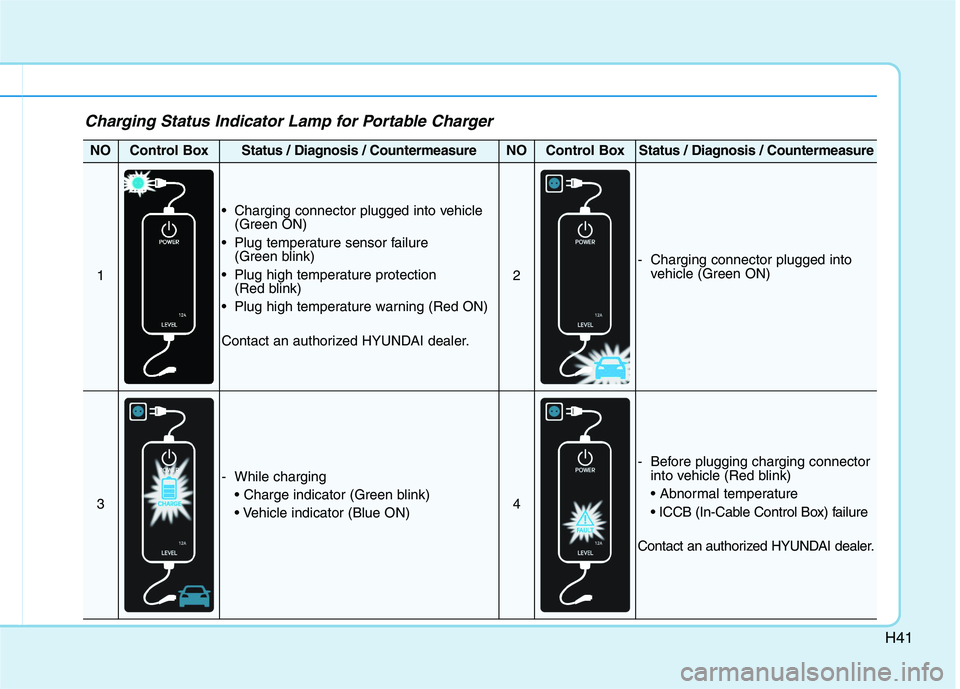
Charging Status Indicator Lamp for Portable Charger
NOControl BoxStatus / Diagnosis / CountermeasureNOControl BoxStatus / Diagnosis / Countermeasure
1
Charging connector plugged into vehicle
(Green ON)
Plug temperature sensor failure
(Green blink)
Plug high temperature protection
(Red blink)
Plug high temperature warning (Red ON)
Contact an authorized HYUNDAI dealer.
2
- Charging connector plugged into
vehicle (Green ON)
3
- While charging
4
- Before plugging charging connector
into vehicle (Red blink)
Contact an authorized HYUNDAI dealer.
Page 530 of 561
H42
C CH
HA
AR
RG
GI
IN
NG
G
E
EL
LE
EC
CT
TR
RI
IC
C
V
VE
EH
HI
IC
CL
LE
E
(
(T
TR
RI
IC
CK
KL
LE
E
C
CH
HA
AR
RG
GE
E)
)
(
(C
CO
ON
NT
T.
.)
)
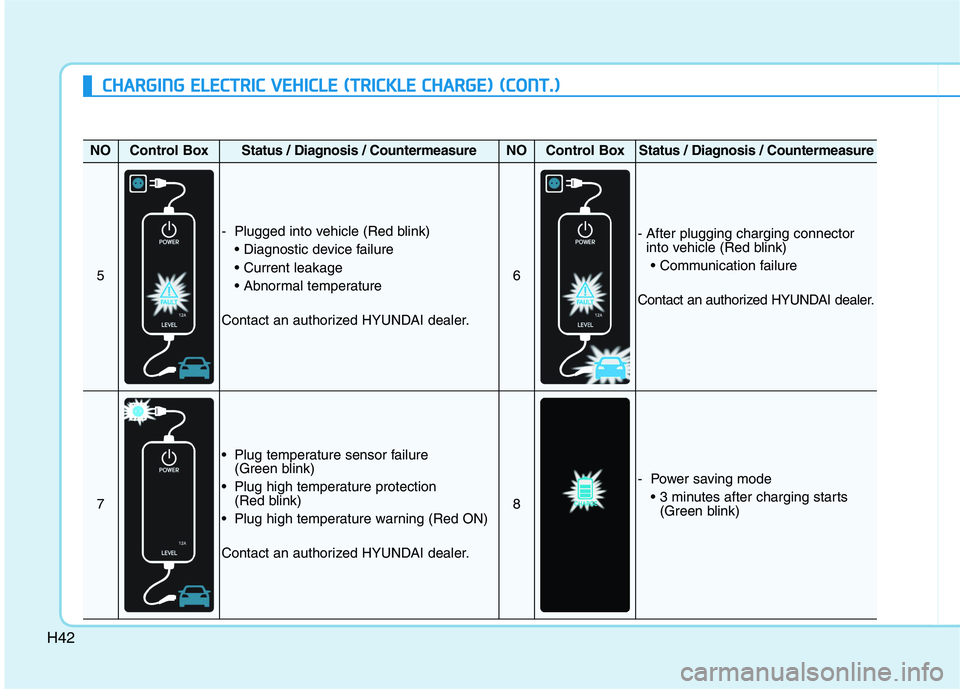
NOControl BoxStatus / Diagnosis / CountermeasureNOControl BoxStatus / Diagnosis / Countermeasure
5
- Plugged into vehicle (Red blink)
Contact an authorized HYUNDAI dealer.
6
- After plugging charging connector
into vehicle (Red blink)
Contact an authorized HYUNDAI dealer.
7
Plug temperature sensor failure
(Green blink)
Plug high temperature protection
(Red blink)
Plug high temperature warning (Red ON)
Contact an authorized HYUNDAI dealer.
8
- Power saving mode
(Green blink)
Page 539 of 561
H51
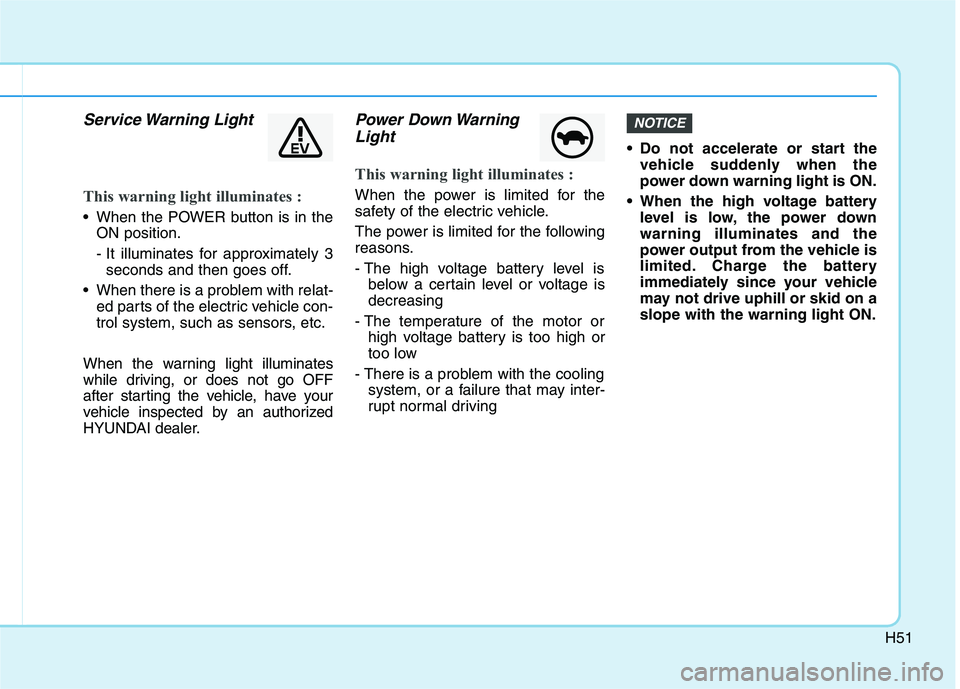
Service Warning Light
This warning light illuminates :
When the POWER button is in the
ON position.
- It illuminates for approximately 3
seconds and then goes off.
When there is a problem with relat-
ed parts of the electric vehicle con-
trol system, such as sensors, etc.
When the warning light illuminates
while driving, or does not go OFF
after starting the vehicle, have your
vehicle inspected by an authorized
HYUNDAI dealer.
Power Down Warning
Light
This warning light illuminates :
When the power is limited for the
safety of the electric vehicle.
The power is limited for the following
reasons.
- The high voltage battery level is
below a certain level or voltage is
decreasing
- The temperature of the motor or
high voltage battery is too high or
too low
- There is a problem with the cooling
system, or a failure that may inter-
rupt normal driving Do not accelerate or start the
vehicle suddenly when the
power down warning light is ON.
When the high voltage battery
level is low, the power down
warning illuminates and the
power output from the vehicle is
limited. Charge the battery
immediately since your vehicle
may not drive uphill or skid on a
slope with the warning light ON.
NOTICE