warning light HYUNDAI IONIQ 2020 Workshop Manual
[x] Cancel search | Manufacturer: HYUNDAI, Model Year: 2020, Model line: IONIQ, Model: HYUNDAI IONIQ 2020Pages: 561, PDF Size: 24.5 MB
Page 194 of 561
3-109
Convenient features of your vehicle
3
Change the switch to the AUTO posi-
tion when the vehicle is in the ready
( ) mode. The adaptive front light-
ing system will operate when the
headlamp is ON. To turn off the AFL
system, change the switch to other
positions. After turning the AFL sys-
tem off, headlamp swiveling no
longer occurs, but leveling operates
continuously.
If the AFL system malfunction indica-
tor comes on, the AFL system is not
working properly. Drive to the near-
est safe location and restart the vehi-
cle ( indicator ON). If the indica-
tor continuously remains on, have
the system be checked by an author-
ized HYUNDAI dealer.Interior Lights
Do not use the interior lights for
extended periods when the vehi-
cle is turned off or the battery will
discharge.
Interior lamp AUTO cut
The interior lamps will automatically
go off approximately 20 minutes after
the vehicle is turned off and the
doors closed. If a door is opened, the
lamp will go off 40 minutes after the
vehicle is turned off. If the doors are
locked by the smart key and the vehi-
cle enters the armed stage of the
theft alarm system, the lamps will go
off five seconds later.
Front lamps
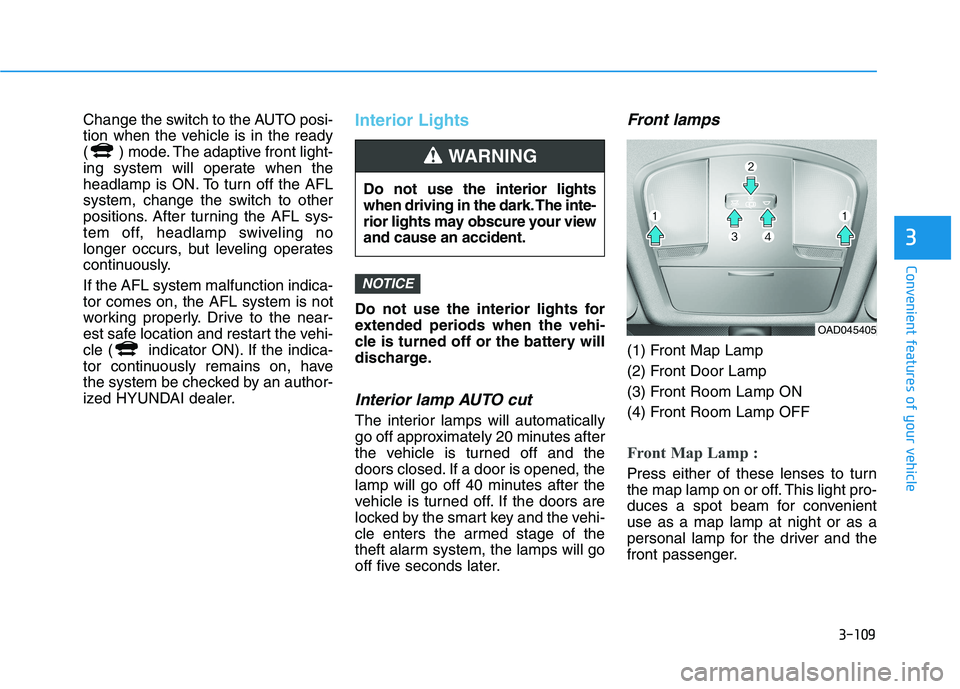
(1) Front Map Lamp
(2) Front Door Lamp
(3) Front Room Lamp ON
(4) Front Room Lamp OFF
Front Map Lamp :
Press either of these lenses to turn
the map lamp on or off. This light pro-
duces a spot beam for convenient
use as a map lamp at night or as a
personal lamp for the driver and the
front passenger.
NOTICE
Do not use the interior lights
when driving in the dark. The inte-
rior lights may obscure your view
and cause an accident.
WARNING
OAD045405
Page 221 of 561
3-136
Convenient features of your vehicle
To avoid possible theft, do not
leave valuables in the storage
compartments.
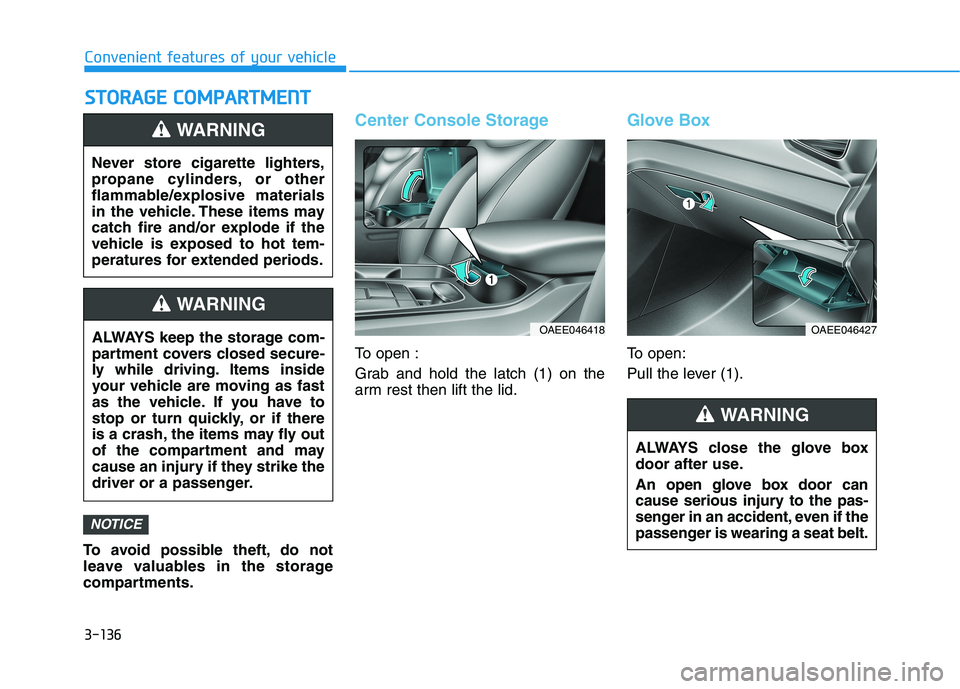
Center Console Storage
To open :
Grab and hold the latch (1) on the
arm rest then lift the lid.
Glove Box
To open:
Pull the lever (1).
NOTICE
S ST
TO
OR
RA
AG
GE
E
C
CO
OM
MP
PA
AR
RT
TM
ME
EN
NT
T
Never store cigarette lighters,
propane cylinders, or other
flammable/explosive materials
in the vehicle. These items may
catch fire and/or explode if the
vehicle is exposed to hot tem-
peratures for extended periods.
WARNING
ALWAYS keep the storage com-
partment covers closed secure-
ly while driving. Items inside
your vehicle are moving as fast
as the vehicle. If you have to
stop or turn quickly, or if there
is a crash, the items may fly out
of the compartment and may
cause an injury if they strike the
driver or a passenger.
WARNING
OAEE046418
ALWAYS close the glove box
door after use.
An open glove box door can
cause serious injury to the pas-
senger in an accident, even if the
passenger is wearing a seat belt.
WARNING
OAEE046427
Page 223 of 561
3-138
Convenient features of your vehicle
I IN
NT
TE
ER
RI
IO
OR
R
F
FE
EA
AT
TU
UR
RE
ES
S
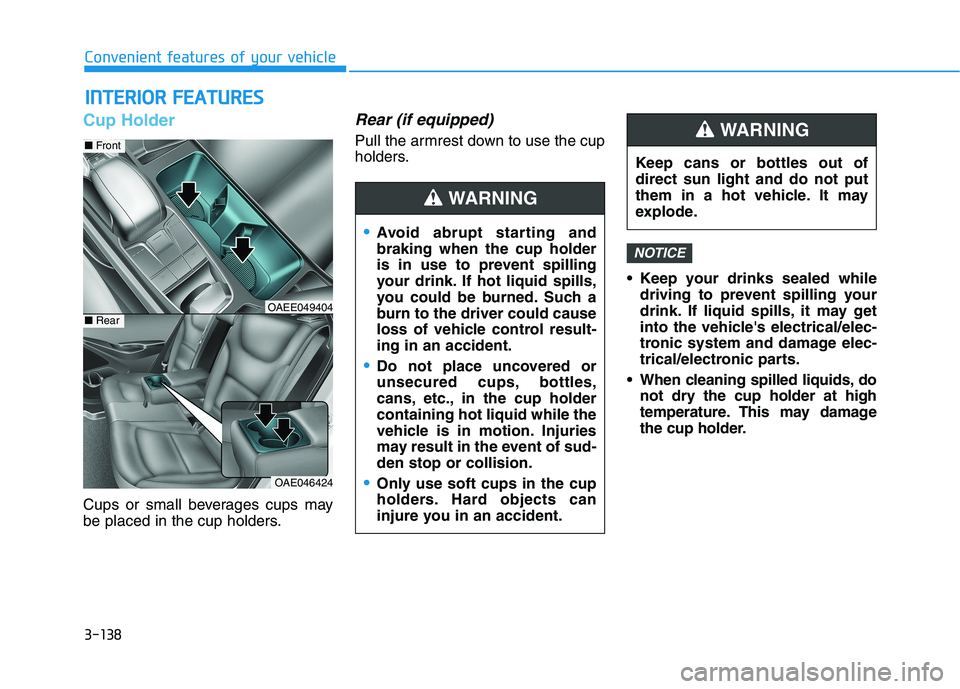
Cup Holder
Cups or small beverages cups may
be placed in the cup holders.
Rear (if equipped)
Pull the armrest down to use the cup
holders.
Keep your drinks sealed while
driving to prevent spilling your
drink. If liquid spills, it may get
into the vehicle's electrical/elec-
tronic system and damage elec-
trical/electronic parts.
When cleaning spilled liquids, do
not dry the cup holder at high
temperature. This may damage
the cup holder.
NOTICE
OAE046424
■Front
■RearOAEE049404
Avoid abrupt starting and
braking when the cup holder
is in use to prevent spilling
your drink. If hot liquid spills,
you could be burned. Such a
burn to the driver could cause
loss of vehicle control result-
ing in an accident.
Do not place uncovered or
unsecured cups, bottles,
cans, etc., in the cup holder
containing hot liquid while the
vehicle is in motion. Injuries
may result in the event of sud-
den stop or collision.
Only use soft cups in the cup
holders. Hard objects can
injure you in an accident.
WARNING
Keep cans or bottles out of
direct sun light and do not put
them in a hot vehicle. It may
explode.
WARNING
Page 227 of 561
3-142
Convenient features of your vehicle
(Continued)
The wireless charging process
may temporarily stop, when tem-
perature abnormally increases
inside the wireless cellular
phone charging system. The
wireless charging process
restarts, when temperature falls
to a proper level.
The wireless charging process
may temporarily stop when
there is any metallic item, such
as a coin, between the wireless
cellular phone charging system
and a cellular phone.
For certain cellular phone with
their own protection, the wire-
less charging speed may
decrease and the wireless
charging may stop.
If the cellular phone has a thick
cover, the wireless charging may
not be possible.
If the cell phone is not complete-
ly contacting the charging pad,
wireless charging may not oper-
ate properly.
(Continued)(Continued)
Some magnetic items like credit
cards, phone cards or rail tickets
may be damaged if left with the
cellular phone during the charg-
ing process.
If the cellular phone without the
wireless charging function or
the metallic items are placed on
the charging pad, it may cause
slight noise. This noise does not
affect the cellular phone and the
vehicle, because this noise is an
operating sound during deter-
mining the item on the charging
pad.
If the POWER button is in the
OFF position, the charging also
stops.
Clock
Vehicles with Audio system
Select the [SETUP]button on the
audio system ➟Select [Date/Time].
Set time : Set the time displayed on
the audio screen.
Time format : Choose between 12-
hour and 24-hour time formats. Do not adjust the clock while
driving, you may lose your
steering control and cause an
accident that results in severe
personal injury or death.
WARNING
Page 237 of 561
Driving your vehicle
Before driving.........................................................5-3
Before Entering the Vehicle ...........................................5-3
Before Starting ..................................................................5-3
Power button ..........................................................5-5
POWER Button Positions.................................................5-6
Starting the Vehicle ..........................................................5-8
Turning Off the Vehicle ...................................................5-9
Reduction gear .....................................................5-10
Reduction Gear Operation ............................................5-10
Parking ...............................................................................5-12
LCD Display Messages ...................................................5-12
Good Driving Practices ..................................................5-15
Paddle shifter (regenerative braking control) ..5-16
One Pedal Driving ...........................................................5-17
Smart regeneration system with
smart cruise control system...............................5-18
System Setting .................................................................5-18
Activating the Smart Regeneration System .............5-18
Cancelling the Smart Regeneration System .............5-20
Resuming the Smart Regeneration System ..............5-20
Disabling the Smart Regeneration System ...............5-20
Vehicle-to-Vehicle Front Recognition
- Front Radar Sensor ....................................................5-20
Warning Message............................................................5-21
Limitations of the System .............................................5-21
Braking system ...................................................5-26
Power Brakes ...................................................................5-26
Disc Brake Wear Indicator ............................................5-27
Electronic Parking Brake (EPB)...................................5-27
Auto Hold ..........................................................................5-32
Anti-lock Brake System (ABS) ....................................5-36
Electronic Stability Control (ESC)................................5-38
Vehicle Stability Management (VSM).........................5-42
Hill-Start Assist Control (HAC) ....................................5-43
Good Braking Practices .................................................5-44
Drive Mode Integrated Control System ...........5-45
Drive mode ........................................................................5-45
Initial setting for each Drive Mode ............................5-45
Forward Collision-Avoidance assist (FCA) .....5-46
System setting and activation......................................5-46
FCA warning message and brake control .................5-48
FCA sensor (Front view camera+ Front radar) .......5-51
System malfunction ........................................................5-53
Limitations of the system .............................................5-55
Lane Keeping Assist (LKA) .................................5-62
LKA operation ..................................................................5-64
Warning light and message ..........................................5-67
Limitations of the System .............................................5-68
LKA system function change .......................................5-70
5
Page 239 of 561
5-3
Driving your vehicle
5
Before Entering the Vehicle
• Be sure all windows, outside mir-
ror(s), and outside lights are clean
and unobstructed.
Remove frost, snow, or ice.
Visually check the tires for uneven
wear and damage.
Check under the vehicle for any
sign of leaks.
Be sure there are no obstacles
behind you if you intend to back up.
Before Starting
Make sure the hood, the liftgate,
and the doors are securely closed
and locked.
Adjust the position of the seat and
steering wheel.
Adjust the inside and outer side
view mirrors.
Verify all the lights work.
Fasten your seat belts. Check that
all passengers have fastened their
seat belts.
Check the gauges and indicators in
the instrument panel and the mes-
sages on the instrument display
when the POWER button is in the
ON position.
Check that any items you are car-
rying are stored properly or fas-
tened down securely. CALIFORNIA PROPOSITION 65
WARNING
Engine exhaust and a wide vari-
ety of automobile components
including components found in
the interior furnishings in a
vehicle, contain or emit harmful
chemicals known to the State of
California to cause cancer and
birth defects and reproductive
harm. In addition, certain fluids
contained in vehicles and cer-
tain products of components
contain or emit chemicals
known to the State of California
to cause cancer and birth
defects or other reproductive
harm.WARNING
B BE
EF
FO
OR
RE
E
D
DR
RI
IV
VI
IN
NG
G
Page 243 of 561
5-7
Driving your vehicle
5
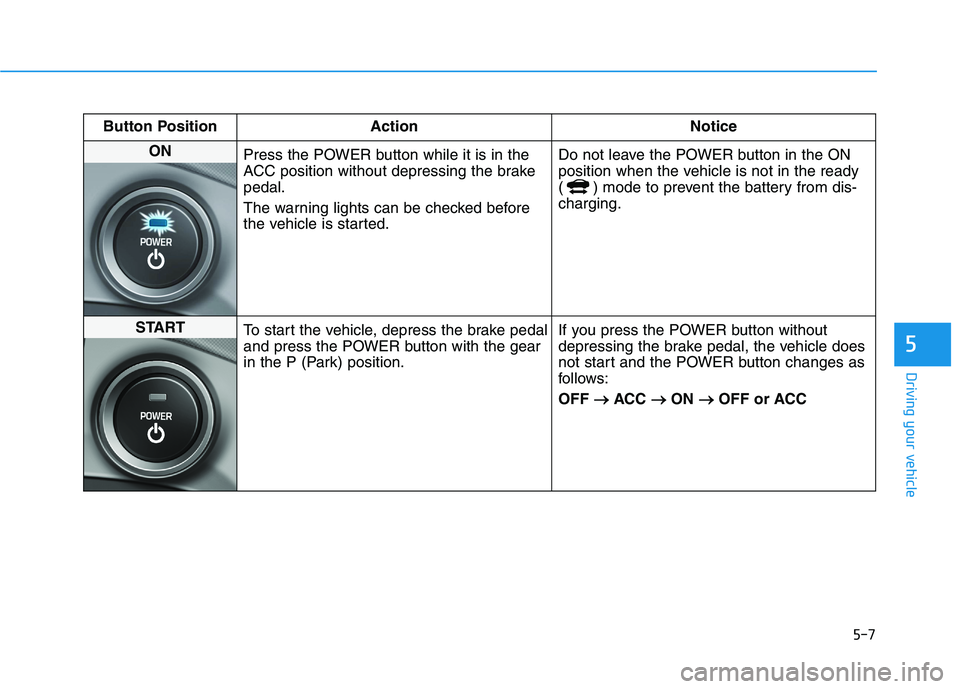
Button Position Action Notice
ON
Press the POWER button while it is in the
ACC position without depressing the brake
pedal.
The warning lights can be checked before
the vehicle is started.Do not leave the POWER button in the ON
position when the vehicle is not in the ready
( ) mode to prevent the battery from dis-
charging.
START
To start the vehicle, depress the brake pedal
and press the POWER button with the gear
in the P (Park) position.If you press the POWER button without
depressing the brake pedal, the vehicle does
not start and the POWER button changes as
follows:
OFF → →
ACC → →
ON → →
OFF or ACC
Page 251 of 561
5-15
Driving your vehicle
5
Good Driving Practices
Never shift to P (Park) or N
(Neutral) to any other position with
the accelerator pedal depressed.
Never shift to P (Park) when the
vehicle is in motion.
Be sure the vehicle is completely
stopped before you attempt to shift
into R (Reverse) or D (Drive).
Do not shift to N (Neutral) when
driving. Doing so may result in an
accident.
Do not drive with your foot resting
on the brake pedal. Even light, but
consistent pedal pressure can
result in the brakes overheating,
brake wear and possibly even
brake failure.
Alway apply the parking brake
when parked on a sloped driveway
or hill when leaving the vehicle. Do
not depend on placing the gear in
P (Park) to keep the vehicle from
moving. Exercise extreme caution when
driving on a slippery surface. Be
especially careful when braking,
accelerating or shifting gears. Also,
avoid increasing the regenerative
braking level suddenly. On a slip-
pery surface, an abrupt change in
vehicle speed can cause the drive
wheels to lose traction and may
cause loss of vehicle control result-
ing in an accident
Optimum vehicle performance and
economy is obtained by smoothly
depressing and releasing the
accelerator.
To reduce the risk of SERIOUS
INJURY or DEATH:
ALWAYS wear your seat belt.
In a collision, an unbelted
occupant is significantly more
likely to be seriously injured
or killed than a properly belt-
ed occupant.
Avoid high speeds when cor-
nering or turning.
(Continued)
WARNING
(Continued)
Do not make quick steering
wheel movements, such as
sharp lane changes or fast,
sharp turns.
The risk of rollover is greatly
increased if you lose control
of your vehicle at highway
speeds.
Loss of control often occurs if
two or more wheels drop off
the roadway and the driver
over steers to reenter the
roadway.
In the event your vehicle
leaves the roadway, do not
steer sharply. Instead, slow
down before pulling back into
the travel lanes.
HYUNDAI recommends you
follow all posted speed limits.
Page 262 of 561
5-26
Driving your vehicle
Power Brakes
Your vehicle has power-assisted
brakes that adjust automatically
through normal usage.
If the vehicle is not in the ready
( ) mode or the vehicle is turned
off while driving, the power assist for
the brakes will not work. You can still
stop your vehicle by applying greater
force to the brake pedal than typical.
The stopping distance, however, will
be longer than with power brakes.
When the vehicle is not in the ready
( ) mode, the reserve brake
power is partially depleted each time
the brake pedal is applied. Do not
pump the brake pedal when the
power assist has been interrupted.
Pump the brake pedal only when
necessary to maintain steering con-
trol on slippery surfaces.
B BR
RA
AK
KI
IN
NG
G
S
SY
YS
ST
TE
EM
M
Take the following precautions:
Do not drive with your foot
resting on the brake pedal.
This will create abnormal high
brake temperatures, exces-
sive brake lining and pad
wear, and increased stopping
distances.
When descending down a
long or steep hill, use the pad-
dle shifter (left side lever) to
increase regenerative braking
control in order to control
your speed without using the
brake pedal excessively.
Applying the brakes continu-
ously will cause the brakes to
overheat and could result in a
temporary loss of braking per-
formance.
(Continued)
(Continued)
Wet brakes may impair the
vehicle's ability to safely slow
down; the vehicle may also
pull to one side when the
brakes are applied. Applying
the brakes lightly will indicate
whether they have been
affected in this way. Always
test your brakes in this fash-
ion after driving through deep
water. To dry the brakes, light-
ly tap the brake pedal to heat
up the brakes while maintain-
ing a safe forward speed until
brake performance returns to
normal. Avoid driving at high
speeds until the brakes func-
tion correctly.
WARNING
Page 263 of 561
5-27
Driving your vehicle
5
Do not continue depressing the
brake pedal if the "
"indica-
tor is OFF. The battery may be
discharged.
Noise and vibration generated
during braking is normal.
Under normal operation, electric
brake pump noise and motor
vibration may occur temporarily
in below cases.
- When the pedal is depressed
suddenly.
- When the pedal is repeatedly
depressed in short intervals.
- When the ABS function is acti-
vated while braking.
Disc Brake Wear Indicator
When your brake pads are worn and
new pads are required, you will hear
a high pitched warning sound from
your front or rear brakes. You may
hear this sound come and go or it
may occur whenever you depress
the brake pedal.
Note that some driving conditions or
climates may cause a brake squeal
when you first apply (or lightly apply)
the brakes. This is normal and does
not indicate a problem with your
brakes.
To avoid costly brake repairs, do
not continue to drive with worn
brake pads.
Information
Always replace brake pads as com-
plete front or rear axle sets.
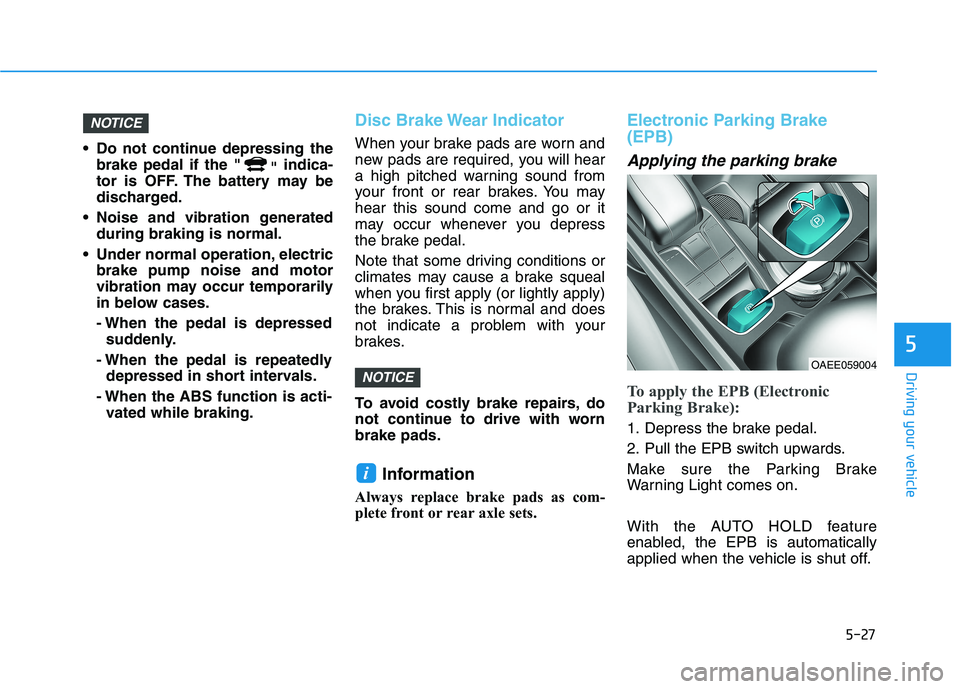
Electronic Parking Brake
(EPB)
Applying the parking brake
To apply the EPB (Electronic
Parking Brake):
1. Depress the brake pedal.
2. Pull the EPB switch upwards.
Make sure the Parking Brake
Warning Light comes on.
With the AUTO HOLD feature
enabled, the EPB is automatically
applied when the vehicle is shut off.
i
NOTICE
NOTICE
OAEE059004