climate control HYUNDAI IONIQ 5 2023 Owner's Manual
[x] Cancel search | Manufacturer: HYUNDAI, Model Year: 2023, Model line: IONIQ 5, Model: HYUNDAI IONIQ 5 2023Pages: 680, PDF Size: 48.22 MB
Page 303 of 680
![HYUNDAI IONIQ 5 2023 Owners Manual 05
5-111
System Maintenance
Climate control air filter
OHI048581L
[A] : Outside air, [B] : Recirculated air
[C] : Climate control air filter, [D] : Blower
[E] : Evaporator core, [F] : PTC & Inner con](/img/35/56168/w960_56168-302.png "HYUNDAI IONIQ 5 2023 Owners Manual 05
5-111
System Maintenance
Climate control air filter
OHI048581L
[A] : Outside air, [B] : Recirculated air
[C] : Climate control air filter, [D] : Blower
[E] : Evaporator core, [F] : PTC & Inner con")
05
5-111
System Maintenance
Climate control air filter
OHI048581L
[A] : Outside air, [B] : Recirculated air
[C] : Climate control air filter, [D] : Blower
[E] : Evaporator core, [F] : PTC & Inner condenser
The cabin air filter is installed behind the
front trunk. It filters the dust or other
pollutants that enter the vehicle through
the heating and air conditioning system.
Have the cabin air filter replaced by an
authorized HYUNDAI dealer according to
the maintenance schedule. If the vehicle
is being driven in severe conditions such
as dusty or rough roads, more frequent
cabin air filter inspections and changes
are required.
If the air flow rate suddenly decreases,
have the system inspected at an
authorized HYUNDAI dealer.
Checking the amount of air
conditioner refrigerant and
compressor lubricant
When the amount of refrigerant is low,
the performance of the air conditioning
is reduced. Overfilling also reduces the
performance of the air conditixoning
system.
Therefore, if abnormal operation is
found, have the system inspected by an
authorized HYUNDAI dealer.
NOTICE
It is important that the correct type and
amount of oil and refrigerant is used.
Otherwise, damage to the compressor
and abnormal system operation may
occur. To prevent damage, the air
conditioning system in your vehicle
should only be serviced by trained and
certified technicians.
NOTICE
The refrigerant system should only
be serviced by trained and certified
technicians to insure proper and safe
operation.
The refrigerant system should be
serviced in a well-ventilated place.
The air conditioning evaporator (cooling
coil) shall never be repaired or replaced
with one removed from a used or
salvaged vehicle and new replacement
MAC evaporators shall be certified
(and labeled) as meeting SAE Standard J2842.
Page 308 of 680
Convenience Features
5-116
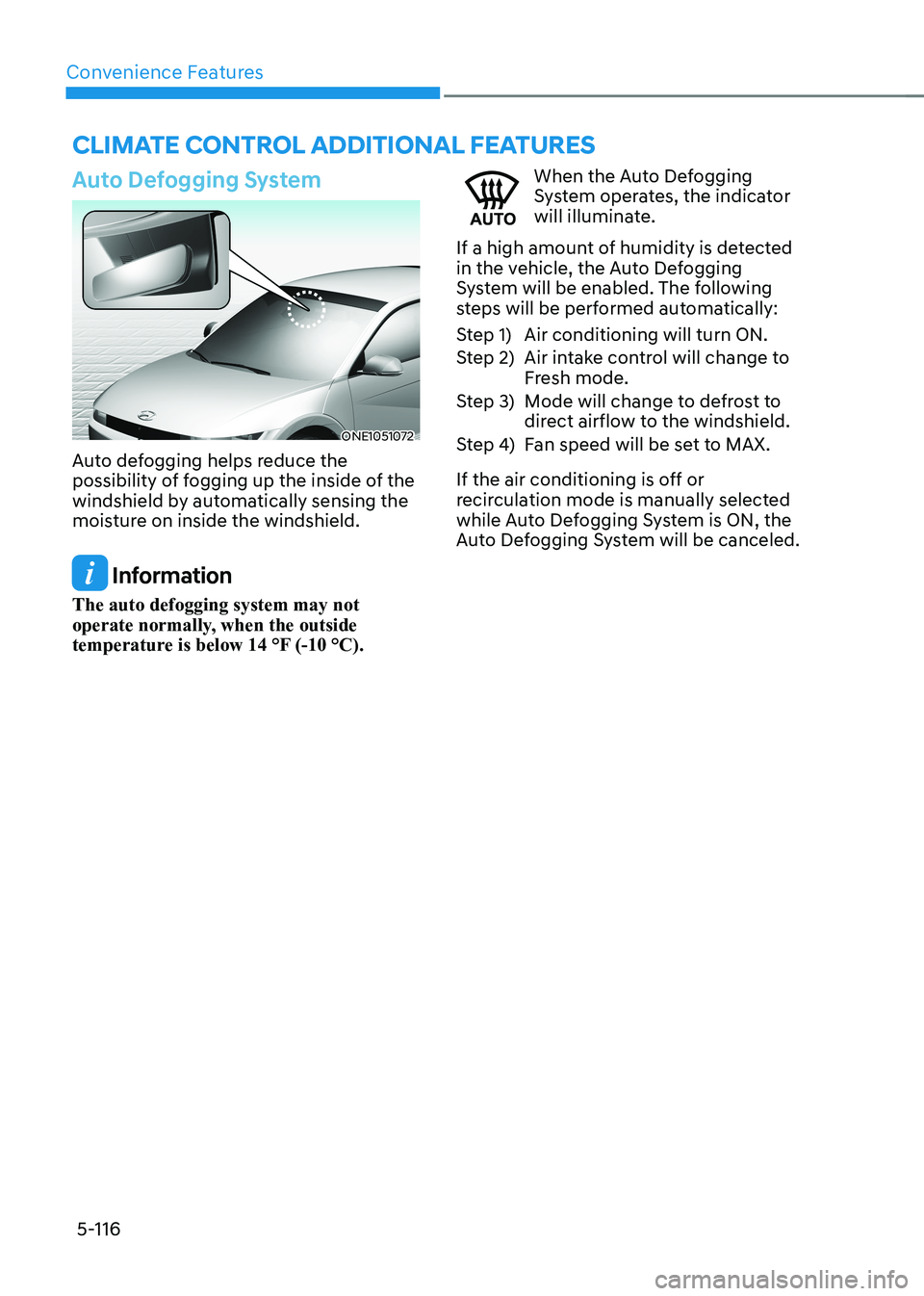
Auto Defogging System
ONE1051072
Auto defogging helps reduce the
possibility of fogging up the inside of the
windshield by automatically sensing the
moisture on inside the windshield.
Information
The auto defogging system may not
operate normally, when the outside
temperature is below 14 °F (-10 °C).
When the Auto Defogging
System operates, the indicator
will illuminate.
If a high amount of humidity is detected
in the vehicle, the Auto Defogging
System will be enabled. The following
steps will be performed automatically:
Step 1) Air conditioning will turn ON.
Step 2) Air intake control will change to Fresh mode.
Step 3) Mode will change to defrost to direct airflow to the windshield.
Step 4) Fan speed will be set to MAX.
If the air conditioning is off or
recirculation mode is manually selected
while Auto Defogging System is ON, the
Auto Defogging System will be canceled.
clImaTe conTrol addITIonal feaTUres
Page 309 of 680
05
5-117
Turning the Auto Defogging System ON or OFF
Climate control system
Touch the front windshield defroster
icon for 3 seconds when the Start/Stop
button is in the ON position. When the
Auto Defogging System is turned off, the
ADS OFF symbol will blink 3 times and
ADS OFF will be displayed on the climate
control information screen.
When the Auto Defogging System is
turned on, the ADS OFF symbol will blink 6 times without a signal.
Infotainment system
Auto Defogging System can be turned
on and off by selecting ‘Setup →
Vehicle Settings → Climate → Defog/
Defrost Options → Auto Defog’ from the
infotainment system screen.
For detailed information, refer to the
separately supplied infotainment
system manual.
Information
• When the air conditioning is turned
on by Auto Defogging System, if you
try to turn off the air conditioning, the
indicator will blink 3 times and the air conditioning will not be turned off.
• To maintain the effectiveness and
efficiency of the Auto Defogging
System, do not select Recirculation mode while the system is operating.
• When Auto Defogging System is operating, fan speed adjustment,
temperature adjustment, and air intake
control selection are all disabled.
NOTICE
Do not remove the sensor cover located
on the upper end of the windshield glass.
Damage to system parts could occur
and may not be covered by your vehicle
warranty.
Auto Dehumidify (if equipped)
To increase cabin air quality and reduce
windshield misting, recirculation mode
switches off automatically after about
5 minutes, depending on the outside
temperature, and the air intake will
change to fresh mode.
Turning Auto Dehumidify ON or OFF
Climate control system
To turn the Auto Dehumidify feature on
or off, select Face level () mode and
touch the air intake control icon at least
five times within three seconds. When
Auto Dehumidify is turned on, the air
intake control button indicator will blink
6 times. When turned off, the indicator will blink 3 times.
Infotainment system
Auto Dehumidify can be turned on and
off by selecting ‘Setup → Vehicle Settings
→ Climate → Automatic Ventilation →
Auto Dehumidify’ from the infotainment
system screen.
Information
If the battery (12V) is discharged or
disconnected, Auto dehumidify settings
will be reset. Readjust the settings to
turning Auto dehumidify option ON or
OFF.
For detailed information, refer to the separately supplied infotainment system manual.
Page 310 of 680
Convenience Features
5-118
Recirculating Air When Washer
Fluid Is Used
Recirculation mode automatically
activates to reduce any objectionable
scent of the washer fluid from entering
the cabin when the windshield washer is used.
Turning Activate upon Washer Fluid
Use ON or OFF
Activate upon Washer Fluid Use can be
turned on and off by selecting ‘Setup →
Vehicle Settings → Climate → Recirculate
Air → Activate upon Washer Fluid Use
(or Interlocking washer fluid)’ from the
infotainment system screen.
For detailed information, refer to the
separately supplied infotainment
system manual.
Auto. Controls That Use Climate
Control Settings (for driver’s
seat)
The temperature of the driver’s seat
warmer, air ventilated seat and heated
steering wheel is automatically
controlled depending on the inside and
outside temperature of the vehicle when
the vehicle is running.
To use these features, it must be
enabled from the Settings menu in the
infotainment system screen. Select: - Setup → Vehicle Settings → Seat →
Heated/Ventilated Features → Heated/
Ventilated Features → Auto. Controls
That Use Climate Control Settings
For more details on Auto Comfort
Control, refer to “Seat Warmers” and
“Air ventilation seats” section in chapter
3 and “Heated Steering Wheel” section
in this chapter.
Smart ventilation
The smart ventilation system maintains
pleasant/fresh air condition inside
the passenger compartment by
automatically detecting/controlling
the temperature and humidity, when
you drive the vehicle with the climate
control system in the OFF position.
When the smart ventilation system
starts to operate, the message “SMART
VENTILATION ON” appears for 5 seconds. • The smart ventilation system stops
operating, when the BLOWER DOWN
OFF button of the climate control
system is selected.
• The smart ventilation system stops
operating, when any button of the
climate control system is selected for
operation.
• The smart ventilation system may not
operate, when the vehicle is driven at
low speed.
Page 377 of 680
06
6-51
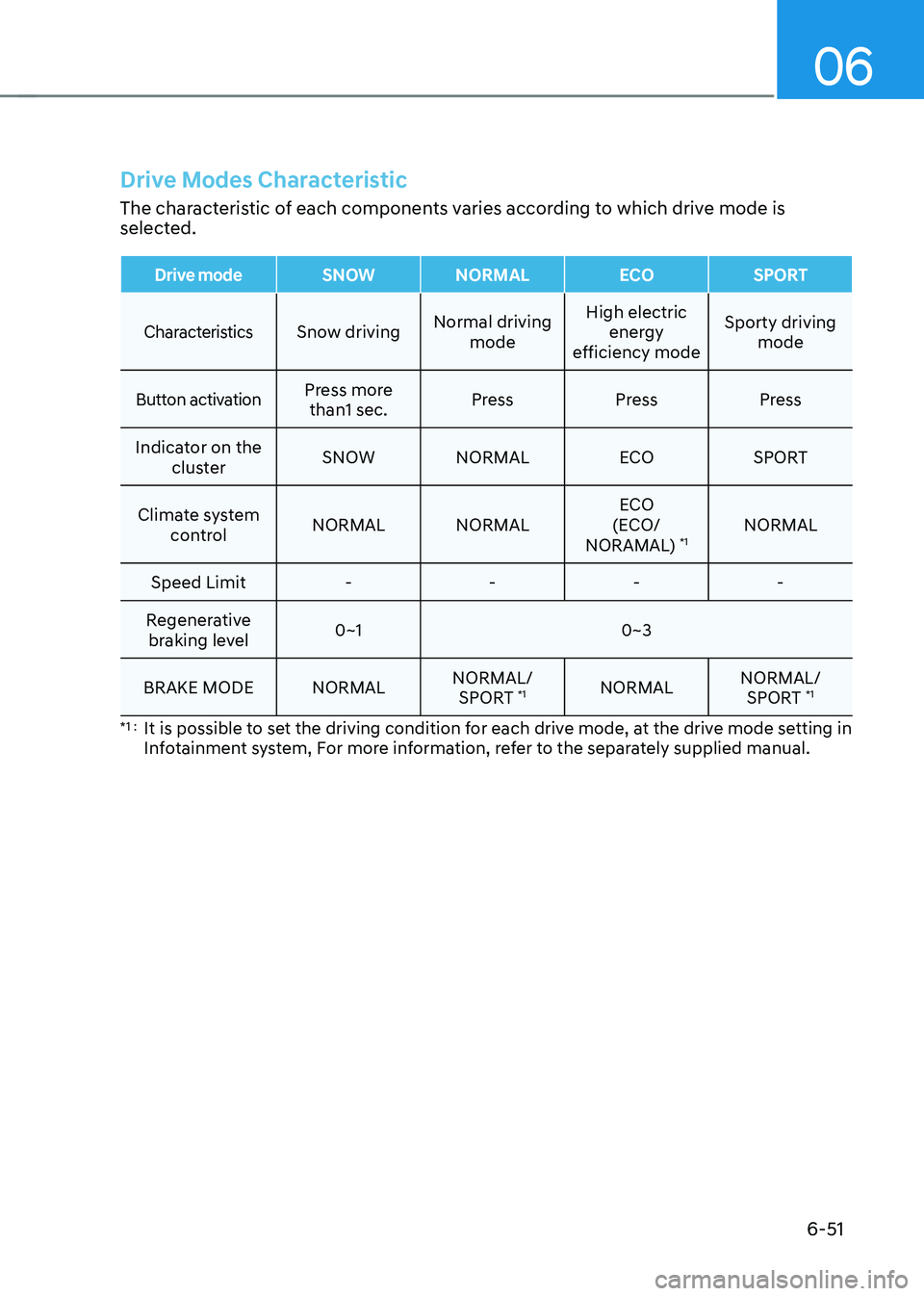
Drive Modes Characteristic
The characteristic of each components varies according to which drive mode is
selected.
Drive modeSNOW NORMALECOSPORT
CharacteristicsSnow driving Normal driving
mode High electric
energy
efficiency mode Sporty driving
mode
Button activationPress more than1 sec. Press Press Press
Indicator on the cluster SNOW NORMAL
ECOSPORT
Climate system control NORMAL NORMAL ECO
(ECO/
NORAMAL) *1NORMAL
Speed Limit - - - -
Regenerative braking level 0~1 0~3
BRAKE MODE NORMAL NORMAL/
SPORT *1
NORMAL NORMAL/
SPORT *1
*1 : It is possible to set the driving condition for each drive mode, at the drive mode setting in
Infotainment system, For more information, refer to the separately supplied manual.
Page 406 of 680
![HYUNDAI IONIQ 5 2023 Owners Manual Driver Assistance System
7-4
Detecting sensor
ONE1071002K
ONE1071003
ONE1071004N
[1]: Front view camera, [2]: Front radar,
[3]: Front corner radar (if equipped),
[4]: Rear corner radar (if equipped](/img/35/56168/w960_56168-405.png "HYUNDAI IONIQ 5 2023 Owners Manual Driver Assistance System
7-4
Detecting sensor
ONE1071002K
ONE1071003
ONE1071004N
[1]: Front view camera, [2]: Front radar,
[3]: Front corner radar (if equipped),
[4]: Rear corner radar (if equipped")
Driver Assistance System
7-4
Detecting sensor
ONE1071002K
ONE1071003
ONE1071004N
[1]: Front view camera, [2]: Front radar,
[3]: Front corner radar (if equipped),
[4]: Rear corner radar (if equipped)
Refer to the picture above for the
detailed location of the detecting
sensors.
CAUTION
Take the following precautions to
maintain optimal performance of the
detecting sensor: • Never disassemble the detecting
sensor or sensor assembly, or cause
any damage to it.
• If the detecting sensors have
been replaced or repaired, have
the vehicle be inspected by an
authorized HYUNDAI dealer.
• Never install any accessories or
stickers on the front windshield, or
tint the front windshield.
• Pay extreme caution to keep the
front view camera dry.
• Never place any reflective objects
(for example, white paper, mirror)
over the dashboard.
• Do not place any objects near the
front windshield or install any
accessories on the front windshield.
It can affect the performance of the
defogging and defrosting function
of the climate control system, which
may prevent the Driver Assistance
systems from operating
• Do not place objects or mount
structures near the windshield.
When operating the air conditioner,
moisture and defrost performance
may be poor, and driver assistance
functions may not work.
• Do not apply license plate frame or
objects, such as a bumper sticker,
film or a bumper guard, near the
front radar cover.
• Always keep the front radar and
cover clean and free of dirt and debris.
Use only a soft cloth to wash the
vehicle. Do not spray pressurized
water directly on the sensor or
sensor cover.
Page 604 of 680
9-3
09
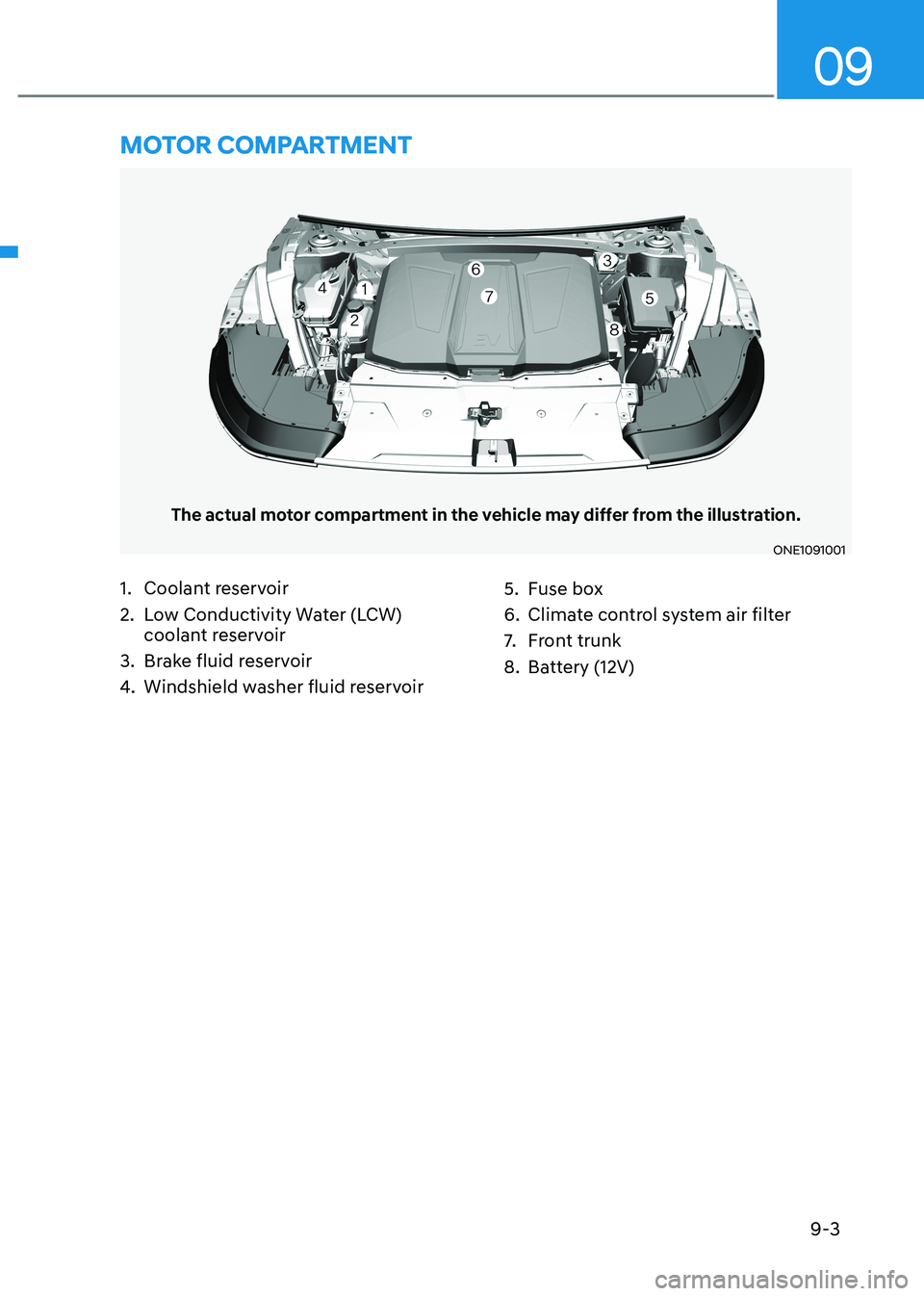
The actual motor compartment in the vehicle may differ from the illustration.
ONE1091001
1. Coolant reservoir
2. Low Conductivity Water (LCW) coolant reservoir
3. Brake fluid reservoir
4. Windshield washer fluid reservoir 5. Fuse box
6. Climate control system air filter
7.
Front trunk
8. Battery (12V)
Motor coMpartMent
Page 609 of 680
9-8
Maintenance
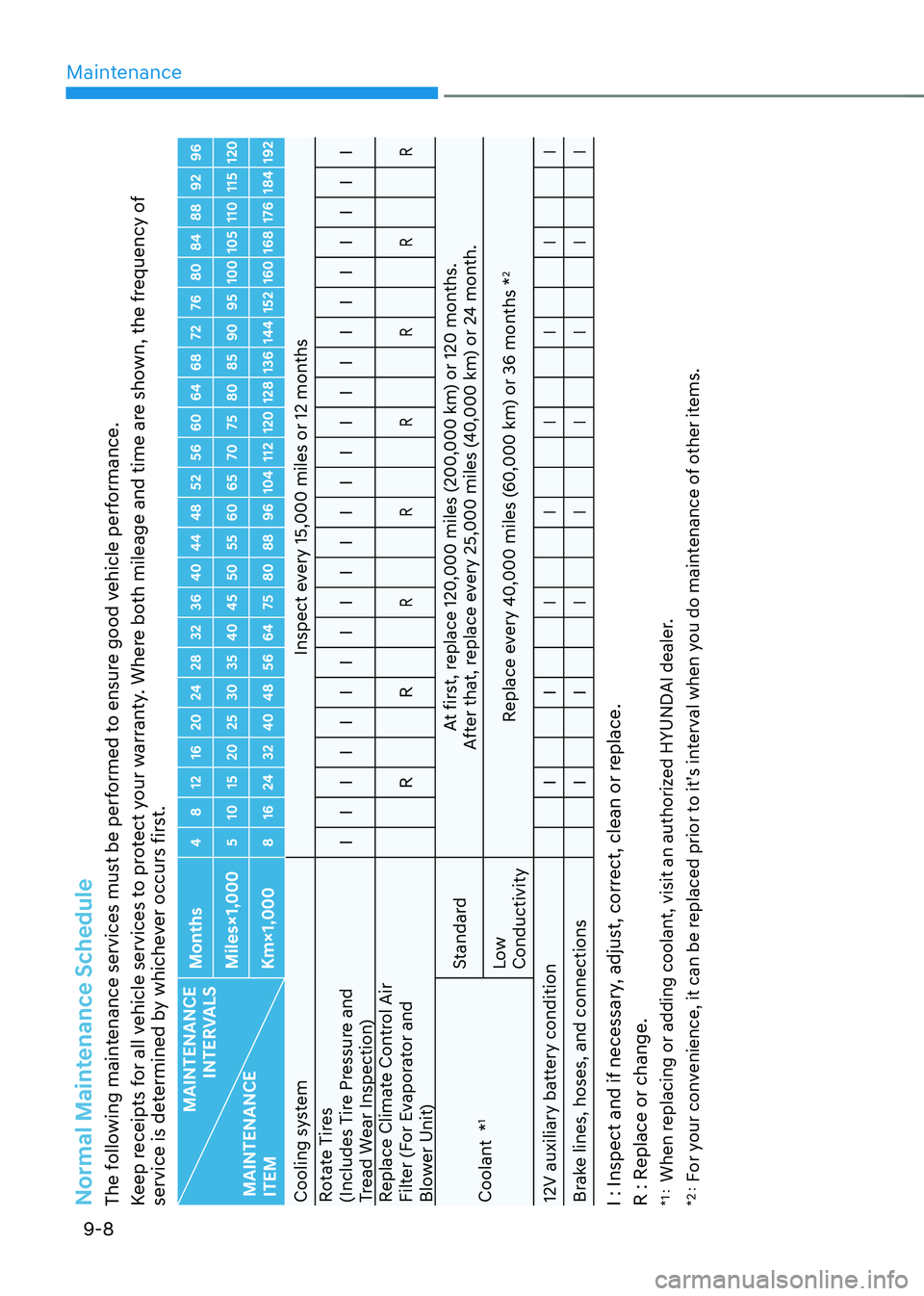
Normal Maintenance Schedule The following maintenance services must be performed to ensure good vehicle performance.
Keep receipts for all vehicle services to protect your warranty. Where both mileage and time are shown, the frequency of
service is determined by whichever occurs first.
MAINTENANCE INTERVALS
MAINTENANCE ITEM Months
4 8 12 16 20 24 28 32 36 40 44 48 52 56 60 64 68 72 76 80 84 88 92 96
Miles×1,000 5 10 15 20 25 30 35 40 45 50 55 60 65 70 75 80 85 90 95 100 105 110 115 120
Km×1,000 8 16 24 32 40 48 56 64 75 80 88 96 104 112 120 128 136 144 152 160 168 176 184 192
Cooling system
Inspect every 15,000 miles or 12 months
Rotate Tires
(Includes Tire Pressure and
Tread Wear Inspection) I I I I I I I I I I I I I I I I I I I I I I I I
Replace Climate Control Air
Filter (For Evaporator and
Blower Unit) R R
R R R R R R
Coolant *
1 Standard
At first, replace 120,000 miles (200,000 km) or 120 months.
After that, replace every 25,000 miles (40,000 km) or 24 month.
Low Conductivity Replace every 40,000 miles (60,000 km) or 36 months *
2
12V auxiliary battery condition I I
I I I I I I
Brake lines, hoses, and connections I I
I I I I I I
I : Inspect and if necessary, adjust, correct, clean or replace.
R : Replace or change. *1 : When replacing or adding coolant, visit an authorized HYUNDAI dealer.
*2 : For your convenience, it can be replaced prior to it’s interval when you do maintenance of other items.
Page 611 of 680
Maintenance
9-10
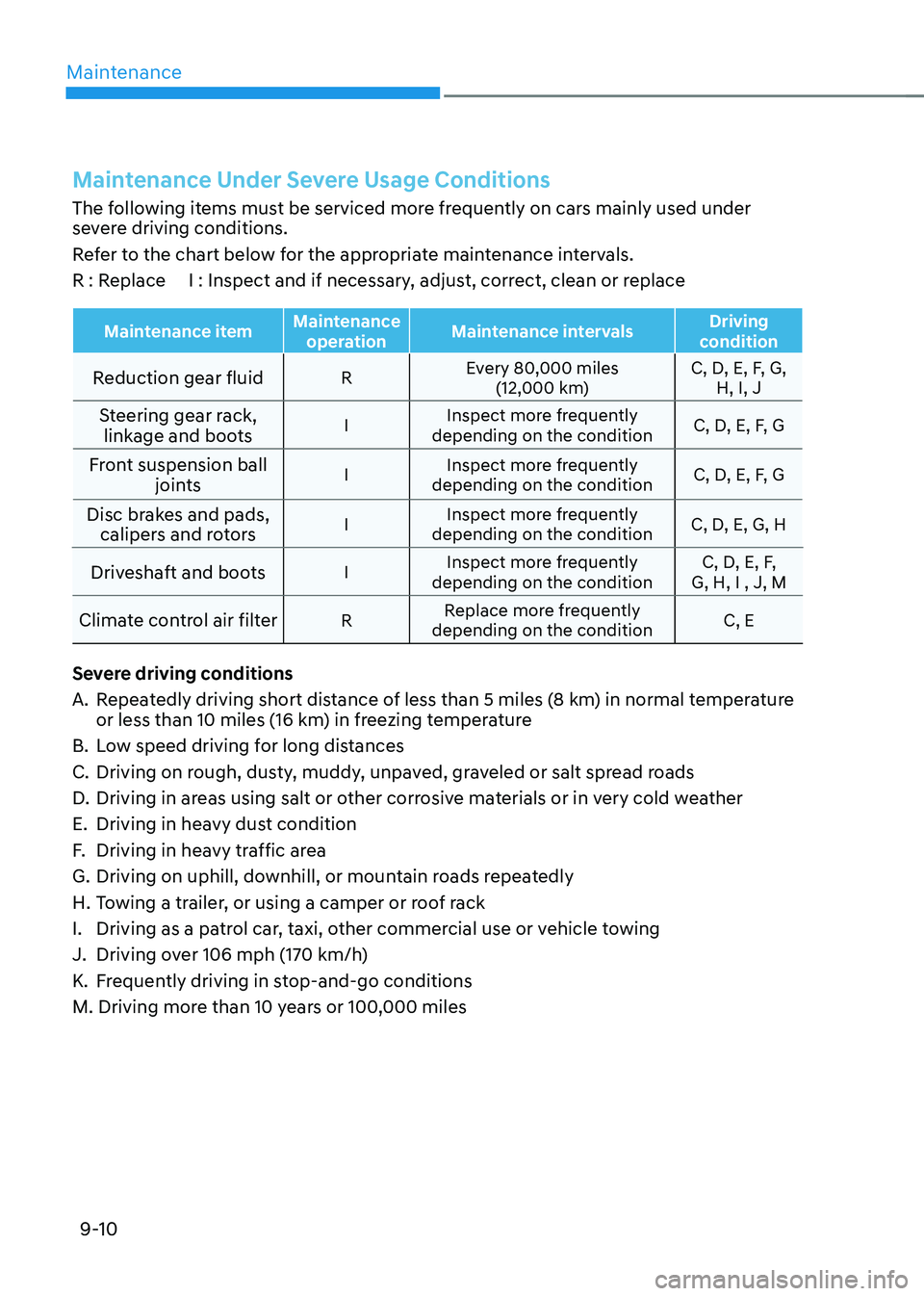
Maintenance Under Severe Usage Conditions
The following items must be serviced more frequently on cars mainly used under
severe driving conditions.
Refer to the chart below for the appropriate maintenance intervals.
R : Replace I : Inspect and if necessary, adjust, correct, clean or replace
Maintenance itemMaintenance
operation Maintenance intervals Driving
condition
Reduction gear fluid REvery 80,000 miles
(12,000 km) C, D, E, F, G,
H, I, J
Steering gear rack, linkage and boots I
Inspect more frequently
depending on the condition C, D, E, F, G
Front suspension ball joints I
Inspect more frequently
depending on the condition C, D, E, F, G
Disc brakes and pads, calipers and rotors I
Inspect more frequently
depending on the condition C, D, E, G, H
Driveshaft and boots IInspect more frequently
depending on the condition C, D, E, F,
G, H, I , J, M
Climate control air filter RReplace more frequently
depending on the condition C, E
Severe driving conditions
A. Repeatedly driving short distance of less than 5 miles (8 km) in normal temperature or less than 10 miles (16 km) in freezing temperature
B. Low speed driving for long distances
C. Driving on rough, dusty, muddy, unpaved, graveled or salt spread roads
D. Driving in areas using salt or other corrosive materials or in very cold weather
E. Driving in heavy dust condition
F. Driving in heavy traffic area
G. Driving on uphill, downhill, or mountain roads repeatedly
H. Towing a trailer, or using a camper or roof rack
I. Driving as a patrol car, taxi, other commercial use or vehicle towing
J. Driving over 106 mph (170 km/h)
K. Frequently driving in stop-and-go conditions
M. Driving more than 10 years or 100,000 miles
Page 615 of 680
Maintenance
9-14
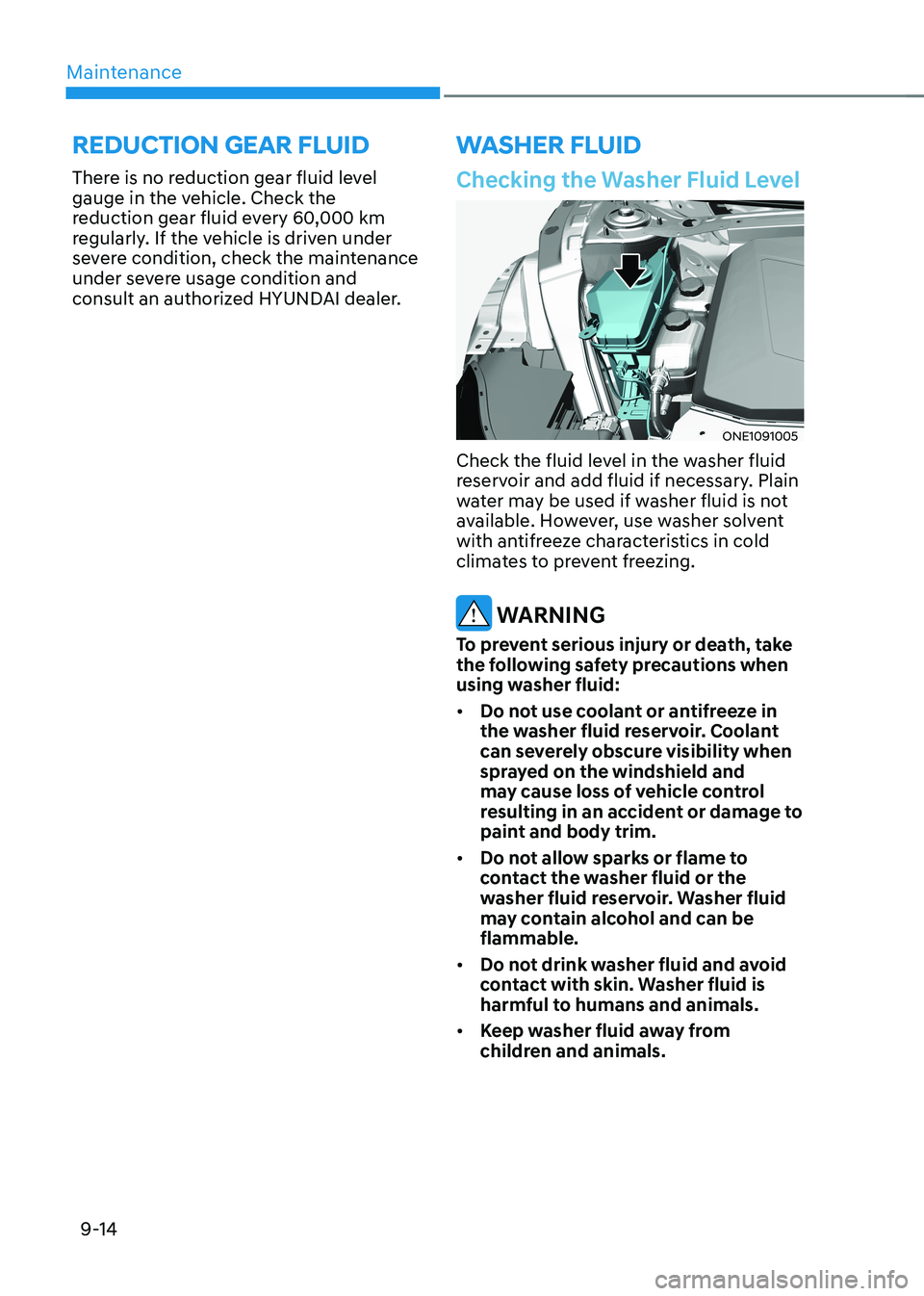
Checking the Washer Fluid Level
ONE1091005
Check the fluid level in the washer fluid
reservoir and add fluid if necessary. Plain
water may be used if washer fluid is not
available. However, use washer solvent
with antifreeze characteristics in cold
climates to prevent freezing.
WARNING
To prevent serious injury or death, take
the following safety precautions when
using washer fluid: • Do not use coolant or antifreeze in
the washer fluid reservoir. Coolant
can severely obscure visibility when
sprayed on the windshield and
may cause loss of vehicle control
resulting in an accident or damage to
paint and body trim.
• Do not allow sparks or flame to
contact the washer fluid or the
washer fluid reservoir. Washer fluid
may contain alcohol and can be flammable.
• Do not drink washer fluid and avoid
contact with skin. Washer fluid is
harmful to humans and animals.
• Keep washer fluid away from
children and animals.
washer fluid
reduction gear fluid
There is no reduction gear fluid level
gauge in the vehicle. Check the
reduction gear fluid every 60,000 km
regularly. If the vehicle is driven under
severe condition, check the maintenance
under severe usage condition and
consult an authorized HYUNDAI dealer.