key HYUNDAI IONIQ 5 2023 Repair Manual
[x] Cancel search | Manufacturer: HYUNDAI, Model Year: 2023, Model line: IONIQ 5, Model: HYUNDAI IONIQ 5 2023Pages: 680, PDF Size: 48.22 MB
Page 334 of 680
Driving Your Vehicle
6-8
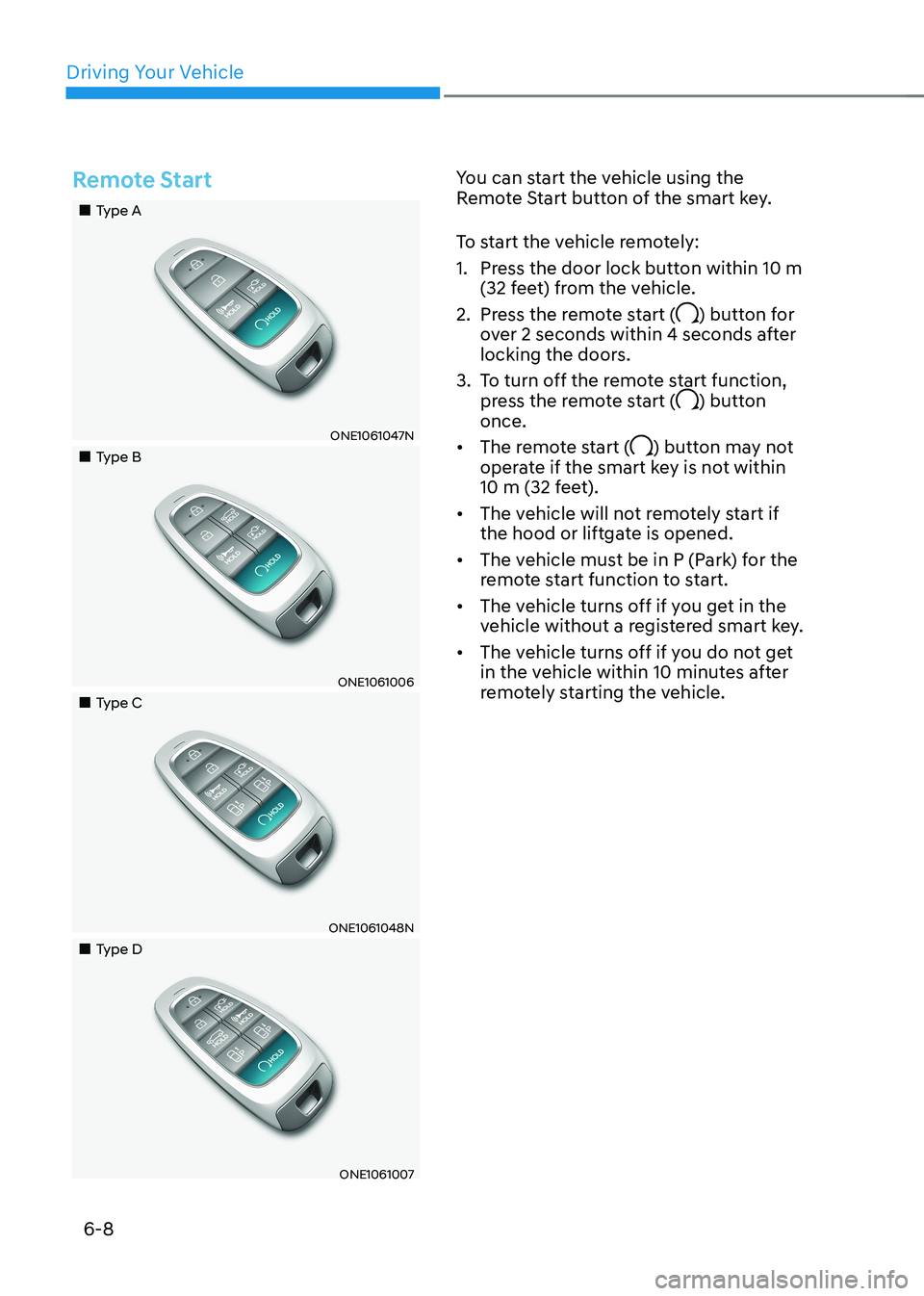
Remote Start
„„Type A
ONE1061047N
„„Type B
ONE1061006
„„Type C
ONE1061048N
„„Type D
ONE1061007You can start the vehicle using the
Remote Start button of the smart key.
To start the vehicle remotely:
1. Press the door lock button within 10 m
(32 feet) from the vehicle.
2. Press the remote start (
) button for
over 2 seconds within 4 seconds after
locking the doors.
3. To turn off the remote start function, press the remote start (
) button
once.
• The remote start (
) button may not
operate if the smart key is not within
10 m (32 feet).
• The vehicle will not remotely start if
the hood or liftgate is opened.
• The vehicle must be in P (Park) for the
remote start function to start.
• The vehicle turns off if you get in the
vehicle without a registered smart key.
• The vehicle turns off if you do not get
in the vehicle within 10 minutes after
remotely starting the vehicle.
Page 339 of 680
06
6-13
When the battery (12V) is discharged
You cannot shift gears, when the battery
is discharged.
Jump start your vehicle (refer to "Jump
Starting" in chapter 8) or contact an
authorized HYUNDAI dealer.
Parking
Always come to a complete stop and
continue to depress the brake pedal.
Shift the gear to P (Park), apply the
parking brake, and press the Start/Stop
button to the OFF position. Take the Key
with you when leaving the vehicle.
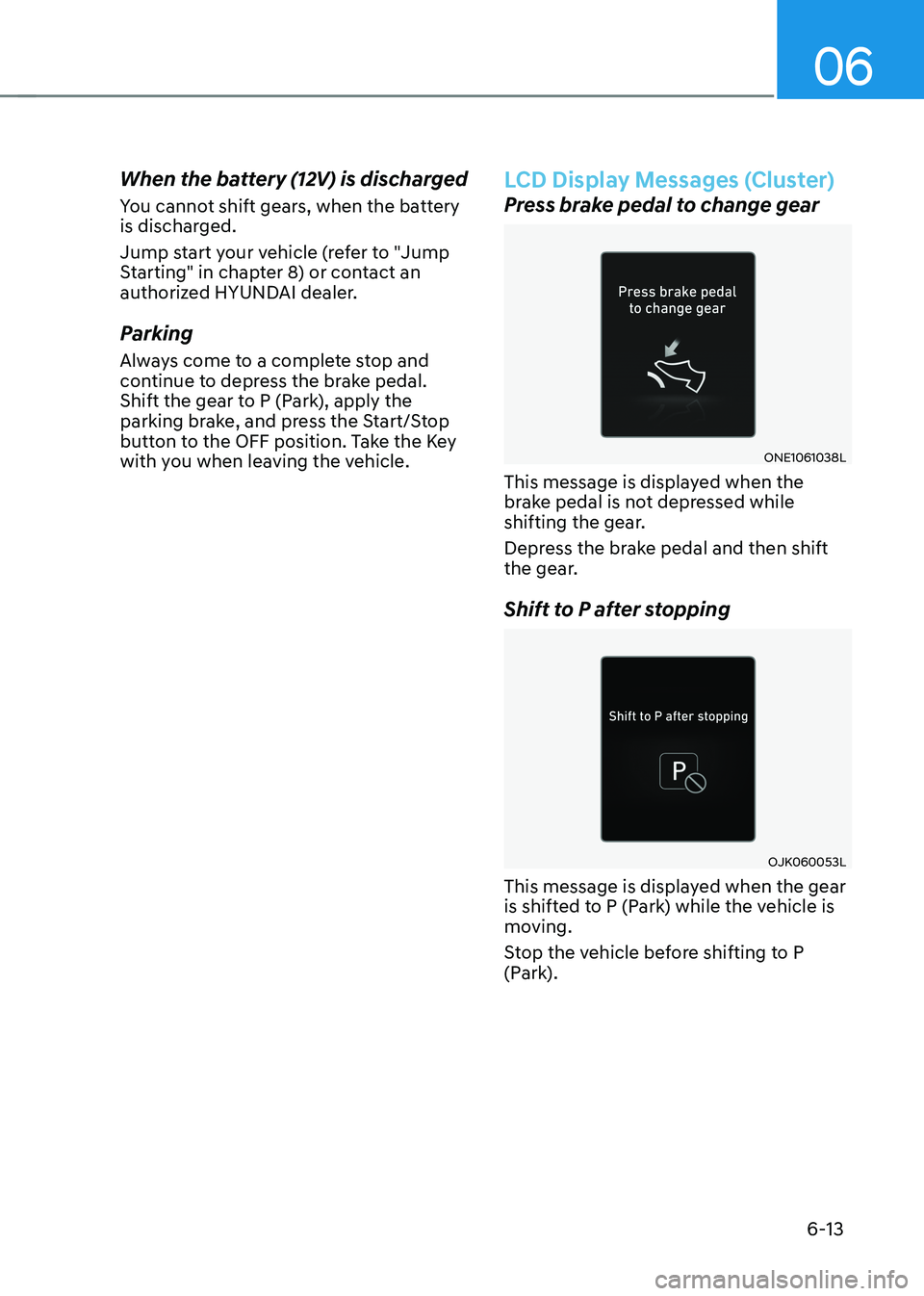
LCD Display Messages (Cluster)
Press brake pedal to change gear
ONE1061038L
This message is displayed when the
brake pedal is not depressed while
shifting the gear.
Depress the brake pedal and then shift
the gear.
Shift to P after stopping
OJK060053L
This message is displayed when the gear
is shifted to P (Park) while the vehicle is
moving.
Stop the vehicle before shifting to P
(Park).
Page 356 of 680
Driving Your Vehicle
6-30
WARNING
• Whenever leaving the vehicle or
parking, always come to a complete
stop and continue to depress the
brake pedal.
Shift the gear into P (Park), pull the
EPB switch, and press the Start/Stop
button to the OFF position. Take
the Key with you when leaving the
vehicle.
Vehicles not fully engaged in P (Park)
with the parking brake set are at risk
for moving inadvertently and causing
injury to yourself or others.
• NEVER allow anyone who is
unfamiliar with the vehicle to touch
the EPB switch. If EPB is released
unintentionally, serious injury may
occur.
• Only release EPB when you are
seated inside the vehicle with your
foot firmly on the brake pedal.NOTICE
• Do not apply the accelerator pedal
while the parking brake is engaged.
If you depress the accelerator pedal
with EPB engaged, a warning will
sound and a message will appear.
Damage to the parking brake may
occur.
• Driving with the parking brake on
can overheat the braking system and
cause premature wear or damage
to brake parts. Make sure EPB is
released and the Parking Brake
warning light is off before driving.
Information
• A clicking sound may be heard while
operating or releasing the EPB. These
conditions are normal and indicate that
EPB is functioning properly.
• When leaving your keys with a parking
attendant or assistant, make sure to
inform him/her how to operate EPB.
Page 386 of 680
Driving Your Vehicle
6-60
Winter Precautions
Check battery and cables
Winter temperatures affect battery
performance. Inspect the battery and
cables, as specified in chapter 9. The
battery charging level can be checked
by an authorized HYUNDAI dealer or in a
service station.
To prevent locks from freezing
To prevent the locks from being frozen,
spray approved de-icing fluid or glycerin
into key holes. When a lock opening is
already covered with ice, spray approved
de-icing fluid over the ice to remove it.
When an internal part of a lock freezes,
try to thaw it with a heated key. Carefully
use the heated key to avoid an injury.
Use approved window washer anti-
freeze solution in system
To prevent the window washer from
being frozen, add authorized window
washer anti-freeze solution, as specified
on the window washer container.
Window washer anti-freeze solution is
available from an authorized HYUNDAI
dealer, and most vehicle accessory
outlets. Do not use coolant or other types
of anti-freeze solution, to prevent any
damage to the vehicle paint. Do not let your parking brake freeze
Under some conditions your parking
brake can freeze in the engaged position.
This is most likely to happen when there
is an accumulation of snow or ice around
or near the rear brakes or if the brakes
are wet. When there is the risk that your
parking brake may freeze, temporarily
apply it with the gear in P (Park). Also,
block the rear wheels in advance, so the
vehicle may not roll. Then, release the
parking brake.
Do not let ice and snow accumulate
underneath
Under some conditions, snow and ice
can build up under the fenders and
interfere with the steering. When driving
in such conditions during the severe
winter, you should check underneath
the vehicle on a regular basis, to ensure
that the front wheels and the steering
components is unblocked.
Carry emergency equipment
In accordance with weather conditions,
you should carry appropriate emergency
equipment, while driving. Some of the
items you may want to carry include tire
chains, tow straps or chains, flashlight,
emergency flares, sand, shovel, jumper
cables, window scraper, gloves, ground
cloth, coveralls, blanket, etc.
Do not place objects or materials in the
motor compartment
Putting objects or materials in the motor
compartment may cause an motor
failure. Such damage will not be covered
by the manufacturer’s warranty.
Page 397 of 680
06
6-71
Trailer Towing Equipment
Hitches
ONE1061060N
Information
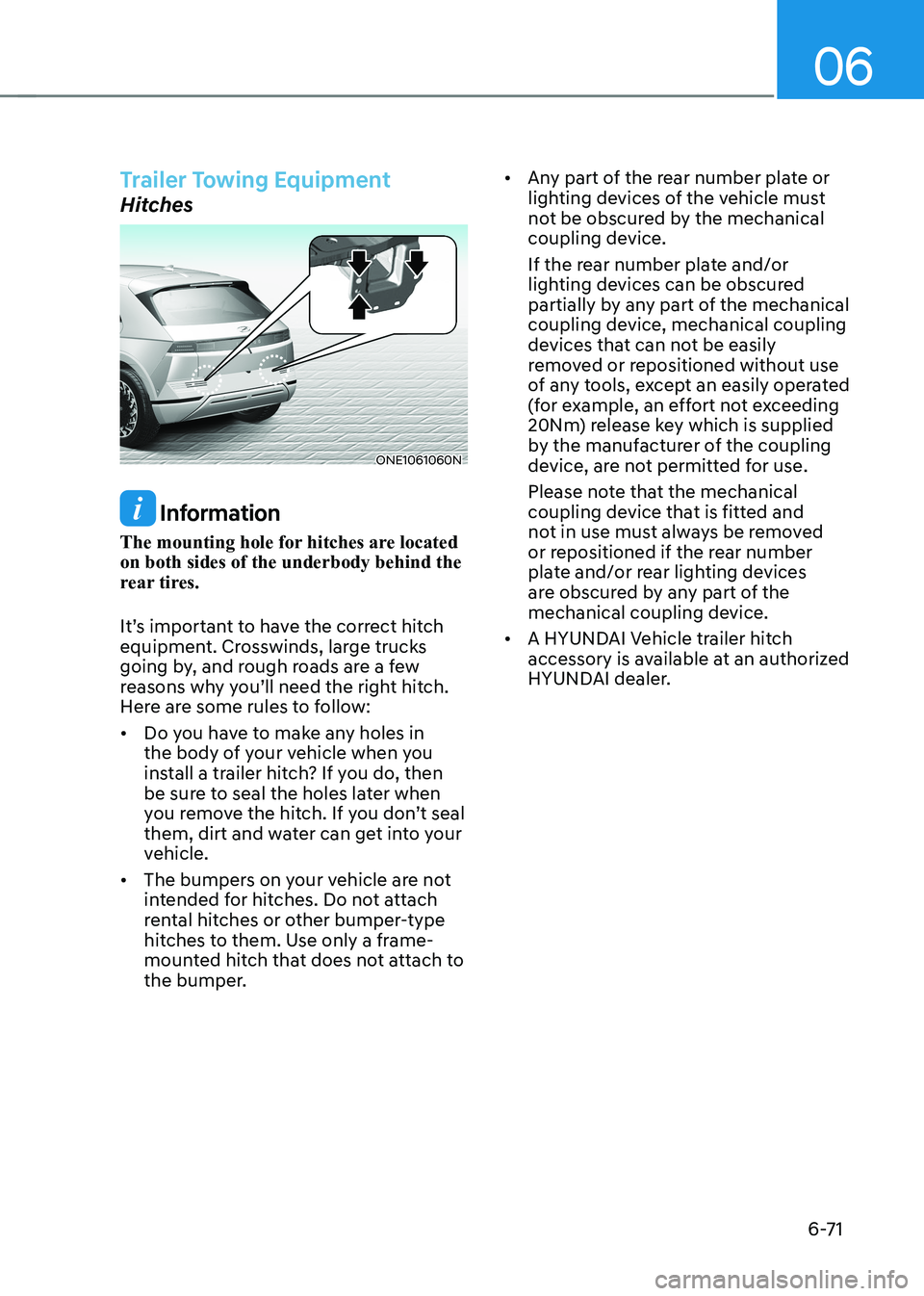
The mounting hole for hitches are located on both sides of the underbody behind the
rear tires.
It’s important to have the correct hitch
equipment. Crosswinds, large trucks
going by, and rough roads are a few
reasons why you’ll need the right hitch.
Here are some rules to follow: • Do you have to make any holes in
the body of your vehicle when you
install a trailer hitch? If you do, then
be sure to seal the holes later when
you remove the hitch. If you don’t seal
them, dirt and water can get into your
vehicle.
• The bumpers on your vehicle are not
intended for hitches. Do not attach
rental hitches or other bumper-type
hitches to them. Use only a frame-
mounted hitch that does not attach to
the bumper. •
Any part of the rear number plate or
lighting devices of the vehicle must
not be obscured by the mechanical
coupling device.
If the rear number plate and/or
lighting devices can be obscured
partially by any part of the mechanical
coupling device, mechanical coupling
devices that can not be easily
removed or repositioned without use
of any tools, except an easily operated
(for example, an effort not exceeding
20Nm) release key which is supplied
by the manufacturer of the coupling
device, are not permitted for use.
Please note that the mechanical
coupling device that is fitted and
not in use must always be removed
or repositioned if the rear number
plate and/or rear lighting devices
are obscured by any part of the
mechanical coupling device.
• A HYUNDAI Vehicle trailer hitch
accessory is available at an authorized
HYUNDAI dealer.
Page 552 of 680
Driver Assistance System
7-150
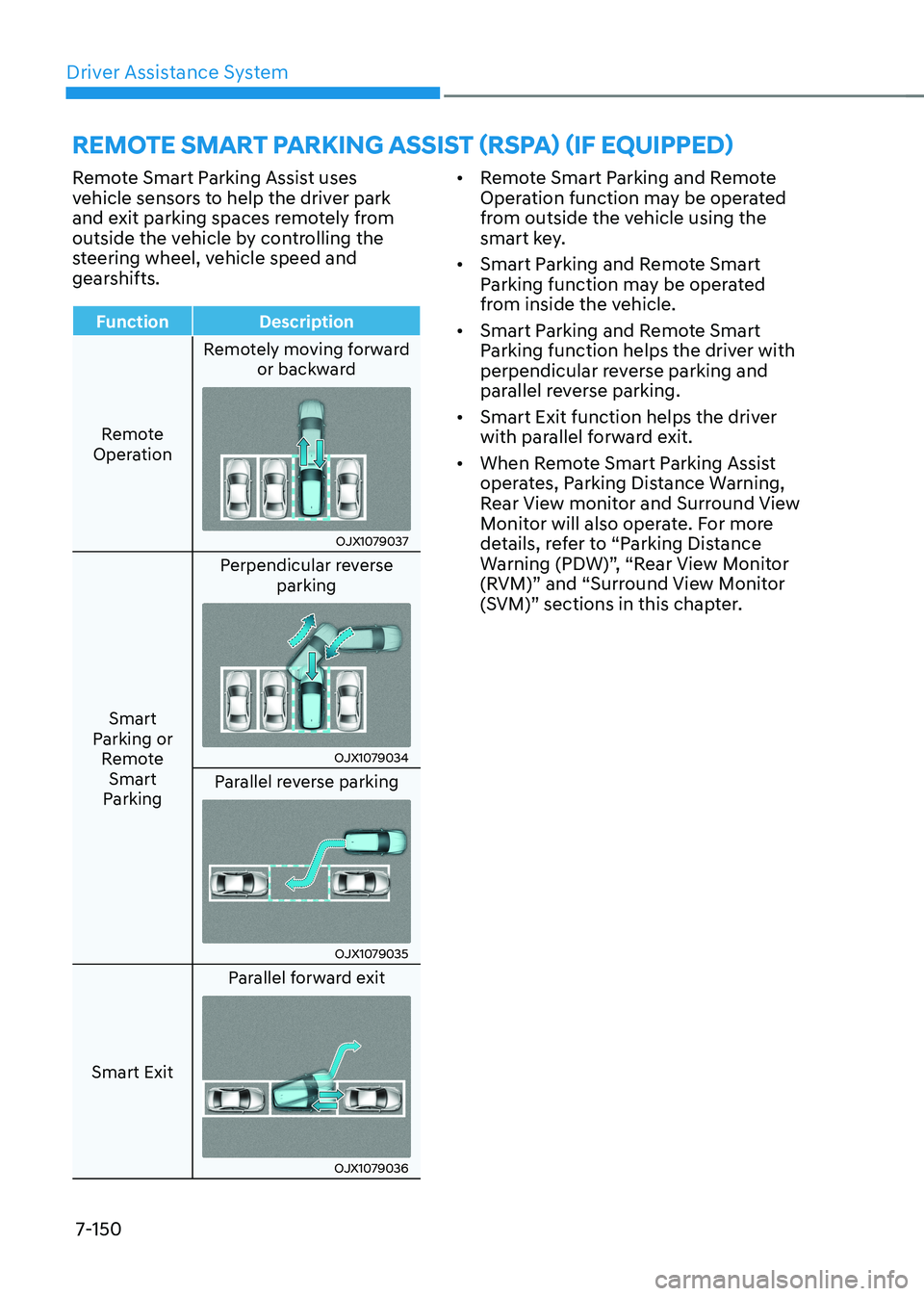
Remote Smart Parking Assist uses
vehicle sensors to help the driver park
and exit parking spaces remotely from
outside the vehicle by controlling the
steering wheel, vehicle speed and
gearshifts.
Function Description
Remote
Operation Remotely moving forward
or backward
OJX1079037
Smart
Parking or Remote Smart
Parking Perpendicular reverse
parking
OJX1079034
Parallel reverse parking
OJX1079035
Smart Exit Parallel forward exit
OJX1079036•
Remote Smart Parking and Remote
Operation function may be operated
from outside the vehicle using the
smart key.
• Smart Parking and Remote Smart
Parking function may be operated
from inside the vehicle.
• Smart Parking and Remote Smart
Parking function helps the driver with
perpendicular reverse parking and
parallel reverse parking.
• Smart Exit function helps the driver
with parallel forward exit.
• When Remote Smart Parking Assist
operates, Parking Distance Warning,
Rear View monitor and Surround View
Monitor will also operate. For more
details, refer to “Parking Distance
Warning (PDW)”, “Rear View Monitor
(RVM)” and “Surround View Monitor
(SVM)” sections in this chapter.
REMOTE SMART PARKING ASSIST (RSPA) (IF EQUIPPED)
Page 554 of 680
Driver Assistance System
7-152
Remote Smart Parking Assist Operation
Remote Smart Parking Assist button
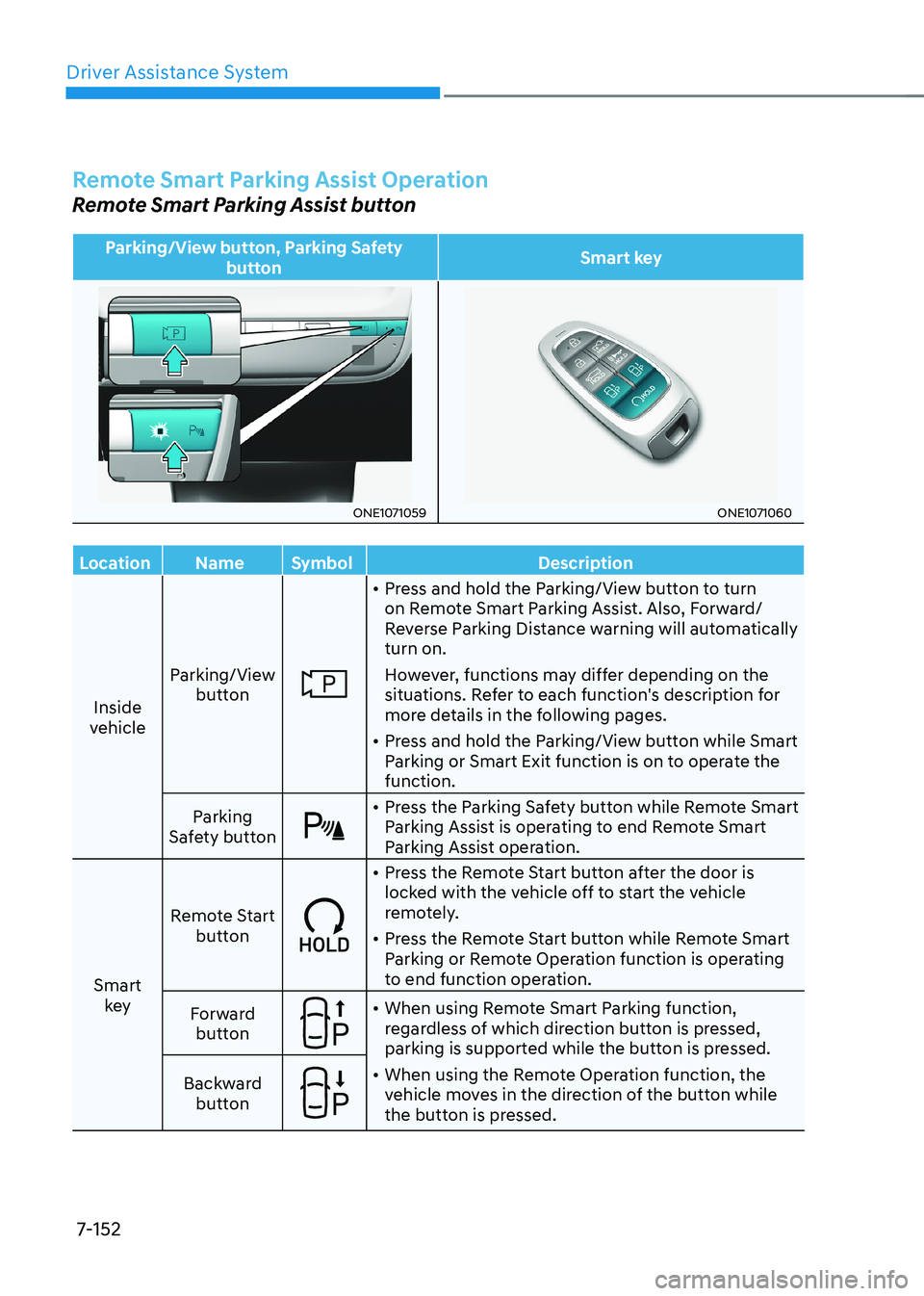
Parking/View button, Parking Safety button Smart key
ONE1071059ONE1071060
Location Name Symbol Description
Inside
vehicle Parking/View
button
• Press and hold the Parking/View button to turn
on Remote Smart Parking Assist. Also, Forward/
Reverse Parking Distance warning will automatically turn on.
However, functions may differ depending on the
situations. Refer to each function's description for
more details in the following pages.
• Press and hold the Parking/View button while Smart
Parking or Smart Exit function is on to operate the function.
Parking
Safety button
• Press the Parking Safety button while Remote Smart
Parking Assist is operating to end Remote Smart
Parking Assist operation.
Smart key Remote Start
button
• Press the Remote Start button after the door is
locked with the vehicle off to start the vehicle
remotely.
• Press the Remote Start button while Remote Smart
Parking or Remote Operation function is operating
to end function operation.
Forward button
• When using Remote Smart Parking function,
regardless of which direction button is pressed,
parking is supported while the button is pressed.
• When using the Remote Operation function, the
vehicle moves in the direction of the button while
the button is pressed.
Backward
button
Page 555 of 680
07
7-153
Remote Operation
Operating order
Remote Operation operates in the
following order:
1. Getting ready to remotely move
forward and backward
2. Remotely moving forward and backward
1. Getting ready to remotely move forward and backward
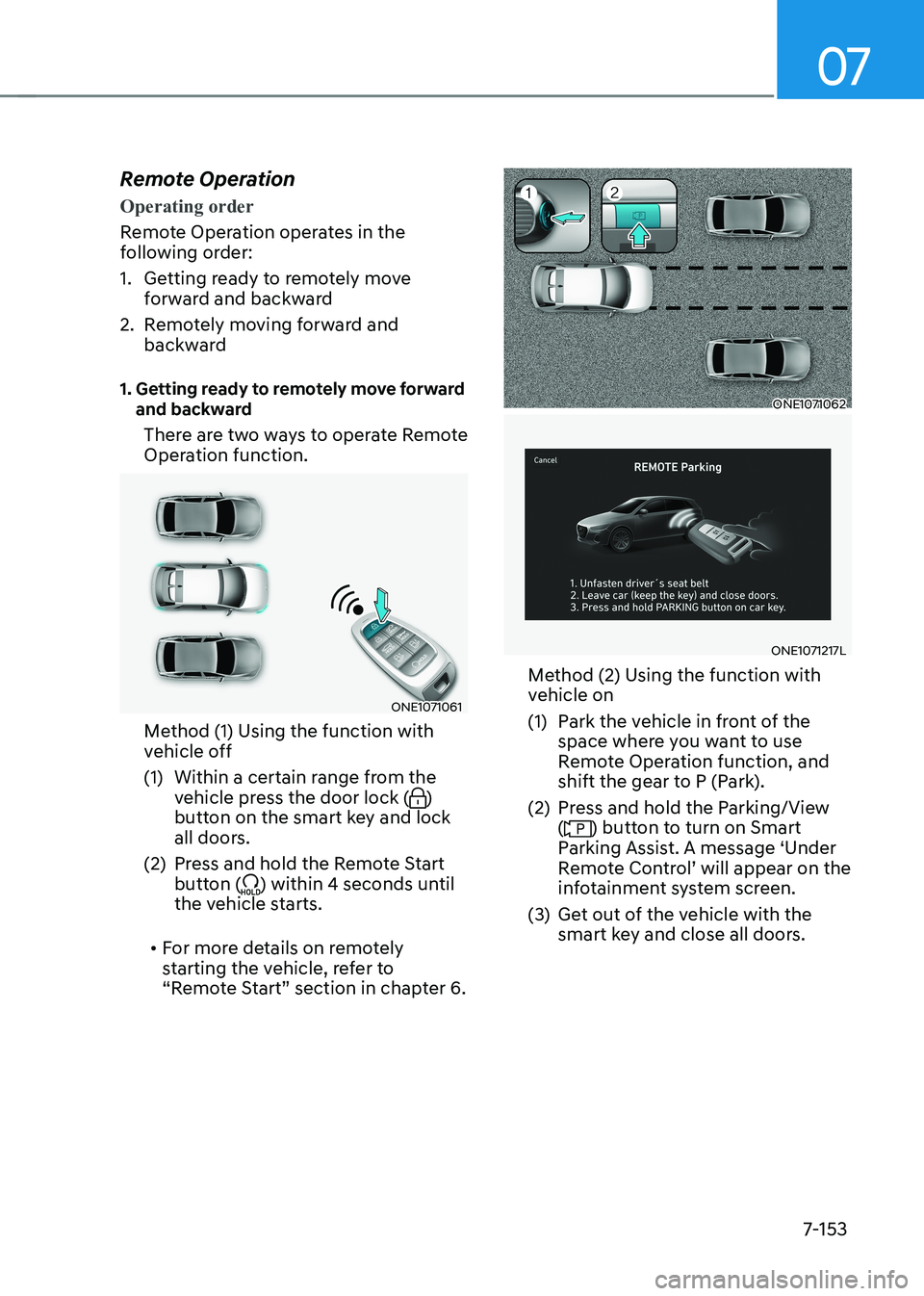
There are two ways to operate Remote
Operation function.
ONE1071061
Method (1) Using the function with
vehicle off
(1) Within a certain range from the vehicle press the door lock (
)
button on the smart key and lock
all doors.
(2) Press and hold the Remote Start button (
) within 4 seconds until
the vehicle starts.
• For more details on remotely
starting the vehicle, refer to
“Remote Start” section in chapter 6.
ONE1071062
ONE1071217L
Method (2) Using the function with
vehicle on
(1) Park the vehicle in front of the space where you want to use
Remote Operation function, and
shift the gear to P (Park).
(2) Press and hold the Parking/View (
) button to turn on Smart
Parking Assist. A message ‘Under
Remote Control’ will appear on the
infotainment system screen.
(3) Get out of the vehicle with the smart key and close all doors.
Page 556 of 680
Driver Assistance System
7-154•
'Agree' must be selected on the
infotainment system screen and the
infotainment system has to operate
properly to use Remote Operation function.
• Method (2) can be used after the
vehicle has been driven above 3
mph (5 km/h).
• If the function is turned on again
after parallel parking is completed
by Remote Smart Parking Assist,
Remote Operation function can be
used with Method (2).
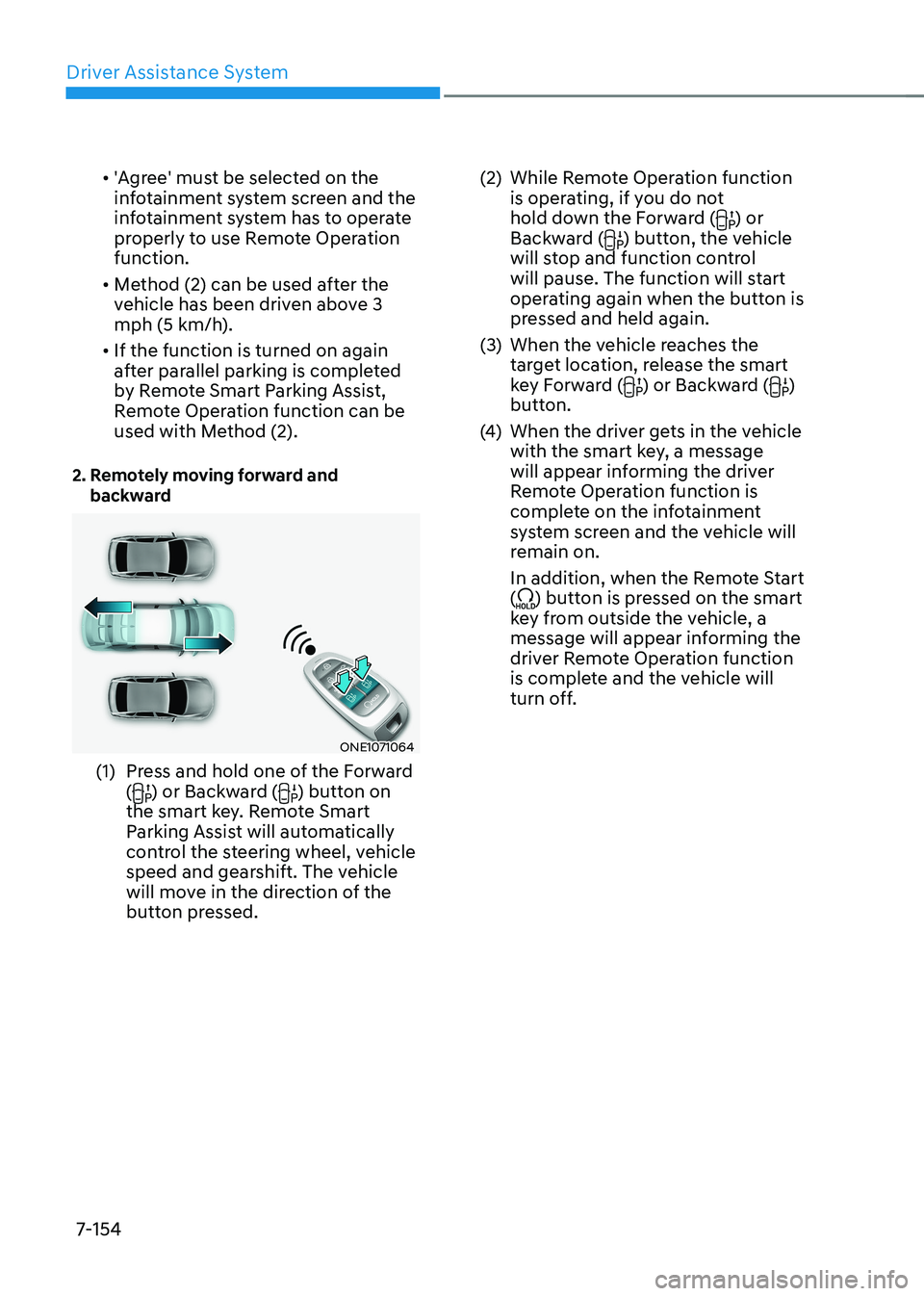
2. Remotely moving forward and backward
ONE1071064
(1) Press and hold one of the Forward (
) or Backward () button on
the smart key. Remote Smart
Parking Assist will automatically
control the steering wheel, vehicle
speed and gearshift. The vehicle
will move in the direction of the
button pressed. (2) While Remote Operation function
is operating, if you do not
hold down the Forward (
) or
Backward () button, the vehicle
will stop and function control
will pause. The function will start
operating again when the button is
pressed and held again.
(3) When the vehicle reaches the target location, release the smart
key Forward (
) or Backward ()
button.
(4) When the driver gets in the vehicle
with the smart key, a message
will appear informing the driver
Remote Operation function is
complete on the infotainment
system screen and the vehicle will
remain on.
In addition, when the Remote Start (
) button is pressed on the smart
key from outside the vehicle, a
message will appear informing the
driver Remote Operation function
is complete and the vehicle will
turn off.
Page 557 of 680
07
7-155
•
Check that all smart keys are
outside the vehicle when using
Remote Operation function.
• Remote Operation function will
operate only when the smart key is
within 13 ft. (4 m) from the vehicle. If
there is no vehicle movement even
when the Forward (
) or Backward
() button is pressed on the smart
key, check the distance to the
vehicle and press the button again.
• The detecting range of the smart
key may vary depending on the
surroundings that are affected by
radio waves such as transmission
tower, broadcast station, etc.
• When remotely moving forward
using method (1), it is recognized
as an exit situation, and the
vehicle moves 13 ft. (4 m) to
check for pedestrians, animals or
objects around the vehicle. After
confirmation, the steering wheel
is controlled according to the condition ahead.
• When remotely moving forward
using method (2), it is recognized
as a parking situation, and will
immediately control the steering
wheel according to the condition
ahead to assist with entering the parking space and aligning the
vehicle. However, performance
may reduce depending on the
pedestrians, animals, shape of
objects, location, etc., around the
vehicle.
• For moving remotely backward,
both method (1) and (2) aligns the
steering wheel first, and then will
only move the vehicle straight.
• When remotely moving forward or
backward is completed, the vehicle
will automatically shift to P (Park)
and engage EPB (Electronic Parking
Brake).
CAUTION
• When using Remote Operation
function, make sure that all
passengers have gotten out of the
vehicle.
• If the vehicle’s battery is discharged
or Remote Smart Parking Assist
malfunctions when parked in a
narrow parking space, Remote
Operation function will not operate.
Always park your vehicle in a space
wide enough for you to get in or out
of your vehicle.
• Please note that depending on the
parking space, you may not be able
to exit from the space you have
entered by using Remote Operation function.
• After parking, the surrounding may
change due to the movement of
surrounding vehicles. If this occurs,
Remote Operation function may not
operate.
• Before leaving the vehicle, close
windows and sunroofs, and make
sure the vehicle is off before locking
the doors.