key HYUNDAI IONIQ 5 2023 Manual PDF
[x] Cancel search | Manufacturer: HYUNDAI, Model Year: 2023, Model line: IONIQ 5, Model: HYUNDAI IONIQ 5 2023Pages: 680, PDF Size: 48.22 MB
Page 558 of 680
Driver Assistance System
7-156
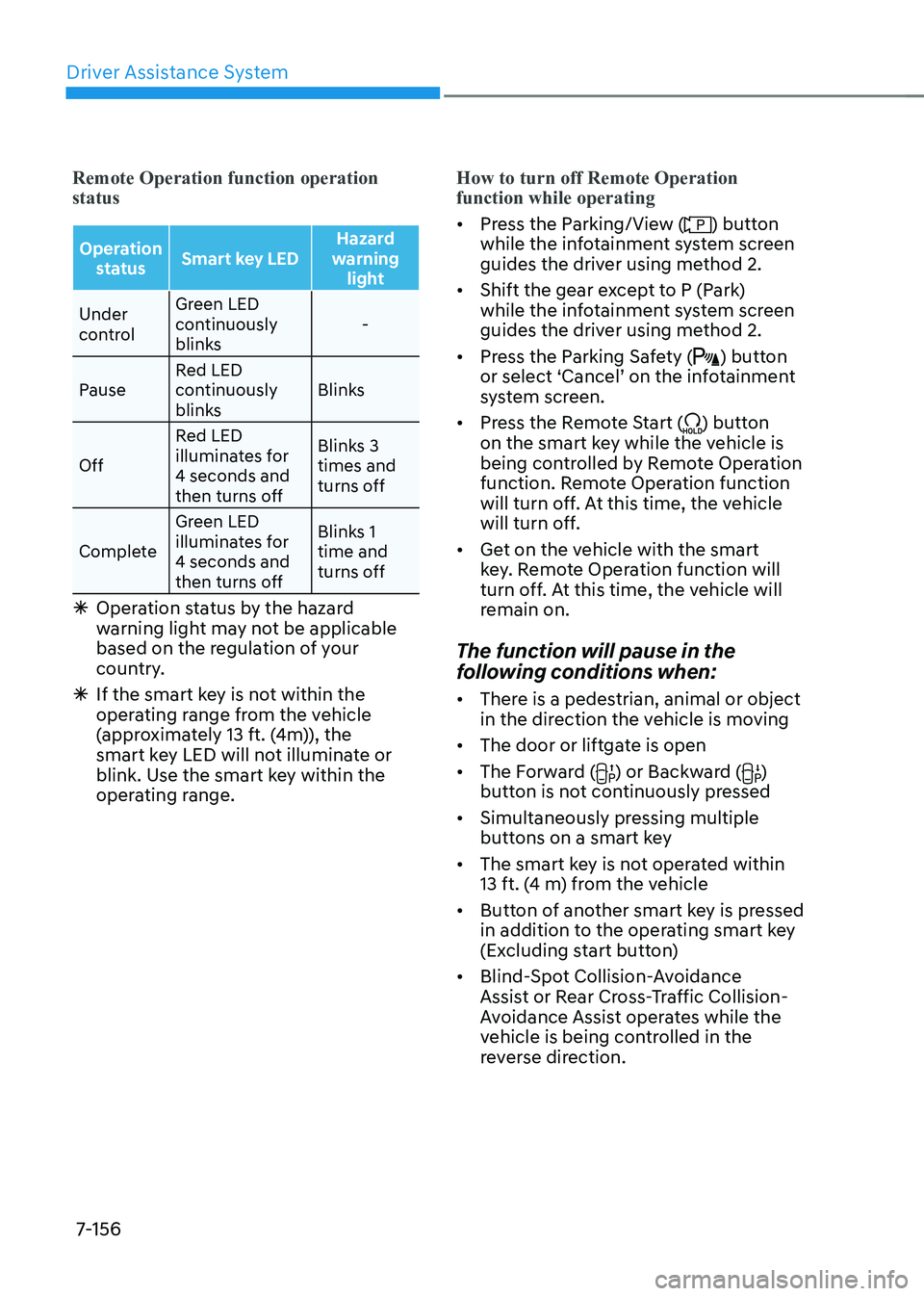
Remote Operation function operation status
Operation status Smart key LED Hazard
warning light
Under
control Green LED
continuously
blinks
-
Pause Red LED
continuously
blinks Blinks
Off Red LED
illuminates for 4 seconds and
then turns off Blinks 3 times and
turns off
Complete Green LED
illuminates for 4 seconds and
then turns off Blinks 1 time and
turns off
à Operation status by the hazard
warning light may not be applicable
based on the regulation of your
country.
à If the smart key is not within the
operating range from the vehicle
(approximately 13 ft. (4m)), the
smart key LED will not illuminate or
blink. Use the smart key within the
operating range.
How to turn off Remote Operation function while operating
• Press the Parking/View () button
while the infotainment system screen
guides the driver using method 2.
• Shift the gear except to P (Park)
while the infotainment system screen
guides the driver using method 2.
• Press the Parking Safety (
) button
or select ‘Cancel’ on the infotainment
system screen.
• Press the Remote Start (
) button
on the smart key while the vehicle is
being controlled by Remote Operation
function. Remote Operation function
will turn off. At this time, the vehicle
will turn off.
• Get on the vehicle with the smart
key. Remote Operation function will
turn off. At this time, the vehicle will
remain on.
The function will pause in the
following conditions when: • There is a pedestrian, animal or object
in the direction the vehicle is moving
• The door or liftgate is open
• The Forward (
) or Backward ()
button is not continuously pressed
• Simultaneously pressing multiple
buttons on a smart key
• The smart key is not operated within
13 ft. (4 m) from the vehicle
• Button of another smart key is pressed
in addition to the operating smart key
(Excluding start button)
• Blind-Spot Collision-Avoidance
Assist or Rear Cross-Traffic Collision-
Avoidance Assist operates while the
vehicle is being controlled in the
reverse direction.
Page 559 of 680
07
7-157
•
The vehicle moves 22 ft. (7 m) while
the smart key is pressed with Remote
Operation function (maximum travel
distance per button press)
When Remote Operation function is
paused, the vehicle will stop. If the
condition that made the function to
pause disappears, the function may
operate again.
The function will cancel in the
following conditions when: • The steering wheel is steered
• The gear is shifted while the vehicle is
moving
• Operating EPB while the vehicle is
moving
• The vehicle hood is open
• The brake pedal or accelerator pedal
is depressed when all the doors are closed
• The smart key is outside the vehicle
when the brake pedal is depressed
while the driver's door is open
• Rapid acceleration occurs
• Vehicle skid occurs
• The wheel is stuck by an obstacle and
cannot move •
Approximately 3 minutes and 50
seconds has passed after Remote
Operation function has started to
operate
• The slope of the road exceeds the
operational range
• The function is paused for more than
1 minute
• The total travel distance of the vehicle
has exceeded 45 ft. (14 m) after
Remote Operation function operation
• The steering wheel, gearshift, braking,
and drive controls are not working
properly
• There is a problem with the smart key
or the smart key battery is low
• ABS, TCS or ESC system operates due
to slippery road conditions
• The alarm of the Theft Alarm System sounds
• The Charging door opens
• The EV mode is utility mode
When Remote Operation function is
canceled, the vehicle will automatically
stop, shift the gear to P (Park) and
engage EPB (Electronic Parking Brake).
Page 564 of 680
Driver Assistance System
7-162•
Smart Parking function will not
operate if the door is open or the
seat belt is not fastened.
• The parking location indicator is
displayed on Surround View Monitor
screen and is displayed until the
vehicle enters the parking space
for the first time by Smart Parking function.
• Vehicle speed can be adjusted
by depressing the brake pedal
while Smart Parking function is
operating. However, the vehicle
does not accelerate even when the
accelerator pedal is depressed.
• Depending on parking
environments, if the vehicle is
stopped by a stopper, parking may
be completed.
• If you need to change the vehicle's
position or location, manually
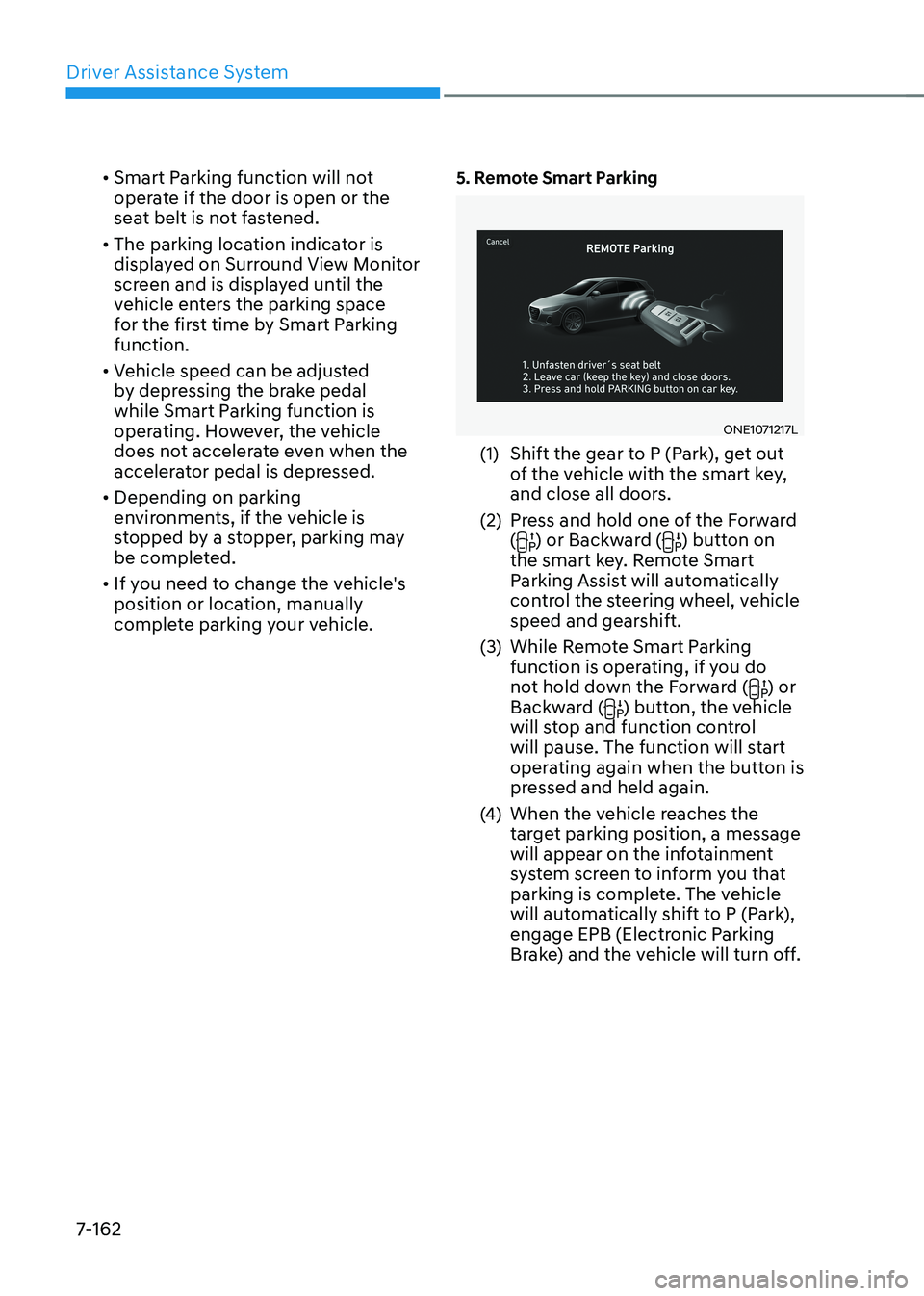
complete parking your vehicle. 5. Remote Smart Parking
ONE1071217L
(1) Shift the gear to P (Park), get out of the vehicle with the smart key,
and close all doors.
(2) Press and hold one of the Forward (
) or Backward () button on
the smart key. Remote Smart
Parking Assist will automatically
control the steering wheel, vehicle
speed and gearshift.
(3) While Remote Smart Parking function is operating, if you do
not hold down the Forward (
) or
Backward () button, the vehicle
will stop and function control
will pause. The function will start
operating again when the button is
pressed and held again.
(4) When the vehicle reaches the
target parking position, a message
will appear on the infotainment
system screen to inform you that
parking is complete. The vehicle
will automatically shift to P (Park),
engage EPB (Electronic Parking
Brake) and the vehicle will turn off.
Page 565 of 680
07
7-163
•
When operating Remote Smart
Parking function, make sure all
smart keys are outside of the
vehicle.
• Remote Smart Parking function will
operate only when the smart key is
within 13 ft. (4 m) from the vehicle. If
there is no vehicle movement even
when the Remote Operation button
is pressed on the smart key, check
the distance to the vehicle and
press the button again.
• The detecting range of the smart
key may vary depending on the
surroundings that are affected by
radio waves such as transmission
tower, broadcast station, etc.
• The parking location indicator is
displayed on Surround View Monitor
screen and is displayed until the
vehicle enters the parking space
for the first time by Remote Smart
Parking function.
• Depending on parking
environments, if the vehicle is
stopped by a stopper, parking may
be completed.
• If you need to change the vehicle's
position or location, manually
complete parking your vehicle.
CAUTION
• When using Remote Smart Parking
function, make sure that all
passengers have gotten out of the
vehicle.
• After ending or turning off Remote
Smart Parking function, before
leaving the vehicle, close windows
and sunroofs, and make sure the
vehicle is off before locking the
doors. How to turn off Parking function
while operating •
Press the Parking/View (
) button in
the following stage:
- Searching for parking space
- Select parking type
• Shift the gear to R (Reverse) in the
following stage:
- Searching for parking space
- Select parking type
- Select operating mode
• Press the Parking Safety (
) button
or select ‘Cancel’ on the infotainment
system screen to turn off Parking function.
• While Smart Parking function is
operating:
- If the vehicle is stopped by depressing the brake pedal, and the
gear is shifted, Parking function will
turn off. At this time, EPB (Electronic
Parking Brake) will not be engaged.
• While Remote Smart Parking function
is operating:
- Press the Remote Start (
) button
on the smart key. Parking function
will turn off.
- Get on the vehicle with the smart key. Parking function will turn off. At
this time, the vehicle will remain on.
Page 566 of 680
Driver Assistance System
7-164
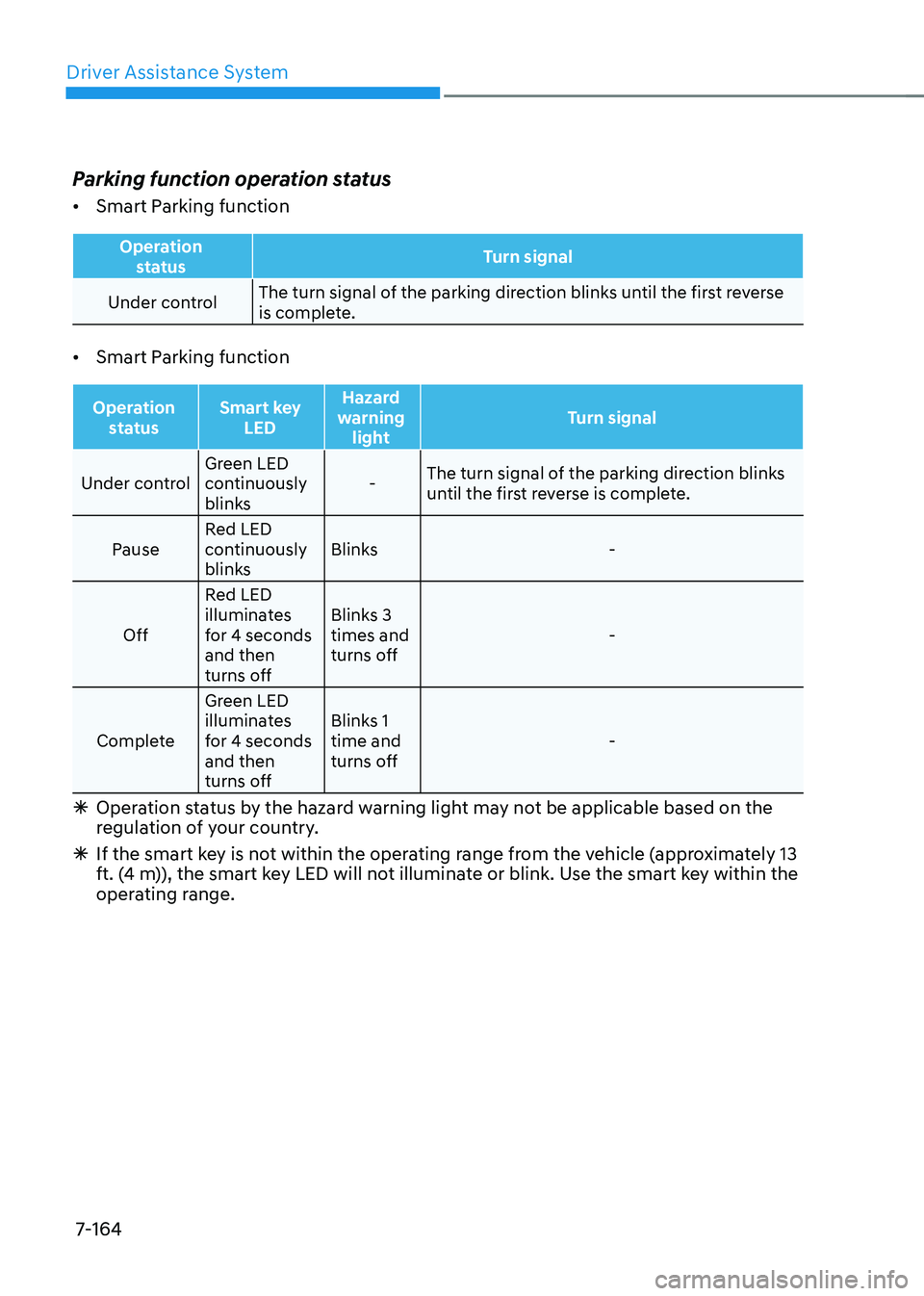
Parking function operation status •
Smart Parking function
Operation
status Turn signal
Under controlThe turn signal of the parking direction blinks until the first reverse
is complete.
• Smart Parking function
Operation
status Smart key
LED Hazard
warning light Turn signal
Under controlGreen LED
continuously
blinks -
The turn signal of the parking direction blinks
until the first reverse is complete.
Pause Red LED
continuously
blinks Blinks -
Off Red LED
illuminates
for 4 seconds and then
turns off Blinks 3 times and
turns off
-
Complete Green LED
illuminates
for 4 seconds and then
turns off Blinks 1 time and
turns off
-
à Operation status by the hazard warning light may not be applicable based on the
regulation of your country.
à If the smart key is not within the operating range from the vehicle (approximately 13
ft. (4 m)), the smart key LED will not illuminate or blink. Use the smart key within the
operating range.
Page 567 of 680
07
7-165
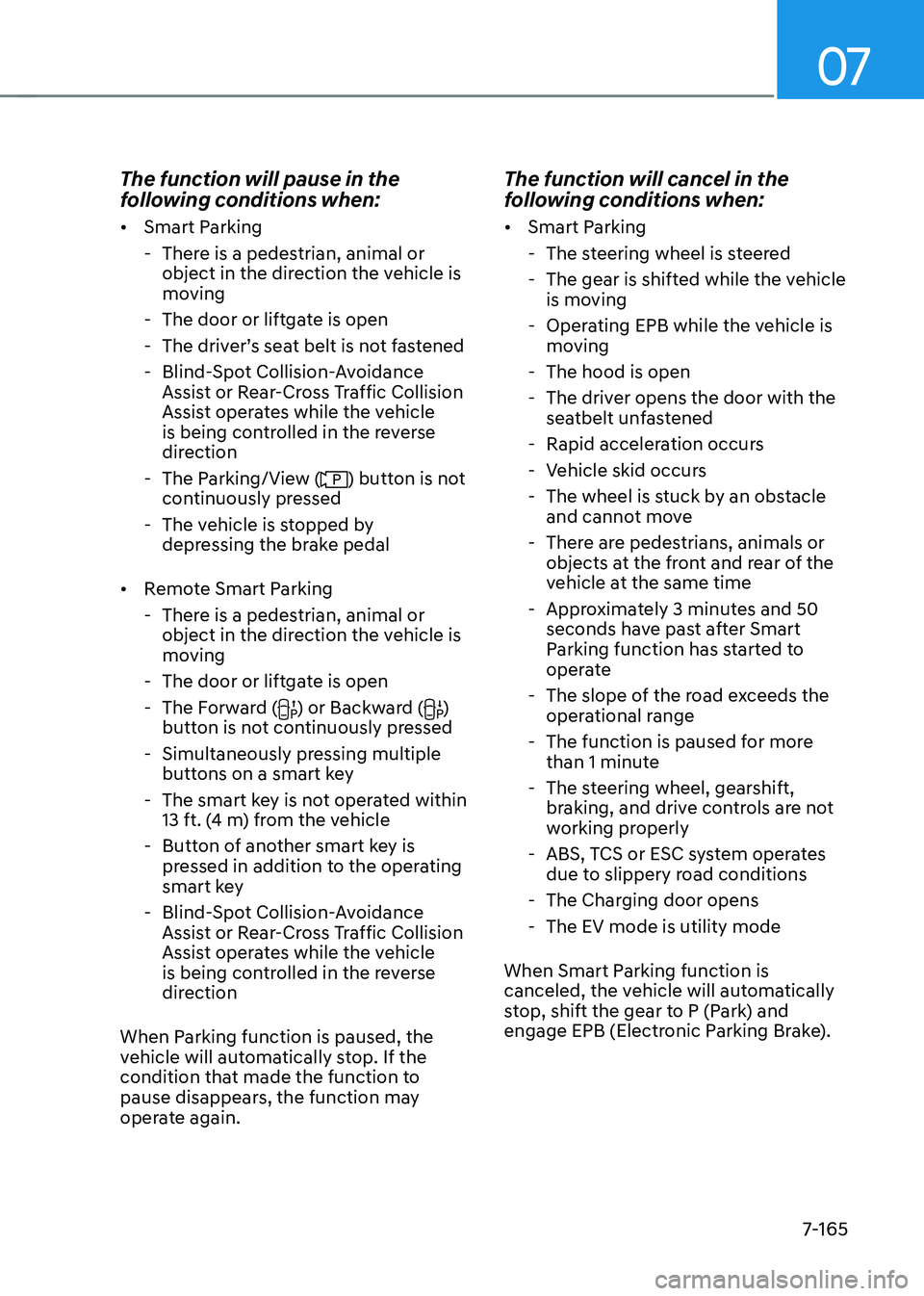
The function will pause in the
following conditions when: •
Smart Parking
- There is a pedestrian, animal or object in the direction the vehicle is
moving
- The door or liftgate is open
- The driver’s seat belt is not fastened
- Blind-Spot Collision-Avoidance Assist or Rear-Cross Traffic Collision
Assist operates while the vehicle
is being controlled in the reverse
direction
- The Parking/View (
) button is not
continuously pressed
- The vehicle is stopped by depressing the brake pedal
• Remote Smart Parking
- There is a pedestrian, animal or object in the direction the vehicle is
moving
- The door or liftgate is open
- The Forward (
) or Backward ()
button is not continuously pressed
- Simultaneously pressing multiple buttons on a smart key
- The smart key is not operated within 13 ft. (4 m) from the vehicle
- Button of another smart key is pressed in addition to the operating
smart key
- Blind-Spot Collision-Avoidance Assist or Rear-Cross Traffic Collision
Assist operates while the vehicle
is being controlled in the reverse
direction
When Parking function is paused, the
vehicle will automatically stop. If the
condition that made the function to
pause disappears, the function may
operate again. The function will cancel in the
following conditions when: •
Smart Parking
- The steering wheel is steered
- The gear is shifted while the vehicle is moving
- Operating EPB while the vehicle is moving
- The hood is open
- The driver opens the door with the seatbelt unfastened
- Rapid acceleration occurs
- Vehicle skid occurs
- The wheel is stuck by an obstacle and cannot move
- There are pedestrians, animals or objects at the front and rear of the
vehicle at the same time
- Approximately 3 minutes and 50 seconds have past after Smart
Parking function has started to
operate
- The slope of the road exceeds the operational range
- The function is paused for more than 1 minute
- The steering wheel, gearshift, braking, and drive controls are not
working properly
- ABS, TCS or ESC system operates due to slippery road conditions
- The Charging door opens
- The EV mode is utility mode
When Smart Parking function is
canceled, the vehicle will automatically
stop, shift the gear to P (Park) and
engage EPB (Electronic Parking Brake).
Page 568 of 680
Driver Assistance System
7-166
•
Remote Smart Parking
- The steering wheel is steered
- The gear is shifted
- Operating EPB while the vehicle is moving
- The hood is open
- The brake pedal or accelerator pedal is depressed when all the
doors are closed
- The smart key is outside the vehicle when the brake pedal is depressed
while the driver's door is open.
- Rapid acceleration occurs
- Vehicle skid occurs
- The wheel is stuck by an obstacle and cannot move
- There are pedestrians, animals or objects at the front and rear of the
vehicle at the same time
- Approximately 3 minutes and 50 seconds have past after Remote
Smart Parking function has started
to operate
- The slope of the road exceeds the operational range
- The function is paused for more than 1 minute
- The steering wheel, gearshift, braking, and drive controls are not
working properly
- There is a problem with the smart key or the smart key battery is low
- ABS, TCS or ESC system operates due to slippery road conditions
- The alarm of the Theft Alarm System sounds
- The Charging door opens
- The EV mode is utility mode
When Remote Smart Parking function is
canceled, the vehicle will automatically
stop, shift the gear to P (Park) and
engage EPB (Electronic Parking Brake). Smart Exit
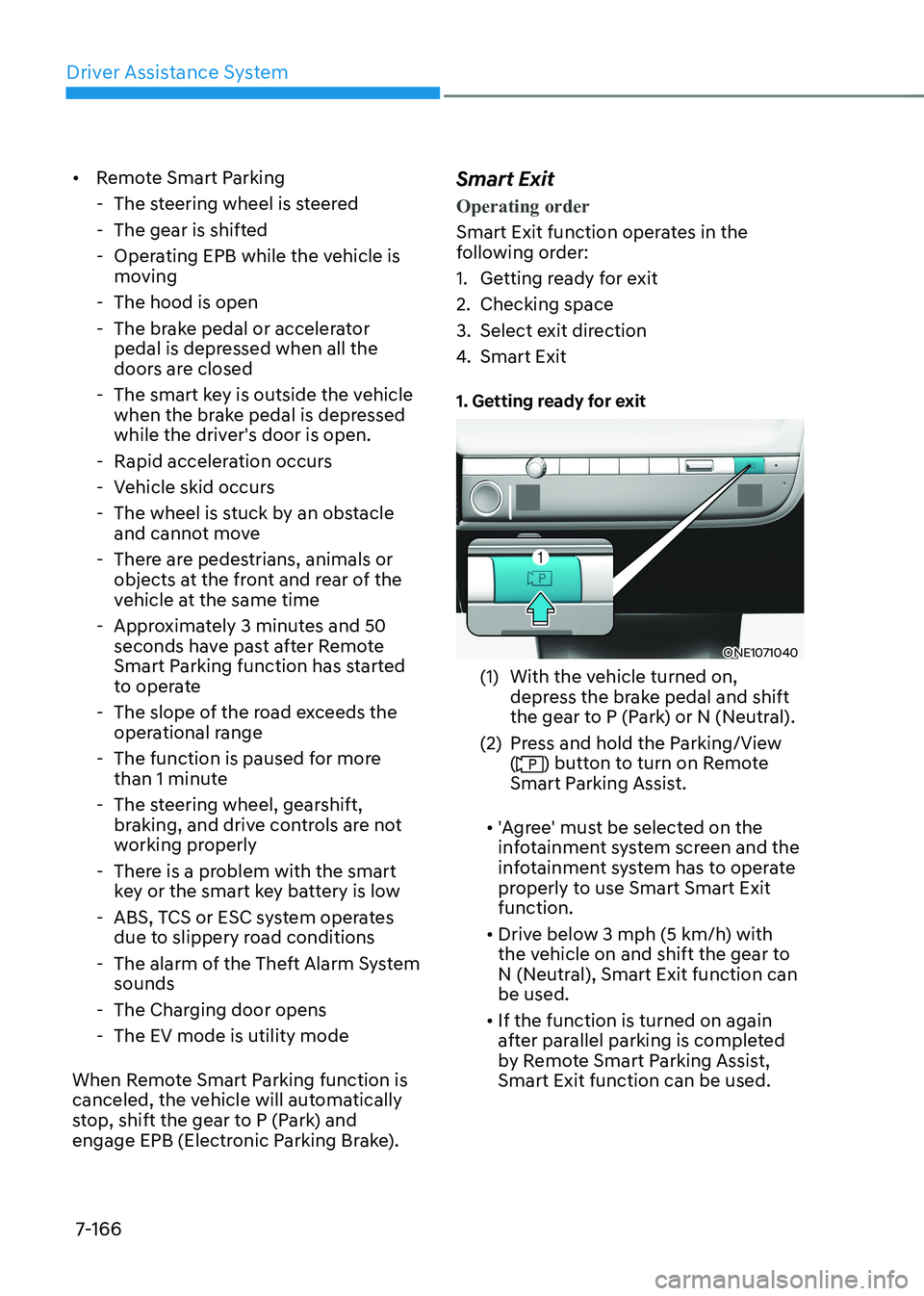
Operating order
Smart Exit function operates in the
following order:
1. Getting ready for exit
2. Checking space
3. Select exit direction
4.
Smart Exit
1. Getting ready for exit
ONE1071040
(1) With the vehicle turned on, depress the brake pedal and shift
the gear to P (Park) or N (Neutral).
(2) Press and hold the Parking/View (
) button to turn on Remote
Smart Parking Assist.
• 'Agree' must be selected on the
infotainment system screen and the
infotainment system has to operate
properly to use Smart Smart Exit function.
• Drive below 3 mph (5 km/h) with
the vehicle on and shift the gear to
N (Neutral), Smart Exit function can be used.
• If the function is turned on again
after parallel parking is completed
by Remote Smart Parking Assist, Smart Exit function can be used.
Page 572 of 680
Driver Assistance System
7-170
Remote Smart Parking Assist
Malfunction and Limitations
Remote Smart Parking Assist
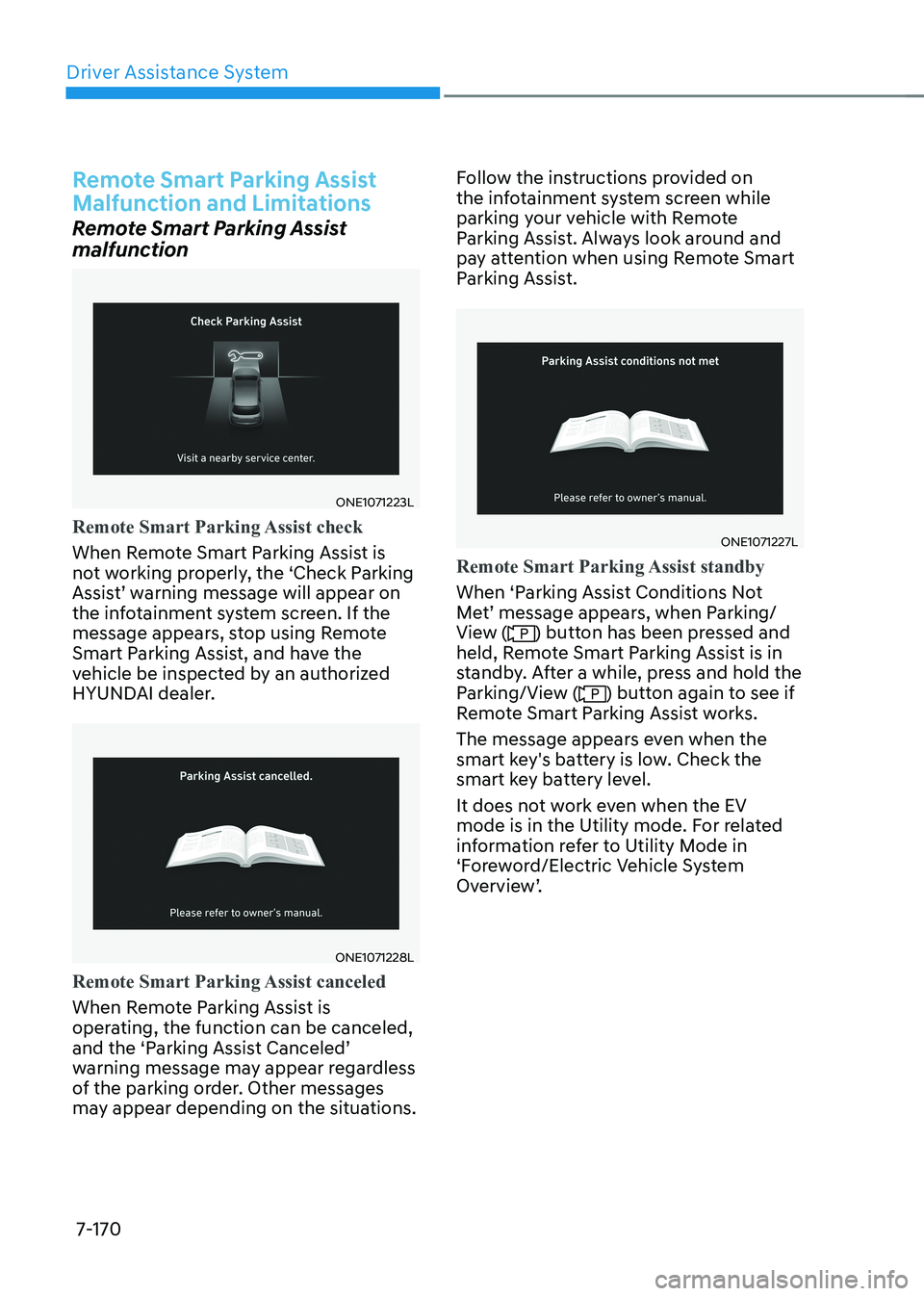
malfunction
ONE1071223L
Remote Smart Parking Assist check
When Remote Smart Parking Assist is
not working properly, the ‘Check Parking
Assist’ warning message will appear on
the infotainment system screen. If the
message appears, stop using Remote
Smart Parking Assist, and have the
vehicle be inspected by an authorized
HYUNDAI dealer.
ONE1071228L
Remote Smart Parking Assist canceled
When Remote Parking Assist is
operating, the function can be canceled,
and the ‘Parking Assist Canceled’
warning message may appear regardless
of the parking order. Other messages
may appear depending on the situations.Follow the instructions provided on
the infotainment system screen while
parking your vehicle with Remote
Parking Assist. Always look around and
pay attention when using Remote Smart
Parking Assist.
ONE1071227L
Remote Smart Parking Assist standby
When ‘Parking Assist Conditions Not
Met’ message appears, when Parking/
View (
) button has been pressed and
held, Remote Smart Parking Assist is in
standby. After a while, press and hold the
Parking/View (
) button again to see if
Remote Smart Parking Assist works.
The message appears even when the
smart key's battery is low. Check the
smart key battery level.
It does not work even when the EV
mode is in the Utility mode. For related
information refer to Utility Mode in
‘Foreword/Electric Vehicle System
Overview’.
Page 576 of 680
Driver Assistance System
7-174
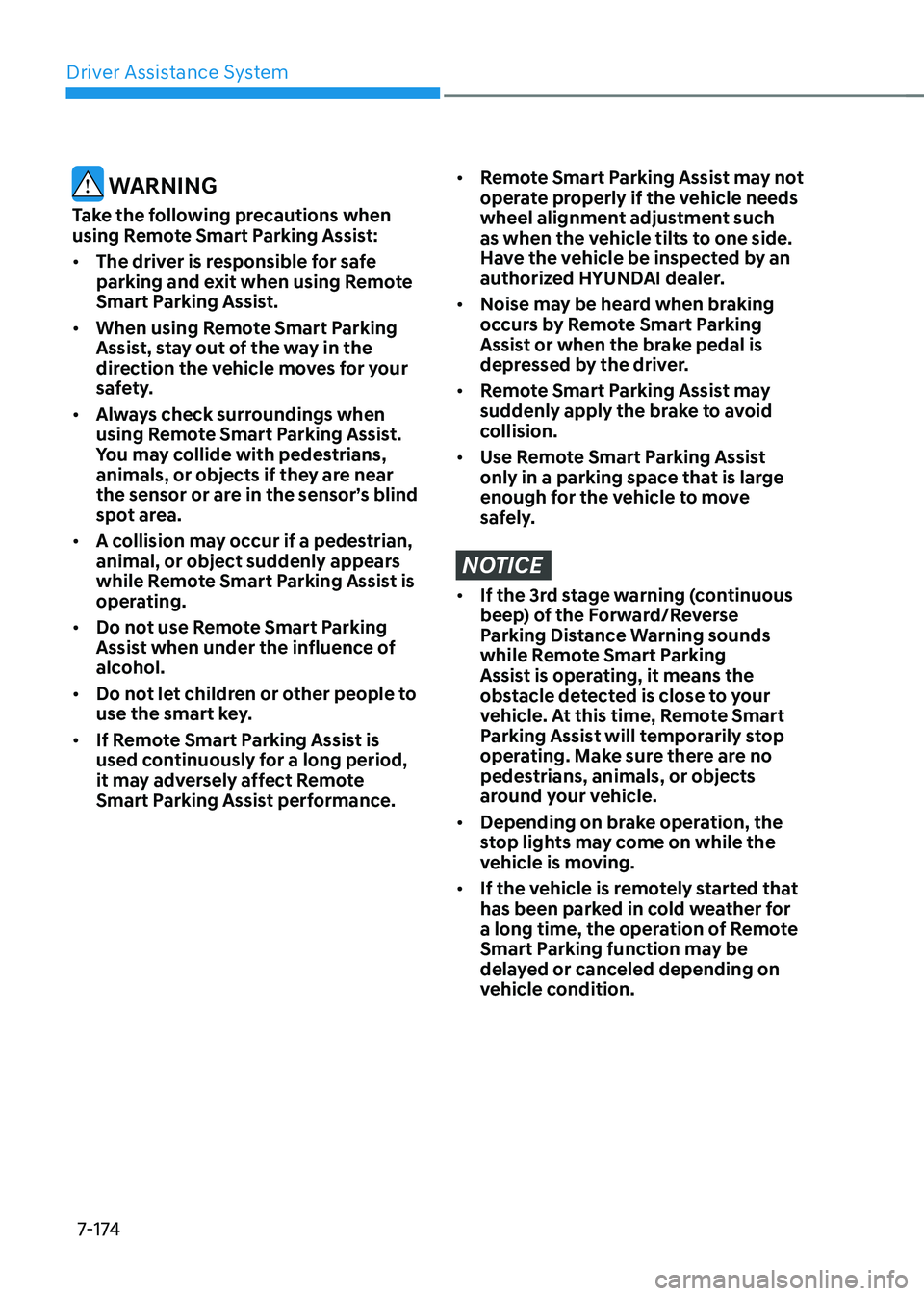
WARNING
Take the following precautions when
using Remote Smart Parking Assist: • The driver is responsible for safe
parking and exit when using Remote
Smart Parking Assist.
• When using Remote Smart Parking
Assist, stay out of the way in the
direction the vehicle moves for your
safety.
• Always check surroundings when
using Remote Smart Parking Assist.
You may collide with pedestrians,
animals, or objects if they are near
the sensor or are in the sensor’s blind
spot area.
• A collision may occur if a pedestrian,
animal, or object suddenly appears
while Remote Smart Parking Assist is
operating.
• Do not use Remote Smart Parking
Assist when under the influence of
alcohol.
• Do not let children or other people to
use the smart key.
• If Remote Smart Parking Assist is
used continuously for a long period,
it may adversely affect Remote
Smart Parking Assist performance.• Remote Smart Parking Assist may not
operate properly if the vehicle needs
wheel alignment adjustment such
as when the vehicle tilts to one side.
Have the vehicle be inspected by an
authorized HYUNDAI dealer.
• Noise may be heard when braking
occurs by Remote Smart Parking
Assist or when the brake pedal is
depressed by the driver.
• Remote Smart Parking Assist may
suddenly apply the brake to avoid
collision.
• Use Remote Smart Parking Assist
only in a parking space that is large
enough for the vehicle to move
safely.
NOTICE
• If the 3rd stage warning (continuous
beep) of the Forward/Reverse
Parking Distance Warning sounds
while Remote Smart Parking
Assist is operating, it means the
obstacle detected is close to your
vehicle. At this time, Remote Smart
Parking Assist will temporarily stop
operating. Make sure there are no
pedestrians, animals, or objects
around your vehicle.
• Depending on brake operation, the
stop lights may come on while the
vehicle is moving.
• If the vehicle is remotely started that
has been parked in cold weather for
a long time, the operation of Remote
Smart Parking function may be
delayed or canceled depending on
vehicle condition.
Page 643 of 680
Maintenance
9-42
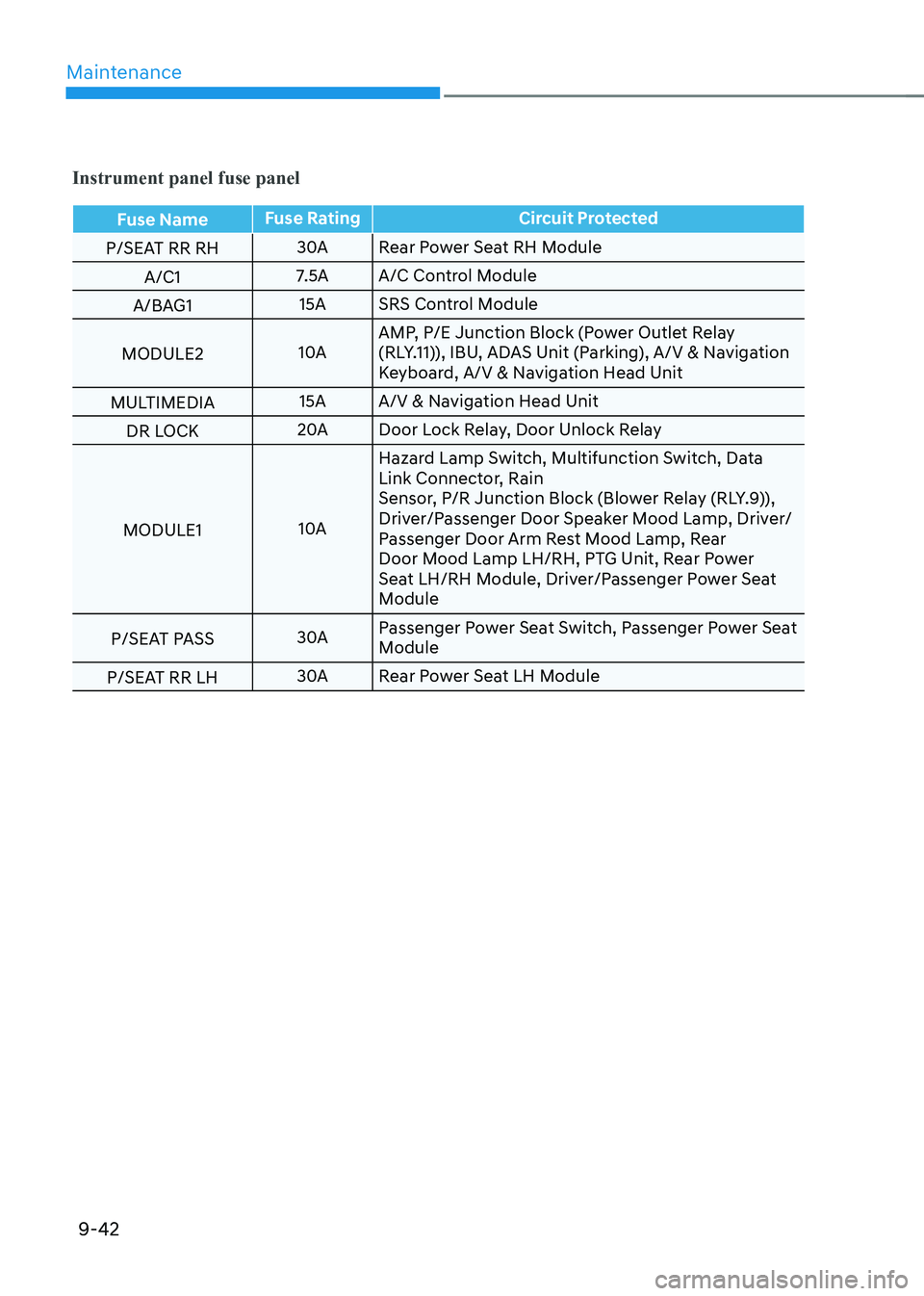
Instrument panel fuse panel
Fuse NameFuse Rating Circuit Protected
P/SEAT RR RH 30A
Rear Power Seat RH Module
A/C1 7.5A A/C Control Module
A/BAG1 15A SRS Control Module
MODULE2 10AAMP, P/E Junction Block (Power Outlet Relay
(RLY.11)), IBU, ADAS Unit (Parking), A/V & Navigation
Keyboard, A/V & Navigation Head Unit
MULTIMEDIA 15A A/V & Navigation Head Unit
DR LOCK 20A
Door Lock Relay, Door Unlock Relay
MODULE1 10AHazard Lamp Switch, Multifunction Switch, Data
Link Connector, Rain
Sensor, P/R Junction Block (Blower Relay (RLY.9)),
Driver/Passenger Door Speaker Mood Lamp, Driver/
Passenger Door Arm Rest Mood Lamp, Rear
Door Mood Lamp LH/RH, PTG Unit, Rear Power
Seat LH/RH Module, Driver/Passenger Power Seat
Module
P/SEAT PASS 30APassenger Power Seat Switch, Passenger Power Seat
Module
P/SEAT RR LH 30A
Rear Power Seat LH Module